
The thrill of a high-speed aerial goal in Rocket League is quickly ruined when the "Unable to Connect to Servers" notification pops up. For players across the Middle East, this has become a frustratingly common sight recently. Whether you are competing from Saudi Arabia, the UAE, or Qatar, finding a stable match has turned into a technical hurdle. This guide explores why these regional servers are currently unavailable and provides the most effective methods to get you back on the pitch without game-breaking lag.

- ✅ Reduce Lag and High Ping.
✅ Boost FPS at the Same Time.
✅ Change Server Without Latency. - ✅End Error Codes, Stuck and Crashing Issues
- ✅ Multiplatform: PC, Console, Mobile
Part 1: Why Rocket League Can't Connect to the Middle East Server
Part 2: How to Fix Rocket League Can't Connect to the Middle East Server? – 100% Working Solutions
Part 1: Why Rocket League Can't Connect to the Middle East Server
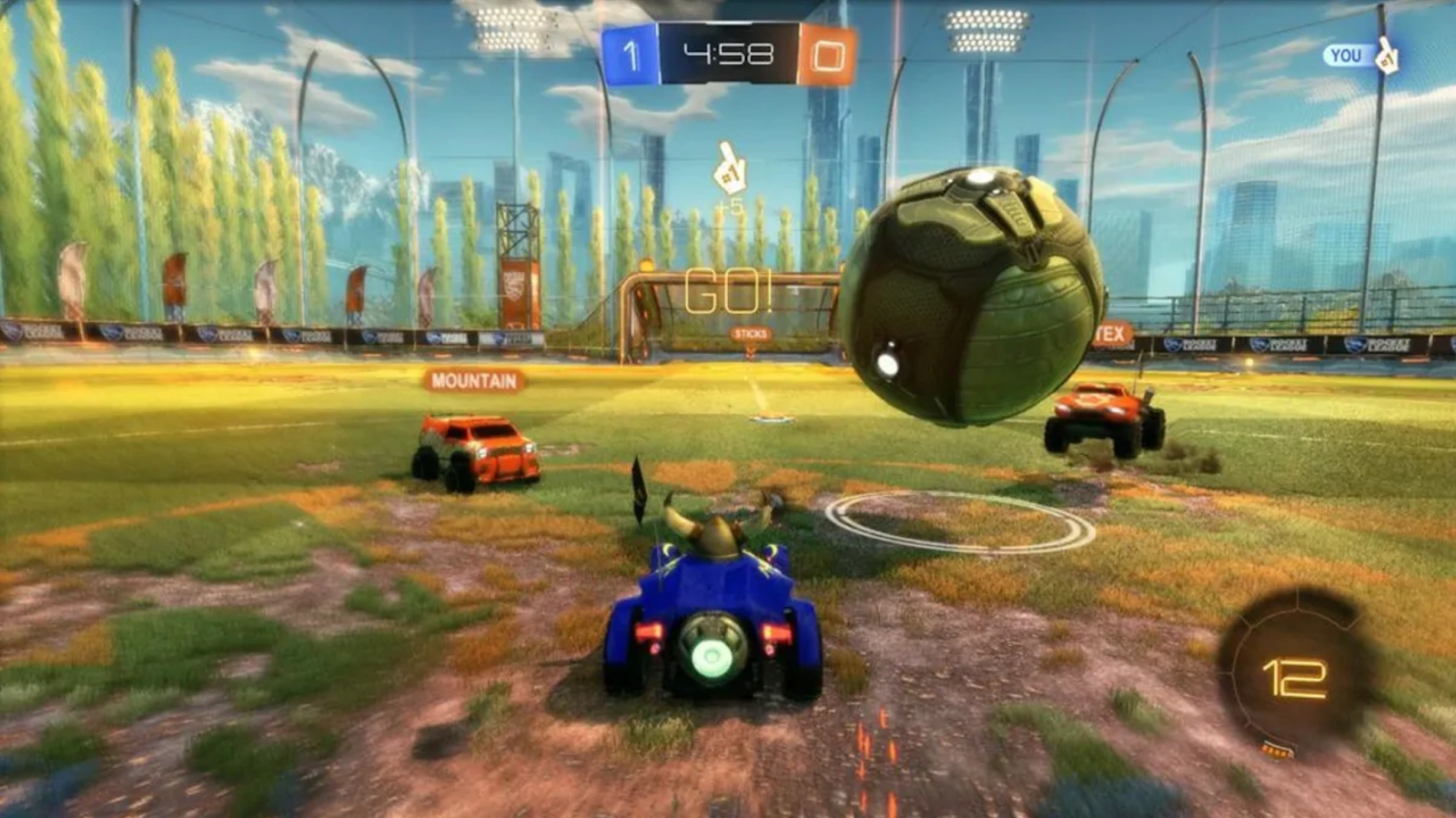
The primary reason players are currently seeing the "Rocket League Middle East server missing" error is due to significant regional infrastructure maintenance and temporary outages. Recent reports and community discussions indicate that local servers for several major titles, including Valorant, Fortnite, Rocket League, and EA FC, have been temporarily shut down in Bahrain and the UAE. While developers work on backend stability and regional routing, the absence of these dedicated nodes means the game client often fails to find a viable local path, leading to the dreaded "search timed out" or "no servers found" errors.
Community sentiment on platforms like Reddit and X reveals a growing sense of frustration. Many players have noted that the Bahrain and Dubai servers simply stopped showing up in the region selection menu overnight. In the past, Rocket League relied heavily on these specific hubs to provide sub-30ms pings for the GCC region. Without them, the game's matchmaking algorithm attempts to reroute traffic to distant European or Asian data centers, which often results in packet loss or rejected connection requests. Until official announcements confirm the restoration of these local hubs, players are effectively left in a "connectivity desert."
Part 2: How to Fix Rocket League Can't Connect to the Middle East Server? — 100% Working Solutions
Solution 1: The Most Reliable Fix: Using LagoFast Game Booster
When local servers are down, the only way to maintain a competitive edge is to optimize the route your data takes to international servers. LagoFast stands out as the premier solution for this, specifically designed to bypass regional outages by connecting you to the most stable nodes in Europe or North America. By using its unique multi-path connection technology, it ensures that even if you are playing on a distant server, your ping remains stable and "ghost hits" are minimized.
Key Features of LagoFast:
- Real-time Multipath Optimization: Automatically finds the fastest route to any game server.
- FPS Boost: One-click optimization to clear background processes and increase in-game frames.
- Global Server Network: Easily switch between regions like EU, NA, and Asia with a single click.
- Game Crash Fix Tool: Integrated diagnostics to resolve common startup and connection errors.
- Easy Latency Tracking: Monitor your jitter and packet loss in real-time while playing.
Tutorial to Use LagoFast to Fix Rocket League Connection Issue:
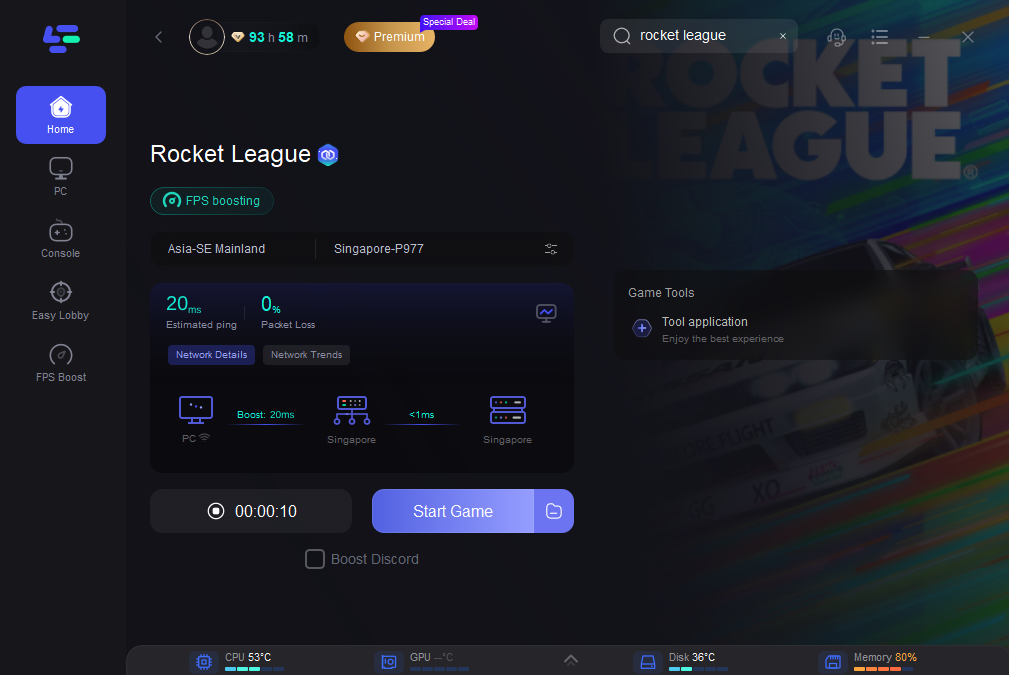
Step 1: Click the Free Trial button to download and install LagoFast.
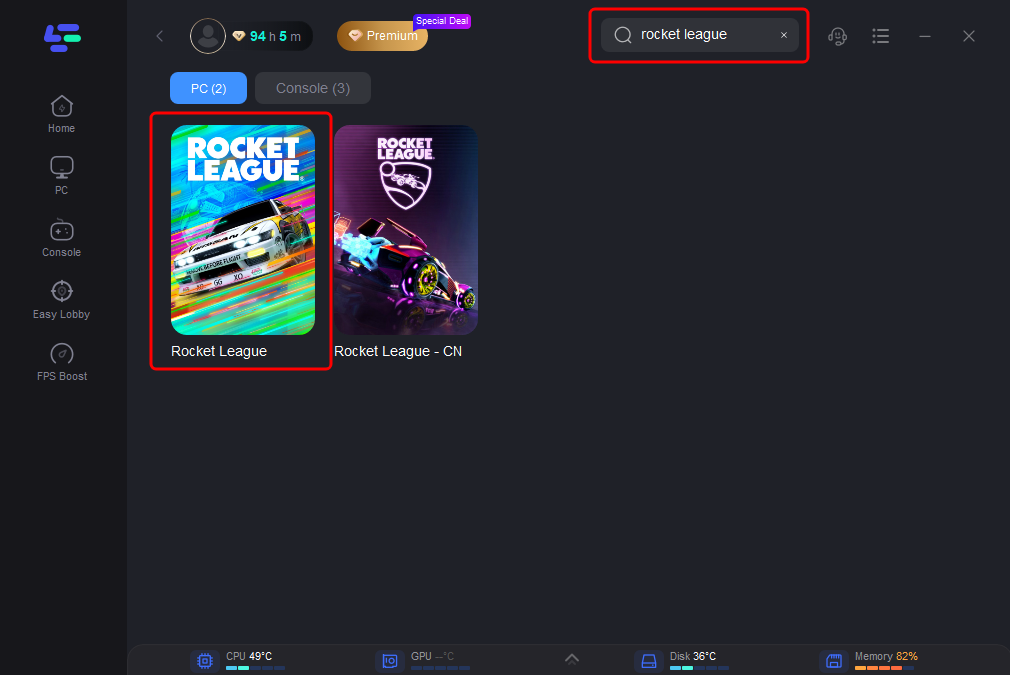
Step 2: Open LagoFast, then click the PC button on the left and search for Rocket League in the search bar and click it after it appears.
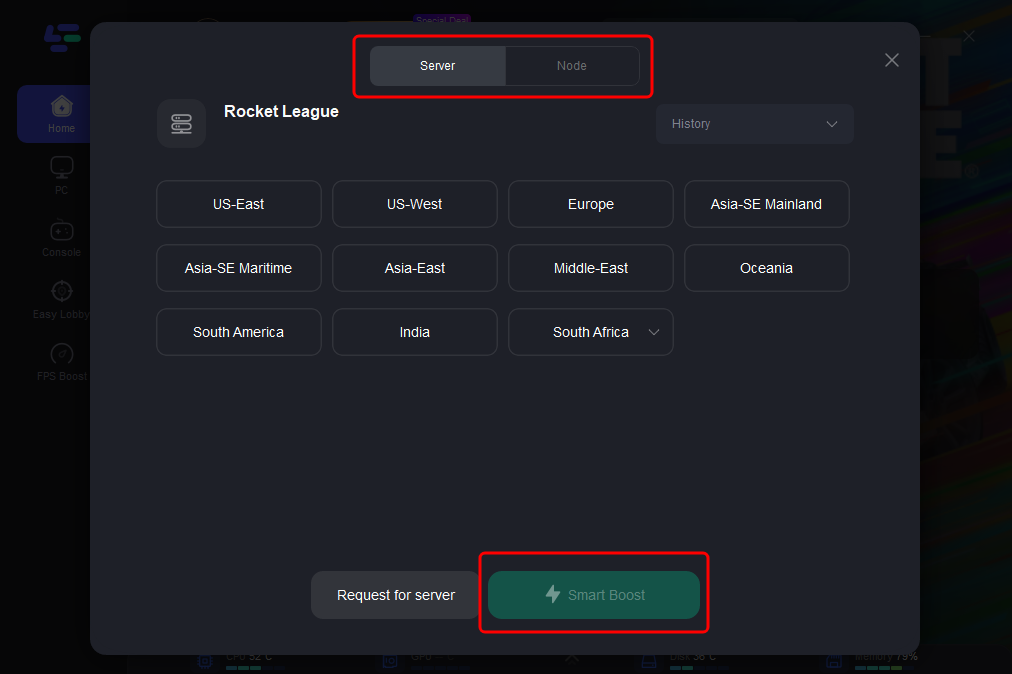
Step 3: Click “Server” to switch to a better server, such as EU or NA, which can improve the gaming experience. Then click “Smart Boost” to resolve the connection issue.
Step 4: Check the specific game ping, packet loss, and multiple path connections on the right side. Finally, click the “Start Game” to play the game.
While the following methods can sometimes help stabilize a connection, they are generally less effective than a dedicated game booster like LagoFast. These manual fixes do not optimize the actual data routing and often fail to overcome the physical distance between the Middle East and European data centers.
Solution 2: Reset Your Network Hardware
Power cycling your hardware can clear the cache and re-establish a fresh handshake with your ISP, which might help if your IP has been flagged or throttled.
Step 1. Turn off your PC or Console completely.
Step 2. Unplug the power cable from your modem and router.
Step 3. Wait for at least 60 seconds to ensure the capacitors are fully discharged.
Step 4. Plug the modem back in first, followed by the router after two minutes.
Step 5. Launch Rocket League and attempt to connect to the "Europe" region.
Solution 3: Change Your DNS Settings
Using a public DNS like Google or Cloudflare can sometimes improve the "lookup" speed of game servers, though it won't lower your in-game latency significantly.
Step 1. Open Control Panel and navigate to Network and Sharing Center.
Step 2. Select Change adapter settings and right-click your active connection.
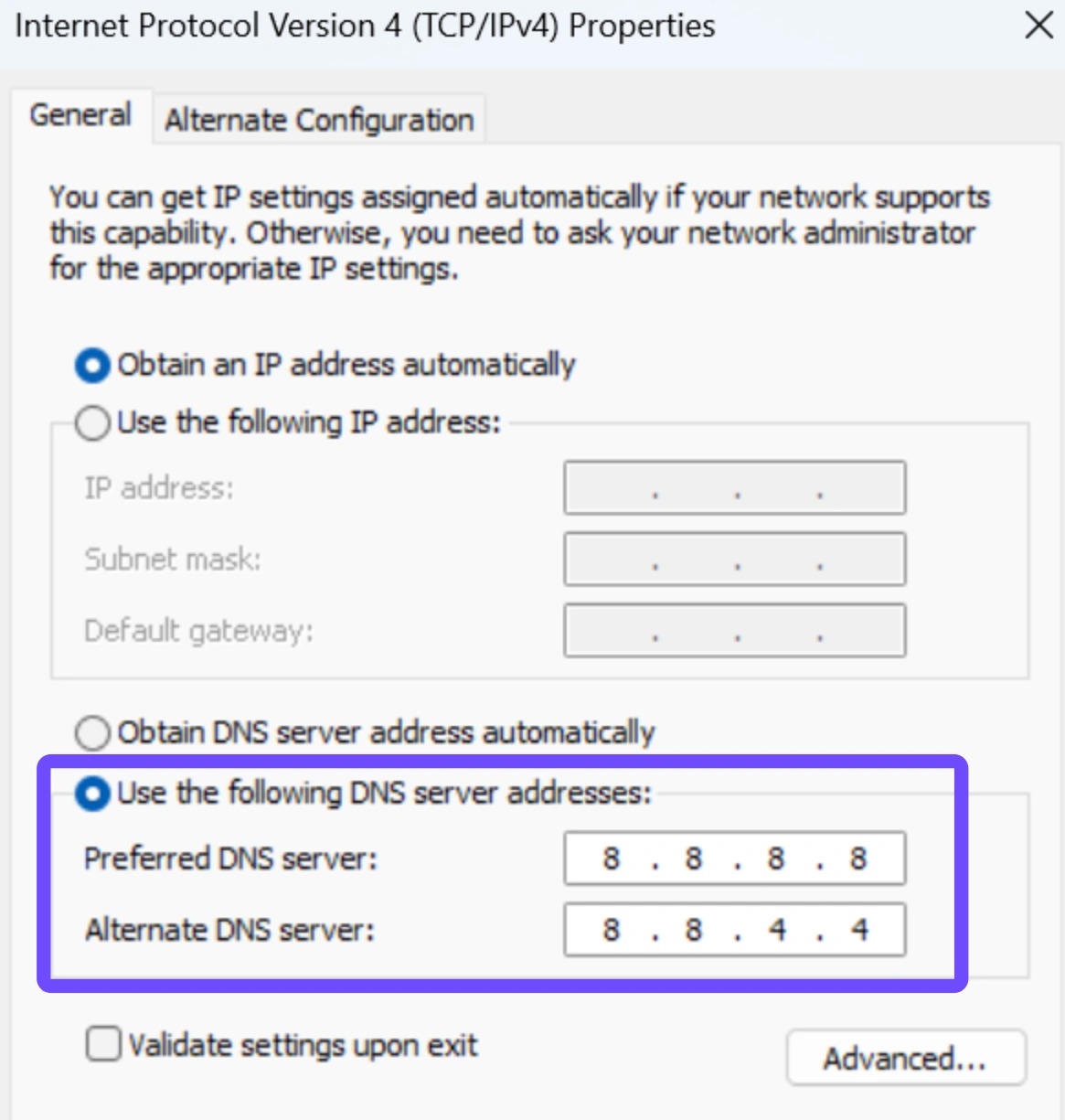
Step 3. Click Properties and then double-click Internet Protocol Version 4 (TCP/IPv4).
Step 4. Select "Use the following DNS server addresses."
Step 5. Enter 8.8.8.8 for Preferred and 8.8.4.4 for Alternate.
Solution 4: Flush DNS via Command Prompt
A cluttered DNS cache can lead to "Server Not Found" errors. Clearing it forces your computer to find the most current path to the Epic Games or Psyonix servers.
Step 1. Type cmd in the Windows search bar and Run as Administrator.
Step 2. Type ipconfig /flushdns and press Enter.
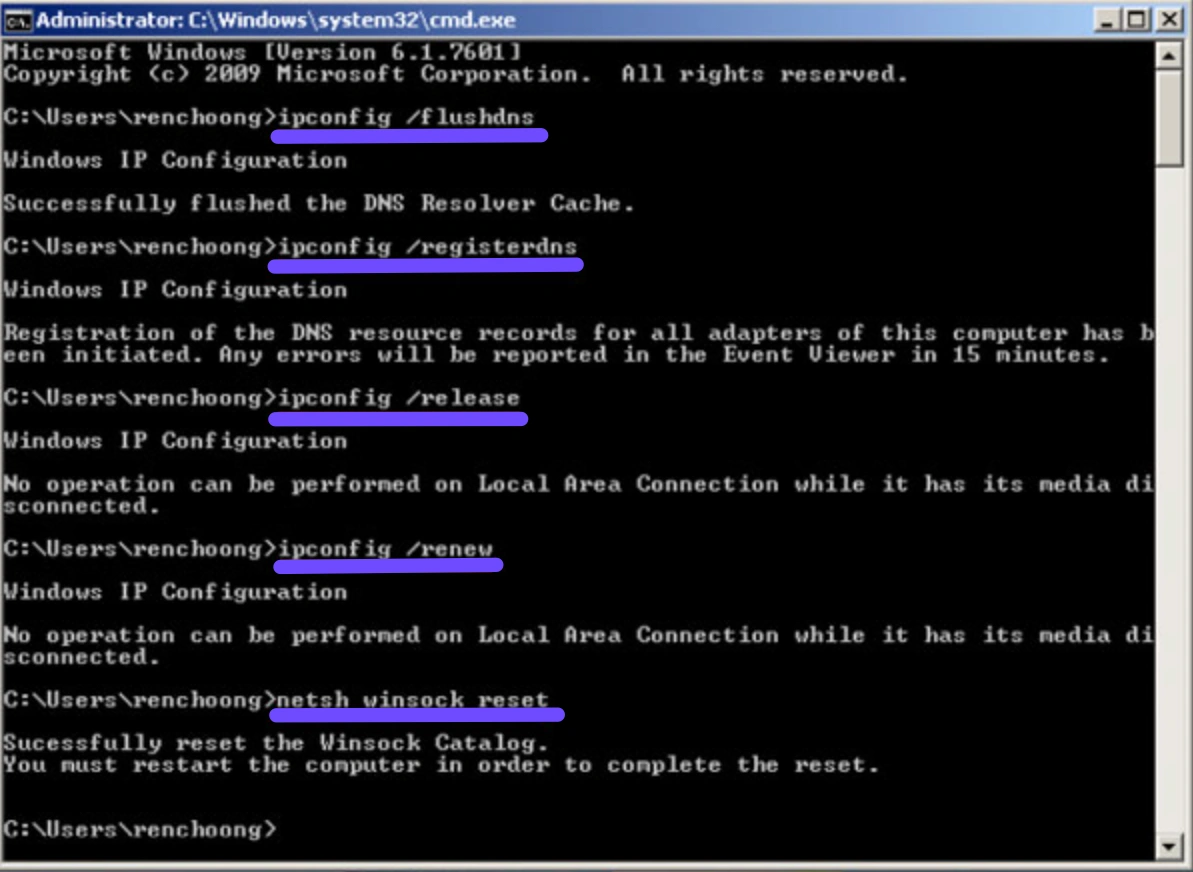
Step 3. Type ipconfig /registerdns and press Enter.
Step 4. Type ipconfig /release and press Enter.
Step 5. Type ipconfig /renew and press Enter.
Solution 5: Verify Integrity of Game Files
Sometimes a connection error isn't the network's fault, but a corrupted file preventing the game from communicating with the server API.
Step 1. Open the Epic Games Launcher and go to your Library.
Step 2. Find Rocket League and click the three dots (...) next to the title.
Step 3. Select Manage from the dropdown menu.
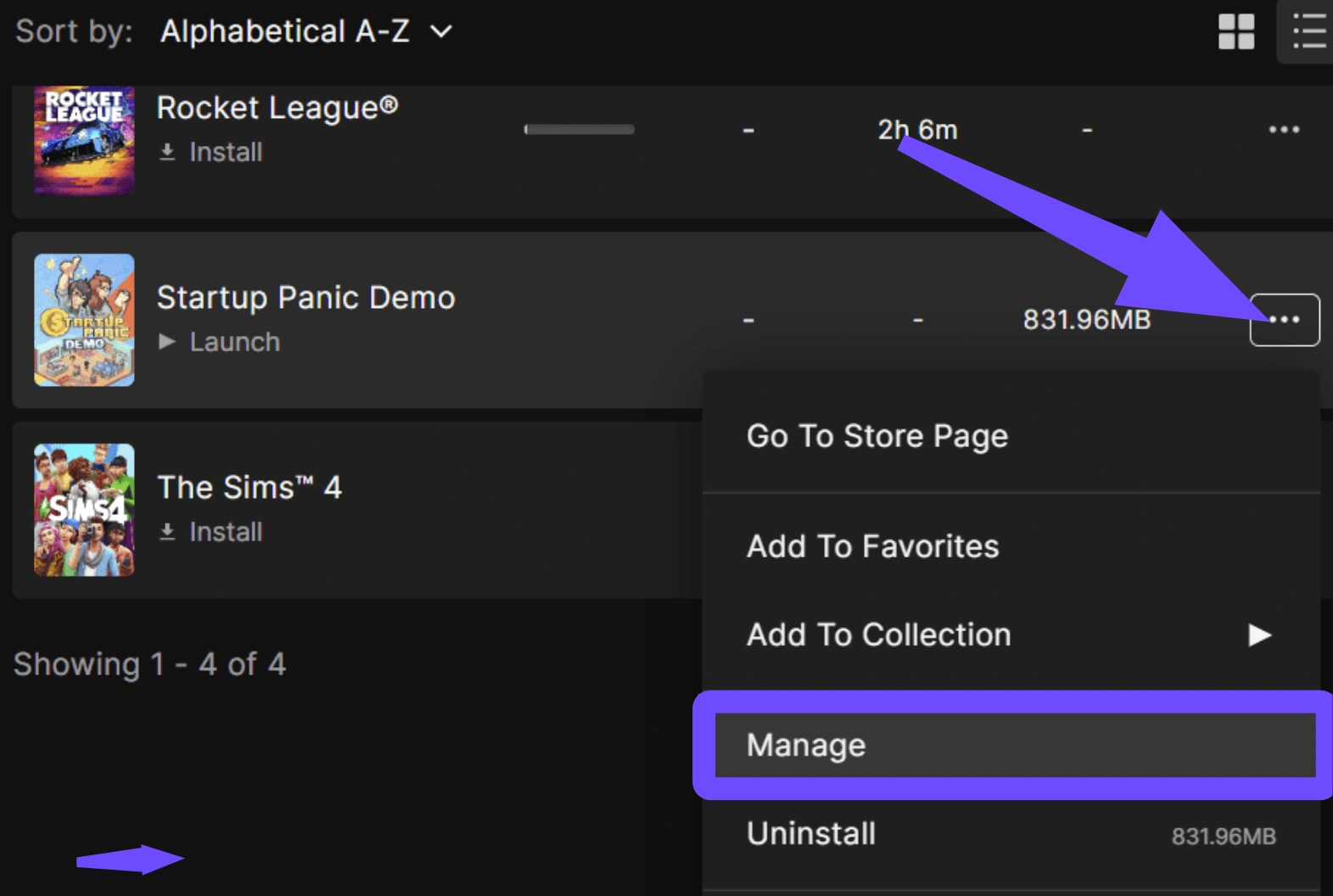
Step 4. Click the Verify button.
Step 5. Wait for the process to finish and restart the launcher.
Solution 6: Switch to a Wired Ethernet Connection
Wi-Fi is prone to interference, especially in high-density areas. A wired connection is the bare minimum requirement for any competitive gaming.
Step 1. Locate a Cat6 or Cat7 Ethernet cable.
Step 2. Connect one end directly into your router's LAN port.
Step 3. Connect the other end into your PC or Console's Ethernet port.
Step 4. Disable Wi-Fi in your device's network settings to ensure it uses the cable.
Step 5. Restart the game and check for packet loss icons.
Conclusion
The current unavailability of Rocket League servers in the Middle East is a significant hurdle for the local community. While traditional fixes like flushing DNS or resetting your router provide a clean slate for your hardware, they cannot bridge the thousand-mile gap to European servers effectively. For players who refuse to let the "Bahrain server missing" issue stop their climb up the ranks, using a specialized tool like LagoFast is the most reliable way to maintain a smooth, lag-free experience. Stay tuned for official updates, but until then, optimize your route and keep playing.
Boost Your Game with LagoFast for Epic Speed
Play harder, faster. LagoFast game booster eliminates stutter and lags on PC, mobile, or Mac—win every match!
Quickly Reduce Game Lag and Ping!
Boost FPS for Smoother Gameplay!