
Pragmata not working can happen when the game fails to launch, gets stuck on startup, cannot log in, or crashes before reaching the main menu. Some players also report black screens, infinite loading, or the game freezing before the menu appears.
These issues are usually caused by incomplete game files, system conflicts, or unstable network connections. A network optimization tool can help stabilize the connection route and reduce login and loading failures. Manual fixes like verifying game files, updating drivers, or closing background apps can also help resolve the issue.
This guide explains the main causes and the most effective steps to get the game running again quickly.

- ✅ Reduce Lag and High Ping.
✅ Boost FPS at the Same Time.
✅ Support 8000+ Popular Online Games.
✅ Change Server without Latency.
✅ Boost Game Loading Speed.
Part 1: What Players Are Experiencing Right Now
Part 2: Why Pragmata Is Not Working for You
Part 3: Quick Fix — Use a Stable Game Route (Most Important)
Part 4: Step-by-Step Fix for Pragmata Not Working
Part 5: Still Can’t Launch or Start Pragmata?
Part 1: What Players Are Experiencing Right Now
- The game fails to launch on Steam after clicking “Play”
- “don’t start” issues where the game briefly runs but immediately closes
- Login failures where the game gets stuck during authentication or fails to connect
- black screen appearing right after startup with no menu loading
- infinite loading screens before reaching gameplay
- crashes or freezes shortly after launch
In most cases, these issues happen right after launching the game, before reaching the main menu.
Part 2: Why Pragmata Is Not Working for You
Incomplete or corrupted game files
If files are missing or damaged, Pragmata not working issues like crashes or loading failures may appear.
Lack of administrator permissions
If the game is not running with administrator rights, it may fail to access required system resources, leading to launch failures or immediate crashes on startup.
Outdated GPU drivers or missing system components
Old graphics drivers or missing dependencies like DirectX or Visual C++ can prevent the game from opening correctly or cause black screen issues.
Background apps or overlays interfering
Overlays, recording software, or heavy background processes can conflict with the game and cause it to stop responding or crash during startup.
Unstable network routing or connection issues
Even with a stable internet speed, unstable routing or server-side connection issues may cause login failures, long loading times, or disconnects.
Server congestion during peak hours
When too many players are trying to access the game at once, it can result in login delays, failed connections, or startup loops.
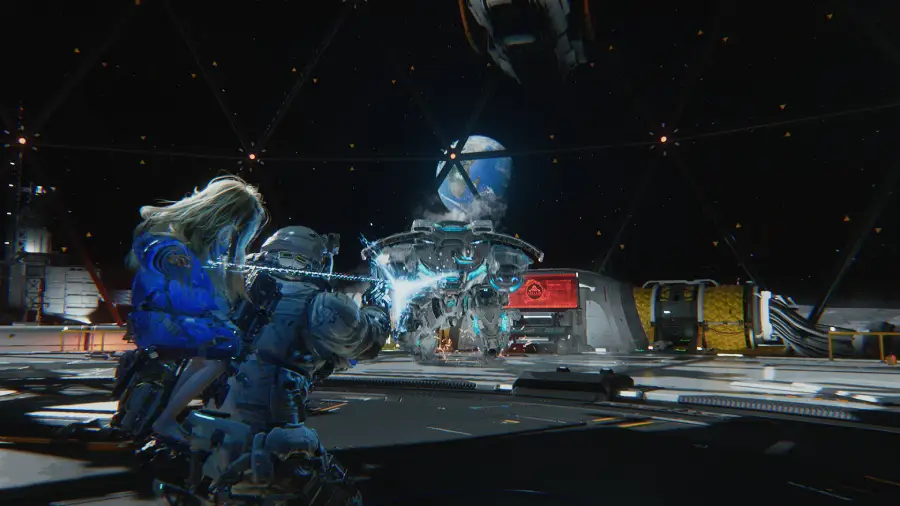
Part 3: Quick Fix — Use a Stable Game Route (Most Important)
LagoFast is a game-focused network optimization tool designed to optimize routing, reduce ping, and fix packet loss. It improves the connection path between your device and game servers, helping reduce login failures, connection interruptions, and long loading times.
Beyond basic network acceleration, LagoFast also enhances overall system performance by intelligently allocating resources and reducing unnecessary background activity. This helps stabilize gameplay, especially during launch and login stages where interruptions are most common.
In addition, LagoFast includes a dedicated Fixed Game Crashes Tool for PRAGMATA, which can automatically modify configuration files to disable high-load or incompatible settings such as ray tracing and DLSS. This effectively resolves common crash issues, including startup failures and black screens, without requiring any manual adjustments.
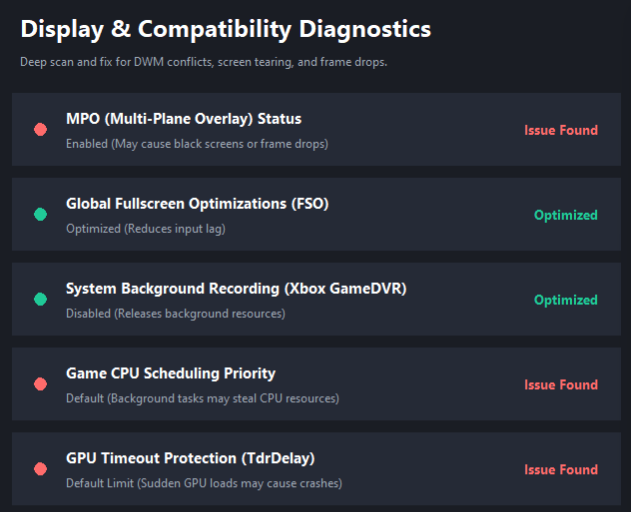
It also features Display & Compatibility Diagnostics, which performs deep scans to detect and fix issues like DWM conflicts, screen tearing, and frame drops, ensuring smoother visuals and more stable performance.
How to fix it with LagoFast
Step 1: Click the Free Trial button to download and install LagoFast.
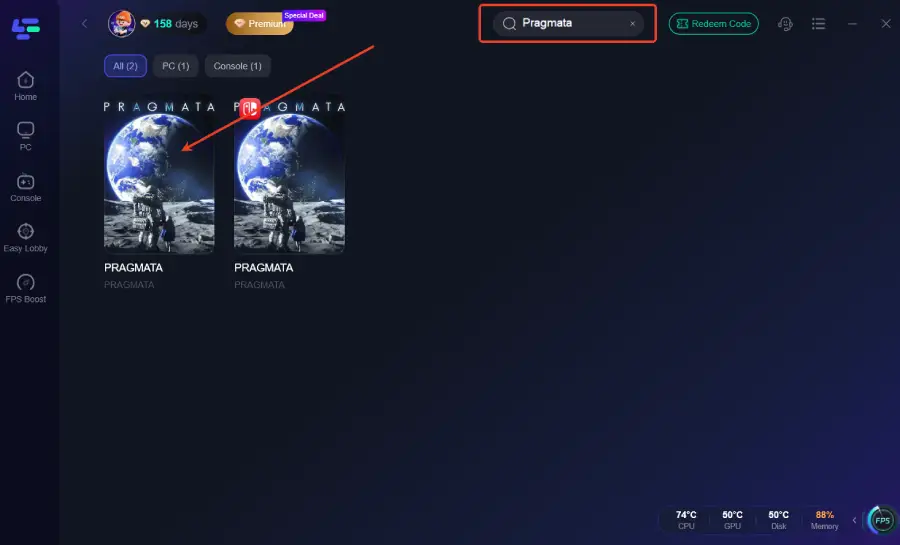
Step 2: After installation, search "Pragmata" in the search bar and select the game.
Step 3: Click the Fixed Game Crashes Tool on the right.
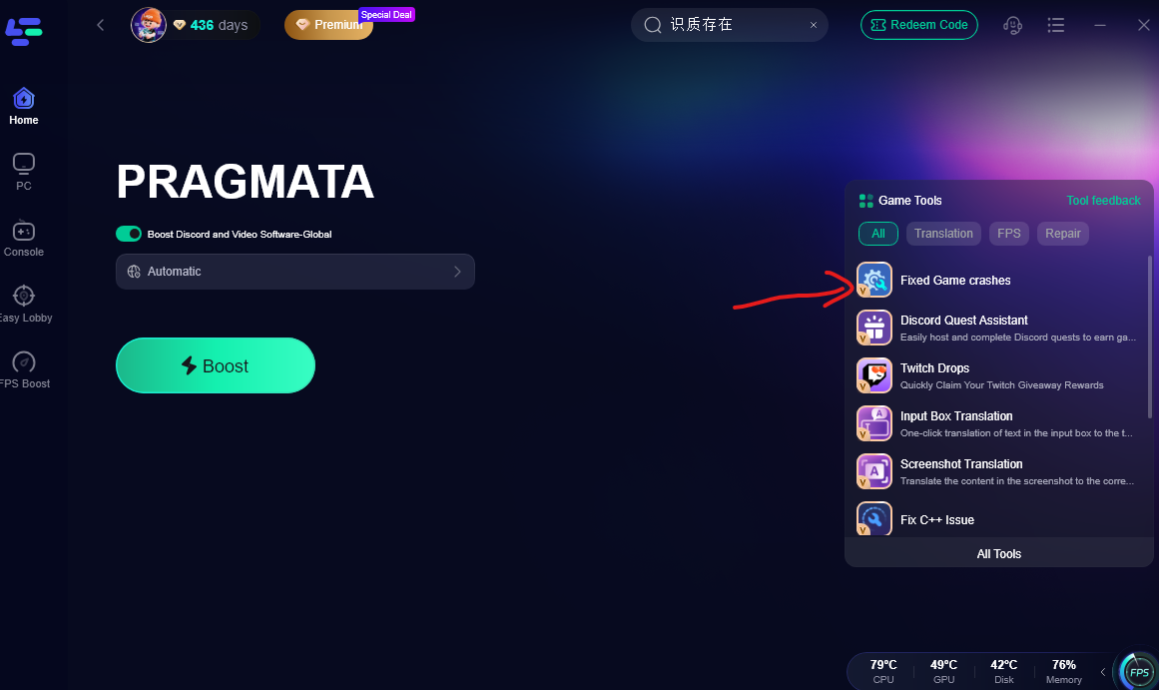
This tool can perform a deep diagnostic scan to identify and resolve display and compatibility issues, including DWM conflicts, screen tearing, and frame drops, ensuring smoother visuals and more stable performance during gameplay.
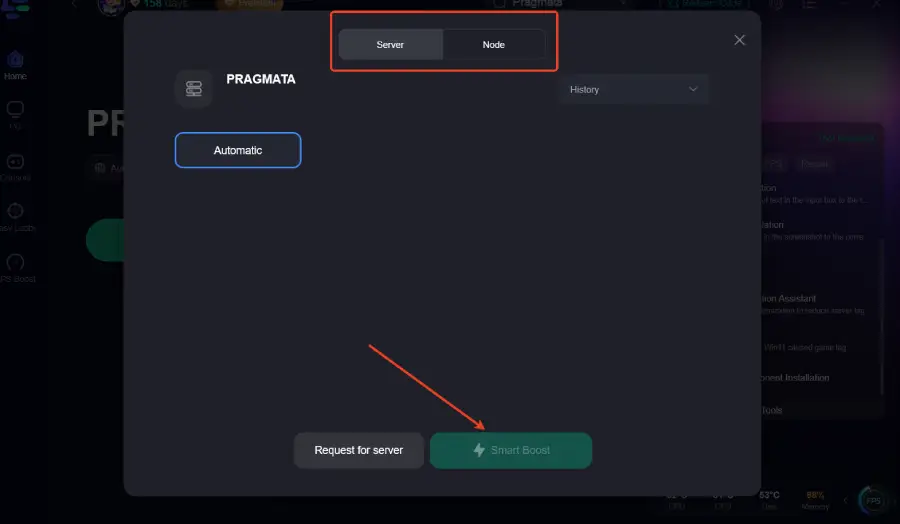
Step 4: Choose your preferred server node and click "Smart Boost" to start optimizing.
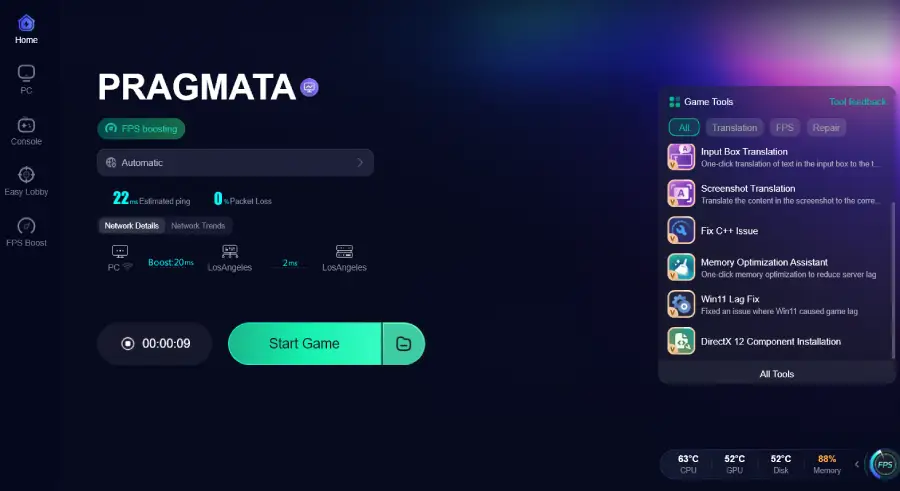
Step 5: Launch your game and enjoy smooth, optimized gameplay with lower ping and packet loss.
Part 4: Step-by-Step Fix for Pragmata Not Working
Work through these fixes in order. Most launch, login, and black screen issues are resolved in the first few steps.
1. Launch the game from an official Steam install
Make sure Pragmata is installed and launched directly from your Steam library. Avoid outdated shortcuts. or leftover executables, as they may point to outdated or broken files.
If the game does not respond at all when clicking Play, it usually points to a launch or permission issue.
2. Restart Steam and your device
A full restart often clears temporary processes that may block the game from launching.
- close Pragmata completely
- exit Steam fully
- restart your PC or console
- try launching again
This is one of the quickest ways to fix “don’t start” issues.
3. Verify integrity of game files
Corrupted or missing files can prevent the game from loading properly.
On Steam:
- open Library
- right-click Pragmata
- Properties → Installed Files
- select Verify integrity of game files
Let the process complete before relaunching.
4. Run the game with administrator permissions
If the game lacks access to system resources, it may crash on startup or fail silently.
- right-click the game or Steam shortcut
- choose Run as administrator
- launch the game again
This helps resolve permission-related startup failures.
5. Update graphics drivers
Outdated GPU drivers are a common cause of black screen or startup crashes.
- update NVIDIA / AMD drivers to the latest version
- restart your system after installation
- try launching the game again
6. Disable overlays and background apps
Some applications interfere with game startup or rendering.
Temporarily disable:
- Steam Overlay
- Discord Overlay
- screen recording tools
- performance monitors (if any)
Then relaunch the game.
7. Check system load and storage space
If your system is under pressure, the game may fail before reaching the menu.
- ensure enough free disk space
- close heavy applications (browsers, downloads, etc.)
- avoid running multiple games or tools in the background
Low system resources may cause the game to freeze or fail before reaching the main menu.
8. Check network stability
If the issue happens during login or loading:
- switch Wi-Fi ↔ mobile hotspot
- restart your router
- avoid unstable or shared networks
Connection instability can trigger login loops or infinite loading screens.
9. Reinstall the game if issues persist
A clean reinstall can fix deeper installation problems.
This is useful when:
- updates were interrupted
- files are consistently corrupted
- black screen happens every launch
Reinstall from Steam and try again after completion.
10. Try again during off-peak times
If everything looks fine but the game still fails to connect, server congestion may be affecting login or startup.
Waiting and retrying later can sometimes resolve temporary connection issues.
Part 5: Still Can’t Launch or Start Pragmata?
If Pragmata still won’t start after trying the steps above, consider the following:
- Check whether firewall or antivirus is blocking the game
- Ensure no background processes related to Steam or Pragmata are still running in Task Manager
- Confirm your system meets the minimum requirements
- Try again during off-peak hours in case of server issues
At this stage, the problem is usually caused by either local system conflicts or temporary server-side instability.
Where to Get Official Updates and Help
If the issue continues, check official sources for the latest updates or server status. Steam announcements, the game’s official page, or community forums usually provide information about known issues or ongoing maintenance.
Part 6: FAQs
Why can’t I get past the login screen in Pragmata?
Login issues are usually related to server congestion, unstable network routing, or incorrect account credentials.
Does internet speed affect Pragmata not working issues?
Speed is less important than connection stability. Even with fast internet, unstable routing can still cause login failures, long loading times, or disconnections.
How much storage does Pragmata need after installation?
Storage requirements may vary depending on platform and updates. Always ensure you have sufficient free space for installation and future patches.
Where to check official updates if Pragmata is still not working?
Check Steam announcements, the game’s official page, or community hubs for server status, maintenance updates, and known issues.
Conclusion
Most Pragmata not working issues are caused by missing files, system conflicts, outdated drivers, or network instability. Once these areas are checked, most launch and login problems can be resolved. If issues persist, they may be related to temporary server problems or system-specific configurations.
Boost Your Game with LagoFast for Epic Speed
Play harder, faster. LagoFast game booster eliminates stutter and lags on PC, mobile, or Mac—win every match!
Quickly Reduce Game Lag and Ping!
Boost FPS for Smoother Gameplay!