
As the highly anticipated global launch of Odin: Valhalla Rising approaches on April 29, 2025, players worldwide are eager to dive into its Norse-inspired MMORPG world. To ensure a seamless experience, this guide addresses server status, common issues, troubleshooting steps, and performance optimization tools like LagoFast Game Booster.

Part 1. Is Odin: Valhalla Rising Down?
Part 2. How to Check Odin: Valhalla Rising Server Status?
Part 3: Common Server Issues in Odin: Valhalla Rising
Part 4: Troubleshooting Server Issues in Odin: Valhalla Rising
Part 5. Enhance Your Odin: Valhalla Rising Gaming Experience with LagoFast
Part 1: Is Odin: Valhalla Rising Down?
As of April 24, 2025, Odin: Valhalla Rising’s global servers remain offline in preparation for the official launch . Players attempting to access the game will encounter login failures or connectivity errors until servers go live on April 29. Preloading becomes available on April 28, allowing early installation to minimize launch-day delays .
For real-time updates, monitor these official channels:
- Kakao Games’ official website
- Global Facebook page
- Pre-registration rewards page
If you’re testing the game in regions like South Korea or Japan, servers are operational . However, the global version’s schedule takes precedence for most players.
Part 2. How to Check Odin: Valhalla Rising Server Status?
To confirm if Odin: Valhalla Rising is down or undergoing maintenance, follow these methods:
1. Official Announcements
- Kakao Games’ Updates: Visit the official website for maintenance schedules or launch updates.
- Social Media: Follow the game’s global Facebook page or Twitter (Japanese server) for real-time alerts.
- Discord: Join communities like Odin: Valhalla Rising Türkiye for player discussions, though these may not be officially managed .
2. Third-Party Tools
- DownDetector: Monitor user-reported outages on DownDetector. A surge in complaints may indicate server issues.
- Steam/Google Play Store: Check for game updates or server-related notifications in the store pages.
3. In-Game Notifications
- Once servers launch, the game client will display maintenance notices or connectivity errors if problems arise.
Part 3: Common Server Issues in Odin: Valhalla Rising
Even after launch, players may encounter these challenges:
1. Login Failures
- Cause: Overloaded servers during peak hours or maintenance.
- Example: On launch day, thousands of players flooding the servers could trigger temporary login queues or timeouts .
2. High Latency/Ping Spikes
- Cause: Distance from server locations or network congestion.
- Example: Players in Europe connecting to Asian servers may experience lag during large-scale battles .
3. Disconnects/Crashes
- Cause: Outdated drivers, conflicting software, or server instability.
- Example: Players reported crashes when upgrading skills in previous patches, which were later fixed via updates .
4. Server Busy Errors
- Cause: Capacity limits or regional restrictions.
- Example: During beta tests, players in non-supported regions faced “server unavailable” messages without a VPN .
Part 4: Troubleshooting Server Issues in Odin: Valhalla Rising
Address common problems with these steps:
1. Verify Server Status
Use DownDetector or official channels to confirm outages before troubleshooting.
2. Network Optimization
- Restart Router/Modem: Resetting your network device can resolve temporary connectivity issues.
- Switch DNS Servers: Change to Google DNS (8.8.8.8) or Cloudflare DNS (1.1.1.1) for faster resolution.
- Disable Background Apps: Close bandwidth-heavy programs like streaming services or downloads.
3. Update Software
- Game Client: Ensure you have the latest patch installed via Steam or app stores.
- Drivers: Update GPU and network drivers to prevent crashes .
4. Clear Cache/Reinstall
- PC: Delete the game’s cache folder (usually in AppData/Local/Odin).
- Mobile: Clear app data in device settings or reinstall the game.
5. Use a VPN/Accelerator
- VPN: Bypass regional restrictions (e.g., connecting to a Korean server from Europe).
- LagoFast Game Booster: Reduce latency and stabilize connections—more on this in Part 5.
6. Contact Support
If issues persist, submit a ticket via Kakao Games’ support portal with details like error codes and timestamps.
Part 5: Enhance Your Experience with LagoFast Game Booster
If you want to expand your gaming social circle while playing Odin: Valhalla Rising and explore servers in different languages and regions, you can use LagoFast's one-click translation tool to break through language barriers! Currently, LagoFast supports translating Odin: Valhalla Rising into Russian, French, Portuguese (Brazilian), German, Turkish, and Arabic.
Here's how to use LagoFast's one-click translation tool:
Click "Free Trial" button to download and install LagoFast.
Open LagoFast and type "Odin: Valhalla Rising", click it in the results.
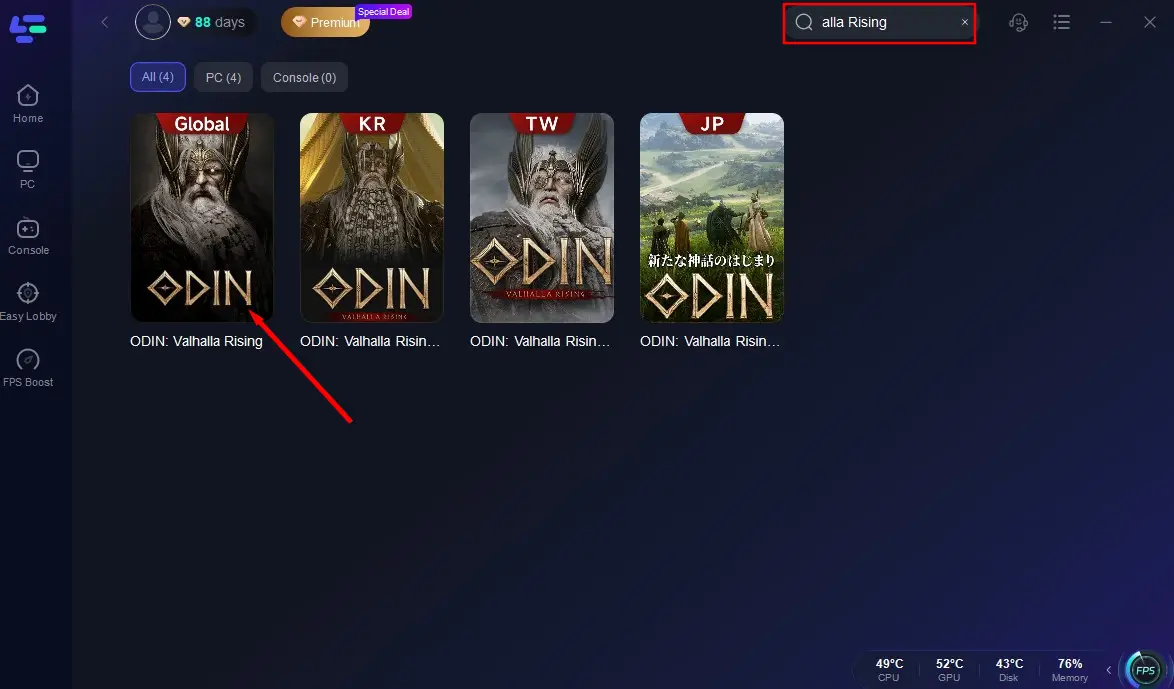
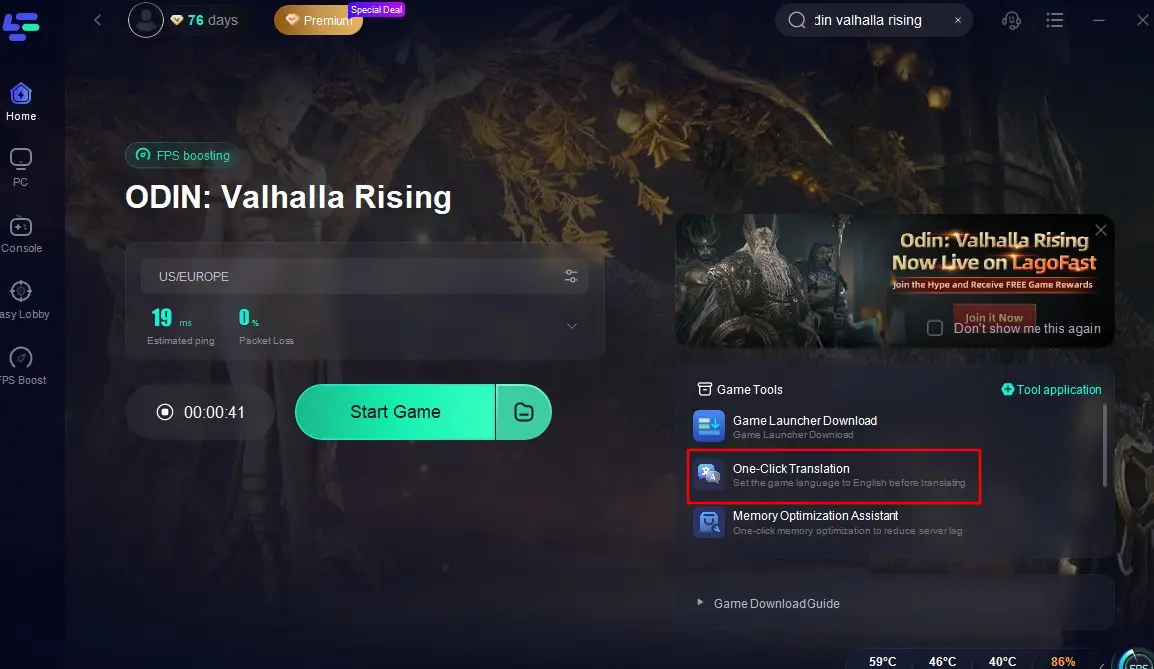
Select a server to start the acceleration. Click the One-Click Translation tool located at the bottom right of the screen, and import the installation path of Odin: Valhalla Rising.
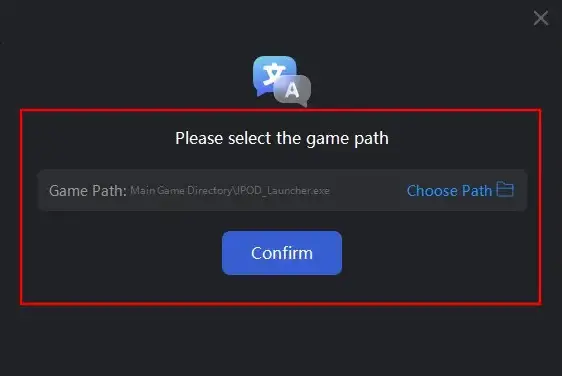
Select your target language for translation and click "Apply Translation".
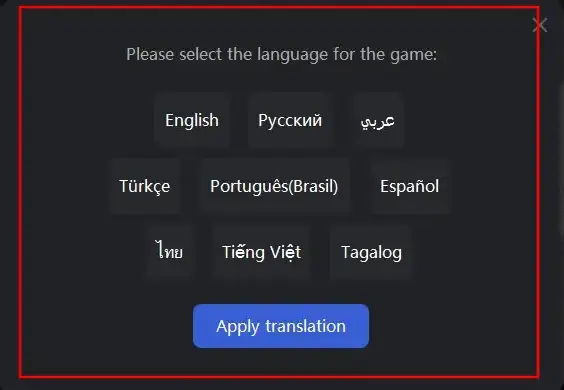
Wait a moment for the translation to complete, and then you can return to the game!
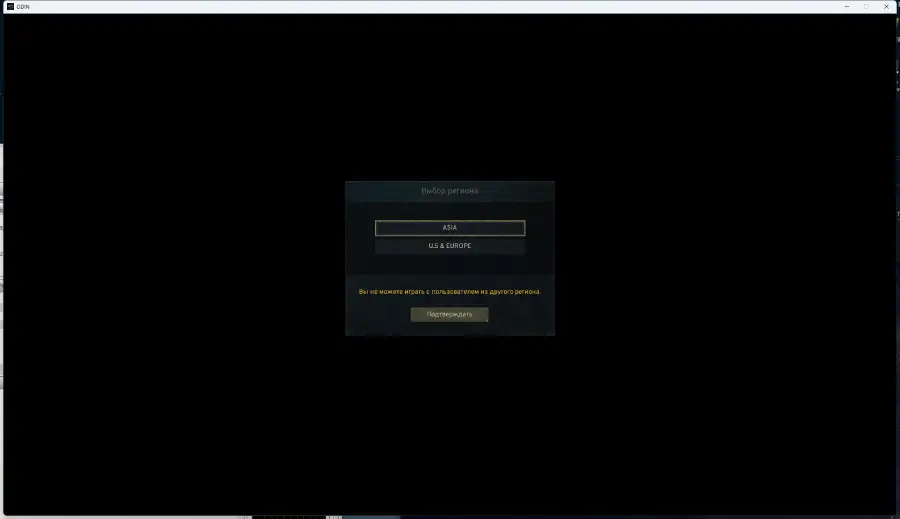
Occasionally, lag and performance issues can hinder gameplay. LagoFast Game Booster offers cross-platform solutions for PC and mobile:
Key Features of LagoFast
- Cross-Platform Compatibility: Optimizes Odin: Valhalla Rising on PC (Steam), Android, and iOS, ensuring consistent performance across devices .
- Global Server Network: Reduces ping by up to 90% using 300+ global nodes, ideal for cross-region battles .
- FPS Boost: Automatically optimizes CPU/GPU usage to eliminate stuttering during intense combat .
- One-Click Acceleration: Simplifies setup with a user-friendly interface, even on mobile .
How to Use LagoFast to Boost Odin: Valhalla Rising on PC :
Step 1: Open LagoFast, then click the PC button on the left and search Odin: Valhalla Rising in the search bar, click it after presenting.
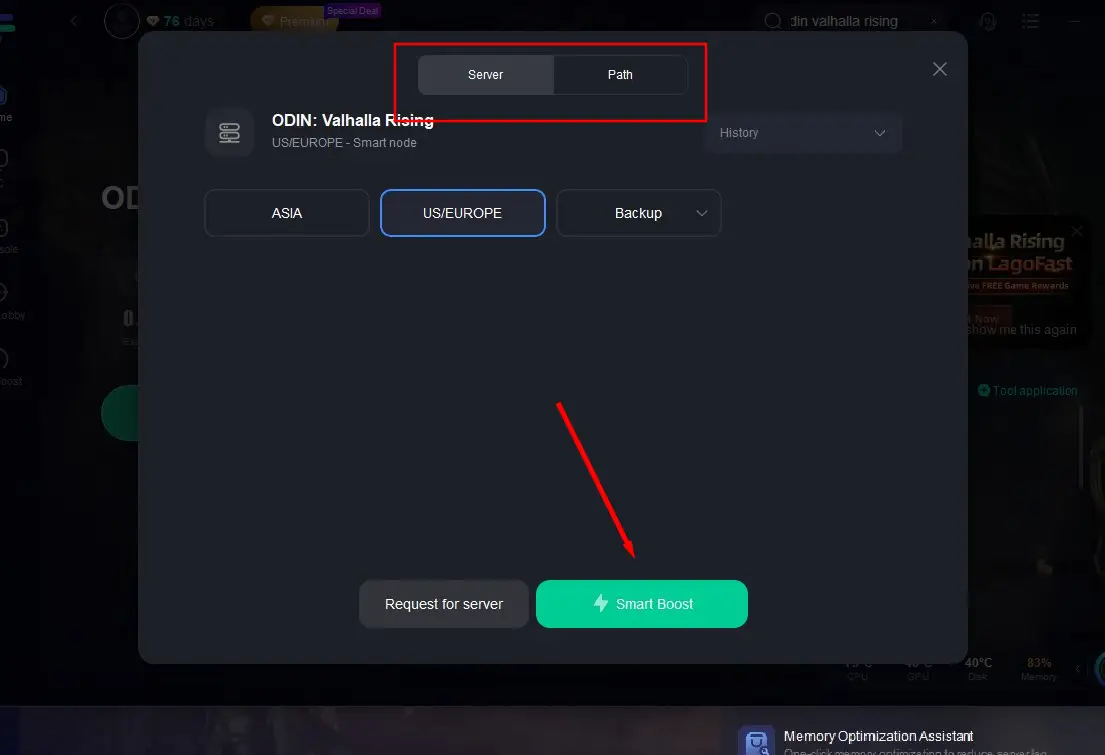
Step 2: Click on "Server" to change to a better server to ensure a smooth gaming experience, then click on "Smart Boost".
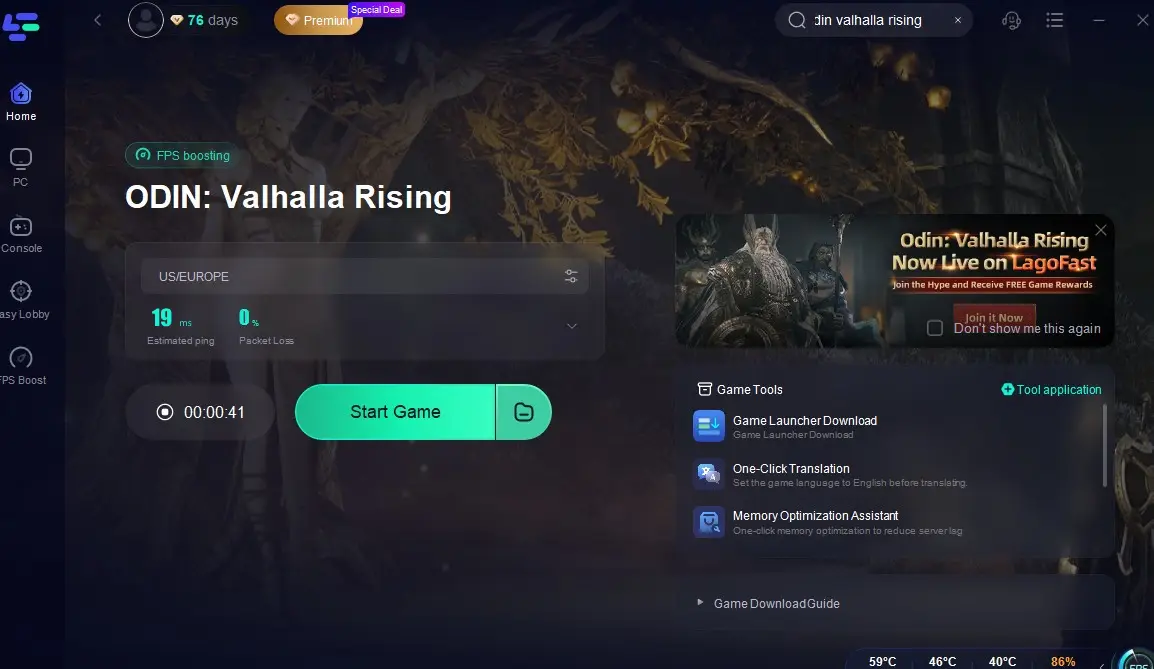
Step 3: Check the specific game ping, packet loss, and multiple path connection on the right side. Finally, click "Start Game" to play the game.
Follow the tutorial to use the LagoFast Mobile booster:
Step 1: Search "LagoFast Mobile Booster" in the Google Play or App Store. Alternatively, you can scan the QR code below.

Step 2: Click the "Download" button, then install and launch "LagoFast Mobile Booster".
Step 3: Start Odin: Valhalla Rising then switch to LagoFast Mobile and search it.
Step 4. Select and click Odin: Valhalla Rising in the interface.
Step 5: Enter the Severs selection interface where you can change to a stable server, then click the "Boost" button to enhance the gaming experience
Step 6: Finally, go back to Odin: Valhalla Rising and start playing it without any lag.
Conclusion
As Odin: Valhalla Rising’s global launch nears, staying informed and prepared is key. Remember:
- April 24–28: Servers are offline; preload the game to avoid delays.
- April 29: Global servers go live—check official channels for updates.
- Lag and crashes: Use LagoFast to optimize performance on PC or mobile.
With these insights, you’ll navigate Valhalla’s challenges with ease. Gear up, Riser—the gods await your prowess!

Boost Your Game with LagoFast for Epic Speed
Play harder, faster. LagoFast game booster eliminates stutter and lags on PC, mobile, or Mac—win every match!
Quickly Reduce Game Lag and Ping!
Boost FPS for Smoother Gameplay!