
Quick Answer
If you can't play Mistfall Hunter with friends in other regions, the primary reason is often due to differing game builds (North American vs. Global) tied to your Steam store region, or a lack of cross-server functionality between regions like NA and EU. While the game supports cross-platform play, this doesn't automatically enable cross-region partying. To troubleshoot, ensure both players have the same game build, verify game file integrity, and check server selection. For an optimized connection when playing with distant friends on a shared server, consider using a game booster like LagoFast to reduce latency and improve stability.

- ✅Less ping and crashes.
- ✅ Higher FPS and better performance.
- ✅ Support for 8000+ games.
- ✅ Stable connection and region switching.
- ✅ Mistfall Hunter Translation Tool
Part 1: Why Can’t You Play Mistfall Hunter With Friends?
Part 2: Does Mistfall Hunter Support Cross-Region Play?
Part 3: How the North American Build Affects Playing With Friends
Part 4: How to Check Whether You and Your Friend Are on the Same Server
Part 5: How to Invite Friends in Mistfall Hunter
Part 6: How to Fix Mistfall Hunter Friend Invite Not Working
Part 7: How to Fix Mistfall Hunter Crossplay Not Working
Part 8:What to Do If Your Friend Is in Another Region
Part 9: How to Improve the Connection When Playing With Distant Friends
Part 10: How to Enhance Your Game Experience with LagoFast Game Booster
Part 11: Mistfall Hunter Friends and Cross-Region FAQ
Why Can’t You Play Mistfall Hunter With Friends?
Mistfall Hunter, a thrilling PvPvE extraction game, thrives on cooperative play. However, many players, particularly those attempting to team up with friends across different geographical locations, encounter frustrating barriers. The inability to connect, send invites, or even see friends online when they are actively playing is a common complaint. This section delves into the various reasons behind these cross-region party issues, from server segmentation to game build discrepancies.
You and Your Friend Are on Different Server Regions
One of the most straightforward reasons for connection issues is that you and your friend are simply trying to play on different server regions. Game developers often segment their player base into regional servers (e.g., North America, Europe, Asia) to manage network latency and server load. If one player is connected to an NA server and another to an EU server, the game's matchmaking or party system might not allow them to interact directly. This is a fundamental limitation in many online games, designed to ensure a stable experience for players within a given geographical area.
One Player Has the North American Build
Mistfall Hunter, like some other titles, has been observed to distribute different game builds based on the player's region. Specifically, players in North America (US/Canada) often receive a dedicated
North American build by default when downloading from Steam. This build is often hard-coded to connect only to NA servers, making it impossible to play with friends who have the Global build and are trying to connect to European or Asian servers.
One Player Has the Global Build
Conversely, players outside of North America typically download the "Global build" of Mistfall Hunter. This version is designed to connect to a wider array of international servers, including EU, Asia, and others. The incompatibility arises when a Global build player attempts to party with an NA build player, as their game clients are fundamentally configured to access different server infrastructures.
Cross-Platform Matchmaking Is Not Enabled Correctly
Mistfall Hunter officially supports cross-platform matchmaking, allowing PC, Xbox, and PlayStation players to play together. However, if this feature is not enabled correctly in the game settings for all party members, it can prevent friends from finding each other. This is distinct from cross-region issues but can contribute to the overall problem of not being able to play with friends.
The Friend or Party System Is Temporarily Unavailable
Like any online game, Mistfall Hunter can experience temporary outages or bugs within its friend and party systems. These issues can manifest as friends not appearing online, invite buttons being greyed out, or party invites failing to send or be received. While often short-lived, these technical glitches can be frustrating and mimic the symptoms of region locking.
One Player Is Using an Outdated Game Version
Ensuring all players are on the latest game version is crucial for online multiplayer. If one friend has an outdated client, they might not be able to connect to the same servers or party with friends who have the most recent update. This is a common oversight that can easily be fixed by verifying game files or checking for updates.
Does Mistfall Hunter Support Cross-Region Play?
The distinction between cross-region play and cross-platform play is vital for understanding Mistfall Hunter's multiplayer capabilities. While the game boasts robust cross-platform support, its cross-region functionality is more nuanced and, at times, limited.
Cross-Region Play vs Cross-Platform Play
Cross-platform play refers to the ability of players on different gaming systems (e.g., PC, Xbox, PlayStation) to play together. Mistfall Hunter explicitly supports this, allowing a diverse player base to interact. Cross-region play, however, refers to the ability of players located in different geographical regions (e.g., North America, Europe, Asia) to connect and play on the same game servers. This is where Mistfall Hunter currently faces significant limitations.
During its beta phase, developers confirmed that there was no cross-server functionality between regions like NA and EU. This means that even if you and your friend are on the same platform (e.g., both on PC), if one is in North America and the other in Europe, the game's server architecture might prevent you from joining the same party or matchmaking queue. While the full release might see some improvements, the core challenge of connecting players across vast geographical distances and distinct server infrastructures remains.
Can Players on Different Servers Join the Same Party?
Based on current player feedback and developer statements, players on fundamentally different regional servers (e.g., an NA server vs. an EU server) generally cannot join the same party or matchmaking queue in Mistfall Hunter. The game's design, particularly the existence of region-specific builds (like the NA build), reinforces this separation. While cross-platform matchmaking allows a PC player to play with an Xbox player, it does not override the regional server segregation. Players must typically be on the same regional server to form a party and play together.
How the North American Build Affects Playing With Friends
The existence of a distinct North American build for Mistfall Hunter is a significant factor contributing to cross-region play difficulties. This build, often automatically assigned to players based on their Steam store region, creates a walled garden for NA players.
Which Players Receive the North American Build?
Players whose Steam accounts are registered to North American countries (primarily the United States and Canada) will, by default, download and install the North American build of Mistfall Hunter. This build is specifically configured to connect to game servers located within the North American continent, ensuring optimal latency for players in that region.
Why NA and Global Players May Not Find Each Other
When a player with the North American build attempts to party with a friend who has the Global build (and is thus connecting to, for example, European servers), they often find each other's names unsearchable, or if found, unable to send invites. This is because their game clients are trying to access entirely separate server pools. The NA build is essentially hard-locked to NA servers, making it incompatible with players on other regional servers.
Why the Same Steam Version Can Still Use Different Builds
It's a common misconception that simply having the same
Steam version guarantees compatibility. However, as seen with Mistfall Hunter, the underlying game build can differ even within the same Steam version. This build difference is determined by the region from which the game was acquired or where the Steam account is registered, leading to the NA vs. Global build dichotomy.
Can You Switch From the NA Build to the Global Build?
Switching from the North American build to the Global build is not a straightforward process and is generally not officially supported. It would typically involve changing your Steam store region, which is a complex procedure with strict rules and potential risks, including account restrictions. Furthermore, even if you manage to change your Steam region, there's no guarantee that the game client would automatically switch to the Global build without a full re-download or specific developer tools.
How to Check Whether You and Your Friend Are on the Same Server
Before diving into complex troubleshooting, it's crucial to confirm whether you and your friend are even attempting to connect to the same game server. This diagnostic step can save a lot of frustration.
Check the Server Name Before Entering the Game
Many online games display the currently selected server region or server name on the main menu or login screen. Before you and your friend enter the game, compare these details. Ensure that both of you have selected or are automatically connected to the identical server region (e.g., both on "US East" or both on "EU West"). If these differ, that's your primary issue.
Compare Available Server Regions
If the game allows manual server selection, both players should check the list of available server regions. If one player sees a list of servers that the other does not, it's a strong indicator of different game builds or regional restrictions. For instance, if an NA player only sees North American servers and an EU player only sees European servers, cross-region play is likely impossible through direct server selection.
Check Each Player’s Steam Store Country
Your Steam store country often dictates which game build you receive. Both you and your friend should verify your Steam account details to confirm your registered countries. If these differ significantly, especially between North America and other continents, it's highly probable that you have different game builds.
Confirm That Both Players Installed the Same Build
While difficult to verify directly without developer tools, if you suspect a build difference (e.g., NA vs. Global), compare game file sizes or specific file versions if possible. Community forums might offer insights into distinguishing between builds. Ultimately, if one player is on an NA-locked build and the other on a Global build, direct play is unlikely.
Check That Both Clients Are Fully Updated
Ensure both game clients are fully updated to the latest version. Outdated clients can lead to connection errors, inability to see friends, or being unable to join the same game sessions. Verify game file integrity through Steam to ensure no corrupted or missing files are preventing proper updates.
How to Invite Friends in Mistfall Hunter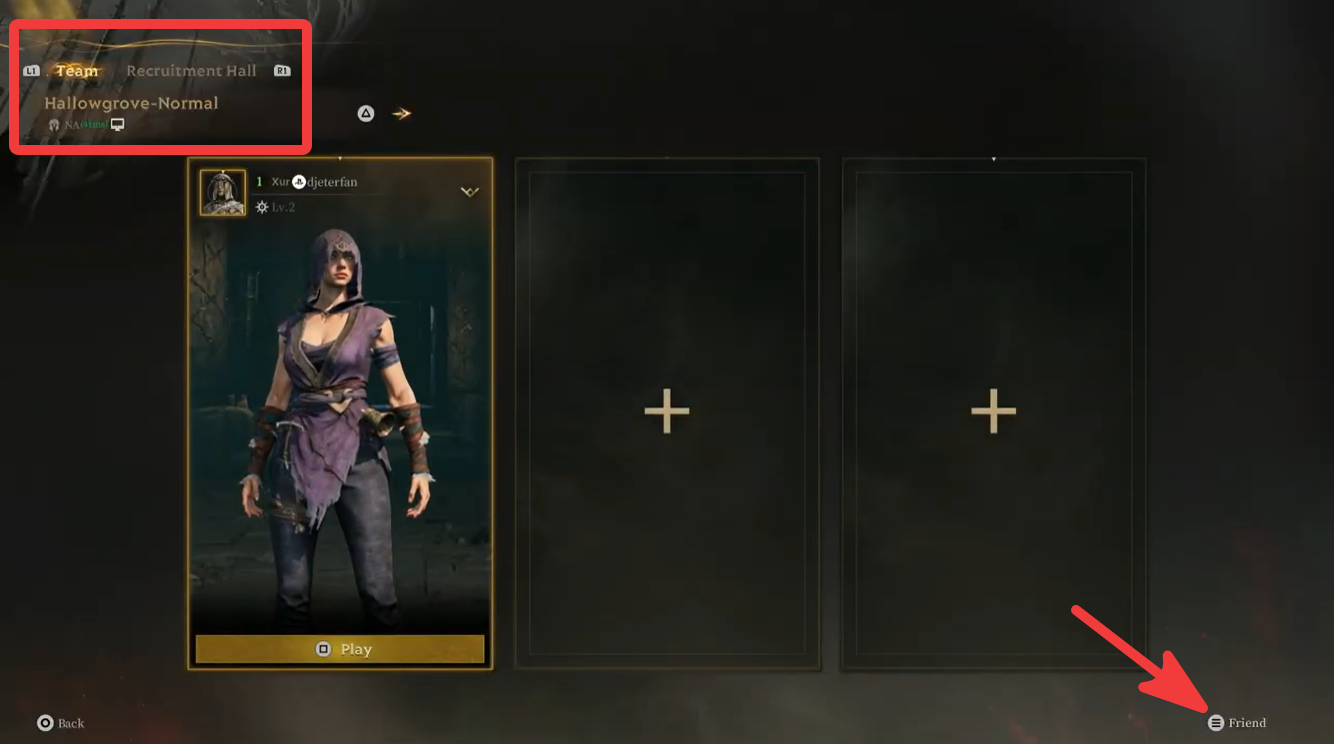
Once you've established that you and your friends are on compatible servers and builds, the next step is to correctly use the in-game friend and party system. Even without region locks, this process can sometimes be unintucted.
Add a Friend Using the Correct Player Name
Ensure you are using the exact player name or ID required by Mistfall Hunter's friend system. Some games use unique in-game IDs, while others rely on platform-specific usernames (e.g., Steam friend codes). Double-check for typos, case sensitivity, and any special characters. If you can't find your friend, ask them to send you their exact in-game identifier.
Open the Friends and Party Menu
Locate and open the dedicated friends and party menu within Mistfall Hunter. This is typically accessible from the main menu or a social tab. Familiarize yourself with its layout and options for adding friends, viewing online status, and sending invites.
Send and Accept a Party Invitation
Once your friend is added and appears online, select their name from your friends list and choose the option to send a party invitation. Your friend will then need to accept this invitation. Ensure both players are in a state where they can receive and accept invites (e.g., not in the middle of a match or another party).
Select the Same Server Before Matchmaking
Even if you're in a party, if the game allows manual server selection, ensure all party members confirm they are on the same server before initiating matchmaking. This prevents the party from being split or encountering errors when trying to find a game.
Enable Crossplay for PC, Xbox, and PlayStation Players
If you are playing with friends on different platforms (PC, Xbox, PlayStation), ensure that the crossplay option is enabled in your game settings. This is usually a toggle in the gameplay or network settings menu. All party members must have crossplay enabled for it to function correctly.
How to Fix Mistfall Hunter Friend Invite Not Working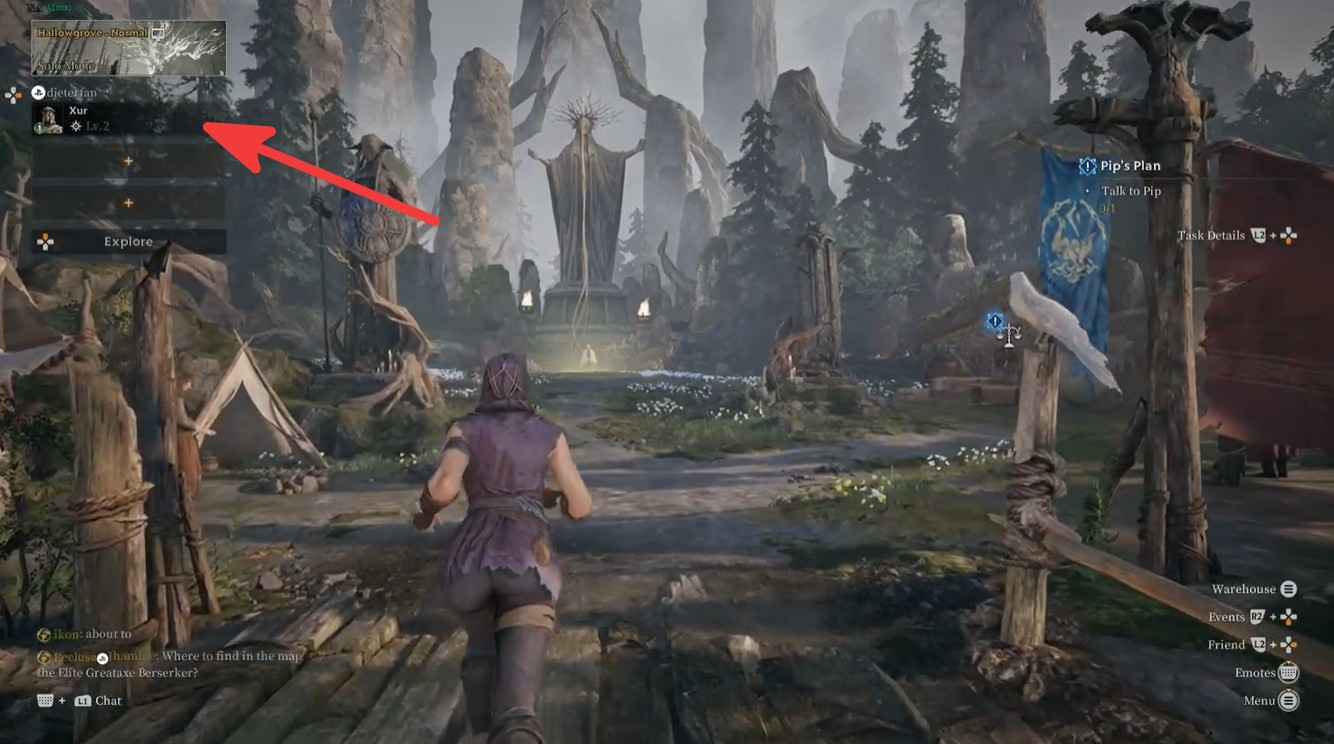
When friend invites fail, it can be incredibly frustrating. Here are some targeted solutions for common issues with the Mistfall Hunter friend invite system.
Verify Online Status and Game Version
First, confirm that both you and your friend are genuinely online and running the exact same, most up-to-date version of Mistfall Hunter. A friend appearing offline when they are not, or a version mismatch, will prevent invites from working. Restarting the game for both players can often resolve display issues with online status.
Check In-Game Privacy Settings
Some games have privacy settings that can block friend requests or party invites. Ensure your in-game privacy settings, and those of your friend, are configured to allow invites from friends or public. Temporarily setting them to a more permissive option can help diagnose if this is the issue.
Re-add Friends or Use Alternative Invite Methods
If direct invites are failing, try removing your friend from your in-game friends list and re-adding them. Sometimes, a corrupted friend entry can cause issues. If the game offers alternative invite methods, such as a party code or session ID, try using those instead of direct invites.
Restart Game and Platform Client
A full restart of both Mistfall Hunter and your gaming platform client (e.g., Steam) can often clear up temporary glitches preventing invites from working. Close both applications completely and relaunch them.
Check for Server Status and Maintenance
Occasionally, the game's friend or party servers might be undergoing maintenance or experiencing issues. Check official Mistfall Hunter social media channels or community forums for any announcements regarding server status. If there's an ongoing issue, you'll simply need to wait for the developers to resolve it.
How to Fix Mistfall Hunter Crossplay Not Working
Crossplay is a fantastic feature, but it can also be a source of frustration when it doesn't function as expected. Here's how to troubleshoot crossplay issues in Mistfall Hunter.
Ensure Crossplay is Enabled for All Players
The most common reason for crossplay not working is that one or more party members have it disabled. Navigate to the game's settings (usually under 'Gameplay' or 'Network') and ensure the 'Crossplay' toggle is set to ON for everyone in the party.
Verify Platform-Specific Network Settings
Each platform (PC, Xbox, PlayStation) has its own network settings that can affect crossplay. For Xbox and PlayStation, ensure your console's privacy settings allow for cross-network play. On PC, check your firewall and antivirus to ensure they aren't blocking crossplay connections.
Confirm Game Version Consistency
All players attempting to crossplay must be on the exact same game version. A slight version mismatch between platforms can prevent crossplay from functioning. Ensure all game clients are fully updated.
Check for Platform-Specific Outages
Sometimes, issues might stem from a specific platform's network services (e.g., Xbox Live, PlayStation Network) experiencing an outage. Check the status of these services if you suspect a platform-specific problem.
Understand Cross-Region Limitations
Remember that crossplay does not automatically mean cross-region play. Even with crossplay enabled, if players are in fundamentally different server regions (e.g., an NA PC player and an EU Xbox player), they might still be unable to party due to server segregation. This is a design limitation, not a bug.
What to Do If Your Friend Is in Another Region
When direct cross-region play is not supported, connecting with friends in distant locations requires a more strategic approach. While some solutions are unofficial and carry risks, others focus on optimizing the connection to shared servers.
Option 1: Coordinate Server Selection (If Available)
If Mistfall Hunter allows manual server selection, the most straightforward approach is for both you and your friend to manually select the same server region. For example, if an NA player and an EU player both select a 'Central US' server, they might be able to connect. However, this often means one player will experience higher latency. This is a compromise for playing together.
Option 2: Consider Regional Account Creation (Use with Caution)
Some players attempt to create new game accounts or even platform accounts (e.g., Steam accounts) registered to a region where their friend plays. This is a complex and often risky workaround. It can violate terms of service, lead to account bans, and complicate future purchases or game access. This is generally not recommended due to the high risks involved.
Option 3: Wait for Official Cross-Server Functionality
Developers are often aware of cross-region play demands. Keep an eye on official announcements and community forums for any news regarding future cross-server or global matchmaking functionality. Submitting feedback and support tickets can also highlight the community's desire for this feature.
How to Improve the Connection When Playing With Distant Friends
Even if you manage to connect with friends in other regions, the increased geographical distance often translates to higher latency and a less responsive gaming experience. Optimizing your network is crucial to mitigate these effects.
Choose the Shared Server With the Lowest Combined Latency
If you and your friend are forced to play on a server that is geographically distant for one of you, try to find a server that offers the best compromise. Use in-game ping indicators or external tools to test latency to various server regions. Aim for a server where the combined ping for both players is as low and stable as possible.
Test Ping Before Entering Matchmaking
Before queuing for a match, both players should test their ping to the selected server. This can be done through in-game network diagnostics or external ping tools. If one player has an exceptionally high or unstable ping, it's advisable to re-evaluate the server choice or troubleshoot their local connection before impacting the gameplay experience for the entire party.
Reduce Packet Loss and Jitter
Packet loss and jitter are the bane of online gaming, especially when playing across distances. Packet loss means data isn't reaching its destination, causing lag spikes and disconnections. Jitter is the inconsistency in packet arrival times, leading to an erratic connection. A stable, wired internet connection is the first step. Beyond that, specialized network optimization tools can help.
Optimize the Connection Route to the Shared Server
Your internet traffic often takes suboptimal routes to game servers, especially across continents. These routes can be congested or pass through unreliable nodes, increasing latency. A game booster can help by intelligently rerouting your connection through optimized pathways, ensuring your data travels the most efficient and stable path to the game server.
Avoid Downloads and Bandwidth-Heavy Applications
Ensure that no background applications are consuming significant bandwidth while you're playing. Streaming services, large downloads, or other online activities can saturate your internet connection, leading to increased ping and packet loss. Close all unnecessary applications to dedicate maximum bandwidth to Mistfall Hunter.
How to Enhance Your Game Experience with LagoFast Game Booster
For PC gamers navigating the complexities of cross-region play or simply seeking to optimize their online experience in Mistfall Hunter, LagoFast Game Booster offers a powerful solution. It's specifically designed to address the network challenges that plague online gaming, ensuring a smoother, more responsive, and more stable connection.
LagoFast(LagoFast Game Booster - Get No Lag and Lower Ping) works by creating an optimized network pathway between your PC and the game servers. It intelligently analyzes network conditions, identifies bottlenecks, and reroutes your game traffic through its global network of dedicated servers. This process effectively bypasses congested ISP routes, reduces ping, minimizes packet loss, and stabilizes your connection, which is paramount for a fast-paced PvPvE game like Mistfall Hunter, especially when playing with friends across distances.
Here’s how to use LagoFast Game Booster to optimize your Mistfall Hunter experience:
Click the Free Trial button to download and install LagoFast Free Trial
Launch LagoFast and Search for Mistfall Hunter: Open the LagoFast application. In the prominent search bar, type "Mistfall Hunter" and select the game from the search results. This action tells LagoFast to prepare its optimizations specifically for this title.
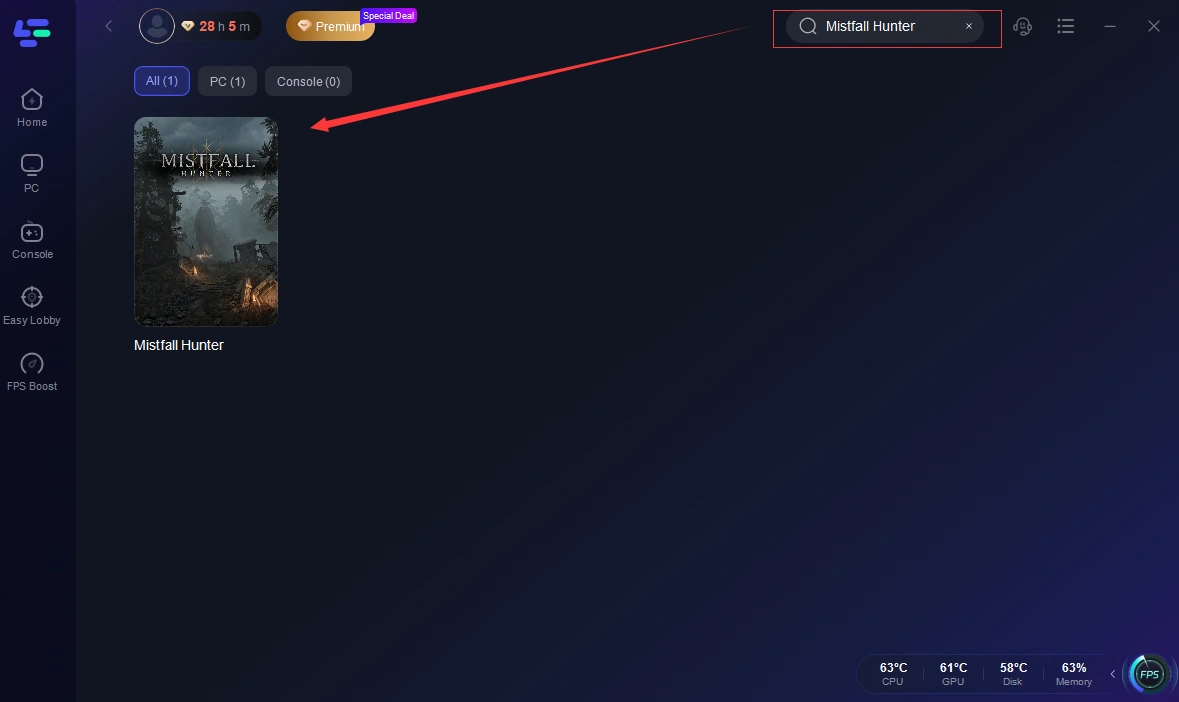
Select Optimal Server and Node: LagoFast's intelligent system will automatically analyze your current network conditions and the game's server locations. It will then recommend the most optimal server and network node to connect through. Choose the recommended option for the best possible connection quality and lowest latency, especially if you're trying to connect to a distant server to play with friends.
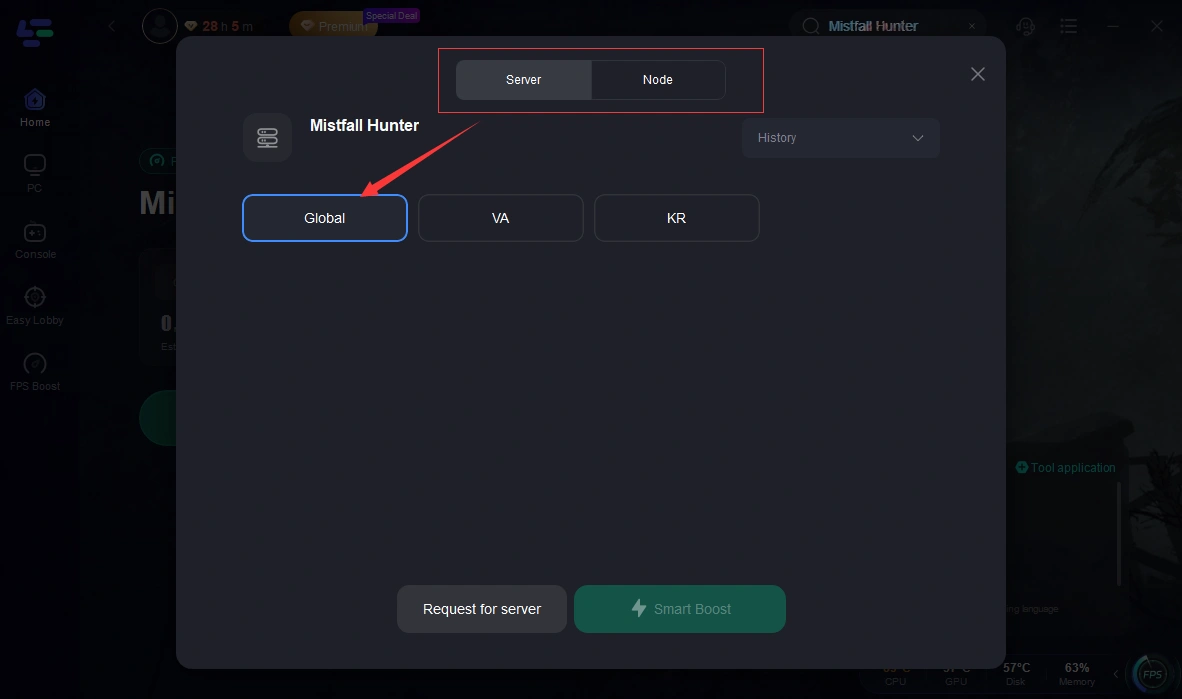
Start Boosting: With the game selected and optimal settings chosen, click the "Start Boosting" button. LagoFast will then activate its specialized network optimization protocols, establishing a stable and fast connection pathway for Mistfall Hunter.
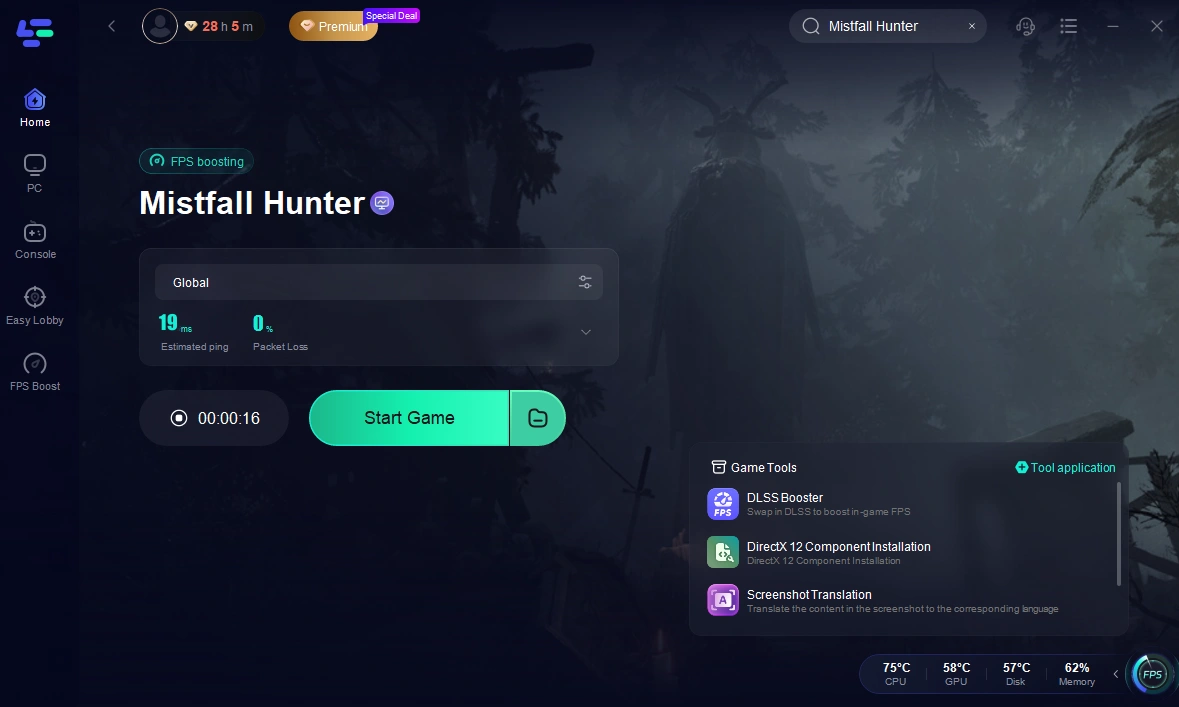
Launch Mistfall Hunter: Once LagoFast indicates that boosting is active, launch Mistfall Hunter through your preferred platform (e.g., Steam). You should immediately experience a more responsive game, with lower ping and reduced instances of lag, allowing for more precise inputs and a more enjoyable cooperative experience, even with friends in other regions.
Mistfall Hunter Friends and Cross-Region FAQ
Can Mistfall Hunter NA and EU Players Play Together?
Generally, no, not directly through standard matchmaking or party systems. Due to separate game builds and server segregation, NA and EU players often cannot directly party or queue together. Workarounds might involve manually selecting a shared server, but this often comes with high latency for one player.
Does Crossplay Allow Cross-Region Parties?
No, crossplay (PC, Xbox, PlayStation) in Mistfall Hunter allows players on different platforms to play together, but it does not override regional server locks. If an NA PC player and an EU Xbox player are on different regional servers, crossplay will not enable them to party up.
Why Can’t I Find My Friend’s Username?
This could be due to several reasons: a typo in the username, your friend being on a different game build (NA vs. Global), or your friend being on a different regional server. Ensure exact spelling and verify server/build compatibility.
Why Is My Friend Online but Showing as Offline?
This is often a display bug within the game's social system. Try restarting your game and your friend's game. It can also happen if there's a slight version mismatch or a temporary server glitch.
Why Is the Party Invite Button Greyed Out?
A greyed-out invite button can indicate several issues: your friend is already in a party, they have privacy settings that block invites, there's a game version mismatch, or you are on incompatible regional servers. Ensure all conditions for inviting are met.
Can I Transfer My Character to My Friend’s Server?
Most online games, including Mistfall Hunter, do not typically allow character transfers between regional servers. Your character data is usually tied to the specific server region it was created on. This is a significant limitation for players wishing to switch regions to play with friends.
Will Mistfall Hunter Add Cross-Server Matchmaking?
While developers are aware of the demand for cross-server functionality, there's no official confirmation yet. Implementing true cross-server matchmaking is a complex technical challenge. Keep an eye on official game announcements for any future plans.
Key Takeaway
The inability to play Mistfall Hunter with friends in other regions is a significant hurdle for many, primarily stemming from distinct game builds and server segregation. While cross-platform play is supported, cross-region partying remains a challenge. Understanding the differences between NA and Global builds, verifying server connections, and troubleshooting friend invite issues are crucial steps. For those who manage to bridge the regional gap, optimizing network performance with a tool like LagoFast Game Booster is essential to ensure a stable, low-latency connection, making cooperative play across distances a more enjoyable and responsive experience. Always prioritize a robust network setup to enhance your Mistfall Hunter adventures with friends.
Boost Your Game with LagoFast for Epic Speed
Play harder, faster. LagoFast game booster eliminates stutter and lags on PC, mobile, or Mac—win every match!
Quickly Reduce Game Lag and Ping!
Boost FPS for Smoother Gameplay!