

Quick Answer: To fix Mabinogi Mobile lag, the most effective solution is using a dedicated gaming network optimizer like LagoFast Game Booster. This tool specifically addresses high ping and packet loss when connecting to the Taiwan, Hong Kong, and Macau (TW/HK/MO) servers from overseas. Additionally, ensuring a wired connection on PC, clearing the mobile app cache, and adjusting in-game graphics settings can significantly reduce stuttering and disconnections.

- ✅ Reduce Lag and High Ping.
✅ Boost FPS at the Same Time.
✅ Support 8000+ Popular Online Games.
✅ Change Server without Latency.
✅ Boost Game Loading Speed.
Part 1: Understanding the Causes of Mabinogi Mobile Lag
Part 2: How to Fix Mabinogi Mobile Lag on PC
Part 3: How to Fix Mabinogi Mobile Lag on Mobile Devices
Part 4: Why Overseas Players Face High Ping on TW/HK/MO Servers
Part 5: Enhancing Gameplay with Network Optimization
Part 6: How to Enhance Your Game Experience with LagoFast Game Booster
Part 7: Mabinogi Mobile Lag FAQ
Part 1: Understanding the Causes of Mabinogi Mobile Lag
Mabinogi Mobile brings the beloved world of Erinn to a new generation of players, but for many, the experience is marred by frustrating technical hurdles. Lag in Mabinogi Mobile isn't just a single issue; it's a combination of network latency, hardware limitations, and server-side congestion.
When you experience "lag," you might notice your character teleporting (rubberbanding), inputs taking seconds to register, or the dreaded "Connection Lost" message. For players outside of the primary service regions—specifically those trying to access the Taiwan, Hong Kong, or Macau versions—the physical distance to the servers introduces significant High Ping and Network Jitter. These issues are compounded by Packet Loss, where data sent between your device and the server simply disappears, leading to frequent disconnections.
Part 2: How to Fix Mabinogi Mobile Lag on PC
Many veteran players prefer playing Mabinogi Mobile on PC via official launchers or emulators for better control and screen real estate. However, the PC environment introduces its own set of lag variables.
Network Stability
The most common cause of lag on PC is a volatile Wi-Fi connection. Even high-speed Wi-Fi can suffer from interference, leading to spikes in jitter.
- Use Ethernet: Switching to a wired connection is the single best hardware upgrade you can make for MMORPG stability.

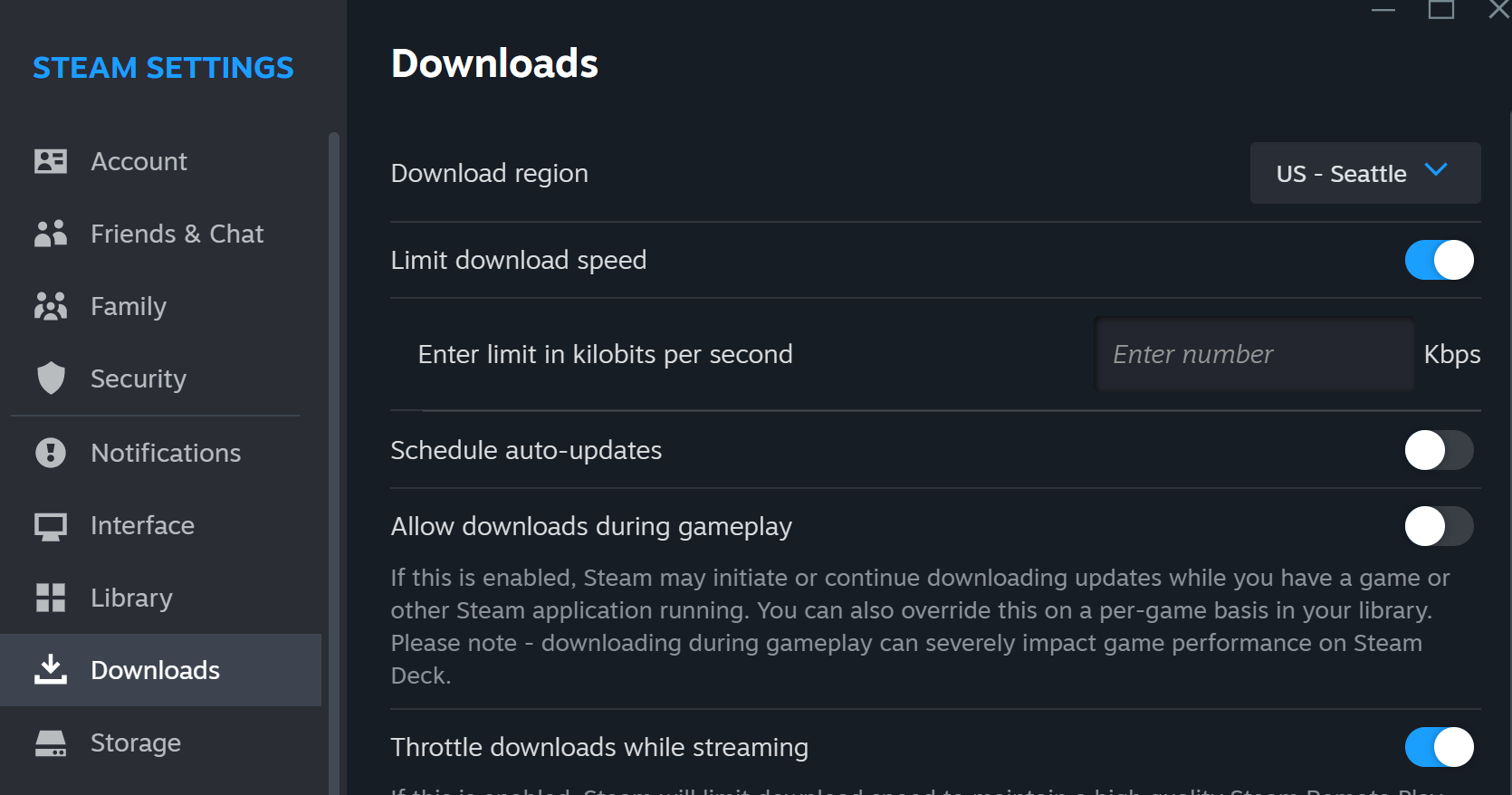
- Disable Background Downloads: Windows Update, Steam, and cloud syncing services (like OneDrive) can hog your bandwidth, causing sudden ping spikes.
Hardware Optimization
If the game feels "choppy" rather than delayed, you are likely facing low FPS (Frames Per Second) rather than network lag.
- Adjust Graphics Settings: Lower the shadow quality and turn off high-end post-processing effects in the Mabinogi Mobile settings menu.
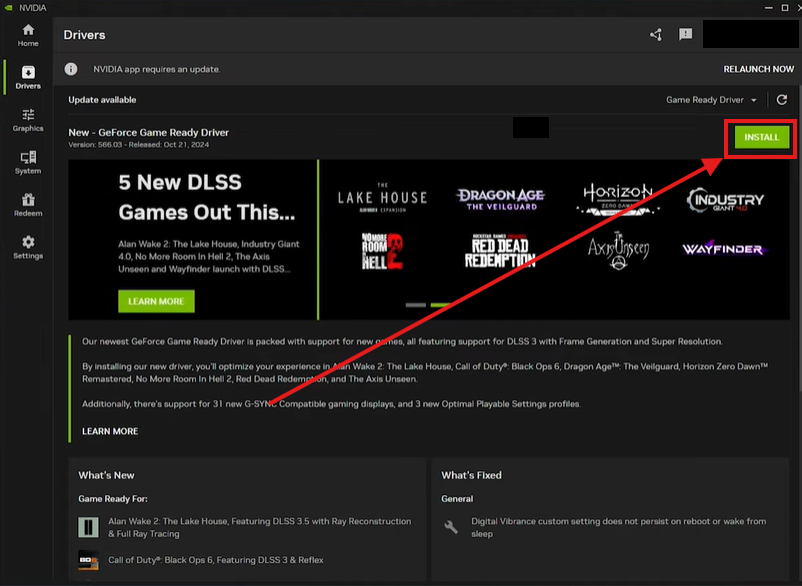
- Update GPU Drivers: Ensure your NVIDIA or AMD drivers are up to date to support the game's rendering engine efficiently.
- Set High Priority: In the Windows Task Manager, set the Mabinogi Mobile process priority to "High" to ensure it gets the most CPU resources.
Part 3: How to Fix Mabinogi Mobile Lag on Mobile Devices
Playing on the go is the core of the Mabinogi Mobile experience, but mobile networks and hardware are more prone to instability.
Optimizing the Mobile Connection
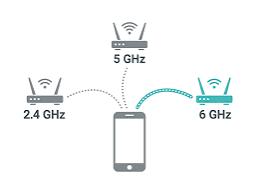
- Switch to 5G or Stable Wi-Fi: Avoid playing on crowded public Wi-Fi networks, which are notorious for packet loss.
- Reset Network Settings: If you find yourself constantly disconnecting, a quick toggle of Airplane Mode or a network settings reset can often clear a "stuck" connection.
Managing Device Resources
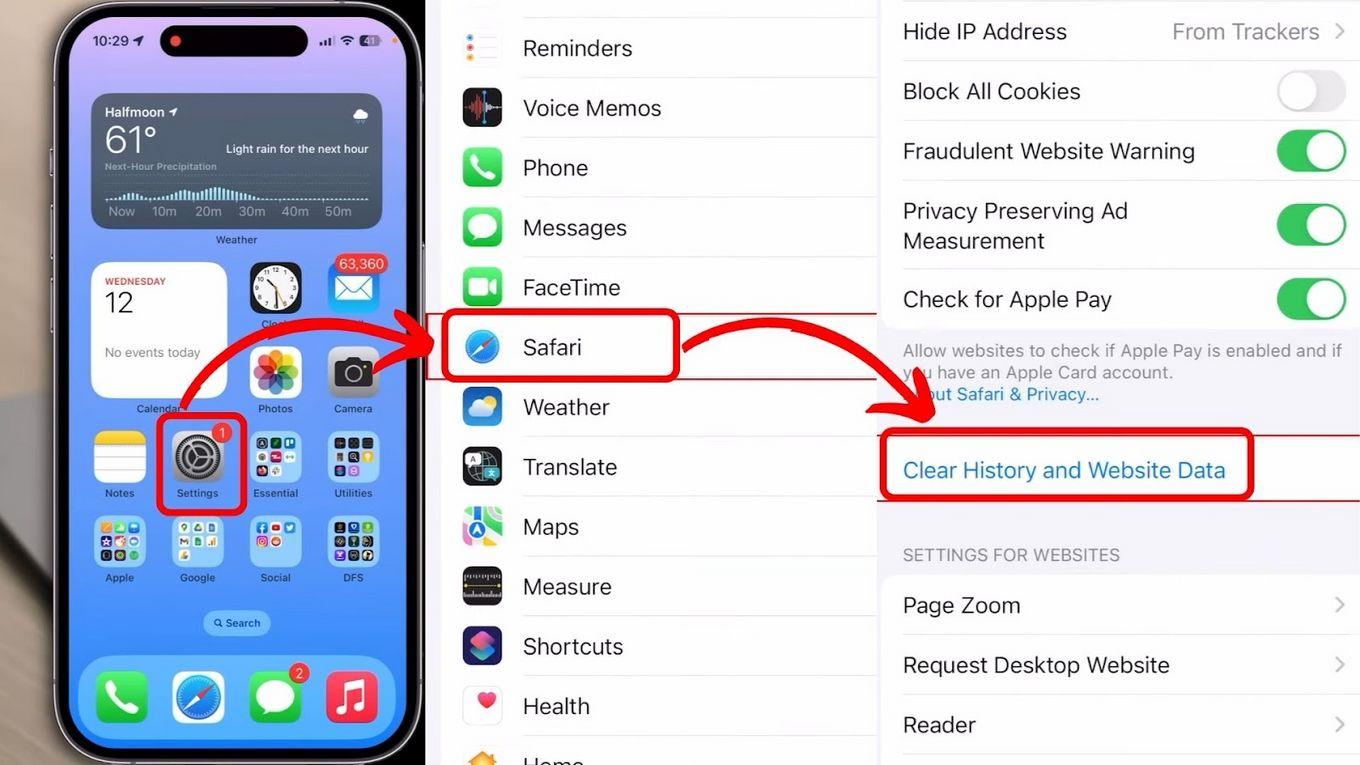
- Clear App Cache: Over time, the game's cache can become bloated or corrupted. Go to your phone's storage settings and clear the Mabinogi Mobile cache to improve loading times and stability.
- Disable Power Saving Mode: Most phones throttle the CPU and GPU when in power-saving mode, which will cause the game to stutter and lag.
- Close Background Apps: Social media and messaging apps can consume significant RAM, leaving less for the game and causing it to crash or lag during intensive combat.
Part 4: Why Overseas Players Face High Ping on TW/HK/MO Servers
For the global Mabinogi community, the TW/HK/MO servers are often the first point of entry for new content. However, connecting to these regions from North America, Europe, or other parts of Asia presents a major challenge: the "Great Distance" problem.
When your game data has to travel across oceans, it passes through dozens of international gateways. Each "hop" increases the chance of Network Jitter and Packet Loss. Standard internet service providers (ISPs) do not prioritize gaming traffic; they route your data based on cost, not speed. This results in a "High Ping" that makes the fast-paced, timing-based combat of Mabinogi nearly impossible to master.
Part 5: Enhancing Gameplay with Network Optimization
Beyond basic troubleshooting, serious players need a way to bypass the inefficient routing of their standard ISP. This is where network optimization comes into play. By using a dedicated gaming route, you can ensure that your data takes the most direct path to the Mabinogi Mobile servers in Taiwan or Hong Kong.
Stabilizing your connection doesn't just lower your ping; it eliminates the micro-stutters that happen during skill execution. In a game like Mabinogi, where the "Rock-Paper-Scissors" combat system relies on split-second reactions, a stable connection is the difference between a successful counterattack and a trip back to the soul stream.
Part 6: How to Enhance Your Game Experience with LagoFast Game Booster
If you have tried the basic fixes and are still struggling with disconnections and high latency, LagoFast Game Booster is the professional solution you need. Unlike a standard VPN, LagoFast(LagoFast Game Booster - Get No Lag and Lower Ping) is specifically engineered for gamers, offering a global network of dedicated nodes that prioritize your game data.
LagoFast addresses the core issues of Mabinogi Mobile lag by providing a stable, high-speed tunnel directly to the game's regional servers. It effectively reduces High Ping, eliminates Packet Loss, and smooths out Network Jitter, ensuring that you stay connected even during peak hours.
Detailed Steps to Use LagoFast Game Booster:
Click the Free Trial button to download and install LagoFast Free Trial.
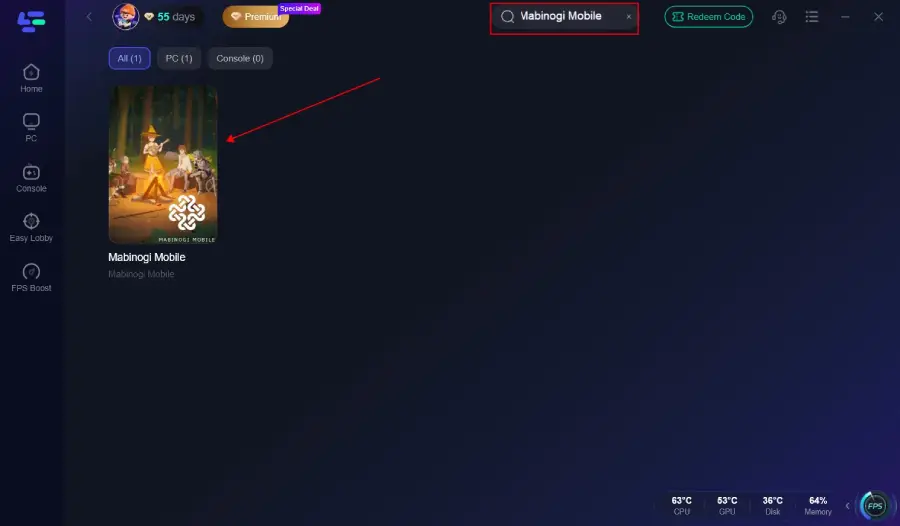
Search for Mabinogi Mobile: Open the application and type "Mabinogi Mobile" in the search bar.
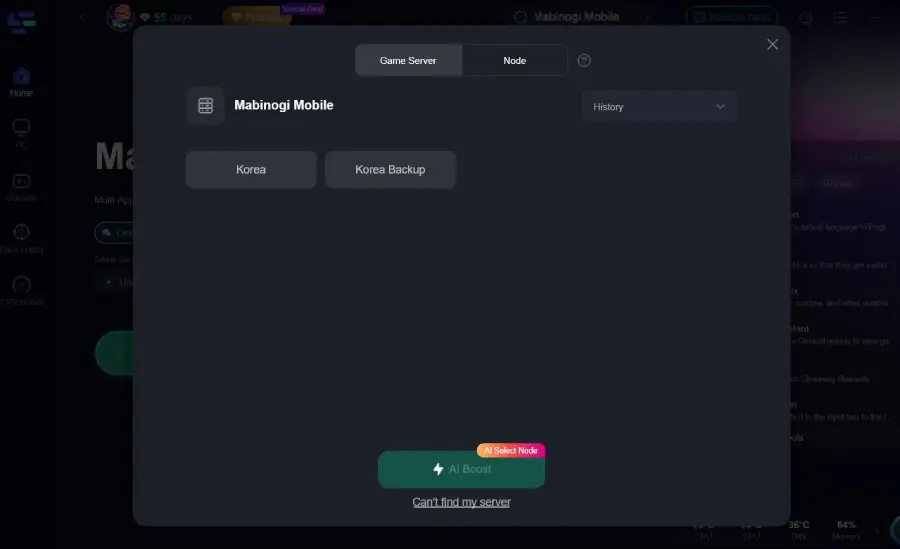
Select Your Server: Choose the server location that corresponds to your game (e.g., Taiwan, Hong Kong, or Macau).
Smart Boost: Click the "Boost" button. LagoFast will automatically analyze the available nodes and switch you to the fastest, most stable path.
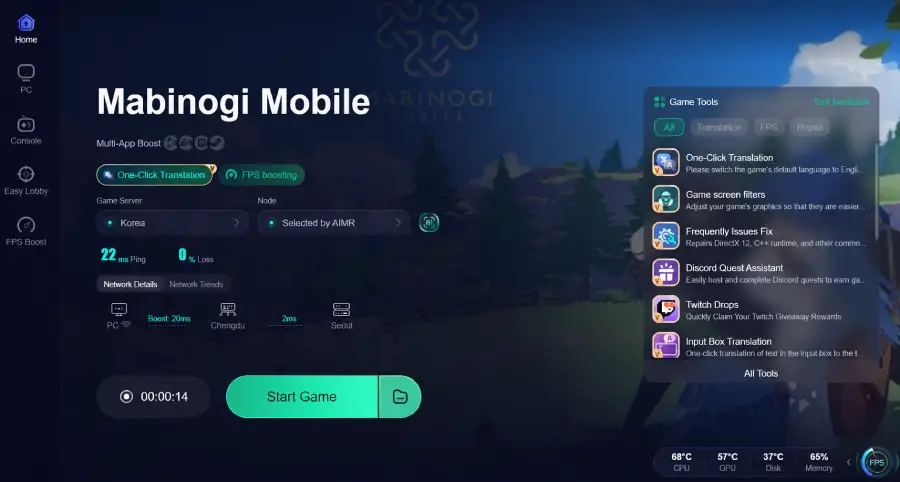
Launch the Game: With the boost active, open Mabinogi Mobile. You will notice an immediate reduction in delay and a much more responsive combat experience.
By using LagoFast, you can finally enjoy Mabinogi Mobile the way it was meant to be played—smooth, fast, and without the constant fear of a "Connection Error" interrupting your adventure.
Part 7: Mabinogi Mobile Lag FAQ
Q1: Why does my game lag only during boss fights?
A: Boss fights involve more players and complex visual effects, which put a strain on both your hardware (FPS lag) and your network (as more data is being synced). Try lowering your graphics settings and using a booster to stabilize the data flow.
Q2: Is my internet speed too slow for Mabinogi Mobile?
A: MMORPGs don't actually require high download speeds (1-5 Mbps is usually enough). What matters is Latency (Ping) and Stability. A 1000 Mbps connection can still lag if it has high jitter.
Q3: Can I play Mabinogi Mobile on an emulator?
A: Yes, but emulators require significant CPU resources. If you experience lag on an emulator, ensure "Virtualization Technology" (VT) is enabled in your PC's BIOS.
Q4: Why am I getting "Connection Error" even with good Wi-Fi?
A: This is likely due to server-side issues or poor routing from your ISP to the overseas servers. Using a tool like LagoFast can help bypass these bad routes.
Q5: Does Mabinogi Mobile have a global server?
A: As of 2026, Mabinogi Mobile is primarily serviced in regional versions (KR, TW/HK/MO). Global players usually have to connect to these regional servers, which is why network optimization is so critical.
Key Takeaway
Mabinogi Mobile lag is a multifaceted problem, but it is solvable. For PC players, focusing on wired connections and hardware optimization is key. For mobile users, managing device resources and cache is essential. However, for anyone playing on overseas servers like TW/HK/MO, the most impactful solution is using LagoFast Game Booster to eliminate high ping and packet loss, ensuring a seamless journey through Erinn.

Boost Your Game with LagoFast for Epic Speed
Play harder, faster. LagoFast game booster eliminates stutter and lags on PC, mobile, or Mac—win every match!
Quickly Reduce Game Lag and Ping!
Boost FPS for Smoother Gameplay!