
Quick Answer: If Delta Force matchmaking is taking forever, cancel the search after a reasonable wait, restart the queue, confirm crossplay and region settings, and try a more active map or mode. Operations queues for Brakkesh, Space City, AZ3, and hard difficulties can be much smaller than Zero Dam, especially outside peak hours. Check the official server status before changing settings. If another region has a larger queue but your normal route produces high ping, use LagoFast Game Booster to compare routes and select the fastest region with acceptable latency. Do not choose a distant server only because its queue appears shorter.

- ✅ Reduce Lag and High Ping.
- ✅ Boost FPS at the Same Time.
- ✅ Support 8000+ Popular Online Games.
- ✅ Stable Server Connection
Part 1: Why Is Delta Force Matchmaking Taking So Long?
Part 2: Why Delta Force Operations Has Long Queue Times
Part 3: Why Delta Force Warfare Matchmaking Takes Forever
Part 4: How to Fix Long Matchmaking in Delta Force
Part 5: Fix Delta Force Matchmaking Stuck at 63/64 or Searching for Players
Part 6: Can Changing Server Reduce Delta Force Matchmaking Times?
Part 7: Delta Force Matchmaking FAQ and Key Takeaways
Part 1: Why Is Delta Force Matchmaking Taking So Long?
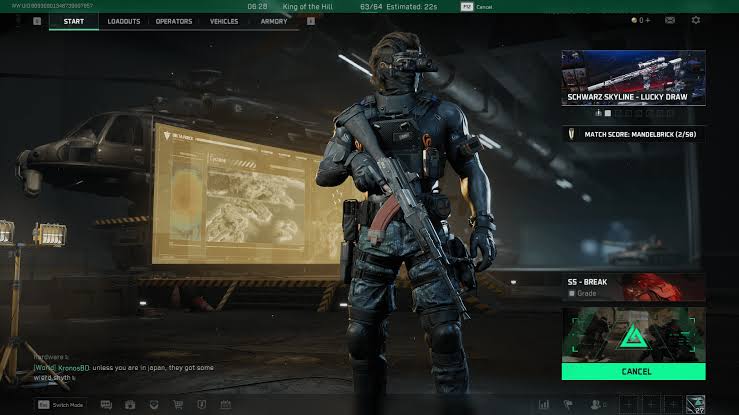
Is Delta Force Matchmaking Down or Broken?
Start with server status before assuming your client is broken. Check the official Delta Force social channels, service notices, launcher announcements, and current community reports. A widespread outage usually produces several symptoms at once: login failures, missing services, repeated matchmaking errors, and players across multiple regions reporting the same behavior.
If the game opens, your account connects, and only one map or difficulty searches indefinitely, the issue is more likely a narrow queue. A Delta Force long queue time can be normal for an unpopular map, an extreme difficulty, or a low-population region. By contrast, a complete inability to queue in every mode points more strongly toward a service, account, client, or network issue.
Is It a Map, Mode, Region, Crossplay, or Player-Pool Problem?
Matchmaking works with the players who meet your current filters. Every additional restriction removes candidates. Selecting a particular Operations map, hard difficulty, solo or squad arrangement, region, and limited crossplay setting can leave only a small group eligible for the same search.
The most useful test is to widen one variable at a time. Keep your region unchanged and try another map. Then keep the map unchanged and test the normal difficulty. This tells you whether the queue itself is inactive or whether one filter is responsible for the delay.
|
Symptom |
Strongest first explanation |
Best comparison test |
|
Only one map takes forever |
Small map-specific pool |
Try Zero Dam or the current active map |
|
Every mode searches indefinitely |
Service, client, region, or network issue |
Check status and test another region |
|
Queue reaches 63/64 and pauses |
Final-slot or lobby validation delay |
Cancel once, then retry the same mode |
|
Queue finds a lobby but high ping follows |
Distant or inefficient route |
Compare a nearby region and route |
|
Works at night but not afternoon |
Time-zone and population pattern |
Test during the region’s peak hours |
|
Solo search is slow but squads are fast |
Squad-size pool is larger |
Queue with a squad or change team setting |
Part 2: Why Delta Force Operations Has Long Queue Times
Map and Difficulty Split the Matchmaking Pool
Operations has more variables than a simple all-purpose PvP queue. Map, difficulty, mission preference, squad composition, and regional population can all divide the available players. A player looking for one specific map on hard mode is not necessarily placed with someone searching for another map or normal difficulty.
That is why Delta Force Operations matchmaking can feel healthy in one playlist and nearly empty in another. A short Zero Dam queue does not prove that Brakkesh is broken; it may simply show where most players are currently concentrating.
Brakkesh, Space City, AZ3, and Other Map Queues
Community reports have repeatedly described long waits for Brakkesh, AZ3, Space City, and hard modes. Some players have reported 20–40 minute searches, while individual discussions have described waits exceeding that range. These reports show a real player experience, but they do not establish one universal wait time for every region or day.
The practical reason is queue fragmentation. Popular maps can absorb most of the active population, leaving less common maps with too few compatible players. If a mission requires Brakkesh or AZ3, you may need to play during a busier period, join a squad, or accept a broader queue rather than repeatedly restarting at a quiet hour.
Region and Time of Day
The queue population follows local time zones. Delta Force EU matchmaking may be stronger during European evening hours than during a quiet afternoon, while North American and Asian queues follow their own peak periods. A region can appear empty simply because most of its players are asleep, working, or playing another mode.
Track your own results for several sessions. Write down region, map, difficulty, local time, party size, and wait length. This personal log is more useful than assuming that the region with the largest global reputation is always fastest.
Part 3: Why Delta Force Warfare Matchmaking Takes Forever
Warfare generally has a broader player pool than a map-specific Operations queue, but it can still slow down. Large-scale modes may require enough players for a complete match, and a region with low activity may wait for the lobby to reach a threshold rather than starting with an incomplete team structure.
A Delta Force can't find match problem in Warfare can also occur after a major update, balance change, event rotation, or platform-region disruption. Players may temporarily move into a new playlist, leaving the normal mode thinner than usual. Check the featured playlist, event schedule, and server status before making drastic changes.
Check Party and Crossplay Conditions
Queue as a solo player once to test the party itself. If solo works but a full squad does not, the slow search may be related to party leader region, mixed platform settings, skill grouping, or one member’s connection state. Have the party leader restart the game and create a fresh lobby.
Crossplay can increase the available pool, but it may also change input, platform, or region behavior depending on the current build. Confirm that it is enabled for testing, then compare the result with your preferred setting. If you disable crossplay, expect longer queues in less populated modes.
Part 4: How to Fix Long Matchmaking in Delta Force
The following sequence targets the most common causes without pretending that one switch can solve every queue. Make one change at a time and note the result.
Use LagoFast to Compare Stable Routes and Acceptable Ping
If the game finds players but fails to complete the lobby, or if a region appears available only through a distant route, use LagoFast Game Booster as a controlled route test. The goal is not to force a short queue. The goal is to find a stable path to a legitimate Delta Force region without accepting excessive latency or packet loss.
Step-by-Step Tutorial for Testing Delta Force Routes with LagoFast
1. Click the Free Trial button to download and install LagoFast Free Trial.
2. Search for Delta Force. Use the game search field and select the Delta Force profile that matches your platform and current game installation.
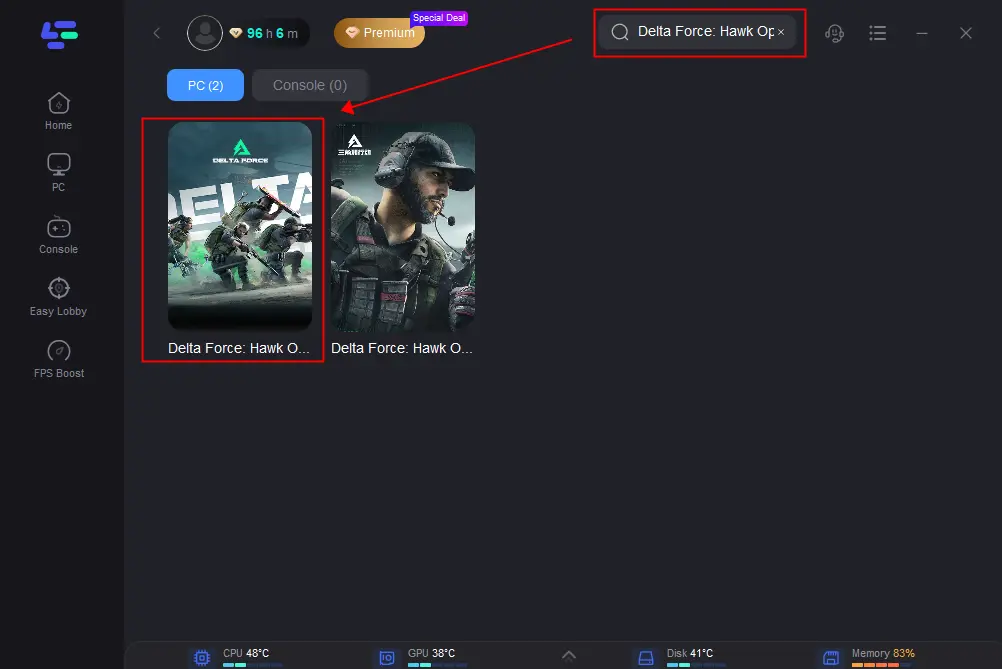
3. Choose your normal region first. Start with the nearest reasonable region, such as EU, NA, or Asia. Select an available route. Pick a route with a stable connection indicator and start the boost.
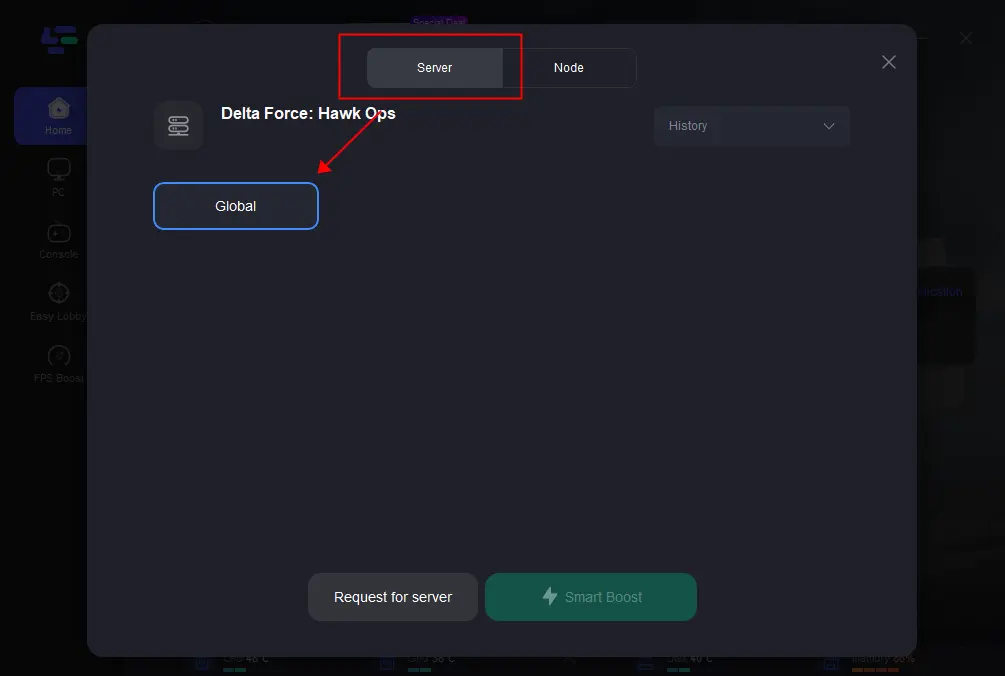
4. Record your normal queue baseline. Before comparing routes, note the usual wait time, in-game ping, packet loss, and whether the lobby completes. One short or long queue is not enough to establish a pattern.
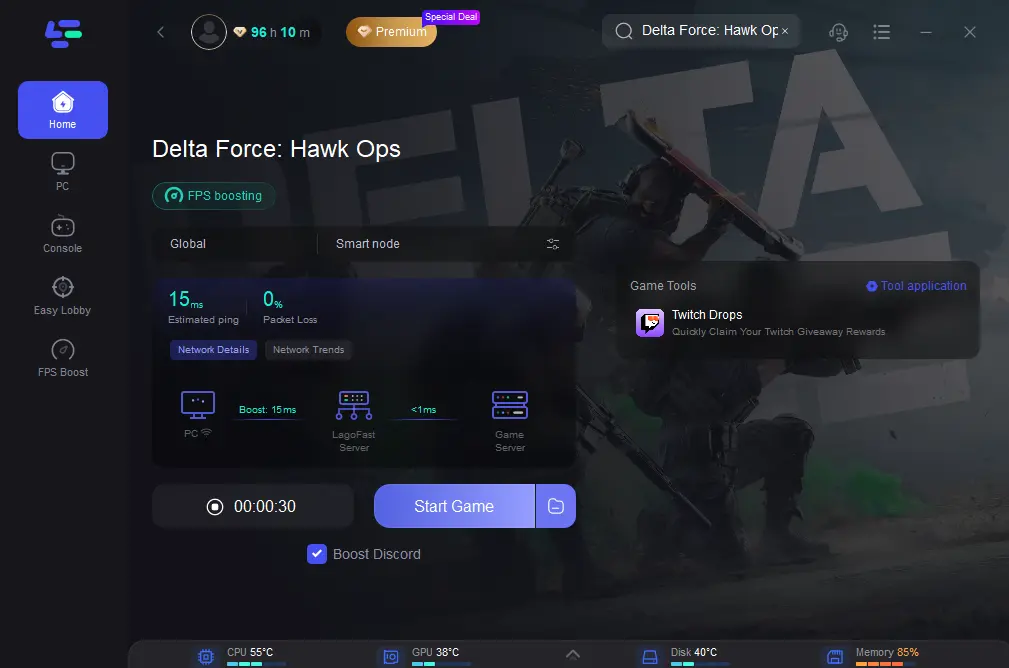
5. Launch Delta Force through the boosted route. Enter the same Operations or Warfare playlist and wait through one normal search interval. Check the in-game network indicator after the lobby forms.
6. Compare a second nearby route if necessary. Test another available route to the same region, then compare ping stability, packet loss, lobby completion, and actual queue time. Avoid changing several settings at once.
7. Test one alternative region only when the local queue is clearly inactive. If EU remains empty, you may compare NA or Asia, but check the resulting ping before committing to the match.
Keep the route only when the overall result improves. A route is useful when it provides stable ping and a reasonable queue, not merely when it finds a lobby several seconds faster.
Stop the test if latency becomes unacceptable. If the match produces high ping, rubberbanding, or packet loss, return to the nearest stable region and investigate the local queue, party, or ISP connection.
A better route can reduce connection-related failures and may help matchmaking complete when the normal ISP path is unstable. It does not create players, merge separate map queues, guarantee a faster search, or bypass regional restrictions. If the queue is empty because Brakkesh, Space City, AZ3, or hard mode has few active players, route optimization cannot solve the population problem. The correct target is the fastest region that still delivers acceptable ping and stable gameplay.
Cancel and Restart the Queue
When the timer has clearly exceeded your normal wait, cancel the search and return to the main menu. Wait briefly, reopen the same mode, and start a fresh search. This can clear a stale lobby request or a party state that no longer matches the server.
Do not cancel every 20 seconds. Give the queue enough time to find players, especially during a known peak period. The useful pattern is one controlled reset after an abnormal delay, not continuous clicking.
Try a More Active Map or Mode
For Delta Force Operations long queue reports, test the most populated map or normal difficulty. Zero Dam and other featured content may have a larger pool than Brakkesh, Space City, AZ3, or hard modes. If the active queue starts immediately, your account and client are probably functioning.
Return to the desired map after confirming that the broader queue works. If a mission requires a specific map, consider playing at peak time or finding squad members who are searching for the same content.
Check Crossplay Settings
Enable crossplay temporarily if your platform and account settings permit it. A larger cross-platform pool can reduce waits, although the effect depends on current population and playlist rules. If the setting is already enabled, toggle it only after restarting the game so the change is applied cleanly.
Do not assume crossplay always lowers ping. It may reduce search time while connecting you to a farther or more heavily loaded region. Check the resulting latency after the lobby forms.
Play During Peak Hours
Test your region’s evening and weekend periods. In Europe, Delta Force EU matchmaking may improve later in the day, while North American and Asian players may see different patterns. A queue that is inactive in the afternoon can become healthy at night without any patch or setting change.
Use a small log rather than relying on memory. Record the first successful queue time for the same map and difficulty across multiple sessions.
Check Your Server Region
Use the official server-location list as a guide. Delta Force has published locations across North America, South America, Europe, Oceania, and Asia, including Virginia, Silicon Valley, São Paulo, Frankfurt, Finland, Sydney, Saudi Arabia, Singapore, Japan, and Indonesia.
The nearest region is usually the best starting point for latency, but matchmaking may consider availability and other constraints. A distant region can have a shorter queue and a much worse playing experience. Treat region changes as a measured test, not a permanent answer.
Restart the Game and Network
Close Delta Force completely, restart the launcher, and reboot the router once if other services are also unstable. Use Ethernet where possible, pause large downloads, and stop VPN or traffic-filtering software that may interfere with the connection.
If a mobile hotspot finds a match while home internet does not, investigate the home router, ISP route, DNS, and firewall. If all networks fail in one mode but not another, return to the map and player-pool diagnosis.
Check Delta Force Server Status
Check official announcements before changing regions repeatedly. A service incident can produce Delta Force matchmaking not working symptoms across modes. During an outage, waiting for the service to recover is more effective than editing local files or forwarding random ports.
Part 5: Fix Delta Force Matchmaking Stuck at 63/64 or Searching for Players
A queue stuck at 63/64 often feels like a bug because almost every slot has been filled. It may represent a final player search, lobby validation, party synchronization, or a server-side delay. It can also indicate that the last slot requires a compatible player from a narrow region or mode pool.
When Delta Force stuck matchmaking reaches this state, wait through one reasonable interval, then cancel and restart once. Test a broader map or difficulty afterward. If every mode repeatedly stops at the same number, record the time, region, party size, and error behavior before reporting it.
When Delta Force Can’t Find Players
Delta Force can't find players is often a population signal. It does not necessarily mean that nobody is playing the game; it can mean that too few players are searching for your exact map, difficulty, region, input group, or party format.
Try a featured or popular queue. If that succeeds, the original search is narrow. If the broader queue also fails, check server status, account state, client updates, and network stability.
When Queue Resets Do Not Help
If the timer resets repeatedly across several modes and regions, stop changing settings at random. Run a controlled diagnosis:
|
Test |
Result |
Likely conclusion |
|
Same account, different mode |
Only one mode fails |
Playlist or population issue |
|
Same mode, different region |
One region works |
Regional population or route issue |
|
Same PC, hotspot connection |
Hotspot works |
Home ISP or router path issue |
|
Same network, different account |
One account fails |
Account or entitlement issue |
|
All modes and networks fail |
Nothing changes |
Service, client, or account support case |
Part 6: Can Changing Server Reduce Delta Force Matchmaking Times?
EU vs NA vs Asia Queue Times
There is no permanently fastest region. Queue speed depends on current population, playlist, map, difficulty, time zone, party size, crossplay, skill grouping, maintenance, and route quality. The following comparison is more reliable than a blanket recommendation.
|
Region |
Potential queue advantage |
Main risk |
Best use |
|
EU |
Strong during European evening and weekend periods |
Quiet during local off-hours; distant for other continents |
European players seeking a nearby low-latency baseline |
|
NA |
Active during North American peak hours and some broad Warfare queues |
Higher ping for Europe or Asia; time-zone mismatch |
Players near North America or testing a busy alternative |
|
Asia |
Large potential population across several published server locations |
Region size does not guarantee a fast map-specific queue; distant routes can add latency |
Players near Asia or testing an Operations queue at Asian peak time |
|
South America |
Better local path for nearby players |
Smaller regional pool in some modes |
South American players prioritizing stable local ping |
|
Oceania |
Low latency for nearby players |
Smaller population and fewer compatible queues |
Australian and nearby players during peak hours |
Why Long Queue Times May Expand Matchmaking to Other Regions
When the local pool is too small, the system may widen the search according to its current matchmaking rules. That can increase the chance of finding players but may also result in a distant server. A search that eventually succeeds is not automatically a good result if the match begins with severe latency or packet loss.
Why EU Players May End Up on Asian Servers
An EU player can be routed to Asia if the selected mode has insufficient local players, the search expands, or party and region conditions make another server available. This is more likely in narrow Operations queues than in popular broad modes, but it is not proof that Asia is universally more populated.
Check the in-game ping indicator after entering the lobby. The queue region and the final game-server location are not always identical.
Should You Change Region for Faster Matchmaking?
Change region only after recording your local baseline. Test one alternative during its peak hours and compare both wait time and in-match ping. Keep the change only if the time saved is worth the connection trade-off.
The core principle is simple: do not choose the region with the shortest queue by itself. Choose the fastest region that delivers acceptable ping, low jitter, and stable packet delivery.
Faster Matchmaking vs Higher Ping: Which Server Should You Choose?
For a competitive Warfare match, a few minutes saved may not justify a distant server that produces delayed hit registration, rubberbanding, or inconsistent movement. For a casual Operations run, some players may accept a moderate increase in latency to complete a mission, but severe packet loss can still ruin the extraction.
Use LagoFast to compare routes only after choosing a legitimate region. If it stabilizes the route without pushing latency beyond your acceptable limit, it may be useful. If the nearest region has no compatible players, a route optimizer cannot create a queue; it can only improve the path to a server that already exists.
Part 7: Delta Force Matchmaking FAQs
1. Why is Delta Force matchmaking taking forever only on Brakkesh?
Brakkesh may have a smaller active pool than popular Operations maps, especially at quiet hours or on hard difficulty. Try peak hours, a squad, normal difficulty, or a broader map to compare the queue.
2. Is Delta Force matchmaking down if one mode cannot find a match?
Not necessarily. A single map or mode can be underpopulated while the rest of the service works. Check the official status and test another playlist before calling it a full outage.
3. Why does Delta Force Operations take longer than Warfare?
Operations divides players by map, difficulty, mission preference, squad size, and region. Warfare often has a broader pool, but it can also slow when a full lobby requires more players.
4. Why is Delta Force EU matchmaking slow in the afternoon?
The EU player pool may be smaller outside local peak hours. Test European evenings and weekends, then compare the same map and difficulty rather than switching regions immediately.
5. Should I switch to Asia or NA for a shorter queue?
Only as a measured test. A larger region may find players faster, but the final server can produce high ping. Keep the region that offers the fastest acceptable connection, not simply the shortest timer.
6. What does it mean when Delta Force is stuck at 63/64?
The lobby may be waiting for a final compatible player, validating the session, or experiencing a queue delay. Wait once, reset the queue, and test a broader mode if the state repeats.
7. Can crossplay reduce Delta Force queue times?
It can increase the available pool when the current platform-only queue is narrow. However, the effect varies by mode, region, and current population, and a shorter queue may come with a different ping result.
8. Can high ping cause Delta Force matchmaking to take longer?
High ping is more often an in-match quality problem, but unstable routing, packet loss, or failed server handshakes can prevent a lobby from completing. Compare another network or route while keeping the mode unchanged.
9. How long should I wait before restarting the queue?
There is no universal timer because maps and regions differ. Use your normal successful wait as the baseline. If the search is clearly abnormal, cancel once, restart, and widen one filter instead of repeatedly resetting.
Key Takeaways
- A Delta Force Matchmaking Taking Forever report does not automatically mean the servers are down; map, mode, difficulty, region, time, squad size, and crossplay can split the queue.
- Delta Force long queue time is especially common in narrow Operations searches and during off-peak hours.
- Delta Force matchmaking not working across every mode requires a server-status, client, account, and network check.
- Delta Force can't find match and Delta Force can't find players often indicate that too few compatible players are searching for the selected combination.
- Delta Force stuck matchmaking at 63/64 can be a final-slot or validation delay; reset once and test a broader queue.
- Delta Force queue taking forever on Brakkesh, Space City, AZ3, or hard modes should be compared with a more active map or normal difficulty.
- Delta Force Operations matchmaking is more sensitive to map and difficulty fragmentation than broad playlists.
- Delta Force EU matchmaking may improve during European evening hours, but there is no region that is always fastest.
- Delta Force Operations long queue problems should be handled with timing, map, party, and region tests before reinstalling the game.
- Delta Force matchmaking high ping is a trade-off: a shorter queue is not worthwhile if the final server causes severe latency or packet loss.

Boost Your Game with LagoFast for Epic Speed
Play harder, faster. LagoFast game booster eliminates stutter and lags on PC, mobile, or Mac—win every match!
Quickly Reduce Game Lag and Ping!
Boost FPS for Smoother Gameplay!