
For any serious Counter-Strike 2 player, the FACEIT platform represents the pinnacle of competitive integrity and skill-based matchmaking. It's where the best come to prove themselves, hone their skills, and climb the ranks in a truly competitive environment. If you've grown tired of the inconsistencies of standard CS2 Premier matchmaking—the cheaters, the inconsistent server performance, and the often-frustrating ELO system—then FACEIT is your next logical step.
This comprehensive guide, crafted by a veteran PC gamer, will walk you through everything you need to know to transition from casual play to the high-stakes world of FACEIT CS2. From initial setup and understanding the unique ranking system to advanced tips and network optimization, we'll ensure your journey to becoming a FACEIT legend is as smooth as your aim.

- ✅ Reduce Lag and High Ping.
✅ Boost FPS at the Same Time.
✅ Support 8000+ Popular Online Games.
✅ Change Server without Latency.
✅ Boost Game Loading Speed. - ✅ Fix Connection Issues.
Part 2. Why Play FACEIT Instead of CS2 Matchmaking?
Part 3. FACEIT Ranking System & How FACEIT Matches Work
Part 4. Pre-game Checklist: Essential Preparations
Part 5. Registering Your FACEIT Account
Part 6. Installing the FACEIT Anti-Cheat
Part 7. Binding CS2 and Starting Your First Match
Part 8. FACEIT CS2 Elo Mechanism: Understanding Your Rank
Part 9. Pro Tips to Improve Your Win Rate on FACEIT CS2
Part 10. How to Enhance Your Game Experience with LagoFast Game Booster
Part 1. What is FACEIT?
FACEIT is a third-party competitive gaming platform that hosts tournaments, leagues, and matchmaking for various esports titles, with Counter-Strike 2 being one of its most popular offerings. Founded in 2012, it has established itself as a premier destination for players seeking a more structured and fair competitive experience than what is typically available in-game .
Part 2. Why Play FACEIT Instead of CS2 Matchmaking?
The decision to switch from official CS2 Premier matchmaking to FACEIT is a common one among aspiring pros, driven by several key advantages:
Superior Anti-Cheat: FACEIT employs a robust, proprietary Anti-Cheat (FACEIT AC) that is widely regarded as more effective than Valve's VAC (Valve Anti-Cheat). This significantly reduces the incidence of cheaters, fostering a fairer play environment.
128-Tick Servers: Unlike Valve's 64-tick servers, FACEIT matches are played on 128-tick servers. This means more precise hit registration, smoother gameplay, and a more accurate representation of your actions, which is crucial for competitive play.
Advanced Matchmaking & Ranking: FACEIT's ELO-based ranking system (Levels 1-10) is often perceived as more granular and reflective of individual skill. It also offers more detailed statistics and a clearer progression path.
Community & Features: The platform boasts a vibrant community, offering features like custom leagues, tournaments, and a more integrated social experience. Players can also pick and ban maps, giving them more control over their match environment .
Part 3. FACEIT Ranking System & How FACEIT Matches Work
FACEIT utilizes an ELO (Elo rating system) to determine a player's skill level, which translates into a visible Level from 1 to 10. Winning matches increases your ELO, while losing decreases it. The amount of ELO gained or lost depends on the average ELO of both teams and your individual performance. This system ensures you're consistently matched against players of similar skill, promoting balanced and challenging games .
Part 4. Pre-game Checklist: Essential Preparations
Before you even think about queuing for your first FACEIT match, ensure your setup meets the competitive standards. A solid foundation prevents frustration and allows you to focus on your game.
Own Counter-Strike 2 (Legitimate Steam Copy): This might seem obvious, but you need a legitimate copy of CS2 linked to your Steam account. FACEIT integrates directly with Steam, so ensure your game is properly installed and updated.
Stable Internet Connection (Low Ping Recommended): Competitive CS2 demands a stable, low-latency connection. A wired Ethernet connection is always preferred over Wi-Fi. High ping or frequent packet loss will severely hinder your performance and can lead to penalties on FACEIT. Aim for a ping below 50ms to the server region you're playing in.
Functional Steam Account: Your Steam account must be in good standing. Any VAC bans on your account, especially for CS2 or previous CS titles, will prevent you from playing on FACEIT. Ensure your Steam profile is public for FACEIT to properly retrieve game data.
No VAC / FACEIT Ban History: Players with a history of VAC bans on CS2 or any prior FACEIT bans will not be able to register or play. FACEIT maintains a strict policy against cheating and disruptive behavior.
Part 5. Registering Your FACEIT Account
Getting started on FACEIT is a straightforward process, but attention to detail during registration is key to avoiding future issues.
Visit the Official FACEIT Website: Navigate to faceit.com.
Sign Up: Click on the "Sign Up" button. You'll be prompted to create an account using your email, or you can directly sign up using your Steam account. Using Steam is often more convenient as it streamlines the linking process.
Complete Your Profile: Fill in all required personal details. Choose a unique username that adheres to FACEIT's guidelines. Select your primary game as Counter-Strike 2.
Choose Your Region: This is crucial. Select the geographical region where you primarily play. This ensures you're matched with players in your vicinity, minimizing latency and improving connection quality .
Part 6. Installing the FACEIT Anti-Cheat
The FACEIT Anti-Cheat (FACEIT AC) is a mandatory client-side application that runs in the background while you play. It's designed to detect and prevent cheating, ensuring a fair competitive environment. Without it, you cannot queue for matches.
Download the FACEIT Client: After successful registration, you'll be prompted to download the FACEIT client. This client manages your matches, statistics, and the Anti-Cheat.
Install the Anti-Cheat: During the client installation, the FACEIT AC will also be installed. Ensure you grant all necessary permissions. It's often recommended to run the FACEIT client and AC as an administrator to prevent permission-related conflicts.
System Requirements: The FACEIT AC is quite robust and may require certain system configurations, such as Secure Boot and TPM 2.0 to be enabled in your BIOS/UEFI settings. If you encounter issues launching the AC, check these settings in your motherboard's BIOS. Outdated drivers can also cause conflicts, so ensure your graphics drivers and Windows are fully updated.
Part 7. Binding CS2 and Starting Your First Match
With your account registered and Anti-Cheat installed, the next step is to link your CS2 game to your FACEIT profile and jump into a match.
Launch CS2 via Steam: Always launch Counter-Strike 2 directly through your Steam library. Do not use desktop shortcuts or cs2.exe directly, as FACEIT needs to verify the game's integrity through Steam.
Link Steam to FACEIT: In your FACEIT client, navigate to your game settings or profile. You'll find an option to link your Steam account to FACEIT. Authorize FACEIT to access your CS2 game data for matchmaking and statistics tracking .
Join a Queue: Once linked, you can select CS2 from the FACEIT client and choose your preferred matchmaking option (e.g., 5v5 Competitive). Click "Play" to enter the queue. The system will then find a match for you based on your ELO and region.
Connect to Server: Once a match is found, you'll receive a notification. Click "Connect" in the FACEIT client, and it will automatically launch CS2 and connect you to the game server. If automatic connection fails, you can manually copy the server IP from the match room and paste it into your CS2 console (connect [IP address]).
Part 8. FACEIT CS2 Elo Mechanism: Understanding Your Rank
FACEIT's ranking system is a core aspect of its competitive appeal. It provides a clear, progressive path for players to track their skill development. Your FACEIT Level (1-10) is directly tied to your ELO rating, which fluctuates with every match played.
|
FACEIT Level |
ELO Range |
Description |
|
Level 1 |
1-800 |
Newcomers and casual players. |
|
Level 2 |
801-950 |
Learning the ropes, basic mechanics. |
|
Level 3 |
951-1100 |
Developing game sense and utility usage. |
|
Level 4 |
1101-1250 |
Intermediate players, consistent performance. |
|
Level 5 |
1251-1400 |
Solid understanding of competitive play. |
|
Level 6 |
1401-1550 |
Advanced players, good aim and teamwork. |
|
Level 7 |
1551-1700 |
High-level players, strong tactical awareness. |
|
Level 8 |
1701-1850 |
Approaching semi-professional skill. |
|
Level 9 |
1851-2000 |
Elite players, exceptional game knowledge. |
|
Level 10 |
2001+ |
Top-tier professionals and highly skilled individuals. |
Part 9. Pro Tips to Improve Your Win Rate on FACEIT CS2
Climbing the FACEIT ladder requires more than just good aim. As a veteran player, I can tell you that these aspects are often overlooked but are crucial for consistent wins:
Communication is Key: Use your microphone! Clear, concise callouts are vital. Inform your teammates about enemy positions, utility usage, and your intentions. Good communication elevates team play significantly.
Master Utility Usage: Learn common smoke, flash, and incendiary lineups for every map. Effective utility usage can win rounds, open sites, or delay pushes. Don't just throw grenades randomly; use them with purpose.
Play with a Consistent Stack: While solo queuing is possible, playing with a pre-made team (a "stack") of friends or trusted players dramatically improves coordination and reduces the variance of teammates. This is the fastest way to climb ELO.
Review Your Demos: After a match, especially a loss, download and review the demo. Analyze your mistakes, learn from your opponents, and identify areas for improvement in your positioning, aim, and decision-making.
Maintain a Positive Mindset: Competitive environments can be toxic. Stay positive, encourage your teammates, and avoid tilting. A calm and focused team performs better.
Understand the Economy: Knowing when to buy, when to save, and how to manage your team's economy is a fundamental aspect of competitive CS2. Don't force buys that will cripple your team in subsequent rounds.
Part 10. How to Enhance Your Game Experience with LagoFast Game Booster
Even with a perfect setup and pro-level skills, network issues can still plague your FACEIT experience. High ping, packet loss, and unstable connections are ELO killers. This is where LagoFast(LagoFast Game Booster - Get No Lag and Lower Ping) Game Booster comes into play, offering a dedicated solution to optimize your network for competitive gaming.
LagoFast is designed to provide a stable, low-latency connection by intelligently routing your game traffic through optimized pathways, bypassing congested public internet nodes. This is particularly beneficial for FACEIT's 128-tick servers, where every millisecond counts. It ensures that your commands reach the server faster and your game data flows smoothly, reducing the chances of frustrating lag spikes or disconnections during crucial rounds.
How to Use LagoFast Game Booster
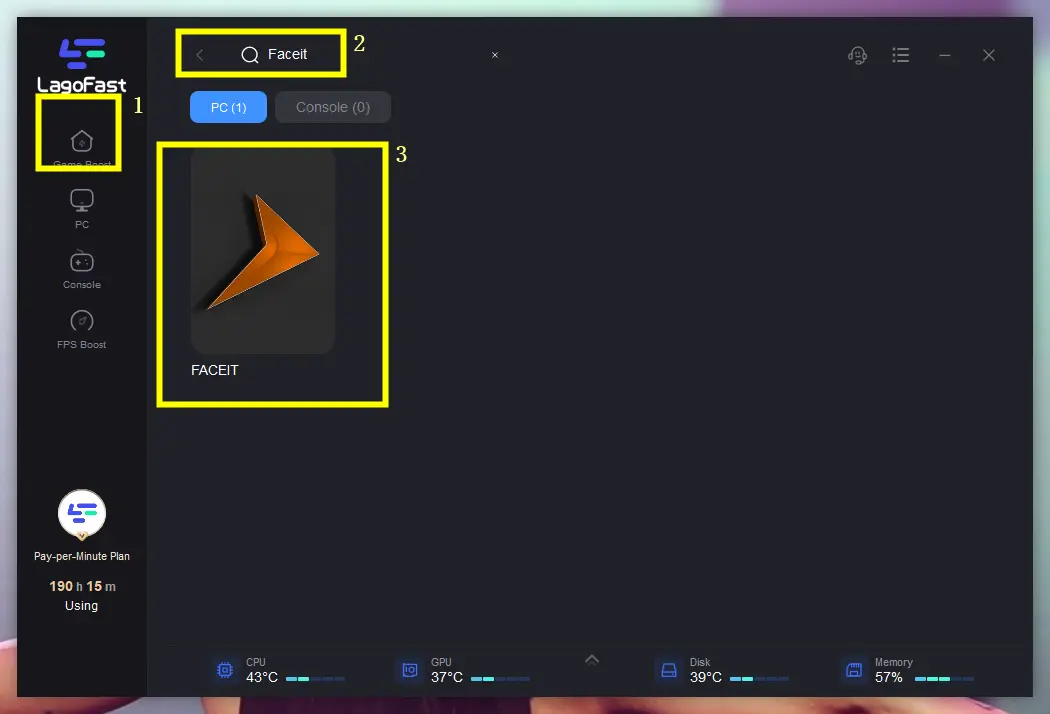
1. Click the Free Trial button to download and install LagoFast Free Trial.
2. Search for “FACEIT” in the interface.
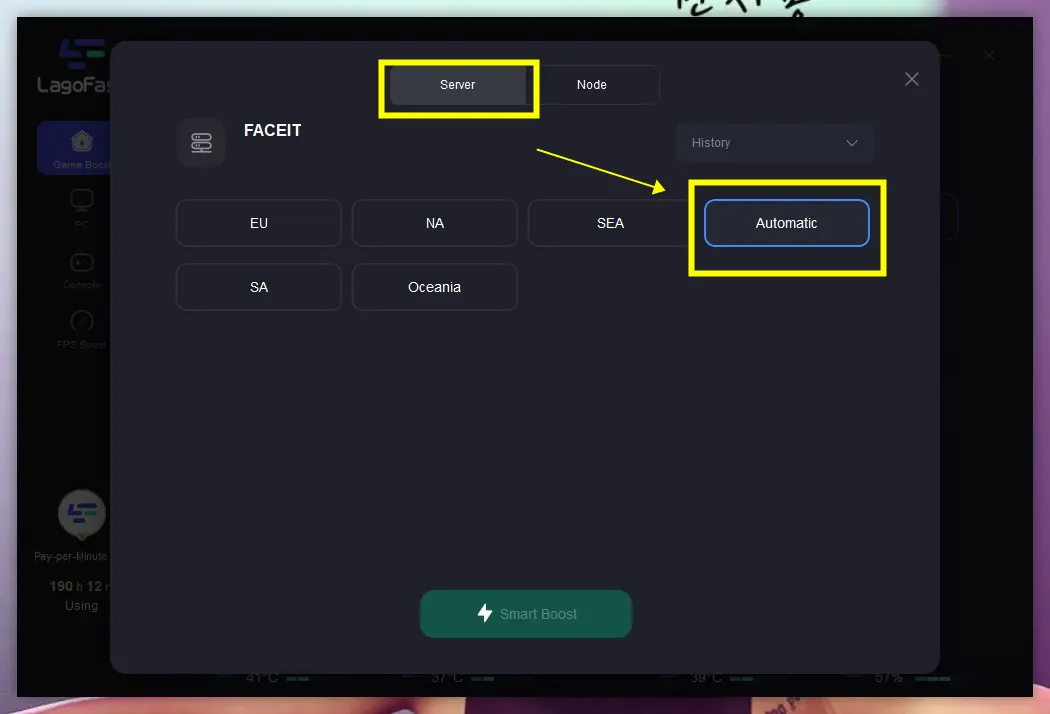
3. Select a nearby stable server (e.g., Germany or Netherlands nodes for EU FACEIT).
4. Enable Smart Boost to automatically reduce ping and packet loss.
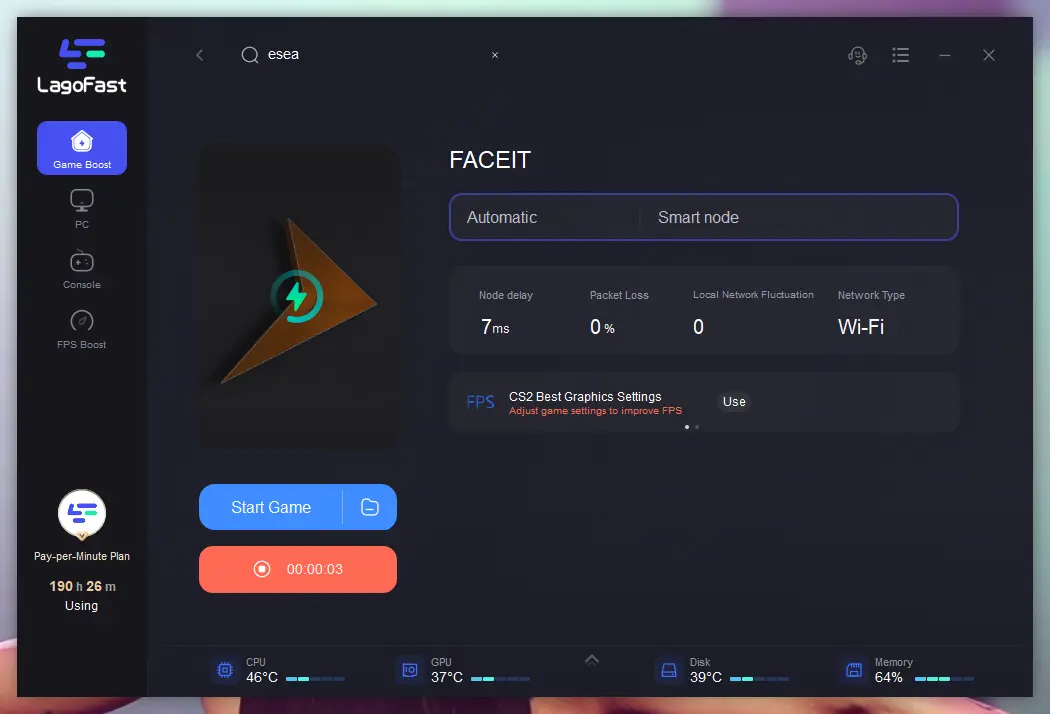
By integrating LagoFast into your competitive routine, you effectively eliminate network instability as a variable, allowing you to perform at your peak without being held back by technical limitations.
Part 11. FAQs
Q1: How to play FACEIT CS2 without Prime?
A1: You can register and play FACEIT CS2 without a Prime status on Steam. However, many community hubs, leagues, and higher-level matches on FACEIT effectively require Prime for a better experience or as a prerequisite for certain queues. While not strictly mandatory by FACEIT itself, not having Prime might limit your access to certain competitive environments or increase the likelihood of encountering less serious players.
Q2: Do you need Prime to play FACEIT CS2?
A2: No, Prime status is not a direct requirement set by FACEIT to play CS2 on their platform. You can create an account and join matches without it. However, as mentioned, having Prime status on Steam is highly recommended as it's often a soft requirement for more competitive environments and helps to filter out potential smurfs or disruptive players.
Q3: What is the difference between FACEIT ELO and CS2 Premier Rating?
A3: FACEIT ELO is a continuous rating system that determines your FACEIT Level (1-10), offering a more granular representation of skill. CS2 Premier Rating is Valve's in-game rating system, which also uses an ELO-like mechanism but is displayed as a numerical rating (e.g., 20,000+). Many competitive players find FACEIT's ELO system to be more transparent and a better indicator of individual skill.
Q4: Can I play FACEIT CS2 for free?
A4: Yes, FACEIT offers a free tier that allows you to play competitive CS2 matches. There are also premium subscriptions that unlock additional features like advanced matchmaking preferences, exclusive leagues, and more detailed statistics, but the core competitive experience is accessible for free.
Q5: What if my FACEIT Anti-Cheat doesn't launch?
A5: If your FACEIT Anti-Cheat fails to launch, first try restarting your PC and running the FACEIT client as administrator. Ensure your Windows is fully updated and that Secure Boot and TPM 2.0 are enabled in your BIOS settings. If the issue persists, a clean reinstallation of the FACEIT AC client is often necessary.
Conclusion
Embarking on your FACEIT CS2 journey is a significant step towards elevating your competitive gameplay. By understanding the platform's mechanics, diligently preparing your system, and adopting a disciplined approach to communication and strategy, you're well on your way to climbing the ELO ladder. While the path to becoming a FACEIT legend is challenging, it's also incredibly rewarding. To ensure your competitive edge is never dulled by technical hiccups, integrating a powerful network optimization tool like LagoFast Game Booster is highly recommended. It provides the stable, low-latency connection essential for performing at your peak on FACEIT's 128-tick servers. Don't let network issues hold you back; optimize your connection with LagoFast today and experience Counter-Strike 2 as it was meant to be played—fast, fair, and flawlessly.

Boost Your Game with LagoFast for Epic Speed
Play harder, faster. LagoFast game booster eliminates stutter and lags on PC, mobile, or Mac—win every match!
Quickly Reduce Game Lag and Ping!
Boost FPS for Smoother Gameplay!