
FACEIT CS2 Connection Issues Quick Fix
1: Launch and update FACEIT Anti-Cheat
2: Verify your Steam account is linked to FACEIT
3: Restart your PC and router
Still not working? Use LagoFast to fix high ping, connection errors, and random disconnects instantly.
FACEIT CS2 Connection Issues Explained
FACEIT CS2 connection issues can prevent you from joining matches, cause high ping, or lead to random disconnects. These problems often come from network routing issues, Anti-Cheat errors, or system misconfigurations and can result in ELO loss or temporary bans.
This guide covers the most common issues and provides quick fixes and reliable solutions to keep your connection stable and competitive.

- ✅ Reduce Lag and High Ping.
✅ Boost FPS at the Same Time.
✅ Support 8000+ Popular Online Games.
✅ Change Server without Latency.
✅ Boost Game Loading Speed. - ✅ Fix Connection Issues.
Part 1: What Are FACEIT CS2 Connection Issues?
FACEIT CS2 connection issues refer to problems that prevent players from joining, connecting to, or smoothly playing matches on the FACEIT platform. Common issues include "Unable to Establish Connection with Game Server", "FACEIT Anti-Cheat Connection Failed", "Connection Timed Out", "Server Join Failed", high ping, packet loss, and random disconnects during matches.
These problems are typically caused by network routing issues, FACEIT Anti-Cheat errors, Steam integration conflicts, firewall restrictions, or corrupted game files. Identifying the root cause is the key to fixing the issue quickly and restoring a stable connection.
Because FACEIT is highly competitive, even minor connection problems can affect your ELO, matchmaking experience, and overall gameplay performance.
Related Article: Faceit Matchmaking Error Fix
Part 2: Full List of FACEIT CS2 Connection Issues and Solutions
Unable to Establish Connection with Game Server
Cause: Network cache conflicts, unstable routing, firewall restrictions, or temporary communication issues with FACEIT servers.
Solution:
- Open Command Prompt as administrator and run:
ipconfig /flushdns
netsh winsock reset
netsh int ip reset
- Restart your PC and power cycle your router.
- Verify the integrity of your CS2 game files through Steam.
- Ensure FACEIT Anti-Cheat is running and updated.
- Disable any VPN or proxy services and check the FACEIT server status before reconnecting.
Connection Timed Out Error
Cause: Network instability, ISP routing inefficiencies, or firewall interference.
Solution: Restart your router and modem to refresh your IP. Check FACEIT server status. For persistent FACEIT CS2 connection issues, use a network optimizer to bypass poor routing paths.
Match Found But Game Won’t Launch
Cause: Steam integration conflicts, missing permissions, or FACEIT Anti-Cheat initialization errors.
Solution:
- Verify your Steam account is properly linked in FACEIT Integrations.
- Launch Steam, CS2, and FACEIT Anti-Cheat as administrator.
- Ensure Steam and CS2 are fully updated.
- Restart FACEIT Anti-Cheat from the system tray and relaunch the match.
FACEIT AC Platform Connection Error
Cause:
This error usually occurs when FACEIT Anti-Cheat cannot communicate with FACEIT services. Common causes include temporary platform outages, network restrictions, VPN interference, or corrupted Anti-Cheat files.
Solution:
- Restart FACEIT Anti-Cheat and run it as administrator.
- Check FACEIT server status to see if there is an ongoing outage or maintenance period.
- Disable any VPN, proxy, or network filtering software.
- Sign out of the FACEIT client and log back in.
- Reinstall FACEIT Anti-Cheat if the issue persists.
- Ensure your system date and time are set correctly.
FACEIT Anti-Cheat Connection Failed
Cause: System conflicts, outdated drivers, or disabled BIOS features like Secure Boot.
Solution: Restart FACEIT Anti-Cheat as administrator. Ensure Secure Boot and TPM 2.0 are enabled. Reinstall Anti-Cheat if needed. If the issue persists, perform a Clean Boot to eliminate software conflicts.
Account Verification or Integration Errors
Cause: Steam account linking issues or privacy settings preventing FACEIT verification.
Solution:
- Reconnect your Steam account in FACEIT Integrations.
- Ensure your Steam Profile and Game Details are set to Public.
This can resolve errors such as "Platform account already used," "Game required to join this queue," and account verification failures.
Server Join Failed
Cause: NAT conflicts or blocked ports.
Solution: Assign unique ports using +clientport 27005 in launch options. Enable UPnP on your router.
FACEIT Blocked by Firewall or Antivirus
Cause: Windows Defender or third-party antivirus software blocking FACEIT services.
Solution:
- Add FACEIT.exe to your firewall exceptions.
- Add FACEITService.exe to your firewall exceptions.
- Allow Steam and CS2 through your security software.
- Restart the FACEIT client after applying changes.
Infinite Loading or Map Stuck Issue
Cause: Corrupted game files or outdated drivers.
Solution: Use Steam’s Verify Integrity of Game Files feature. Update GPU drivers.
Disconnect During Match
Cause: Unstable internet or background bandwidth usage.
Solution: Switch to Ethernet and close bandwidth-heavy applications via Task Manager.
High Ping and Lag Spikes
Cause: Poor routing or server distance.
Solution: Connect to the closest server region. Tools like LagoFast can significantly reduce CS2 FACEIT high ping by optimizing routes.
You May Also Like: Faceit ELO Reset CS2 Explained (Season 8)—Why Your Rank Changed & How to Fix It
Part 3: Causes of FACEIT CS2 Connection Issues
Understanding the root causes helps prevent recurring problems:
- ISP Routing Issues: Inefficient paths increase latency and packet loss
- Local Network Problems: Weak Wi-Fi or outdated routers cause instability
- Firewall Restrictions: May block FACEIT Anti-Cheat communication
- System Configuration Problems: Missing Secure Boot, TPM 2.0, or outdated drivers
- Background Applications: Compete for bandwidth and cause lag
- Corrupted Game Files: Can prevent server connections and matchmaking
- Steam Account Integration Errors: May stop FACEIT from verifying your account properly
These factors often combine, making FACEIT disconnection CS2 issues more complex than they appear.
Part 4: Step-by-Step Fix Guide for FACEIT CS2 Connection Issues
Method 1: Optimize Network with LagoFast Game Booster
For competitive players, network stability is critical. LagoFast Game Booster is designed to fix FACEIT disconnection CS2 problems and reduce latency using advanced routing technology.
Why choose LagoFast:
- Exclusive routing paths: Avoid congested ISP routes
- Real-time optimization: Automatically selects the fastest node
- Ping reduction: Stabilizes connection for competitive play
- Performance boost: Improves FPS and system efficiency
How to use it:
1. Download and install LagoFast from the official site.
2. Search for “FACEIT” in the interface.
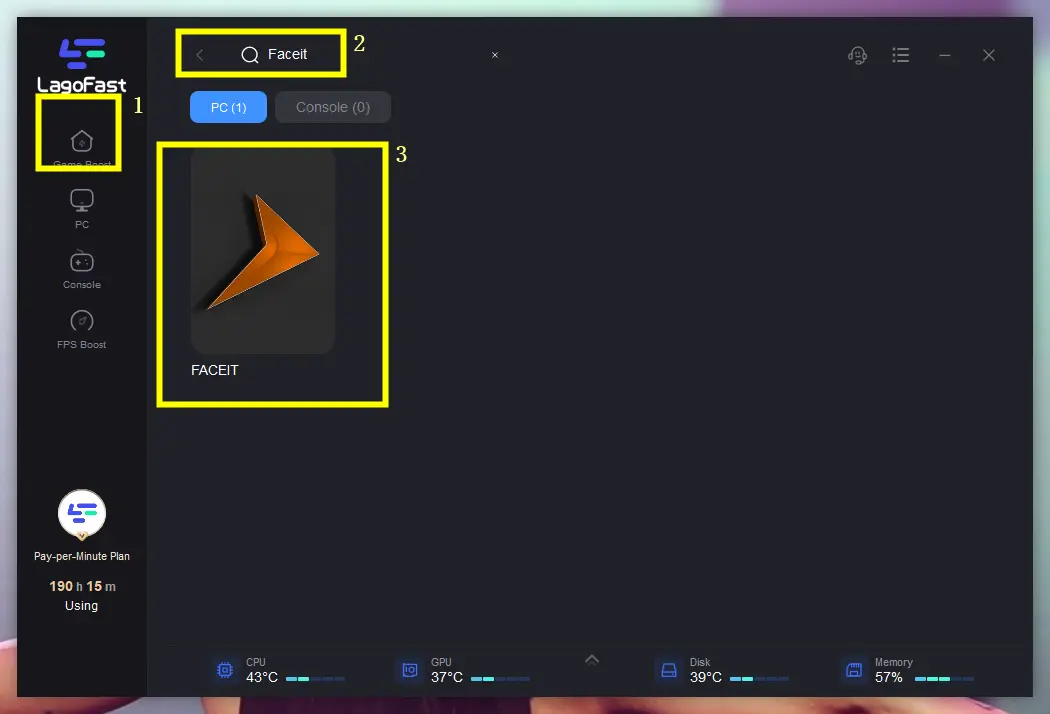
3. Select a nearby stable server (e.g., Germany or Netherlands nodes for EU FACEIT).
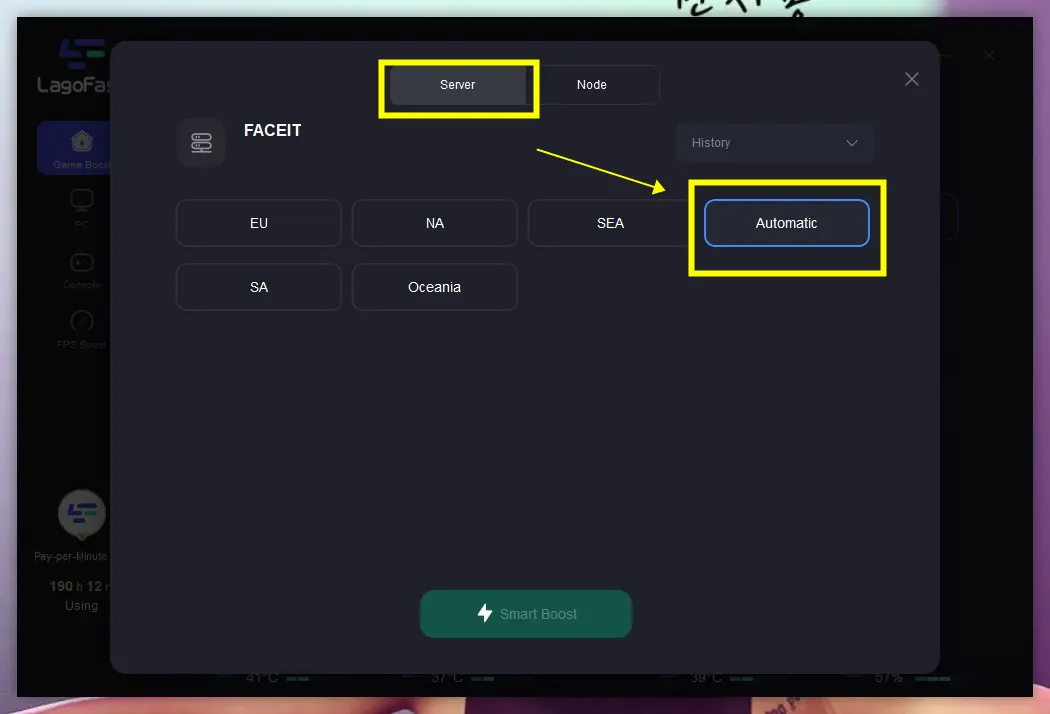
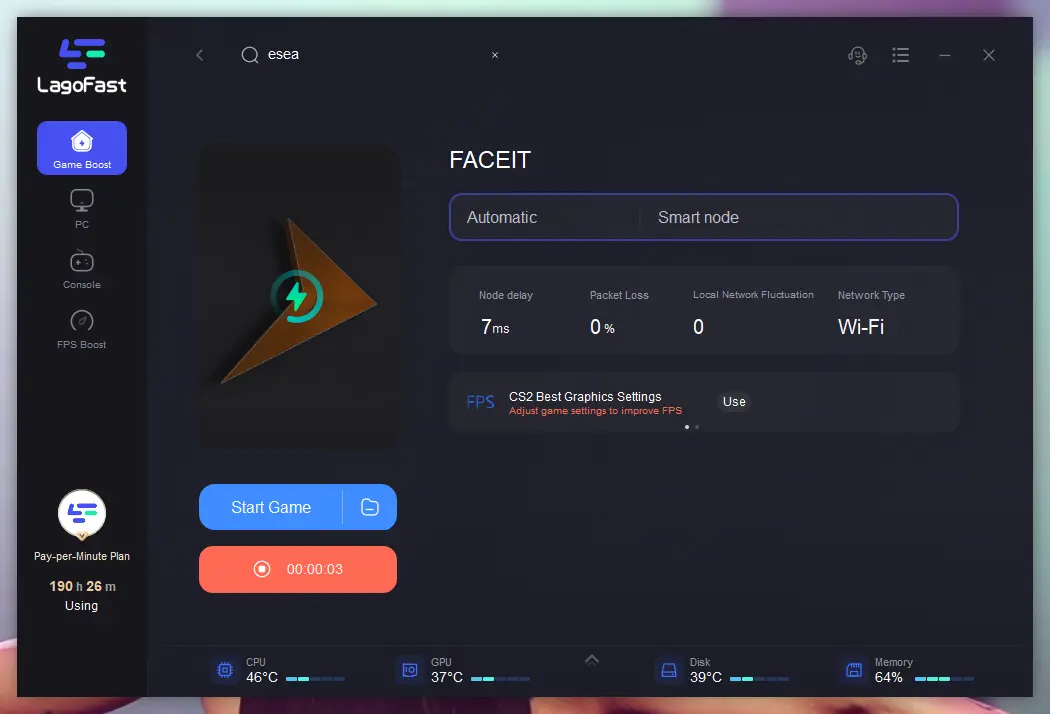
4. Enable Smart Boost to automatically reduce ping and packet loss.
Method 2: Verify Game Files and Updates
Corrupted game files can prevent players from joining FACEIT servers or cause loading issues.
Steps:
- Open Steam Library.
- Right-click Counter-Strike 2.
- Select Properties.
- Open Installed Files.
- Click Verify Integrity of Game Files.
Also make sure Steam and CS2 are updated to the latest version.
Method 3: Manual Network and Firewall Fixes
- Switch to Ethernet: Ensures stable connection
- Allow apps in firewall: Add CS2 and FACEIT Anti-Cheat
- Flush DNS: Run
ipconfig /flushdnsin Command Prompt - Disable VPN or proxy services if they interfere with FACEIT connectivity.
Part 5: Comparison Table – Common FACEIT Issues and Fixes
To help you quickly identify and fix FACEIT CS2 connection issues, the table below summarizes the most common problems, their root causes, and the most effective solutions. This allows you to diagnose issues faster and apply the right fix without trial and error.
|
Issue |
Root Cause |
Best Fix |
|---|---|---|
| Connection Timed Out | Network routing | Optimize network path |
| Match Found But Not Launching | Steam/AC conflict | Restart client |
| AC Platform Connection Error | Backend communication issue | Restart Anti-Cheat |
| Anti-Cheat Error | Permission/system issue | Reinstall Anti-Cheat |
| Unable to Establish Connection | DNS or routing problem | Flush DNS and reset network |
| High Ping | Network congestion | Change routing node |
| Server Join Failed | NAT/firewall | Open ports |
| Mid-Match Disconnect | Packet loss | Stabilize connection |
| Infinite Loading Screen | Corrupted game files | Verify game files |
| Account Verification Error | Steam integration issue | Re-link Steam account |
Part 6: FAQs About FACEIT CS2 Connection Issues
Can I play FACEIT without Anti-Cheat?
No. FACEIT Anti-Cheat is mandatory. Without it, you cannot join matches.
Why is ping higher on FACEIT than CS2 Premier?
FACEIT servers differ from Valve servers. Your ISP may route less efficiently, causing higher latency.
What does Secure Boot error mean?
It means Secure Boot is disabled in BIOS, which is required for Anti-Cheat functionality.
What happens if I disconnect mid-match?
You must reconnect quickly. Otherwise, you receive ELO penalties and temporary bans.
How to link a new Steam account?
Unlink the current account in FACEIT integrations before adding a new one. Restrictions may apply.
Conclusion: Fix FACEIT CS2 Connection Issues and Play Without Interruptions
FACEIT CS2 connection issues can range from Anti-Cheat errors and server join failures to high ping and unexpected disconnects. In most cases, these problems can be resolved by updating FACEIT Anti-Cheat, verifying Steam integration, repairing game files, and optimizing your network settings.
If routing issues, packet loss, or latency continue to affect your matches, LagoFast can help improve connection stability and reduce ping for a smoother FACEIT experience. With the right fixes, you can spend less time troubleshooting and more time focusing on competitive play.
Boost Your Game with LagoFast for Epic Speed
Play harder, faster. LagoFast game booster eliminates stutter and lags on PC, mobile, or Mac—win every match!
Quickly Reduce Game Lag and Ping!
Boost FPS for Smoother Gameplay!