
MMORPG launches on PC are rarely perfect, especially when modern titles rely on complex launchers, anti-cheat systems, and advanced engines. One of the most common startup issues players encounter is aion2 exe 0xe0000015, which appears right after launching the game.
For many users, the experience is frustrating: Aion2 failed to start, the launcher shows “Running,” but no game window appears, or the client crashes instantly.
This guide explains the root cause of this error, compares it with similar issues, and provides detailed solutions to fix AION 2 not starting on PC, including network-related problems like login server connection failures.

- ✅Less ping and crashes.
- ✅ Higher FPS and better PC performance.
- ✅ Support for 8000+ games.
- ✅ Stable connection and region switching.
Part 1. What Is Aion2 exe 0xe0000015 Error in AION 2
Part 2. Why Aion2 Failed to Start on PC
Part 3. Aion2 exe 0xe0000015 vs 0xe0000013 Differences
Part 4. Why Players Confuse These AION 2 Errors
Part 5. How To Fix Error 0x0000015 In AION 2
Part 6. How to Fix Aion 2 Error Unable to Connect to Login Server
Part 7. Improve Stability and Reduce Network Issues
Part 8. FAQs About Aion2 exe 0xe0000015
Part 1. What Is Aion2 exe 0xe0000015 Error in AION 2
Understanding the Startup Process
The error aion2 exe 0xe0000015 is a runtime environment initialization failure. It occurs when the game executable cannot properly load required system components after the launcher starts it.
A typical launch sequence looks like this:
- Player clicks Start Game in launcher
- Launcher loads Aion2.exe
- System libraries initialize
- Graphics drivers load
- Game engine begins startup
Where the Error Occurs
The error usually appears between system library initialization and GPU driver loading, meaning:
- The launcher works normally
- The executable starts
- But the system environment fails to initialize
Common Symptoms
- Launcher shows Running, but nothing opens
- Splash screen appears briefly, then disappears
- Instant crash after launch
- No error logs except the code
These are classic signs of Aion2 launcher error tied to system configuration rather than permissions.
Part 2. Why Aion2 Failed to Start on PC
Before attempting to fix AION 2 game not starting or not starting on PC, it’s important to understand the main causes.
1. Missing System Libraries
Modern games rely on essential runtime components:
- Microsoft Visual C++ Redistributables
- DirectX Runtime
- .NET Framework
If any of these are missing or outdated, the game cannot initialize.
2. Outdated Graphics Drivers
AION 2 uses modern rendering technologies, requiring up-to-date GPU drivers.
Driver issues may cause:
- Failure during engine initialization
- Immediate crashes
- Black screen before closing
3. Overlay and Monitoring Software Conflicts
Programs that inject overlays can interfere with startup:
- MSI Afterburner
- Discord overlay
- Recording tools
- Performance monitoring utilities
These tools may block or interrupt engine initialization.
4. Corrupted or Incomplete Game Files
Broken files can lead to Aion2 failed to start errors.
Common reasons:
- Interrupted downloads
- Failed patch updates
- Disk write errors
Part 3. Aion2 exe 0xe0000015 vs 0xe0000013 Differences
Key Differences Between the Errors
|
Error Code |
Type |
Cause |
Fix |
|---|---|---|---|
|
0xE0000013 |
Permission / Anti-cheat |
Antivirus, lack of admin rights |
Disable AV, run as admin |
|
0xE0000015 |
Runtime failure |
Missing drivers/libraries |
Update drivers, install runtimes |
Error 0xE0000013 Explained
This error is related to security or permission issues:
- Antivirus blocking files
- Missing admin privileges
- Corrupted anti-cheat modules
Error 0xE0000015 Explained
This error is purely environment-related, including:
- Missing Visual C++
- Outdated GPU drivers
- DirectX incompatibility
Understanding this distinction is critical when learning how to fix error 0x0000015 in AION 2.
Part 4. Why Players Confuse These AION 2 Errors
1. Similar Error Windows
Both errors display nearly identical system dialogs referencing Aion2.exe.
2. Same Launch Timing
They occur immediately after clicking Start Game.
3. Same Symptoms
Both can result in:
- Game not launching
- Instant crashes
- Silent failures
Because of this, many players searching for how to fix error 0x0000015 in AION 2 mistakenly apply fixes meant for 0xE0000013.
Part 5. How To Fix Error 0x0000015 In AION 2
Below are proven methods to fix AION 2 crashing or not launching/opening.
1. Update GPU Drivers (Most Important Fix)
Outdated drivers are the most common cause.
Steps:
- Open GPU control panel
- Check for updates
- Install latest version
- Restart PC
Modern engines require updated drivers for stability.
2. Install Required Runtime Libraries
Missing dependencies often cause startup failure.
Install or update:
- Microsoft Visual C++ packages
- DirectX Runtime
- .NET Framework
Restart your PC after installation.
3. Verify Game Files via Launcher
Corrupted files can prevent proper startup.
Steps:
- Open launcher
- Go to Settings
- Select Repair / Scan
- Wait for verification
This fixes damaged or missing files automatically.
4. Close Background Programs
Disable tools that interfere with game execution.
Close before launching:
- MSI Afterburner
- Process Lasso
- Screen recording apps
- Overlay software
This step is essential for resolving Aion2 launcher error conflicts.
Part 6. How to Fix Aion 2 Error Unable to Connect to Login Server
Another issue that players sometimes experience after launch is the Unable to Connect to Login Server error.
This usually happens when the game cannot reach the official authentication servers.
In some cases, the issue occurs because the servers are region-restricted.
If the login server cannot verify your connection, the client may close or return to the launcher.
Possible solutions include:
- ensuring a stable internet connection
- avoiding frequent network switching
- using a network optimization tool to improve routing
Server connection issues can sometimes resemble launcher errors, which is why troubleshooting both system and network factors is important.
Part 7. Improve Stability and Reduce Network Issues
Although aion2 exe 0xe0000015 is mainly caused by system configuration issues, network quality still plays an important role in both the game launch and login process. Even after fixing Aion2 failed to start or resolving the Aion2 launcher error, unstable connections can still interrupt communication with authentication servers, leading to login failures, timeouts, or unexpected disconnections.
Network-related problems can be broken down as follows:
- Long-distance server routing:
AION 2 servers are mainly located in Korea and Taiwan, so players connecting from other regions must travel through multiple network nodes. This increases the chance of instability during data transmission. - High latency and packet loss:
Due to long routing paths, data may experience delays or loss. This often results in high ping, noticeable lag, or delayed server responses. - Server connection failures:
In more severe cases, unstable routing can prevent the client from successfully communicating with authentication servers, leading to login errors or repeated connection failures.
To mitigate these issues, tools like LagoFast can optimize the connection path between your PC and the game servers. Instead of relying on default ISP routing, it intelligently selects more stable and lower-latency routes, which helps reduce lag, improve connection stability, and ensure smoother login and gameplay performance.
Tutorial to use LagoFast to ensure a smooth gaming experience:
Step 1: Click the Free Trial button to download and install LagoFast.
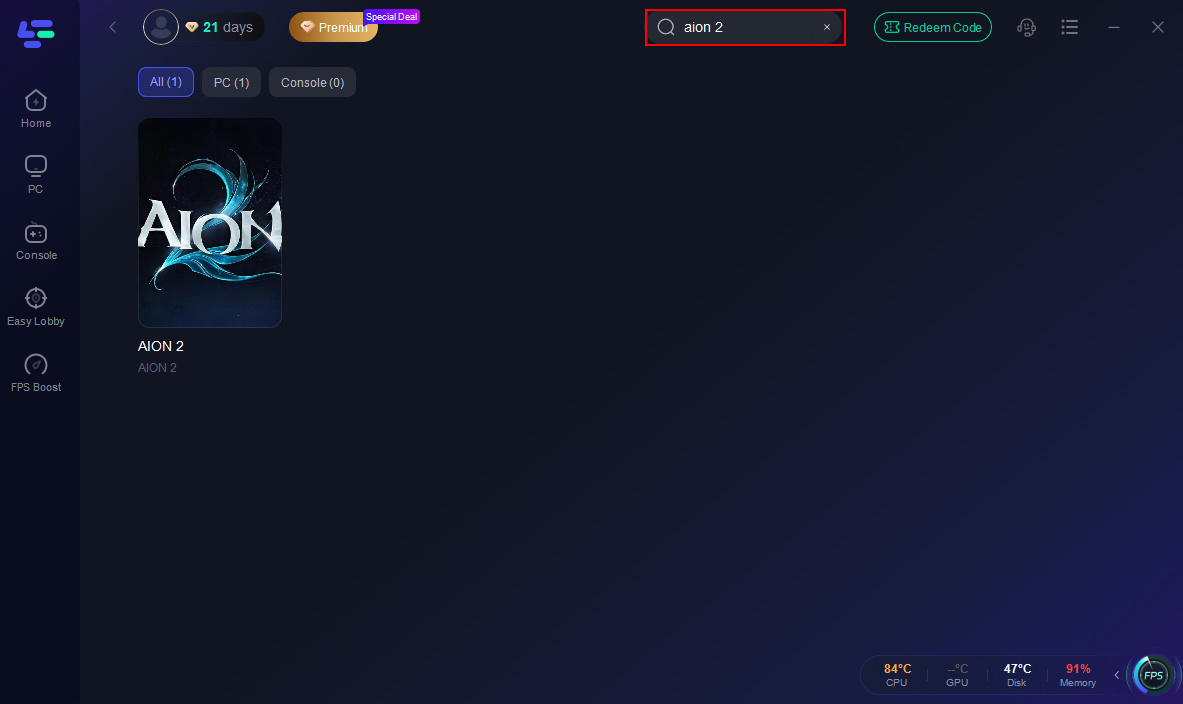
Step 2: Open LagoFast, then click the PC button on the left and search Aion 2 in the search bar; click it after it appears.
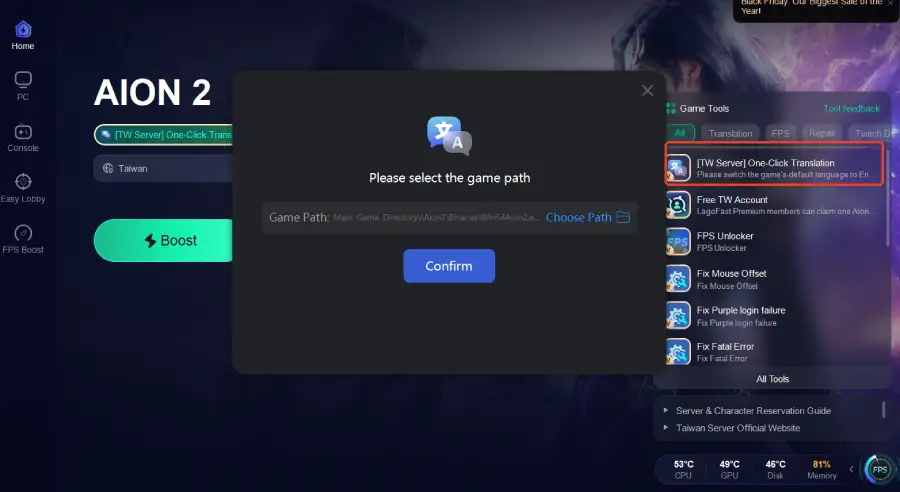
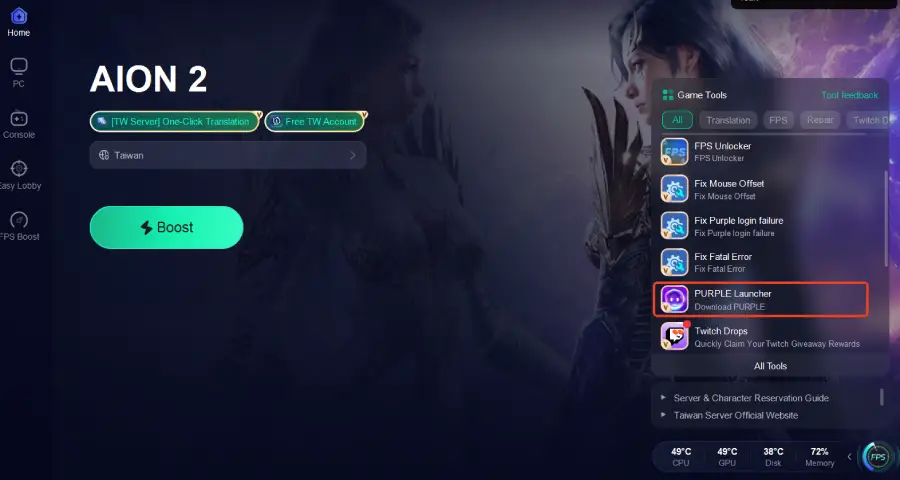
Step 3: Enable the One-Click Translation feature to translate the game into your preferred language.
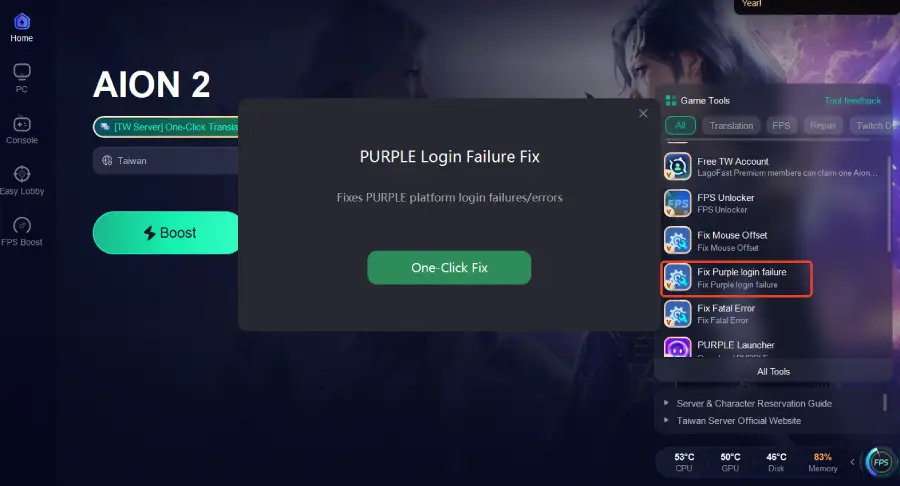
Step 4: Enable Fix Purple Login Failure to resolve login errors and ensure smooth access to the Taiwan server.
Step 5: Use the PURPLE Launcher Tool to ensure smoother updates and stable login.
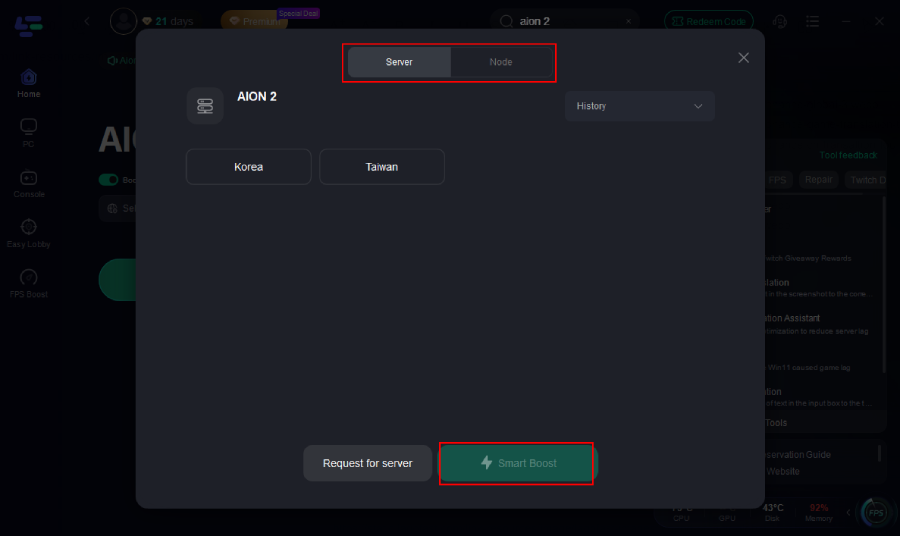
Step 6 : Click on “Server” to change to a better server that ensures a smooth gaming experience, then click on “Smart Boost.”
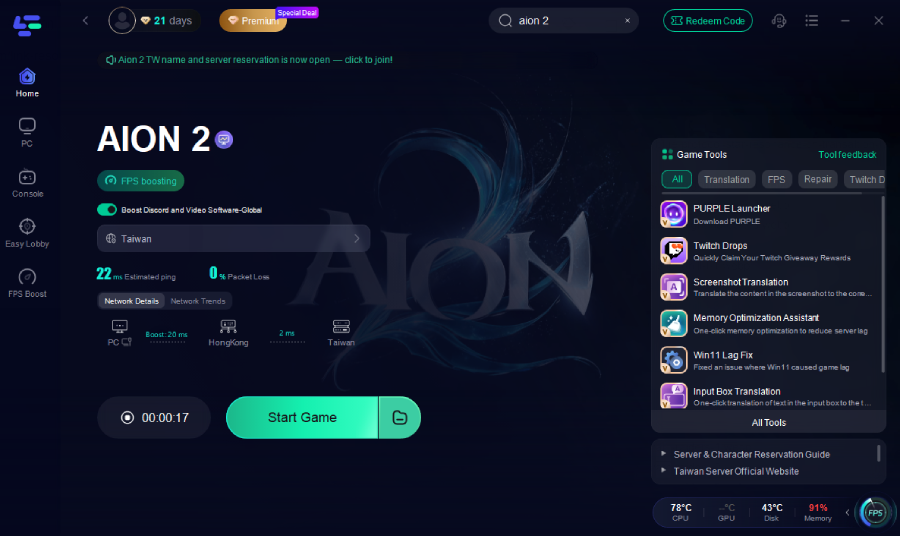
Step 7: Check the specific game ping, packet loss, and multiple path connection on the right side. Finally, click “Start Game” to play the game.
Part 8. FAQs About Aion2 exe 0xe0000015
1. What does aion2 exe 0xe0000015 mean?
It indicates the game failed to initialize required system components during startup.
2. Why does Aion2 fail to start on my PC?
Common causes include:
- Outdated GPU drivers
- Missing runtime libraries
- Corrupted files
- Background software conflicts
3. Is antivirus related to this error?
Usually no. Antivirus issues are more commonly linked to 0xE0000013.
4. Should I reinstall the game?
Only if file verification fails. Most cases are resolved without reinstalling.
5. Can network issues cause launcher problems?
Yes. Poor connectivity can interfere with authentication and startup processes.
Conclusion
The aion2 exe 0xe0000015 error occurs when the game fails to initialize its runtime environment during startup. While the error may seem complex, the underlying causes are straightforward: missing system components, outdated graphics drivers, or software conflicts.
Because it closely resembles 0xe0000013, many players apply incorrect fixes and waste time troubleshooting unrelated issues. Understanding the difference is essential for efficient problem-solving.
Most users can fix AION 2 game not starting by:
- Updating GPU drivers
- Installing required runtime libraries
- Verifying game files
- Closing background applications
Once resolved, players can enjoy AION 2 without crashes, launcher errors, or startup failures.

Boost Your Game with LagoFast for Epic Speed
Play harder, faster. LagoFast game booster eliminates stutter and lags on PC, mobile, or Mac—win every match!
Quickly Reduce Game Lag and Ping!
Boost FPS for Smoother Gameplay!