
Quick Answer: 4 Ways to Fix Forza Horizon 6 Performance Issues
If you want to get back to the race immediately, try these four proven solutions:
- The All-in-One Fix: Use LagoFast Game Booster to optimize your PC's resources, stabilize your network, and unlock higher FPS with a single click.
- Enable AI Upscaling: On PC, turn on DLSS 4.5 (Nvidia) or FSR 4.1 (AMD) in the video settings to boost frames without a massive hit to quality.
- Toggle Performance Mode: On Xbox Series X/S, switch the Graphics settings from "Quality" to "Performance" to target 60 FPS.
- Lower Reflection & Shadow Quality: These are the most taxing settings in the ForzaTech engine; dropping them to "Medium" can provide an instant 15–20% FPS gain.
Forza Horizon 6 is a visual masterpiece, but its "Japan" setting introduces unprecedented asset density, from neon-soaked Tokyo streets to lush mountain forests. This beauty comes at a cost. Many players find themselves asking, "Why is my Forza Horizon 6 FPS so low?" or dealing with frustrating frame drops. This guide breaks down exactly how to fix low FPS and lag, ensuring your trip through the Horizon Festival is as smooth as a drift on Mount Fuji.

- ✅ Reduce Lag and High Ping.
✅ Boost FPS at the Same Time.
✅ Support 2000+ Popular Online Games.
✅ Change Server without Latency.
✅ Boost Game Loading Speed. - ✅ Fix Disconnection Issues
Part 1: Understanding the Problem: Low FPS vs. Frame Drops
Part 2: Why is My Forza Horizon 6 FPS so Low?
Part 3: How to Fix Low FPS and Lag on Forza Horizon 6?
Part 4: Why Common Low FPS Fixes Often Fail?
Part 5: Optimizing with LagoFast: The Professional Solution
Part 6: Bonus Tips: Forza Horizon 6 Low FPS on High-End PCs
Part 1: Understanding the Problem: Low FPS vs. Frame Drops
Before applying fixes, you must identify your specific issue. Is your game consistently slow, or does it stutter intermittently?
|
Feature |
Low FPS (Consistent) |
|
|
Experience |
The game feels like "slow motion" or heavy throughout the race. |
The game runs smoothly, then suddenly "hiccups" or freezes for a split second. |
|
Primary Cause |
Hardware is below the requirements, or settings are too high for the GPU/CPU. |
Background apps, slow storage (HDD), or thermal throttling. |
|
Visual Indicator |
FPS counter stays low (e.g., 20–30 FPS). |
FPS counter is high (e.g., 60+) but occasionally dives to 10 or 0. |
|
Best Fix |
Lower resolution/graphics or upgrade hardware. |
Close background tasks, move game to SSD, or use a Game Booster. |
Part 2: Why is My Forza Horizon 6 FPS so Low?
The move to the updated ForzaTech engine means the game demands more from your hardware than FH5 ever did.
- VRAM Bottleneck: FH6 uses high-resolution textures for Tokyo's signage and lighting. If your GPU has only 4GB or 6GB of VRAM, you will hit a wall quickly.
- CPU Limitations: Managing high-speed traffic and dynamic weather in an open world requires heavy physics processing. An older 4-core CPU will struggle to keep up.
- Slow Storage: Forza Horizon 6 officially requires an SSD. If you are running the game from a traditional Hard Drive (HDD), the assets cannot load fast enough as you drive, leading to "low streaming bandwidth" errors and low FPS.
- Low GPU Usage: Sometimes, your PC doesn't realize it needs to prioritize the game, leading to the "low GPU usage" bug where the card sits idle while the game lags.
Part 3: How to Fix Low FPS and Lag on Forza Horizon 6?
Follow these detailed steps to reclaim your performance.
For PC Players
Method 1: Update Graphics Drivers & Windows
Step 1. Nvidia and AMD release "Game Ready" drivers specifically for Forza launches.
Step 2. Open Nvidia GeForce Experience or AMD Software: Adrenaline Edition.
Step 3. Check for updates and perform a "Clean Install."
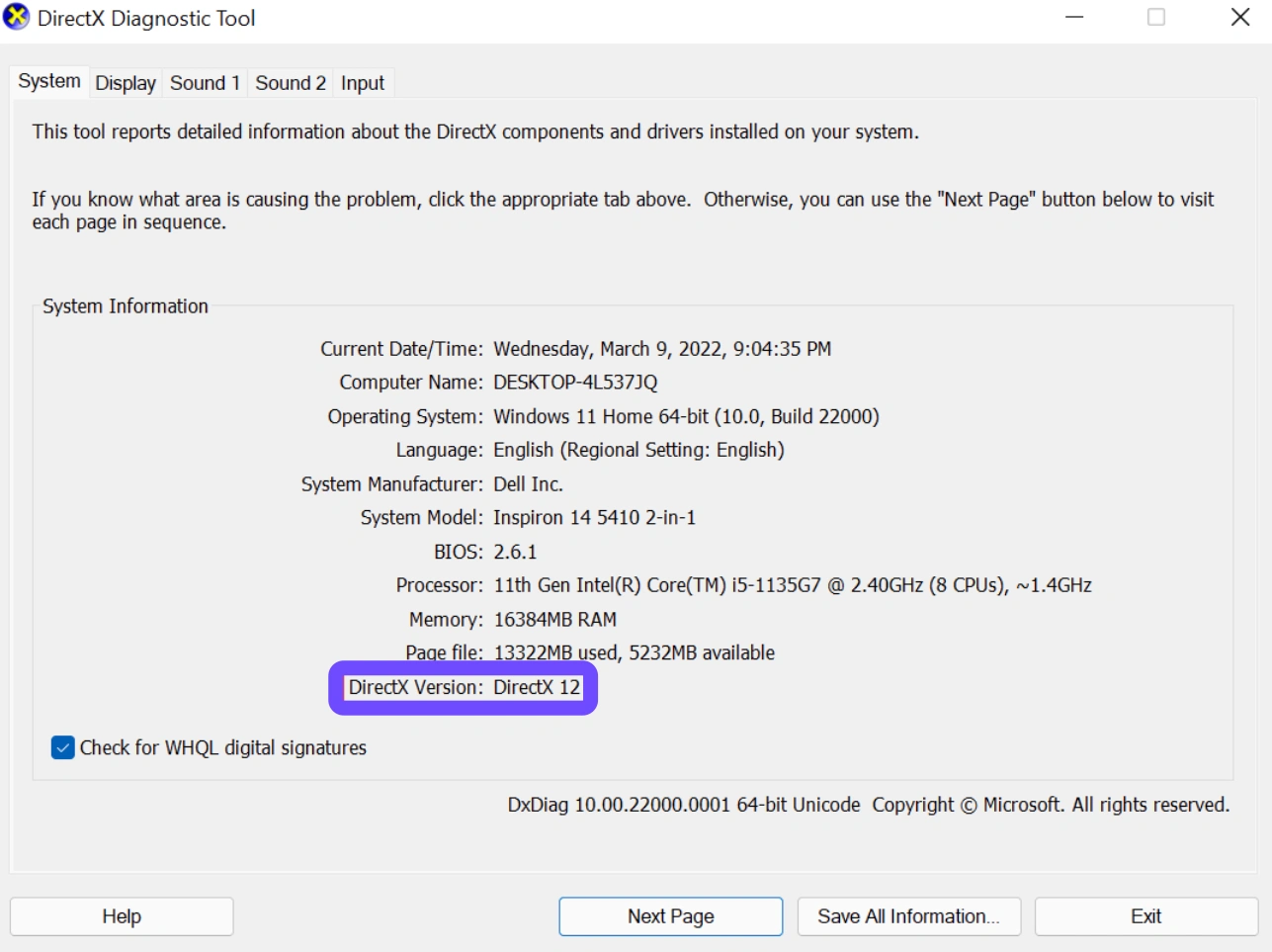
Step 4. Ensure your Windows 10/11 is updated to at least version 22H2, as the new DirectX 12 features require modern OS builds.
Method 2: Optimize In-Game Video Settings
Step 1. Go to Settings and select Video.
Step 2. Turn Resolution Scaling to "Performance" or "Ultra Performance."
Step 3. Set Environment Geometry Quality and Shadow Quality to "Medium."
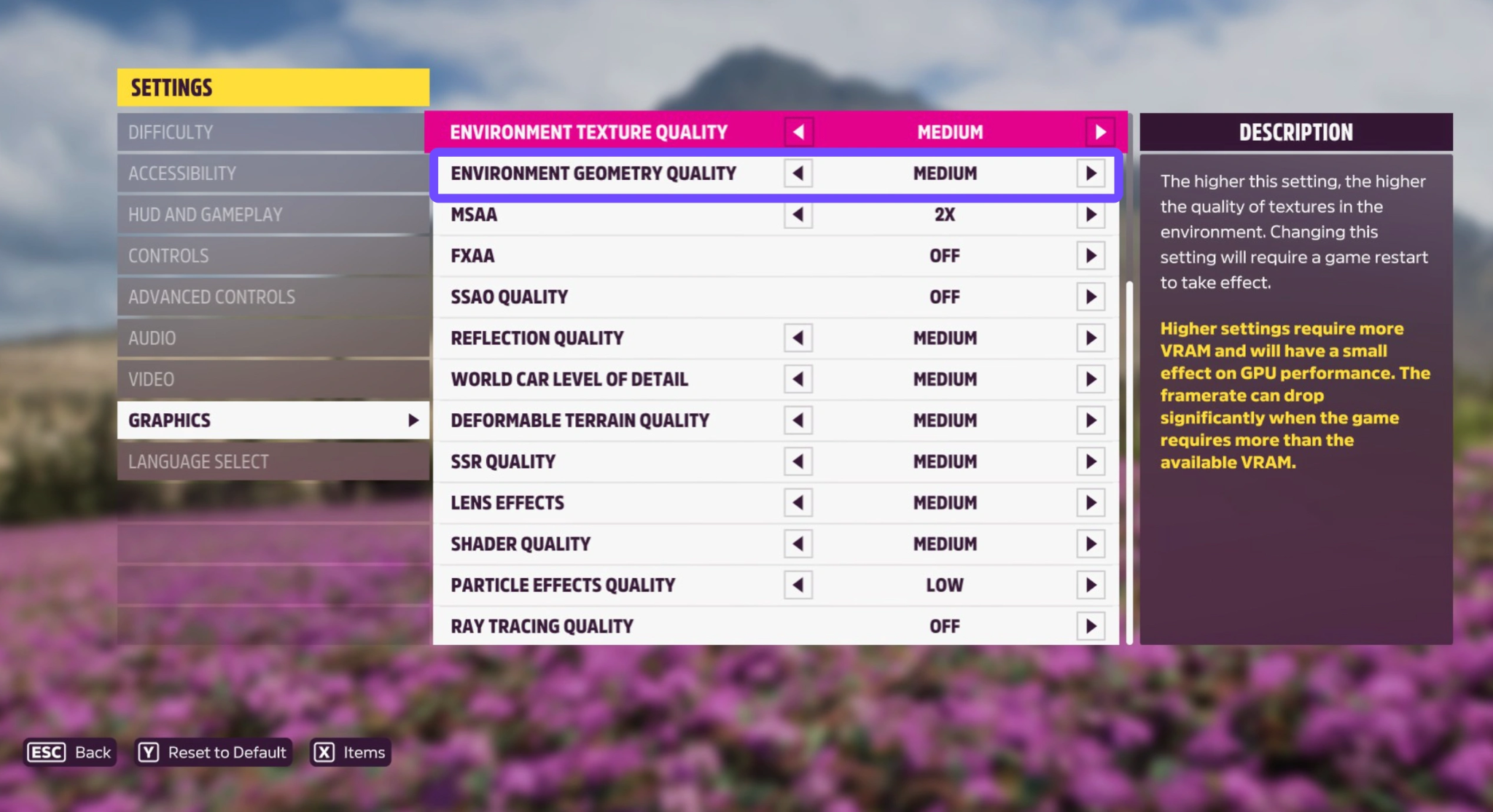
Step 4. Disable Ray Tracing if you are not using an RTX 40-series card or equivalent; it is the single biggest FPS killer.
For Xbox Players
Method 1: Switch to Performance Mode
Step 1. While in the game, open the Pause Menu.
Step 2. Go to Settings and select Graphics.
Step 3. Change the Game Mode from "Quality" to "Performance". This drops the native resolution slightly but stabilizes the game at 60 FPS.
Method 2: Clear the Console Cache
Persistent data can sometimes slow down asset streaming.
Step 1. Turn off your Xbox.
Step 2. Unplug the power cable for 30 seconds.
Step 3. Plug it back in and restart. This clears temporary files that might be causing frame drops.
Part 4: Why Common Low FPS Fixes Often Fail?
You’ve lowered your settings, updated your drivers, and you’re still seeing lag. Why?
The problem often isn't the average FPS, but the 1% lows and network-induced lag. Standard fixes don't address how your Windows OS manages background processes or how your internet routes data to the Forza servers. Even on a powerful PC, "micro-stutters" can occur because your CPU is distracted by a Windows update or a browser tab in the background.
Part 5: Optimizing with LagoFast: The Professional Solution
When manual fixes aren't enough, LagoFast is the ultimate tool for Forza Horizon 6 players. Unlike basic VPNs, LagoFast is a specialized game booster designed to eliminate both hardware lag and network latency. If you are experiencing "Forza Horizon 6 low FPS on high-end PC" scenarios, LagoFast can reallocate your system resources to ensure your GPU and CPU are 100% dedicated to the race.
Key Features include:
- FPS Boost 2.0: Automatically optimizes Windows settings, closes unnecessary background processes, and wakes up "parked" CPU cores.
- Multipath Connection: Reduces ping and prevents packet loss during online races by finding the fastest route to the game server.
- Cross-Device Support: Boost your experience whether you are on PC, Xbox, or even mobile.
- Easy Interface: No technical knowledge required, just select Forza Horizon 6 and click "Boost."
Tutorial to Use LagoFast to Fix FH6 Low FPS and Lag:
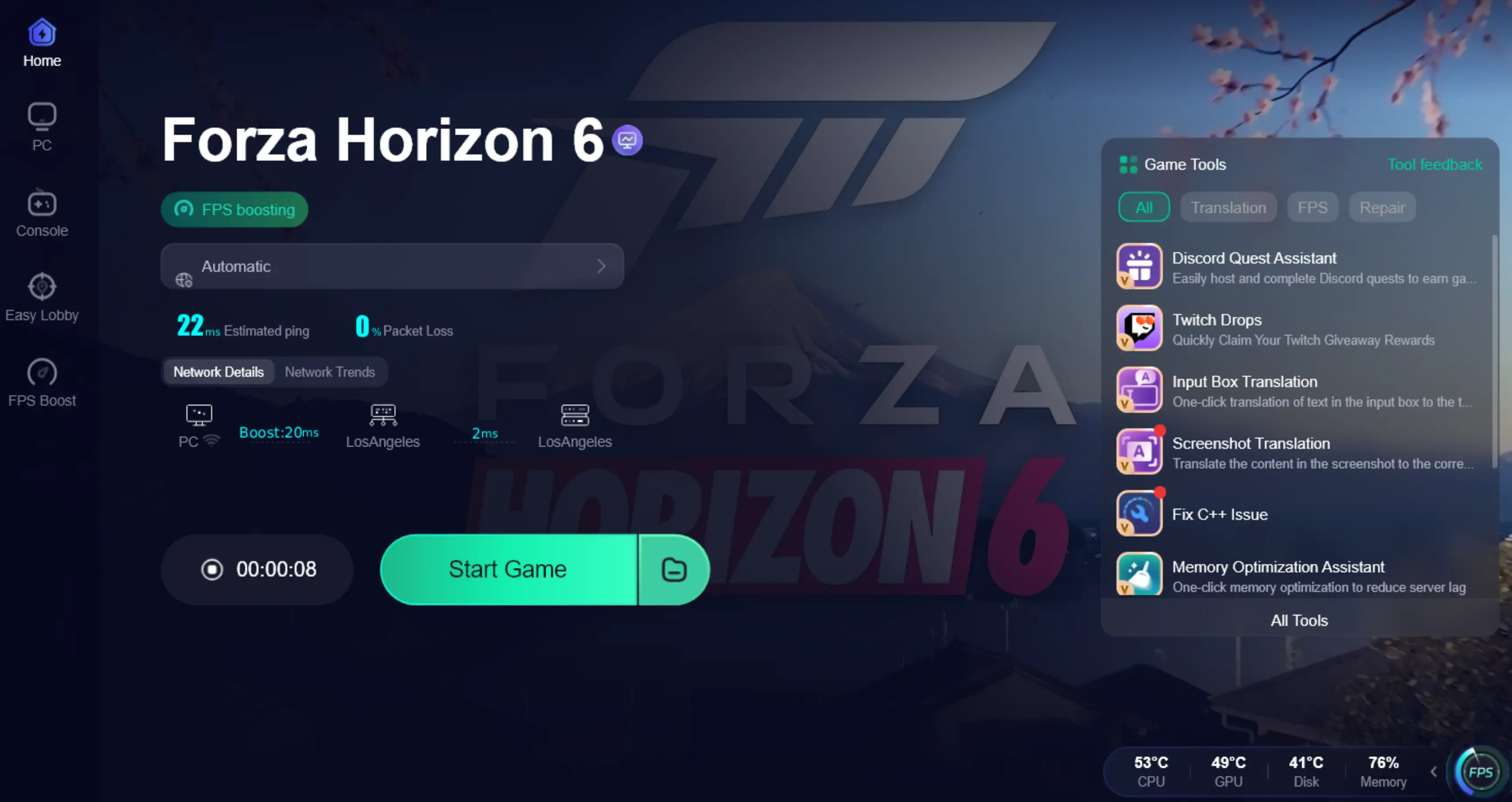
Step 1: Click the Free Trial button to download and install LagoFast.
Step 2: After installation, search "Forza Horizon 6" in the search bar and select the game.

Step 3: Click the “FPS Boost 2.0” option in the bottom-right corner.
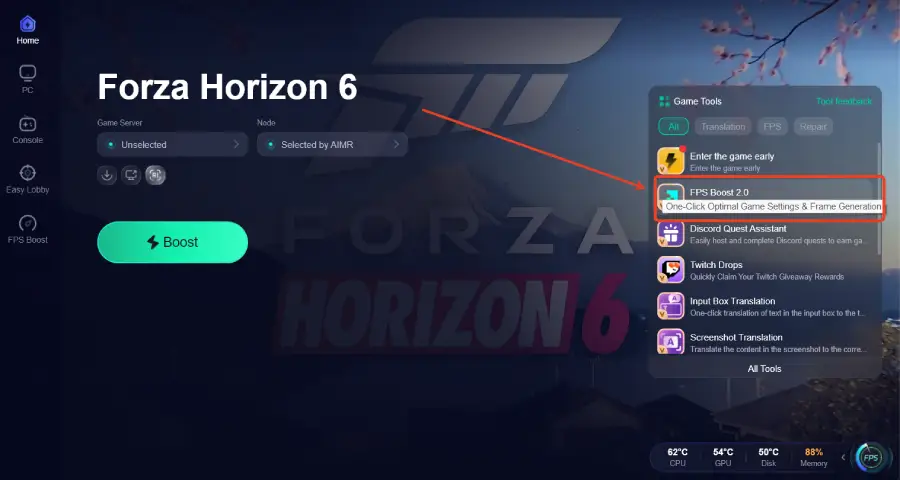
Step 4: Set the game to Borderless or Windowed mode, then click “Enable” to turn on FPS Boost.
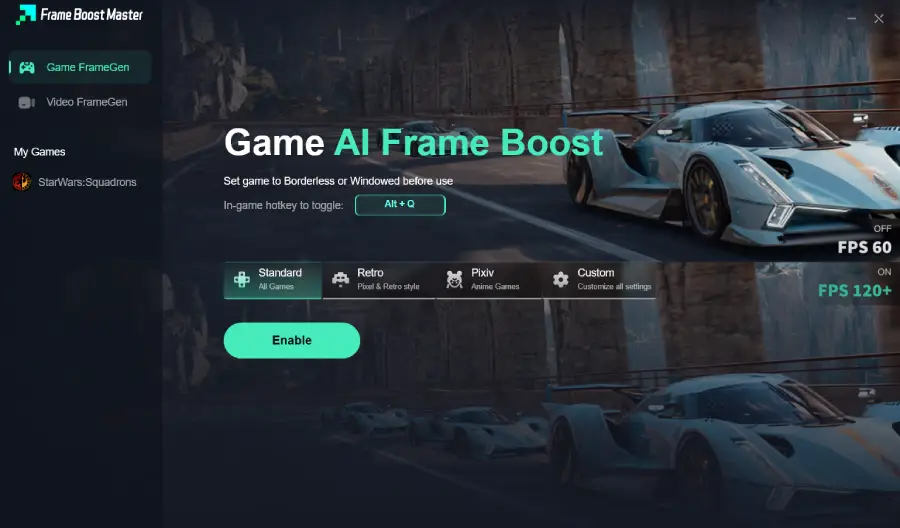
Step 5: Choose your preferred server node and click "Smart Boost" to start optimizing.

Step 6: Launch your game and enjoy smooth, optimized gameplay with lower ping and no stutter.
Part 6: Bonus Tips: Forza Horizon 6 Low FPS on High-End PCs
It is frustrating when an RTX 4080 or 50-series card struggles. If you have a beastly rig but low FPS:
- Check Thermal Throttling: Ensure your fans are spinning. FH6's Japan map puts a massive load on the GPU.
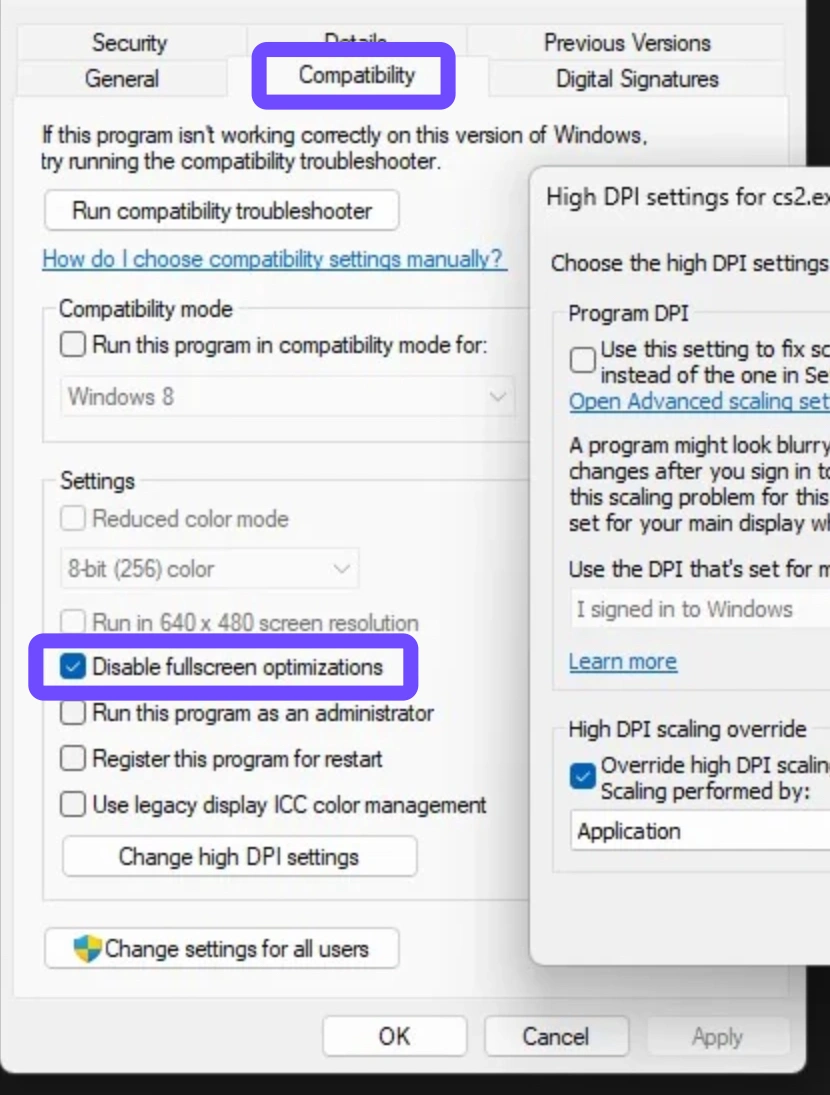
- Disable Fullscreen Optimizations: Right-click the FH6 executable, select Properties, select Compatibility, and select Check "Disable fullscreen optimizations."
- RAM Speed: Ensure your XMP/DOCP profile is enabled in BIOS. FH6 is extremely sensitive to RAM frequency.
Part 7: FAQs
Is there 120 FPS on Forza Horizon 6?
On PC, FPS is unlocked. On Xbox Series X, the game targets 60 FPS in Performance Mode, but 120 FPS is not natively supported for the open-world mode at launch.
Does FH6 support DLSS/FSR?
Yes, it supports DLSS 4.5, FSR 4.1, and Intel XeSS, which are essential for maintaining high FPS at 4K.
Why is my GPU usage low in Forza Horizon 6?
This usually indicates a "CPU Bottleneck." Your processor can't send instructions fast enough for the GPU to stay busy. Try increasing your resolution to shift the load to the GPU.
Can I fix lag without upgrading my PC?
Yes, using a tool like LagoFast or optimizing your Windows "Game Mode" settings can provide a significant boost without spending money on new parts.
Why does the game stutter during rain?
The dynamic weather system increases the number of particles and reflections. Lowering "Particle Effects Quality" will fix this.
Does Forza Horizon 6 run on Steam Deck?
Yes, it has Day-1 support, but you must use "Low" settings and FSR to maintain a stable 30-40 FPS.
Key Takeaways
- Identity the issue: Distinguish between consistent Low FPS and sudden Frame Drops.
- SSD is Mandatory: Do not run FH6 on an HDD if you want to avoid lag.
- Use Upscaling: DLSS and FSR are your best friends for high-resolution racing.
- Automate your optimization: Use LagoFast to handle the technical heavy lifting and enjoy a lag-free festival.
Boost Your Game with LagoFast for Epic Speed
Play harder, faster. LagoFast game booster eliminates stutter and lags on PC, mobile, or Mac—win every match!
Quickly Reduce Game Lag and Ping!
Boost FPS for Smoother Gameplay!