
If you’re trying to queue into Fortnite and keep seeing the “Can’t connect to server” message, you’re not the only one. Recently, many players across the Middle East have reported connection problems, including failed matchmaking, 200+ ms ping, and constant packet loss. These issues appear to be related to instability affecting Middle East servers in Bahrain and the UAE, causing players to struggle with connections or experience severe lag in matches. This guide explains what’s causing the Fortnite can't connect to server in Middle East issue and shows ways players can reduce ping and get back into the game.

- ✅ Reduce Lag and High Ping
- ✅ Boost FPS in Real Time
- ✅ Get the Easiest Server in Fortnite
- ✅ End All Connection Login Issues.
- ✅ Support 2000+ Online Games.
- ✅ Multiplatform: PC, Mobile, Console
Part 1: Why is Fortnite Saying "Can't Connect to Server" in Middle East
Part 2: How to Fix Fortnite Can't Connect to Server in Middle East
Part 1: Why is Fortnite Saying "Can't Connect to Server" in Middle East
The main reason behind the “Fortnite can't connect to a server in the Middle East” error is instability, which affects the regional network infrastructure around Bahrain and the UAE.
Recent network disruptions in the region—possibly linked to submarine cable instability and cloud infrastructure, such as AWS—have affected how player traffic reaches these servers. When these network routes become unreliable, players may experience connection failures, very high latency, or constant packet loss even if the servers themselves are still online.
This issue is not limited to Fortnite. Other online games that rely on the same regional infrastructure have also been affected, including Valorant, Rocket League, and EA Sports FC, with some local Bahrain and UAE server instances temporarily unavailable.
On top of that, congestion from regional internet service providers (ISPs) and performance drops after certain server updates can make routing even less stable. When all of these factors combine, the result is what many players are currently experiencing: failed matchmaking, server connection errors, and unusually high ping on Middle East servers.
Part 2: How to Fix Fortnite Can't Connect to Server in Middle East
The Best Solution: Use LagoFast Game Booster
When Middle East server routes become unstable, trying to connect directly to the region often leads to connection errors, high ping, or constant packet loss. In this situation, a practical solution is using LagoFast to optimize your connection. LagoFast is a game network optimizer designed to reduce ping, fix packet loss, stabilize connections, and improve routing between your device and the game servers. Instead of relying on unstable Middle East nodes, players can use LagoFast to switch regions and connect through more stable routes. This allows you to access European or North American servers with much more consistent latency, even if the Middle East servers are temporarily unavailable.
LagoFast also includes several tools that can improve your overall gaming experience:
- Game Crash Fix—Repair DirectX 12, C++ Runtime, and other common game environment issues with one click
- FPS Boost 2.0 – One-click optimal game settings and frame generation to improve performance
- Best Graphics Settings – Automatically adjust game settings to help increase FPS and maintain smoother gameplay
Tutorial to Use LagoFast to Fix Fortnite Connection Issue:
Step 1: Click the Free Trial button to download and install LagoFast.
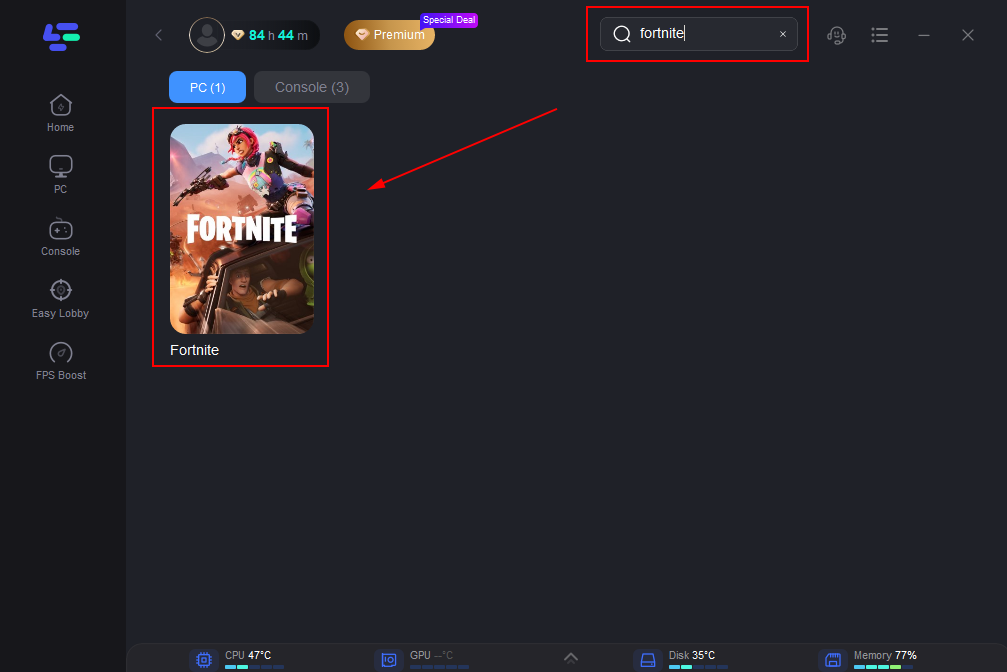
Step 2: After installation, search "Fortnite" in the search bar and select the game.
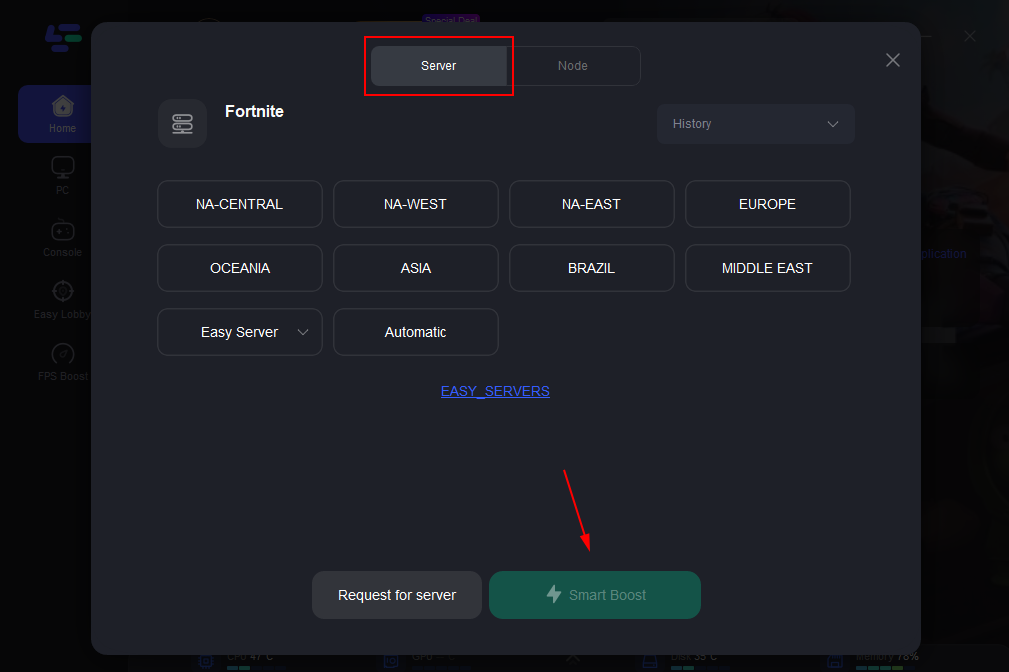
Step 3: Choose your preferred server node and click "Smart Boost" to start optimizing.
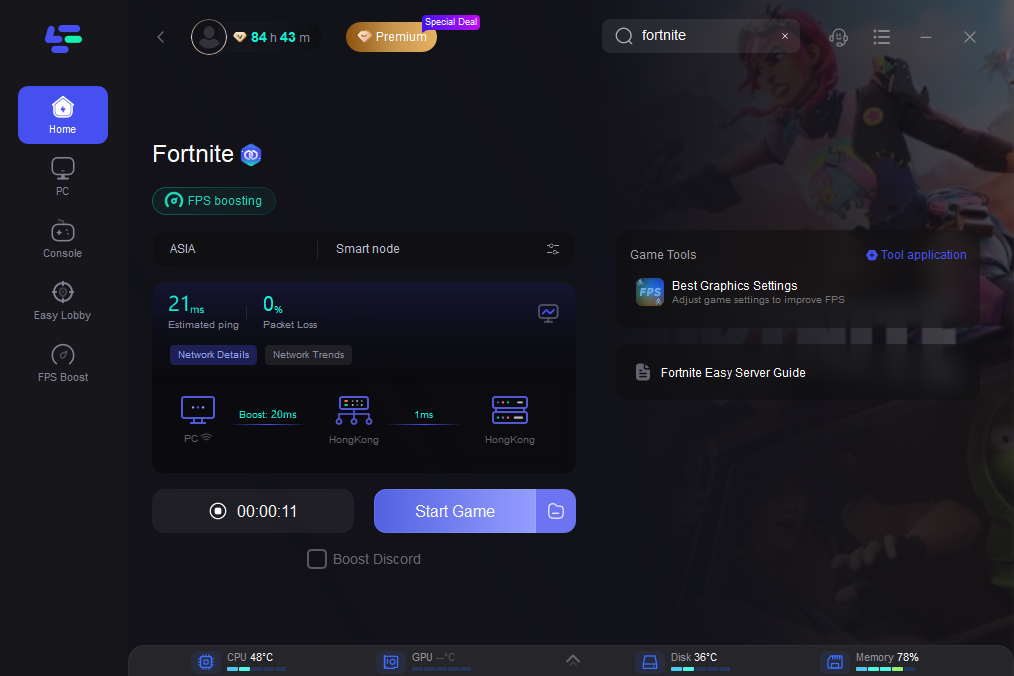
Step 4: Launch your game and enjoy smooth, optimized gameplay with lower ping and no stutter.
Restart Your Router to Refresh the Network Route
Sometimes your internet provider may route your connection through a problematic network node. Restarting your router can refresh the connection and force a new routing path, which may help improve connection stability.
Try the following steps:
- Restart your router
- Reconnect your internet connection
- Wait a few minutes before launching the game again
Flush Your DNS Cache
Outdated DNS records can occasionally affect how your system connects to game servers. Flushing the DNS cache refreshes the network lookup and may help your system establish a more stable connection path.
On Windows, you can open Command Prompt and run:
ipconfig /flushdns
After clearing the DNS cache, restart the game and check whether the connection improves.
Update Network Drivers
Outdated network drivers can sometimes lead to unstable connections, higher latency, or packet loss. Updating your network adapter drivers ensures your system communicates properly with your ISP and game servers.
You can update drivers through Device Manager or download the latest version directly from your motherboard or network adapter manufacturer.
Conclusion
The “Fortnite can't connect to server in Middle East” issue is largely linked to regional network instability affecting server routes in Bahrain and the UAE. When these routes become unreliable, players may experience connection errors, high ping, and packet loss. While the infrastructure problems may take time to stabilize, players can still improve their experience by optimizing their network route, restarting their connection, or refreshing local network settings. Using tools like LagoFast or applying basic network fixes can help reduce lag and make the game playable again while the regional servers recover.
Boost Your Game with LagoFast for Epic Speed
Play harder, faster. LagoFast game booster eliminates stutter and lags on PC, mobile, or Mac—win every match!
Quickly Reduce Game Lag and Ping!
Boost FPS for Smoother Gameplay!