

Palworld is an exciting and innovative game that seamlessly blends elements of simulation, strategy, and adventure. Developed by Pocketpair, this captivating title introduces players to a unique world where adorable creatures called "Pals" coexist with humans. Unlike traditional games, Palworld features a dynamic ecosystem where Pals serve not only as companions but also as valuable assets for resource gathering and crafting. The game's stunning graphics and immersive gameplay create a visually appealing experience.
While video games are not immune to glitches, the occurrence of the black screen issue in online games is not uncommon. Palworld, unfortunately, is not exempt from this, and it seems to be stemming from a settings optimization problem on the developer's end. Fortunately, the gaming community has come to the rescue with a user-suggested fix for this pesky problem, by utilizing a reliable VPN, LagoFast is recommended.

- ✅ Reduce Dedicated Server Lag
- ✅ Boost FPS at the Same Time
- ✅ Best Palworld Server Hosting
- ✅ Quick Fix to Connection/ Crashing/ Freezing Issue
- ✅ Support 2000+ Popular Games
Part 1: What Caused Black Screen On Launch Palworld
When the Black screen on Launch of Palworld happens, instead of the anticipated gaming landscape, a mysterious canvas of darkness challenges adventurers, adding an unexpected twist to the virtual journey. Various factors can trigger black screen problems within Palworld:
1. Settings Optimization Issue:
The black screen on launch in Palworld is likely caused by a settings optimization problem on the developer's side. This suggests that certain configurations or parameters within the game's code may not be optimized correctly for some users' systems.
2. Development Oversight:
It could result from an oversight during the game development process where compatibility issues with certain hardware configurations or software environments were not adequately addressed.
3. Graphic Drivers or Software Conflicts:
Black screen problems can also arise from conflicts with graphic drivers or other software running on the player's system. Incompatibilities with specific driver versions or conflicts with background applications might be contributing to the issue.
4. Bug in Game Code:
Another possibility is that there may be a bug in the game's code that triggers the black screen under certain conditions. This could be a more intricate issue requiring a detailed analysis of the game's programming.
5. Network or Server Issues:
Network or server issues could potentially lead to the black screen problem on launch, especially in online games like Palworld. If the game relies on online connectivity during launch, disruptions or instability in the connection might be a factor.
Understanding these potential causes is essential for developers to diagnose and address the black screen issue effectively. Stay tuned for the following passage, which will provide optimal solutions to address these challenges effectively.
Related Article: Palworld Guide: Breeding Combos & How to Breed Fusion Pals >
Part 2. The Efficient Way To Fix Black Screen - LagoFast
While video games are prone to glitches, the black screen problem is not uncommon in online gaming, Palworld included. This issue likely stems from network instability. But if you’re looking to enhance your Palworld experience even further, try using mods — such as Visible Pal Capture Counter or AlwaysFastTravel — to make your gameplay more engaging and personalized. LagoFast not only ensures these mods and the game itself run smoothly, but also helps fix black screen issues and other connection-related problems.
As a reputable VPN and game booster, LagoFast offers optimized routes, wide game compatibility, and over eight years of experience in improving online stability. It also provides a free trial, letting you explore a lag-free, mod-friendly Palworld experience — along with many other mod-supported games available through LagoFast.
- Effectively fix Palworld’s black screen
- Exclusive routes with global coverage
- No server lag With Smart servers and route
- Support a Free trial
- Best Palworld Dedicated Server hosting
With LagoFast, the top-rated Palworld server hosting provider, Host Your Own Palworld Dedicated Server Easily! You can find the link in the Client app.
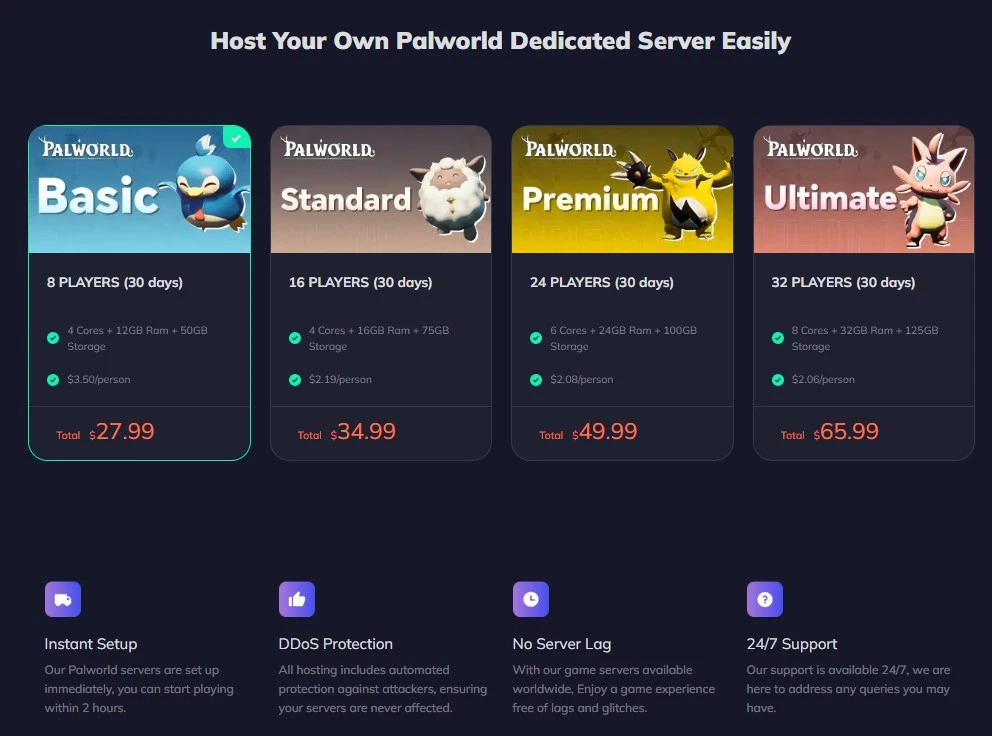
Follow these four easy actions to improve your game experience and stop Palworld's black screen issues:
Step 1: Download and install LagoFast.
Step 2: Input “Palworld” and click the result.
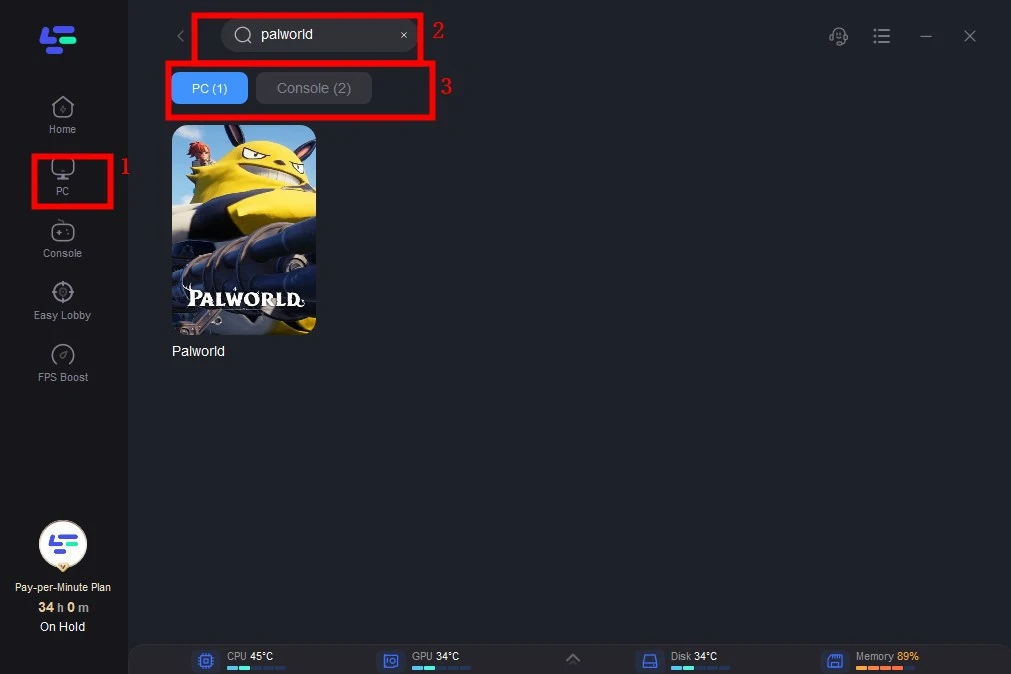
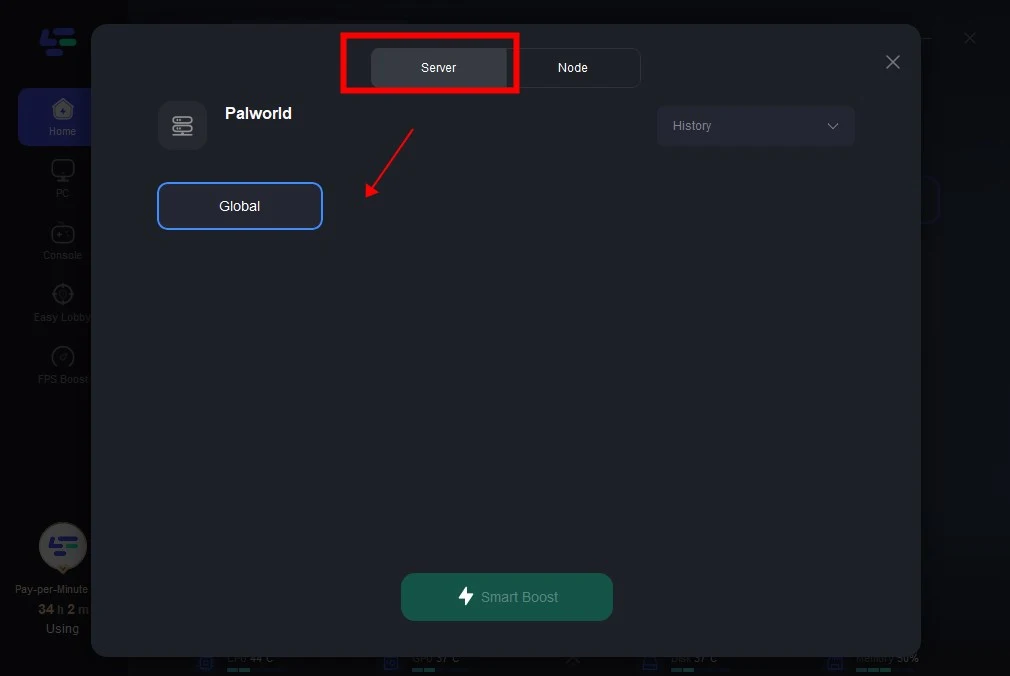
Step 3: Choose the server you like.
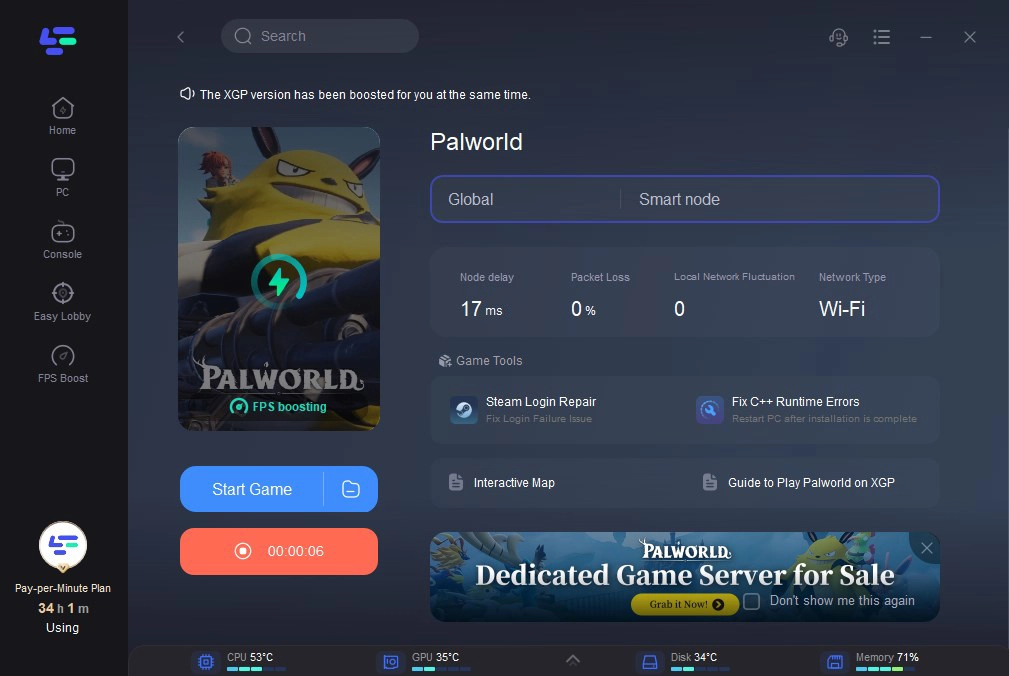
Step 4: Click boost and it will show you real-time ping & packet loss rate.
With LagoFast, the top-rated Palworld server hosting provider, Host Your Own Palworld Dedicated Server Easily!
Part 3. Further Troubleshooting Steps
Fixing Palworld’s black screen error on Steam
To address the issue, follow these steps:
- Right-click on the Palworld launcher icon and choose Properties.
- Navigate to the Compatibility tab and tick the boxes next to "Disable full-screen optimizations" and "Run as administrator."
- Save the changes and close the window.
- Launch Palworld again and verify if the problem persists.
Try the following if this doesn't resolve the problem:
- Since Palworld is currently in early access, you should keep an eye out for updates and hotfixes and install them as soon as you can to prevent issues like the black screen.
- Verify that the operating system and graphics drivers on your computer are current.
- Close any open apps. Certain background apps have the potential to crash games and result in black screen errors.
- Try checking the files' integrity or fixing any corrupted ones. To accomplish this on Steam, right-click Palworld in your library, choose Installed Files from the menu, and then click Verify integrity of files. Click the three dots on Palworld's play page in the Xbox app, choose Manage, and then click Verify and Fix under General.
Final thoughts
In conclusion, to fix the Palworld black screen issue, for a reliable solution, consider using LagoFast.
- ✅ Reduce Dedicated Server Lag.
- ✅ Boost FPS at the Same Time.
- ✅ Best Palworld Server Hosting.
- ✅ Support 2000+ Popular Online Games.

Boost Your Game with LagoFast for Epic Speed
Play harder, faster. LagoFast game booster eliminates stutter and lags on PC, mobile, or Mac—win every match!
Quickly Reduce Game Lag and Ping!
Boost FPS for Smoother Gameplay!