
Quick Answer
Fortnite stuck on the logging in screen is usually caused by server issues, unstable connections, or authentication problems. In most cases, improving your network stability or using a network optimization tool like LagoFast and basic manual fixes can help you get past the login screen.
Introduction
If Fortnite gets stuck on the “logging in” screen, it usually means the game is having trouble connecting or verifying your account rather than a complete crash. This issue, often referred to as Fortnite stuck on logging in, can appear on PC, PS5, and Xbox, and it’s commonly tied to server conditions, network stability, or small system glitches. In this guide, we’ll go through the main reasons behind Fortnite login issues and show you both the most effective way to fix it and the manual steps you can try to get back into the game quickly.

- ✅ Reduce Lag and High Ping
- ✅ Boost FPS in Real Time
- ✅ Get the Easiest Server in Fortnite
- ✅ End All Connection Login Issues.
- ✅ Support 2000+ Online Games.
- ✅ Multiplatform: PC, Mobile, Console
Part 1: Why Is My Fortnite Stuck on Logging In?
Part 2: Best Fix for Fortnite Stuck on Logging In
Part 3: Manual Fixes for Fortnite Keep Getting Stuck on Logging In
Part 1: Why Is My Fortnite Stuck on Logging In?
If you’re stuck on the “logging in…” screen, it’s usually not a single issue. In most cases, it comes down to server conditions, network stability, or small problems with your game or device.
Server congestion or outages
When Fortnite servers are busy, especially during updates or live events, login requests can slow down or fail to complete. This can leave the game hanging on the login screen longer than usual.
Unstable internet connection or routing issues
Even if your internet seems fine, unstable routing, packet loss, or an inconsistent connection can interrupt the login process. This is often why Fortnite works normally on other games but gets stuck here.
Authentication delays or account issues
Fortnite needs to verify your account each time you log in. If Epic Games’ authentication system is delayed or your session fails to validate properly, the login process may loop or stop progressing.
Corrupted cache or game files
Damaged or outdated files can prevent the game from loading properly. This can block the login process and keep you stuck on the same screen.
Platform-specific issues
Login problems can also vary depending on your device:
- PC: launcher issues, corrupted files, or background software interference
- PS5: account sync or license verification problems
- Xbox: cache issues or login token errors
When any of these happen, you may notice symptoms like:
- Fortnite stuck on logging in
- Fortnite freezing on login screen
- Fortnite keep getting stuck on logging in loop
- “Login Failed” errors on console
Part 2: Best Fix for Fortnite Stuck on Logging In
LagoFast is a game performance platform designed to improve your overall gaming experience by stabilizing your connection to game servers. It helps reduce ping, fix packet loss, and optimize routing to make your connection more consistent, which can help resolve issues like Fortnite stuck on logging in caused by unstable networks or routing problems. In addition to connection optimization, it also includes useful features such as FPS optimization and Game Crash Fix tools, helping you maintain smoother performance and a more stable gameplay experience overall.
How to Use LagoFast to Boost Fortnite:
Step 1: Click the Free Trial button to download and install LagoFast.
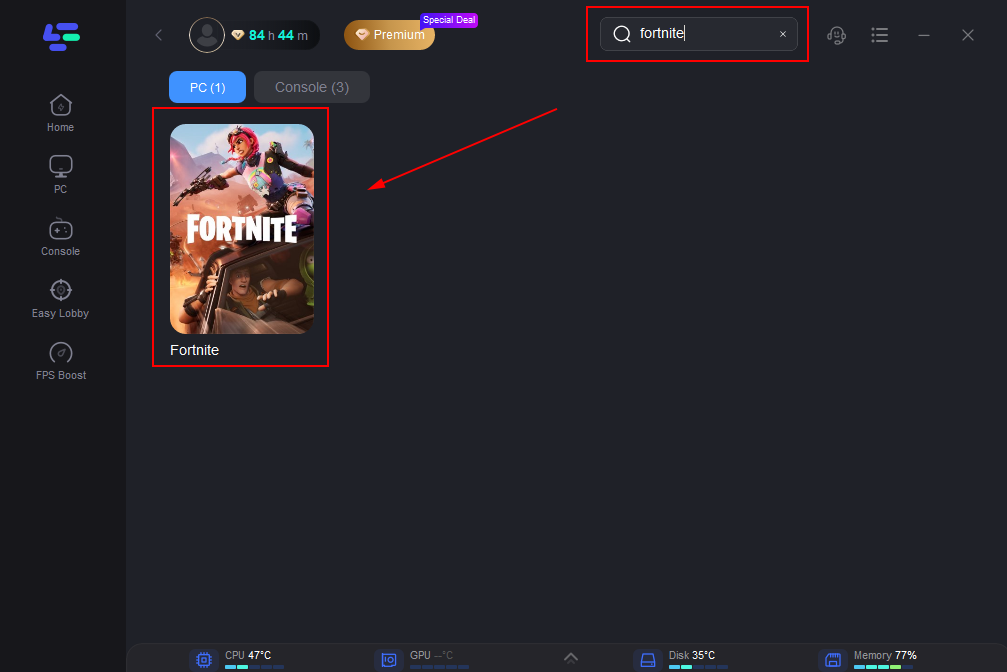
Step 2: After installation, search "Fortnite" in the search bar and select the game.
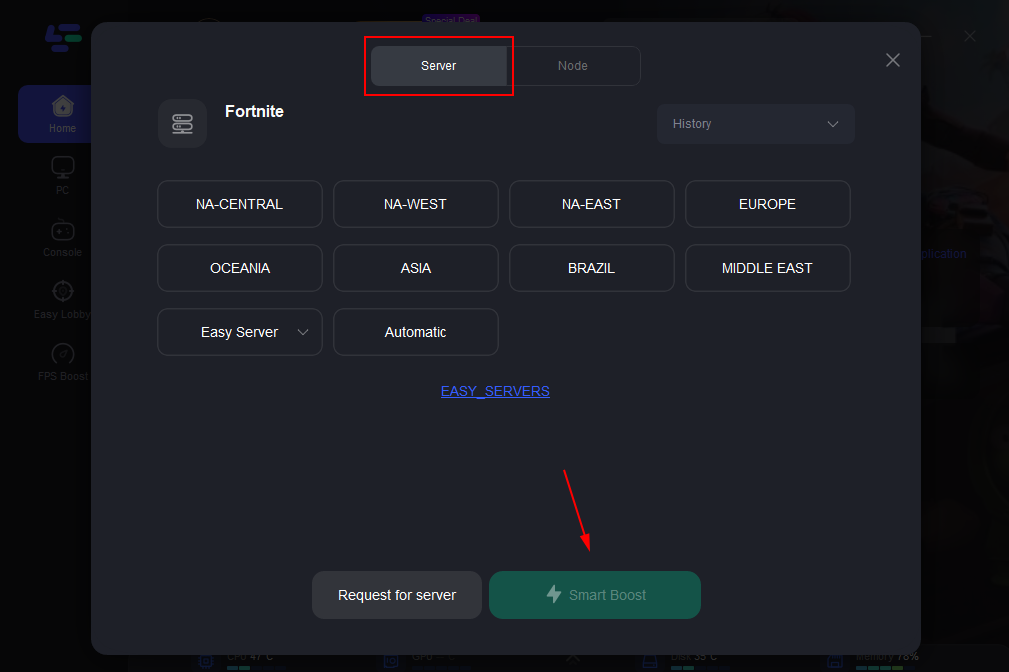
Step 3: Choose your preferred server node and click "Smart Boost" to start optimizing.
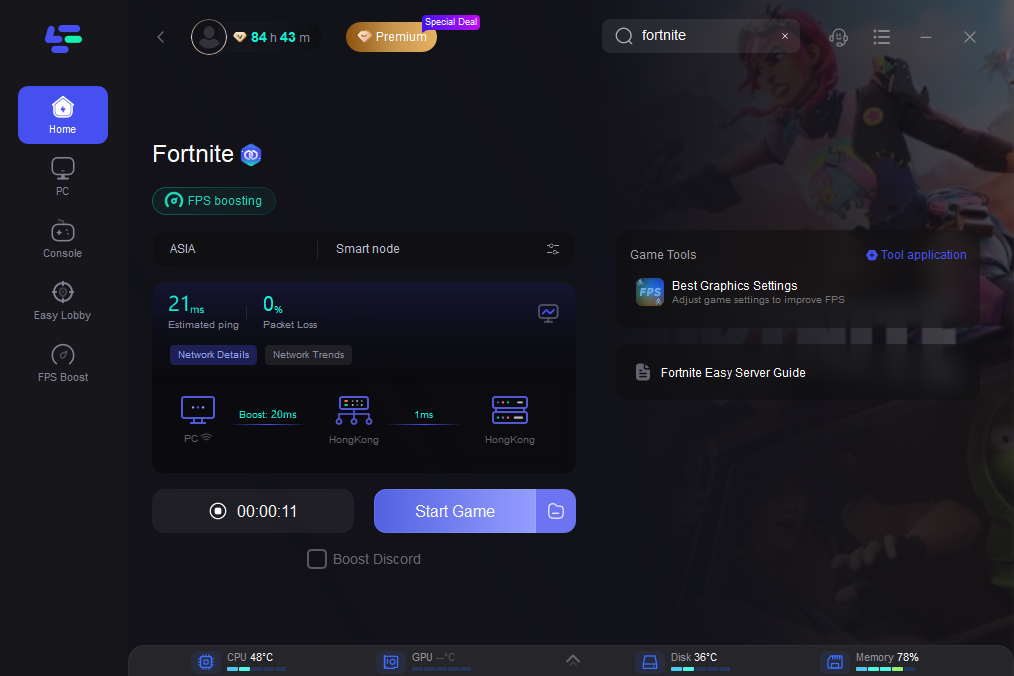
Step 4: Launch your game and enjoy smooth, optimized gameplay with lower ping and no stutter.
Part 3: Manual Fixes for Fortnite Keep Getting Stuck on Logging In
If you prefer manual methods, you can try the following fixes to resolve Fortnite stuck on logging in. These steps address common causes like server issues, network instability, and device-related problems.
Check Fortnite server status first
Before trying anything else, make sure Fortnite servers are not down or under heavy load. If the issue is on the server side, login problems usually resolve once services are stable again.
Restart your game, device, and router
Simple restarts can often clear temporary glitches. Close Fortnite completely, restart your device, and power cycle your router to refresh your connection.
Improve your internet connection
Unstable connections can interrupt the login process. Try using a wired Ethernet connection, avoid unnecessary VPNs, switch to a more stable DNS, and stop background downloads or streaming.
Verify or reinstall Fortnite files (PC)
Corrupted or missing files can prevent the game from logging in properly. Use the Epic Games Launcher to verify files, or reinstall Fortnite if the issue continues.
Disable overlays and background apps (PC)
Some background applications, such as overlays or recording tools, may interfere with the login process. Closing these apps can help Fortnite run and log in more smoothly.
Platform-specific fixes
Fortnite Stuck on Logging In PC – Fixes
- Verify game files
- Flush DNS to refresh network settings
- Disable overlays and close background apps
- Restart the Epic Games Launcher
Fortnite Stuck on Logging In PS5 – Fixes
- Restore licenses in system settings
- Check PlayStation Network status
- Reinstall Fortnite if login issues persist
"Login Failed" Error When Logging in to Fortnite on Xbox – Fix
- Power cycle your console to clear cache
- Check Xbox Live service status
- Sign out and sign back into your account to refresh authentication
Part 4: FAQs
How long should Fortnite stay on the logging in screen?
Under normal conditions, Fortnite should log in within a short time. If it stays stuck for several minutes without progress, it usually indicates a connection or authentication problem.
Does switching internet connections help fix Fortnite login issues?
Yes, switching to a more stable connection can sometimes resolve login problems, especially if the issue is related to routing, packet loss, or an unstable network.
Why does Fortnite fail to log in after an update?
After updates, servers are often under heavy load, and login systems may experience temporary instability. This can lead to delays or failures during the login process.
Can background applications affect Fortnite logging in?
Yes, certain background apps can interfere with the game’s connection or performance, which may contribute to login delays or issues in some cases.
Can VPN affect Fortnite login?
Yes, VPNs can sometimes cause routing delays or instability, which may interfere with the login process and lead to Fortnite getting stuck on the logging in screen.
Conclusion
Fortnite stuck on the logging in screen is usually tied to server conditions, network stability, or small system issues rather than a serious error. In most cases, improving your connection and applying a few basic troubleshooting steps can help you get back into the game. If manual fixes don’t work, using a network optimization tool like LagoFast can further stabilize your connection and reduce login problems. With the right approach, this issue is typically easy to resolve.

Boost Your Game with LagoFast for Epic Speed
Play harder, faster. LagoFast game booster eliminates stutter and lags on PC, mobile, or Mac—win every match!
Quickly Reduce Game Lag and Ping!
Boost FPS for Smoother Gameplay!