
Quick Answer: How to Fix FACEIT Matchmaking Errors Instantly
Most FACEIT matchmaking error issues can be fixed quickly with these steps:
- Log out and back into FACEIT (client + browser)
- Update FACEIT Anti-Cheat
- Make sure CS2 is updated and Steam profile is Public
- Optimize your network (e.g., use LagoFast)
These steps resolve most Matchmaking Failed / Unable to Join Queue problems fast.
Introduction
Nothing ruins a competitive grind like hitting the "Play" button only to be met with a red notification bar. Whether it’s a FACEIT matchmaking failed situation or a cryptic message saying you aren't eligible, these technical hiccups are the ultimate buzzkill for CS2 players.
In this guide, we are diving deep into every single reason why FACEIT matchmaking fails and providing the exact steps to fix it fast so you can get back to climbing the ELO ladder.

- ✅ Reduce Lag and High Ping.
✅ Boost FPS at the Same Time.
✅ Support 8000+ Popular Online Games.
✅ Change Server without Latency.
✅ Boost Game Loading Speed. - ✅ Fix Connection Issues.
Part 1: What Is a Faceit Matchmaking Error?
Part 2: Common Categories of FACEIT Errors
Part 3: Step-by-Step Solutions for Specific FACEIT Errors
Part 4: Bonus Tips: Fix Other Errors
Part 5: Summary Table: FACEIT Error Solutions
Part 1: What Is a FACEIT Matchmaking Error?
A FACEIT matchmaking error occurs when communication breaks between three key systems: your local client, FACEIT servers, and the Steam/CS2 API. When one of these components fails to sync properly, matchmaking is blocked to maintain competitive integrity.
This disruption can appear in multiple forms, including:
- Matchmaking Failed / Unable to Join Queue
- FACEIT matchmaking queue is temporarily closed / Queue Closed
- matchmaking queue is temporarily closed FACEIT cs2
- FACEIT matchmaking not showing
Understanding this foundation helps explain why errors happen and why solutions vary depending on the source of the failure.
Part 2: Common Categories of FACEIT Errors
Before diving into fixes, it’s important to categorize the problem. Different errors stem from different systems, and recognizing the type will help you apply the right solution faster.
Unable to Join Queue Errors
This is the most frequently reported category. Messages like FACEIT matchmaking queue is temporarily closed or FACEIT matchmaking not showing typically indicate:
- Temporary server maintenance
- Backend overload
- Local cache or UI issues
While often server-side, local fixes can still resolve many cases.
Account & Eligibility Restrictions
When you see You Are Not Eligible to Join This Queue, the issue usually relates to account status rather than a technical malfunction.
Common causes include:
- Unverified FACEIT account
- Anti-Cheat not running
- Active cooldown or ban
This category is often confused with general FACEIT matchmaking not working issues, but it requires account-level fixes.
Client & Game Connection Issues (CS2 Integration)
Errors such as:
- FACEIT Anti-Cheat Not Running
- Game Not Connected
- CS2 Not Running
These occur when FACEIT cannot detect your game session. This often leads to confusion because everything appears functional locally, yet matchmaking fails.
This is a major contributor to FACEIT Matchmaking Failed situations.
Lobby & Party Restrictions
Some errors are not bugs at all, but system rules:
- Skill level difference too high
- Party members not ready
- Region mismatches
These can still feel like FACEIT matchmaking error problems, especially when they prevent queue entry.
Network & Server Timeout Issues
This category includes:
- Connection timed out
- Failed to connect to matchmaking servers
- FACEIT does not appear to accept the match
These are often caused by unstable routing, packet loss, or high latency, making them among the most frustrating issues to troubleshoot.
Part 3: Step-by-Step Solutions for Specific FACEIT Errors
Now that we’ve identified the main categories, let’s move into targeted fixes. Each solution below directly addresses a specific type of FACEIT matchmaking error.
Fix: Matchmaking Failed / Unable to Join Queue
When you encounter Matchmaking Failed / Unable to Join Queue, start by checking whether the issue is global.
Steps:
- Visit the FACEIT status page to confirm server availability.
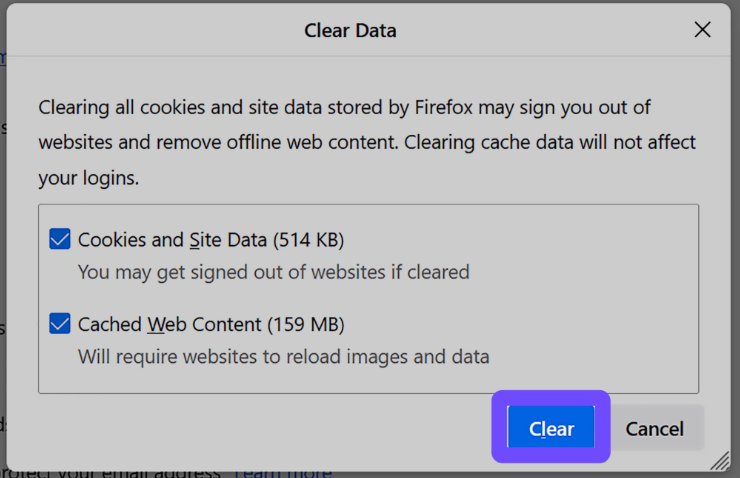
- Clear browser cache and cookies if using the web version.
- Reload the desktop client using Ctrl + R.
- Ensure you are not stuck in a previous match session.
If the matchmaking queue is temporarily closed FACEIT cs2 message appears for everyone, waiting is the only solution.
Fix: Stuck in Matchroom or “Match Is Being Prepared”
Errors like:
- FACEIT stuck on match is being prepared
- FACEIT Matchroom ongoing stuck
- FACEIT stuck in matchroom
These indicate a synchronization failure between your client and FACEIT servers.
Solutions:
- Wait 15–20 minutes for automatic reset
- Restart the client and Anti-Cheat
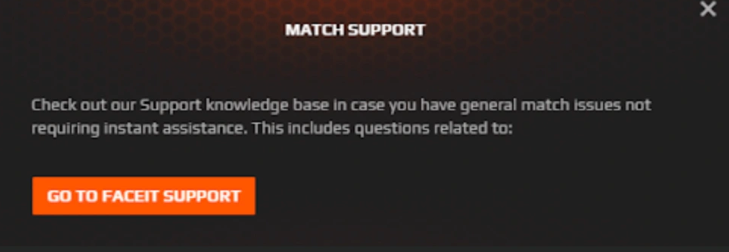
- Contact live support if the issue persists
This problem often follows completed matches where the system fails to register results properly.
Fix: You Are Not Eligible to Join This Queue
This error is especially common after updates or configuration changes.
Steps:
- Ensure FACEIT Anti-Cheat is running and updated
- Verify CS2 game files through Steam
- Confirm Steam account is properly linked
- Check that your account is verified
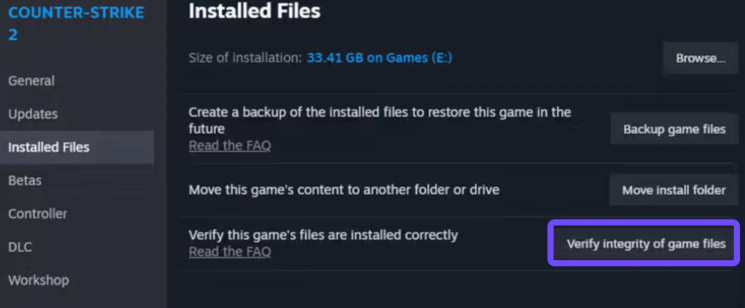
If your Steam profile settings recently changed, it can trigger FACEIT matchmaking not showing issues as well.
Fix: Network-Related Matchmaking Errors
When facing persistent FACEIT matchmaking not working or FACEIT does not appear to accept the match errors, the root cause is often network instability.
These issues include:
- Accept button not registering
- Connection timeout
- Failure to join server after accepting
Why this happens:
Your ISP may route traffic inefficiently, causing delays or packet loss before reaching FACEIT servers.
The Ultimate Fix for Network-Related Matchmaking Errors: LagoFast
Many players don't realize that Faceit matchmaking not working is often caused by high jitter or unstable pings that prevent the "Accept" button from registering. This is where LagoFast becomes an essential tool for any serious FACEIT player.
Why Use LagoFast for FACEIT?
When you encounter "Failed to connect to matchmaking servers," it’s usually because your data packets are taking a long, inefficient route to the FACEIT server.
- Multipath Connection: LagoFast finds the fastest route to the server, reducing the chance of a faceit that does not appear to accept the match error.
- Easy Fix for CS2 Lag: It optimizes your network specifically for CS2, ensuring that once the matchmaking succeeds, you don't get kicked for "Connection Timed Out."
- One-Click Optimization: You don't need to be a tech genius. Just select "CS2," choose the FACEIT server region (NA, EU, SEA), and boost.
- Pro Tip: Using LagoFast can also prevent the "Matchroom stuck" issue caused by your client failing to send the "Match Finished" packet to the FACEIT servers.
Tutorial to Use LagoFast to Fix Network-Related Matchmaking Errors:
1. Download and install LagoFast from the official site.
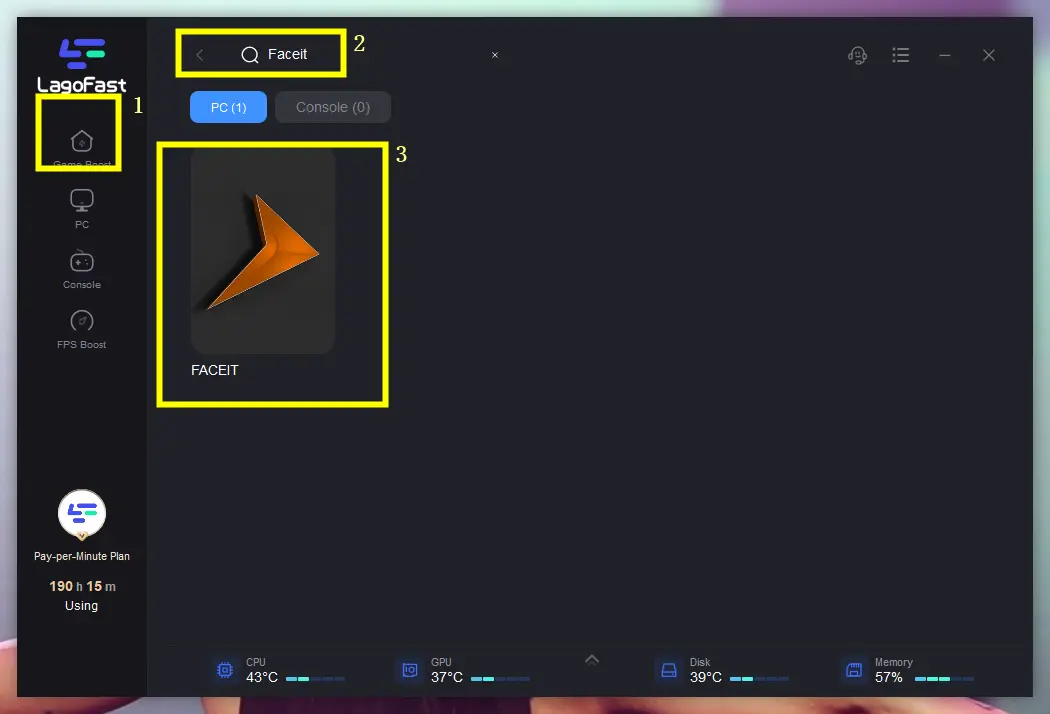
2. Search for “FACEIT” in the interface.
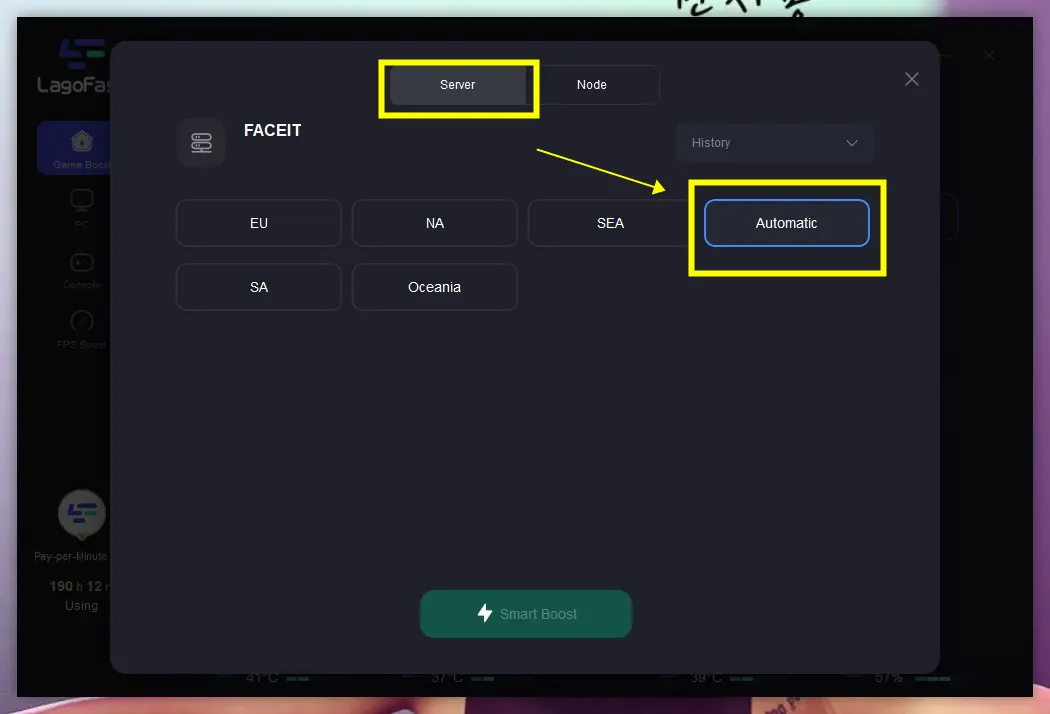
3. Select a nearby stable server (e.g., Germany or Netherlands nodes for EU FACEIT).
4. Enable Smart Boost to automatically reduce ping and packet loss.
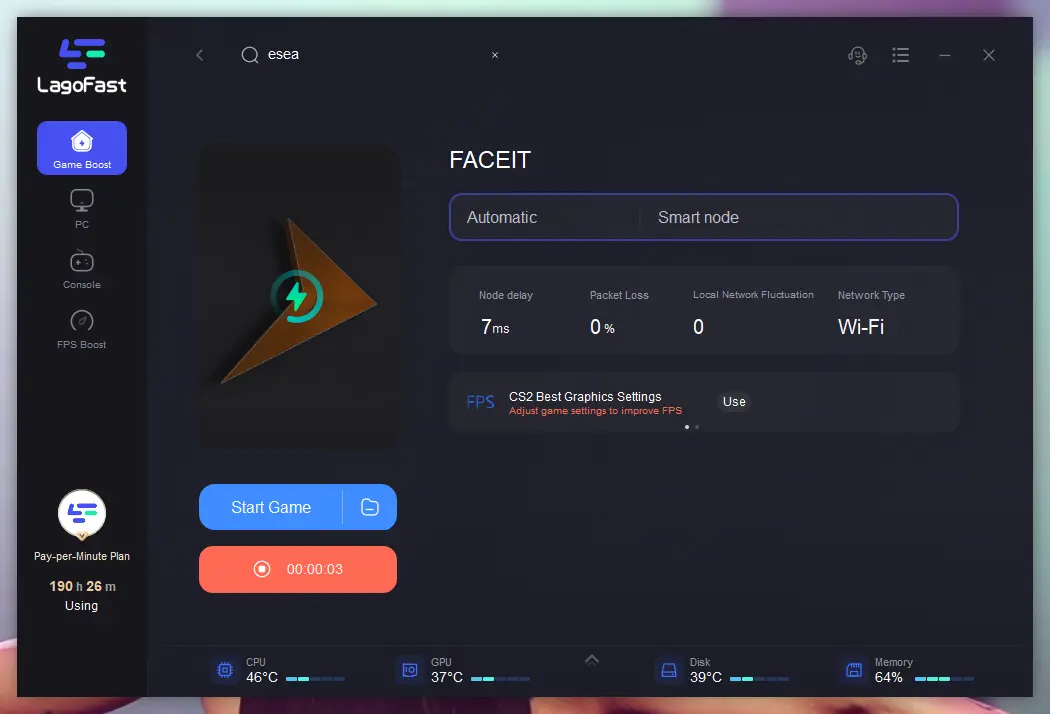
This approach is particularly effective for recurring FACEIT Matchmaking Failed situations tied to network performance.
Part 4: Bonus Tips: Fix Other Hidden Issues
Not all problems display clear error messages. Some issues require observation and proactive fixes.
Abnormal Matchmaking Times
If matchmaking takes unusually long:
- Leave the queue
- Wait 30 seconds
- Rejoin
This resets your matchmaking priority and can resolve hidden FACEIT matchmaking queue is temporarily closed states.
Accepted Match but Cannot Join Server
If you accept a match but cannot connect:
- Open CS2 console (~)
- Look for retry or connection errors
- Check firewall settings
Your firewall may be blocking FACEIT connections, leading to FACEIT does not appear to accept the match issues.
Part 5: Summary Table: FACEIT Error Solutions
|
Error Type |
Root Cause |
Fastest Fix |
|---|---|---|
|
Queue Closed |
Server maintenance |
Check status page |
|
Not Eligible |
AC or verification issue |
Restart AC, verify account |
|
Matchroom Stuck |
Sync failure |
Wait or contact support |
|
Connection Timeout |
Network routing |
Use LagoFast |
|
Accept Button Fails |
High latency |
Refresh client, optimize network |
Part 6: FAQs
Why does “matchmaking queue is temporarily closed FACEIT cs2” appear after updates?
After major updates, FACEIT needs time to sync with CS2 changes. This typically resolves within 30–60 minutes.
Does a matchmaking error affect ELO?
No. If a match never starts, your ELO remains unchanged. However, failing to connect after acceptance may result in penalties.
Why is FACEIT matchmaking not working even when Steam is fine?
FACEIT uses its own infrastructure. Steam being operational does not guarantee FACEIT services are stable.
Why does the Accept button not respond?
This is often due to packet loss or latency issues preventing your input from reaching the server.
Can I queue if Anti-Cheat shows reconnect timed out?
No. Until the Anti-Cheat reconnects successfully, you will continue to see You Are Not Eligible to Join This Queue.
Final Takeaway
Dealing with a FACEIT matchmaking error can be frustrating, especially when you’re ready to play. However, most problems—from Matchmaking Failed / Unable to Join Queue to FACEIT stuck in matchroom—have clear and manageable solutions.
Keeping your Anti-Cheat updated, ensuring proper account configuration, and maintaining a stable network connection are the most reliable ways to avoid recurring issues. For players frequently encountering FACEIT Matchmaking Failed situations, optimizing network routing can make a significant difference.
Boost Your Game with LagoFast for Epic Speed
Play harder, faster. LagoFast game booster eliminates stutter and lags on PC, mobile, or Mac—win every match!
Quickly Reduce Game Lag and Ping!
Boost FPS for Smoother Gameplay!