
For any dedicated Counter-Strike 2 player, the quality of your matchmaking experience can make or break your game. Are you consistently matched with fair players, or does every other match feel like a lottery filled with cheaters, griefers, and toxic teammates? This disparity often boils down to a hidden, yet profoundly influential, system known as Trust Factor. Valve introduced Trust Factor to ensure players are matched with others who have a similar reputation, aiming to create a cleaner, more enjoyable environment.
However, a crucial point must be addressed immediately: a true, official "CS2 Trust Factor Checker" does not exist. Valve has never made this data public, nor is there an API or numerical score accessible to players or third-party websites. It remains a completely hidden system variable. This article will cut through the misinformation, explain precisely what Trust Factor is, how it subtly influences your matches, and, most importantly, provide legitimate methods to indirectly assess your standing and concrete steps to improve it, ensuring a more positive experience in the competitive landscape of CS2.

- ✅ Reduce Lag and High Ping.
- ✅ Boost FPS at the Same Time.
- ✅ Add CSGO to Steam Library.
- ✅ Change Server Without Latency.
- ✅ End All Connection crash Issues.
- ✅ Multiplatform: PC, Mobile, Console.
Part 1. What Is CS2 Trust Factor (How It Affects Your Matches)
Part 2. Is There a CS2 Trust Factor Checker? Debunking the Myths
Part 3. How to Actually Check Your Trust Factor in CS2
Part 4. CS2 Low Trust Factor Fix: How to Improve Your Reputation
Part 5. How to Enhance Your Game Experience with LagoFast Game Booster
Part 6. Are Trust Factor Checker Websites Safe? Protecting Your Account
Part 1. What Is CS2 Trust Factor (How It Affects Your Matches)
Trust Factor in Counter-Strike 2 is Valve's proprietary, opaque system designed to evaluate a player's overall reputation and reliability. Its primary function is to pair you with other players who possess a similar Trust Factor score, thereby enhancing the quality of your matchmaking experience. This means that two players of the same skill rank can have vastly different game experiences based solely on their hidden Trust Factor.
A high Trust Factor generally leads to:
- Cleaner Matches: Fewer encounters with cheaters, smurfs, and disruptive players.
- Better Teammates: Players who communicate effectively, play cooperatively, and are less prone to toxicity.
- Faster Queue Times: For many, a higher Trust Factor can result in quicker matchmaking, as the system finds suitable peers more efficiently.
Conversely, a low Trust Factor can plunge you into a less desirable matchmaking pool, characterized by:
- Frequent Cheaters: A higher likelihood of encountering players using illicit software.
- Toxic Environments: More instances of verbal abuse, griefing, and uncooperative behavior.
- Longer Queue Times: The system struggles to find enough low-Trust Factor players, leading to extended waits.
Valve does not disclose the exact formula for Trust Factor, but it is widely understood to be a complex algorithm that considers a multitude of factors, both within CS2 and across your entire Steam account history. Key signals that contribute to your Trust Factor include:
- Reports: The number and frequency of reports against you for cheating, griefing, or abusive communication.
- In-Game Behavior: Actions such as abandoning matches, going AFK (Away From Keyboard), dealing excessive team damage, or being flagged for voice/text toxicity.
- Steam Account History: The age of your Steam account, its level, the number of games owned (especially paid titles), purchase history, and consistent, positive activity across the platform.
- VAC/Game Bans: Any prior bans, whether VAC (Valve Anti-Cheat) or game-specific bans in CS2 or other Steam titles, can significantly and permanently impact your Trust Factor.
- Playing with Others: The Trust Factor of players you frequently queue with can also influence your own, either positively or negatively.
Part 2. Is There a CS2 Trust Factor Checker? Debunking the Myths
Given the significant impact of Trust Factor on gameplay, it is natural for players to seek ways to check their score. This demand has unfortunately led to the proliferation of third-party websites and tools claiming to be a "CS2 Trust Factor Checker" or "CS2 Trust Factor Test." It is imperative to understand that these tools are not legitimate.
Valve has explicitly stated that Trust Factor data is private and not accessible via any public API. This means any website or application claiming to provide a numerical Trust Factor score is, at best, providing an arbitrary, speculative number, and at worst, a malicious scam. These "checker" websites often exist for several reasons:
- Ad Revenue: They generate traffic and income through advertisements.
- Phishing Attempts: Some may attempt to trick you into logging in with your Steam credentials, thereby compromising your account.
- Data Harvesting: They might collect your Steam profile data for various, often undisclosed, purposes.
- Selling Fake "Boosts": Many will offer paid services to "boost" your Trust Factor, which are entirely ineffective and a waste of money.
The official stance from Valve is clear: there is no public-facing tool or method to view your exact Trust Factor score. Any site asking for your Steam login, an API key, or payment for this information should be treated as a red flag. Your Steam account security is paramount, and you should never provide your credentials to unverified third-party services.
Part 3. How to Actually Check Your Trust Factor in CS2
While a direct numerical score remains elusive, there are several indirect, yet reliable, methods to gauge your Trust Factor. These methods rely on in-game signals and observations of your matchmaking experience.
Signs You Have Low Trust Factor
Before diving into the checking methods, recognize the common symptoms of a low Trust Factor:
- Consistently Long Queue Times: If your queue times are significantly longer than those of your friends or the average for your region and rank.
- Poor Match Quality: Frequent encounters with players who are clearly cheating, exhibiting extreme toxicity, or intentionally griefing.
- Unbalanced Teams: Matches that feel heavily one-sided, often due to a disparity in player behavior rather than skill.
Real Methods to Gauge Your Trust Factor
The Party Warning Message (The Most Reliable In-Game Signal):
1. This is the closest you will get to an official Trust Factor check. Invite a friend with a known high Trust Factor to your party, or ask them to invite you. If one of you has a significantly lower Trust Factor, CS2 will display a yellow or red warning message in the party chat, stating something similar to: "Your matchmaking experience may be affected because one of your party members has a low Trust Factor." This message is the clearest indicator that someone in the lobby (likely you, if your friend has high Trust) has a lower standing.
Compare Match Quality with a Friend:
2. This method requires a bit of experimentation. Have a friend with a known high Trust Factor queue solo for a few games, noting the quality of their matches. Then, queue with that same friend for a few games. If the matches consistently degrade in quality (more cheaters, more toxicity) when you join their party, it strongly suggests your Trust Factor is lower than theirs.
Observe Your "Looking to Play" List (Community Observation):
3. While not an official method, community observations suggest that the "Looking to Play" list (where you can see other players seeking matches) can offer a subtle hint. Accounts with higher Trust Factors tend to see a "healthier" list of potential teammates, while those with lower Trust might see a more sparse or suspicious collection of profiles. Treat this as a rough sanity check rather than a definitive measure.
Part 4. CS2 Low Trust Factor Fix: How to Improve Your Reputation
Improving your Trust Factor is not an overnight process; it requires consistent positive behavior and engagement. Think of it as building a reputation over time. Here's a checklist of actions you can take:
Play Clean and Fair: This is paramount. Absolutely no cheating, no griefing, and minimize team damage. Any action that results in a report or a ban will severely damage your Trust Factor.
Be a Positive Teammate: Use voice and text chat constructively. Provide callouts, encourage your team, and avoid any form of toxicity. Commendations from other players, while not a magic bullet, can contribute positively.
Strengthen Your Steam Profile:
- Public Profile: Ensure your Steam profile is public. This allows Valve's system to verify your activity and legitimacy.
- Own Paid Games: Having a library of legitimate, paid games on Steam signals a more invested and trustworthy user.
- No Bans: Avoid any VAC or game bans across all Steam titles. These leave a lasting negative mark.
- Engage Positively: Participate in Steam Community discussions, leave helpful reviews, and earn badges to increase your Steam level.
Stay Active: Play CS2 regularly and engage with other legitimate Steam games. Consistent, normal activity across the platform is a strong positive signal.
Prime Status: While not a direct Trust Factor booster, Prime Status is considered the baseline for serious matchmaking. It filters out many low-Trust Factor accounts and significantly improves your chances of being matched with higher-quality players.
Avoid Abandons and AFK: Never rage-quit or go AFK. These actions directly impact your teammates' experience and will negatively affect your Trust Factor.
Part 5. How to Enhance Your Game Experience with LagoFast Game Booster
Even with a high Trust Factor, a poor internet connection can undermine your CS2 experience, leading to frustrating lag, packet loss, and even disconnects. These technical issues can inadvertently contribute to a lower Trust Factor by causing you to appear AFK, perform poorly, or even get reported for suspicious behavior (e.g., "lag switching"). This is where a professional game booster like LagoFast becomes an invaluable tool.
LagoFast(LagoFast Game Booster - Get No Lag and Lower Ping) is designed to optimize your network connection specifically for gaming, ensuring stable ping, reduced packet loss, and a smoother overall experience. By addressing underlying network instabilities, LagoFast helps you maintain a consistent presence in matches, reducing the likelihood of disconnects or performance issues that could negatively impact your Trust Factor. Furthermore, a stable connection contributes to a more enjoyable and fair competitive environment, allowing your true skill to shine.
How to Use LagoFast Game Booster
Step 1: Click the Free Trial button to download and install LagoFast Free Trial.
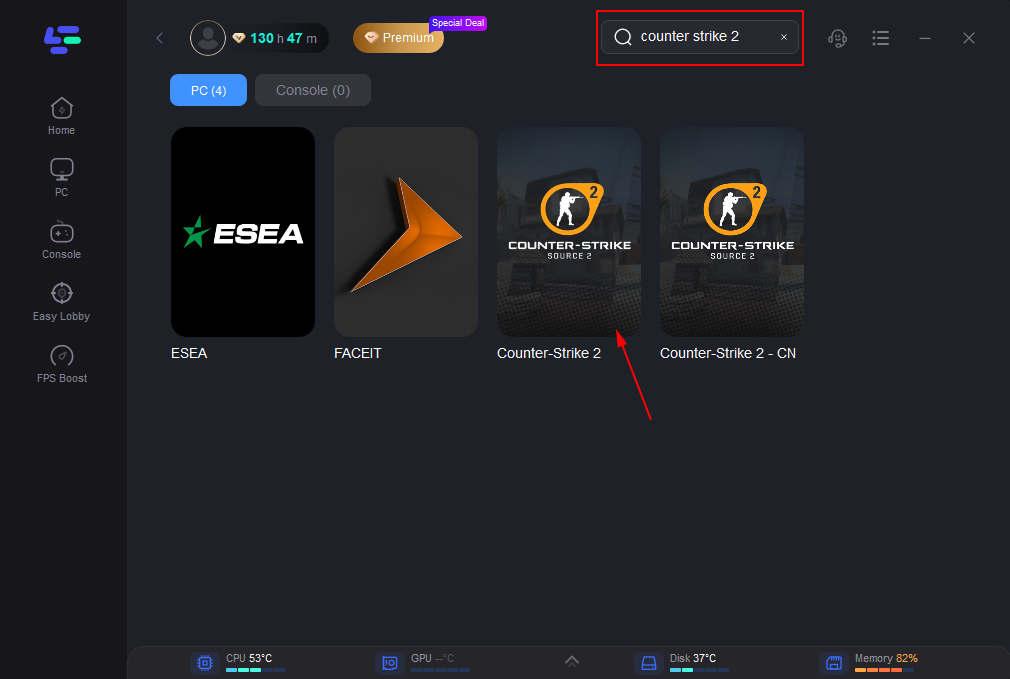
Step 2: Search for CS2: Open the LagoFast application. In the search bar, type "CS2" or "Counter-Strike 2" to find the game.
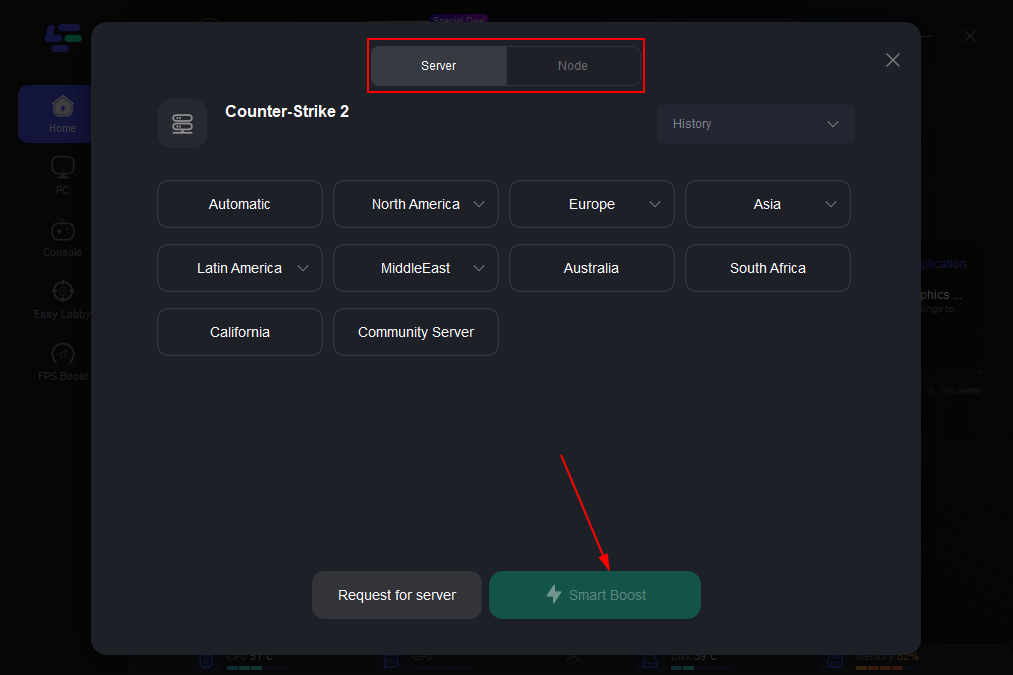
Step 3: Select the Optimal Node: LagoFast will automatically analyze your network and the available game servers to recommend the most optimal routing node. This ensures the lowest possible ping and minimal packet loss for your connection to the CS2 servers.
Step 4: Enable FPS Boost (Optional but Recommended): Before initiating the boost, consider enabling the "FPS Boost" feature within LagoFast. This function optimizes your system settings, closes unnecessary background applications, and allocates more resources to CS2, potentially increasing your in-game frame rates for an even smoother experience.
Step 5. One-click Boost: Click the "Boost" button. LagoFast will then establish a dedicated, optimized connection path to the CS2 servers.
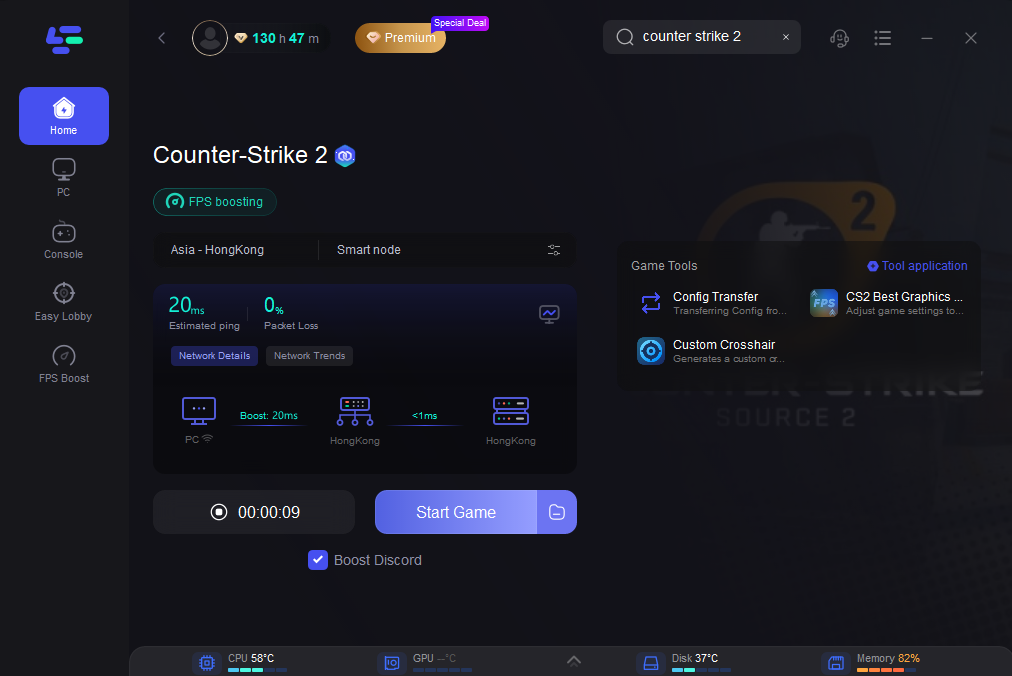
Launch the Game: With LagoFast actively boosting your connection in the background, launch Counter-Strike 2. You should immediately notice a more stable and responsive gameplay experience, allowing you to focus on your aim and strategy without network distractions.
Part 6. Are Trust Factor Checker Websites Safe? Protecting Your Account
As previously emphasized, any website or application claiming to be a "CS2 Trust Factor Checker" is not legitimate. Engaging with such sites carries significant risks that can compromise your Steam account and personal data.
- Steam Login Risks (Phishing): Many fake checkers will prompt you to log in with your Steam credentials. This is a classic phishing tactic designed to steal your username and password, giving malicious actors full access to your account, inventory, and payment information.
- API Key Scams: Some sites might ask for your Steam Web API key. While this key doesn't grant full account access, it can be used to intercept trade offers, leading to inventory theft.
- Data Abuse: Even if a site doesn't directly steal your credentials, it might collect and misuse your Steam profile data, including your game history, friends list, and inventory details.
- False Promises and Payments: Legitimate Trust Factor improvement comes from consistent good behavior, not from paying for a "boost" service. Any site offering such a service is fraudulent.
Always exercise extreme caution. Only log into Steam through the official Steam client or the official Steam website. Never download executable files from unverified sources claiming to be Trust Factor tools.
Part 7. FAQs
Q: Does buying skins increase Trust Factor?
A: No, there is no official evidence or statement from Valve suggesting that buying skins directly increases your Trust Factor. While having a legitimate Steam purchase history (which often includes games and skins) contributes to a healthy Steam profile, the act of buying skins itself is not a direct Trust Factor booster.
Q: Can I reset my Trust Factor?
A: No, Valve does not provide a mechanism to reset your Trust Factor. It is a dynamic system that continuously evaluates your behavior. The only way to improve a low Trust Factor is through consistent positive actions over time.
Q: Does queuing with low-trust friends affect me?
A: Yes, if you queue with friends who have a significantly lower Trust Factor than you, your matchmaking experience will be adjusted to match the lowest Trust Factor in the party. This means you will likely encounter more cheaters and toxic players.
Q: How long does it take to fix a low Trust Factor?
A: There is no definitive timeline. Improving a low Trust Factor requires consistent positive behavior over an extended period. It can take weeks or even months of clean play, positive engagement, and active Steam account usage to see a noticeable improvement.
Q: Will a private profile hurt my trust?
A: While a private profile won't necessarily hurt your Trust Factor, making your profile public allows Valve's system to more easily verify your legitimate activity and engagement, which can contribute positively to your Trust Factor. A public profile helps demonstrate that you are a real, active player.
Conclusion
The quest for a better matchmaking experience in Counter-Strike 2 often leads players down the rabbit hole of "CS2 Trust Factor Checkers." However, the truth is that Valve's Trust Factor remains a hidden, internal system, making all third-party checkers unreliable and potentially dangerous. The key to a high Trust Factor lies not in external tools, but in consistent, positive behavior both within CS2 and across your entire Steam ecosystem.
By understanding the factors that influence your Trust Factor, recognizing the subtle in-game signals, and actively working to maintain a clean and positive reputation, you can significantly improve your matchmaking quality. Furthermore, by leveraging network optimization tools like LagoFast Game Booster, you can ensure that technical issues like lag and disconnects don't inadvertently sabotage your efforts. Focus on fair play, be a good teammate, and let LagoFast handle your connection—that's the real strategy for dominating the competitive landscape of CS2.

Boost Your Game with LagoFast for Epic Speed
Play harder, faster. LagoFast game booster eliminates stutter and lags on PC, mobile, or Mac—win every match!
Quickly Reduce Game Lag and Ping!
Boost FPS for Smoother Gameplay!