
Crossfire is back, and it's not just a rehash of the classic. Crossfire: Legends is making its triumphant return to Southeast Asia in mobile form, offering an exciting and modernized version of the iconic FPS franchise. With improved controls, familiar game modes, and fully localized content for SEA audiences, it’s an essential title for longtime fans and newcomers alike. But what really makes this version worth diving into is its accessibility and early access period through the official beta test.
If you're eager to jump into fast-paced gunfights, classic maps, legendary weapons, and test the newest mobile battle pass system, Crossfire: Legends SEA is now available for beta testing in selected countries. This article walks you through everything, from key dates and features to a full breakdown of how to download and join the beta, and even how to play it if you're located outside the supported regions.

Part 1: Crossfire: Legends SEA — Release Date and Beta Period
Part 2: How to Download Crossfire: Legends SEA?
Part 3: How to Join the Crossfire: Legends Beta Test?
Part 4: How to Play Crossfire: Legends from Anywhere?
Part 1: Crossfire: Legends SEA — Release Date and Beta Period

The Southeast Asia beta test for Crossfire: Legends officially runs from July 23 to August 22, 2025, with pre-downloads available starting July 17. The game is available on both iOS and Android, targeting players in Malaysia, Indonesia, Thailand, and the Philippines.
This month-long trial allows players to experience revamped gameplay, try out legacy content such as 13 classic maps, and even participate in special events to unlock exclusive rewards. It also provides Level Infinite, the publisher, and TiMi Studio Group, the developer, with critical feedback ahead of the game's full launch.
Key Beta Highlights:
- Platforms: iOS via TestFlight, Android via Google Play
- Start Date: July 23, 2025
- End Date: August 22, 2025
- Pre-download Available: From July 17, 2025
- Eligible Regions: Malaysia, Indonesia, Thailand, and the Philippines
Part 2: How to Download Crossfire: Legends SEA?

Android Users:
Step 1: Visit the official Crossfire: Legends page
Follow the links on official social channels like Facebook, or directly check the game’s Google Play listing for the SEA version.
Step 2: Pre-register or Download
Tap the download button (if available), or pre-register to be notified when the beta becomes accessible.
Step 3: Enable Unknown Sources (if applicable)
If you're downloading via APK outside of Google Play, ensure your device allows installs from third-party sources.
Step 4: Launch and Play
After installing, launch the game and log in using the method required (may involve guest login or linking a social account).
iOS Users:
Step 1: Apply for Beta Access via TestFlight
Apple users must request a TestFlight invite. This can typically be done through an official link shared by the Crossfire: Legends team.
Step 2: Install TestFlight from the App Store
If you haven’t already, download the TestFlight app. This is Apple’s platform for beta testing apps.
Step 3: Accept the Invitation
Once your email is accepted, you'll receive a link to download Crossfire: Legends SEA directly through TestFlight.
Step 4: Keep an Eye on Availability
Spots are usually limited for iOS beta tests, so act quickly. Follow the game’s official Facebook or Discord channels for updated invite waves.
Part 3: How to Join the Crossfire: Legends Beta Test?
Joining the beta isn’t just about downloading the game; you’ll want to make sure you’re registered correctly, are eligible, and can maximize your participation to unlock all available content and rewards.
Step-by-Step Guide:
Step 1. Visit the Official Game Channels
Head to the official Crossfire: Legends SEA social media accounts (Facebook, Twitter, Discord) to find the latest download links and announcements.
Step 2. Confirm Regional Availability
Only players from Malaysia, Thailand, the Philippines, and Indonesia are officially supported. If you’re outside these regions, skip to the LagoFast section below.
Step 3. Install via Google Play (Android) or TestFlight (iOS)
Depending on your platform, use the appropriate store or TestFlight invite link to install the game.
Step 4. Create or Link an Account
Some in-game rewards are tied to registered accounts. Link your game to Facebook, Google, or a guest account to secure progress and participate in events.
Step 5. Join Events, Battle Pass Missions, and Giveaways
Once in the game, don’t miss out on:
- Daily login rewards
- VVIP Weapon Gift events
- Premium bundle giveaways
- Lucky draw missions for legendary weapons
Step 6. Stay Updated
Beta access is dynamic. Features like the Sniper-only mode and new characters are added progressively, so follow the news closely.
Hot Related: Borderlands 4 Release Date: All Details Unlocked
Part 4: How to Play Crossfire: Legends from Anywhere?
The beta test is officially limited to four countries, but that doesn’t mean you’re locked out if you live elsewhere. With the right tools, you can still access the SEA servers, join the beta, and enjoy everything it has to offer.
If you're outside the supported countries, LagoFast Mobile is your key to bypassing region locks and enjoying smooth, low-latency gameplay.
Why LagoFast Mobile?
- Bypass Geo-Restrictions: Connect to Southeast Asian servers from anywhere in the world.
- Reduce Ping: Optimized routing helps ensure stable and fast connections.
- Mobile Game Booster: Improve game performance and reduce lag spikes.
- Easy to Use: One-click optimization for Crossfire Legends and other titles.
Whether you're on Wi-Fi or mobile data, LagoFast helps deliver the best connection possible so you can play Crossfire Legends like a local.
Tutorial to use LagoFast Mobile to Play Crossfire: Legends from Anywhere on Mobile:
Step 1: Visit the official website of LagoFast, download the LagoFast Mobile APK file, and follow the prompts to complete the installation.

Step 2: Click the “Download” button, then install and launch “LagoFast Mobile Booster”.
Step 3: Start Crossfire: Legends, then switch to LagoFast Mobile and search for it, click the result.
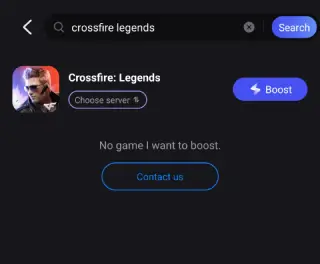
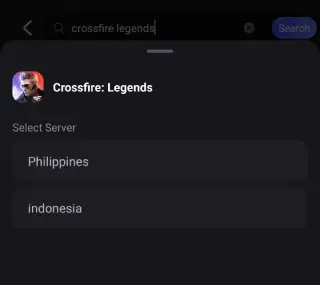
Step 4: Enter the server selection interface, where you can change to a stable server.
Step 5: Then click the “Boost” button to enhance the gaming experience and play Crossfire: Legends from anywhere.
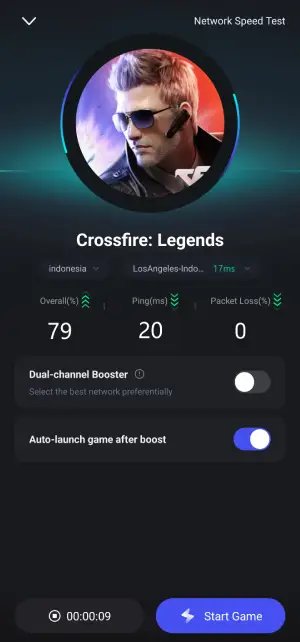
Step 6: Finally, go back to Crossfire: Legends and start playing it without any lag.
Hot Related: Where Winds Meet Final Beta Test: Everything You Need to Know
Conclusion
The Crossfire Legends SEA beta is more than just a nostalgic revival. It’s a mobile shooter built with the future in mind. With competitive modes, legendary content, and accessible systems, the game is shaping up to be a must-play title in 2025. Whether you're in Southeast Asia or halfway across the world, with tools like LagoFast Mobile and the right guide, you can dive into the action on day one. Don’t miss your chance to join the beta, master your aim, and relive the Crossfire experience.
Boost Your Game with LagoFast for Epic Speed
Play harder, faster. LagoFast game booster eliminates stutter and lags on PC, mobile, or Mac—win every match!
Quickly Reduce Game Lag and Ping!
Boost FPS for Smoother Gameplay!