
Quick Answer
CONTROL Resonant’s listed launch languages include English, French, Italian, German, Spanish, Japanese, Korean, Brazilian Portuguese, Chinese, Polish, Russian, Turkish, and Ukrainian. Arabic is not listed. To play in Arabic, use LagoFast Game Translator for on-screen text, subtitles, chat, typed input, voice, and screenshots while keeping the original game files unchanged.

- ✅ Reduce Lag and High Ping.
- ✅ Boost FPS at the Same Time.
- ✅ Support 8000+ Popular Online Games.
- ✅ Stable Server Connection
Part 1: CONTROL Resonant Official Language Support
Part 2: Why Arabic Players Need a Translation Tool
Part 3: What a CONTROL Resonant Translation Tool Should Translate
Part 4: How to Translate CONTROL Resonant in Real Time With LagoFast
Part 5: Best Translation Workflow for Story, Missions, and Combat
Part 6: Translation Accuracy, Privacy, and Performance Tips
Part 7: FAQs About CONTROL Resonant Translation

Part 1: CONTROL Resonant Official Language Support
Remedy’s sequel is a story-heavy action RPG set in a warped Manhattan. Players follow Dylan Faden through supernatural threats, ability upgrades, and Federal Bureau of Control lore. Clear translation matters because a missed line can hide a quest condition or story clue.
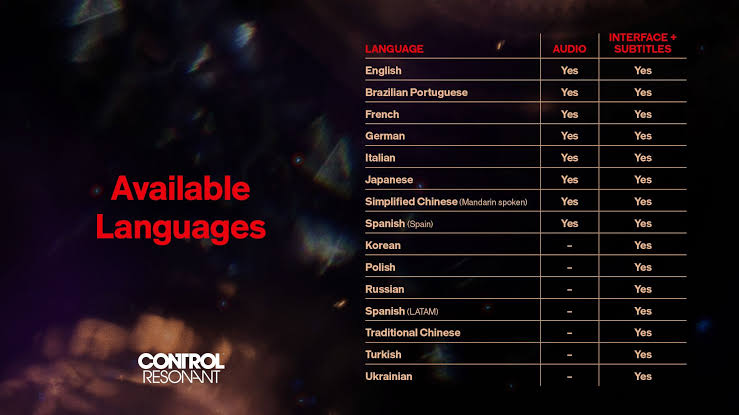
Launch language availability
|
Language |
Interface |
Full audio |
Subtitles |
|
English |
Yes |
Yes |
Yes |
|
French, Italian, German |
Yes |
Yes |
Yes |
|
Spanish – Spain |
Yes |
Yes |
Yes |
|
Japanese |
Yes |
Yes |
Yes |
|
Korean |
Yes |
No |
Yes |
|
Brazilian Portuguese |
Yes |
Yes |
Yes |
|
Simplified Chinese |
Yes |
Yes |
Yes |
|
Latin American Spanish |
Yes |
No |
Yes |
|
Traditional Chinese |
Yes |
No |
Yes |
|
Polish, Russian, Turkish, Ukrainian |
Yes |
No |
Yes |
|
Arabic |
Not listed |
Not listed |
Not listed |
The absence of Arabic is the key search intent behind CONTROL Resonant Arabic. The current official menu does not provide a native Arabic interface, audio track, or subtitle option.
The game uses specialized terms such as paranatural, Hiss, Mold, FBC, and altered items. A game-focused workflow can translate the actual screen without leaving the scene.
Part 2: Why Arabic Players Need a Translation Tool
CONTROL Resonant combines cinematic dialogue with environmental storytelling. Information appears in subtitles, mission prompts, collectibles, menus, ability descriptions, and combat notifications. Copying every sentence into a separate app interrupts the game.
Common translation pain points
- Subtitle lines disappear before they can be copied.
- Mission objectives use fictional names and technical terms.
- Menus and upgrade descriptions contain dense wording.
- Audio dialogue may continue while the player is exploring.
- Screenshots can include several text boxes at once.
- Community guides may use different English names.
A useful CONTROL Resonant translation tool should work during play and let players choose Arabic without changing original files or installing an unofficial language patch.
Part 3: What a CONTROL Resonant Translation Tool Should Translate
Different types of text need different translation methods. A strong setup gives the player more than one way to understand the game without repeatedly leaving the application.
Real-time screen translation
LagoFast can translate visible scenes, menus, interface elements, and subtitles while the game is running. This covers tutorials, objectives, item descriptions, and dialogue boxes.
Chat and typed-input translation
LagoFast can translate typed messages and chat history into a selected language. This helps when players discuss lore, share screenshots, or use community tools.
Voice and dialogue translation
Voice audio can be converted into translated text and speech, useful when dialogue continues during exploration.
Screenshot translation
A screenshot can be translated within seconds for pause menus, collectibles, codex pages, upgrade screens, and puzzle clues.
LagoFast advertises support for more than 100 languages, including Arabic, English, Spanish, French, German, Portuguese, Turkish, Japanese, Korean, Thai, Vietnamese, and Russian. That range makes it useful for multilingual households, content creators, and players switching between games from different regions.
Part 4: How to Translate CONTROL Resonant in Real Time With LagoFast
The setup is short because the translation layer works alongside the game rather than replacing its installation. Keep the original audio and subtitles enabled first; translation can then be used only when a line or menu needs clarification.
Step-by-step tutorial for using LagoFast with CONTROL Resonant
Step 1. Click the Free Trial button to download and install LagoFast Free Trial.
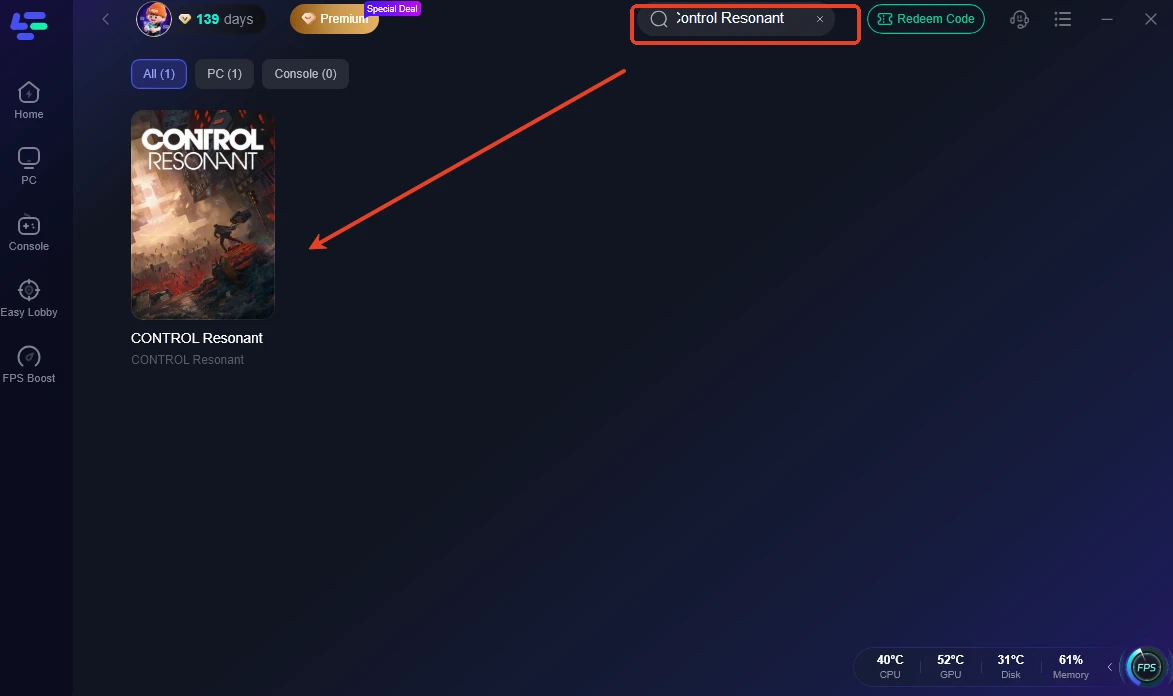
Step 2. Search for CONTROL Resonant. Select the correct game profile and open its available game tools.
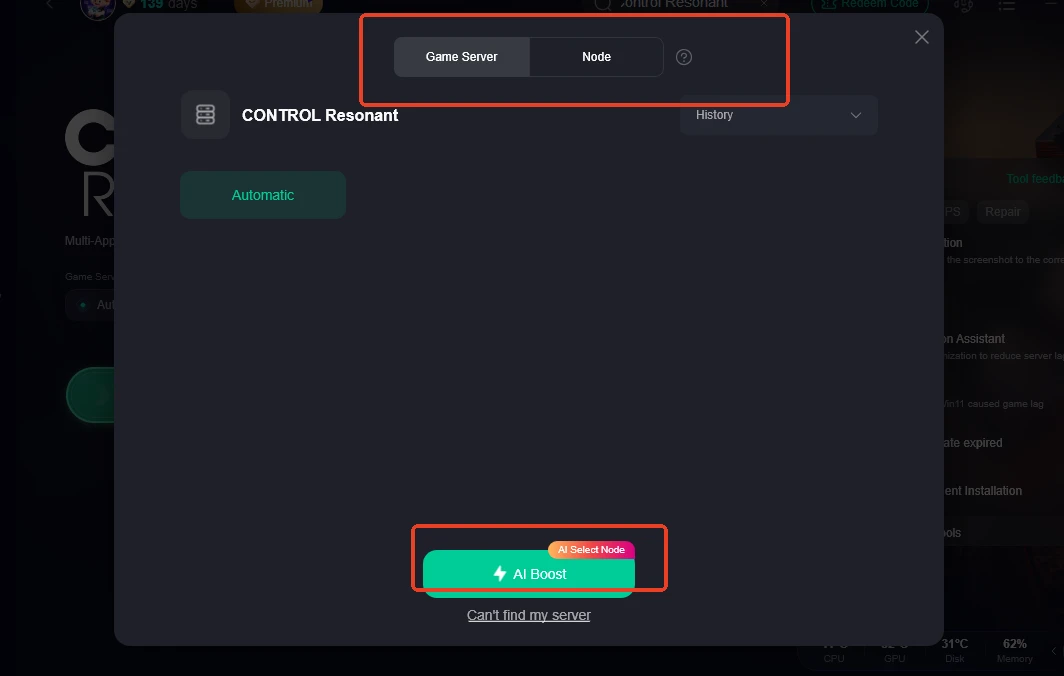
Step 3. Open the translation feature. Choose the screen, one-click, screenshot, input, or voice translation mode that matches the current task.
Step 4. Select Arabic as the target language. Choose Arabic or another supported language and adjust the translation display so it does not cover important controls or subtitles.
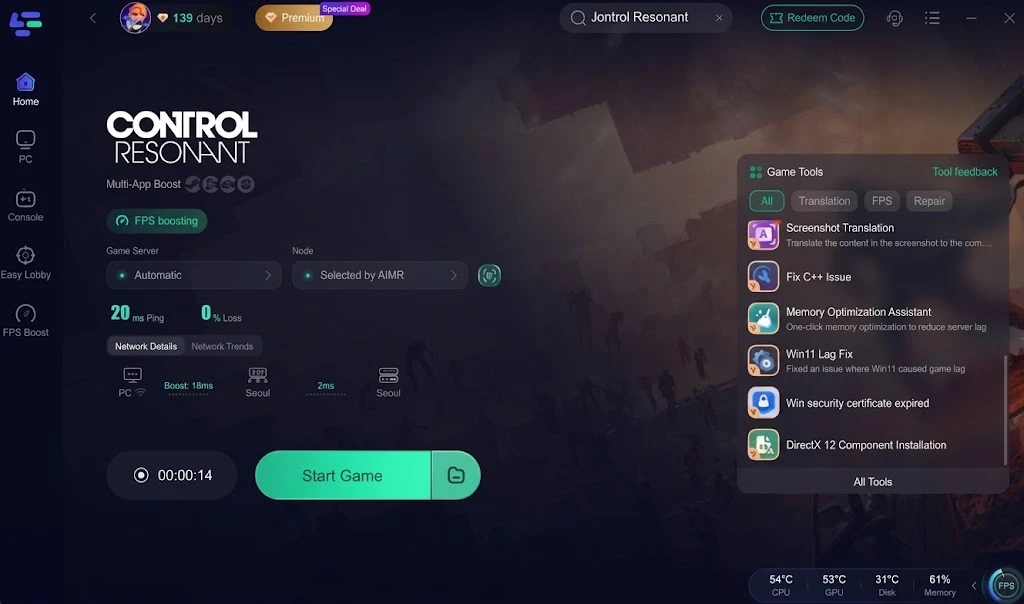
Step 5. Launch the game and translate as needed. Use live translation for subtitles and menus, screenshot translation for codex pages, and voice translation for dialogue that is difficult to follow.
Keep English audio for character delivery, use Arabic for difficult text, and preserve official terminology for guide searches. Content creators can translate scenes while recording.
Part 5: Best Translation Workflow for Story, Missions, and Combat
Use translation selectively. Translating every word can clutter the screen during fast combat. Separate reading-heavy moments from action-heavy moments.
Story and dialogue
Keep original subtitles enabled when possible. Use real-time translation for unfamiliar lines and pause when a phrase contains an important name or lore term.
Missions and collectibles
Use screenshot translation for documents, case files, collectibles, and long codex entries. Keep the original screenshot for terminology checks.
Combat and upgrades
Translate ability descriptions before major encounters. During combat, translate only short prompts or status effects.
|
Game situation |
Best translation mode |
|
Subtitles and short prompts |
Real-time screen translation |
|
Long documents and codex pages |
Screenshot translation |
|
Voice-heavy scenes |
Voice-to-text translation |
|
Chat or typed messages |
Input translation |
|
Ability and item menus |
Screen or screenshot translation |
Part 6: Translation Accuracy, Privacy, and Performance Tips
AI translation is useful but not infallible. Fictional terms, sarcasm, names, and paranormal vocabulary may produce awkward results.
Improve translation quality
- Translate complete sentences instead of isolated words.
- Keep the original game language visible when checking names.
- Compare confusing lines with an English guide or glossary.
- Avoid translating a blurred or heavily animated frame.
- Use screenshots when the text remains on screen for only a moment.
Keep the game responsive
Use a smaller panel during combat and avoid stacking overlays. If frame time changes, close unnecessary applications and compare with translation disabled.
Use safe installation practices
Do not replace game files with unofficial language packs. An overlay is easier to remove and leaves the original installation intact. Keep the game and tool updated.
Part 7: FAQs About CONTROL Resonant Translation
Does CONTROL Resonant support Arabic officially?
Arabic is not listed among the current launch interface, audio, or subtitle languages. Players who want Arabic can use an external translation workflow.
How to Play CONTROL Resonant in Arabic?
Install LagoFast, select CONTROL Resonant, open the translation tool, choose Arabic, and use real-time, screenshot, input, or voice translation while playing.
Can I translate CONTROL Resonant subtitles in real time?
Yes. A screen translation mode can read visible subtitles and interface text while the game is running. Accuracy can vary with font size, motion, and fictional terminology.
Can the tool translate CONTROL Resonant voice dialogue?
Voice audio can be converted into translated text and speech. This is useful when dialogue continues during exploration or when reading subtitles is inconvenient.
Can I translate CONTROL Resonant screenshots?
Yes. Screenshot translation is suitable for codex entries, documents, upgrade menus, and puzzle clues. It can return a translated result within seconds.
Which languages can I use besides Arabic?
LagoFast advertises more than 100 languages, including English, Spanish, French, German, Portuguese, Turkish, Japanese, Korean, Thai, Vietnamese, Russian, and Arabic.
Will translation change the CONTROL Resonant game files?
The overlay-based workflow is designed to translate what appears on screen rather than replace the game’s official language files. Keep the original installation and use trusted software.
Is a translation overlay useful for content creators?
Yes. Creators can understand dialogue and menus during recording, explain lore more accurately, and prepare translated clips without manually copying every line after the session.
Key takeaway
CONTROL Resonant does not currently list Arabic among its official launch languages, but Arabic-speaking players can still follow the campaign, missions, upgrades, and lore through a real-time translation workflow. LagoFast supports screen, subtitle, chat, input, voice, and screenshot translation across more than 100 languages, including Arabic. Use it selectively, preserve original terminology, and keep the game’s native files untouched for a smoother and safer setup.

Boost Your Game with LagoFast for Epic Speed
Play harder, faster. LagoFast game booster eliminates stutter and lags on PC, mobile, or Mac—win every match!
Quickly Reduce Game Lag and Ping!
Boost FPS for Smoother Gameplay!