
Starfield has undergone a massive transformation since its initial launch. With the recent release of Update 1.16.236 (the "Free Lanes" update) and the Terran Armada DLC, the Settled Systems are more crowded and more technically demanding than ever. Whether you are navigating the new Cruise Mode or battling the robotic forces of the Terran Armada, the right modifications are essential to tailor the experience to your liking. This Starfield Essential Modding Guide 2026 provides a curated list of working mods to help you optimize performance, enhance immersion, and fix those lingering Bethesda quirks.

- ✅ Reduce Lag and High Ping.
- ✅ Boost FPS at the Same Time.
✅ Support 2000+ Popular Online Games.
✅ Popular Mods Supported.
✅ Boost Game Loading Speed.
Part 1: The State of Starfield Modding in 2026
Part 2: The Core Framework of Starfield Modding
Part 3: List of Working Mods for Starfield: Updated Version
Part 4: What Mods are a Must-Have for your Starfield Play?
Part 5: Best Starfield Mods to Improve the Game in 2026
Part 6: How to Install Mods on Steam PC
Part 7: Boost Your Starfield Experience with LagoFast
Part 8: Important Notes: Avoiding the "Crash to Desktop"
Part 1: The State of Starfield Modding in 2026
Since the launch of the Creation Kit, the modding scene has split into two main avenues: the in-game Creations menu and the classic Nexus Mods ecosystem.
For the average player, the Creations menu is a godsend for "plug-and-play" simplicity. But for those of us wanting a truly transformative experience, the Starfield mods on Steam are still best managed through external tools like Vortex or Mod Organizer 2. The reason? High-level mods like the Starfield Script Extender (SFSE) still require a manual touch to ensure your game doesn't crash every time you enter a Grav Jump.
Part 2: The Core Framework of Starfield Modding
Before you download that shiny new ship part, you need a stable foundation. Without these, most of the "best mods for Starfield" simply won't run.
Starfield Script Extender (SFSE)
This is the "brain" of the modding community. SFSE expands the game's scripting capabilities, allowing for complex UI changes and gameplay mechanics.
Note: Every time Bethesda drops an update like 1.16.236, SFSE must be updated. Always launch your game via sfse_loader.exe rather than the Steam "Play" button.
Baka Achievement Enabler
Bethesda is notoriously strict about achievements. If you use a single mod, your save file is flagged as "Modded," and achievements are disabled. This mod acts as a bypass, keeping those Steam trophies popping even if you're flying a Star Destroyer.
Address Library for SFSE Plugins
A technical must-have. It helps SFSE mods stay compatible across different game versions, reducing the frequency of crashes after small patches.
Part 3: List of Working Mods for Starfield: Updated Version
|
Mod Name |
Category |
Primary Function |
Requirement |
|
SFSE |
Utility |
Scripting Engine |
Steam Version |
|
StarUI HUD |
UI |
Cleaner Interface |
None |
|
Starvival |
Gameplay |
Survival Mechanics |
SFSE |
|
Baka Achievement Enabler |
Utility |
Keep Achievements |
SFSE |
|
Moon Jumper Tweaks |
Vehicle |
Improves REV-8 / Moon Jumper |
None |
|
X-Tech Expanded |
Crafting |
More Legendary Tiers |
DLC Required |
Part 4: What Mods are a Must-Have for your Starfield Play?

If you only have 10 minutes to mod your game, focus on these three. They address the most common frustrations reported by the community in 2026.
- Baka Achievement Enabler: Bethesda disables achievements the moment you toggle a mod. This "must-have" ensures you still get your Steam trophies while enjoying a customized game.
- Cleanfield: Removes the seizure warning and Bethesda logo at startup, dropping you straight into the main menu.
- Ship Builder Tolerance Tweaks: If you’ve ever been frustrated by a "module is overlapping" error when it clearly isn't, this mod relaxes the collision boxes, allowing for much more creative ship designs.
Part 5: Best Starfield Mods to Improve the Game in 2026
With the Terran Armada DLC introducing new robotic enemies and ship systems, these mods ensure your gameplay experience is polished and immersive.
UI and Quality of Life (QoL)
StarUI Inventory & HUD:
The vanilla UI is functional, but StarUI is professional. It adds compact lists, item icons, and much-needed data (like value-to-weight ratios) directly into your menus. In 2026, the updated version also supports the new X-Tech crafting resources introduced in 1.16.236.
Undelayed Menus:
Does it bother you that menus take half a second to fade in? This mod removes those transitions, making the game feel significantly snappier.
Cleanfield:
Removes the seizure warning and the Bethesda logo on startup. It gets you into the game faster, which is essential for those quick sessions.
Gameplay and Immersion
Starvival (The Immersive Survival Addon):
If you find the base game too easy, Starvival is the answer. It adds hunger, thirst, sleep, and—most importantly—fuel management. In the latest 2026 version, it integrates perfectly with the "Free Lanes" cruise mode, requiring you to manage engine heat and fuel consumption during long-distance interplanetary travel.
The Gang’s All Here:
Why settle for one companion? This mod allows you to bring multiple crew members on away missions, turning your exploration into a true squad-based tactical experience.
Royal Galaxy:
This is a comprehensive combat and encounter overhaul. It scales enemy levels more aggressively and improves AI behavior, making the new Terran Armada robots a genuine threat rather than just bullet sponges.
Performance Boosters
Steam Deck Essentials:
For the handheld gamers, this is a non-negotiable. It optimizes textures and shadows specifically for the Deck’s hardware, maintaining a steady 30-40 FPS even in dense areas like New Atlantis.
Disk Cache Enabler:
Helps reduce the "stuttering" often felt when loading new assets in space or landing on planet surfaces.
Part 6: How to Install Mods on Steam PC
Installing mods has become easier, but there are still two primary paths you should know.
Method A: The Creations Menu (The Easy Way)
Step 1. Launch Starfield and select Creations from the main menu.
Step 2. Browse the "Best Starfield Mods" list or search for specific ones.
Step 3. Click Download. The game will automatically handle the load order.
Pros: One-click install, works on consoles.
Cons: Limited selection, fewer "deep" mechanical mods.
Method B: Nexus Mods & Vortex (The Pro Way)
Step 1. Set up the .ini file: Navigate to Documents\My Games\Starfield and create (or edit) StarfieldCustom.ini.
Step 2. Install Vortex: Download the Vortex Mod Manager from Nexus Mods.
Step 3. Download Mods: Use the "Mod Manager Download" button on Nexus pages.
Step 4. Manage Load Order: Vortex will alert you to conflicts. For large overhauls like Starvival, ensure they are loaded after basic UI mods.
Part 7: Boost Your Starfield Experience with LagoFast
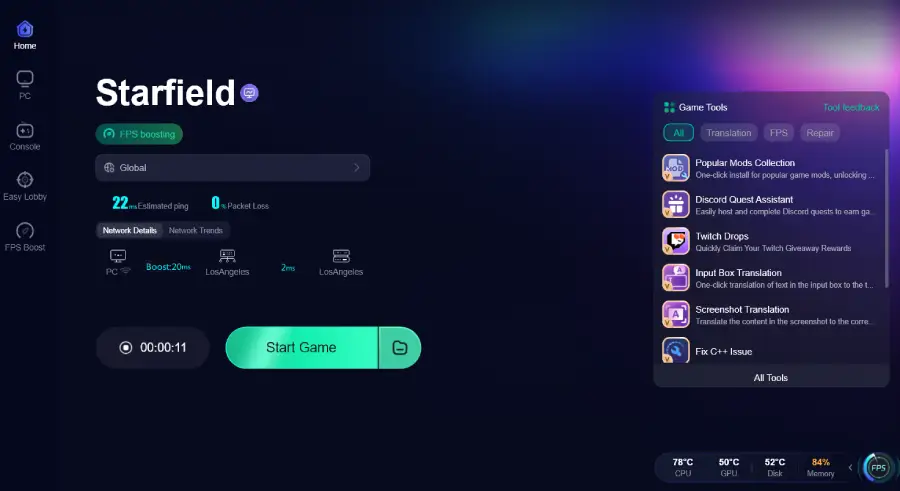
While mods can fix gameplay and UI, they can’t always fix server-side lag or local network stutters, especially if you're streaming the game or playing on a handheld. LagoFast can help stabilize your connection and optimize your PC’s performance, ensuring that your modded Starfield runs as smoothly as a Class-C Reactor. Whether you're exploring the new Anchorpoint Station or battling the Terran Armada, a lag-free experience is the ultimate "must-have mod."
Tutorial to Use LagoFast to Optimize The Starfield Gaming Experience:
Step 1: Click the Free Trial button to download and install LagoFast.
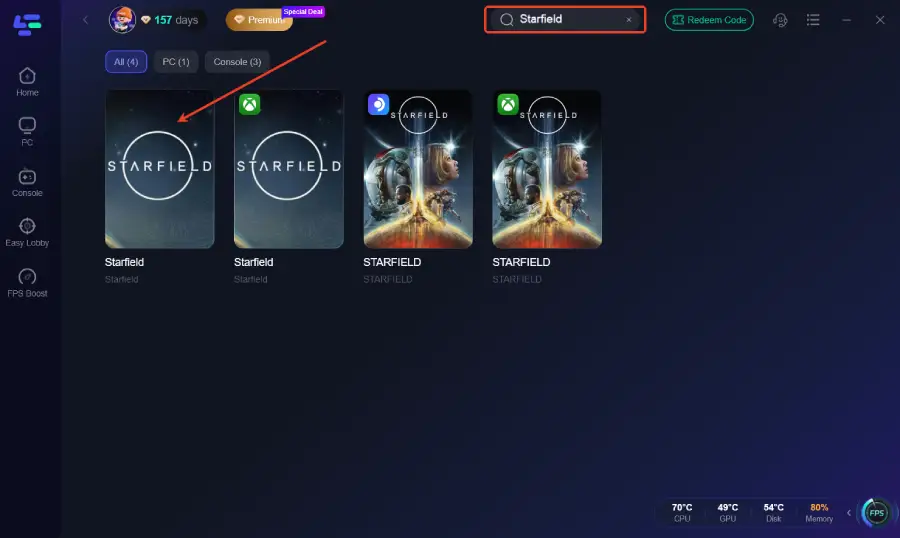
Step 2: After installation, search "Starfield" in the search bar and select the game.
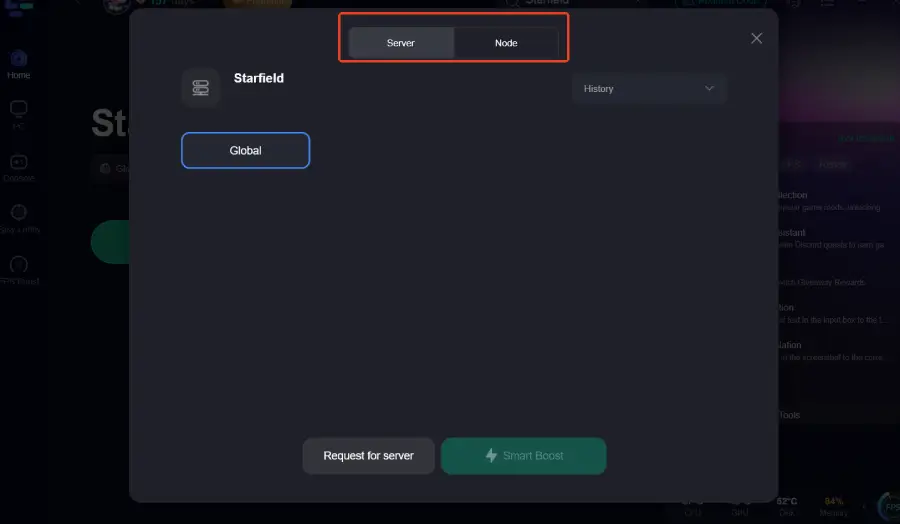
Step 3: Choose your preferred server node and click "Smart Boost" to start optimizing.
Step 4: Launch your game and enjoy smooth, optimized gameplay with lower ping and packet loss.
Part 8: Important Notes: Avoiding the "Crash to Desktop"
Modding is an art, not a science. To keep your 2026 playthrough stable, remember these three rules:
- The "SFSE" Rule: If the game won't launch after an update, SFSE is the culprit. Wait 24-48 hours for the developers to update the script extender.
- Load Order Matters: Always place "Master" files (like the Starfield Community Patch) at the top and specific "Overhauls" (like Starvival) near the bottom.
- Achievement Warning: Using any mod through Nexus will disable achievements unless you have the Baka Enabler installed.
Conclusion
With Starfield update 1.16.236, Bethesda has finally given us the "space" in space exploration. By following this Starfield Essential Modding Guide, you can take that foundation and turn it into a personalized masterpiece. From the visual clarity of StarUI to the brutal challenge of Starvival, these are the best mods for Starfield in 2026. To ensure your modded experience is as fluid as possible, especially when downloading massive texture packs or navigating the new DLC areas, using LagoFast is a game-changer.

Boost Your Game with LagoFast for Epic Speed
Play harder, faster. LagoFast game booster eliminates stutter and lags on PC, mobile, or Mac—win every match!
Quickly Reduce Game Lag and Ping!
Boost FPS for Smoother Gameplay!