
The release of Call of Duty: Black Ops 7 has gamers everywhere excited to dive in. But that excitement can quickly turn to frustration when you encounter the dreaded Call of Duty: Black Ops 7 server down message. Don’t worry — this comprehensive guide will help you understand server issues and get back to gaming.

- ✅ Reduce Lag and High Ping.
- ✅ Boost FPS at the Same Time.
- ✅ Ensure Stable Server Connection.
- ✅ Change Server without Latency.
- ✅ Fix Crashing and Stuck Errors.
- ✅ 0% Packet Loss Rate
- ✅ Boost Game Downloading Speed.
Part 1: Black Ops 7 Release Details
Part 2: Why Black Ops 7 Servers Go Down: Symptoms and Causes
Part 3: How to Fix Black Ops 7 Server Issues
Part 4: How to Stabilize Your Black Ops 7 Server Connection
Part 1: Black Ops 7 Release Details
Call of Duty: Black Ops 7 brings an impressive scope of content. As Matt Cox, General Manager of Call of Duty, outlined, players can choose to team up with friends or tackle challenges solo. The game promises to deliver creativity and innovation throughout the experience.
Naturally, this ambitious scope means increased demands on servers. Maintaining a stable server connection will be crucial for enjoying everything the game has to offer.
You May Like: How to Fix Call of Duty: Black Ops 7 Slow Download Speed - 100% Work
Part 2: Why Black Ops 7 Servers Go Down: Symptoms and Causes
Connection Failure
Symptoms: Game stuck at login screen with “Unable to connect to server” or similar errors. This is the clearest sign of Call of Duty: Black Ops 7 servers down.
Causes:
- Official server maintenance or outages: Developers perform regular maintenance for updates and bug fixes, and sometimes experience unexpected server crashes.
- Network firewall/antivirus blocking: Security software may mistakenly identify game connections as threats.
- Server overload: During launch periods or major updates, massive player traffic can overwhelm servers.
High Latency (Lag)
Symptoms: Choppy character movement, delayed response to commands, or characters teleporting back to previous positions. This might make you wonder are Call of Duty: Black Ops 7 servers down, but often the servers are up — it’s just connection quality issues.
Causes:
- Poor network routing: Inefficient or congested paths between your ISP and game servers.
- Geographical distance: Connecting to distant server regions naturally increases latency.
- Local network congestion: Other devices on your network consuming significant bandwidth.
Frequent Disconnects
Symptoms: Sudden disconnections during gameplay, returning to main menu with errors like “Connection to host lost.”
Causes:
- Unstable Wi-Fi connection: Wireless signals are susceptible to interference.
- Corrupted game files: Damaged game client files can disrupt server communication.
- ISP issues: Your internet provider might have intermittent connection problems.
Hot Related: Is Black Ops 7 Cross Platform?
Part 3: How to Fix Black Ops 7 Server Issues
Check Official Server Status
Before making any changes, verify if the problem is on your end. The best way to check Call of Duty: Black Ops 7 server status is through official channels:
- Activision’s official support website for server outage announcements.
- Official social media accounts (particularly Twitter/X) where maintenance and outage information is posted in real-time.
Restart Network Equipment
This remains one of the simplest yet most effective solutions. Power down your router and modem, wait approximately 60 seconds, then restart them. This refreshes your network connection and resolves many temporary issues.
Switch to Wired Connection
Whenever possible, use an Ethernet cable instead of Wi-Fi. Wired connections provide greater stability, less susceptibility to interference, and significantly reduce latency and disconnection risks.
Check Firewall and Antivirus Settings
Temporarily disable your firewall or antivirus software and attempt to run the game. If this resolves the issue, add the Black Ops 7 executable file (.exe) to your security software’s whitelist or exceptions list.
Verify Game File Integrity
- Steam users: Right-click Black Ops 7 in your library, select Properties > Local Files > Verify Integrity of Game Files.
- Battle.net users: Select the game in the client, click Options > Scan and Repair.
This process automatically checks and repairs any corrupted or missing game files.
You May Like: Call of Duty: Black Ops 7 Black Screen – Fixes and Solutions
Part 4: How to Stabilize Your Black Ops 7 Server Connection
While the above methods can address immediate issues, preventing Call of Duty: Black Ops 7 server down problems and ensuring consistent performance requires a more comprehensive solution. This is where a professional tool like LagoFast Game Booster proves invaluable.
LagoFast is an intelligent game booster that goes beyond basic network optimization to comprehensively enhance your gaming environment:
- Smart routing and multi-path connection: Leveraging its globally distributed server network, LagoFast identifies optimal data transmission paths for your game traffic, effectively avoiding network congestion. Even if one path experiences issues, it seamlessly switches to backup routes, maintaining stable connections and eliminating disconnection worries.
- Reduced latency and packet loss: For high ping and packet loss issues, LagoFast significantly lowers latency and reduces packet loss rates. This ensures your every command receives immediate server response, giving you the edge in fast-paced combat situations.
- FPS optimization: Beyond network enhancement, LagoFast’s built-in FPS boost feature optimizes your operating system, fine-tunes CPU and GPU performance, and adjusts in-game graphical settings to eliminate screen tearing and stuttering. It also ensures your graphics drivers remain updated for optimal hardware performance.
How to Use LagoFast to Fix Black Ops 7 Server Problems on PC
Step 1: Click the Free Trial button to download and install LagoFast.
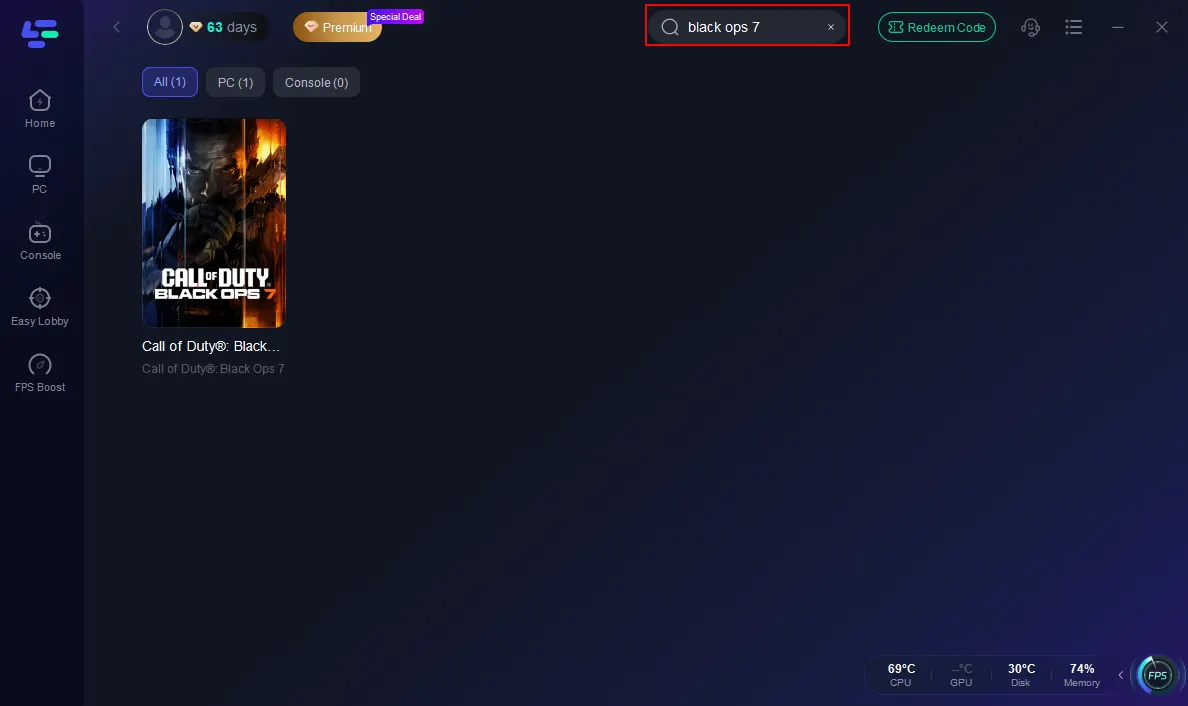
Step 2: Open LagoFast, then click the PC button on the left and search Black Ops 7 in the search bar, and click it after it appears.
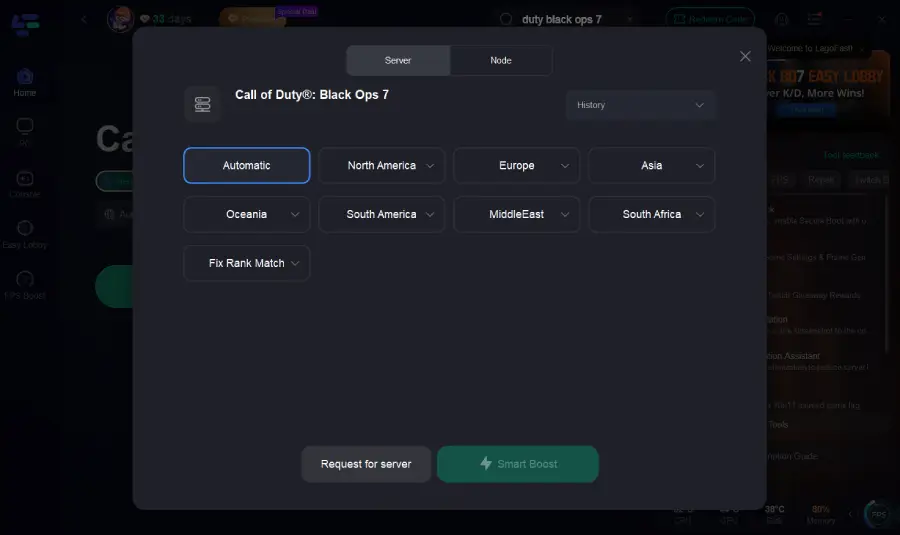
Step 3: Click on “Server” to change to a better server that ensures the Black Ops 7 gaming experience, then click on “Smart Boost”.
Step 4: Launch the game and enjoy an enhanced gaming experience with reduced lag and improved stability.
LagoFast for Console Players
PC gamers aren’t the only ones who benefit. For PlayStation and Xbox users, LagoFast offers the LagoFast Box, a plug-and-play solution that connects directly to your console. It optimizes network routing in real time, stabilizes server connections, and reduces lag, making it the perfect option for console players facing server issues.
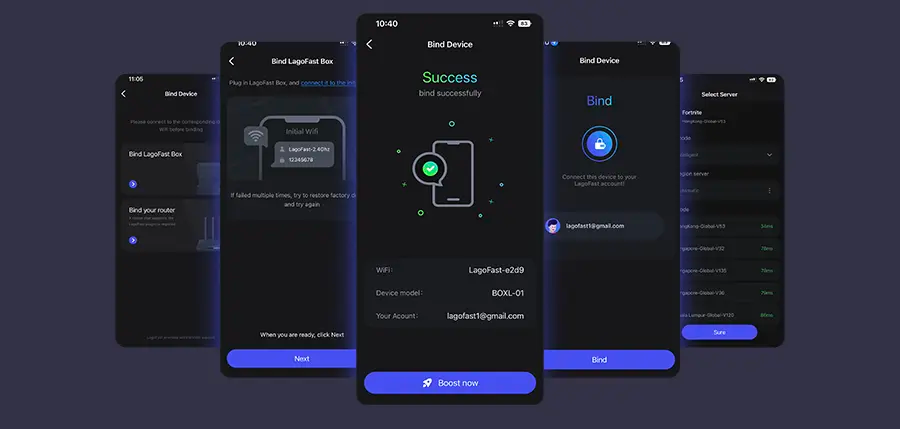
Step 1: Download the LagoFast Console App on your phone to control the LagoFast Box.
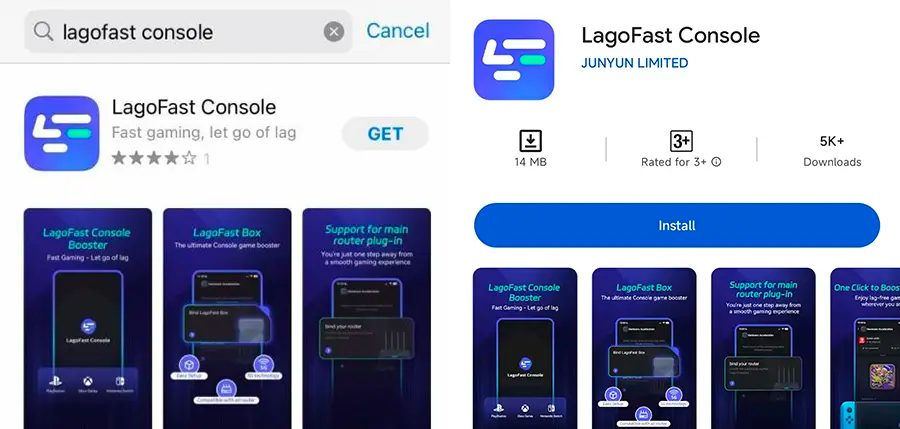
Step 2: Establish a connection between your LagoFast Box, router, and console, choosing between a wired or wireless connection.
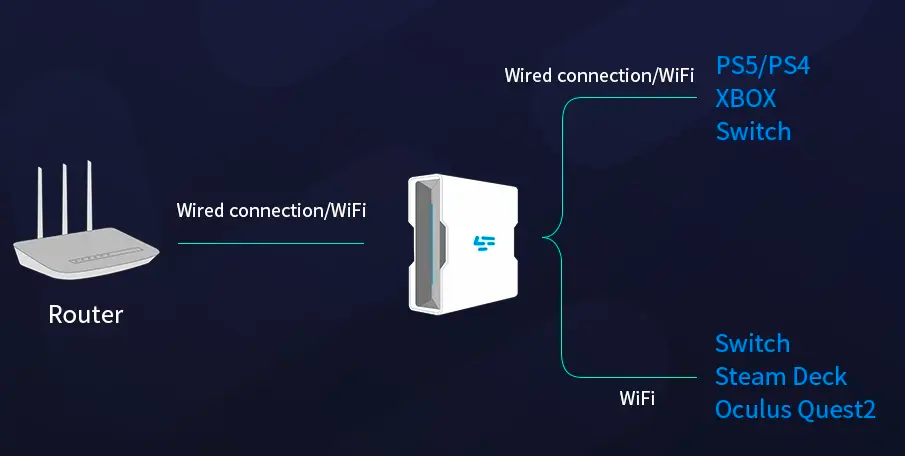
Step 3: Launch the LagoFast Console App and boost Black Ops 7. Once you have completed the binding process with the LagoFast Box, proceed to boost this game within the LagoFast Console App.
Conclusion
Call of Duty: Black Ops 7 promises an exceptional audio-visual experience and intense combat gameplay. When facing potential Call of Duty: Black Ops 7 server down situations, there’s no need to panic. Start by checking official channels and performing basic network troubleshooting to identify the problem’s source.
For players seeking ultimate stability and peak performance, LagoFast provides a comprehensive and powerful solution. By optimizing network paths, boosting FPS, and stabilizing connections across PC and console (via LagoFast Box), it ensures you never miss a crucial moment due to technical issues. Prepare to use LagoFast, bid farewell to latency and disconnections, and fully immerse yourself in the future battlefields of Black Ops 7.
Boost Your Game with LagoFast for Epic Speed
Play harder, faster. LagoFast game booster eliminates stutter and lags on PC, mobile, or Mac—win every match!
Quickly Reduce Game Lag and Ping!
Boost FPS for Smoother Gameplay!