
Counter-Strike 2, the latest iteration of the legendary tactical shooter, demands precision, quick reflexes, and, crucially, a perfectly synchronized game client. Few things are more frustrating for a dedicated player than being ready to drop into a competitive match, only to be met with the dreaded “Your client is out of date” error. This seemingly simple message can halt your gaming session, prevent you from joining friends, or even lead to temporary bans on platforms like FACEIT or Premier matchmaking.
This comprehensive guide, crafted from the perspective of a seasoned PC gamer, will dissect the root causes of this persistent issue and provide you with a robust arsenal of solutions, from basic troubleshooting to advanced network optimizations. Our goal is to get you back into the action swiftly, ensuring your client is always battle-ready.

- ✅ Reduce Lag and High Ping.
✅ Boost FPS at the Same Time.
✅ Support 8000+ Online Games
✅ Change Server Without Latency.
✅ Multiplatform: PC, Console, Mobile.
✅End Connection & Crashing Issue
✅ Support Easy Lobby in all Cod Series
Part 1. Why You See "Your Client is Out of Date" in CS2
Part 2. How To Fix Your Client Needs Update in CS2: Basic Troubleshooting
Part 3. Advanced Fixes: How to fix "your client is out of date" error CS2
Part 4. Cannot Begin Matchmaking Because Your Client Needs to Update CS2? Check Your Connection
Part 5. How to fix CS2 stuck on validating
Part 6. How to Enhance Your Game Experience with LagoFast Game Booster
Part 1: Why “Your Client is Out of Date CS2” Happens in Counter-Strike 2
When you see a message like your client is out of date CS2, it almost always points to a mismatch between your installed version and the game server version. However, the situation is not always straightforward.
Version mismatch between client and server
The most direct reason is a missing or partially applied update. Valve frequently pushes patches, hotfixes, and security updates. If your game is not fully synchronized, matchmaking will immediately block access.
This is why players often encounter messages like your client needs update CS2 even when they believe everything is updated.
“Pseudo outdated” or fake update detection
In some situations, the client is technically updated, but Steam or the game incorrectly detects a mismatch. This is often caused by:
- Cached Steam update data
- Incorrect routing to matchmaking servers
- Temporary server-side version indexing issues
This is where “false outdated” errors happen, making players think they missed an update when they actually didn’t.
Network routing confusion
If your ISP routing is unstable, Steam may connect you to inconsistent matchmaking clusters. This can trigger misleading update prompts even when your installation is correct.
This explains why some users only search solutions like how to fix CS2 stuck on validating or version mismatch errors without any actual update pending.
Part 2: Basic Fixes for CS2 “Your Client Needs Update” Issue
Before moving into advanced methods, most cases of How To Fix Your Client Needs Update in CS2 can be solved with simple client resets and cache clearing.
Restart Steam and Counter-Strike 2 properly
A full restart often resolves temporary desynchronization.
Step-by-step restart process:
- Fully close CS2: End CS2.exe via Task Manager
- Exit Steam completely: Do not leave it running in tray
- Reopen Steam: Let it refresh update services
- Check CS2 update status: Library → CS2 → Properties → Updates
This helps fix cases where your client is out of date CS2 is shown due to delayed update detection.
Clear Steam download cache
Steam cache corruption is one of the most overlooked issues.
Steps:
- Open Steam Settings
- Go to Downloads
- Click “Clear Download Cache”
- Re-login to Steam
This refreshes update metadata and often resolves persistent “your client needs update CS2” messages.
Part 3: Advanced Fixes for “Your Client is Out of Date” CS2 Error
If basic steps fail, deeper file or configuration issues may be involved. This section addresses advanced solutions for how to fix "your client is out of date" error CS2.
Verify integrity of game files
Corrupted installation files can block version synchronization.
Steps:
- Right-click CS2 in Steam library
- Select Properties
- Open Installed Files tab
- Click “Verify integrity of game files”
This ensures missing or broken files are automatically replaced.
Disable beta branches
If you are enrolled in beta builds, version mismatch is expected.
Steps:
- Open CS2 Properties
- Go to Betas tab
- Set Beta Participation to None
This forces Steam to use the stable public version, resolving update mismatch errors.
Part 4: Fix Matchmaking Error “Cannot Begin Matchmaking Because Your Client Needs to Update CS2”
Sometimes the issue appears specifically during matchmaking rather than startup.
Players often report cannot begin matchmaking because your client needs to update CS2 even though the game launches normally.
Reset network configuration
Network instability can cause matchmaking version misreads.
Try the following:
- Run Command Prompt as admin
- Enter:
ipconfig /flushdns - Enter:
netsh winsock reset - Restart PC
Router and connection refresh
- Restart your router fully
- Avoid VPN or proxy tools
- Ensure firewall allows Steam and CS2
These steps help fix hidden routing issues that cause false update errors.
Part 5: Fix CS2 Stuck on Validating Issue During Launch
Another related issue players face is how to fix CS2 stuck on validating, where Steam endlessly checks files without launching the game.
Common causes of validation loop
- Corrupted download cache
- Disk space limitations
- Antivirus file locking
- Incorrect download region
Solutions to break validation loop
- Clear Steam download cache again
- Ensure sufficient disk space
- Change Steam download region
- Temporarily disable antivirus software
This issue often overlaps with update errors like your client is out of date CS2, especially after patches.
Part 6: Improve CS2 Stability with LagoFast Game Booster
Beyond simply fixing error messages, maintaining a stable network route can also help reduce the chances of repeated version mismatch issues appearing during matchmaking. When your connection path is more consistent, Steam and CS2 are less likely to misread update status or place you into unstable matchmaking clusters.
LagoFast Game Booster is built around this idea. Instead of just “boosting ping”, it focuses on stabilizing the route between your PC and CS2 servers, which is especially useful when matchmaking errors or update-related glitches keep appearing.
How to use LagoFast for CS2 optimization
Step 1: Click the Free Trial button to download and install LagoFast Free Trial.
Step 2: Search for CSGO in the top search bar then click the result.
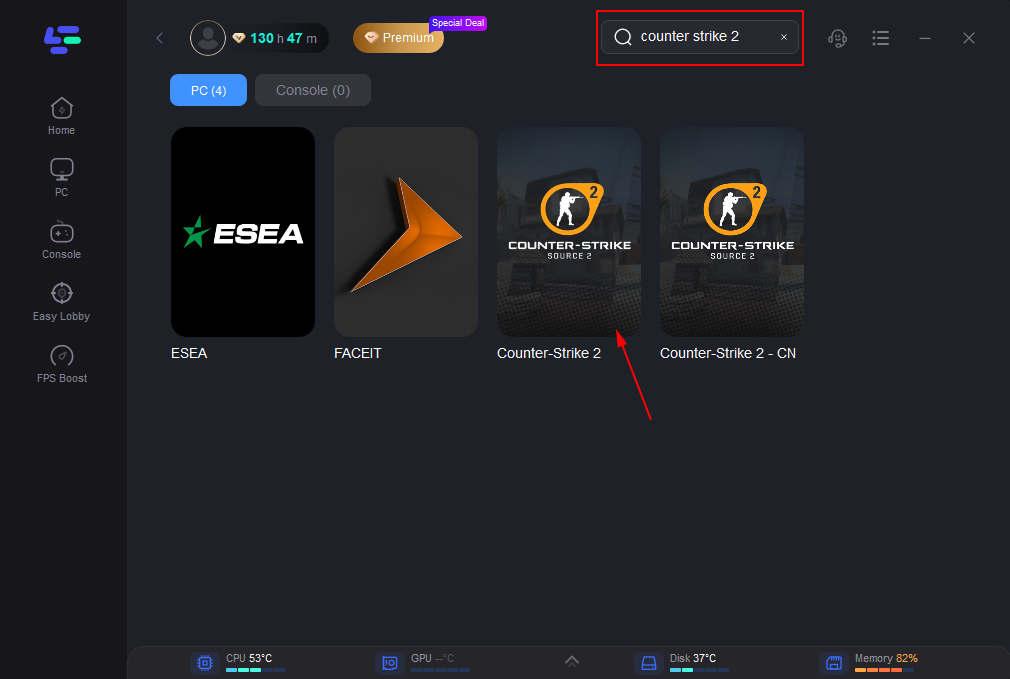
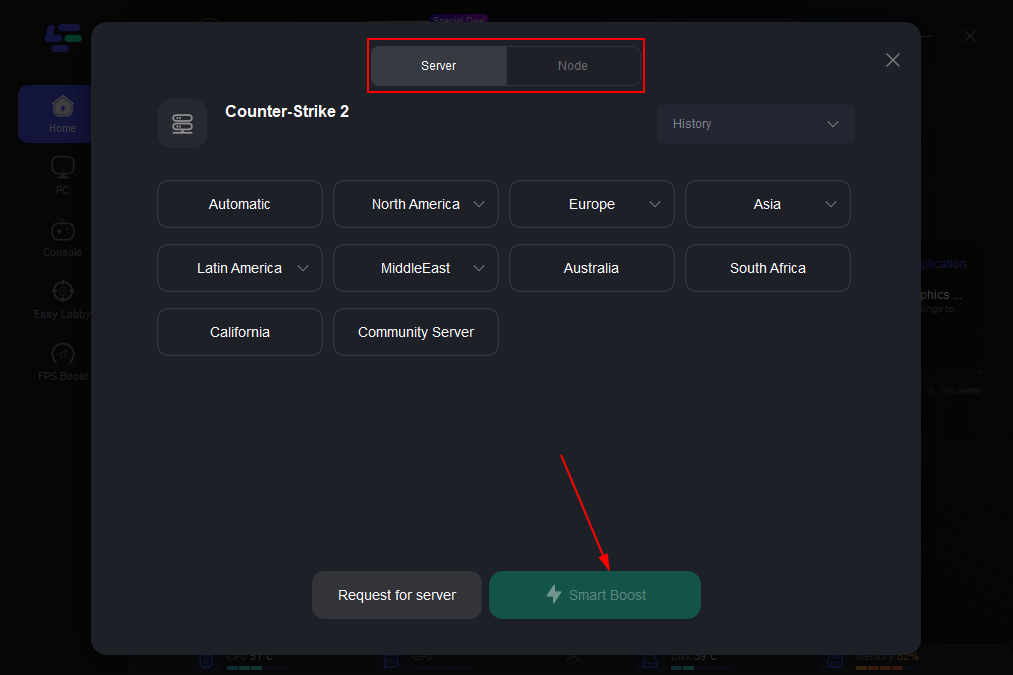
Step 3: Click on “Server” to change to a better server that ensures smooth gameplay, then click on “Smart Boost”.
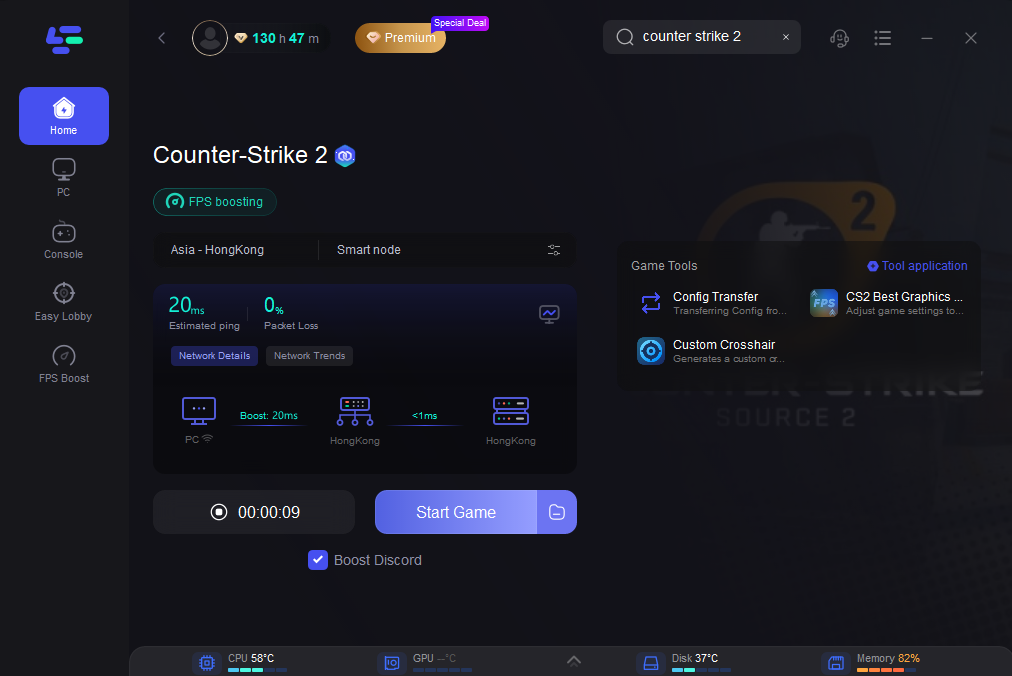
Step 4: Check the specific game ping, packet loss, and multiple path connection on the right side. Finally, click the “Start Game” to play the game.
What you typically gain from it
Once the connection is stabilized, the experience usually becomes noticeably smoother. Players often see more consistent ping instead of sudden spikes, and matchmaking sessions feel more stable overall. Packet loss is also reduced, which helps prevent strange in-game behavior or connection-related interruptions. In some cases, it can even reduce those confusing “false update” or version mismatch warnings caused by unstable routing paths.
Part 7: FAQs
What does “your client is out of date CS2” mean?
It means your game version does not match the server version, often due to missing updates or cache issues.
Do I need reinstall for update errors?
Not usually. Most cases are fixed by cache clearing or file verification instead of reinstalling the full game.
Can the Internet cause update mismatch errors?
Yes. Poor routing can trigger incorrect version detection or matchmaking conflicts.
How often does CS2 update?
Valve updates Counter-Strike 2 frequently, sometimes multiple times per week.
Why does the update bar stay after the patch?
This is usually a Steam UI cache issue, fixed by restarting Steam and clearing download cache.
Conclusion: Final Fix Strategy for CS2 Update and Matchmaking Errors
The “your client is out of date CS2” problem, along with related issues like your client needs update CS2 or CS2 stuck on validating, all share a common root: version synchronization failure between Steam, your local client, and matchmaking servers.
By systematically applying basic fixes, then moving to advanced troubleshooting, most players can resolve issues without reinstalling the game. In cases where network routing contributes to instability, optimization tools can further reduce recurrence.
Once everything is aligned, CS2 returns to its intended state—fast matchmaking, stable servers, and uninterrupted competitive gameplay.
Boost Your Game with LagoFast for Epic Speed
Play harder, faster. LagoFast game booster eliminates stutter and lags on PC, mobile, or Mac—win every match!
Quickly Reduce Game Lag and Ping!
Boost FPS for Smoother Gameplay!