
If you’re trying to jump into Warhammer 40,000: Darktide and suddenly run into a backend error, login failed, or “cannot connect to server,” you’re effectively locked out before you even reach the game. Everything on your side may look fine, but the game still won’t let you in, which usually points to server issues, login session failures, or network routing problems. In this guide, we’ll break down what’s actually causing it and how to fix it step by step so you can get back into the game without guessing.

- ✅Less ping and crashes.
- ✅ Higher FPS and better performance.
- ✅ Support for 2000+ games.
- ✅ Stable connection and region switching.
Part 1: What Does Warhammer 40k Darktide Backend Error and Login Failed Mean
Part 2: Why Warhammer 40k Darktide Backend Error and Login Failed Happens
Part 3: How to Fix Warhammer 40k Darktide Backend Error and Login Failed
Part 1: What Does Warhammer 40k Darktide Backend Error and Login Failed Mean
When you see errors like backend error, login failed, sign in error, or failed to connect to backend, it means the game is failing to complete the connection to its online servers.
In simple terms, your game is trying to log in, but the connection process breaks before it finishes the server handshake.
What this usually leads to:
- Stuck before the character screen
- Endless loading screen
- Instant kick back to login
What it does NOT mean:
- Your account is banned or deleted
- Your character is lost
- The game is permanently broken
In most cases, your account is fine. The issue is the connection path between your client and the servers failing somewhere in the middle.
Part 2: Why Warhammer 40k Darktide Backend Error and Login Failed Happens
There isn't a single cause behind this error. Depending on when it happens, the issue could be related to Darktide's servers, your network connection, or the game client itself.
1. Server status issues
One of the most common causes of Darktide backend error and login failed is server-side instability. Since Darktide requires a constant connection to its online services, any outage or disruption on the backend can prevent you from logging in, even if your internet connection is working normally.
This usually happens after:
- Major patches or content updates
- Peak player hours (heavy login traffic)
- Ongoing backend maintenance
When this happens, you may see:
- Darktide server not responding
- Backend overload or timeout errors
- Login queues failing or looping
In these situations, the best option is to check the current Darktide server status and wait for the servers to recover before trying again.
2. Network routing or connection instability
Even if your internet seems fine, your route to the game servers can still fail or become unstable.
Common triggers include:
- VPN or proxy being active
- ISP routing issues to game servers
- Packet loss or unstable Wi-Fi connections
This is often why you see “cannot connect to server” while other games still work normally.
3. Game or client-side issues after updates
A lot of login problems appear right after a patch or version update.
Typical causes:
- Game version not fully updated
- Corrupted or incomplete game files
- Broken login session or expired authentication token
This is why many players report the issue as “after update cannot log in” or “login failed out of nowhere.”
Part 3: How to Fix Warhammer 40k Darktide Backend Error and Login Failed
Try these fixes in order, starting with the simplest ones first, as many backend and login issues can be resolved without going through every step.
Fix 1: Use LagoFast to stabilize your connection
If you've already confirmed the servers are online but still experience frequent login failures or unstable connections, improving your network route may help.
Using LagoFast can help by:
- Optimizing your network route to Darktide servers
- Lowering ping and reducing connection delay
- Fixing packet loss and unstable connections
- Improving login success rate during backend errors
- Reducing frequent “server not responding” issues
In some cases, it also improves stability during peak hours and after major updates when servers are under heavy load.
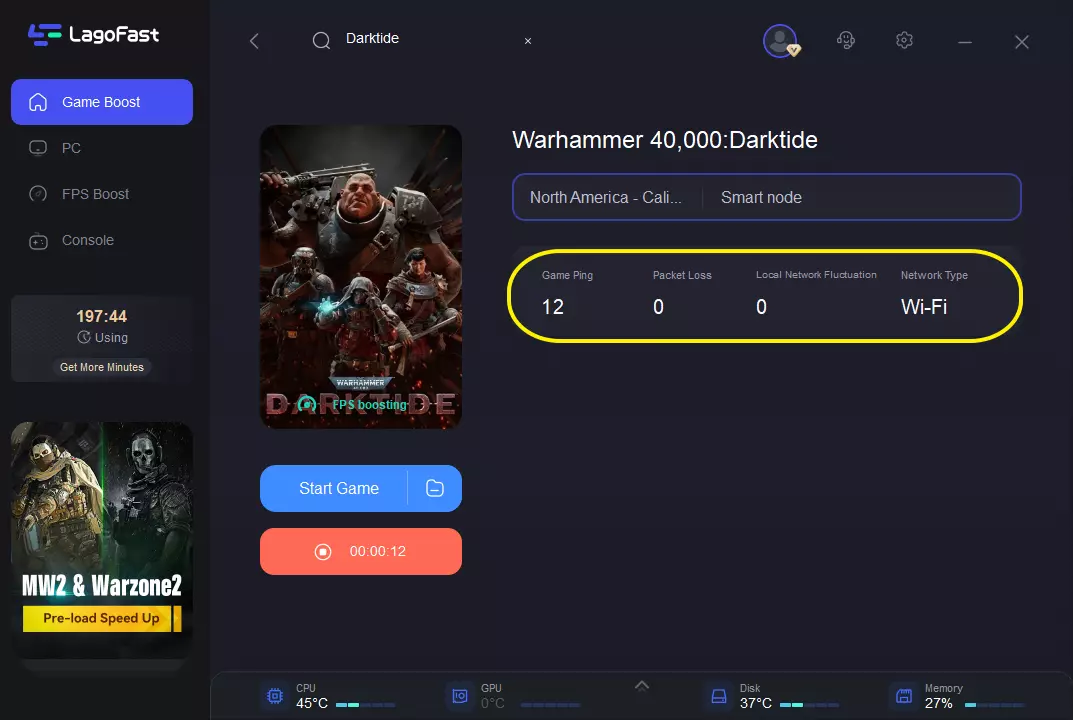
How to Use LagoFast for Warhammer 40k Darktide
Step 1: Click the Free Trial button to download and install LagoFast.
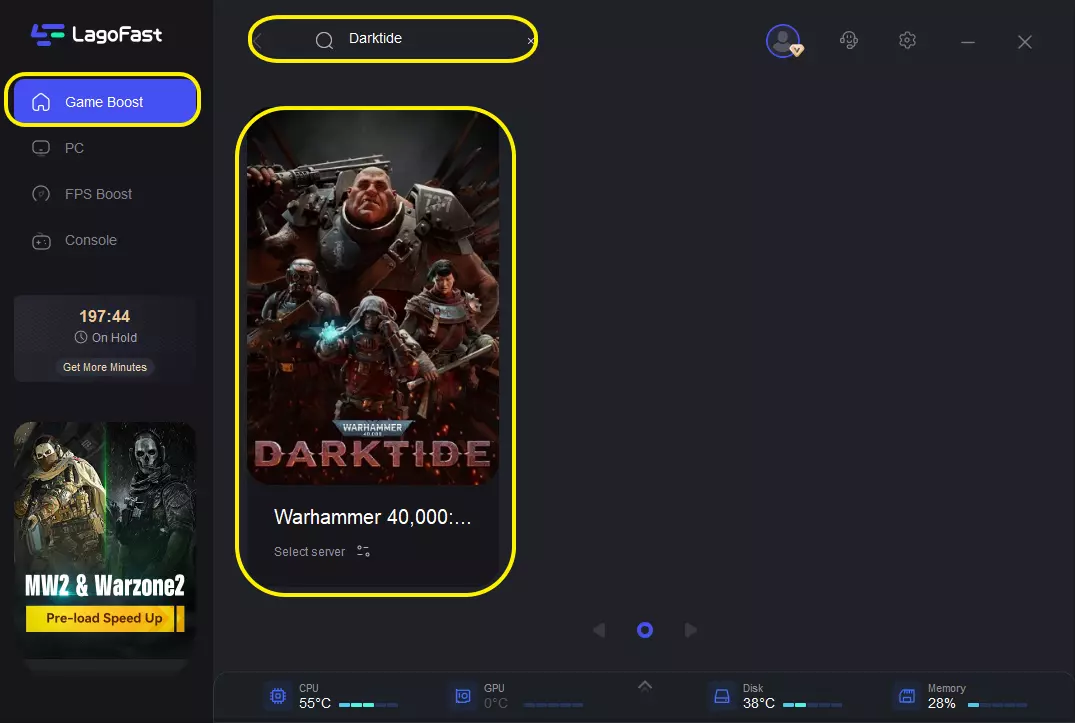
Step 2: After installation, search "Warhammer 40k Darktide" in the search bar and select the game.
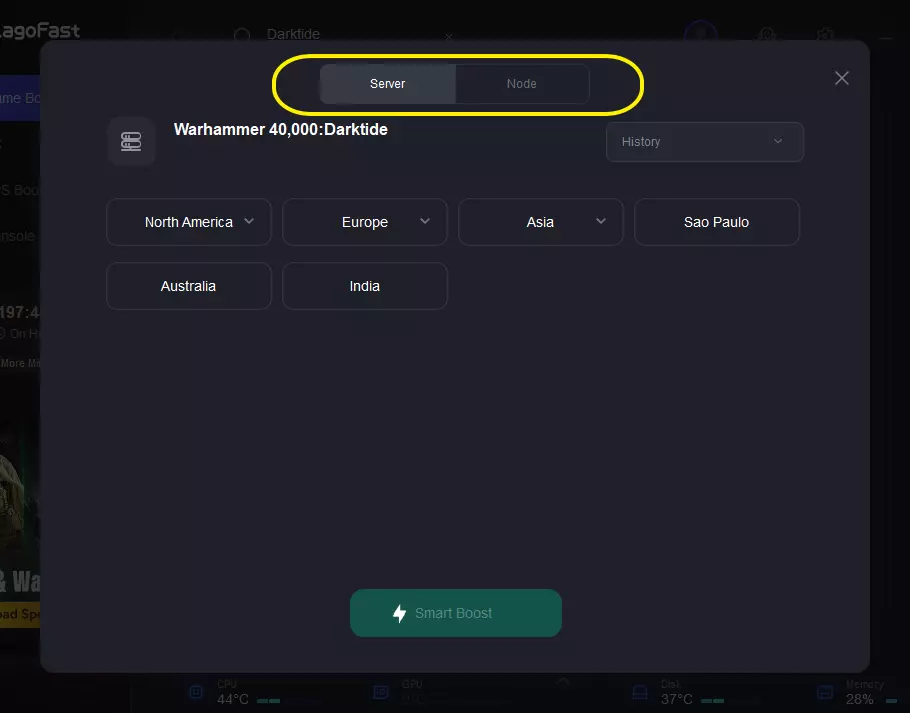
Step 3: Choose your preferred server node and click "Smart Boost" to start optimizing.
Step 4: Launch your game and enjoy smooth, optimized gameplay with lower ping and packet loss.
Fix 2: Check server status first
Before changing any settings on your PC, check whether the issue is affecting other players as well. Backend errors are often reported shortly after updates or during server maintenance.
Look for signs like:
- Widespread login failures
- Backend outage reports
- Issues happening right after patches
If servers are unstable, your only real option is to wait until things recover.
Fix 3: Restart your connection and system setup
A full reset often clears stuck login states.
Do this in order:
- Close Darktide completely
- Restart Steam
- Reboot your PC
- Restart your router
This refreshes your session and clears temporary connection errors.
Fix 4: Fix network or blocking issues
If you still can’t get in, your connection path may be blocked or unstable.
Try:
- Turning off VPN or proxy
- Switching Wi-Fi to Ethernet
- Temporarily disabling firewall (for testing only)
This helps remove interference between your device and the servers.
Fix 5: Verify game files
Corrupted or missing files can break backend authentication.
In Steam:
- Right-click Darktide
- Go to Properties → Installed Files
- Click Verify integrity of game files
Once completed, relaunch the game.
Fix 6: Fix login failed after updates
If the problem started after a patch, it’s often a sync issue.
Try:
- Fully updating the game
- Clearing Steam download cache
- Logging out and back into Steam
This resets authentication with the backend system.
Fix 7: Fix stuck before character screen
If you can’t even reach character selection, the login handshake is failing early.
Try:
- Fully exiting Steam
- Running Steam as administrator
- Testing with a mobile hotspot
If hotspot works, your ISP routing is likely the cause.
Part 4: FAQs
Why does Darktide keep showing backend error?
This usually happens when the game can’t properly connect to its backend servers. It’s often caused by server instability, maintenance, or temporary network issues during peak traffic.
Is login failed a server issue or my PC?
In most cases, it’s a server-side or network-related issue. Your PC is rarely the cause, though problems like unstable connections or corrupted login sessions can sometimes contribute.
Why am I stuck before character selection?
This means the login process fails during the final authentication step, so the game can’t load your account data into the character screen.
Does VPN cause Darktide connection issues?
Yes, it can. VPNs may change your routing path to the servers, which can lead to login failures, backend errors, or connection timeouts depending on the route quality.
Do I need to reinstall the game?
Usually no. Most backend and login issues can be fixed by verifying game files or resolving connection problems. Reinstalling is only needed in rare cases of corrupted installation data.
Conclusion
While Darktide backend errors can be frustrating, they're usually temporary and can often be resolved with a few simple checks. Start by confirming the server status, then work through the connection and game-related fixes. If the problem persists, improving your network stability may help you get back into the game more reliably.
Boost Your Game with LagoFast for Epic Speed
Play harder, faster. LagoFast game booster eliminates stutter and lags on PC, mobile, or Mac—win every match!
Quickly Reduce Game Lag and Ping!
Boost FPS for Smoother Gameplay!