
Quick Answer
The “unknown error while communicating with Rocket League servers” usually means your connection to the servers is unstable. It’s often caused by network issues, server problems, or routing instability. Basic fixes like restarting the game or checking your network may help, and improving routing with tools like LagoFast can further stabilize the connection.
If you’ve seen the “unknown error while communicating with Rocket League servers” message, you’re not alone. It often appears when queuing, finishing a match, or logging in and can seem like a game or account issue. In reality, it’s usually tied to connection stability or how your device communicates with the servers. This guide explains what the error means, why it happens, and the most effective ways to fix it so you can get back into matches smoothly.

- ✅ Reduce Lag and High Ping.
✅ Boost FPS at the Same Time.
✅ Change Server Without Latency. - ✅End Error Codes, Stuck and Crashing Issues
- ✅ Multiplatform: PC, Console, Mobile
Part 1: What the “Unknown Error While Communicating with Rocket League Servers” Means
Part 2: Why Rocket League Servers Fail to Connect (Common Causes)
Part 3: How LagoFast Helps Stabilize Rocket League Connections
Part 4: Step-by-Step Fixes for the Rocket League Unknown Server Error
Part 1: What the “Unknown Error While Communicating with Rocket League Servers” Means
This error appears when Rocket League fails to properly communicate with its servers during key actions like logging in, matchmaking, or syncing match results.
Instead of showing a specific error code, the game uses a generic message, which usually points to a connection breakdown rather than a gameplay issue.
You might see this error when:
- Trying to connect to Epic Online Services
- Queueing for a match
- Returning to the lobby after a game
- Experiencing sudden disconnections
Part 2: Why Rocket League Servers Fail to Connect (Common Causes)
Several underlying issues can trigger this error:
Server-side instability
Rocket League servers may be temporarily down, overloaded, or under maintenance, especially during updates or peak hours.
Unstable internet connection
Packet loss, Wi-Fi drops, or inconsistent latency can interrupt communication with the servers.
Inefficient routing
Even with fast internet, poor routing between your ISP and the game servers can cause delays or failed requests.
VPN or firewall interference
VPNs, proxies, or strict firewall settings may block or reroute traffic in ways that disrupt server communication.
Epic Online Services issues
Since Rocket League relies on Epic services, login or authentication disruptions can prevent successful connections.
Part 3: How LagoFast Helps Stabilize Rocket League Connections
Sometimes the issue isn’t your device or settings, but the quality of the connection path to the servers. Unstable routing can lead to packet loss, high latency, and failed communication.
LagoFast improves connection stability by optimizing the route between your device and Rocket League servers, reducing network inefficiencies that can trigger errors.
Key benefits include:
- Lower ping and faster response times
- Reduced packet loss during gameplay
- More stable connections to servers
- Fewer random disconnects and errors
For players who experience repeated connection issues, improving routing stability can make gameplay more consistent.
How to Use LagoFast to Boost Rocket League:
Step 1: Click the Free Trial button to download and install LagoFast.
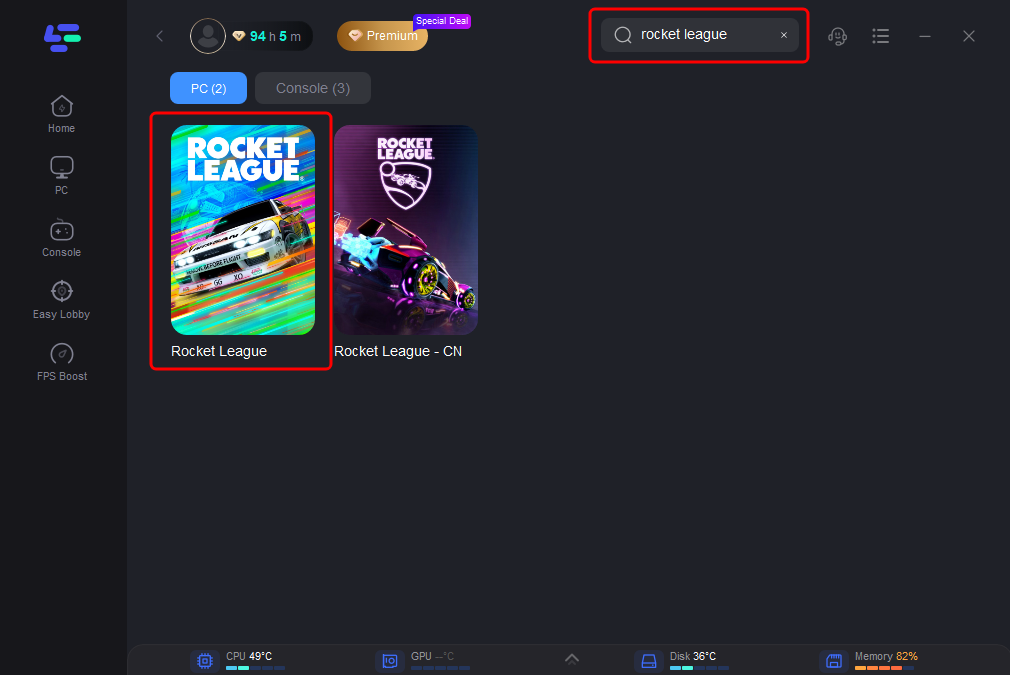
Step 2: After installation, search "Rocket League" in the search bar and select the game.
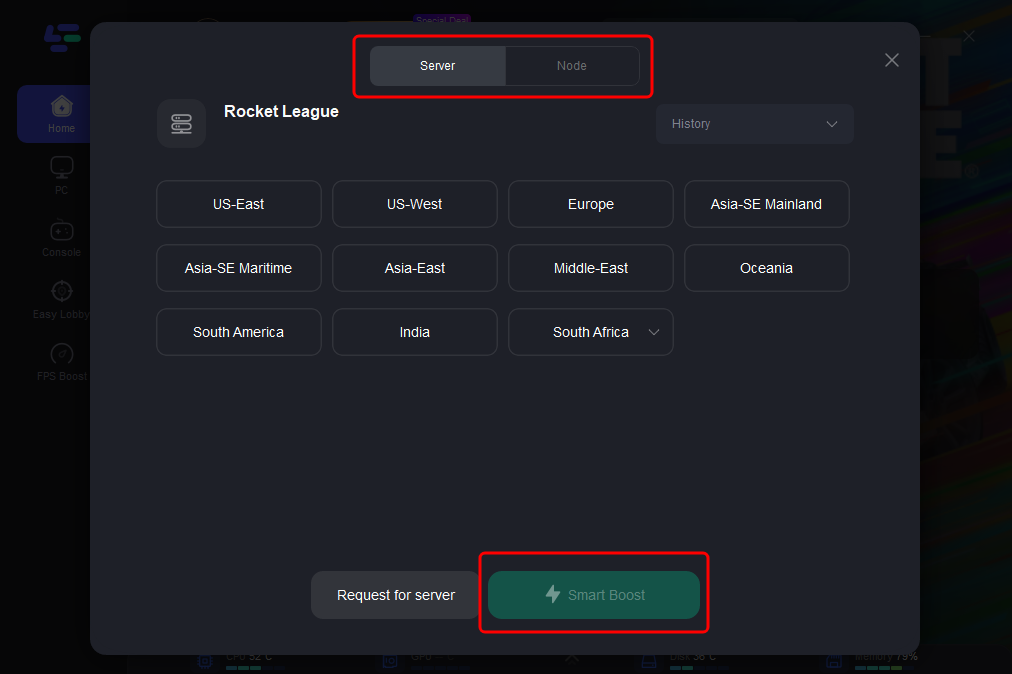
Step 3: Choose your preferred server node and click "Smart Boost" to start optimizing.
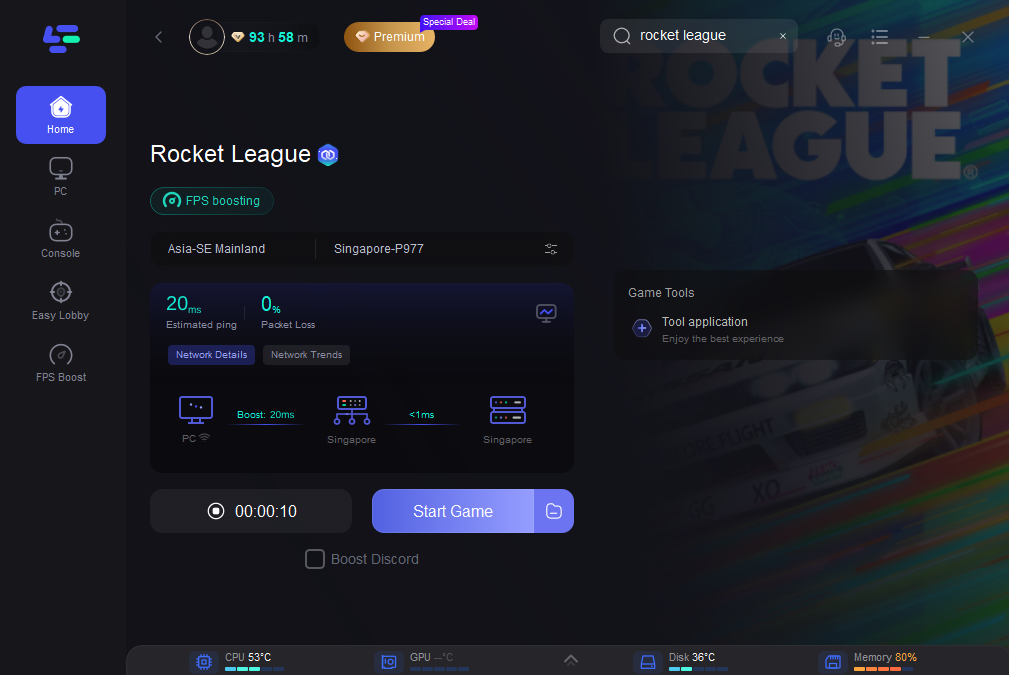
Step 4: Launch your game and enjoy smooth, optimized gameplay with lower ping and no stutter.
Part 4: Step-by-Step Fixes for the Rocket League Unknown Server Error
If you prefer to troubleshoot the issue manually, you can try the following methods:
Restart the Game and Launcher
Close Rocket League completely, exit Steam or Epic Games Launcher, then relaunch the game and reconnect.
Check Server Status
Check whether Rocket League servers are undergoing maintenance or experiencing outages before troubleshooting further.
Stabilize Your Network
Use a wired connection if possible, restart your router, and avoid bandwidth-heavy activities while playing.
Disable VPN or Proxy
Turn off any VPN or proxy services and connect directly through your ISP to avoid routing conflicts.
Verify Game Files
Use Steam or Epic Games to verify Rocket League files and repair any corrupted data.
Reconnect Your Epic Account
Log out of your Epic Games account and log back in to refresh your session and authentication.
Close Background Applications
Disable overlays and unnecessary background apps, and temporarily turn off antivirus or firewall if they may interfere with the connection.
Part 5: FAQs
1. Why does Rocket League keep showing connection errors when trying to queue or join matches?
This usually happens when the game cannot maintain a stable connection to the servers, often due to network instability, routing issues, or temporary server problems.
2. Why does Rocket League fail to connect to Epic Online Services?
This is often caused by authentication issues, server outages, or unstable network connections.
3. Why do I get kicked out or disconnected after finishing a match?
This can happen when the game fails to sync match results properly with the servers, often due to unstable connectivity.
4. Can poor internet connection cause Rocket League server errors?
Yes. High latency, packet loss, or unstable connections can trigger communication errors even if your internet speed is high.
5. How can I quickly fix Rocket League server connection issues?
Common quick fixes include restarting the game, checking server status, switching to a stable connection, and disabling VPNs or proxies.
Conclusion
The “unknown error while communicating with Rocket League servers” is typically linked to unstable connections rather than account-related issues. In most cases, restarting the game, improving your network stability, or removing VPN interference can resolve it. If the issue persists, optimizing your connection routing can help reduce recurring errors and provide a more consistent gameplay experience.

Boost Your Game with LagoFast for Epic Speed
Play harder, faster. LagoFast game booster eliminates stutter and lags on PC, mobile, or Mac—win every match!
Quickly Reduce Game Lag and Ping!
Boost FPS for Smoother Gameplay!