
Quick Answer: If your TFT Set 18 PBE queue is stuck or you are unable to connect to the login queue, the most effective fix is to restart the Riot Client and ensure your internet connection is stable. If the queue number isn't moving for over 10 minutes, it likely means the PBE server is full or undergoing maintenance. To bypass network-related queue stalls and stabilize your connection to the PBE login server, use LagoFast Game Booster to optimize your routing and reduce ping spikes that cause queue disconnects.
The launch of a new TFT set on the Public Beta Environment (PBE) is always a chaotic event. With Set 18 introducing massive gameplay shifts and new mechanics, thousands of players are flooding the single PBE server simultaneously. This surge leads to the dreaded "Login Queue" screen, where players often face hours of waiting, numbers that refuse to budge, or sudden "Unable to Connect" errors that kick them back to the end of the line. Understanding the difference between a server-side bottleneck and a local connection issue is key to getting into the game faster.

- ✅ Reduce Lag and High Ping.
- ✅ Boost FPS at the Same Time.
- ✅ No more PBE Queue Issues.
- ✅ Full Guides For Novice Players.
- ✅ Support 8000+ Online Games.
Part 1: Why Is the TFT Set 18 PBE Queue So Long?
Part 2: Is the TFT Set 18 PBE Server Full or Down?
Part 3: How to Fix TFT Set 18 PBE Queue Stuck
Part 4: How to Fix TFT Set 18 Unable to Connect to the Login Queue
Part 5: Why Is the TFT Set 18 PBE Queue Resetting?
Part 6: How Long Does the TFT Set 18 PBE Queue Take?
Part 7: What Is the Best Time to Join the TFT Set 18 PBE?
Part 8: Can You Skip the TFT Set 18 PBE Queue?
Part 9: How to Enhance Your Game Experience with LagoFast Game Booster
Part 10: TFT Set 18 PBE Queue FAQ
Part 1: Why Is the TFT Set 18 PBE Queue So Long?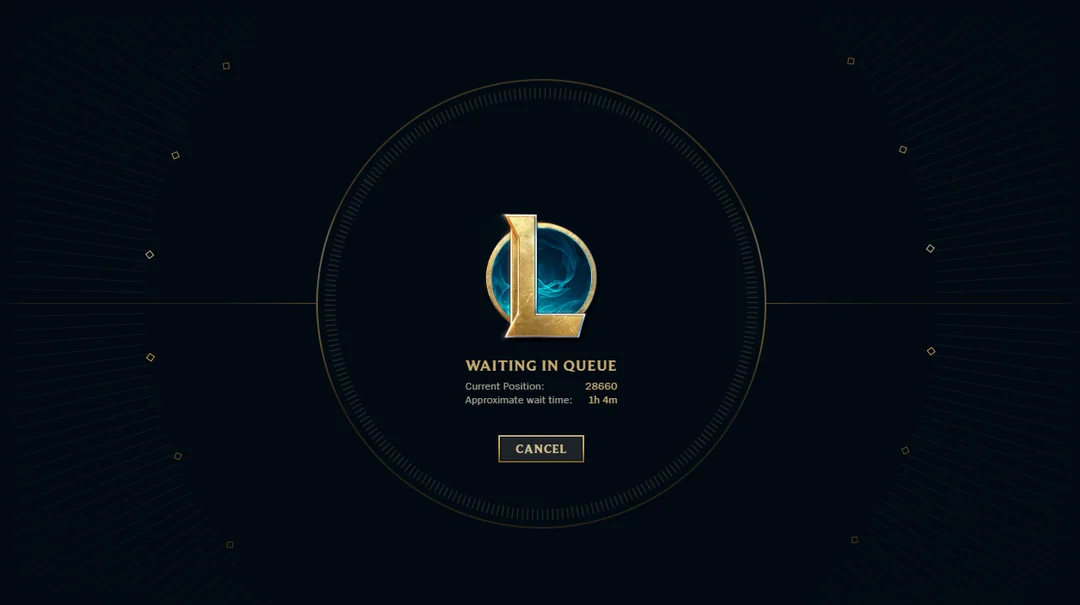
Too Many Players Are Joining the Set 18 PBE
The primary reason for the long wait is simple: demand exceeds supply. Unlike the live servers which are regional (NA, EUW, KR, etc.), the PBE is a single global server located in North America. When a highly anticipated update like Set 18 drops, players from every corner of the world attempt to log in at once, creating a massive bottleneck.
The TFT PBE Server Has Limited Capacity
Riot Games intentionally keeps the PBE server capacity much lower than live servers. Its purpose is for testing, not for hosting the entire player base. Once the server reaches its maximum concurrent player count, the login queue activates to manage the flow of incoming traffic.
Set 18 PBE Maintenance or Patch Deployment Is Still Ongoing
During the first few days of a new set, Riot frequently takes the PBE offline for emergency maintenance or to deploy hotfixes. If you try to join during these windows, the queue may appear to be active but will not move because the login service is technically disabled.
Your Connection to the PBE Login Server Is Unstable
Sometimes the queue isn't long because of the server, but because your client is failing to maintain a handshake with the login gateway. If your ping is fluctuating or you have packet loss, the client may "lose its place" in the queue, resulting in a stuck number or a disconnect.
Part 2: Is the TFT Set 18 PBE Server Full or Down?
How to Check the TFT PBE Server Status
Before you commit to a two-hour wait, check the Riot Games Service Status page. While it primarily focuses on live servers, they often post notices about PBE outages. Additionally, checking the LeaguePBE subreddit or official Riot developer Twitter accounts is the fastest way to see if the community is reporting a total blackout.
How to Tell a Normal Queue From a Server Outage
A normal queue will show a "Position in Queue" number that decreases, even if slowly. If the number remains identical for more than 15-20 minutes, or if the "Estimated Wait Time" shows "Calculating..." indefinitely, the server is likely down or the login service has crashed.
What TFT PBE Server Full Means
When the client tells you the server is full, it means the maximum number of active game instances has been reached. You are essentially waiting for someone else to finish their game and log out before you can take their spot.
Part 3: How to Fix TFT Set 18 PBE Queue Stuck
If your queue position hasn't changed in a significant amount of time, try these steps:
- The 10-Minute Rule: If the number hasn't moved in 10 minutes, close the Riot Client completely.
- Task Manager Flush: Open Task Manager (Ctrl+Shift+Esc) and end all processes related to "Riot Client" and "League of Legends."
- Restart and Re-queue: Relaunch the client. While this might put you further back, it often resolves a "ghost" session where your client thinks it's in queue but the server has already dropped the connection.
- Flush DNS: Open Command Prompt as admin and type ipconfig /flushdns. This ensures your PC is looking for the most current path to the Riot login servers.
Part 4: How to Fix TFT Set 18 Unable to Connect to the Login Queue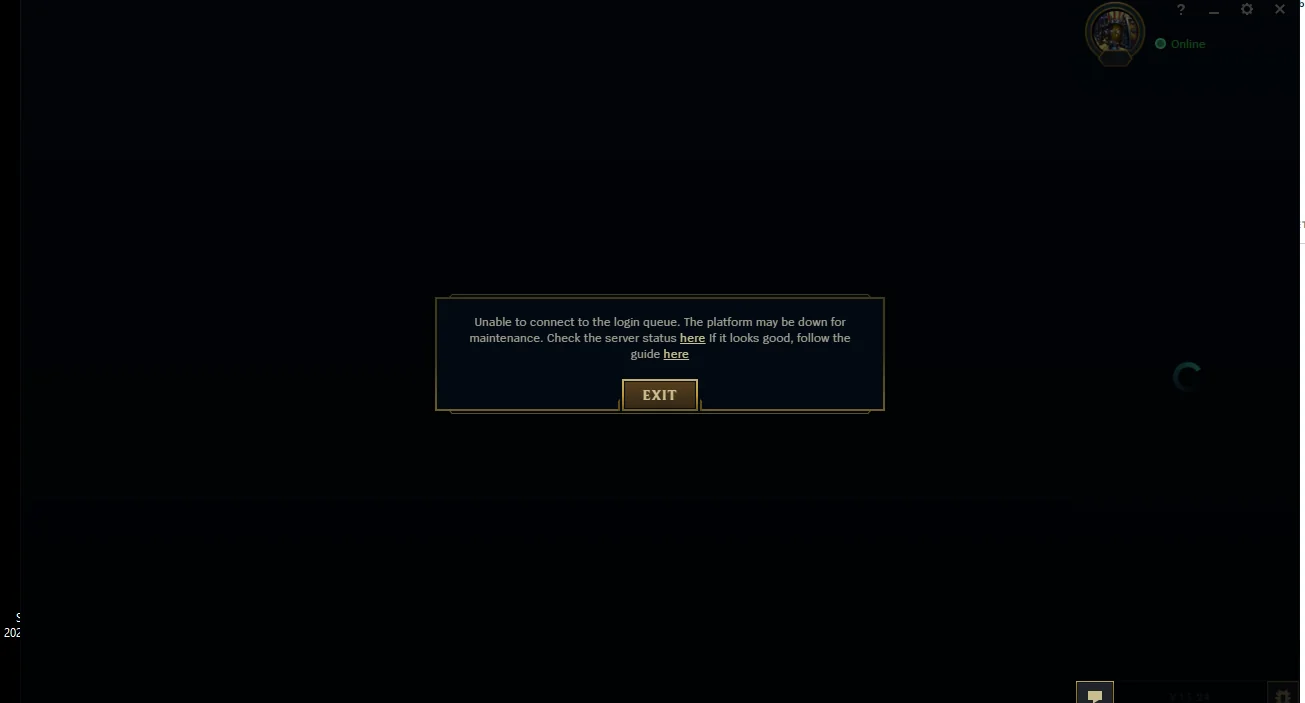
This error usually triggers before you even see a queue number. It indicates a handshake failure between your PC and Riot's authentication servers.
- Check Firewall Permissions: Ensure that both the Riot Client and the PBE executable are allowed through your Windows Firewall.
- Disable VPNs: While some VPNs help, many generic ones use shared IP addresses that Riot's security systems might flag or throttle, preventing a successful login connection.
- Use a Wired Connection: Wi-Fi interference is a common cause of "Unable to Connect" errors. A stable Ethernet cable is highly recommended for PBE testing.
Part 5: Why Is the TFT Set 18 PBE Queue Resetting?
It is incredibly frustrating to see your wait time go from 5 minutes back to 45 minutes. This usually happens for two reasons:
1. Priority Re-queuing: If the server crashes and restarts, the system attempts to let everyone back in at once. Those who were already in-game or at the front of the queue are sometimes given a "hidden" priority, causing the visible numbers for others to shift backward.
2. Client Timeout: If your internet has a micro-disconnect, the Riot Client may silently fail. When it reconnects, it sends a new login request, effectively placing you at the back of the line.
Part 6: How Long Does the TFT Set 18 PBE Queue Take?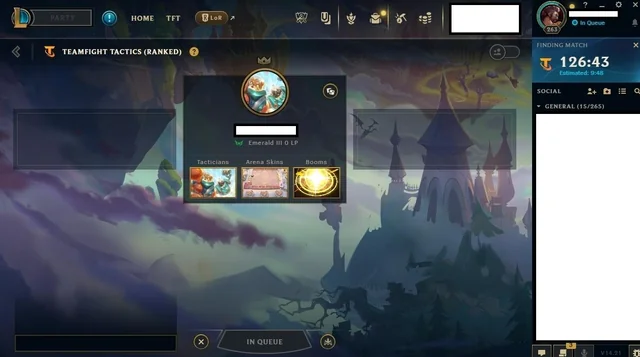
On the first day of Set 18, queue times can range from 30 minutes to over 4 hours. During peak hours, it is not uncommon to see queue positions exceeding 100,000. Once you are in the queue, the speed at which it moves depends on how quickly games are ending. Since a game of TFT takes about 30-40 minutes, the queue often moves in "waves."
Part 7: What Is the Best Time to Join the TFT Set 18 PBE?
Avoid the First Hours After the Set 18 PBE Launch
The first 6 hours after a set goes live are the most congested. If you can wait until the following morning, the initial "hype" surge usually subsides.
Avoid Peak North American Play Hours
Since the PBE server is in NA, the busiest times are usually between 4:00 PM and 11:00 PM EST. If you are in Europe or Asia, try logging in during your morning or early afternoon, which corresponds to late night/early morning in the US.
Try Logging In After PBE Maintenance Ends
Riot usually performs PBE maintenance around 11:00 AM to 1:00 PM PST. If you are ready to log in the second the servers come back up, you can often beat the massive queue that forms shortly after.
Part 8: Can You Skip the TFT Set 18 PBE Queue?
There Is No Official Way to Skip the Queue
Riot does not offer a "priority pass" for the PBE. Everyone, from pro players to casual fans, must wait in the same line. Any website or tool claiming to "skip" the Riot queue is likely a scam or a security risk.
Why Repeatedly Restarting May Send You Back to the End
Some players think that restarting the client will "refresh" their position. In reality, every time you close the client, you lose your token. Unless your queue is genuinely stuck (Part 3), you should stay in line.
Does TFT Mobile PBE Have the Same Login Queue?
Yes. The PBE environment is shared. However, some players have reported that the mobile client occasionally handles queue reconnections better than the PC client. If you are stuck on PC, trying to log in via the mobile PBE app (if you have access) might work, but you will still face a queue.
Part 9: How to Enhance Your Game Experience with LagoFast Game Booster
While LagoFast(LagoFast Game Booster - Get No Lag and Lower Ping) cannot physically remove other players from the Riot server, it is the best tool for ensuring you don't get kicked out of the queue due to network instability. For PBE players outside of North America, the distance to the server often causes high jitter, which the Riot Client interprets as a disconnect.
Why Use LagoFast for TFT PBE?
- Multipath Optimization: LagoFast finds the most direct route to the PBE servers in Los Angeles, reducing the chance of your login token timing out.
- Ping Stabilization: Once you finally get into a game, the last thing you want is 300ms lag while trying to roll down for your units. LagoFast stabilizes your ping for a smooth gameplay experience.
- Easy Setup: It features a dedicated "PBE" boost mode specifically tuned for Riot's test environment.
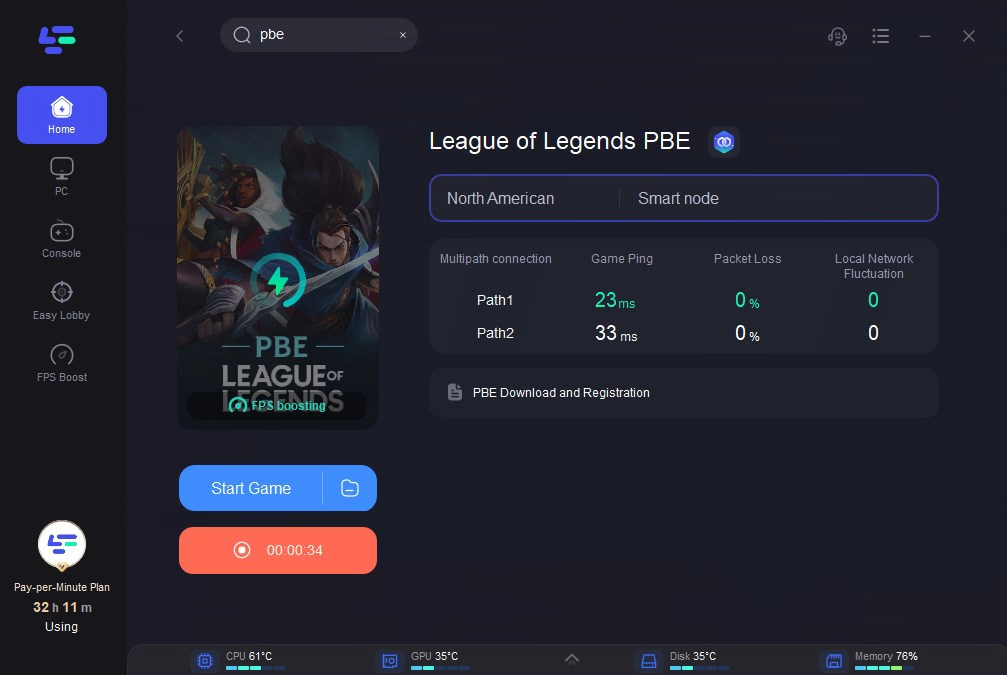
Steps to Use LagoFast for TFT Set 18 PBE:
Click the Free Trial button to download and install LagoFast Free Trial.
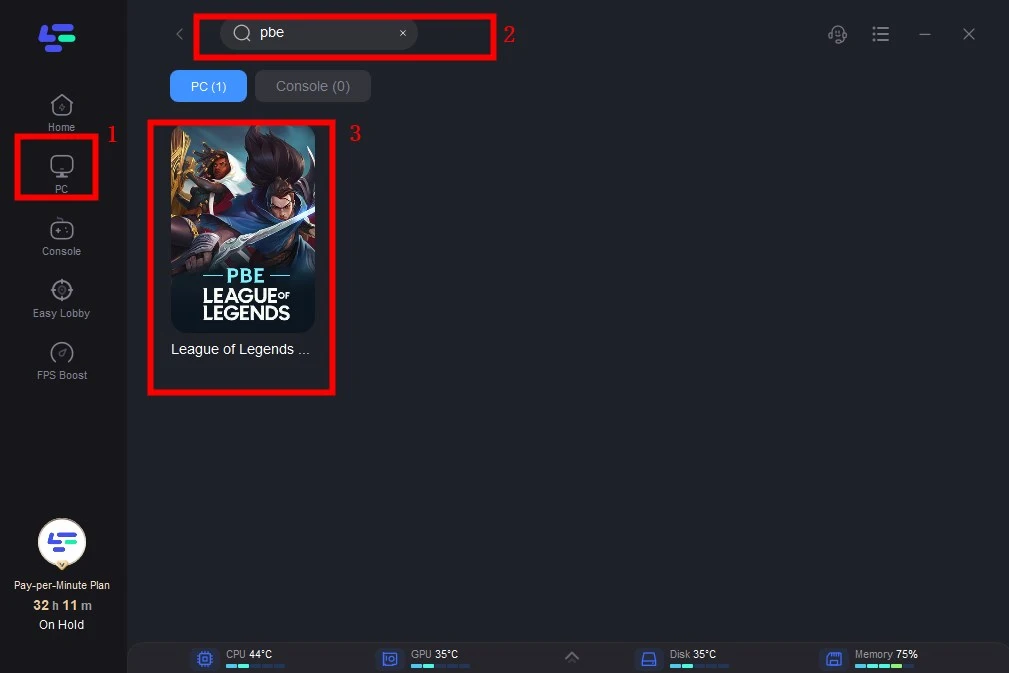
Search for PBE: Type "League of Legends PBE" or "TFT PBE" in the search bar.
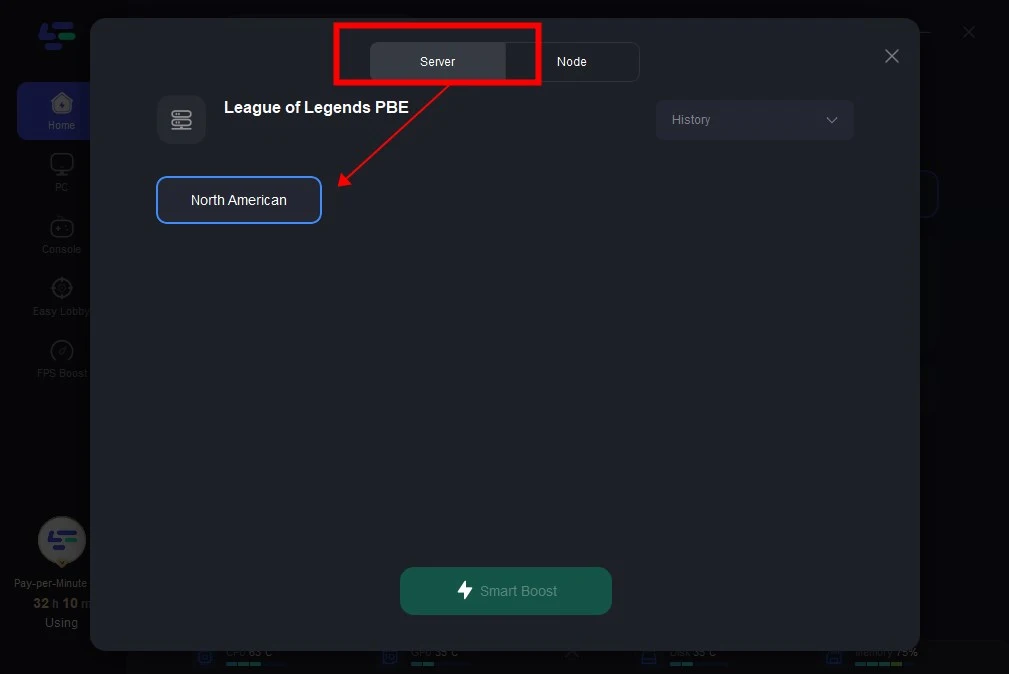
Select Your Node: Choose the node closest to the PBE server (typically North America/Los Angeles) or use the "Smart" mode.
Boost and Launch: Click the "Boost" button and then launch the Riot Client. This ensures your connection is optimized before you enter the login queue, significantly reducing the risk of "Unable to Connect" errors.
Additionally, many players have reported running into the "Incomplete Version" client error after the latest PBE update. To address this issue, LagoFast Game Booster now includes a Fixed Version Error tool, which can be accessed from the right-hand panel of the client to quickly repair the problem.
Part 10: TFT Set 18 PBE Queue FAQ
1. Why is my TFT PBE queue position not moving?
This usually means the server is at maximum capacity or the login service is temporarily down. If it hasn't moved for 20 minutes, try restarting the client.
2. Can I play other games while waiting in the TFT PBE queue?
Yes, as long as they don't interfere with your internet connection. However, do not launch the live version of League of Legends on the same account, as this will log you out of the PBE client.
3. Does the PBE queue ever go away?
Yes. After the first week of a new set, the initial rush dies down, and you can usually log in instantly or with a very short wait.
4. What does "Calculating..." wait time mean?
It means the system is currently processing a large influx of players and cannot yet provide an accurate estimate. Wait a few minutes for it to update to a numerical value.
5. Why did I get kicked out of the queue after waiting for an hour?
This is usually due to a local network spike or a brief server hiccup. Using a tool like LagoFast can help prevent these local disconnects by providing a more stable path to the server.
Key Takeaway
- Be Patient: The Set 18 PBE queue is a result of massive global demand; long wait times are normal during the first few days.
- Monitor Status: Always check official Riot status pages before assuming the issue is on your end.
- Stabilize Your Connection: Use an Ethernet cable and LagoFast Game Booster to prevent disconnects that could reset your queue position.
- Time Your Login: Try to join during off-peak hours (early morning NA time) to find the shortest lines.
- Don't Panic Restart: Only restart your client if the queue position has been completely frozen for more than 15-20 minutes.

Boost Your Game with LagoFast for Epic Speed
Play harder, faster. LagoFast game booster eliminates stutter and lags on PC, mobile, or Mac—win every match!
Quickly Reduce Game Lag and Ping!
Boost FPS for Smoother Gameplay!