
Quick Answer
If your inventory keeps filling up during AFK farming, auto crafting can help automatically merge materials, process low-tier gear, and reduce inventory clutter. This makes it easier to manage long farming sessions and helps prevent valuable drops from being blocked by limited inventory space.
Many TBH Task Bar Hero players run into the same issue after leaving the game running overnight: their inventory ends up packed with duplicate gear, crafting materials, and low-level equipment. Without regular cleanup, valuable drops can become harder to manage and farming efficiency can suffer. This guide explains how crafting, alchemy, and auto crafting work, what items to keep or dismantle, and how to better manage your inventory during AFK farming.

- ✅ Reduce Lag and High Ping.
✅ Boost FPS at the Same Time.
✅ Support 8000+ Popular Online Games.
✅ Change Server without Latency.
✅ Boost Game Loading Speed.
Part 1: Why Your Inventory Fills Up So Fast in TBH
Part 2: How Crafting and Alchemy Work
Part 3: What Items Should You Keep, Merge, or Dismantle?
Part 4: Best Auto Crafting Rules for AFK Farming
Part 5: How to Turn Low-Level Gear into Upgrade Materials
Part 6: How to Avoid Wasting Materials Overnight
Part 7: Recommended Inventory Cleanup Workflow
Part 1: Why Your Inventory Fills Up So Fast in TBH
If you've ever come back after an overnight AFK session and found your inventory completely full, you're not alone. This is one of the most common issues in TBH Task Bar Hero.
Several factors contribute to inventory overload:
- Low-tier gear drops constantly—Farming generates a large number of common equipment pieces that quickly take up space.
- Duplicate items accumulate over time – The longer you farm, the more duplicate gear and materials you'll collect.
- Crafting materials build up quickly—Resources used for crafting and alchemy can pile up faster than they're consumed.
- Unused upgrade fodder fills inventory slots—lower-level equipment intended for upgrading often sits in storage waiting to be processed.
- AFK farming runs for hours without cleanup – When items aren't merged, dismantled, or stored regularly, inventory space disappears surprisingly fast.
The real challenge isn't getting loot—it's managing it. Without regular crafting, alchemy, and inventory cleanup, your backpack can fill up quickly during long AFK farming sessions.

Part 2: How Crafting and Alchemy Work
Crafting and alchemy allow you to turn unwanted gear and materials into something more useful.
As you farm, you'll collect a large number of duplicate items, lower-tier materials, and equipment that may no longer be worth using. Instead of letting those items sit in your inventory, you can process them through crafting and alchemy to improve their value.
In general, these systems allow you to:
- Merge lower-tier materials into higher-tier materials
- Combine duplicate gear for upgrades
- Convert unwanted items into useful resources
- Create materials needed for future progression
The more you farm, the more important crafting and alchemy become. Regularly processing excess items helps you make better use of your drops while keeping your inventory under control.
Part 3: What Items Should You Keep, Merge, or Dismantle?
After a few hours of farming, your inventory will usually contain a mix of useful gear, duplicate items, and materials. Knowing what to do with them can make inventory management much easier.
Keep
These items are usually worth saving:
- Rare and legendary equipment
- Gear with strong stats or useful bonuses
- Materials needed for future upgrades
- Items you plan to use in crafting or alchemy
Merge
These items are often good candidates for merging:
- Duplicate equipment
- Lower-tier gear used as upgrade fodder
- Common materials that can be combined into higher-tier resources
Dismantle
These items are often safe to dismantle:
- Unused low-rarity gear
- Excess duplicate equipment that you don't plan to upgrade
- Materials that have accumulated beyond your needs
As a general rule, keep valuable items, merge anything that can improve your progression, and dismantle gear that is only taking up inventory space.
Part 4: Best Auto Crafting Rules for AFK Farming
If you plan to leave TBH running for several hours, setting up the right auto crafting rules can help prevent inventory clutter and reduce wasted drops.
Recommended priorities include:
- Auto merge lower-tier materials whenever possible.
- Automatically combine duplicate gear used for upgrades.
- Auto dismantle unwanted low-rarity equipment.
- Keep rare and legendary items protected from crafting or dismantling.
- Regularly process excess materials before they start filling inventory space.
The goal is to keep your inventory moving. By automatically merging, crafting, and dismantling lower-value items, you can free up space for more valuable drops during long AFK farming sessions.
Part 5: How to Turn Low-Level Gear into Upgrade Materials
Low-level gear can be converted into useful upgrade resources instead of sitting unused in your inventory.
A common approach is:
- Collect duplicate and lower-rarity equipment while farming.
- Merge items that can be upgraded into higher-tier gear.
- Dismantle equipment that is no longer useful.
- Use the resulting materials in crafting or alchemy.
- Save those resources for future gear upgrades and progression.
This allows you to turn excess gear into materials that can be used more effectively later. The more consistently you process unwanted equipment, the easier it becomes to support long-term progression without letting your inventory fill up.
Part 6: How to Avoid Wasting Materials Overnight
One of the biggest AFK farming problems in TBH Task Bar Hero is waking up to a full inventory and a large pile of unprocessed gear and materials. To help reduce wasted drops and inventory clutter during long farming sessions, LagoFast's Auto AFK Assistant can automate crafting, inventory management, and other repetitive tasks while you're away.
Use LagoFast Auto AFK Assistant for TBH
For players who regularly leave TBH running overnight, LagoFast's Auto AFK Assistant can help automate several repetitive tasks:
- Taskbar Hero Auto Chest and Storage Helper – Automatically opens chest drops, including advanced chests, and stores items to help prevent inventory bottlenecks.
- Taskbar Hero AFK Farming Assistant – Automatically crafts, merges, and performs alchemy based on your settings, helping convert lower-tier items into more useful resources.
- Taskbar Hero Inventory Full Fix Tool – Automatically moves equipment and materials into storage when inventory space becomes limited.
- Taskbar Hero Auto Trading Helper – Automatically lists eligible equipment and materials on the Steam Market, helping reduce inventory clutter during long AFK sessions.
These features help reduce manual inventory management and make it easier to keep materials, gear, and chest rewards flowing during extended farming sessions.
How to Use LagoFast Auto AFK Assistant
Step 1: Download and install LagoFast.
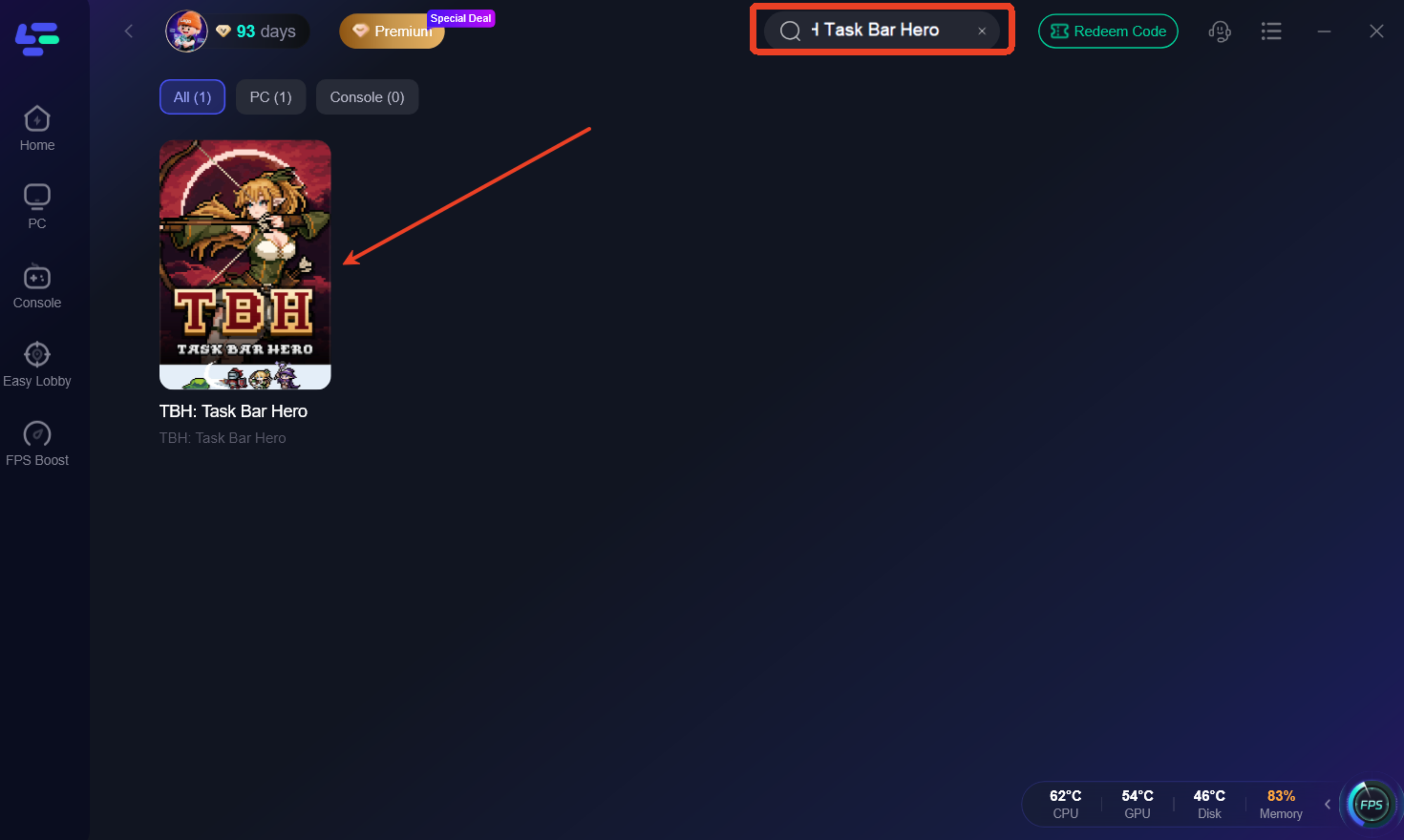
Step 2: Search for "TBH Task Bar Hero" and select the game.
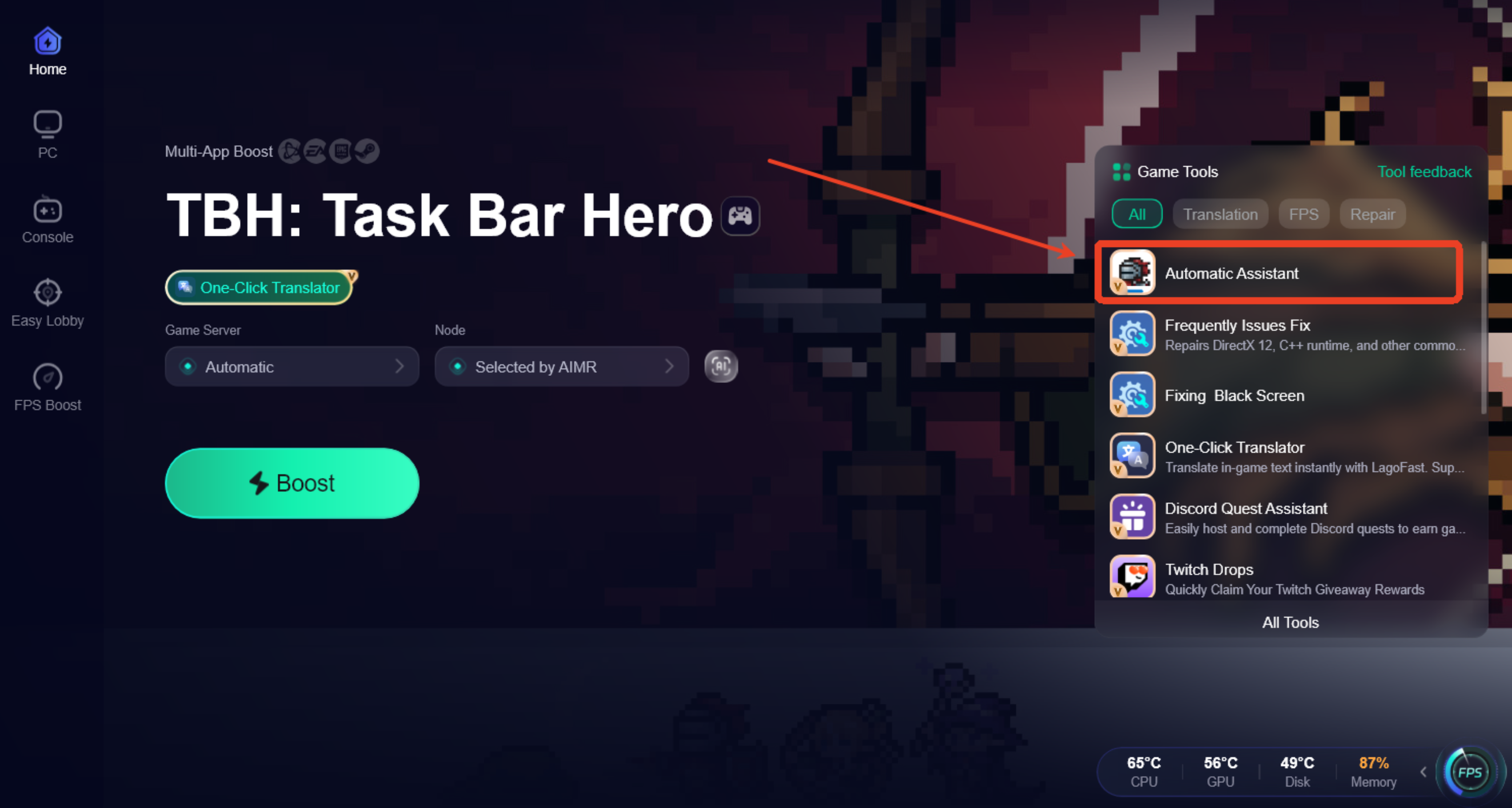
Step 3: Open the Automatic Assistant tool from the bottom-right toolbar.
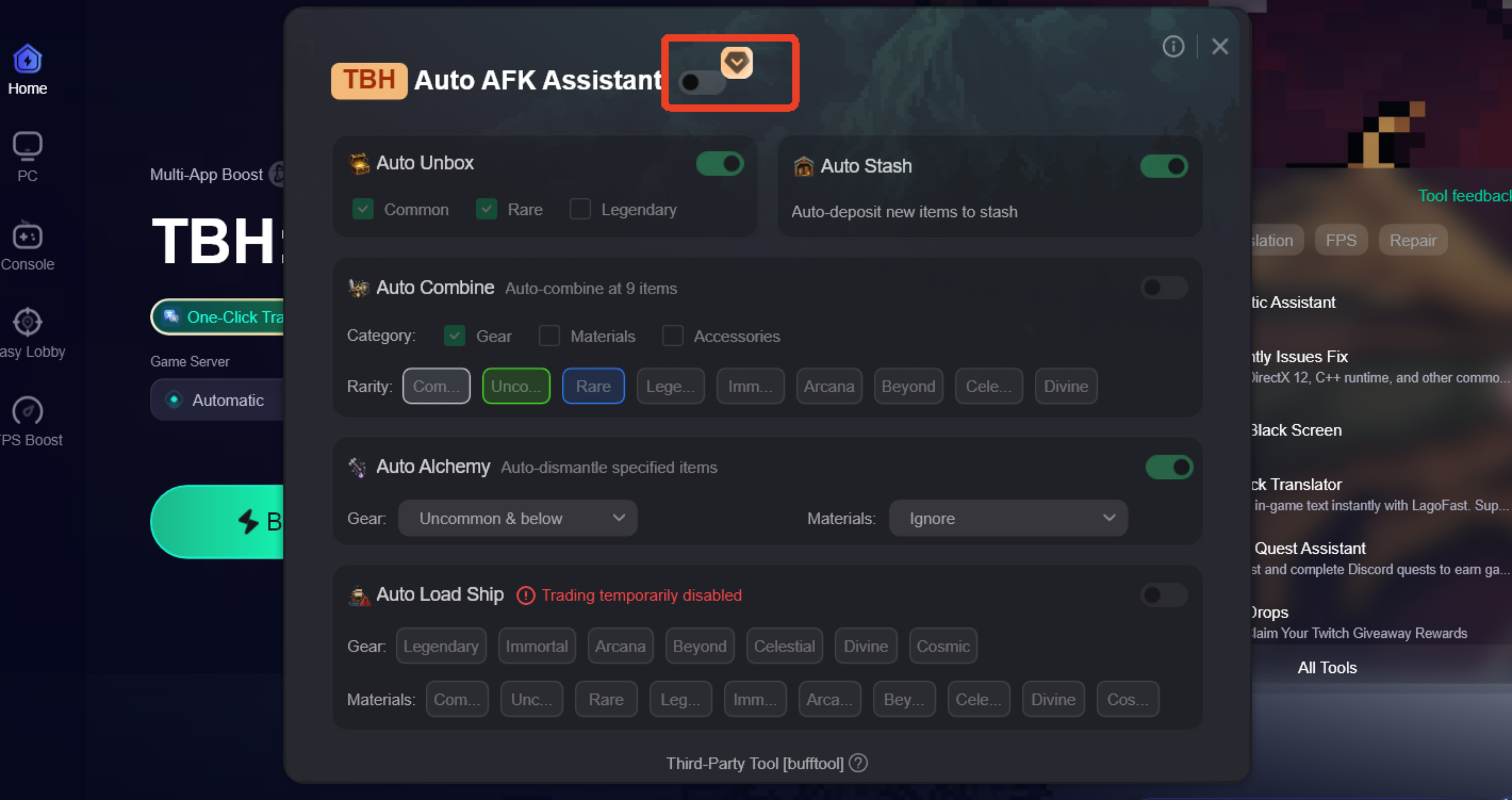
Step 4: Enable Auto AFK Assistant and customize features such as Auto Chest Opening, Auto Crafting & Alchemy, Auto Storage, and Auto Trading.
Additional Features for a Smoother TBH Experience
Besides automation tools, LagoFast also includes features that can help improve overall gameplay stability and connection quality:
- Reduce high ping and lag spikes.
- Fix packet loss and unstable connections.
- Optimize network routes for smoother gameplay.
- Improve connection stability during long gaming sessions.
- Provide additional gaming tools designed to enhance the overall experience.
Step 1: Choose your preferred server node and click "Smart Boost" to start optimizing.
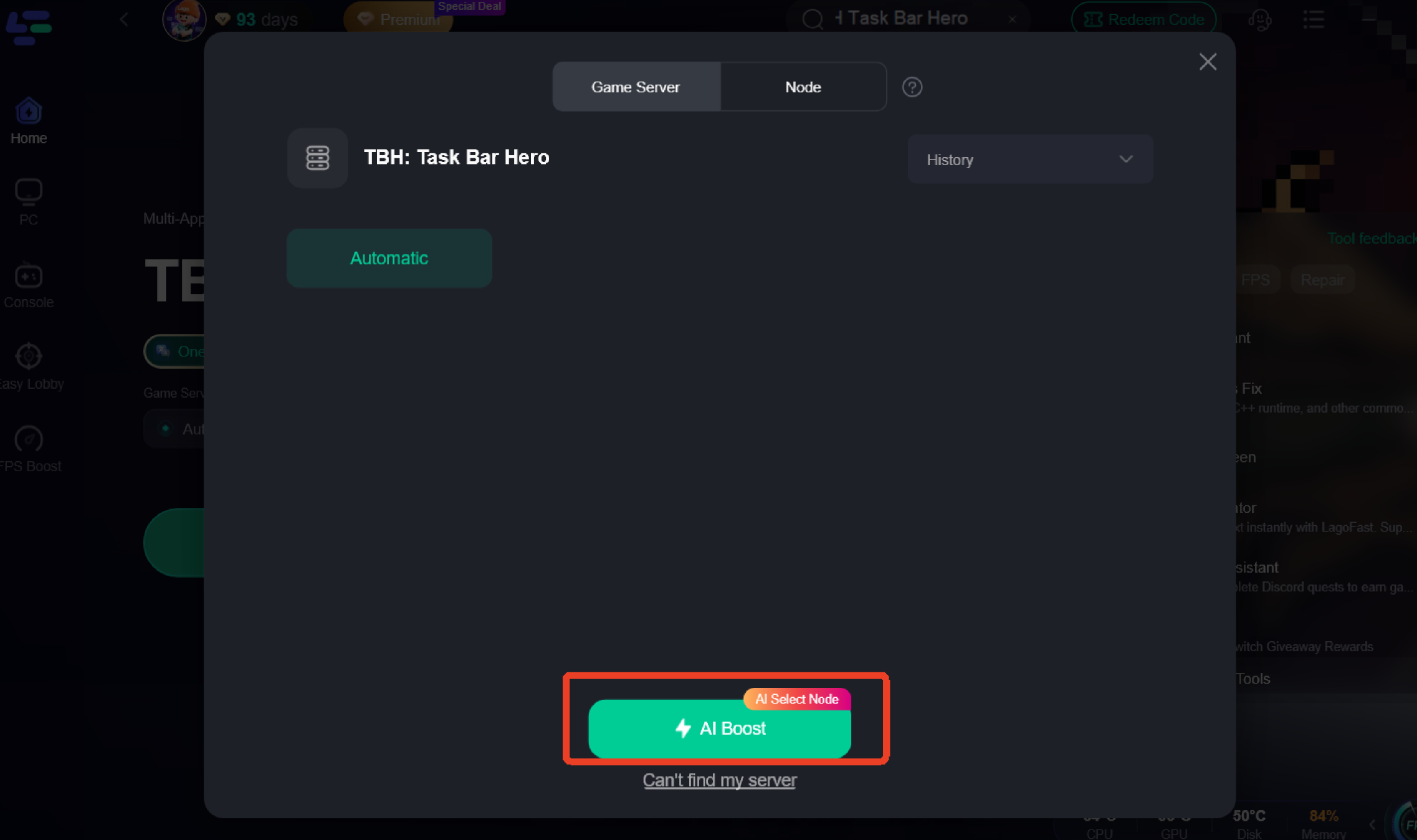
Step 2: Launch your game and enjoy smooth, optimized gameplay with lower ping and no stutter.

Part 7: Recommended Inventory Cleanup Workflow
A simple cleanup routine can help keep your inventory under control during long farming sessions:
- Keep rare and valuable equipment.
- Merge useful duplicate gear.
- Dismantle unwanted low-rarity items.
- Craft or upgrade excess materials when possible.
- Move important resources into storage.
Following this workflow regularly can help reduce inventory clutter and make AFK farming more efficient.
Part 8: FAQ
What is auto crafting in TBH Task Bar Hero?
Auto crafting helps automate tasks such as merging gear, crafting materials, and managing items, reducing the amount of manual inventory cleanup needed.
What items should I dismantle in TBH?
Low-rarity gear and unwanted duplicate equipment are usually the best items to dismantle, while valuable gear and important upgrade materials are worth keeping.
How do I prevent my inventory from filling up overnight?
Merge duplicate gear, craft excess materials, and clear unnecessary items before long AFK sessions. Automation tools can also help reduce inventory buildup.
Is auto alchemy useful in TBH Task Bar Hero?
For long AFK farming sessions, auto alchemy can help process accumulated materials automatically and make inventory management easier.
Final Thoughts
Managing your inventory is just as important as farming in TBH Task Bar Hero. As materials, duplicate gear, and lower-tier items accumulate over time, crafting, alchemy, and regular cleanup can help you make better use of your rewards and avoid unnecessary inventory issues. Whether you prefer manual management or automation tools, having a consistent workflow can make long AFK farming sessions more efficient and easier to manage.

Boost Your Game with LagoFast for Epic Speed
Play harder, faster. LagoFast game booster eliminates stutter and lags on PC, mobile, or Mac—win every match!
Quickly Reduce Game Lag and Ping!
Boost FPS for Smoother Gameplay!