

Many players are waiting to join the Silver Palace beta, but getting access through Twitch Drops can be confusing. Watching streams and claiming rewards are only part of the process, and players still have questions about beta keys, account linking, and missing invites. This guide explains how Silver Palace Twitch Drops work, how to get beta access, and how to fix common issues.

- ✅ Reduce Lag and High Ping.
✅ Boost FPS at the Same Time.
✅ Support 8000+ Popular Online Games.
✅ Change Server without Latency.
✅ Boost Game Loading Speed.
Part 1: Silver Palace Twitch Drops Rewards Overview
Part 2: How to Get Silver Palace Beta Key Through Twitch Drops
Part 3: A Faster and Easier Way to Get Silver Palace Twitch Drops
Part 4: How to Claim Silver Palace Beta Access After Twitch Drops
Part 1: Silver Palace Twitch Drops Rewards Overview

Silver Palace Twitch Drops allow players to participate in the “Dichotomy” Beta Test event by watching eligible Twitch streams and claiming rewards during the limited event period. However, many players are unsure whether claiming a Twitch Drop means they will immediately receive a beta key.
The Silver Palace “Dichotomy” Beta Test Twitch Drops event is available for a limited time. Players need to complete the required steps during the event period to participate:
- Event Start: July 22, 2026, at 21:00 UTC-5
- Event End: July 25, 2026, at 11:00 UTC-5
- Reward Claim Deadline: August 1, 2026, at 3:59 PM UTC
It is important to note that Twitch Drops and beta access are not always the same thing. Some rewards, such as Raffle Tickets, only allow players to enter the beta invitation process and do not guarantee instant access.
The process usually works like this:
- Watch eligible Silver Palace Twitch streams: Complete the required watch time and earn Twitch Drop progress.
- Claim your Twitch Drop reward: Confirm that you have completed the event requirements.
- Receive a beta invite: Selected players will receive beta access details through their registered email.
If you have already claimed a Raffle Ticket but have not received a beta invite, it does not always mean there is a problem. The invitation may still be waiting for the next round of beta access distribution.
Part 2: How to Get Silver Palace Beta Key Through Twitch Drops

Getting a Silver Palace beta key through Twitch Drops is a simple process. Follow these steps to make sure your reward progress is recorded correctly.
Step 1: Link Your Twitch and Silver Palace Accounts
- Go to the Silver Palace Twitch binding page.
- Log in with your Twitch account.
- Authorize the account connection.
If your account still shows “Connect” after linking, try refreshing the page or reconnecting your Twitch account.

Step 2: Watch Silver Palace Twitch Streams
Watch an eligible Silver Palace Twitch stream with Drops enabled. Make sure you meet the required watch time, as streams without Drops will not count.
Step 3: Claim Your Twitch Drop Reward
After completing the watch requirement:
- Open your Twitch Drops inventory.
- Find the Silver Palace reward.
- Click Claim.
Step 4: Check Your Email for Beta Access
After claiming the reward, wait for the beta invitation or raffle results.If you are selected, check your registered email for beta access updates or invitation details.
Part 3: A Faster and Easier Way to Get Silver Palace Twitch Drops
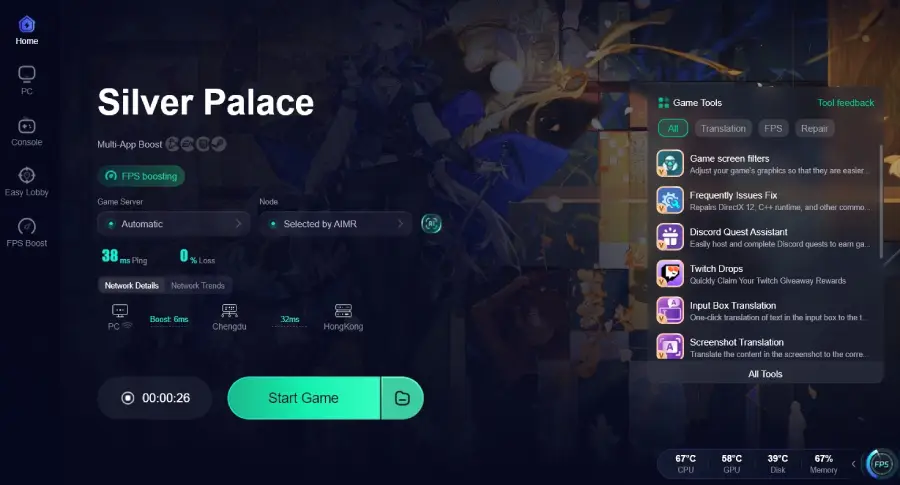
Getting Silver Palace Twitch Drops requires tracking rewards, watching eligible streams, and waiting for beta access updates. If you want a more convenient way to manage Twitch rewards, LagoFast Twitch Drops Tool can help simplify the process and make claiming Twitch giveaway rewards easier.
Besides Twitch Drops support, LagoFast also improves your gaming connection by reducing ping, optimizing network routes, and helping fix issues like packet loss and unstable connections. This can provide a smoother experience when playing online games or connecting to game servers.
How to Use LagoFast to Get Silver Palace Twitch Drops Easily
Step 1: Download and install the LagoFast Free Trial.
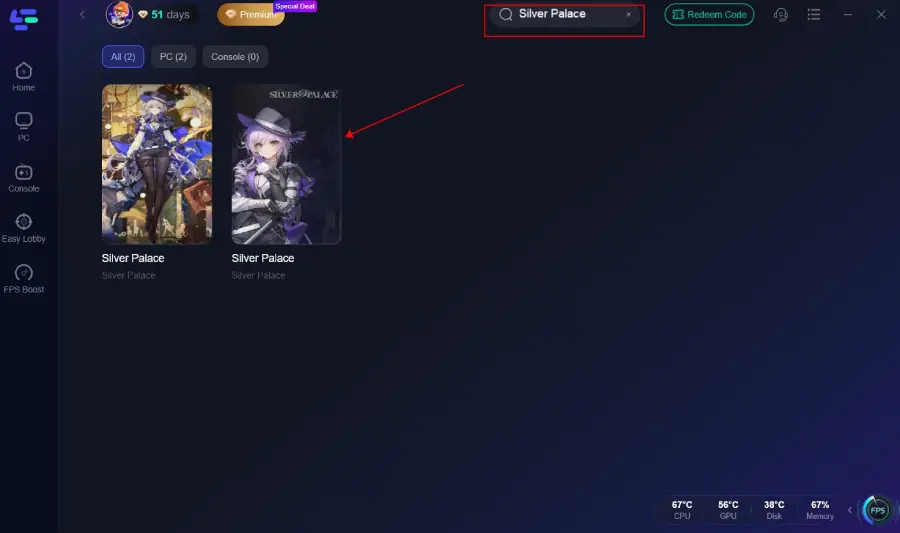
Step 2: Open LagoFast and use the search bar to find Silver Palace.
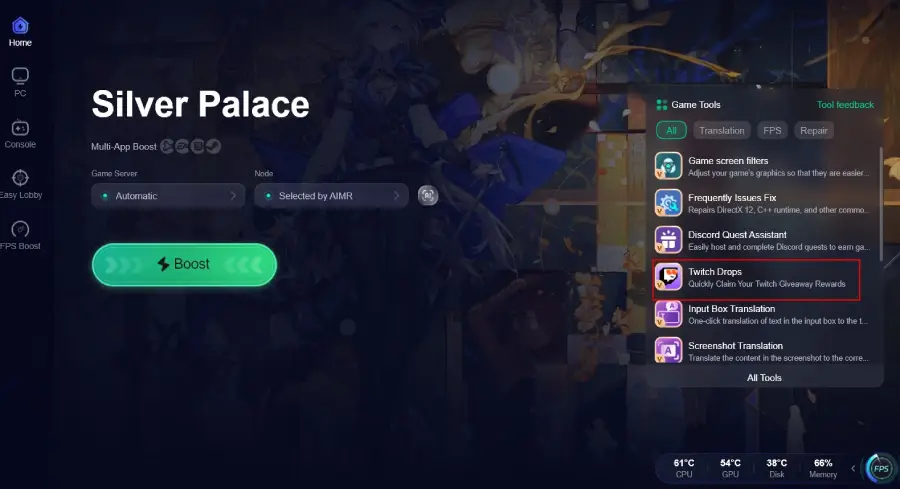
Step 3: Choose the Twitch Drops Tool on the right side.
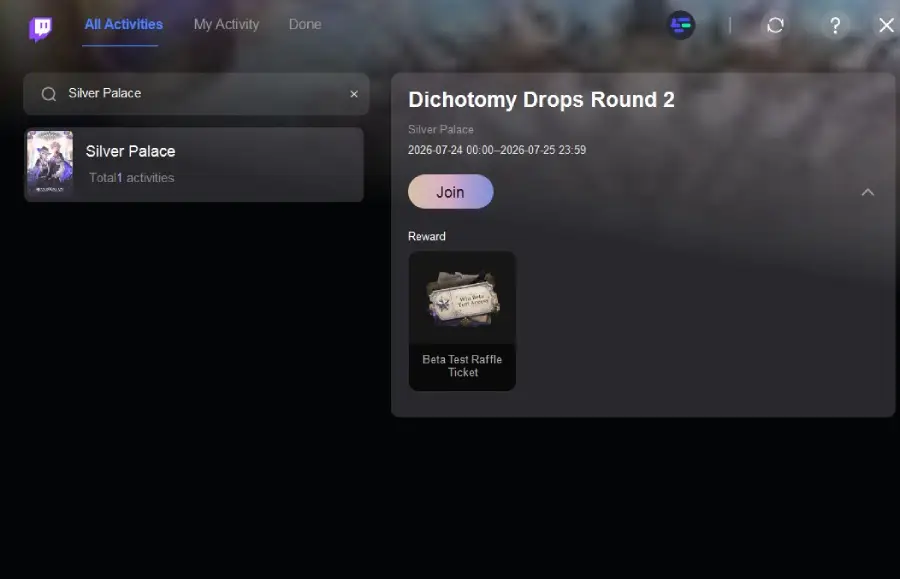
Step 4: Link your accounts and click Join to participate in Silver Palace.
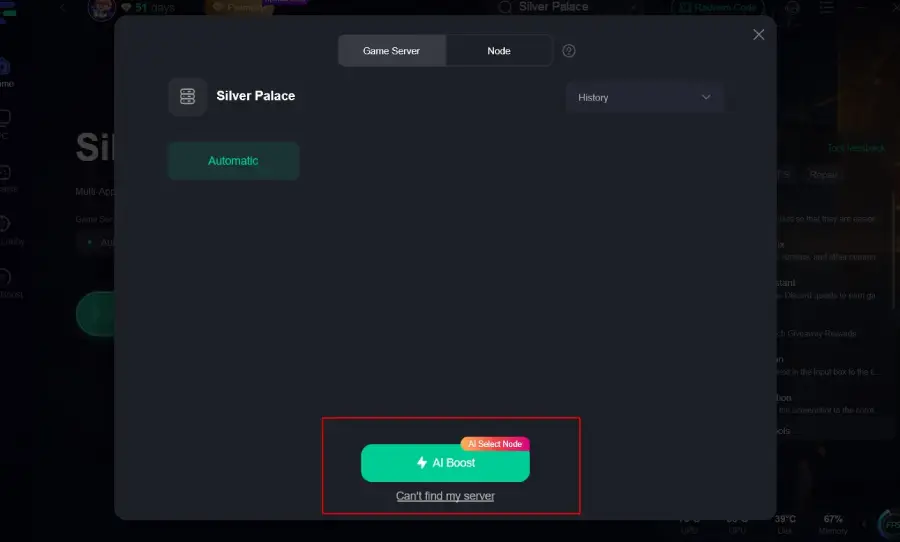
Step 5: Choose your preferred server node and click "Smart Boost" to start optimizing.
Step 6: Launch your game and enjoy smooth, optimized gameplay with lower ping and no stutter.
Part 4: How to Claim Silver Palace Beta Access After Twitch Drops
After claiming your Silver Palace Twitch Drops, the next step is waiting for your beta access confirmation. Keep checking the email linked to your Silver Palace account, as beta invitations and raffle results will be sent there.
If you are selected, check the email linked to your Silver Palace account for beta access updates or invitation details.Also, remember that claiming a Twitch Drop does not always mean you will receive a beta key immediately. The invitation process may take some time depending on the beta distribution schedule.
If your Silver Palace beta invite has not arrived, try these steps:
- Make sure your Twitch and Silver Palace accounts are linked correctly.
- Confirm that you have successfully claimed the Twitch Drop.
- Check all email folders for the invitation.
- Wait for the official beta access distribution to finish.
In many cases, the delay happens because Twitch rewards and beta invitations are sent separately.
Part 5: Silver Palace Twitch Drops FAQs
Does Silver Palace Twitch Drop guarantee a beta key?
No. A Twitch Drop or Raffle Ticket does not guarantee instant beta access. It only means you have entered the beta invitation process.
How long do I need to watch Silver Palace Twitch streams?
The required watch time depends on the current Twitch Drops event. Check the Twitch Drops progress for the exact requirement.
Why does my Silver Palace account still say “Connect”?
This may happen if the account link has not updated correctly. Try refreshing the page, reconnecting Twitch, or signing in again.
I claimed Silver Palace Twitch Drops but received no email. What should I do?
Check your spam folder, confirm your account email, and wait for the beta invitation process to finish. Rewards and invites may not arrive at the same time.
How can I get Silver Palace beta access?
Join official events like Silver Palace Twitch Drops, link your accounts, watch eligible streams, claim rewards, and wait for confirmation.
Final Thought
Getting Silver Palace beta access through Twitch Drops requires more than just watching a stream. Make sure your accounts are connected, claim your rewards correctly, and keep an eye on your email for updates. If you run into issues like missing invites or account connection problems, checking the steps above can help you solve them faster.

Boost Your Game with LagoFast for Epic Speed
Play harder, faster. LagoFast game booster eliminates stutter and lags on PC, mobile, or Mac—win every match!
Quickly Reduce Game Lag and Ping!
Boost FPS for Smoother Gameplay!