
You click Play and expect the game to load, but instead it crashes, freezes, or never gets past the loading screen. If SAND: Raiders of Sophie isn't working properly, you're likely dealing with a common startup, connection, or performance issue rather than an isolated bug. The good news is that most of these problems can be resolved with a few straightforward fixes. This guide explains the most common causes and how to get the game running smoothly again.

- ✅ Reduce Lag and High Ping.
✅ Boost FPS at the Same Time.
✅ Support 2000+ Popular Online Games.
✅ Change Server without Latency.
✅ Boost Game Loading Speed.
What Players Are Experiencing in SAND: Raiders of Sophie
Why SAND: Raiders of Sophie Is Not Working
Fix 1: Crash Issues and Startup Fixes in SAND: Raiders of Sophie
Fix 2: Server Kick and Connection Issues in SAND: Raiders of Sophie
Fix 3: Bugs and Gameplay Errors in SAND: Raiders of Sophie
Fix 4: Performance Fixes – FPS Drops, Stuttering, and Freezing
Fix 5: Black Screen and Infinite Loading Issues
Advanced Fix – Game Stability and Network Optimization with LagoFast Game Booster
Quick Checklist – Fast Fixes for SAND: Raiders of Sophie Not Working
What Players Are Experiencing in SAND: Raiders of Sophie
Most issues players report fall into a few clear patterns rather than random, isolated bugs:
- The game won’t launch or fails to start at all
- Crashes happen immediately after opening the game
- Stuck on loading screens with no progress
- Random server kicks or sudden disconnections mid-session
- Noticeable FPS drops, stuttering, or overall poor performance
If you’re running into any of these, it’s not something unusual or rare. These are the same core problems many players are currently dealing with across different setups.
Why SAND: Raiders of Sophie Is Not Working
When SAND: Raiders of Sophie stops working, it’s rarely caused by a single issue. In most cases, it’s a mix of system setup, game files, and performance or network conflicts happening at the same time:
- Corrupted or incomplete game files after updates or installation issues
- Outdated or unstable GPU drivers causing crashes or launch failures
- Shader compilation issues, especially on first launch or after patches
- Background apps or overlays (Discord, recording tools, browsers) interfering with the game
- Unstable network routing or packet loss affecting online stability
- High CPU or GPU usage from other programs leading to system overload
- Most of the time, the problem isn’t permanent. Once you identify which of these is affecting your setup, the game usually becomes stable again without needing a full reinstall.
Fix 1: Crash Issues and Startup Fixes in SAND: Raiders of Sophie
If the game crashes right after you launch it, the issue is usually tied to missing files, drivers, or background conflicts. Try these in order:
- Verify game files through Steam or your launcher repair tool to fix missing or corrupted data
- Update GPU drivers and perform a clean install if possible
- Run the game as Administrator to avoid permission blocks
- Disable overlays like Steam, Discord, and GeForce Experience before launching
- Close heavy background apps and restart your PC before trying again
If the game still crashes after this, a reinstall is often the only way to fully reset broken installation files.
Fix 2: Server Kick and Connection Issues in SAND: Raiders of Sophie
If you’re getting kicked from sessions or losing connection mid-game, the problem is usually on the network side rather than the game itself:
- Unstable Wi-Fi connection or weak signal strength
- Packet loss during gameplay causing sudden disconnects
- Router congestion from multiple devices using bandwidth
- Poor routing between your ISP and game servers
To stabilize your connection:
- Switch from Wi-Fi to a wired Ethernet connection
- Restart your router and modem to refresh routing
- Stop downloads, streaming, or cloud sync in the background
- Avoid VPNs unless you’re using them specifically for routing stability
If your internet is stable but disconnects still happen, it’s often a routing issue between you and the server path.
Fix 3: Bugs and Gameplay Errors in SAND: Raiders of Sophie
Some in-game problems aren’t crashes but still break gameplay flow:
- Characters stuck in animations or unable to move properly
- UI elements not responding or freezing
- Quest objectives not triggering correctly
- Random soft freezes during exploration or combat
To reduce these issues:
- Reload a checkpoint or restart the mission.
- Clear the game's cache or temporary files if the launcher provides this option.
- Install the latest game updates, as many gameplay bugs are resolved through patches.
Most of these bugs are temporary and often get fixed through patches or a simple reload.
Fix 4: Performance Fixes – FPS Drops, Stuttering, and Freezing
If the game runs but feels unstable or laggy, it’s usually a performance bottleneck:
- Lower shadow quality and post-processing settings first
- Disable motion blur and depth of field for smoother performance
- Install the game on an SSD instead of an HDD
- Close browsers and background apps that consume CPU or RAM
- Make sure DirectX and Microsoft Visual C++ Redistributables are up to date.
Stuttering is often caused by shader compilation or GPU overload, especially on first-time launches or after updates.
Fix 5: Black Screen and Infinite Loading Issues
If the game shows a black screen or gets stuck loading, it’s usually a rendering or display initialization problem:
- Switch to windowed mode using launch options or config settings
- Disable fullscreen optimizations in Windows compatibility settings
- Clear GPU shader cache to remove corrupted temporary files
- Lower resolution before launching the game
- Reinstall or update GPU drivers if the issue persists
In most cases, this type of issue is tied to graphics initialization and can be fixed without reinstalling the game.
Advanced Fix – Game Stability and Network Optimization with LagoFast Game Booster
If you've tried the fixes above but still experience high ping, server kicks, or unstable connections, the problem may be caused by poor network routing rather than your PC.
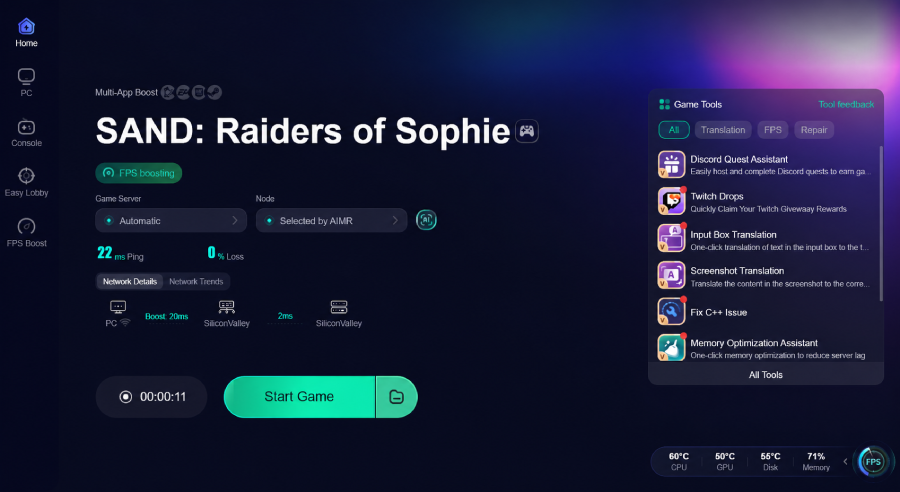
LagoFast Game Booster optimizes the connection between your PC and the game server by selecting a more stable network route. This helps lower ping, reduce packet loss, improve connection stability, and minimize lag spikes during gameplay. It also includes useful features like One-click Translator, allowing you to translate in-game text instantly for a smoother gaming experience.
How to Use LagoFast for SAND: Raiders of Sophie:
Step 1: Click the Free Trial button to download and install LagoFast.
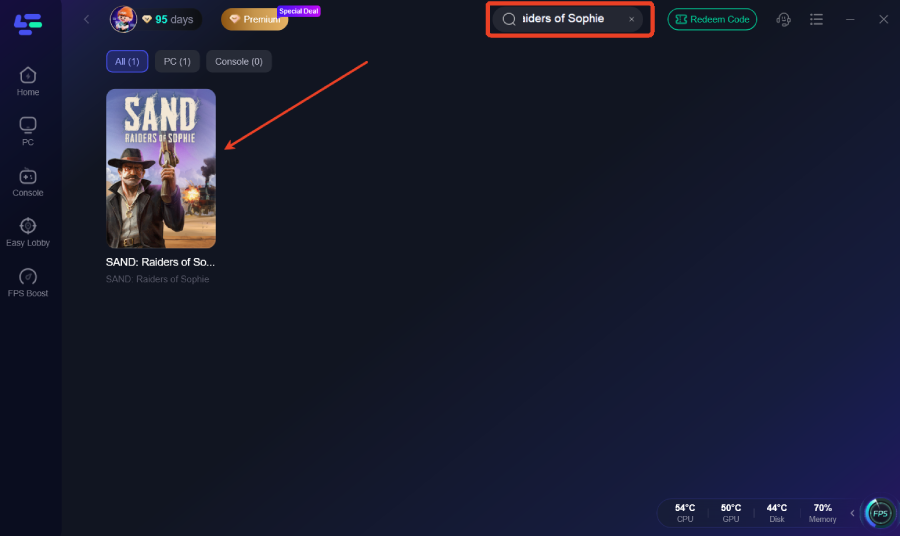
Step 2: After installation, search " SAND: Raiders of Sophie" in the search bar and select the game.
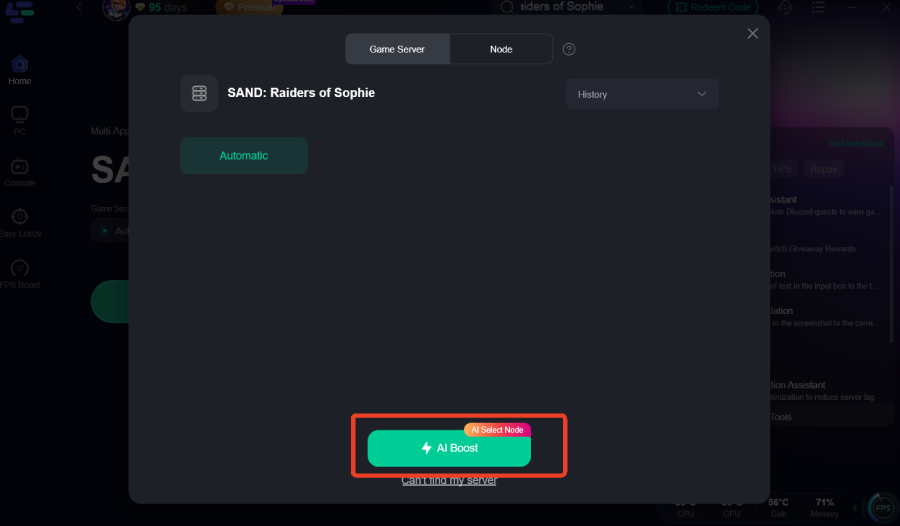
Step 3: Choose your preferred server node and click "Smart Boost" to start optimizing.
Step 4: Launch your game and enjoy smooth, optimized gameplay with lower ping and no stutter.
Quick Checklist – Fast Fixes for SAND: Raiders of Sophie Not Working
Before launching the game again, take a few minutes to check these common fixes:
- Verify the game files to repair missing or corrupted data.
- Update your GPU drivers to the latest stable version.
- Disable Steam, Discord, and other in-game overlays.
- Restart your PC and router to refresh your system and network.
- Lower graphics settings if you're experiencing crashes or poor performance.
- Use a wired Ethernet connection instead of Wi-Fi whenever possible.
- Try LagoFast Game Booster to optimize network routing, reduce ping, and improve connection stability.
In many cases, working through this checklist is enough to resolve common startup, performance, and connection issues without reinstalling the game.
FAQ
Does SAND: Raiders of Sophie require an SSD?
No. An SSD isn't required, but it's recommended if you want faster loading times and smoother overall performance than a traditional HDD.
Can antivirus software stop the game from launching?
Yes. Antivirus software may mistakenly block game files or the launcher. If that happens, add the game folder to your antivirus exclusion list and verify the game files before launching again.
Will my game progress be lost if I reinstall SAND: Raiders of Sophie?
Usually not. Reinstalling the game doesn't normally remove your save data, but it's always a good idea to back up your save files before reinstalling.
Final Thought
Most SAND: Raiders of Sophie issues can be resolved with a few simple troubleshooting steps. Start with the basic fixes before moving on to more advanced solutions. If your problems are caused by network instability, LagoFast Game Booster can help improve connection stability, reduce lag, and get you back into the game faster.

Boost Your Game with LagoFast for Epic Speed
Play harder, faster. LagoFast game booster eliminates stutter and lags on PC, mobile, or Mac—win every match!
Quickly Reduce Game Lag and Ping!
Boost FPS for Smoother Gameplay!