
Roblox is one of the world’s most popular online gaming platforms, but in 2026, the Roblox blocked countries list has continued to expand. Players are now asking: How many countries is Roblox banned in, and why is Roblox banned in some countries? Recent bans in Turkey, Jordan, Algeria, and Qatar highlight the growing restrictions. In this guide, we’ll explain the reasons behind the bans, list the affected regions, and show you how tools like LagoFast can help you bypass these issues and keep playing smoothly.

- ✅ Reduce Lag and High Ping.
✅ Boost FPS at the Same Time.
✅ Support 2000+ Online Games
✅ Change Server Without Latency.
✅ Multiplatform: PC, Console, Mobile.
✅End Disconnection and Crashing Issues
Part 1: Roblox Blocked Countries List (2026 Update)
Part 2: Why Is Roblox Banned in Some Countries?
Part 3: How to Unblock Roblox Access with LagoFast
Part 4: How to Change Location on Your Roblox Account
part 1. Roblox Blocked Countries List (2026 Update)
Roblox has been banned or restricted in several regions, especially in the Middle East. As of now, the following countries are confirmed:
- Turkey—Recently added to the blocked countries list.
- Russia—one of the first major countries to ban Roblox, citing child safety.
- Jordan—Officially restricted Roblox access.
- Algeria—Authorities banned Roblox over content concerns.
- Qatar—Access requires VPNs or accelerators.
- Iraq—Roblox has been blocked due to concerns over inappropriate content and online safety.
- Egypt—Authorities blocked Roblox due to content and safety concerns.
- UAE (partial)—Limited by some internet providers.
Additionally, Indonesia and Brazil are under review and may soon impose restrictions.
Currently, Roblox is blocked in at least 7 countries (Turkey, Russia, Jordan, Algeria, Qatar, Iraq, and Egypt), with partial restrictions in the UAE. Reviews in Indonesia and Brazil could increase this number soon.
Part 2: Why Is Roblox Banned in Some Countries?
Governments restrict Roblox for different reasons:
- Child Safety Risks – Fear of exposure to harmful or inappropriate content.
- Cultural and Religious Values—Some Roblox games conflict with local norms.
- Privacy & Data Concerns – Data handling and storage outside local jurisdictions.
- Regulatory Rules—Stricter online game and internet compliance laws.
Part 3: How to Unblock Roblox Access with LagoFast
When Roblox is restricted in your region, the most effective way to restore access is by using a reliable game accelerator. Among the available options, LagoFast stands out because it’s designed specifically for smoother and safer gaming experiences. Unlike traditional VPNs, it not only helps bypass issues from the Roblox blocked countries list but also reduces ping and boosts FPS for more stable gameplay.
Why Choose LagoFast?
Simple Setup—No technical knowledge required.
Worldwide Nodes—Connect to servers closest to Roblox.
Exclusive Routes—Stable connection without congestion.
Flexible Plans—Choose from monthly, 3-month, 6-month, or 12-month subscriptions.
Performance Boost—Lower ping and higher FPS.
How to Use LagoFast for Roblox
Step 1. Download LagoFast by clicking the "Free Trial" button.
Step 2. Open LagoFast, then click the PC button on the left. Search for "Roblox" in the search bar and click "Roblox" when it appears.

Step 3. Choose your preferred server location (outside the blocked region).
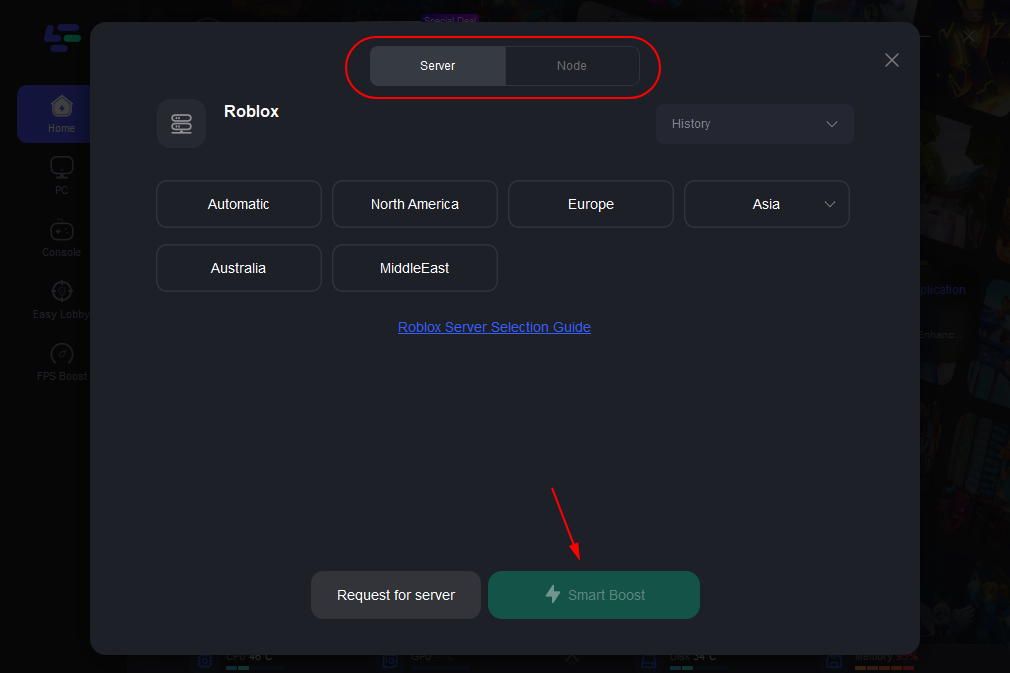
Step 4. Click Boost and start Roblox with smooth, unrestricted access.

Pro tips: While LagoFast is the most reliable solution, some players also try simpler alternatives: checking your internet connection, updating the Roblox client, or contacting Roblox Support. VPNs may work, but they often cause slower speeds and more lag compared to LagoFast.
Part 4: How to Change Location on Your Roblox Account
Sometimes, Roblox block issues are tied to your account’s registered location. If you want to update or switch regions, here’s how you can do it:
Step 1: Open Your Roblox Account Settings
- Log in to your Roblox account.
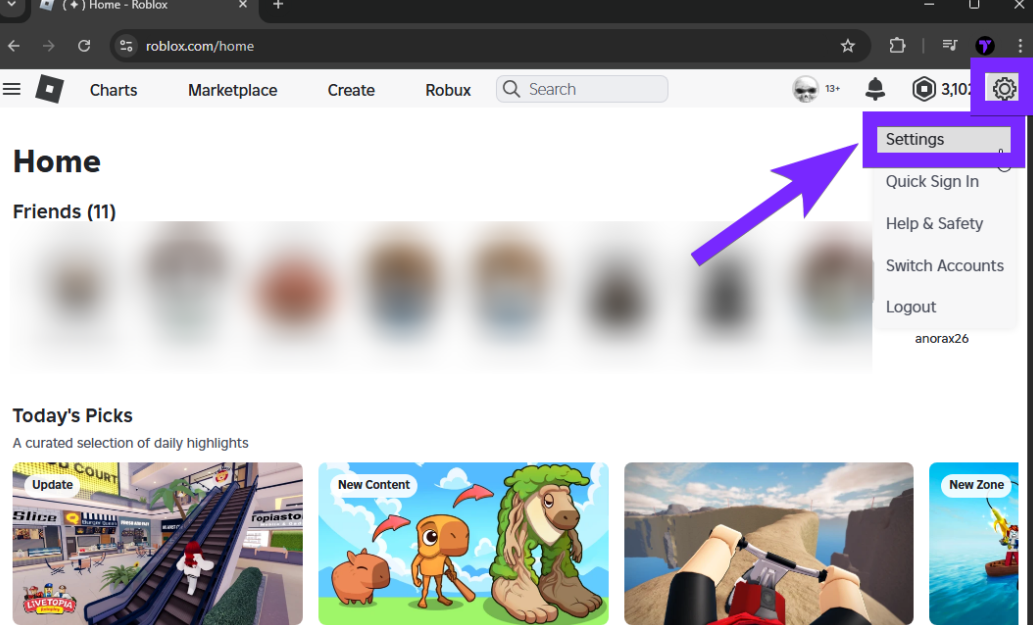
- Click the gear icon in the top-right corner.
- Select Settings from the dropdown menu.
Step 2: Check the Current Location Setting
- Scroll down until you see the Location field.
- If there’s a dropdown menu, select your actual country.
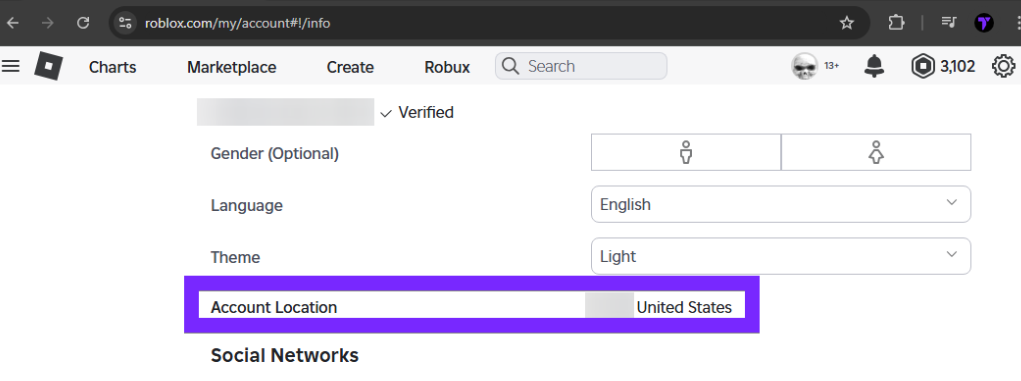
If the field is locked, continue to the next step.
Step 3: Contact Roblox Support
If you cannot change your location manually:
- Go to the Roblox Help Center.
- Submit a support ticket explaining the issue and request a location change.
Step 4: Alternative – Create a New Account with LagoFast
If support can’t solve the issue, you can create a new Roblox account with LagoFast:
1. Open LagoFast and choose the location you want.
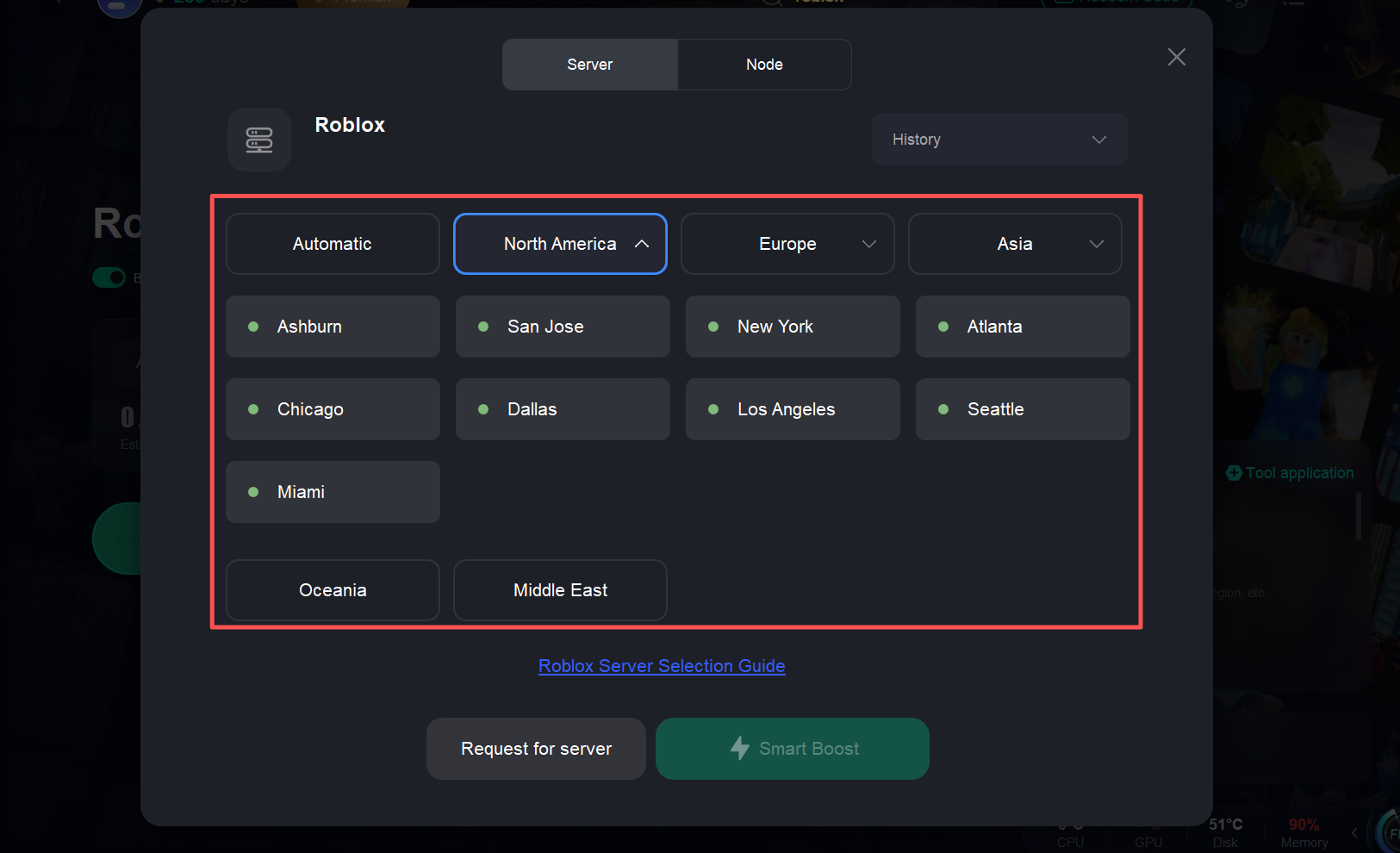
2. Start boosting with LagoFast.
3. Register a new Roblox account while boosted to the selected region.
This ensures your new account matches the preferred region and avoids location-based restrictions.
Related Article: Best VPNs for Roblox 2024
Part 5: FAQs
Q1: Why is Roblox banned in some countries?
Mostly due to child safety, cultural values, or privacy laws.
Q2: Can I still play Roblox if my country blocks it?
Yes, with LagoFast or other accelerators, you can bypass restrictions.
Q3: Does LagoFast also fix lag?
Yes, it reduces ping and boosts FPS.
Q4: Is LagoFast safe to use?
Yes, it’s a trusted gaming accelerator built for global players.
Q5: Will Roblox bans expand to more countries in the future?
It’s possible. Several regions are currently reviewing the platform, so players should stay updated on the latest news and prepare solutions in advance.
Conclusion
The Roblox blocked countries list continues to grow, with bans already in Turkey, Russia, Jordan, Algeria, Qatar, Iraq, and Egypt, plus partial restrictions in the UAE. Players everywhere are asking how many countries Roblox is banned in and why Roblox is banned in some countries. While governments point to safety and compliance, the reality is that players just want to enjoy Roblox.
With LagoFast, you can not only bypass these restrictions but also enjoy smoother, lag-free gameplay. Download it today and keep your Roblox adventure going.
Boost Your Game with LagoFast for Epic Speed
Play harder, faster. LagoFast game booster eliminates stutter and lags on PC, mobile, or Mac—win every match!
Quickly Reduce Game Lag and Ping!
Boost FPS for Smoother Gameplay!