
Excerpt: This article covers the expected system requirements for RF Online: Next, along with new gameplay features, cross-platform support, and tips to optimize your device for the best experience.
As the release of RF Online: Next approaches, players are eager to ensure their systems are ready for this next-generation MMORPG. While official system requirements have yet to be announced, we can make educated estimates based on modern gaming standards and the original RF Online specifications.
Part 1: What is RF Online: Next?
Part 2: Anticipated System Requirements for RF Online: Next PC
Part 3: Mobile Compatibility for RF Online: Next
Part 4: New Features in RF Online: Next
Part 5: How to Optimize Your System for RF Online: Next
Part 6: Optimize Your RF Online: Next Experience: LagoFast
Part 1: What is RF Online: Next?
RF Online: Next is the official sequel to RF Online, a legendary MMORPG that blended sci-fi warfare with fantasy elements. The game retains its faction-based PvP battles, where players choose between three warring factions:
- Bellato Union: A technologically advanced faction known for their powerful mechanized armor.
- Accretia Empire: A cybernetic race that relies on heavy artillery and advanced weaponry.
- Cora Alliance: A mystical civilization that harnesses magic and spiritual energy.
In RF Online: Next, players will experience an expanded universe, upgraded visuals, and new gameplay mechanicswhile staying true to the epic PvP battles that made the original so popular.
Part 2: Anticipated System Requirements for RF Online: Next
Given the advancements in gaming technology since the original release, it’s reasonable to anticipate that RF Online: Next will demand more robust hardware. Below are the projected minimum and recommended system requirements:
Minimum System Requirements
- CPU: Intel Core i3-8100 / AMD Ryzen 3 1200
- RAM: 4GB
- GPU: NVIDIA GTX 750 Ti / AMD Radeon HD 7850
- DirectX: Version 11
- OS: Windows 10 (64-bit)
- Storage: 20GB free space
- Internet: Stable broadband connection
Recommended System Requirements
- CPU: Intel Core i5-9400F / AMD Ryzen 5 3600
- RAM: 8GB
- GPU: NVIDIA GTX 1060 / AMD Radeon RX 580
- DirectX: Version 12
- OS: Windows 10/11 (64-bit)
- Storage: 30GB free space
- Internet: High-speed broadband (5 Mbps or higher)
Part 3: Mobile Compatibility for RF Online: Next
RF Online: Next is also slated for mobile platforms, extending its reach to gamers on the go. Here’s what mobile users might need:
Android Devices
- OS: Android 8.1 or higher
- RAM: 4GB
- CPU: Snapdragon 845 / MediaTek Dimensity 800
- Storage: 10GB free space
iOS Devices
- Device: iPhone XS or newer
- OS: iOS 13.0 or higher
- RAM: 4GB
- Storage: 10GB free space
Part 4: New Features in RF Online: Next
1. Large-Scale Faction Wars
The three-way war between Bellato, Accretia, and Cora will be bigger than ever, featuring improved combat mechanics and enhanced battlefields.
2. Next-Gen Graphics & Animations
Compared to the original RF Online, the sequel brings more detailed environments, dynamic weather effects, and fluid character animations, making the sci-fi world feel more immersive.
3. Expanded PvE and Story Content
While PvP remains a core focus, RF Online: Next introduces a deeper story mode, powerful NPC bosses, and more quest-driven gameplay to keep solo players engaged.
4. Customization & Player Progression
From weapon upgrades to class advancements, players will have more ways to customize their characters and develop unique combat styles.
Part 5: How to Optimize Your System for RF Online: Next
To ensure the best gameplay experience, consider these performance tips:
- Upgrade Your Hardware: If your PC is older than 5 years, upgrading to an SSD, 8GB RAM, and a mid-tier GPU will significantly improve performance.
- Close Background Apps: Ensure no unnecessary apps are running while gaming to free up system resources.
- Update Your Drivers: Keep your GPU and system drivers updated for better optimization.
- Use a Stable Internet Connection: Lag can ruin PvP battles, so aim for a low-latency, high-speed connection.
- Adjust Graphics Settings: If your device struggles, lowering resolution, shadows, and texture quality can help maintain FPS.
Part 6: Optimize Your RF Online: Next Experience: LagoFast
If you’re experiencing lag, high ping, or connection issues in RF Online: Next, LagoFast can help optimize your network for a smoother gaming experience. This game booster reduces latency, packet loss, and unstable connections, ensuring you stay competitive in faction battles.
How to Use LagoFast for RF Online: Next
Step 1: Download LagoFast Start by visiting the LagoFast website and clicking the “Free Trial” button.
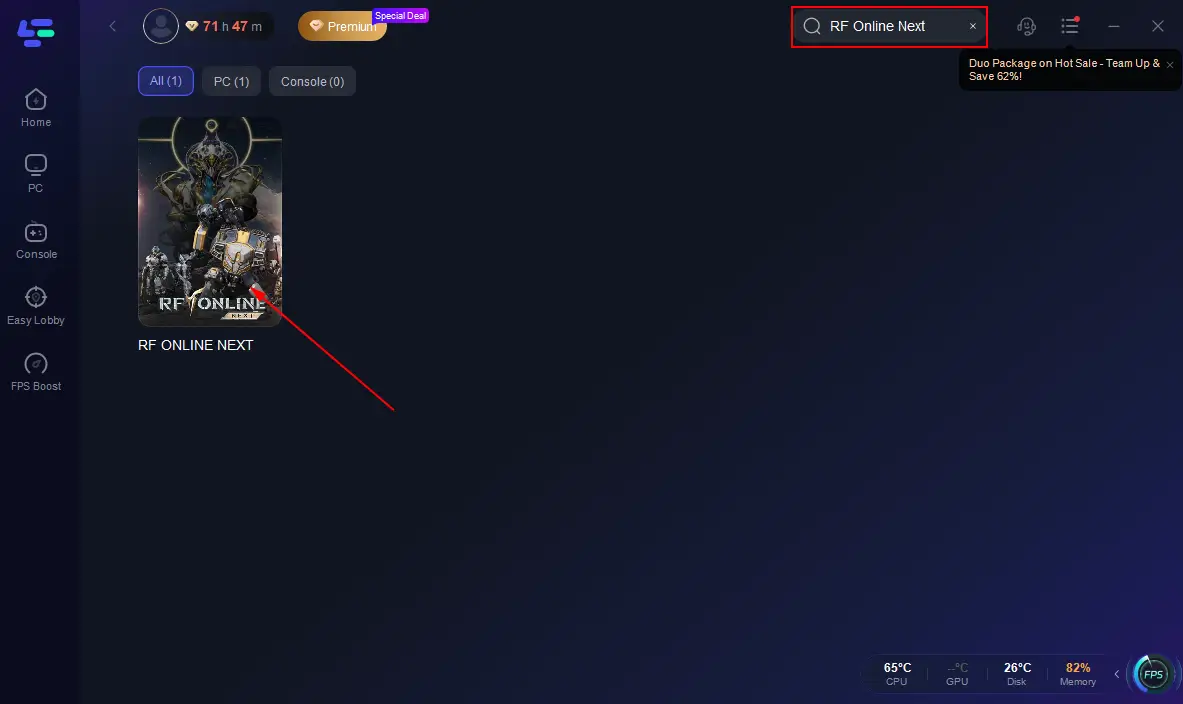
Step 2: Integrate Your Game Open LagoFast and use the search function to find your specific game. This should be done before launching the game to ensure it can be optimized.
Step 3: Server Selection Navigate to “Select Server” within LagoFast. Then select the most efficient Node displayed on the right side to connect.
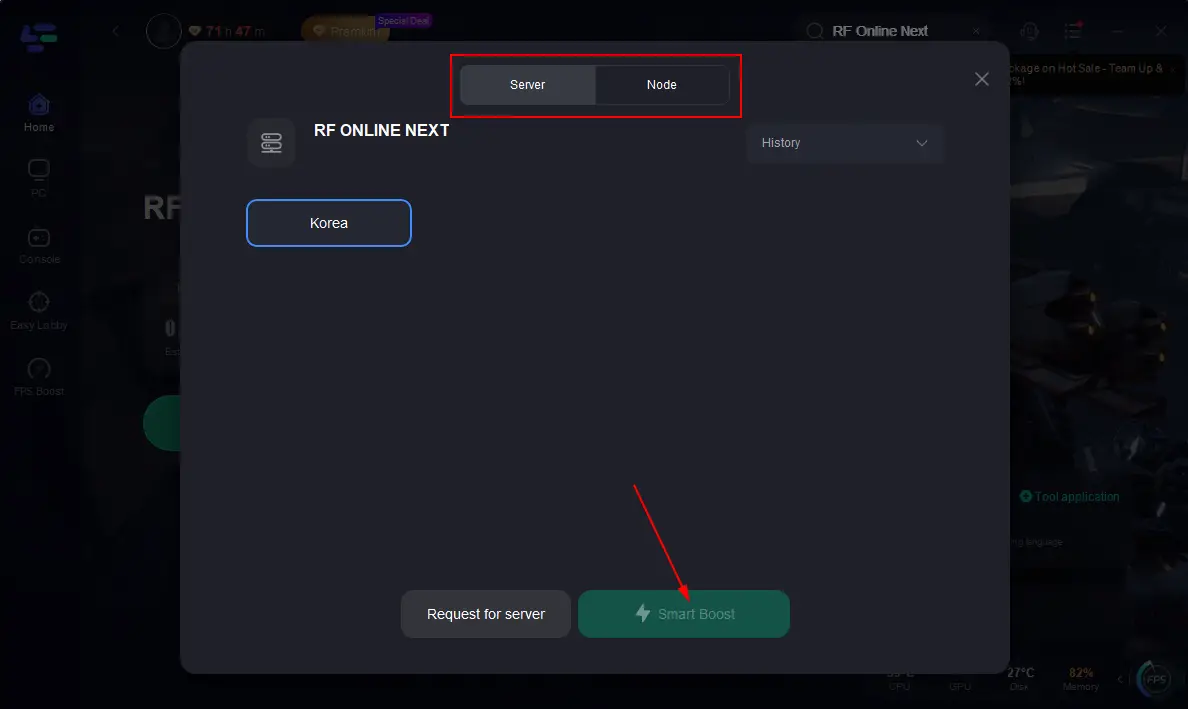
Step 4: Activate Smart Boost Click the “Smart Boost” button to start optimizing your game connection. LagoFast will then display real-time stats such as game ping, packet loss, and network type.
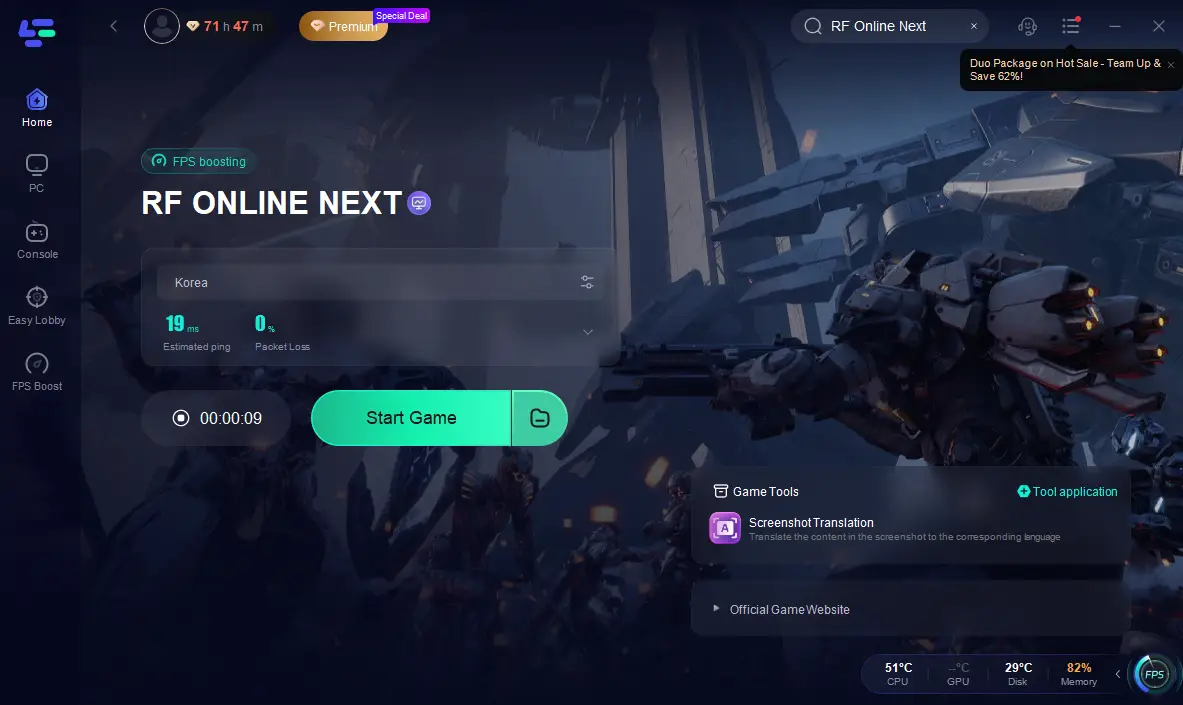
With LagoFast, you can enjoy smoother gameplay, reduced lag, and optimized network performance in RF Online: Next. Give it a try and dominate the battlefield without connection issues!
How to Get Better Gaming on Mobile with LagoFast
Struggling with lag, high ping, or unstable connections while gaming on mobile? LagoFast Mobile Booster helps optimize your network for a smoother, faster gaming experience.
Quick Steps to Use LagoFast Mobile
Download & Install: Get LagoFast Mobile Booster from the official website or App Store and Google Play.

Search Your Game: Open the app, enter your game’s name, and select it.
Select the Best Server: Choose the most stable server for optimal performance.
Boost & Monitor: Click Boost to reduce ping and see real-time ping & packet loss rates.
With LagoFast, you can enjoy low-latency, stable, and lag-free gaming in just a few simple steps. Download now and let LagoFast handle network optimization, so you can focus on winning!
Conclusion
While these anticipated system requirements provide a guideline, it’s essential to await official specifications from Netmarble. Preparing your system in advance will help ensure a seamless and immersive experience when RF Online: Next launches.

Boost Your Game with LagoFast for Epic Speed
Play harder, faster. LagoFast game booster eliminates stutter and lags on PC, mobile, or Mac—win every match!
Quickly Reduce Game Lag and Ping!
Boost FPS for Smoother Gameplay!