
Since the release of POE 2's 0.5 update, some players have reported FPS drops, stuttering, and inconsistent performance during gameplay. These issues are most noticeable during intense combat, crowded maps, and encounters with heavy visual effects. While the update introduced new content and improvements, it may also have affected performance on certain hardware configurations. In this guide, we'll look at the most common causes behind POE 2 0.5 FPS drops and walk through practical solutions to help improve stability and keep your gameplay running smoothly.

- ✅ Reduce Lag and High Ping.
- ✅ Boost FPS at the Same Time.
- ✅ Support 8000+ Popular Online Games.
- ✅ End Stuck & Crashing Issues.
- ✅ Fix Server Queue Issue.
Part 1: Understanding POE 2 0.5 FPS Drops
Part 2: Why is POE 2 0.5 FPS Suddenly Dropping?
Part 3: How to Fix POE 2 0.5 FPS Drops
Part 4: Advanced Fixes for Severe FPS Drops and Stuttering
Part 5: Optimizing with LagoFast: A Reliable Solution for Smoother Gameplay
Part 1: Understanding POE 2 0.5 FPS Drops
Not all performance issues in POE 2 are the same. Unlike consistently low FPS, POE 2 0.5 FPS Drops usually occur unexpectedly during gameplay, even when performance seems stable most of the time.
These brief frame rate dips can cause stuttering, frame spikes, and delayed responsiveness, making combat feel less smooth and predictable. Understanding when and how these drops occur can help you choose the most effective fix.
Related Article: PoE 2 Patch 0.5 Is Not Working? How to Fix Connection Failed and Server Issues
Part 2: Why is POE 2 0.5 FPS Suddenly Dropping?

POE 2 0.5 FPS Drops can be caused by several factors, and the exact reason often varies depending on your hardware and game settings. Since the 0.5 update introduced new content, effects, and encounters, some players may notice performance drops more frequently than before.
Shader Compilation and Cache Issues
After a major update, POE 2 may need to rebuild shader data. In some cases, outdated or corrupted shader caches can contribute to stuttering, sudden FPS drops, and inconsistent performance.
Heavy Combat and Visual Effects
Large enemy packs, boss fights, and skill-heavy encounters can put additional strain on your CPU and GPU. The more effects and enemies on screen, the more likely you are to experience performance dips.
Graphics and Rendering Settings
Using graphics settings that are too demanding for your system can affect overall performance. Some players may also find that Vulkan performs better than DirectX 12, or vice versa, depending on their hardware.
Outdated Drivers and Background Applications
Outdated graphics drivers and resource-intensive applications running in the background can reduce available system resources, making POE 2 0.5 FPS Drops more noticeable during gameplay.
Part 3: How to Fix POE 2 0.5 FPS Drops
If you're experiencing POE 2 0.5 FPS Drops, start with these basic troubleshooting steps before moving on to more advanced fixes.
Update Your Graphics Drivers
Graphics driver updates often include performance improvements and bug fixes for newly updated games. Make sure you're using the latest NVIDIA, AMD, or Intel drivers before testing any other solutions.
Switch Between Vulkan and DirectX 12
POE 2 supports both Vulkan and DirectX 12, but performance can vary depending on your hardware. If you're experiencing stuttering or unstable frame rates, try switching to the other renderer and compare the results.
Lower Performance-Heavy Graphics Settings
Certain settings have a larger impact on performance than others. If POE 2 0.5 FPS Drops occur during combat, consider lowering:
- Shadows
- Global Illumination
- Volumetric Lighting
- Particle Effects
- Post Processing
Reducing these options can help improve frame rate stability without significantly affecting visual quality.
Verify Game Files
Missing or corrupted game files can sometimes cause performance issues after an update. If you're playing through Steam, use the Verify Integrity of Game Files option to check for and repair any damaged files.
Close Unnecessary Background Applications
Applications running in the background can consume CPU, RAM, and GPU resources. Before launching POE 2, close unnecessary programs such as browsers, overlays, recording software, and other resource-intensive applications.
Part 4: Advanced Fixes for Severe FPS Drops and Stuttering
If POE 2 0.5 FPS Drops continue after trying the basic fixes, it may be time to look beyond in-game settings and check for system-level issues.
Clear Shader Cache and Verify Game Data
Major updates can sometimes leave behind outdated shader files or create conflicts with existing game data. Clearing the shader cache and verifying the integrity of your game files can help eliminate stuttering caused by corrupted or outdated files.
Optimize Windows Performance Settings
Windows settings can also affect game performance. Enabling Hardware-Accelerated GPU Scheduling, switching to a High Performance power plan, and making sure the game is installed on an SSD can all contribute to smoother gameplay and more consistent frame rates.
Disable Overlays and Unnecessary Software
Third-party overlays and background utilities may interfere with POE 2 or consume valuable system resources. If stuttering persists, try disabling overlays from Discord, GeForce Experience, Xbox Game Bar, and other applications to see whether performance improves.
Part 5: Optimizing with LagoFast: A Reliable Solution for Smoother Gameplay
While optimizing your game settings can help reduce POE 2 0.5 FPS Drops, overall gameplay smoothness isn't determined by graphics performance alone. Connection stability, latency spikes, and packet loss can also affect how responsive the game feels. LagoFast combines network optimization with performance-enhancing tools, making it a useful option for players looking for a smoother and more stable POE 2 experience.
Key features include:
- Reduce ping and stabilize connections for smoother online gameplay
- Optimize game routes to help minimize packet loss and latency spikes
- FPS Boost 2.0 with one-click game optimization & frame generation support
- Frequently Issues Fix tools that help repair DirectX 12, Visual C++ Runtime, and other common game environment issues with one click
- Twitch Drops integration for easier reward management
- Additional gaming utilities designed to improve convenience and performance
By combining system optimization with a more stable connection, you can enjoy a smoother and more responsive experience in POE 2.
Tutorial to Use LagoFast to Optimize Your Path of Exile 2 Gaming Experience:
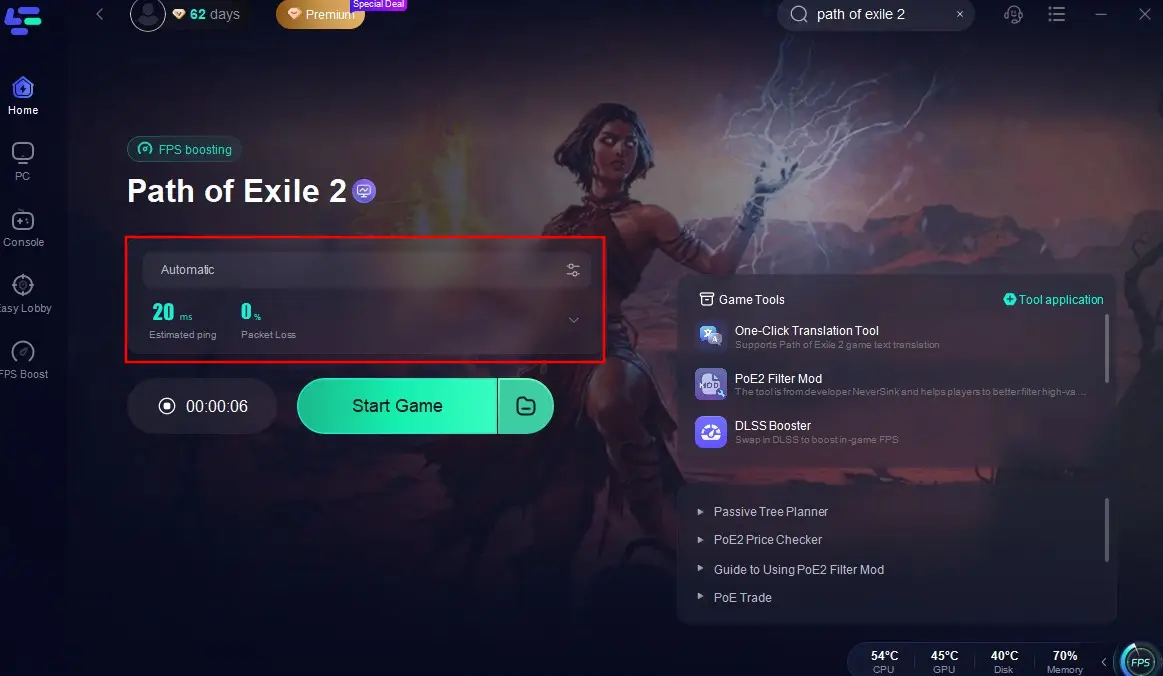
Step 1: Click the Free Trial button to download and install LagoFast.
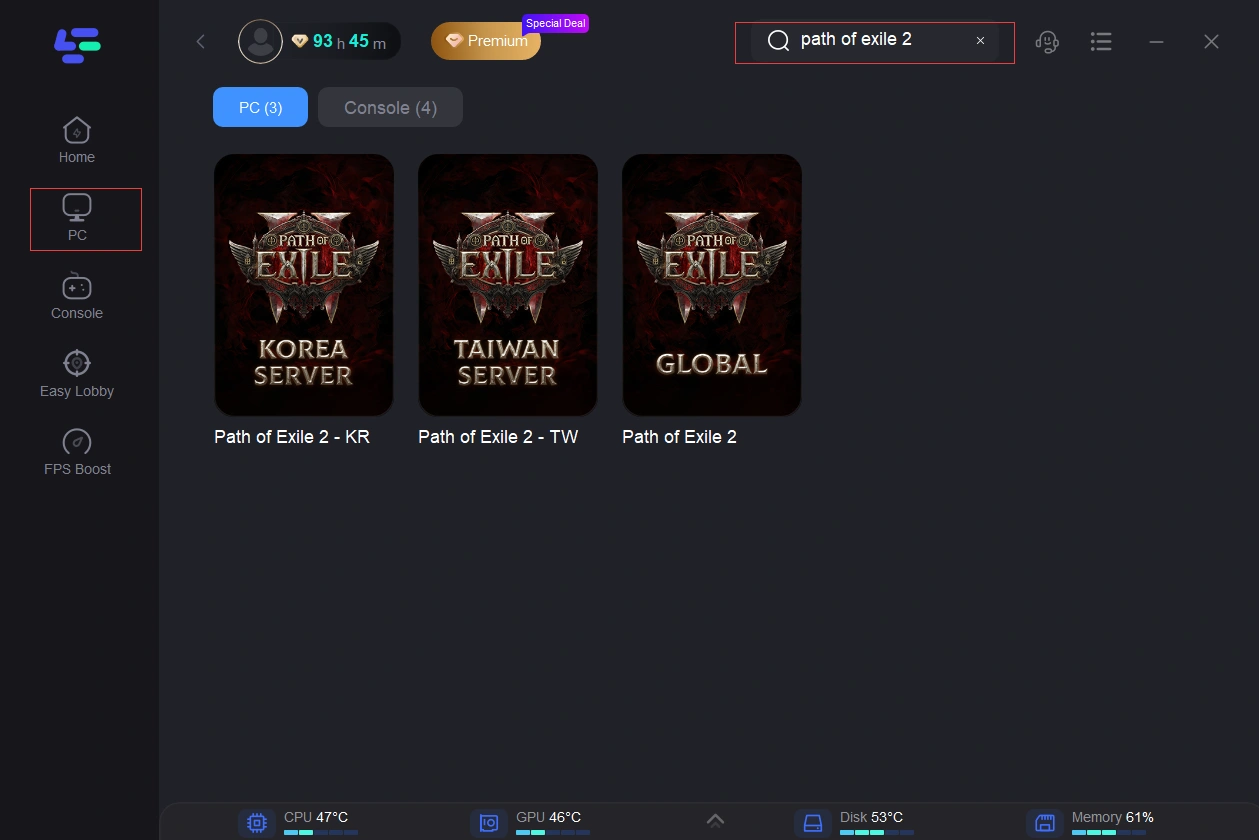
Step 2: After installation, search "Path of Exile 2" in the search bar and select the game.
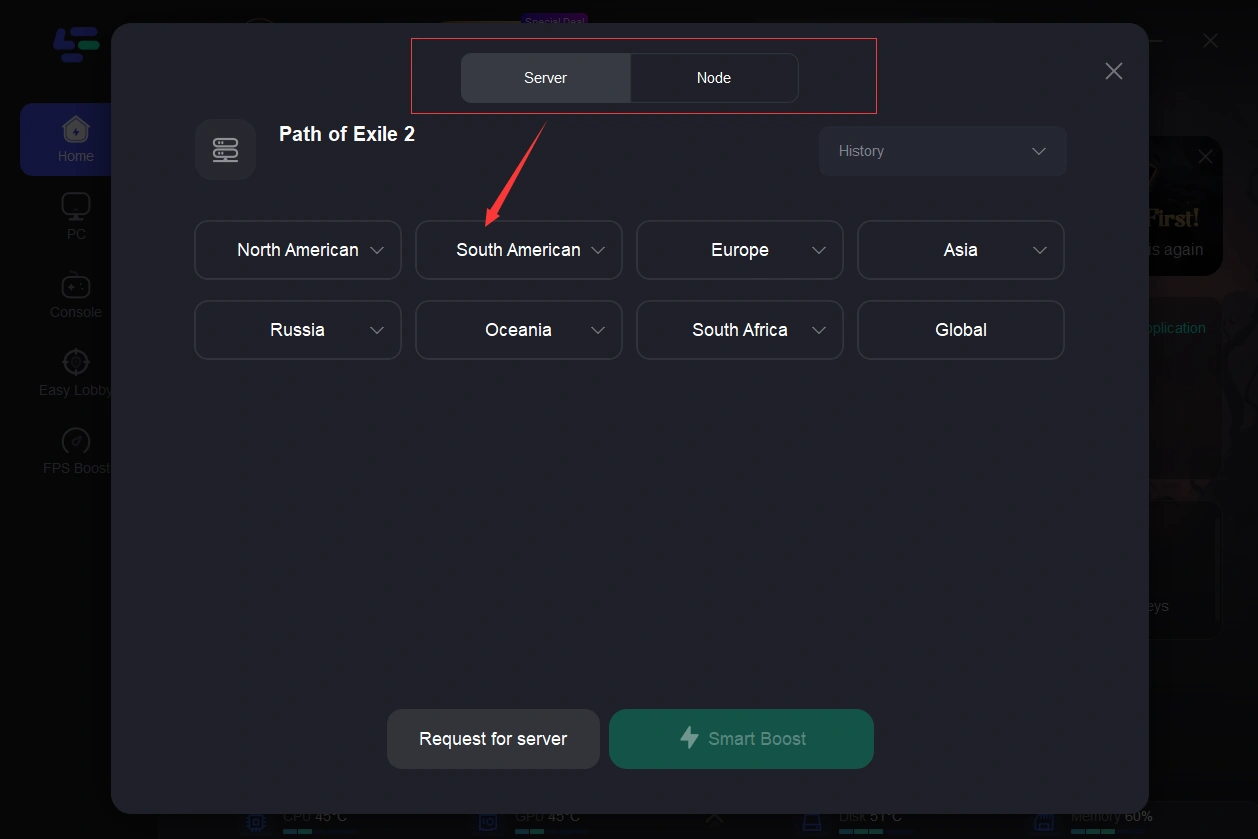
Step 3: Choose your preferred server node and click "Smart Boost" to start optimizing.
Step 4: Launch your game and enjoy smooth, optimized gameplay with lower ping and no stutter.
Part 6: FAQs
Did the POE 2 0.5 update affect performance?
Some players have reported FPS drops and stuttering after the 0.5 update, though the impact varies depending on hardware and settings.
Why are POE 2 0.5 FPS Drops worse during boss fights?
Boss fights often involve more enemies, effects, and mechanics, which can place greater demands on your system.
Can clearing the shader cache improve performance?
Yes. Outdated or corrupted shader cache files can sometimes cause stuttering and frame time spikes after major updates.
Should I use Vulkan or DirectX 12 in POE 2?
It depends on your hardware. Testing both options is the best way to find the most stable performance.
Final Thoughts
POE 2 0.5 FPS Drops can make even the best encounters feel frustrating, especially when stuttering happens at the worst possible moment. While there's no single fix that works for everyone, most players can improve performance by optimizing their settings, updating their system, and addressing potential software conflicts. With the right adjustments, you can enjoy a smoother and more consistent POE 2 experience.
Boost Your Game with LagoFast for Epic Speed
Play harder, faster. LagoFast game booster eliminates stutter and lags on PC, mobile, or Mac—win every match!
Quickly Reduce Game Lag and Ping!
Boost FPS for Smoother Gameplay!