
Choosing the right server can make a big difference in Mistfall Hunter. The wrong server choice may lead to higher ping, unstable connections, or make it harder to play with friends.
This guide covers all Mistfall Hunter server locations, explains how server regions work, helps you choose the best server for your location, and shows what to do if a server is unavailable or your ping is too high.

- Less ping and crashes.
- ✅ Higher FPS and better performance.
- ✅ Support for 8000+ games.
- ✅ Stable connection and region switching.
- ✅ Mistfall Hunter Translation Tool
Part 1: Where Are the Mistfall Hunter Servers Located?
Part 2: Mistfall Hunter Server Regions Explained
Part 3: Which Mistfall Hunter Server Should You Choose?
Part 4: How Mistfall Hunter Selects Your Server
Part 5: Mistfall Hunter playing with friends in NA
Part 6: How to Change Servers in Mistfall Hunter
Part 7: How to Check Your Ping Before Choosing a Server
Part 8: How to Reduce High Ping on Mistfall Hunter Servers-LagoFast
Part 9: Is Mistfall Hunter Progress Shared Between Servers?
Part 10: Mistfall Hunter Server Location FAQ
Part 1: Where Are the Mistfall Hunter Servers Located?
Mistfall Hunter currently has server regions available for several major player areas. Server availability may vary depending on your platform, game version, and regional access. Based on currently available information, the listed server regions include:
- United States – North America
- Germany – Europe
- Singapore – Southeast Asia
- Brazil – South America
- China – Mainland China version
These are the currently available server regions based on available game information. At the moment, available server information does not show separate regions such as US East, US West, or EU Central. Players usually select from the regional servers available for their version of the game.
Part 2: Mistfall Hunter Server Regions Explained
Mistfall Hunter North America Server
The North America server is listed under the United States region.
Depending on your game version and regional availability, players in North America may access the North American build and server region. This version can only connect to the NA server, even if you're playing from another country.
Mistfall Hunter Europe Server
The European server is listed in the Germany region and is generally the recommended choice for players across Europe.
If you're playing from countries such as the UK, France, Spain, Italy, or Poland, this is generally the best choice for lower latency and a more stable connection.
Mistfall Hunter Asia and Southeast Asia Servers
Mistfall Hunter currently has two server locations for players in Asia:
- Singapore – Covers Southeast Asia.
- China – Available for players using the mainland China version.
For most players in Malaysia, Singapore, Thailand, Indonesia, Vietnam, and the Philippines, the Singapore server should provide the best overall connection.
Mistfall Hunter South America Server
The South America server is listed in the Brazil region.
If you're playing from Brazil or nearby South American countries, this server usually offers much lower ping than connecting to North America, making it the recommended choice whenever it's available.
Does Mistfall Hunter Have an OCE Server?
Currently, Mistfall Hunter does not list a dedicated Oceania server for Australia or New Zealand.
Players in Oceania will typically need to connect to either the Singapore or North America server. Which one performs better depends on your ISP and network routing, so it's worth comparing your ping before choosing.
Does Mistfall Hunter Have a Middle East Server?
Currently, no dedicated Middle East server is listed.
Most players in the region will have the best experience on either the Germany or Singapore server. Checking the in-game ping before creating your character is the easiest way to see which option offers the better connection.
Part 3: Which Mistfall Hunter Server Should You Choose?
In most cases, the best server is simply the one closest to your location. A shorter network distance usually means lower ping, fewer connection issues, and smoother combat. However, your available servers may also depend on your game build, so it's worth checking before creating a character.
Best Server for Players in the United States and Canada
The North America server is usually the best choice for players in the U.S. and Canada. If you receive the North American version, your available server options may be limited to the NA region.
Best Server for Players in Europe
Players across Europe should choose the Germany server whenever it's available. It offers the shortest connection route for most European countries and typically delivers the lowest latency.
Best Server for Players in Southeast Asia
The Singapore server is the best option for players in Southeast Asia. Its location provides a stable connection for countries across the region, making it the preferred choice over more distant servers.
Best Server for Players in Australia and New Zealand
Since Mistfall Hunter doesn't currently have an Oceania server, most players should start with the Singapore server. If your connection performs better to North America, compare the in-game ping before deciding.
Best Server for Players in Brazil and South America
The Brazil server is the recommended option for players across South America. Connecting locally usually results in much lower ping than using the North America server.
Best Server for Players in the Middle East
Without a dedicated Middle East server, your best option depends on which region offers the lower latency. For most players, that will be either Germany or Singapore, so compare the available ping before choosing.
Best Server for Players Traveling or Living Abroad
If you're playing from a different country than usual, don't assume your home region is still the best option. Check the available servers and choose the one with the lowest ping for your current location whenever possible.
Part 4: How Mistfall Hunter Selects Your Server
Seeing different servers from your friends doesn't always mean something is wrong. In Mistfall Hunter, server availability isn't based on your location alone—it can also depend on the version of the game you download. Understanding how the system works can help you avoid choosing the wrong server or wondering why certain regions don't appear.
Physical Location vs Steam Store Account Region
For most players, the closest server is usually the best option for lower ping. However, your Steam Store account region can also affect which game build you receive.
Your available game version may depend on factors such as Steam region, platform availability, and regional publishing settings.
For some players, downloading the game through a North American Steam region may result in access to the North American version and server options.
How the North American Build Affects Server Selection
The North American build is designed specifically for the NA region.
If you're using this version, your available server options may be limited to the regions supported by that version. Simply traveling abroad or using a different internet connection won't unlock servers in Europe, Singapore, Brazil, or other regions.
Why the Closest Server May Not Appear
If the server you expected isn't listed, it doesn't always mean the server is offline. Common reasons include:
- Your game build only supports specific server regions.
- The server isn't available for your version of the game.
- The developers haven't introduced additional regional servers yet.
This is one of the main reasons players search for Mistfall Hunter server unavailable, even when the servers themselves are running normally.
Does Mistfall Hunter Automatically Choose the Lowest-Ping Server?
Not always.
While lower ping generally provides a better experience, Mistfall Hunter may not always connect you to the closest physical server. Available server options can depend on your game version, platform, and regional availability. If more than one server is available, you can then compare the displayed ping and choose the better option.
Part 5: Mistfall Hunter playing with friends in NA
If your friends are playing on the North America server, the first thing to check is whether everyone can access the same server region.
Players using the North American version can usually access the NA server directly. However, players using game builds from other regions may have different server options available.
To avoid starting over later, it's a good idea to confirm that everyone can select the same server before creating a character.
Part 6: How to Change Servers in Mistfall Hunter
If more than one server is available for your game build, you can choose a different server before entering the game. Here's what to do if you want to switch regions or can't find the server you're looking for.
Reduce High Ping with LagoFast
Already connected to the right server but still experiencing high ping? The issue may not be the server itself. Long-distance connections, inefficient routing, packet loss, and network jitter can all lead to lag, rubberbanding, delayed skill registration, and unstable gameplay.
LagoFast optimizes your connection by improving network routing, reducing ping, and minimizing packet loss and jitter. It's especially helpful when you're playing on servers outside your region or experiencing unstable cross-border connections.
Open the Server Selection Menu
Before entering the game, open the Server Selection screen from the main menu. This is where you can view the servers available for your game build and compare their ping.
Select Another Available Server
If more than one server is listed, choose the one with the lowest latency whenever possible. A lower ping generally provides smoother combat and a more responsive gameplay experience.
What to Do If the Server Is Missing or Locked
If the server you want isn't available, try the following:
- Restart the game and check the server list again.
- Confirm the server isn't under maintenance.
- Make sure your game build supports that server region.
- Check whether your Steam Store account is limited to a specific regional build.
Can You Change Servers After Creating a Character?
You can switch to another available server, but your character won't move with you.
Characters are generally server-specific, so changing servers usually means creating a new character. If you're planning to play with friends or want the lowest ping, it's best to choose the right server before you begin.
Part 7: How to Check Your Ping Before Choosing a Server
Before creating a character, it's worth taking a minute to compare your connection. Choosing the server with the lowest ping can help reduce input delay, improve combat responsiveness, and make your overall gameplay much smoother.
Check Latency on the Server Selection Screen
The easiest way to compare servers is by checking the ping shown on the Server Selection screen. In general, a lower ping means faster response times and a more stable connection during combat.
Compare Ping Between Available Regions
If your game build gives you access to multiple servers, don't choose one based on its name alone. Compare the displayed ping for each available region and pick the one with the lowest latency whenever possible.
Watch for Packet Loss, Jitter, and Routing Problems
Ping isn't the only indicator of connection quality. Even with a relatively low ping, you may still experience network issues caused by packet loss, jitter, or inefficient routing.
Common symptoms include:
- Rubberbanding
- Delayed skill or attack registration
- Character teleporting or sudden position changes
- Random lag spikes
Why Geographic Distance Is Not the Only Factor
The closest server isn't always the fastest one. Your ISP's routing, international network congestion, and cross-border network paths can all affect your connection quality.
That's why a server that's slightly farther away may sometimes provide a lower ping and a more stable experience than the geographically closest option.
Part 8: How to Reduce High Ping on Mistfall Hunter Servers-LagoFast
Choosing the right server doesn't always guarantee a smooth connection. If you're still dealing with high ping, packet loss, or rubberbanding after joining a server, the issue is often caused by network routing rather than the server itself.
LagoFast helps improve your connection with features including:
- Reduce Ping for smoother gameplay and faster response times.
- Fix Packet Loss & Stabilize Your Network to reduce lag spikes and rubberbanding.
- Optimize Network Routing for more stable cross-region connections.
- One-Click Translation Tool to instantly translate in-game text and menus.
- Free Steam Account for players affected by regional Steam restrictions.
Whether you're connecting to a nearby server or playing across regions, LagoFast helps deliver a smoother and more stable Mistfall Hunter experience.
How to Use LagoFast to Play Mistfall Hunter
Step 1: Download and install LagoFast on your PC
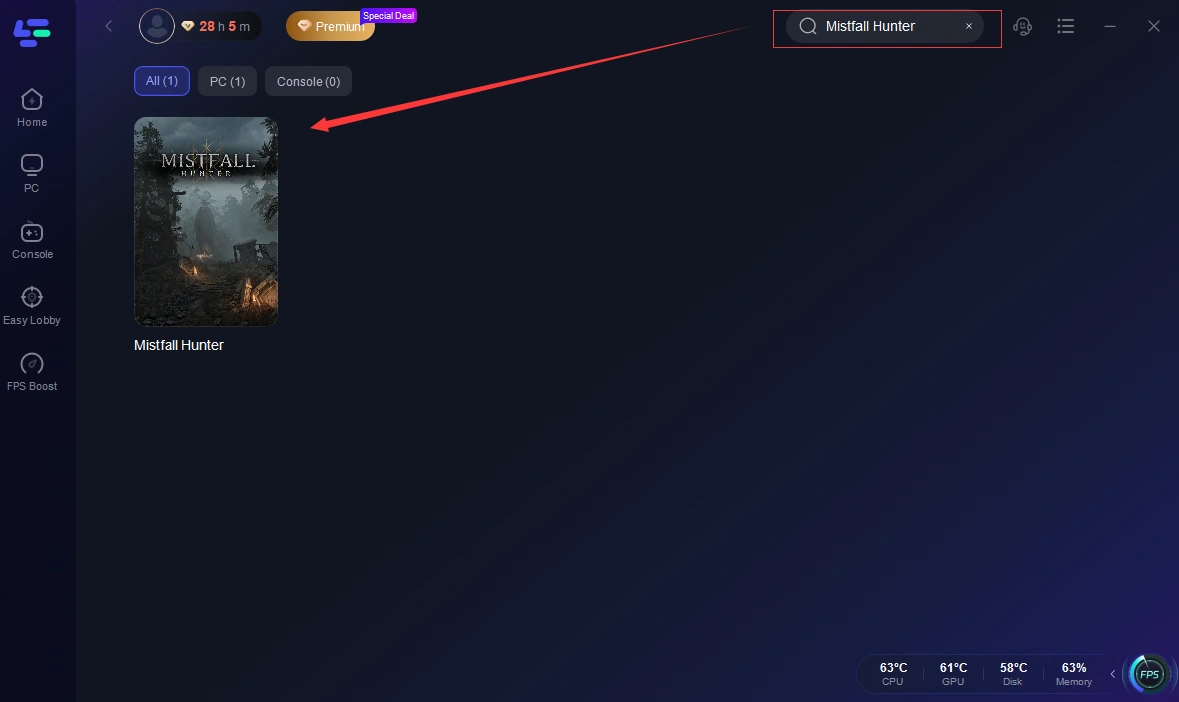
Step 2: Search for the Game: Type "Mistfall Hunter" into the search bar.
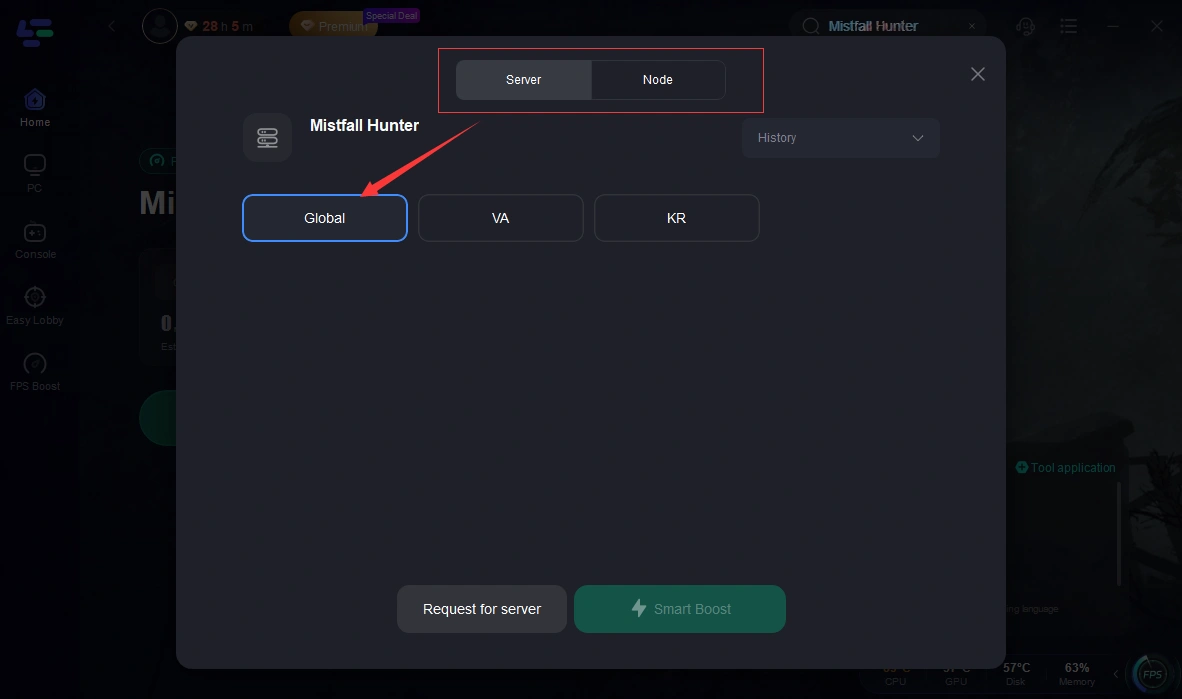
Step 3: Choose your preferred server node and click "Smart Boost" to start optimizing.
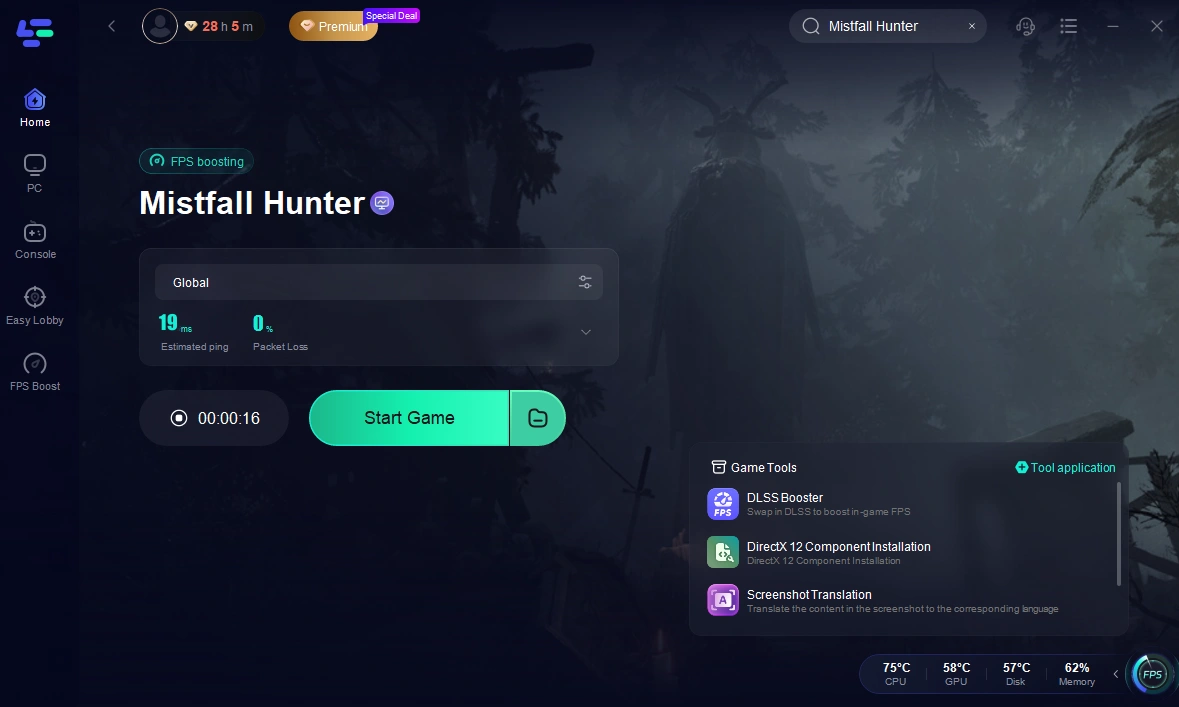
Step 4: Launch your game and enjoy smooth, optimized gameplay with lower ping and no stutter.
Part 9: Is Mistfall Hunter Progress Shared Between Servers?
At the moment, character progress is tied to the server where it's created.
If you switch to a different server, your existing character and progression won't be available there. That's why it's worth choosing the right server before you start playing, especially if you plan to team up with friends or invest a lot of time in your character.
Part 10: Mistfall Hunter Server Location FAQ
Does Mistfall Hunter automatically choose the best server?
Not always. Available servers may depend on your game version, platform, and regional availability. If multiple servers are available, choosing the one with the lowest ping is usually the best option.
Why can't I see the same server as my friend?
Players using different game builds may see different server options. Before creating a character, make sure everyone can access the same server region.
Does Mistfall Hunter have US East or US West servers?
Current server information shows a United States region, but separate regions such as US East or US West have not been listed.
Can I change servers without losing my character?
Character progress is currently server-specific. If you move to another server, you'll generally need to create a new character.
Does using a VPN or traveling unlock more servers?
No. Server availability is usually related to game version, platform, and regional access settings rather than your current network location.
Final Thoughts
Choosing the right server in Mistfall Hunter can make a noticeable difference to your overall experience. Before creating your character, take a moment to check which servers are available, compare your ping, and make sure you can join friends if you're playing together. If you're still dealing with high latency after choosing the right server, optimizing your network connection can help you enjoy smoother and more stable gameplay.
Boost Your Game with LagoFast for Epic Speed
Play harder, faster. LagoFast game booster eliminates stutter and lags on PC, mobile, or Mac—win every match!
Quickly Reduce Game Lag and Ping!
Boost FPS for Smoother Gameplay!