
Quick Answer: How to Play Meccha Chameleon as A Beginner?
To play Meccha Chameleon, you are split into two teams: Hiders and Seekers. As a Hider, you must use an in-game paintbrush, color picker, and slider system to paint your plain white character body to blend perfectly into walls, floors, or map objects, locking unique poses to break your human silhouette. As a Seeker, your goal is to find and tag all hidden players before the timer runs out. Winning requires deep environmental awareness, artistic matching skills, and a flawless network connection. High latency can cause your color matching to lag or make your character stutter while moving to a hiding spot. Using LagoFast Game Booster ensures zero-lag performance, letting you sample pixel-perfect colors and lock poses instantly without network delays.
Introduction
The indie gaming scene has been completely taken by storm by Meccha Chameleon, a fresh, viral hide-and-seek party game that turns players into literal artists of camouflage. Unlike traditional multiplayer titles where you hide behind physical obstacles, this game forces you to become the obstacle. If you are struggling to blend in and find yourself getting caught within the first thirty seconds of every round, you are not alone. This comprehensive beginner guide will break down the fundamental mechanics, step-by-step painting controls, advanced stealth strategies, and performance optimizations required to master the art of mimicry.

- ✅Less ping and crashes.
- ✅ Higher FPS and better performance.
- ✅ Support for 8000+ games.
- ✅ Stable connection and region switching.
Part 1: What Is Meccha Chameleon?
Part 2: How to Play Meccha Chameleon as a Beginner?
Part 3: Best Hider Tips in Meccha Chameleon
Part 4: How to Optimize Meccha Chameleon Gaming Performance?
Part 5: Best Seeker / Hunter Tips in Meccha Chameleon
Part 6: Common Beginner Mistakes
Part 7: Best Settings for Beginners
Part 1: What Is Meccha Chameleon?
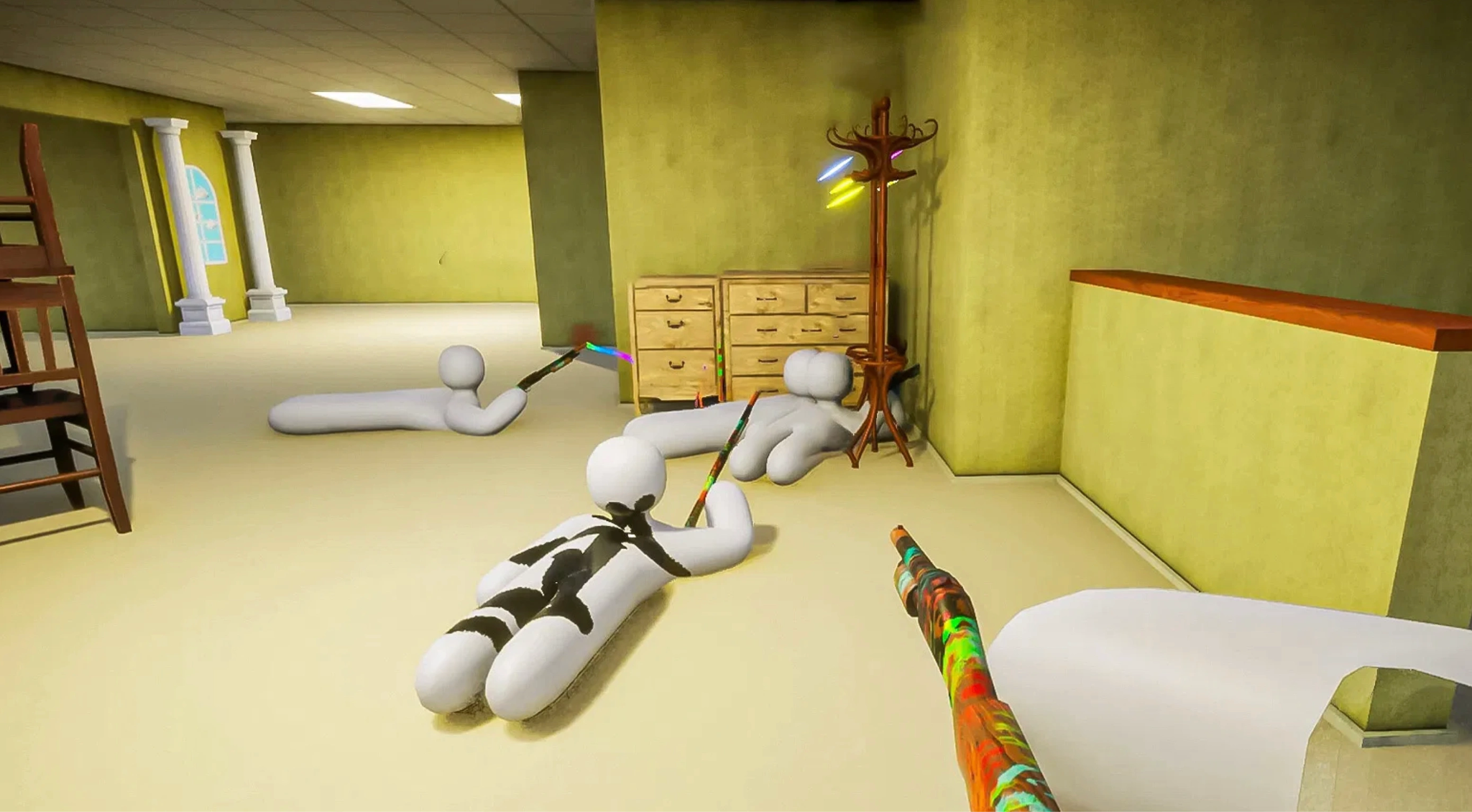
Released to massive acclaim, Meccha Chameleon is a casual multiplayer hide-and-seek party game developed by lemorion_1224. In this game, every player spawns in the lobby as a completely featureless, solid-white humanoid avatar. The core gameplay loop revolves around using an advanced, built-in painting toolset to manually recolor and texture your character's skin to match the surrounding game environment seamlessly. It is a brilliant blend of creative spatial art, social deduction, and stealth mechanics that supports lobbies ranging from 2 to 10 players, making it a massive hit for online gaming groups and streamers alike.
Is Meccha Chameleon like Prop Hunt?
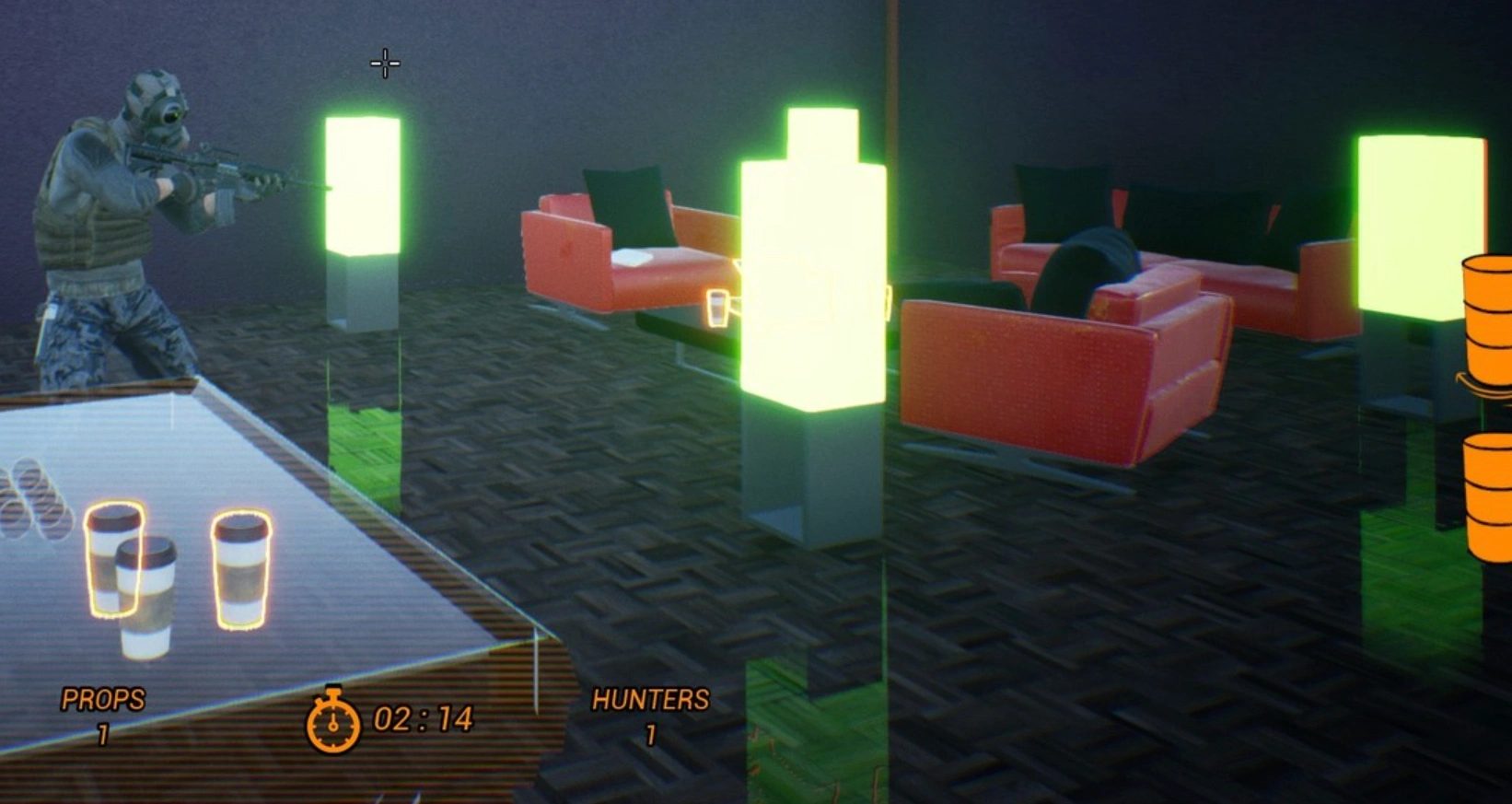
While it shares structural similarities with classic multiplayer mods like Garry's Mod Prop Hunt, Meccha Chameleon introduces a completely distinct tactical twist.
In standard Prop Hunt, players physically transform into stationary 3D map assets, such as a chair, a cardboard box, or a potted plant, and rely on the physical geometry of the item to hide. In Meccha Chameleon, you never change your physical form. You remain a humanoid model throughout the entire match. Instead of turning into an object, you must paint your body to mimic the background color, wall texture, shadows, and lighting of an object, floor, or partition wall. It replaces object transformation with creative camouflage and optical illusions.
Hider vs Seeker: How Each Role Works
|
Role |
Primary Objective |
Key Tools & Abilities |
Win Condition |
|
Hider |
Evade detection by blending into the environment. |
Eyedropper/Color Picker, HSV Sliders, Roughness/Metallic Adjusters, Pose Locking. |
At least one Hider must remain undetected when the match timer hits zero. |
|
Seeker / Hunter |
Scan the map and identify camouflaged players. |
Visual inspection, physical tracking, melee tagging/striking. |
Locate, identify, and successfully eliminate every Hider within the time limit. |
How a Match Starts, Hides, and Ends
Every round follows a strict, highly intense chronological sequence:
- The Preparation Phase: At the start of a round, Hiders are dropped onto the map with a short preparation window. Seekers are locked away in a spawn room, unable to see where the Hiders are running. Hiders must quickly scout the terrain, pick a strategic location, sample the surrounding textures, and paint their bodies.
- The Hunt Phase: Once the countdown ends, the Seekers are released into the map. They use environmental clues, broken symmetries, and visual inconsistencies to hunt down the players. Hiders must remain completely stationary, holding their breath as Seekers walk right past their faces.
- The Results Phase: When the timer expires or all Hiders are caught, the round ends. The post-game screen highlights exactly where each player was hiding, showing hilarious close-ups of brilliant camouflages and failed paint jobs.
Part 2: How to Play Meccha Chameleon as a Beginner?
Stepping into your first match can feel incredibly chaotic. To survive your first few lobbies, you need to master the mechanical controls of the camouflage system. Here is the absolute essential walkthrough for playing as a beginner.
How to Paint Your Character
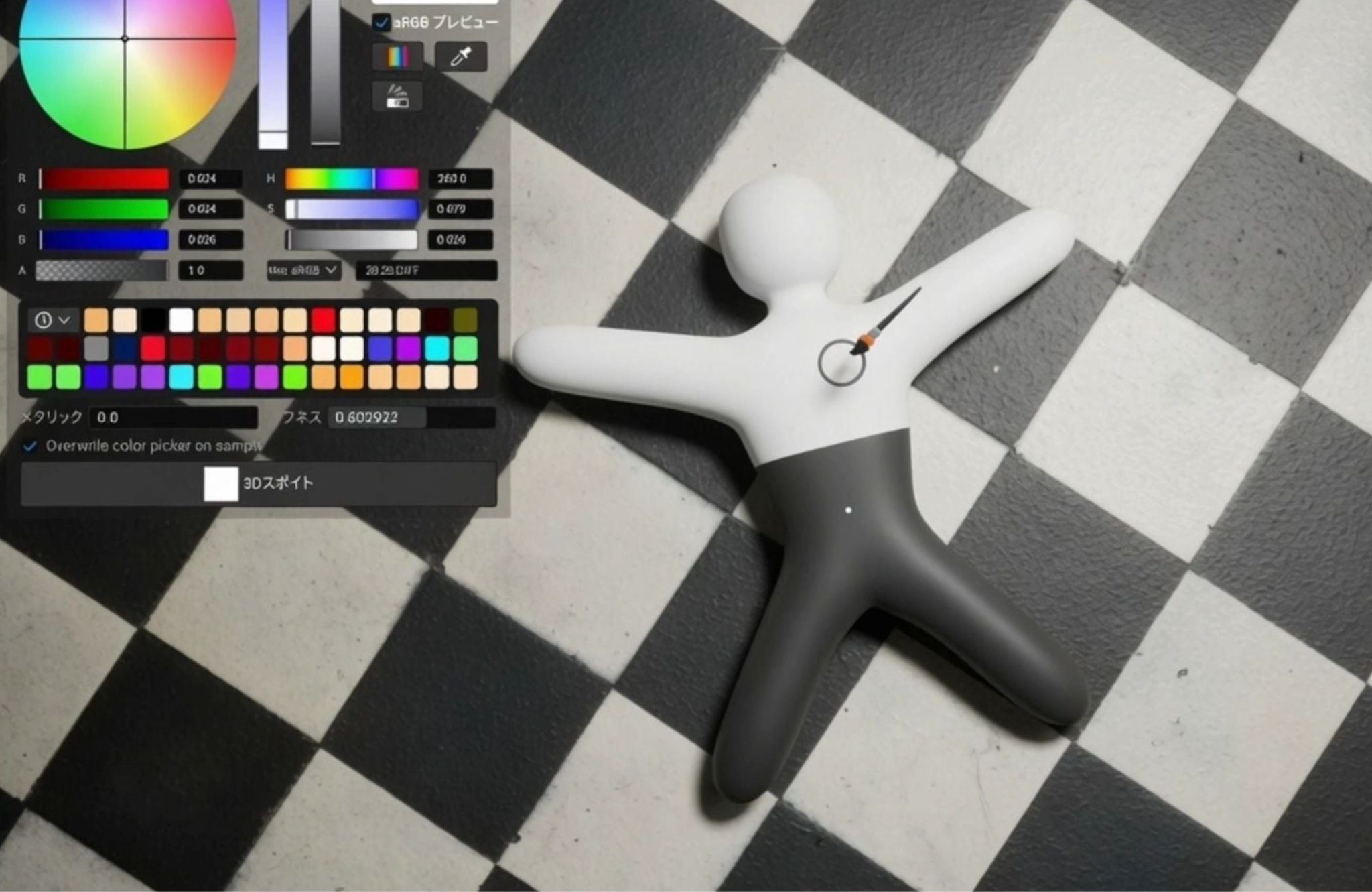
When the round begins, your figure is completely white, acting as a massive beacon for Seekers.
Step 1. Run to your chosen hiding spot immediately. Do not waste the first half of your preparation window wandering around the map.
Step 2. Press the Paint Key (Default: F) to open up the overlay menu.
Step 3. Select your digital paintbrush to begin applying colors directly to your character's limbs, torso, and head.
You can paint individual body parts separately, allowing you to match a floor color with your legs while matching a wall color with your upper chest and head.
How to Use the Color Wheel and Color Picker
Guessing colors by eye using the standard color wheel will almost always get you caught, as subtle differences in light will make your character stand out.
Step 1. Open your paint menu and equip the Eyedropper / Color Picker Tool.
Step 2. Aim your reticle precisely at the surface or object you are leaning against and click to sample the exact hue.
Step 3. Use the HSV (Hue, Saturation, Value) Sliders to fine-tune the lightness or darkness. This is vital for blending into shadows or brightly lit corners.
Step 4. Adjust the Metallic and Roughness Sliders. If you are hiding against a matte plaster wall but your character has a high-gloss, metallic sheen, you will reflect the light and reveal your position instantly.
How to Lock a Pose Before the Hunter Finds You

Leaving your character standing in a default posture completely ruins your disguise because human silhouettes are incredibly easy for the human eye to recognize.
Step 1. Move your character tightly against the asset you want to copy.
Step 2. Use the Pose / Emote Selection Menu to bend, crouch, sit, or lie flat on the ground.
Step 3. Once you find an awkward, non-humanoid shape that mimics the layout of the environment (like bending yourself to look like a geometric sign or a low step), press your Pose Lock Key.
Step 4. Locking your pose freezes your character model completely in place, preventing accidental limb movements from breaking the optical illusion.
How to Move Without Giving Yourself Away
Movement is the ultimate giveaway in Meccha Chameleon. The moment a Seeker spots a shifting pixel, your round is over.
Step 1. Once the Hunt Phase begins, take your hands off your movement keys completely.
Step 2. If you must adjust your camera to watch an approaching Seeker, do so incredibly slowly, or utilize third-person camera panning if your settings allow, preventing your model’s head from turning.
Step 3. Only break your pose and run if a Seeker is directly attacking your exact spot or if they have clearly committed to chasing a nearby teammate, offering you a brief window to relocate to a cleared area.
Part 3: Best Hider Tips in Meccha Chameleon
If you want to survive until the final seconds of the countdown, you need to think like an artist and a tactical illusionist. Use these proven hider tips to completely throw off the competition.
Match the Color First, Then Match the Shape
Beginners often focus entirely on getting the exact shade of blue or green down on their canvas, completely forgetting that their body still looks like a giant person standing against a wall. Always prioritize breaking up your silhouette. Use an awkward crouch or a prone position to turn your limbs into geometric angles that match the structural lines of the room.
Use Shadows, Corners, and Flat Surfaces
Bright, wide-open spaces leave zero room for error. Instead, look for dark corners, deep door recesses, or structural pillars that cast strong ambient shadows. When you hide within a shadow, you can use the HSV sliders to lower the brightness value of your paint, letting the natural darkness of the engine swallow any minor imperfections in your color matching.
Hide as Part of a Pattern, Not as a Random Object
Hiding flat against a single, solid-colored wall gives the Seeker a perfect, clean outline to spot. Instead, look for complex environmental patterns:
- Checkered tiled floors
- Stacked wooden crates or storage boxes
- Busy wall murals and signs
- Clusters of indoor pottery and foliage
When you place your character inside a highly cluttered, repetitive pattern, the Seeker's brain suffers from visual fatigue, making it significantly harder for them to isolate your shape.
Avoid Spots That Look Too “Perfect”
Experienced Seekers know the map layouts inside and out. If there is an empty alcove that perfectly fits a player model, or a highly obvious pedestal in the center of a room, hunters will systematically check it every single game. The best hiding spots are often hidden in plain sight, sitting awkwardly along a standard hallway floor or acting as an extension of a completely mundane wall pillar.
Don’t Always Hide in the Same Popular Spots
The Meccha Chameleon meta shifts incredibly fast. A brilliant spot that worked perfectly during launch week will become common knowledge a few days later. Constantly rotate your positions, experiment with different vertical heights by climbing on top of room assets, and never reuse the exact same spot twice in consecutive matches on the same map.
Part 4: How to Optimize Meccha Chameleon Gaming Performance?
Because Meccha Chameleon relies completely on real-time visual precision, mechanical input accuracy, and pixel-perfect color sampling, dealing with high ping or sudden frame drops can ruin your matches completely. If your connection stutters during the preparation window, your eyedropper tool might sample the wrong texture, or your character might fail to lock a pose before the Seekers are released, leading to an immediate elimination. Manual solutions like altering Windows registries or restarting routers rarely offer a permanent fix for server routing issues.
To guarantee a seamless, competitive experience, using a professional network optimization tool like LagoFast Game Booster is highly recommended. LagoFast provides an automated, comprehensive solution that fixes performance issues with zero hassle, offering features that ensure your client stays perfectly synced with the game servers.
Key Features of LagoFast:
- High Ping Reducer: Utilizes advanced, smart multi-path routing technology to automatically detect and assign the fastest, lowest-latency global server routes, eliminating high ping spikes entirely.
- One-Click FPS Boost: Optimizes your operating system’s CPU, GPU, and RAM allocation with a single click, cleaning up background processes to maximize your frame rate and eliminate micro-stutters.
- One-Click Crash Fix Tool: Features a built-in, dedicated diagnostic suite that can instantly scan, repair, and resolve game client crashes, launch errors, and frozen loading screens.
- Real-Time Network Monitoring: Displays an incredibly precise, real-time readout of your current ping and packet loss metrics directly inside an easy-to-read dashboard overlay.
Tutorial to Use LagoFast to Optimize Meccha Chameleon Gaming Performance:
Step 1: Click the Free Trial button to download and install LagoFast.
Step 2: Open LagoFast, then click the PC button on the left, search for Meccha Chameleon in the search bar, and click it after it appears.

Step 3: Click on “Server” to change to a better server that ensures a better gaming experience, then click on “Smart Boost” to fix Meccha Chameleon common errors.
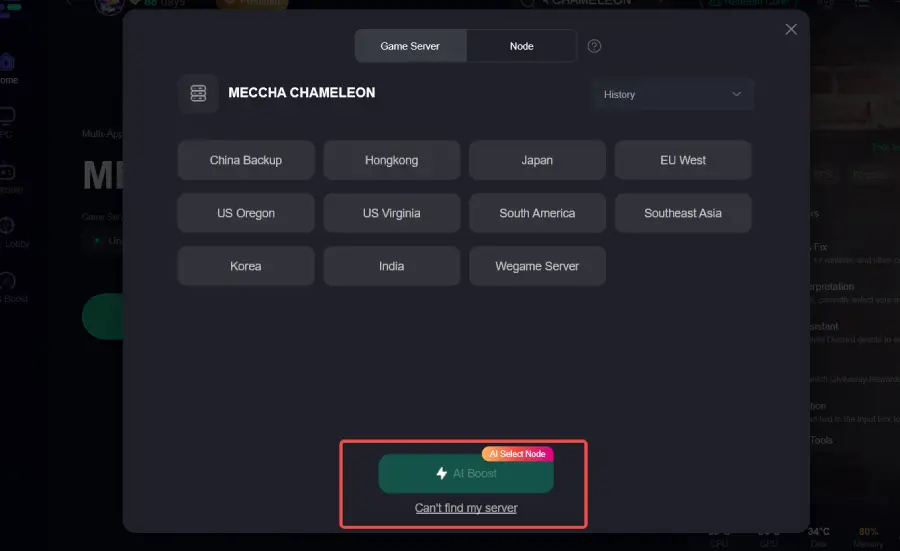
Step 4: Check the specific game ping, packet loss, and multiple path connections on the right side. Finally, click “Start Game” to play the game.

Part 5: Best Seeker / Hunter Tips in Meccha Chameleon
Playing as a Seeker can feel like searching for a needle in a haystack if you don't know what clues to look out for. Use these expert hunting strategies to clear rooms efficiently.
Check Repeated Patterns and Wall Textures
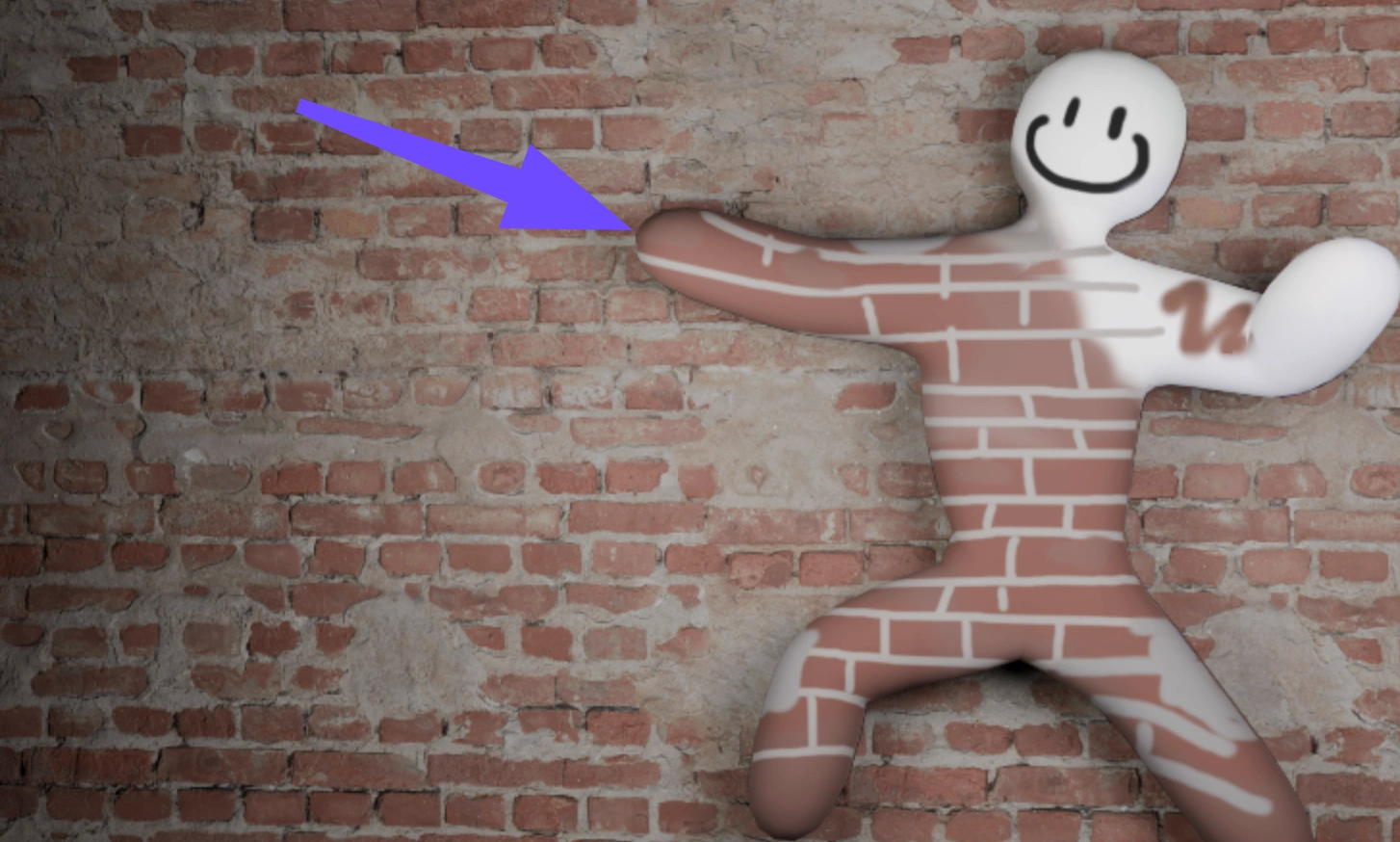
When a Hider tries to blend into a patterned surface, like a brick wall or a wood-paneled floor, they have to line up their body art with the existing environmental lines perfectly. Walk closely along walls and look for areas where the texture suddenly breaks, shifts angle, or looks slightly blurrier than the surrounding assets.
Look for Broken Symmetry
Video game maps are designed with strict architectural symmetry. If a room features a row of four identical decorative pillars, but one pillar appears slightly wider, has an extra bump at the base, or lacks a natural shadow line, do not hesitate to strike it. Broken symmetry is the number one giveaway of a clever hider.
Watch for Odd Shapes, Wrong Angles, and Floating Bodies
Because players must use pre-set emotes and poses to break their silhouettes, they often end up leaving parts of their models clipping through walls or floating slightly off the ground. Keep your eyes peeled for clipping anomalies, such as an unusual geometric shape sticking out from the side of a filing cabinet or a foot hovering an inch above a carpeted floor.
Learn Common Hiding Spots on Each Map
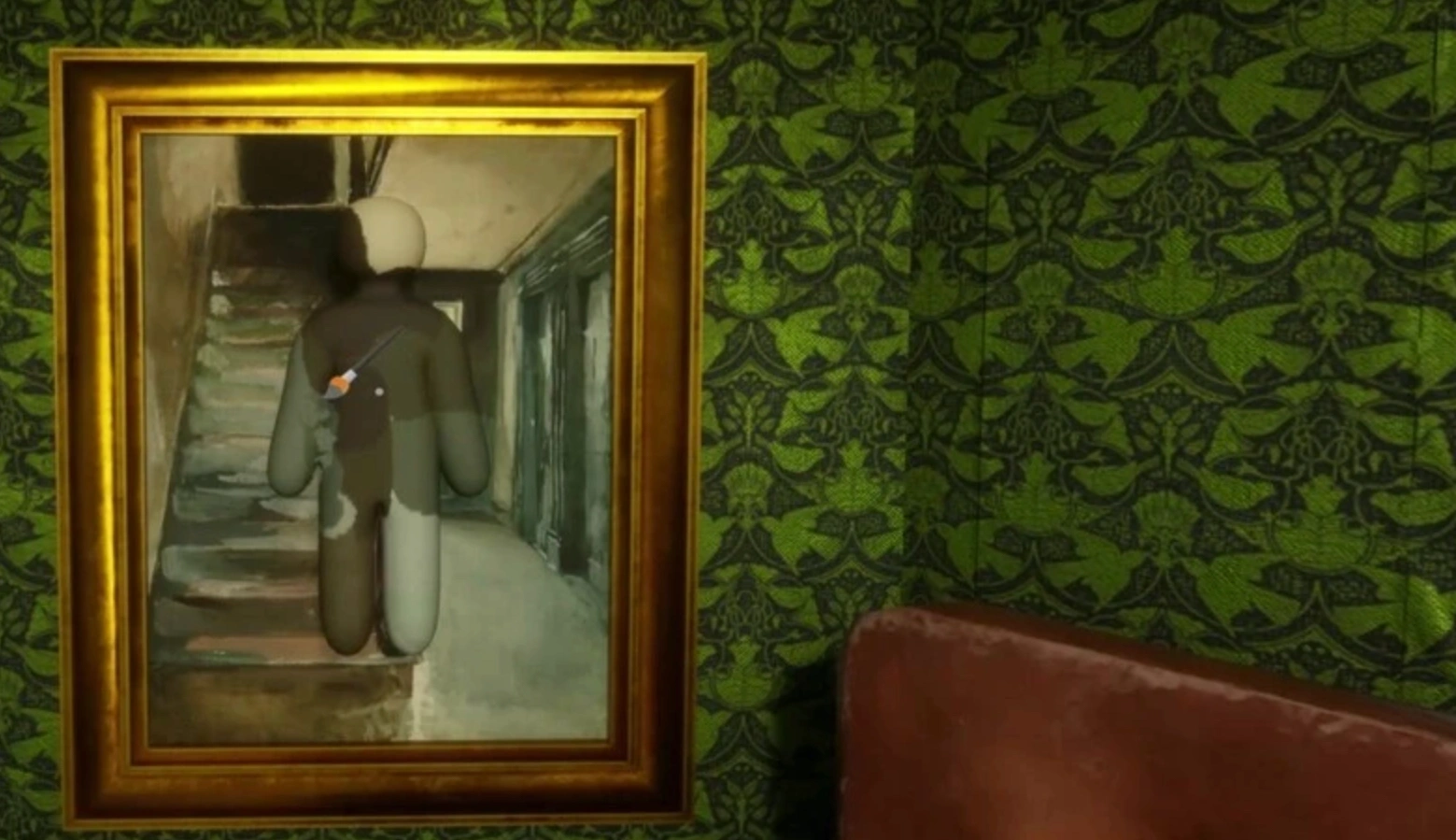
Every map in the rotation has specific zones that naturally attract Hiders due to great lighting conditions or highly detailed environmental clutter. Memorize these locations. Make it a habit to systematically swing your melee weapon through popular corners, dense bushes, and behind large interactive furniture items every time you enter a new section of the map.
Part 6: Common Beginner Mistakes
To quickly elevate your win rate in Meccha Chameleon, you must actively identify and eliminate these classic beginner habits from your gameplay loop.
Only Matching the Color, Not the Object Shape
The most frequent mistake new players make is finding a bright red wall, painting their entire character solid red using the eyedropper tool, and simply standing completely upright against it. Seekers are explicitly hunting for human shapes. If your silhouette stands out completely from the flat plane of the wall, an exact color match will not save you from a quick elimination.
Hiding in the Middle of Open Areas
Spawning into a match and immediately lying down flat in the middle of a wide-open, brightly lit courtyard is a guaranteed way to lose. Without any shadows, corners, or surrounding environmental clutter to break up the visual transition, your character model will look incredibly artificial and obvious to any hunter scanning the horizon.
Forgetting About Lighting and Camera Angle
A disguise that looks absolutely flawless from your own narrow, first-person perspective can look completely broken and distorted to a Seeker approaching from a side angle. Always take the time to rotate your camera full 360 degrees in third-person view before the preparation window ends. Look for exposed white joints, unpainted elbows, or edges that fail to align with the background lighting.
Moving Too Much After the Hunt Starts
It is incredibly tempting to constantly twitch your camera or slightly adjust your positioning to keep tabs on where the Hunters are walking. However, human vision is evolutionary tuned to detect sudden movement. Even a tiny micro-movement or a slight shift in your character's head angle will instantly trigger a Seeker's attention, turning a perfect camouflage into a dead giveaway.
Part 7: Best Settings for Beginners
Before jumping into your next public lobby, taking a few minutes to optimize your in-game configuration settings will give you a massive mechanical advantage over the competition.
Mouse Sensitivity
When you are attempting to sample a tiny, highly specific line of a wall texture with your eyedropper tool, having an excessively high mouse sensitivity will cause your reticle to jitter wildly. Lower your mouse DPI and in-game sensitivity to allow for smooth, pixel-perfect color selection during the high-stress preparation phase.
Graphics Visibility
Set your graphical settings to maximize texture clarity and ambient occlusion. High-resolution textures make it significantly easier as a Hider to read the exact details of the surface you are copying, while also allowing you as a Seeker to quickly spot pixel distortions and mismatched compression lines on hidden opponents.
Controls and Keybinds
Ensure your Paint menu (F), Pose selection, and Eyedropper shortcut keys are bound to highly accessible inputs surrounding your standard WASD setup. You need to be able to seamlessly drop into a location, sample a color, adjust a slider, and lock your pose within a matter of seconds without fumbling across your keyboard.
Voice Chat / Lobby Settings
If you are playing in public matchmaking or hosting viewer participation streams, utilize push-to-talk configuration for your voice chat settings. Accidentally breathing heavily into your microphone or reacting out loud when a Seeker walks near your hiding spot will immediately betray your position to everyone in the voice channel.
Part 8: FAQs
How do I copy colors precisely in Meccha Chameleon?
To copy colors perfectly, open your paint menu during the preparation phase, select the eyedropper tool, and click directly on the environmental texture or map object you want to mimic. Avoid manual guessing on the color wheel.
Why am I always found so fast even when my color matches?
You are likely getting found because you are failing to break up your human silhouette. Seekers look for humanoid outlines. If you don't lock an unusual pose or blend into complex map clutter, your outline remains completely obvious.
How do people blend perfectly into flat walls and floors?
Experienced players match the exact directional lighting of the room by utilizing the HSV value sliders to create artificial highlights and depth shadows on their body models, while matching the surface's roughness settings to prevent unnatural reflections.
Can I change my position after the hunt phase begins?
Yes, but it is incredibly risky. You should only move if a Seeker is actively swinging at your spot or if they have moved into a completely different zone of the map, giving you a clear window to transition to an already cleared area.
What is the purpose of the metallic and roughness sliders?
These sliders control how your character's body interacts with the map’s lighting sources. Matching the roughness of a surface prevents your character from having a glossy shine against a completely matte background, which is a major giveaway.
Does lag affect my ability to hide properly?
Absolutely. High latency or packet loss can cause your color sampling tool to lag, leading to inaccurate color matches. It can also delay your pose locking commands. Using a booster like LagoFast completely resolves these performance issues.
Conclusion
Mastering Meccha Chameleon requires a unique combination of artistic precision, sharp environmental observation, and calm nerves under intense pressure. By learning how to properly sample colors, break your character's silhouette with unique poses, and avoid common beginner movement mistakes, you will quickly become a nightmare for Seekers to locate. Just remember to keep your system performance perfectly optimized with tools like LagoFast so that lag never compromises your ultimate camouflage. Pack your digital paintbrush, find the perfect shadow, and get ready to dominate your next match!

Boost Your Game with LagoFast for Epic Speed
Play harder, faster. LagoFast game booster eliminates stutter and lags on PC, mobile, or Mac—win every match!
Quickly Reduce Game Lag and Ping!
Boost FPS for Smoother Gameplay!