
The long-anticipated release of REMATCH, the new competitive online soccer game developed by Sloclap, has players worldwide eager to hit the pitch. However, one common roadblock many face is REMATCH’s slow download speed, which can be incredibly frustrating, especially for those excited to dive into the action on day one. Whether you’re on PC or console, download issues can occur due to several reasons, like server congestion, unstable connections, outdated settings, or background network traffic. Fortunately, this article provides practical and tested solutions to make REMATCH download faster, including both software-based and hardware-based fixes. Let’s explore what REMATCH is all about and then dive into how to increase REMATCH download speed effectively on any platform.

- ✅ Reduce Lag and High Ping.
✅ Boost FPS at the Same Time.
✅ Support 2000+ Online Games
✅ Change Server Without Latency.
✅ Multiplatform: PC, Console, Mobile.
✅ End Stuck, Connection & Crashing Issues
Part 1: REMATCH Overview & Release Date
Part 2: How to Make REMATCH Download Faster on PC & Consoles - 100% Working Solutions
Part 3: How to Make REMATCH Download Faster on Consoles
Part 1: REMATCH Overview & Release Date
REMATCH is a fresh, fast-paced online soccer game designed for both casual fans and hardcore esports enthusiasts. Developed by Sloclap (creators of Sifu), the game eliminates traditional soccer restrictions, no offsides, no fouls, and no VAR interruptions, creating uninterrupted, high-octane matches. Players control individual characters in competitive 3v3, 4v4, or 5v5 formats, adding a skill-based twist to every match.
The official release date for REMATCH is June 19, 2025, and it's available for:
- PC (Steam)
- PlayStation
- Xbox
Players can choose between three editions:
- Standard Edition ($29.99)
- Pro Edition ($39.99)
- Elite Edition ($49.99)

All versions come with pre-order perks and early access to customization options. Despite the excitement, many users have reported slow download speeds, which we’ll address in detail below.
Part 2: How to Make REMATCH Download Faster on PC - 100% Working Solutions
If you’re downloading REMATCH via Steam or another PC platform and experiencing sluggish speeds, here are the most reliable fixes.
1. Use LagoFast: The Best Way to Make REMATCH Download Faster on PC
LagoFast is the most effective third-party tool to speed up REMATCH downloads on PC. Designed specifically for gamers, LagoFast optimizes network routes and stabilizes download streams, minimizing packet loss and latency. It works by intelligently selecting the fastest route between your system and the game’s servers.
Key Features of LagoFast:
- One-click game booster for REMATCH
- Real-time ping and download speed optimization
- Built-in lag and FPS booster
- Global acceleration coverage
- Customizable routing for optimal performance
- Compatible with Steam and other PC launchers
With LagoFast, players can expect up to 3x faster download speeds, ensuring you're match-ready in no time.
Tutorial to use LagoFast to Make REMATCH Download Faster on PC:
Step 1: Click the Free Trial button to download and install LagoFast.
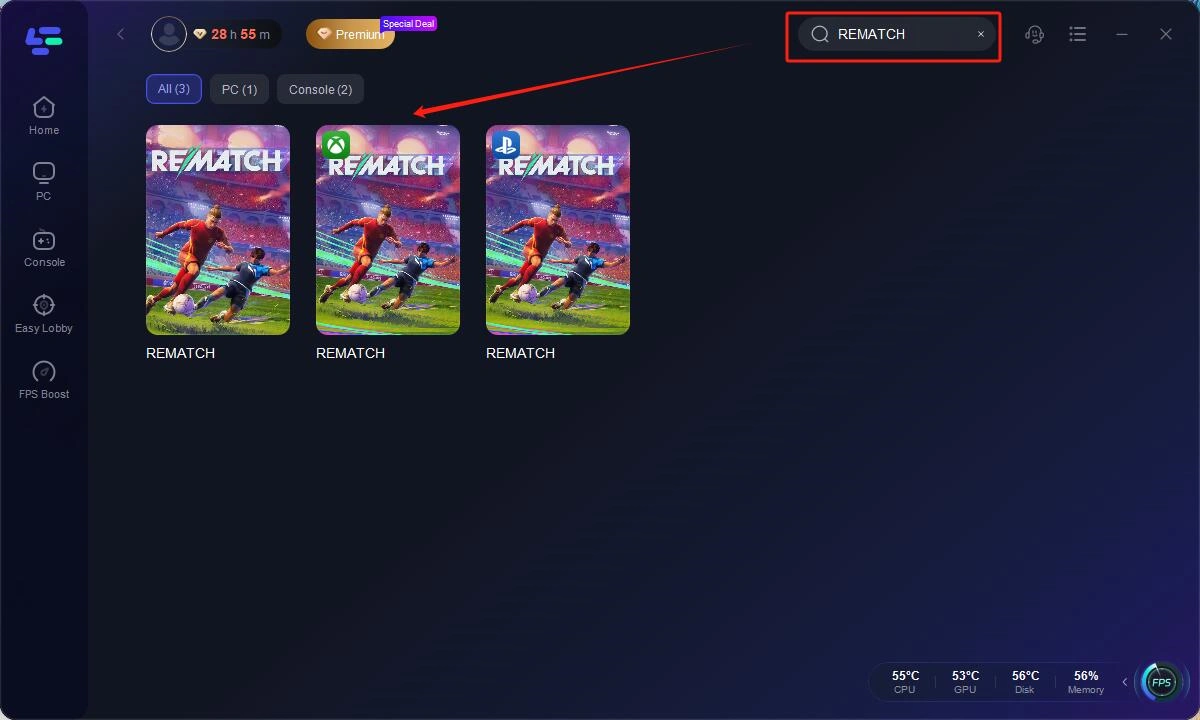
Step 2: Open LagoFast, then click the PC button on the left and search REMATCH in the search bar, click it after it appears.
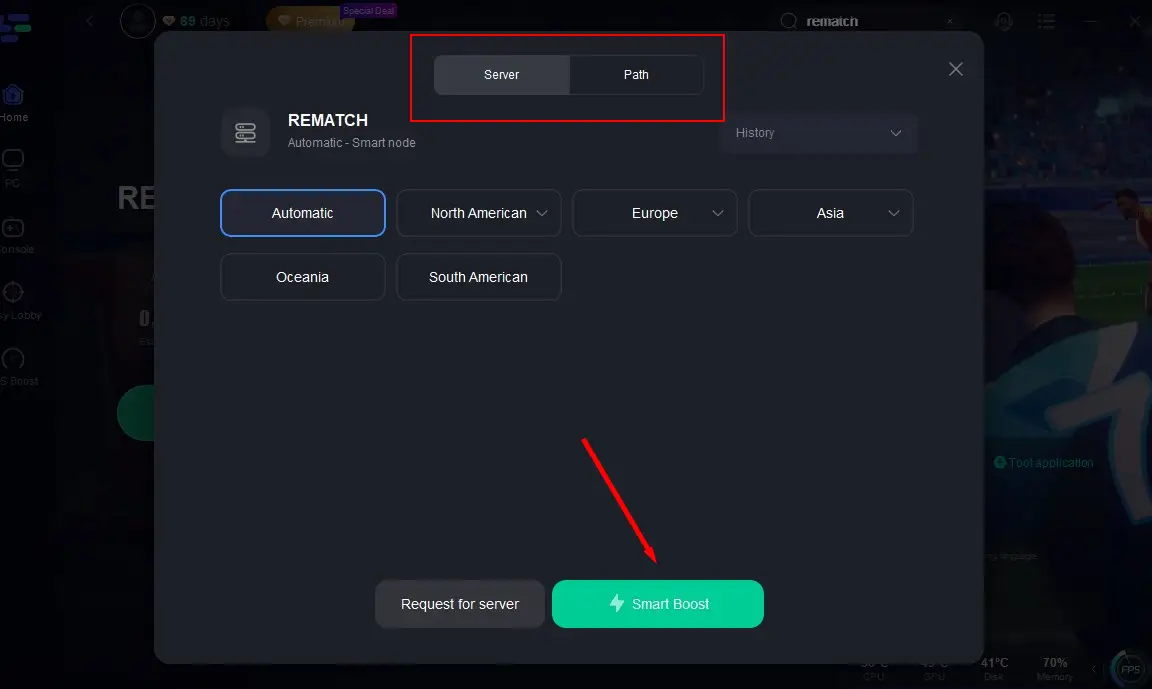
Step 3: Click on "Server" to change to a better server that ensures the gaming experience, then click on "Smart Boost".
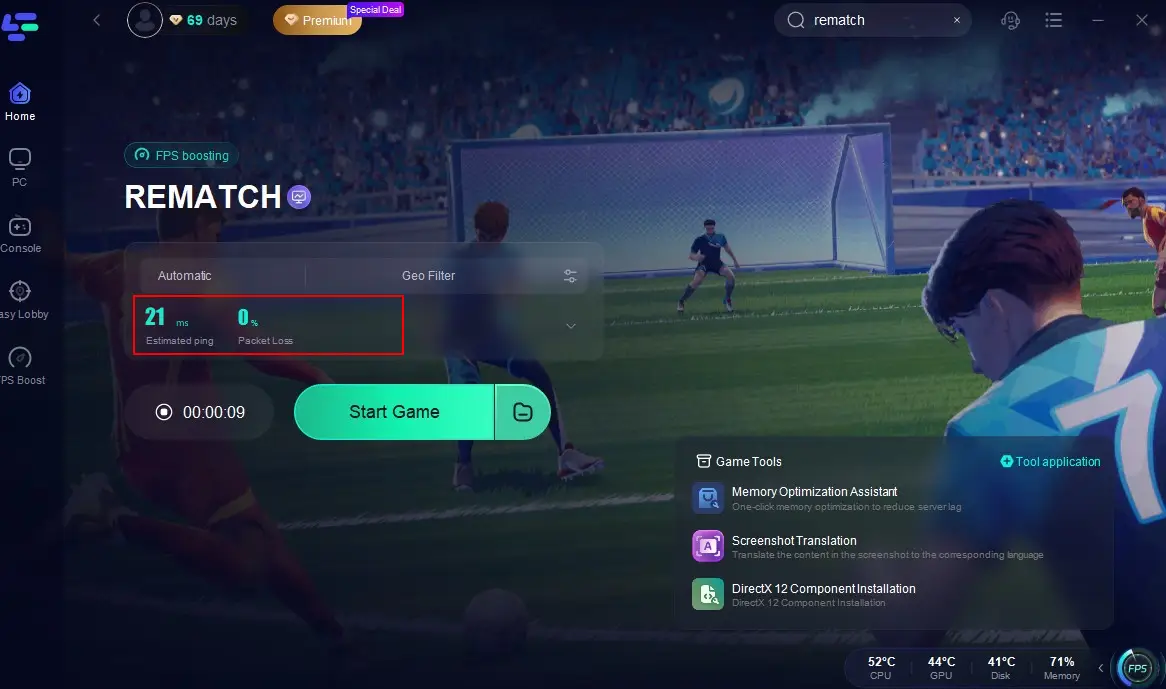
Step 4: Check the specific game ping, packet loss, and multiple path connection on the right side. Finally, click the "Start Game" to play the game.
Step 5. Search REMATCH in Steam and start downloading it.
2. Change Download Server Region
Changing your server region on Steam or your launcher can reduce congestion and improve speeds.
Steps:
Step 1. Open Steam and go to Settings.
Step 2. Navigate to Downloads.
Step 3. Under Download Region, select a less congested region near your location.

Step 4. Click OK to save changes.
Step 5. Restart Steam for the changes to take effect.
Step 6. Retry the REMATCH download and check for speed improvements.
3. Disable Background Applications
Programs running in the background, like browsers or torrent clients, may be hogging bandwidth.
Steps:
Step 1. Press Ctrl + Shift + Esc to open Task Manager.
Step 2. Go to the Processes tab.
Step 3. Identify high network-usage apps (e.g., Chrome, Dropbox).
Step 4. Right-click and choose End Task.

Step 5. Disable startup programs by navigating to the Startup tab.
Step 6. Reboot your system and retry downloading REMATCH.
4. Enable High Performance Mode
Ensuring your PC is set to high performance can boost network and hardware efficiency.
Steps:
Step 1. Open Control Panel and select Power Options.
Step 2. Select the High Performance plan.

Step 3. Click Change plan settings, and then Change advanced power settings.
Step 4. Expand Wireless Adapter Settings and select Power Saving Mode.
Step 5. Set to Maximum Performance.
Step 6. Save and exit.
5. Clear Steam Download Cache
Corrupted cache data can interfere with downloads. Clearing it may restore optimal speed.
Step 1. Launch Steam.
Step 2. Click Steam, go to Settings, and select Downloads.
Step 3. Click Clear Download Cache.

Step 4. Confirm and restart Steam.
Step 5. Log back in and start downloading REMATCH again.
Step 6. Monitor if download speeds have improved.
Part 3: How to Make REMATCH Download Faster on Consoles
Console players, whether on PlayStation or Xbox, may also struggle with long download times. Network bottlenecks and poor Wi-Fi connections are usually the culprits.
1. Use LagoFast Box: The Best Console Download Accelerator
For console users, the LagoFast Box is a hardware-based accelerator that enhances game download speeds by intelligently routing your console’s internet traffic. It is compatible with both Xbox and PlayStation.
Key Features of LagoFast Box:
- Optimized for console gaming and downloads
- Plug-and-play installation
- Intelligent routing for reduced congestion
- Built-in Wi-Fi extender for better coverage
- Traffic shaping to prioritize gaming bandwidth
- Real-time network diagnostics
By using LagoFast Box, console players can bypass common ISP throttling issues and significantly increase REMATCH download speeds.
Tutorial to use LagoFast Box to enhance your console gaming experience:
Step 1: Download the LagoFast Console App on your phone to control the LagoFast Box.

Step 2: Establish a connection between your LagoFast Box, router, and console, choosing between a wired or wireless connection.

Step 3: Launch the LagoFast Console App and boost REMATCH. Once you have completed the binding process with the LagoFast Box, proceed to boost this game within the LagoFast Console App.

2. Use a Wired Ethernet Connection
Wi-Fi can be inconsistent. Switching to Ethernet ensures a stable and faster connection.
Steps:
Step 1. Connect your console to your router using an Ethernet cable.
Step 2. On your console, go to Network Settings.
Step 3. Select Wired Connection.
Step 4. Restart your console.
Step 5. Pause and resume the REMATCH download.
Step 6. Monitor for speed improvements.
3. Set Primary DNS to Google DNS
Using public DNS like Google’s can improve resolution speed for game servers.
Steps (PlayStation):
Step 1. Go to Settings, select Network, and select Set Up Internet Connection.
Step 2. Choose your connection and select Custom.
Step 3. Set IP Address to Automatic.
Step 4. Choose Manual DNS Settings.
Step 5. Set Primary DNS to 8.8.8.8 and Secondary DNS to 8.8.4.4.

Step 6. Save and resume download.
Steps (Xbox):
Step 1. Open Settings > Network > Advanced Settings.
Step 2. Select DNS Settings > Manual.
Step 3. Enter 8.8.8.8 and 8.8.4.4.
Step 4. Confirm and restart your download.
4. Suspend All Other Activities
Ensure no other apps or background updates are draining bandwidth.
Steps:
Step 1. Close all background applications.
Step 2. Pause any other game or app updates.
Step 3. Put your console in Rest Mode (PlayStation) or Instant-on Mode (Xbox).

Step 4. Begin or resume REMATCH download.
Step 5. Monitor the speed.
Step 6. Keep the console connected without turning it off.
Part 4: REMATCH FAQs
Why is my REMATCH download so slow?
Slow downloads may be caused by network congestion, Wi-Fi instability, limited bandwidth, or launcher cache issues.
Why is my REMATCH download stuck at 0%?
If your REMATCH download is stuck at 0%, it could be due to a poor internet connection, overloaded game servers, or corrupted cache files. Try restarting your router, clearing the launcher cache, or switching to a faster network like LagoFast to resolve the issue.
Will LagoFast or LagoFast Box reduce my in-game lag, too?
Absolutely. Both are designed to lower latency, fix packet loss, and improve overall online performance.
Does using Rest Mode on consoles really help?
Yes, Rest Mode often reduces background network activity and improves download prioritization.
Is REMATCH cross-platform, and can I play with friends on other systems?
Yes, REMATCH supports cross-platform play, allowing players on different systems to team up or compete depending on the matchmaking settings.
Conclusion
REMATCH is shaping up to be one of the most exciting soccer video games of the year, but download issues can quickly kill the hype. Whether you're on PC or console, knowing how to make REMATCH download faster is essential to getting into the game quickly and smoothly. For PC users, LagoFast provides a smart, fast, and user-friendly way to speed up downloads and gameplay. Console gamers can rely on the LagoFast Box solution to address network bottlenecks. Combine these with manual tweaks like DNS changes, Ethernet usage, and clearing download cache, and you'll be match-ready in no time.

Boost Your Game with LagoFast for Epic Speed
Play harder, faster. LagoFast game booster eliminates stutter and lags on PC, mobile, or Mac—win every match!
Quickly Reduce Game Lag and Ping!
Boost FPS for Smoother Gameplay!