
Encountering issues with your League of Legends (LoL) client not opening can be frustrating, especially when you’re looking forward to a gaming session. Whether the game won’t launch, the client isn’t responding, the application just doesn’t seem to open, League of Legends won't load, League of Legends won't load into game after champion select, or Why won't my League of Legends account load?, here’s what you need to know to get back into action without significant downtime. Moreover, we’ll introduce you a very powerful game booster, LagoFast, to guarantee your ultimate gaming experience.

- ✅ League of Legends ping checker
- ✅ Reduce Lag and High Ping.
- ✅ Boost FPS at the Same Time.
- ✅ Support 2000+ Popular Online Games.
- ✅ Change Server Without Latency.
- ✅ Multiplatform: PC, Console, Mobile.
Part 1: Common Reasons Why League of Legends Won’t Open
Part 2: Step-by-Step Solutions to Fix League of Legends Launch Issues
Part 3: How to Enhance Your Gaming Experience with LagoFast
Part 1: Common Reasons Why League of Legends Won’t Open
Before diving into the solutions, it’s important to understand why these issues occur. Common causes include:
- Corrupted game files: Essential files may be damaged or corrupted.
- Outdated graphics drivers: Older drivers can cause compatibility issues.
- Software conflicts: Other programs may interfere with the game.
- Administrative rights: Lack of permissions can prevent the game from launching.
- Firewall or antivirus blockages: Security software might mistakenly block the game.
Part 2: Step-by-Step Solutions to Fix League of Legends Launch Issues
Check Server Status
First, ensure that the issue isn’t on Riot Games’ end. Check the Riot Games Service Status page for any announcements regarding server downtimes or maintenance which could be affecting game accessibility. This step is crucial as server problems can lead to various loading issues like league of legends won't load, league of legends won't load into game after champion select, or problems with account loading.
Run as Administrator
Right-click on the League of Legends shortcut and select “Run as Administrator.” This gives the game the necessary permissions to run correctly and can resolve many issues related to game launch, including those that might cause league of legends won't load or account - loading problems.
Update Graphics Drivers
Outdated graphics drivers are a common cause for games not launching. Update your graphics card drivers by visiting the NVIDIA, AMD, or Intel website and downloading the latest drivers for your specific model. Incorrect or outdated drivers could contribute to problems like league of legends won't load into game after champion select due to graphical rendering issues.
Close Conflicting Programs
Ensure no conflicting software is running. Programs like antivirus software, firewalls, or even other gaming platforms might interfere with your game. Temporarily disable these programs to see if the issue resolves. Remember to turn your security software back on afterward! Conflicting programs can disrupt the game's loading process, leading to issues such as league of legends won't load or problems with account loading.
Repair Game Files
League of Legends includes a built-in repair tool which can fix corrupted game files. Open the League of Legends Launcher. Go to the settings gear icon and select “Initiate Full Repair.” Damaged game files can be the root cause of various loading problems, including league of legends won't load into game after champion select and issues with the account not loading.
Reinstall the Game
If none of the above steps work, a fresh installation might be necessary. Uninstall League of Legends. Download the latest installer from the official League of Legends website and install the game again. This can sometimes solve persistent loading issues like league of legends won't load and problems related to account loading.
Adjust Antivirus and Firewall Settings
Sometimes, antivirus programs or firewalls block the game from launching. Add exceptions for League of Legends in your firewall and antivirus settings. These security measures can prevent the game from loading properly, causing issues like league of legends won't load or league of legends won't load into game after champion select.
Update Windows
Ensure your operating system is up to date as this can affect game performance and compatibility. Check for Windows updates and install any available patches. An outdated Windows system might not support the game's loading process correctly, leading to issues such as league of legends won't load or problems with account loading.
Check for Overlays
Disable any screen overlays running in the background, such as those from Discord, NVIDIA, or other game recording software, as they can cause issues with game launches. Overlays can interfere with the game's loading, potentially leading to league of legends won't load into game after champion select or other loading - related problems.
Part 3: How to Enhance Your Gaming Experience with LagoFast
Experiencing lag during gaming sessions can diminish the fun and impact your performance. Fortunately, LagoFast is a game booster designed to optimize your network connection, ensuring smoother gameplay with reduced lag. Here’s a concise guide on how to set up and use LagoFast to improve your gaming experience.
Quick Setup Guide for LagoFast
Step 1: Click the Free Trial button to download and install LagoFast Free Trial.
Step 2: In the LagoFast interface, add League of Legends to the optimized game list. This allows LagoFast to apply its optimization techniques specifically to League of Legends, ensuring the best possible performance.
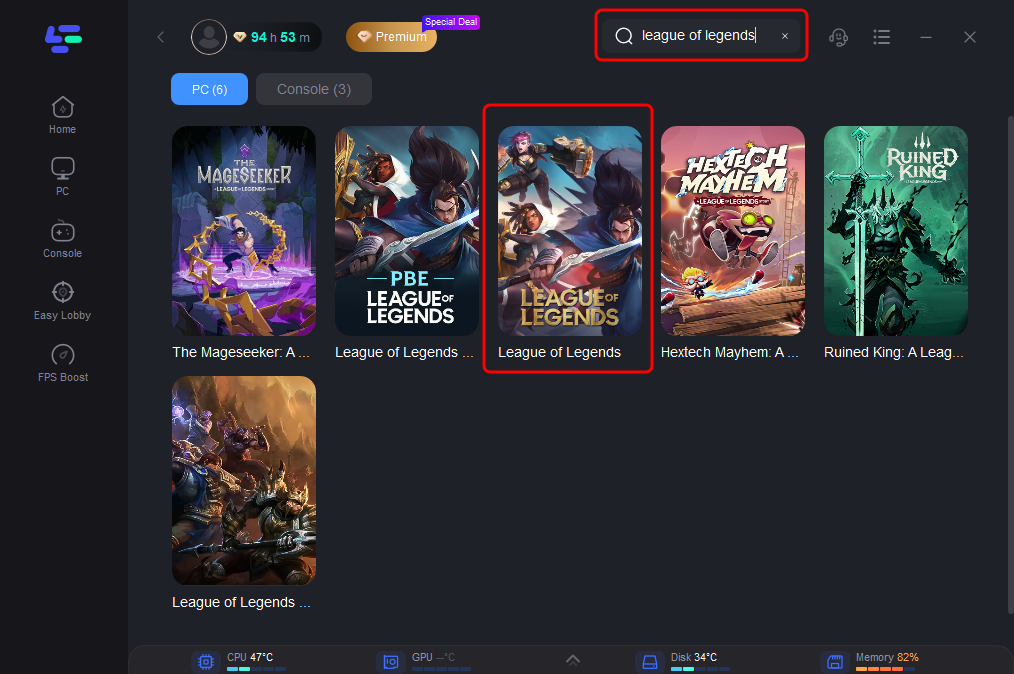
Step 3: Customize the settings according to your preferences. LagoFast offers various options to fine-tune the optimization process, such as selecting the server you wish to play on.
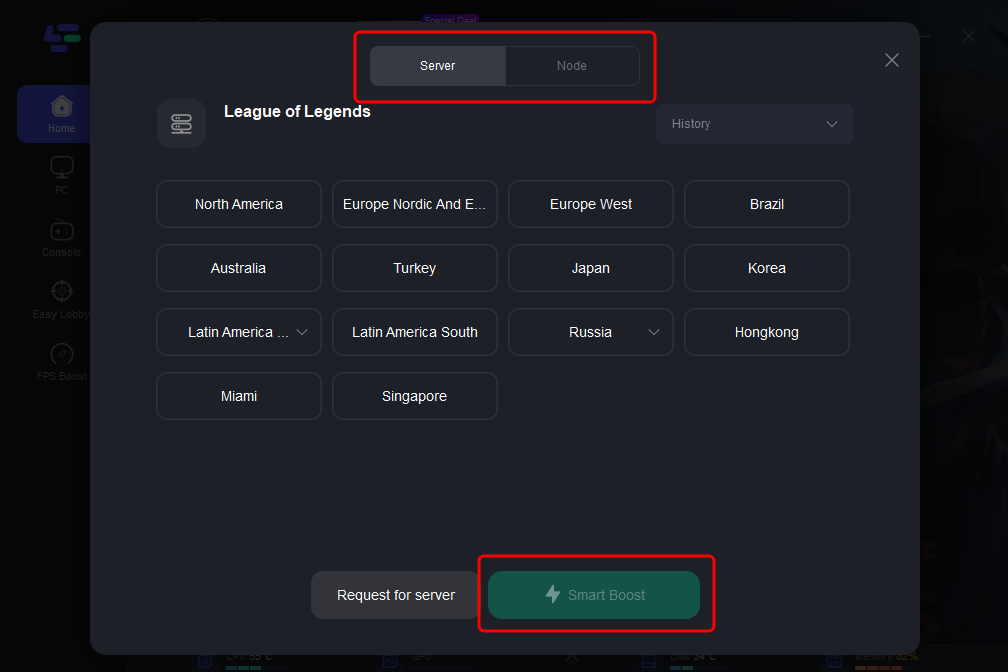
Step 4: Once everything is set up, click the "Boost" button in LagoFast to start the optimization process. Then, launch League of Legends from the LagoFast interface or your usual method.
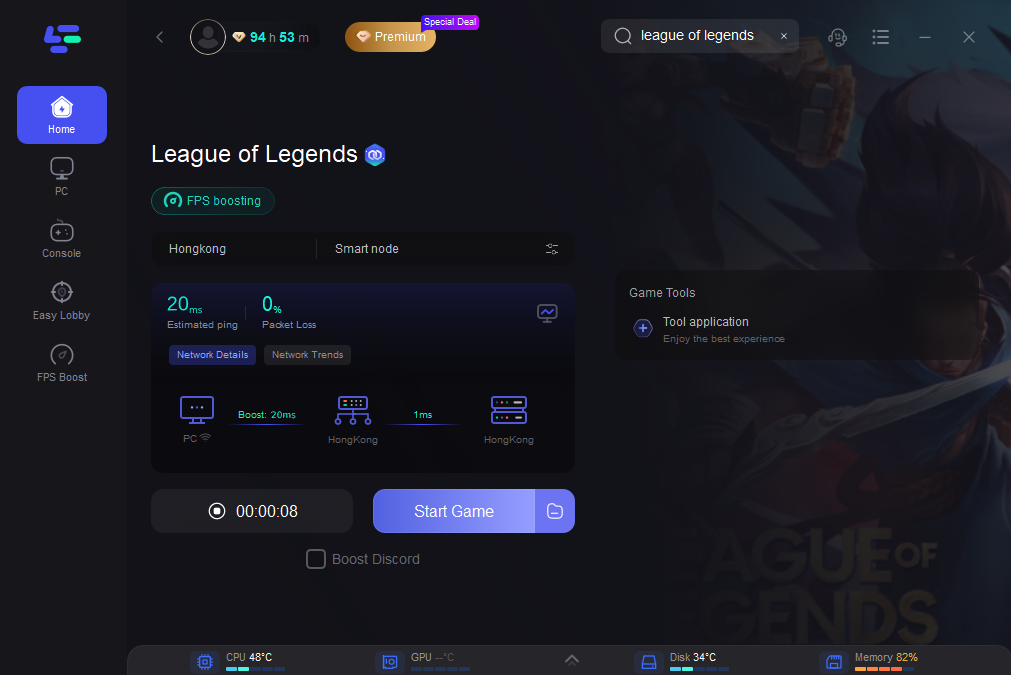
By following these steps, LagoFast will enhance your network performance, providing a smoother and more enjoyable gaming experience.
With LagoFast, gamers can tackle common issues like high ping and packet loss head-on, ensuring a seamless and responsive gaming experience. Whether you’re competing in high-stakes matches or just playing for fun, LagoFast gives you the edge you need to perform your best. Try LagoFast today and feel the difference in your game’s performance.
Conclusion
If League of Legends won’t open, these steps can help you identify and solve the issue, letting you return to the Rift for your next match. It’s important to follow these troubleshooting steps one by one to figure out what exactly is causing the problem with your game client. Remember, if the issue persists after trying these solutions, reaching out to Riot Games Support is a good next step. They can provide more specific guidance based on your individual situation. Whether it's problems with the game not opening, League of Legends won't load, League of Legends won't load into game after champion select, or Why won't my League of Legends account load?, Riot Games Support can offer targeted assistance.

Boost Your Game with LagoFast for Epic Speed
Play harder, faster. LagoFast game booster eliminates stutter and lags on PC, mobile, or Mac—win every match!
Quickly Reduce Game Lag and Ping!
Boost FPS for Smoother Gameplay!