
League of Legends players occasionally face the frustrating issue of being unable to connect to the login queue. This problem can prevent gamers from joining the game, causing delays and disrupting their gaming experience. However, with LagoFast, you'll able to solve the problem with ease.

- ✅ League of Legends ping checker
- ✅ Reduce Lag and High Ping.
- ✅ Boost FPS at the Same Time.
- ✅ Support 2000+ Popular Online Games.
- ✅ Change Server Without Latency.
- ✅ Multiplatform: PC, Console, Mobile.
Part 1: Understanding the "Unable to Connect to Login Queue" Error
Part 2: Common Causes and Solutions for Login Queue Issues
Part 3: When Will the Login Queue Issue Be Resolved?
Part 4: How to Fix Login Queue Issue
Part 1: Understanding the "Unable to Connect to Login Queue" Error
The "Unable to Connect to Login Queue" error typically appears when there are server issues, maintenance work, or network problems on the player’s end. It may display as a message stating, "Unable to connect to the login queue," preventing you from accessing the game servers.
Hot Related : How to Fix League of Legends Downtime Issue
Part 2: Common Causes and Solutions for Login Queue Issues
Server Downtime or Maintenance:
- Check Server Status: Visit the official League of Legends server status page to see if there are any notifications about maintenance or server issues. Riot Games usually updates this page with real-time information.
Network Connection Issues:
- Restart Your Router: Sometimes, simply restarting your router can resolve network connectivity issues that may be blocking your access to the game.
- Check Your Firewall Settings: Ensure that your firewall or antivirus software is not blocking League of Legends. You may need to add LoL as an exception in your firewall settings.
High Player Traffic:
- Try Logging In At a Different Time: If the servers are experiencing high traffic, particularly during peak hours or special gaming events, try logging in at a different time when the servers are less congested.
Corrupted Game Files:
- Repair Game Files: Use the repair tool available in the League of Legends client under the "Settings" menu. This can fix any corrupted files that might be causing issues with the login queue.
Others Are Reading : How To Know How Much Money and Time You Have Spent on LoL
Part 3: When Will the Login Queue Issue Be Resolved?
The resolution time for login queue issues can vary based on the cause. If it’s due to scheduled maintenance, Riot Games typically provides an estimated time when the servers will be back up. For issues on the player's end, such as network problems or software conflicts, the problem might be resolved as soon as the underlying issue is fixed.
Part 4: How to Fix Login Queue Issue
Best Solution : Enhancing Your Connection with LagoFast
To avoid potential disruptions and enhance your gaming experience, consider using a game booster like LagoFast. LagoFast can optimize your network settings specifically for League of Legends, potentially reducing issues related to "Unable to Connect to Login Queue" by:
- Reducing Latency: Lower your game’s ping by selecting optimal network paths.
- Minimizing Packet Loss: Ensure data packets reach the game servers more reliably.
- Stabilizing Your Connection: Avoid fluctuations that might cause disconnections or errors during the login process.
- Changer Server : Sometimes server congestion can cause server problems. LagoFast can help you switch servers to improve the situation.
Using LagoFast is straightforward:
Step 1: Click on Free Trial to download.
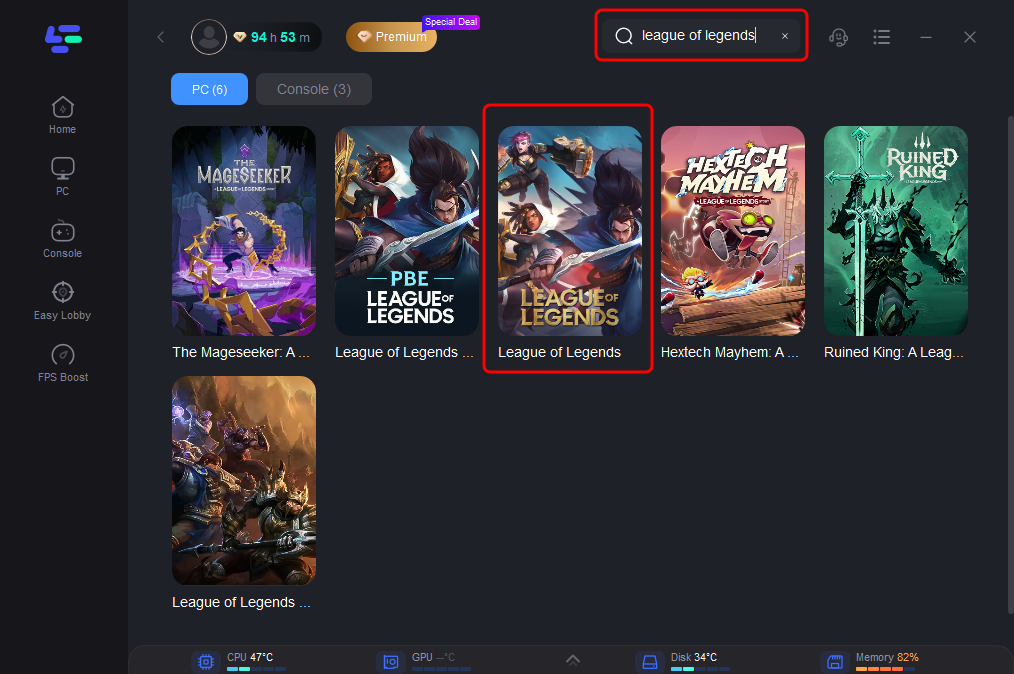
Step 2: Before launching the game, you can search for it in LagoFast.
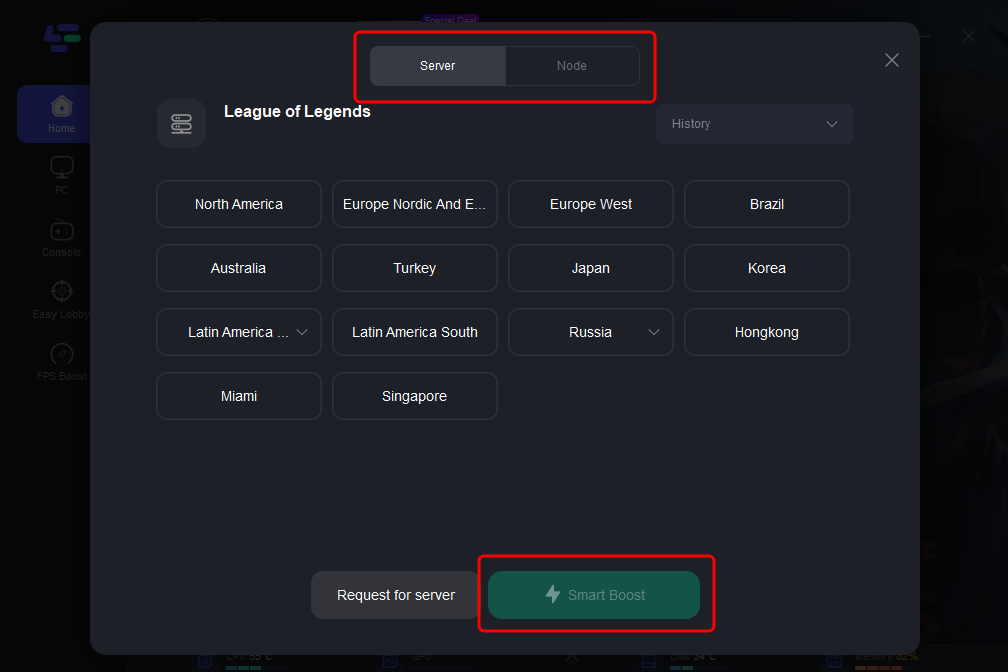
Step 3: Click on “Select Server” so you can choose stable servers, then click on the “Node” on the right to choose the best Node.
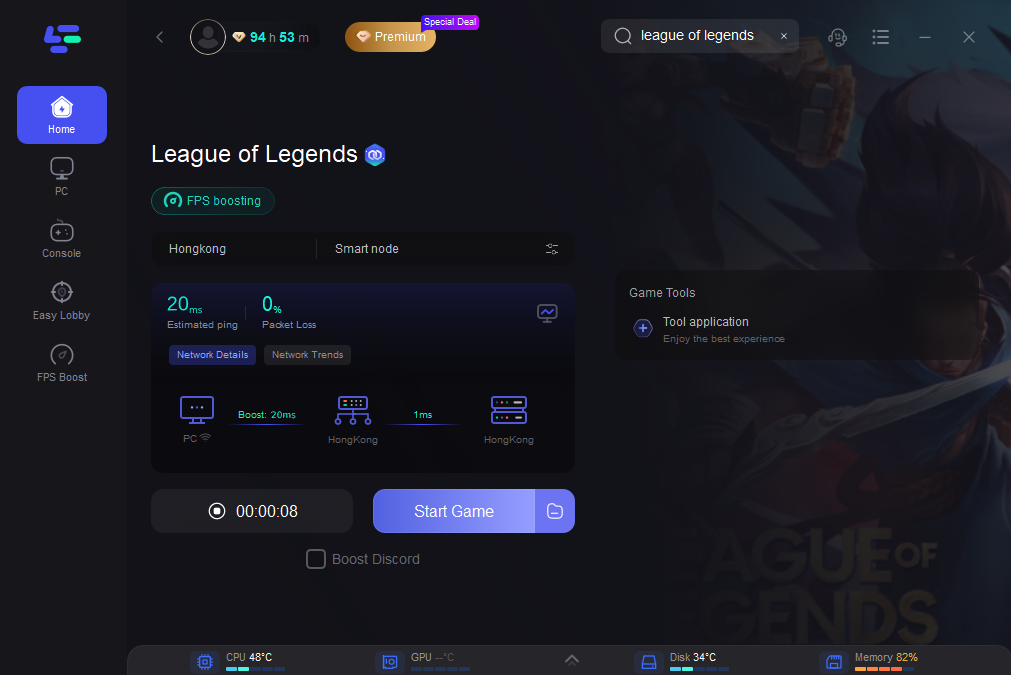
Step 4: By clicking the “Smart Boost” button, you can see the specific game ping, packet loss, and network type on the right side.
Other Manual Solutions :
Restart your PC : It’s a no-brainer remedy. It is recommended to close all instances of the Riot Games client and then restart it to determine if the problem was localized to the client or not. It’s best to give the client some time to restart after being closed.
Check internet connectivity : As we have mentionned before, if you can’t join the League of Legends queue, it could be because of a lack of reliable internet service. Switch off your router, wait two or three minutes, and then turn it back on to make sure this isn’t the case. In order to ensure your computer has the fastest possible internet connection, you may also wish to ensure that any unused devices on the same network are removed.
Switching to Google DNS : Switching to Google’s DNS will improve performance, make the connection more secure, and make it suitable for online gaming.
To modify your Windows 10 DNS settings, please follow these steps:
- To modify your network adapter’s settings, open the Control Panel, select Network and Internet, click Network and Sharing Center, and finally click Change Adapter Settings.
- Choose the network that you’d like to set up Google Public DNS for. Right-click the Ethernet interface you’re using and choose Properties.
- To access this feature, click the Networking menu. Select Internet Protocol Version 4 (TCP/IPv4) or Internet Protocol Version 6 (TCP/IPv6) under the “This connection uses the following items” tab and then click Properties.
- Choose the DNS tab by clicking the Advanced button. DNS server IP addresses should be copied down for future use and the window should be closed if any are displayed.
- Proceed by clicking the OK button and choosing You should make use of the IPv4 DNS servers 8.8.8.8 and/or 8.8.4.4.
- Specify the addresses of the secondary DNS servers in the Advanced settings menu, and then save your changes and dismiss the window.
Note : If none of these work, you may need to delete League of Legends from your computer and reinstall it. Check that you’ve downloaded the game from the official site, and if the issue persists, submit a ticket to Riot Games’ help desk. The “Unable to connect to the login queue” bug in League of Legends can sometimes be fixed fast by applying a fresh patch or a potential hotfix from the developer’s end.
Conclusion
Being unable to connect to the login queue in League of Legends is a common problem with several potential fixes. By understanding the reasons behind the error and how to address them, players can reduce the chances of this issue recurring. Additionally, tools like LagoFast provide a robust solution to ensure a smoother and more reliable gaming experience. Whether you’re gearing up for your next match or just looking to enjoy a hassle-free gaming session, taking the right steps can help you avoid unwanted interruptions.

Boost Your Game with LagoFast for Epic Speed
Play harder, faster. LagoFast game booster eliminates stutter and lags on PC, mobile, or Mac—win every match!
Quickly Reduce Game Lag and Ping!
Boost FPS for Smoother Gameplay!