

League of Legends Swarm has taken the gaming world by storm, offering a fresh twist on the classic MOBA formula. This action-packed PvE mode combines elements of bullet-hell games like Vampire Survivors with League’s iconic champions, creating a fast-paced survival experience. Whether you’re a seasoned Summoner or new to the game, this guide will equip you with strategies to dominate Swarm, covering everything from the latest tier lists to beginner-friendly tips. Let’s dive in!
Vietnamese Version: Hướng dẫn cho người mới chơi LoL Swarm: Giải thích về lối chơi & Danh sách cấp bậc tướng

- ✅ League of Legends ping checker
- ✅ Reduce Lag and High Ping.
- ✅ Boost FPS at the Same Time.
- ✅ Support 2000+ Popular Online Games.
- ✅ Change Server Without Latency.
- ✅ Multiplatform: PC, Console, Mobile.
Part 1. LoL Swarm Game Mode Explained
Part 2. League of Legends Swarm Tier List (Builds)
Part 3. How to Progress for LoL Swarm
Part 4. Best Practices for Swarm Beginners
Part 5. Enhance Your LoL Gaming Experience with LagoFast Game Booster
Part 6. Feedback on League of Legends Swarm Mode
Part 1. LoL Swarm Game Mode Explained
What is Swarm?
Swarm is a limited-time PvE game mode introduced by Riot Games in July 2024 , designed for solo or co-op play with up to three friends. Set in the Anima Squad universe, players defend the city of Final City against hordes of alien Primordians. The mode features a roguelike progression system, where you unlock permanent upgrades and experiment with different champion builds to survive increasingly difficult waves.
Core Gameplay Loop
- Objective: Survive 15 minutes of relentless enemy waves, then defeat a boss to progress to the next map.
- Movement & Combat: Control your champion with WASD (mouse aiming optional) and auto-attack enemies. Level up to unlock abilities and choose augments to enhance your loadout .
- Progression: Earn gold by destroying pods and killing elites to purchase permanent upgrades, such as increased damage or health regeneration .
Key Swarm Features
- Four Maps: Each map (e.g., Outskirts, Subterranean Lab) offers unique mechanics, like ion cannons or freeze zones, requiring adaptability .
- Champion Abilities: Unlock passive, E, and R abilities at levels 1, 3, and 6, with augments to evolve them further .
- Weapon System: Equip up to four weapons and six skills, combining them for synergistic effects (e.g., statikk sword + bunny mega blast for chain lightning) .
Part 2. League of Legends Swarm Tier List (Builds)
Playable Champions
Swarm features nine champions, each with distinct playstyles:
- S+ Tier: Riven (mobility and invincibility), Xayah (AoE damage) .
- S Tier: Briar (tankiness), Jinx (ranged DPS), Yasuo (dash and crits) .
- A Tier: Illaoi (tentacle spam), Leona (CC and survivability) .
- B Tier: Seraphine (healing), Aurora (niche utility) .
Champion Abilities & Builds
- Riven: Use her ultimate (R) for invincibility and AoE damage. Pair with Statikk Sword and The Annihilator for chain lightning and area clearing .
- Jinx: Focus on movement speed (e.g., Yuumi Bot and Bunny Crossbow) to kite enemies while spamming rockets .
- Illaoi: Stack tentacles with Echoing Bat Blades and Cyclonic Slicers for massive AoE .
Meta Builds:
- Gold Farming: Jinx with Yuumi Bot and Bunny Mega Blast for rapid gold accumulation .
- Survival: Leona with Ice Blast Armor and Radiant Field for crowd control and healing .
Part 3. How to Progress for LoL Swarm
- Early Game: Focus on clearing small enemies and collecting XP orbs to level up quickly. Prioritize augments that boost damage or pickup radius.
- Mid Game: Unlock your ultimate and invest in weapons that complement your playstyle (e.g., crit-focused for Yasuo).
- Late Game: Survive boss fights by leveraging crowd control and mobility. Use the environment (e.g., ion cannons) to your advantage .
- Upgrades: Spend gold on permanent buffs like increased health or attack speed, available in the main menu .
Part 4. Best Practices for Swarm Beginners
- Move Strategically: Use WASD to dodge enemy projectiles and position yourself near resource nodes .
- Team Up: Co-op play allows shared XP and gold, making progression faster. Revive fallen allies to extend survival .
- Learn Maps: Study each map’s layout (e.g., Subterranean Lab’s freeze zones) to exploit mechanics .
- Experiment: Try different champion-weapon combos to find what suits your style. Don’t be afraid to fail—death unlocks new upgrades .
Part 5. Enhance Your LoL Gaming Experience with LagoFast Game Booster
Struggling with lag or low FPS in League of Legends Swarm? LagoFast Game Booster is your solution for a seamless, high-performance gaming experience. Designed specifically for gamers, this tool tackles both network issues and hardware inefficiencies to give you a competitive edge.
Reduce Lag & Lower Ping
LagoFast uses AI-driven network optimization to route your connection through the fastest global servers, cutting ping by 30–50% and eliminating packet loss. Its dedicated gaming nodes in 60+ countries ensure minimal latency, even during peak hours, so you can dodge enemy attacks and react faster in Swarm’s intense battles.
Boost FPS & Optimize Performance
The booster automatically allocates more CPU/GPU power to League of Legends, boosting FPS by up to 20% for smoother gameplay. Say goodbye to stuttering during horde waves or boss fights—LagoFast keeps your game running at peak performance, no technical setup required.
Switch Servers & Play on China Server with Low Ping
LagoFast’s Smart Server Selection connects you to less busy nodes, reducing queue times and lag spikes. For players wanting to join the Chinese server (ideal for early updates or competitive play), simply select the LoL CN option to bypass regional restrictions and enjoy 80% lower ping from overseas.
How to Use LagoFast to Boost League of Legends:
Step 1: Click the Free Trial button to download and install LagoFast Free Trial.
Step 2: In the LagoFast interface, add League of Legends to the optimized game list. This allows LagoFast to apply its optimization techniques specifically to League of Legends, ensuring the best possible performance.
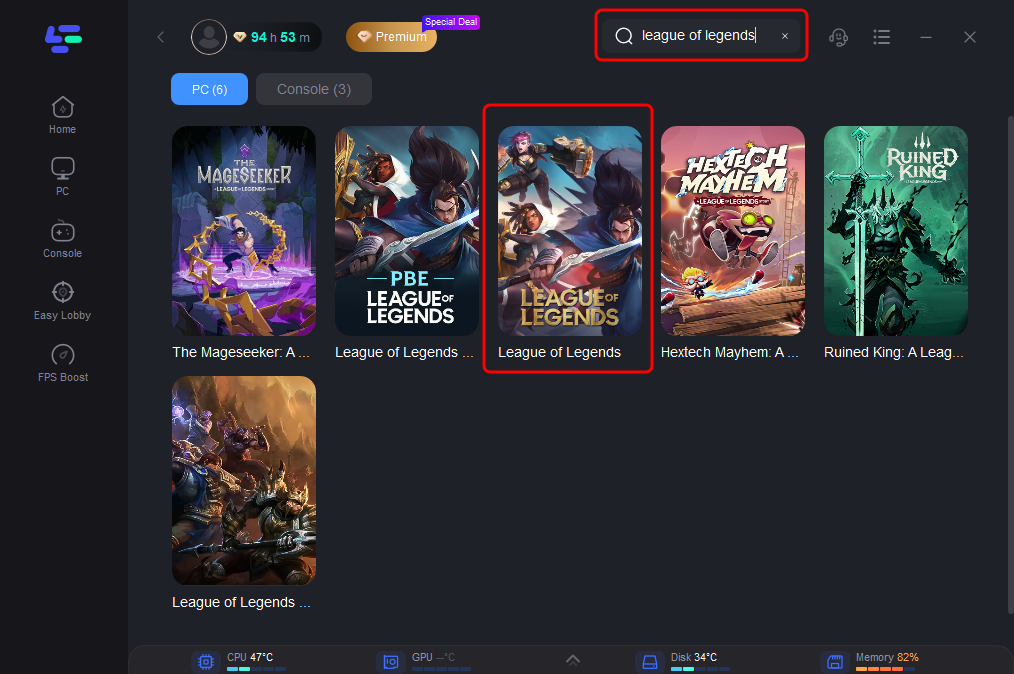
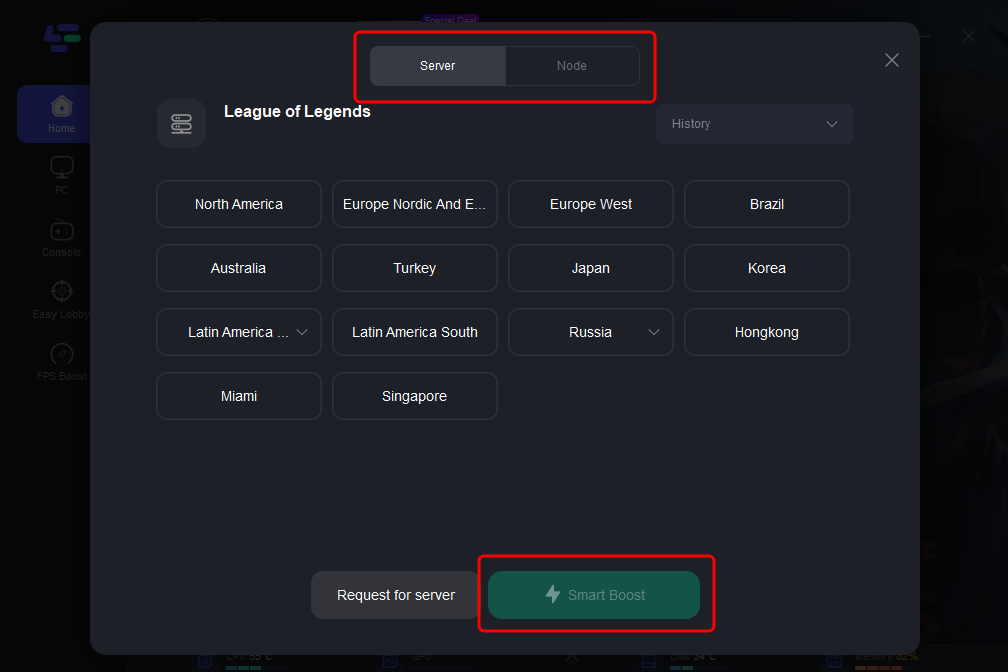
Step 3: Customize the settings according to your preferences. LagoFast offers various options to fine-tune the optimization process, such as selecting the server you wish to play on.
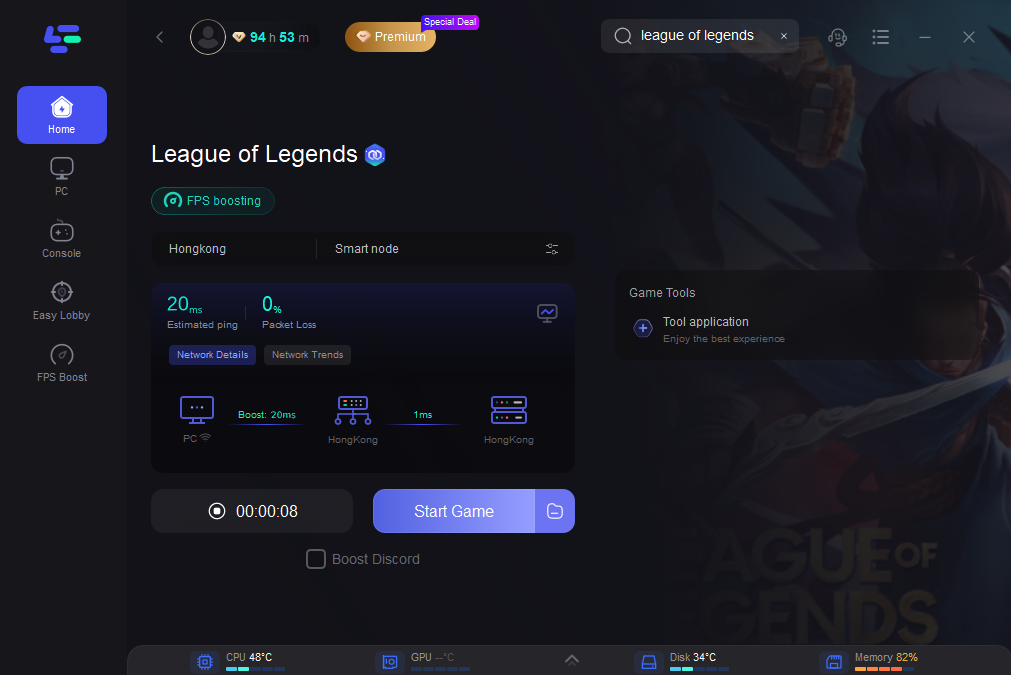
Step 4: Once everything is set up, click the "Boost" button in LagoFast to start the optimization process. Then, launch League of Legends from the LagoFast interface or your usual method.
LagoFast isn’t just a booster—it’s a gameplay enhancer. Whether you’re surviving Swarm’s chaotic waves solo or coordinating with a team, its precision optimizations ensure every move is responsive and every build performs at its best. Don’t let technical issues hold you back—elevate your Swarm experience today.
Part 6. Feedback on League of Legends Swarm Mode
Swarm has received widespread praise for its addictive gameplay and fresh take on PvE . Players love the roguelike progression and diverse champion builds, though some criticize the limited controller support and lack of new content post-launch . Riot has hinted at potential updates for 2025, including rotating modes and balance adjustments .
Conclusion
League of Legends Swarm is a must-try for fans of fast-paced, cooperative gameplay. With this guide, you’ll master the meta builds, navigate challenging maps, and dominate the Primordian hordes. Remember to use LagoFast for optimal performance and stay tuned for future updates. Now, gear up and survive the Swarm!
Boost Your Game with LagoFast for Epic Speed
Play harder, faster. LagoFast game booster eliminates stutter and lags on PC, mobile, or Mac—win every match!
Quickly Reduce Game Lag and Ping!
Boost FPS for Smoother Gameplay!