
Quick Answer: How to Fix League of Legends Error 004
To fix League of Legends Error 004 after the 26.14 update, first restart your PC and run the Riot Client as an administrator. If the patch is still stuck, navigate to your League of Legends installation folder and delete the "Config" and "Logs" folders, then restart the client to force a file verification. If these steps fail, use the Riot Repair Tool (found in the Riot Client settings) to scan for corrupted files. For players experiencing repeated download loops or network timeouts during patching, using LagoFast Game Booster can stabilize your connection to Riot's servers and ensure the update completes without interruption.
The launch of Patch 26.14 was highly anticipated, but for a large segment of the player base, it has been defined by the dreaded "Error 004." This error typically appears mid-patch, accompanied by a message stating that the update has failed and the client must restart. On platforms like Reddit, players have reported a frustrating cycle: the Riot Client attempts to download the update, hits a certain percentage, throws Error 004, and then forces a restart only to repeat the same failure. Whether you're unable to accept invitations or can't even get the client to open, this guide provides the technical breakdown you need to bypass the 26.14 patching hurdles.

- ✅ Reduce Lag and High Ping.
✅ Boost FPS at the Same Time.
✅ Support 8000+ Popular Online Games.
✅ Change Server without Latency.
✅ Boost Game Loading Speed.
Part 1: What Causes League of Legends Error 004 After Patch 26.14?
Part 2: The "Config and Logs" Fix: Does It Actually Work?
Part 3: How to Fix League of Legends Patching Failed Error 004
Part 4: Advanced Troubleshooting for Riot Client Error 004
Part 5: How to Enhance Your Game Experience with LagoFast Game Booster
Part 6: League of Legends Error 004 FAQ
What Causes League of Legends Error 004 After Patch 26.14?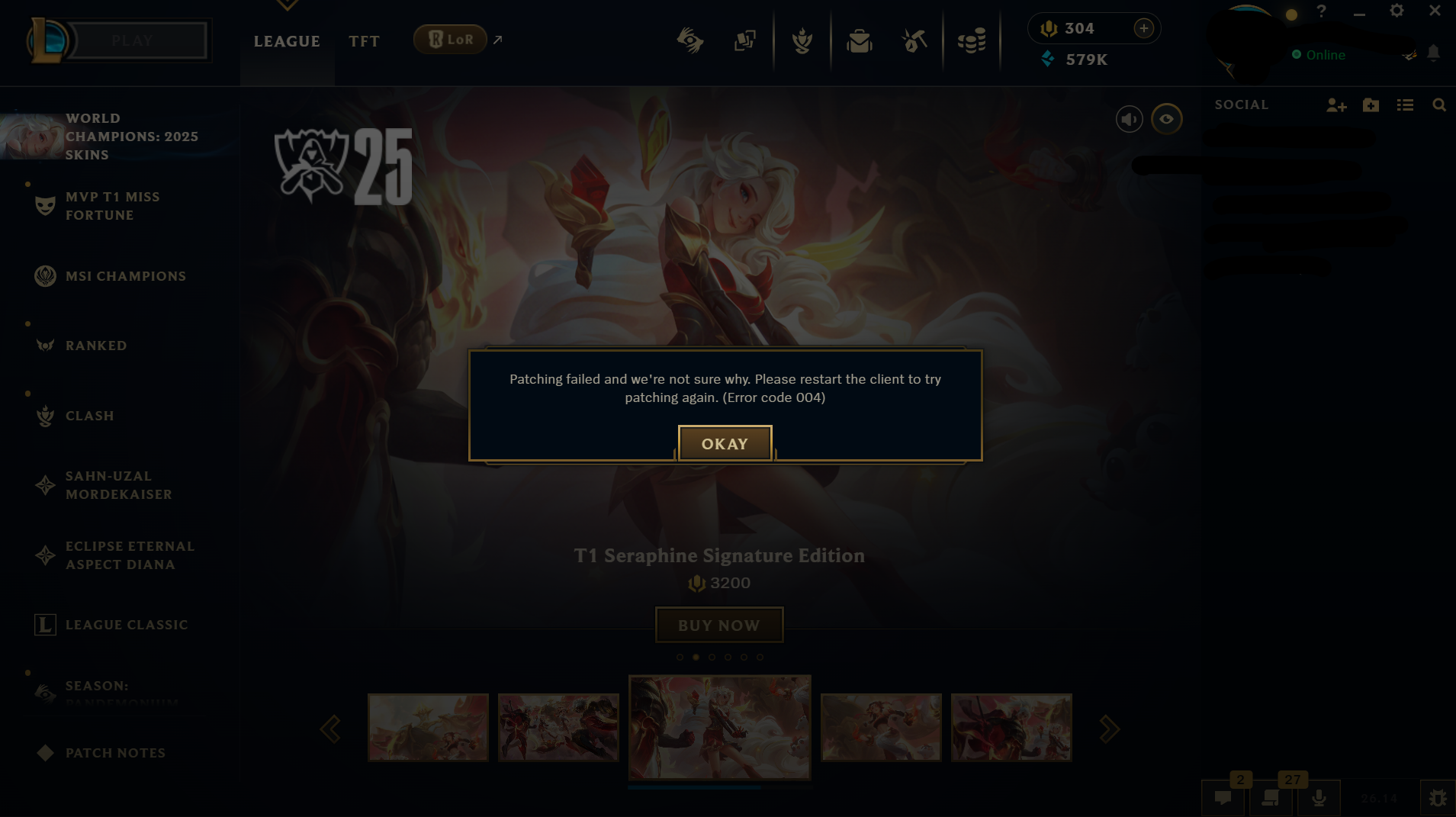
Error 004 is fundamentally a "Patching Failed" signal. It occurs when the Riot Client encounters a roadblock while trying to write new game data to your drive or verify existing files.
- Corrupted Patch Data: The 26.14 update contains specific architectural changes that seem to conflict with older configuration files in some installations.
- Insufficient Permissions: If the Riot Client doesn't have full administrator rights, Windows may block it from modifying the core game files, triggering the 004 code.
- Storage Bottlenecks: Even if you have enough space for the patch, the client needs extra "scratch space" to extract and move files. If your drive is nearly full, the process will fail.
- Network Timeouts: If your connection drops even a single packet during the verification phase, the client may flag the entire patch as corrupted and stop the process.
- Third-Party Conflicts: Antivirus software often flags the Riot Client's deep-system modifications as suspicious, especially right after a major version update like 26.14.
The "Config and Logs" Fix: Does It Actually Work?
Following the 26.14 update, a specific solution began circulating on Reddit: deleting the Config and Logs folders within the League of Legends root directory.
Why this fix is suggested
The Config folder contains your local settings (keybinds, video options, etc.), while Logs stores records of your previous sessions. Sometimes, these files can become "read-only" or contain outdated data that conflicts with the new patch's file structure. By deleting them, you force the client to regenerate fresh, compatible files.
The reality of the results
While many players have reported that this fixed their Error 004 immediately, it is not a "silver bullet." In many cases, the error is tied to deeper registry issues or network instability that deleting folders won't touch. If you try this method, be aware that your in-game settings will be reset to default. If it doesn't work for you, don't panic—it simply means your specific Error 004 has a different root cause.
How to Fix League of Legends Patching Failed Error 004
If the quick restart didn't work, follow these verified steps in order to clear the 26.14 update blockage.
Step 1: Administrator Privileges
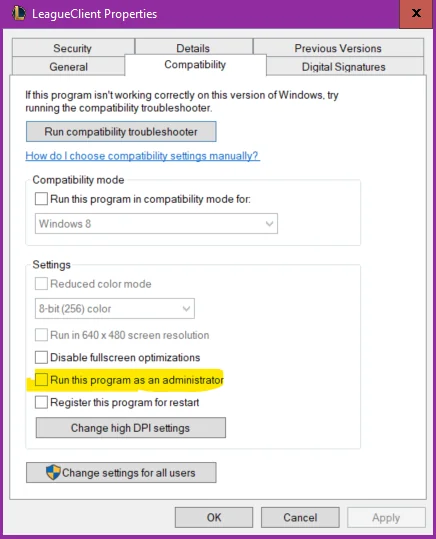
Right-click your Riot Client shortcut and select "Run as administrator." This is the most common fix for permission-based 004 errors. It ensures the client has the "write access" it needs to apply the 26.14 changes.
Step 2: Clear Disk Space
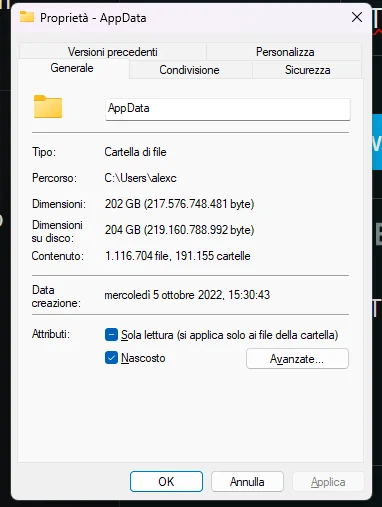
League patches are often larger than they appear because they require room to decompress. Ensure you have at least 10GB of free space on the drive where League is installed. If your drive is in the "red" zone, delete some unused files and try the patch again.
Step 3: The Hextech/Riot Repair Tool
Riot has integrated a repair function directly into the client.
- Open the Riot Client (but don't click "Update" yet).
- Click the Profile Icon in the top right and go to Settings.
- Select League of Legends from the list.
- Click the Repair button. This will scan your entire installation for the 26.14 update and fix any missing or broken segments.
Advanced Troubleshooting for Riot Client Error 004
For players who are stuck in a "re-downloading loop" where the patch never actually finishes, the issue is likely deeper than just a few corrupted files.
Disable Security Software Temporarily
Antivirus programs like Avast, Bitdefender, or even Windows Defender can sometimes "quarantine" a part of the 26.14 patch. Try disabling your real-time protection for 10 minutes while the patch completes. If this works, remember to add an exception for the Riot Games folder afterward.
Check for Drive Errors
If you've had League installed for years, your hard drive might have "bad sectors" where the patch is trying to write data.
- Open This PC, right-click your game drive, and select Properties.
- Go to the Tools tab and click Check under Error Checking.
- If Windows finds errors, let it repair them and then restart the Riot Client.
Re-synchronize Your System Clock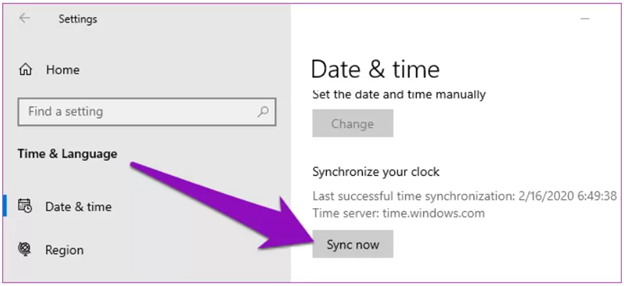
Believe it or not, if your PC's time is out of sync with Riot's servers by even a few seconds, the security handshake for the patch can fail, resulting in Error 004. Ensure your Windows time is set to "Set time automatically."
How to Enhance Your Game Experience with LagoFast Game Booster
One of the most overlooked causes of League of Legends Error 004 is "Network Jitter." If your connection is unstable while the Riot Client is verifying the 26.14 update, the client will assume the files are corrupted and throw the error. This is where LagoFast Game Booster provides a critical advantage.
Stabilizing the Patch Process
LagoFast(LagoFast Game Booster - Get No Lag and Lower Ping) isn't just for lowering your in-game ping; it's a powerful connection stabilizer. By using its dedicated game-route optimization, you can ensure a rock-solid link to Riot's patching servers. This prevents the "packet loss" that often leads to the 004 patching failure. If you've been struggling with a patch that gets stuck at 99% or keeps resetting, LagoFast can help push it through.
Detailed Steps to Use LagoFast for League of Legends:
Click the Free Trial button to download and install LagoFast Free Trial.
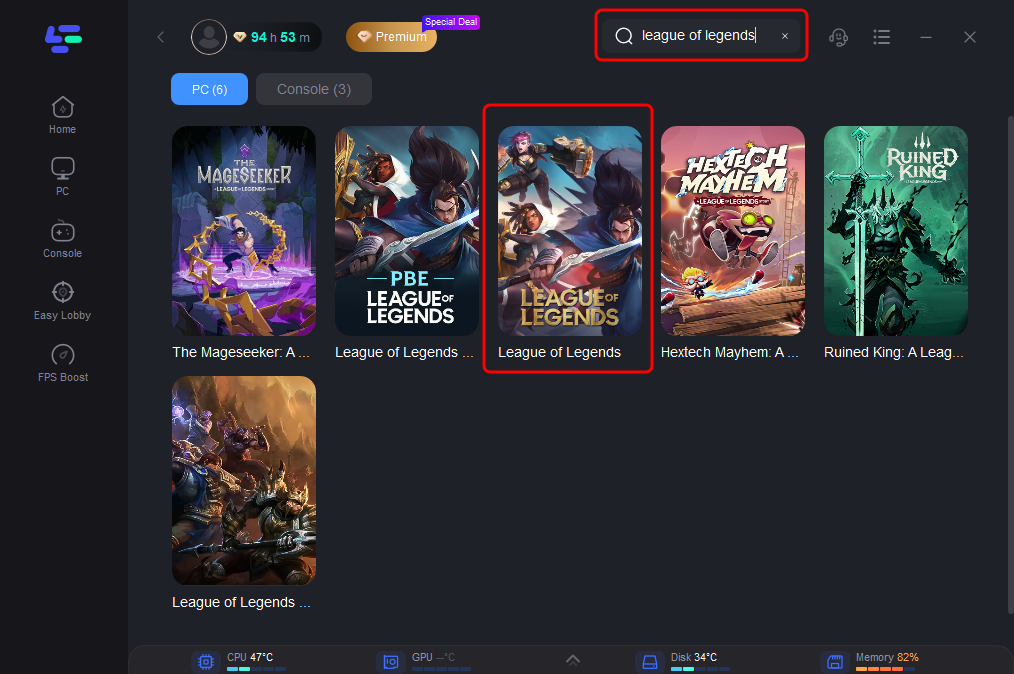
Search for League of Legends: Open the app and type "League of Legends" into the search bar.
Select Your Region: Choose the server region you play on (e.g., NA, EUW, KR).
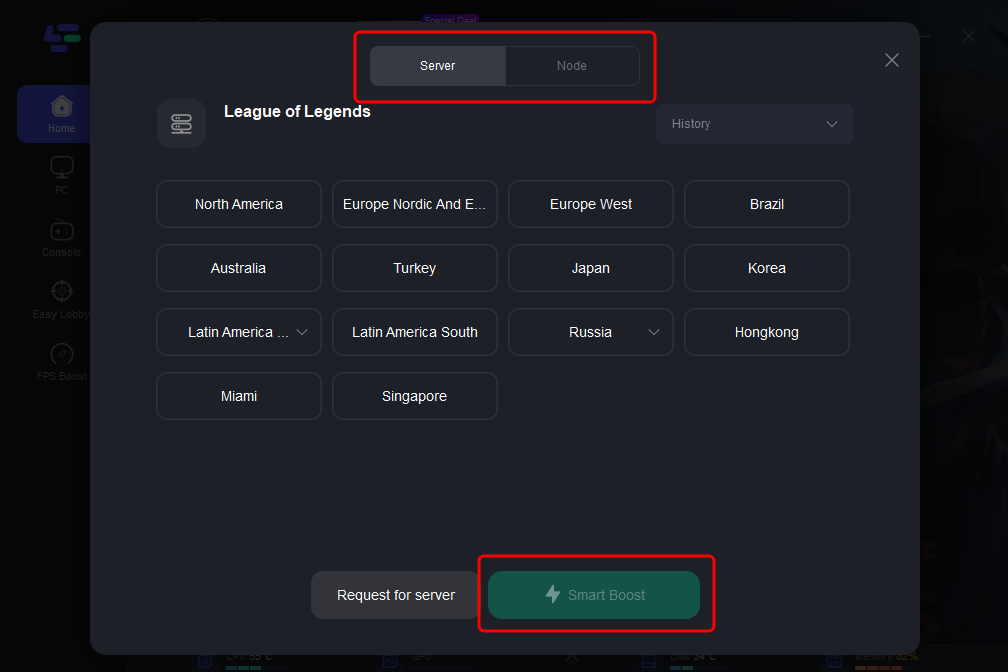
Smart Boost: Click the "Boost" button. LagoFast will automatically find the most stable and fastest route to Riot's servers.
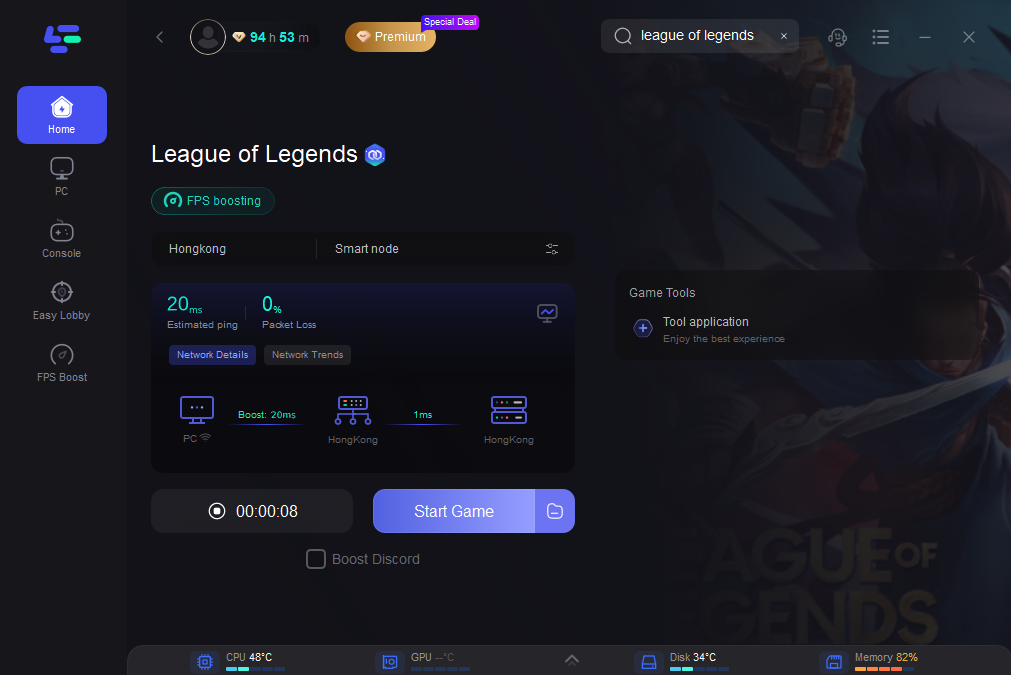
Start Patching: With the boost active, open the Riot Client. You should notice a more consistent download speed and a much higher success rate for the 26.14 update.
League of Legends Error 004 FAQ
Q: Why did Error 004 only start after Patch 26.14?
A: Every major patch changes how the game client interacts with your hardware. Patch 26.14 likely updated some core security or rendering files that are more sensitive to permission issues or corrupted leftovers in your Config folder.
Q: Does deleting the "Config" folder delete my skins or champions?
A: No. Your skins, champions, and account progress are stored on Riot's servers. Deleting the Config folder only resets your local settings like volume, graphics quality, and keybindings.
Q: I have plenty of space, but it still says "Patching Failed." Why?
A: This is likely a permission issue or an antivirus conflict. Even with space, if the client is blocked from "writing" to the drive, it will report a failure. Try running as an administrator.
Q: Can I fix Error 004 by reinstalling the whole game?
A: Yes, a clean reinstall is the "nuclear option" that fixes almost every 004 error. However, it is time-consuming. We recommend trying the Repair Tool and the Config/Logs deletion first.
Q: Is Error 004 related to my internet speed?
A: Not necessarily the speed, but the stability. A fast connection that "blips" for a millisecond can trigger the error, whereas a slow but steady connection might finish the patch just fine.
Key Takeaway
League of Legends Error 004 after the 26.14 update is a frustrating but manageable hurdle. By focusing on administrator permissions, clearing corrupted local folders, and ensuring a stable network connection with tools like LagoFast, you can overcome the "Patching Failed" loop. Don't let a technical glitch keep you off the Rift—systematically work through these fixes and get back to your climb.
Boost Your Game with LagoFast for Epic Speed
Play harder, faster. LagoFast game booster eliminates stutter and lags on PC, mobile, or Mac—win every match!
Quickly Reduce Game Lag and Ping!
Boost FPS for Smoother Gameplay!