

Jumping into the Public Beta Environment to test out new game modes or throwback content should be an exciting experience. However, many players immediately notice a jarring difference: you might have a smooth 20–50 ping on your live server, only to be hit with a sluggish 150–250 ping as soon as you log into the test realm. This frustrating League of Legends Classic PBE high ping is primarily caused by centralized server locations, complex cross-region routing, and the inherent instability of test environments.
If you are noticing that last-hitting feels impossible, your skillshots are delayed, or you can't cancel attack animations properly, you are not alone. Please note that this guide specifically addresses network issues, lag, and input delays occurring on the League Classic PBE, rather than the live official servers.

- ✅ Reduce Lag and High Ping.
- ✅ Boost FPS at the Same Time.
- ✅ No more PBE Queue Issues.
- ✅ Full Guides For Novice Players.
- ✅ Support 8000+ Online Games.
Part 1: Why Is League of Legends Classic PBE Ping So High?
Part 2: Is High Ping Normal on League Classic PBE?
Part 3: Can You Change the League Classic PBE Server?
Part 4: How to Fix League of Legends Classic PBE High Ping
Part 1: Why Is League of Legends Classic PBE Ping So High?

Connecting to a test server is fundamentally different from playing on your local regional server. The architecture behind the Public Beta Environment forces specific network conditions that naturally result in higher latency, especially for international players. Let's break down the main reasons behind this unavoidable baseline lag.
League Classic PBE Uses the League PBE Server
When you load into a match of Classic on the PBE, you are not connecting to the same infrastructure that runs your daily ranked games. The PBE operates on an entirely isolated, singular network cluster built strictly for testing unreleased content. Because it is designed to catch bugs rather than provide a hyper-optimized competitive experience, the backend routing is much less forgiving than live servers.
PBE Servers Are Primarily Located in North America
The most significant factor causing League Classic PBE lag is basic geography. The PBE servers are physically hosted in North America (typically in Chicago, Illinois). If you are logging in from Europe (EUW/EUNE), Southeast Asia (SEA), Oceania (OCE), or Korea (KR), your data has to travel across oceans. This immense physical distance guarantees that non-NA players will permanently experience a baseline of high latency.
Cross-Region Routing Can Add Avoidable Latency
While physical distance explains why a European player might see 150 ms, poor routing explains why that same player might suffer from league classic pbe 200 ping or worse. Internet Service Providers (ISPs) rarely take the most direct path across the globe. Your connection might bounce through multiple unnecessary data centers before finally reaching North America, adding dozens of extra milliseconds and causing severe league classic pbe input delay.
League Classic PBE May Be Under Heavy Server Load
The test server has a much smaller capacity than live servers. Whenever highly anticipated content drops, like a nostalgic Classic mode, thousands of players rush to log in simultaneously. This heavy server load can choke the network, resulting in league classic pbe unstable ping, packet loss, and localized server-side delays that have nothing to do with your personal home internet.
Part 2: Is High Ping Normal on League Classic PBE?
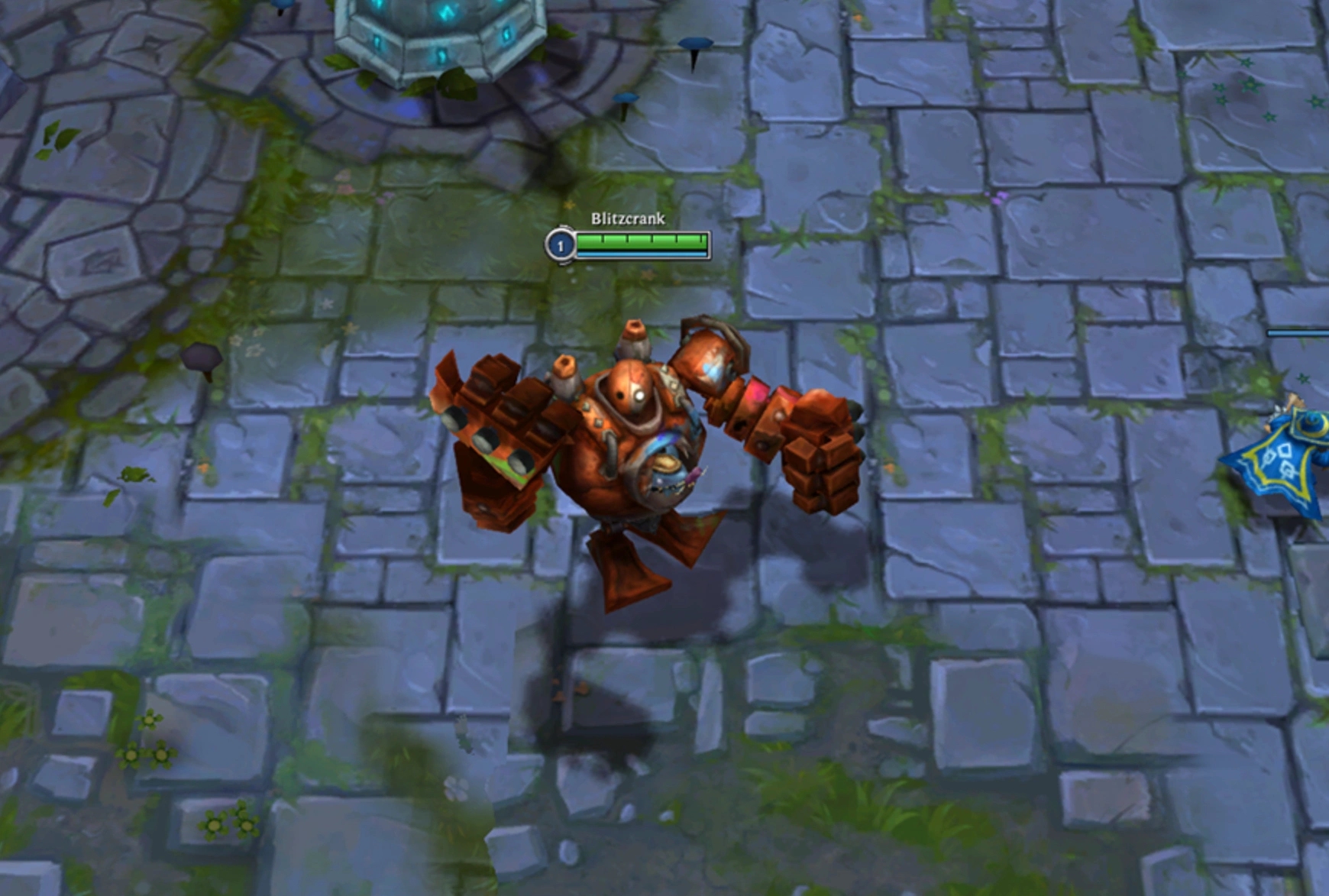
Understanding what constitutes "normal" lag on the test realm can save you hours of unnecessary troubleshooting. Players need to distinguish between physical distance limitations, active network congestion, and hardware-related performance drops to accurately diagnose their game.
Normal PBE Latency by Connection Type
If you are playing from outside North America, you will not get 30 ping. For European players, a stable 110 to 160 ms is standard. For players in Asia or Oceania, a stable 180 to 250 ms is expected. As long as this number remains flat and consistent, this is considered the "normal" operational latency for cross-continent connections to the PBE.
When High Ping Is Probably Caused by Distance
You can usually tell distance is the culprit when your latency is high but incredibly steady. If you have a flat 175 ms for the entire match without any fluctuation, you are simply dealing with the reality of geography. In these cases, you will experience league classic pbe ability delay and movement delay, but the game will not visually freeze or skip frames.
When High Ping May Indicate a Network Problem
If your ping is erratically jumping, for example, shifting wildly between 160 ms and 350 ms, or spiking to 500 ms during team fights, you have a routing or network congestion issue. This causes league classic pbe lag spikes and rubberbanding, where your champion snaps back to previous positions. This is not normal behavior and usually requires routing optimization to fix.
When It May Be a PBE Server Problem
Sometimes your on-screen ping meter looks perfectly stable at 150 ms, but the game feels horrific. You might experience league classic pbe stuttering, delayed abilities, or sudden disconnects despite a "good" ping reading. This typically indicates server-side packet loss, jitter, or overall PBE server strain. If your local FPS is high but the game is skipping, the test server itself is likely struggling.
Part 3: Can You Change the League Classic PBE Server?
A very common reaction to seeing 200 ping is to look for a server toggle in the settings menu. Players naturally assume they mistakenly logged into the wrong region, leading to confusion about where exactly their client is connecting.
Does League Classic PBE Have EU or Asia Servers?
No, it does not. There is only one centralized Public Beta Environment, and it is hosted entirely in North America. Riot Games does not maintain separate localized PBE servers for Europe, Asia, or South America because splintering the testing population would make finding matches and gathering centralized bug data too difficult.
Can Changing the Riot Client Region Lower PBE Ping?
Changing the language or regional display settings within your Riot Client will not alter your physical connection destination. Even if your client is set to EUW or KR, launching the PBE client will still force your internet traffic directly to the servers in Chicago. Your ping will remain exactly the same.
Can You Play League Classic on Your Live Regional Server?
Unless the Classic game mode has been officially pushed to the live servers in the current patch notes, you cannot play it on your local server. Experimental modes are locked strictly to the test realm to ensure they don't crash the main game. You have to endure the cross-region connection if you want early access.
Part 4: How to Fix League of Legends Classic PBE High Ping
While you cannot change the laws of physics or move the server closer to your house, you can absolutely eliminate the extra, unnecessary lag caused by bad routing, packet loss, and local network interference.
Fix 1: Optimize the PBE Connection Route With LagoFast
Because international players naturally suffer from bad cross-region routing to NA, a standard VPN won't cut it. LagoFast is a professional game booster specifically designed to tackle this exact problem. It forces your connection to take the most direct, stable path across the ocean, eliminating erratic lag spikes and drastically reducing your baseline ping.
Key Features:
- Lag Reducer & Ping Booster: Uses smart multi-path technology to find the fastest global server routes in real-time.
- Game Crash Fix Tool: Includes a built-in utility that can fix unexpected game crashes with just one click.
- FPS Boost: Optimizes your PC's background processes to ensure maximum frame rates alongside lower latency.
How to use LagoFast to Optimize the PBE Connection Route:
Step 1. Download and Install: Click the Free Trial button to download and install LagoFast.
Step 2. Search for the Game: Open the LagoFast app and type "League of Legends Classic PBE" into the search bar at the top.
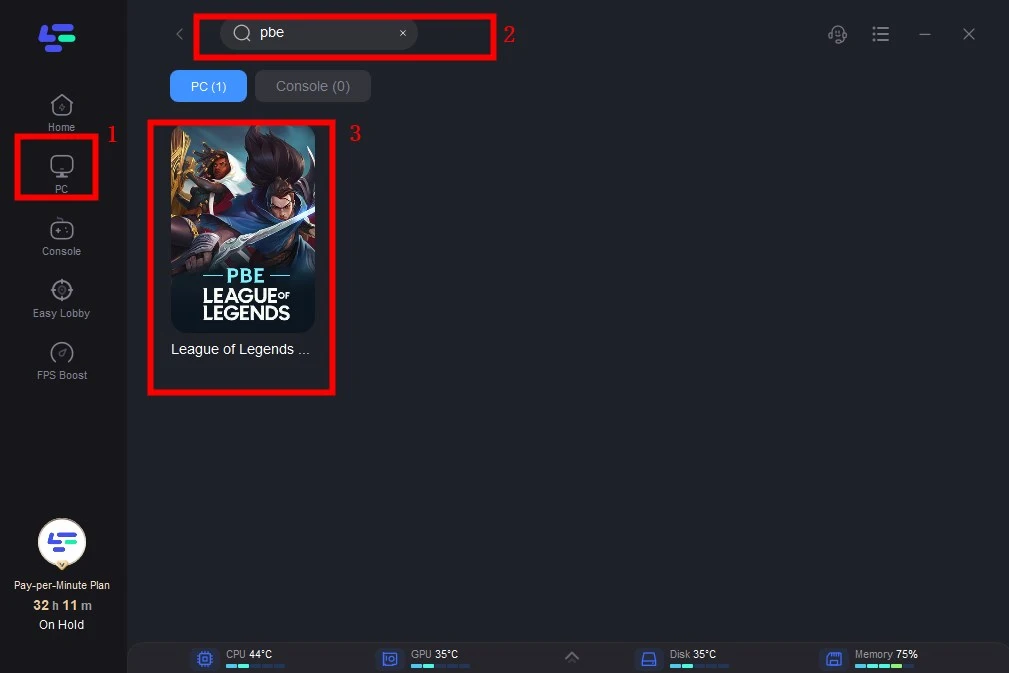
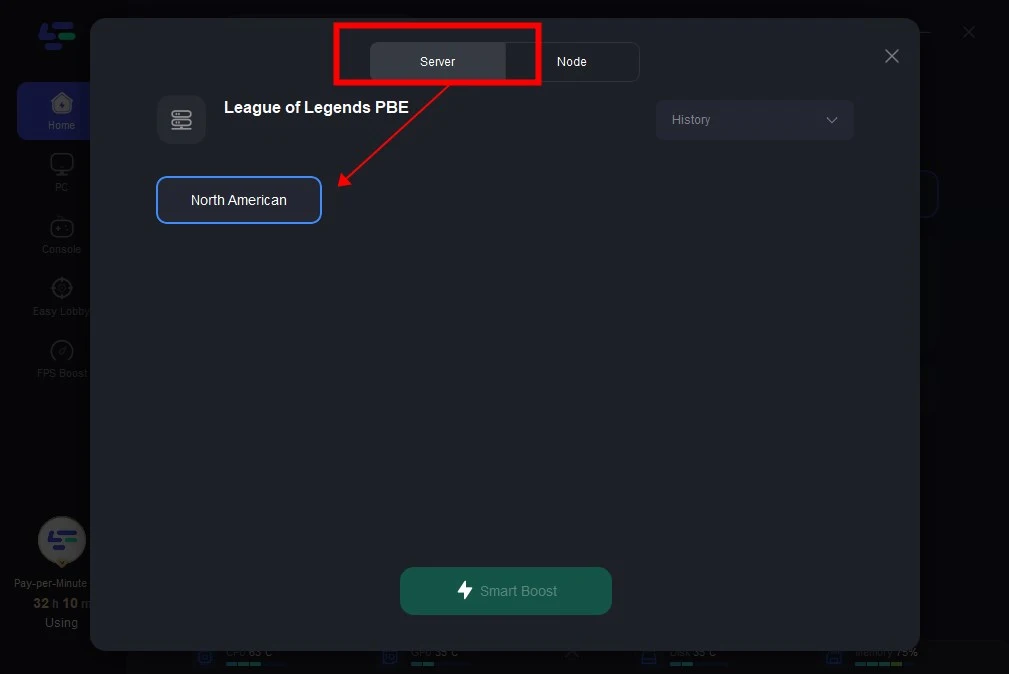
Step 3. Select Your Node: Choose a server node that is geographically close to you to ensure the lowest possible latency for the game connection.
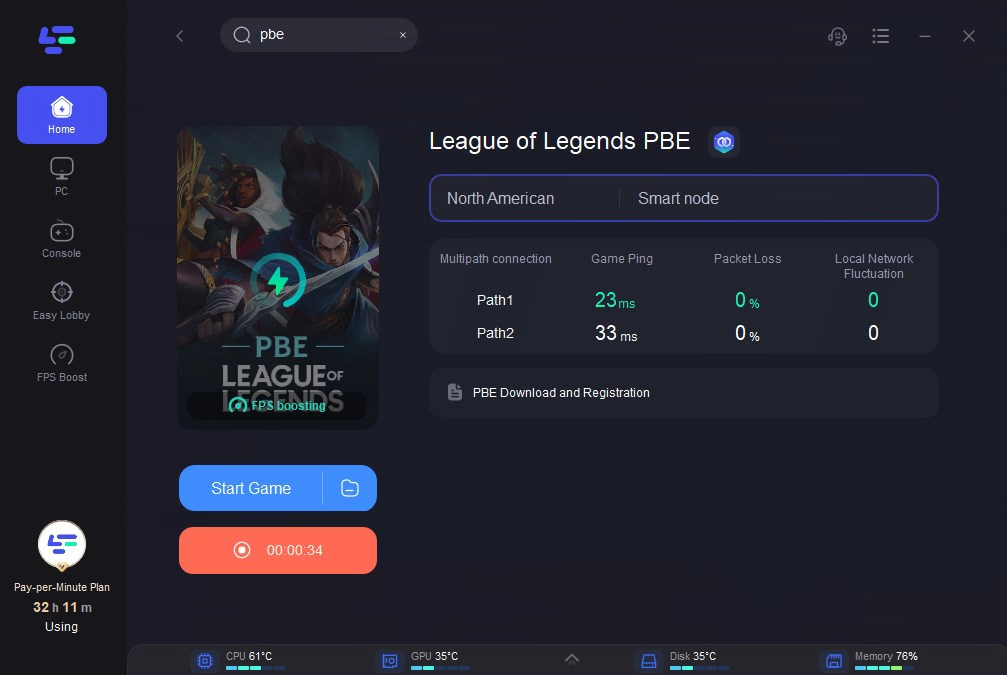
Step 4. Boost: Click the "Boost" button. LagoFast will instantly optimize your routing, stabilize your packet transfer rate, and lower your ping. Launch the game directly from the boosted screen and enjoy the smooth gaming experience.
Fix 2: Use a Wired Ethernet Connection
Wi-Fi is notoriously unstable for gaming, especially when connecting to servers thousands of miles away. Walls, electronics, and distance from the router cause packet loss, which translates directly into League Classic PBE rubberbanding and frustrating input delays.
Step 1. Obtain a Cat6 or Cat5e Ethernet cable long enough to reach your setup.
Step 2. Plug one end directly into an open LAN port on the back of your router.
Step 3. Plug the other end into the Ethernet port on your PC or laptop.
Step 4. Click your network icon in Windows and disable your Wi-Fi connection entirely.
Step 5. Launch a custom PBE match to verify your connection stability has improved.
Fix 3: Stop Background Downloads and Uploads
Other applications eating up your bandwidth will choke your game's data packets. Even if you have high-speed internet, background software uploading data or downloading updates will create massive traffic jams on your local network, leading to league classic pbe lag spikes.
Step 1. Press Ctrl + Shift + Esc to open the Windows Task Manager.
Step 2. Click on the "Network" column header to sort applications by current bandwidth usage.
Step 3. Right-click and select "End task" on any non-essential program consuming heavy network resources.
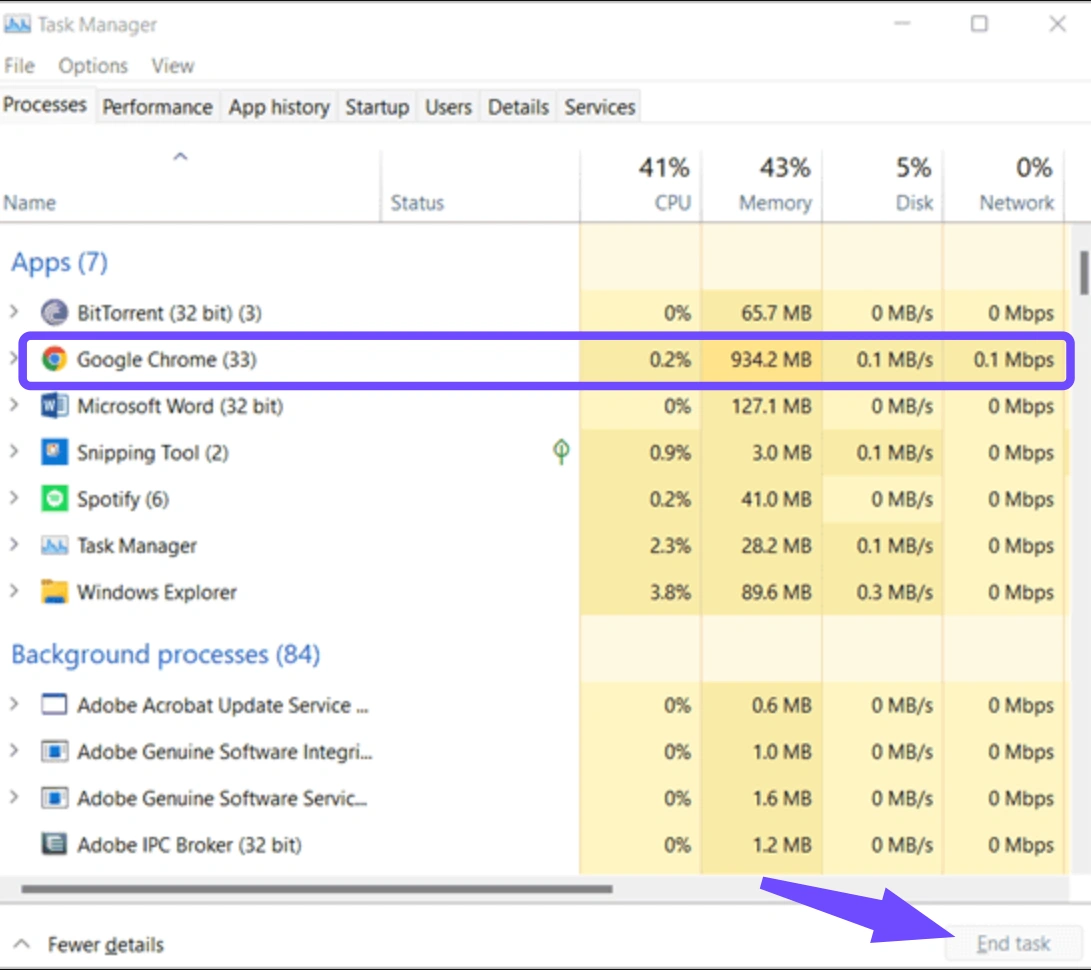
Step 4. Open your Windows Update settings and pause any background OS updates.
Step 5. Check gaming clients like Steam or Epic Games and pause any queued game updates.
Fix 4: Restart the Router and Refresh the Connection
Routers store temporary cache data and can sometimes get bogged down after running continuously for weeks. A simple hardware reset forces the router to clear its memory, drop stale connections, and re-establish a fresh path to your ISP, which can occasionally resolve league classic pbe disconnecting issues.
Step 1. Locate the power cable plugged into the back of your modem and router.
Step 2. Unplug the power cables completely from the wall outlet or surge protector.
Step 3. Wait a full 60 seconds to allow the internal capacitors to drain completely.
Step 4. Plug the hardware back in and wait for all the panel lights to turn solid green or white.
Step 5. Reconnect your PC to the network and test your ping in the practice tool.
Fix 5: Close Bandwidth-Heavy and Overlay Applications
Overlays and streaming applications constantly send and receive data in the background. Software like Discord (especially with hardware acceleration on), Twitch, or browser tabs loaded with heavy media can cause both network congestion and local system stuttering, mimicking high ping.
Step 1. Check your system tray in the bottom right corner of your Windows taskbar.
Step 2. Right-click and exit any unnecessary game overlays or cloud syncing apps (like OneDrive).
Step 3. Open Discord settings, go to Advanced, and turn off Hardware Acceleration.
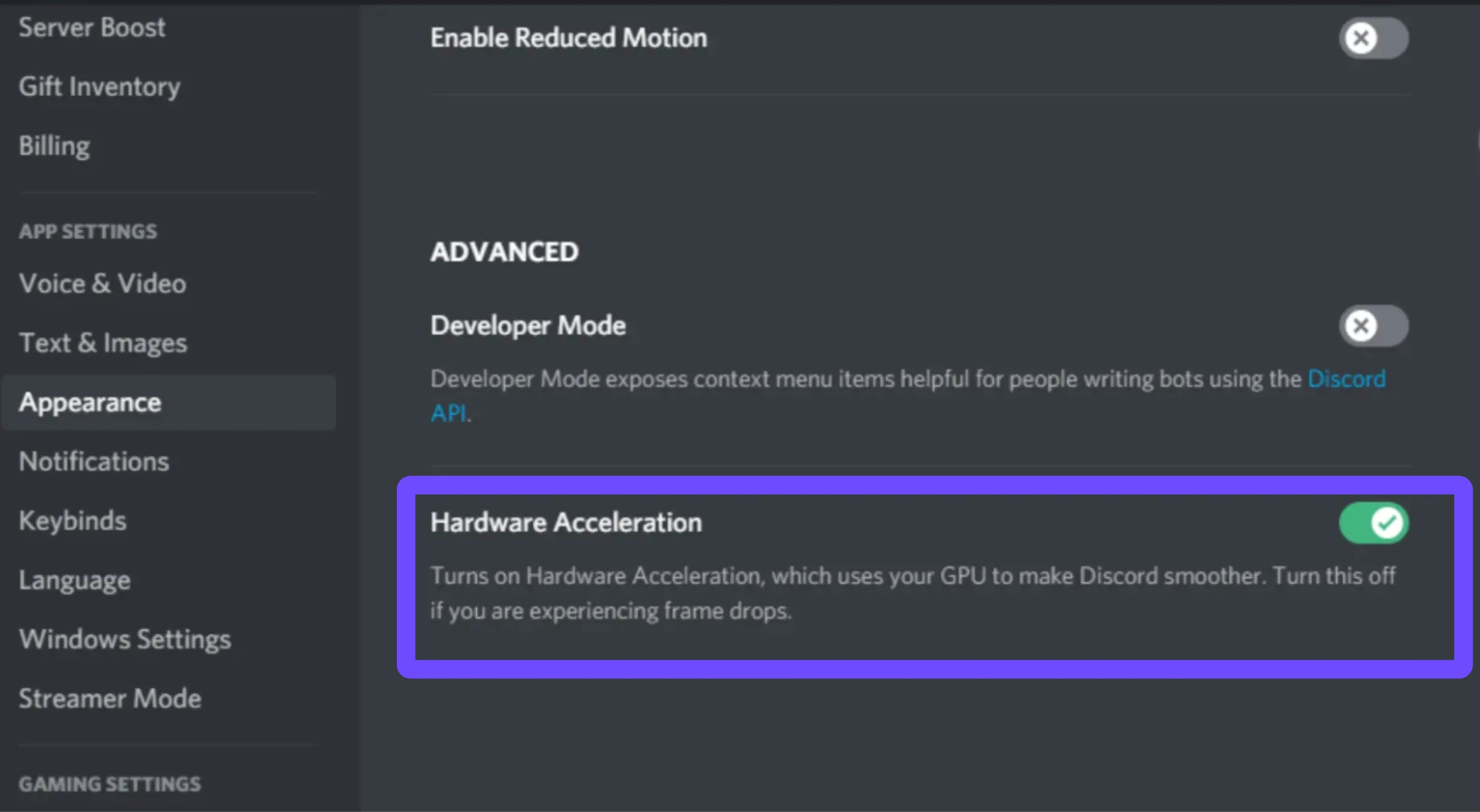
Step 4. Close all active web browsers, particularly tabs playing video or audio streams.
Step 5. Disable the Xbox Game Bar overlay in your Windows gaming settings.
Fix 6: Reset Windows Network Settings
Corrupted DNS caches or outdated IP configurations in Windows can force your connection through highly inefficient routes. Resetting your network adapter settings gives your PC a clean slate, ensuring it communicates as efficiently as possible with the distant North American servers.
Step 1. Click the Windows Start button and open the "Settings" menu (gear icon).
Step 2. Navigate to "Network & Internet" and select the "Advanced network settings" tab.
Step 3. Scroll down and click on the "Network reset" option.
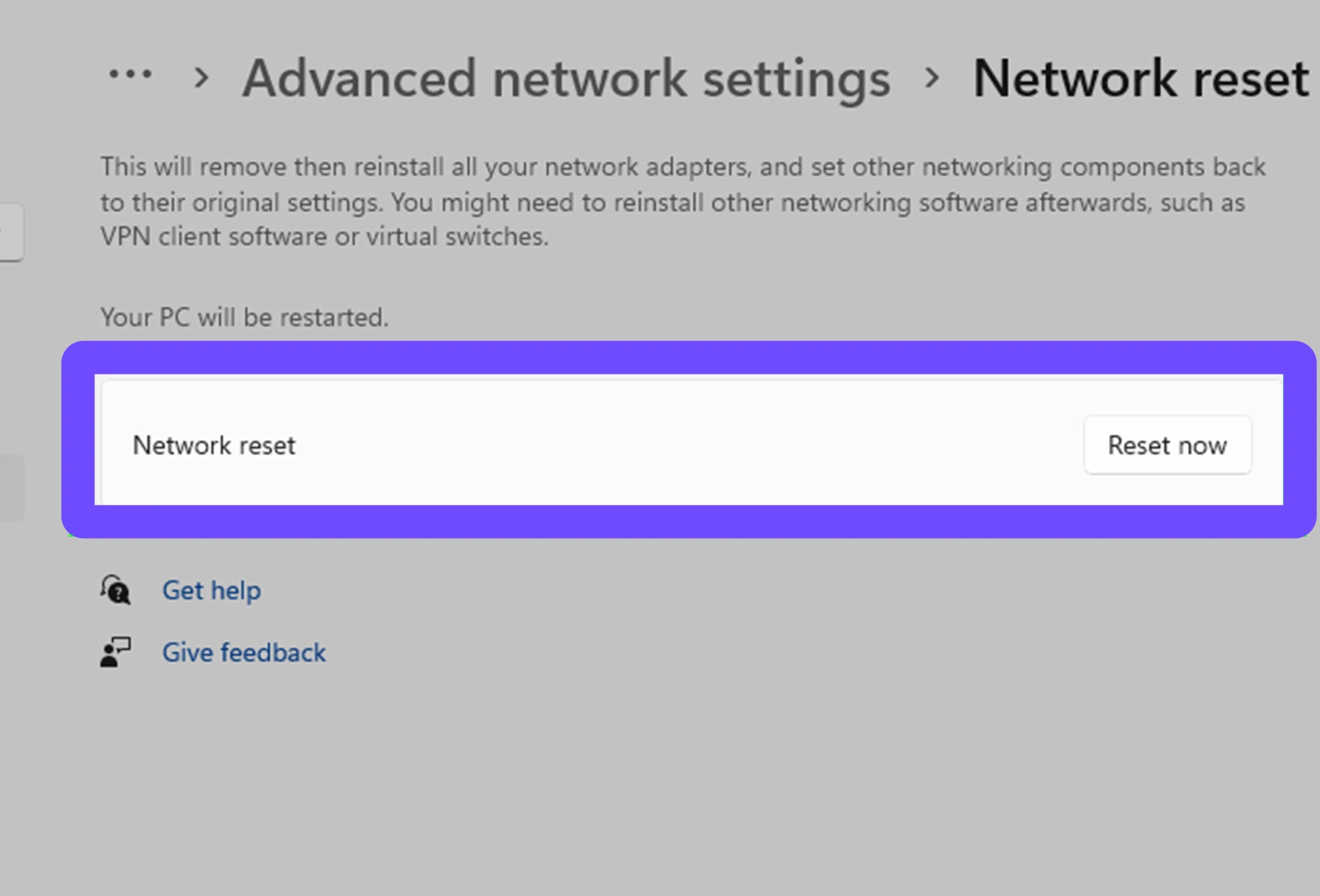
Step 4. Click "Reset now" and confirm the prompt to wipe your network configurations.
Step 5. Restart your computer and reconnect to your network to finalize the changes.
Fix 7: Check Firewall and Antivirus Interference
Overly aggressive firewalls can mistakenly intercept and scan the data packets traveling between your client and the test realm. This constant scanning introduces a severe delay, leading to league classic pbe packet loss and heavily delayed abilities during combat.
Step 1. Open the Windows search bar and type "Windows Defender Firewall."
Step 2. Click on "Allow an app or feature through Windows Defender Firewall" on the left panel.
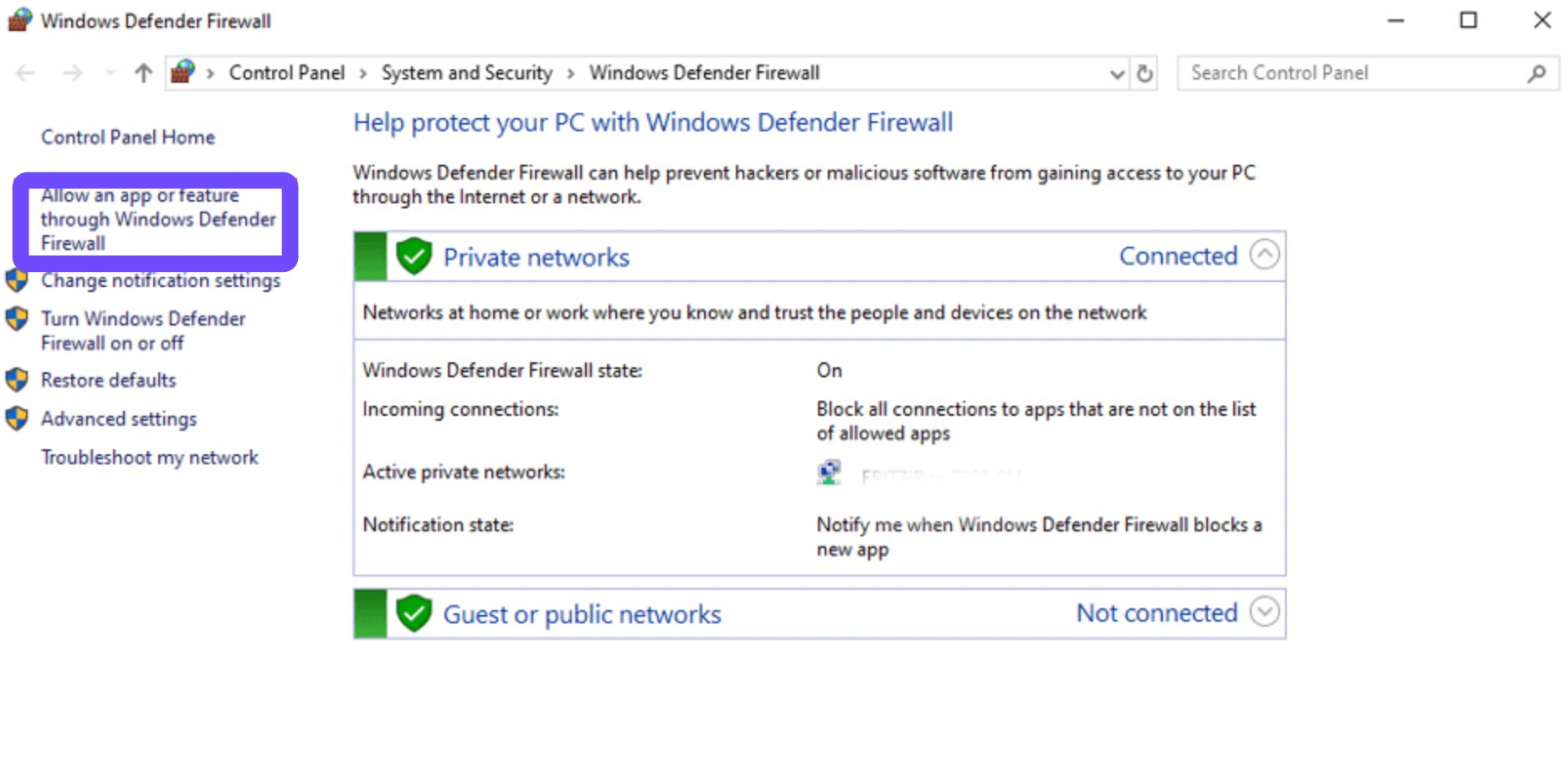
Step 3. Click "Change settings" (you will need administrator privileges).
Step 4. Scroll down to find the League of Legends PBE client and the Riot Client.
Step 5. Ensure both the "Private" and "Public" boxes are checked, then click OK to save.
Fix 8: Check League PBE Server Status
Sometimes the issue has absolutely nothing to do with your setup. The test servers frequently go down for maintenance, experience database errors, or suffer from hardware degradation under heavy player loads, resulting in league classic pbe lag for everyone online.
Step 1. Open a web browser and navigate to the official Riot Games Server Status page.
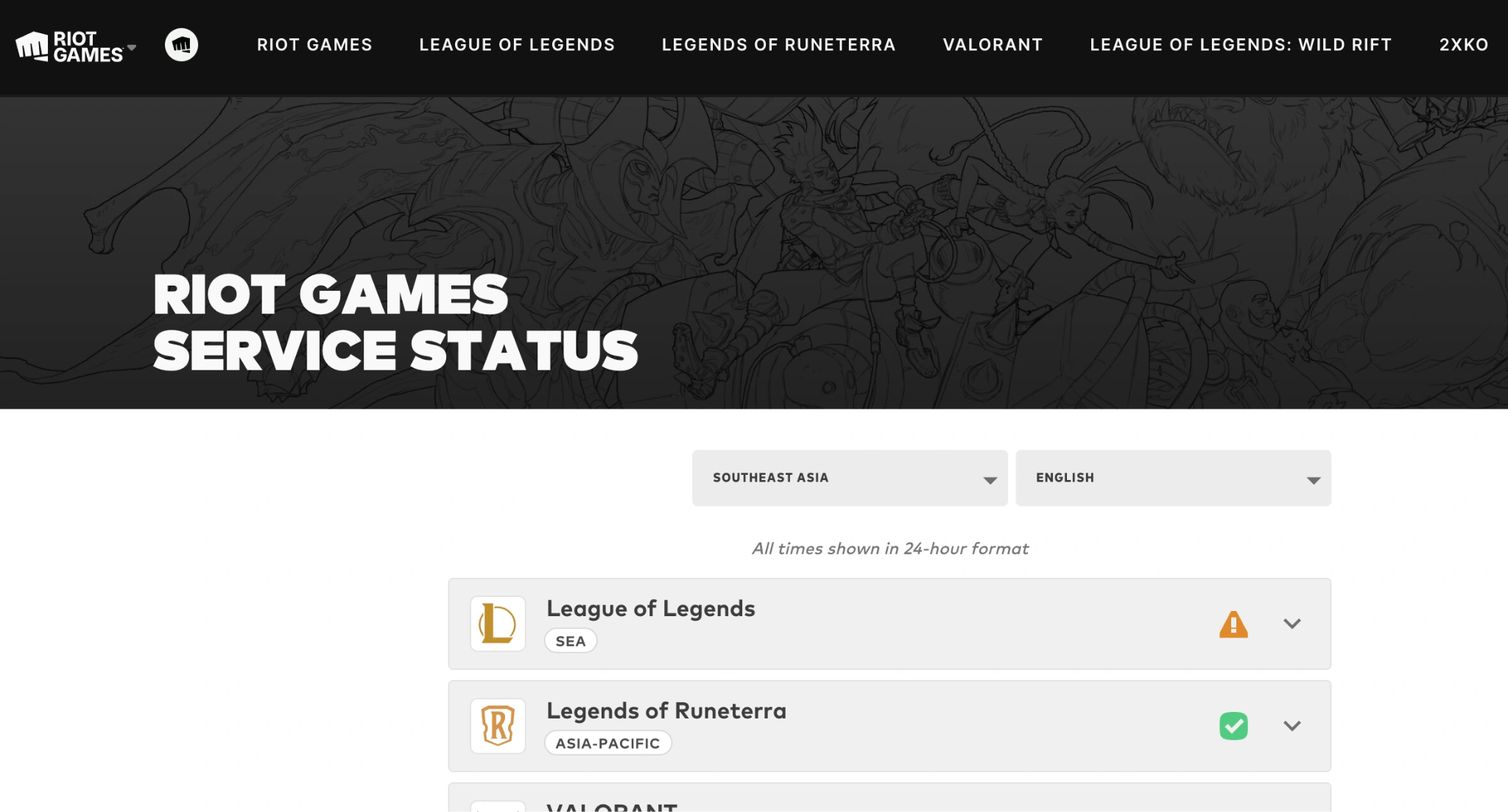
Step 2. Select "League of Legends" from the list of available games.
Step 3. Change the region dropdown menu to specifically select the "PBE" environment.
Step 4. Check for any red banners indicating active maintenance, outages, or known routing issues.
Step 5. If the servers are struggling, simply wait an hour or two for Riot developers to apply a hotfix.
Part 5: FAQs
Why do I have 200 ping on the PBE but 30 on EUW?
Your EUW live server is physically located in Europe, meaning your data travels a very short distance. The PBE server is located in Chicago, North America. The physical time it takes for data to cross the Atlantic Ocean naturally results in around 120-150 ms of unavoidable latency.
Can high ping cause league classic pbe ability delay?
Yes. When your ping is high, the server takes longer to register the button you pressed. If you have 200 ping, it takes roughly 0.2 seconds for the server to acknowledge you pressed 'Q', causing a very noticeable delay between your physical input and the on-screen action.
Is there a way to fix league classic pbe 300 ping from Asia?
While you cannot achieve 20 ping from Asia, 300 ping usually indicates bad routing. Using a game booster with smart multi-path technology, like LagoFast, can bypass congested nodes and drop your ping down to a much more manageable and stable 180-220 ms.
Why am I getting league classic pbe lag spikes randomly?
Random spikes usually point to local network instability. This happens frequently if you are playing on a Wi-Fi connection, if someone else in your house is downloading large files, or if your ISP is throttling your connection during peak internet traffic hours.
Does league classic pbe stuttering happen even with low ping?
Yes. Stuttering can be caused by packet loss, where data gets lost in transit even if the speed is fast, or by local hardware issues. If the PBE servers are overloaded, the game will stutter and skip frames regardless of how good your personal internet connection is.
Will Riot ever make an EU or Asia PBE server?
It is highly unlikely. Riot Games keeps the Public Beta Environment strictly centralized so their developers can monitor a single, unified testing ground. Splitting the servers would fracture the testing population, making it harder to find matches and properly evaluate experimental data.
Conclusion
Experiencing League of Legends Classic PBE high ping is an annoying but common reality for players outside of North America. Because the centralized PBE region forces cross-region latency, your ping will never perfectly match your live server performance. However, by understanding PBE instability, utilizing a wired connection, and using optimized routing tools like LagoFast, you can eliminate erratic lag spikes and enjoy a stable, playable connection while testing out the newest content.

Boost Your Game with LagoFast for Epic Speed
Play harder, faster. LagoFast game booster eliminates stutter and lags on PC, mobile, or Mac—win every match!
Quickly Reduce Game Lag and Ping!
Boost FPS for Smoother Gameplay!