

Arena Breakout: Infinite is an intense tactical shooter where every frame and millisecond counts. But many players—whether they’re on high-end PCs or fiber connections—are reporting random ping spikes, stuttering, and sudden freezes. This guide will explain why Arena Breakout: Infinite’s ping is high and how you can lower it faster.

- ✅ Reduce Lag and High Ping.
- ✅ Boost FPS at the Same Time.
- ✅ Support 2000+ Online Games.
- ✅ Change Region Server Quickly.
- ✅ Multiplatform Game Support.
Part 1: What happens in the Arena breakout infinity ping? (Symptoms)
Part 2: Why big ping in Arena Breakout Infinity?
Part 3. how to lower ping in arena breakout infinity with lagofast
Part 4. other way to reduce the high ping on arena breakout infinity
Part 1: What Happens to Arena Breakout: Infinite Ping? (Symptoms)
Players describe a pattern of:
- Sudden ping spikes: Jumps from a stable 20–60 ms to 150–200 ms or even 1000+ ms for a few seconds.
- Game freezes and stutters: One-second freezes or long stutter chains mid-fight, often coinciding with ping jumps.
- Inconsistent performance: Smooth gameplay one match, then unplayable latency the next, even on the same map.
- Hardware not being the cause: High-end rigs (Intel i7/i9, RTX 4070+ GPUs, 32GB RAM) and fiber internet show the same issues.
- Worse after patches: Multiple users noticed ping instability after major updates in late 2024–2025.
These symptoms show that ping instability isn’t just a weak-PC or Wi-Fi issue—it’s tied to server placement, matchmaking logic, and client-side performance.
Part 2: Why Does Arena Breakout: Infinite Have Big Ping?
1. Server Selection Tied to the Team Leader
Arena Breakout’s servers are assigned based on who creates the lobby.
- If you join a random squad, you’ll connect to the leader’s closest server, which may be across the globe.
- Solo queue players hosting their own games usually get local servers with lower ping.
2. Low Ping Preferences Not Enabled by Default
There is a Low Ping toggle, but:
- It resets every time you restart the game.
- Many players don’t know it exists because it’s buried on the character/team screen (left-hand side).
- If it’s off, matchmaking prioritizes speed over latency, putting you on any available server.
3. Antivirus and Security Software Conflicts
- Bitdefender Advanced Threat Defense and similar antivirus tools falsely detect Arena Breakout’s .exe as malware, causing CPU spikes that directly increase ping.
- Adding the game to the exceptions list fixes this for many.
4. Server Bugs and Matchmaking Limitations
- Even with correct settings, players sometimes get thrown into wrong-region servers due to bugs or a lack of local players.
- Patch-related server instability has been widely reported since mid-2024, meaning some ping problems are server-side.
Part 3: How to Lower Ping in Arena Breakout: Infinite with LagoFast
If you’re tired of lag ruining firefights, LagoFast is one of the most effective solutions for lowering ping and stabilizing your connection in Arena Breakout: Infinite. LagoFast is a dedicated game booster and network optimizer designed specifically for competitive gaming.
LagoFast uses smart routing technology to:
- Bypass poor ISP routes and connect through optimized paths for the lowest latency possible.
- Reduce high ping quickly, often cutting 20–60 ms off your connection.
- Stabilize packet delivery to prevent sudden spikes and rubberbanding.
- Prioritize gaming traffic to ensure smoother matches even on busy networks
Here’s how to set it up:
Step 1: Download & Install: Get LagoFast from the official site and create a free trial account.
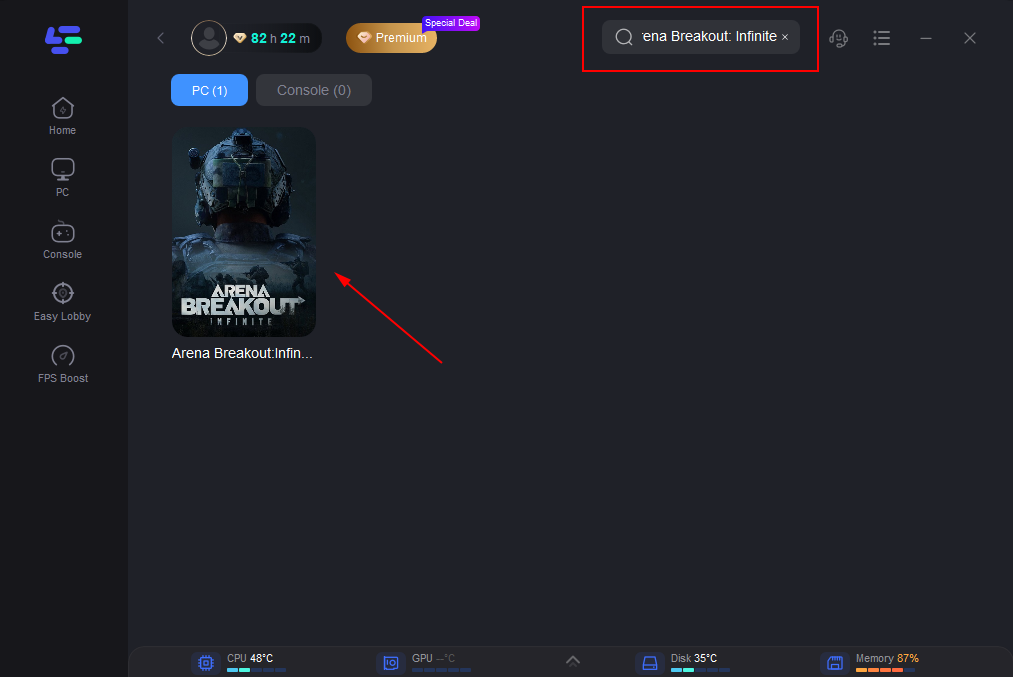
Step 2: Find the Game: Open LagoFast, search Arena Breakout: Infinite, and select it.
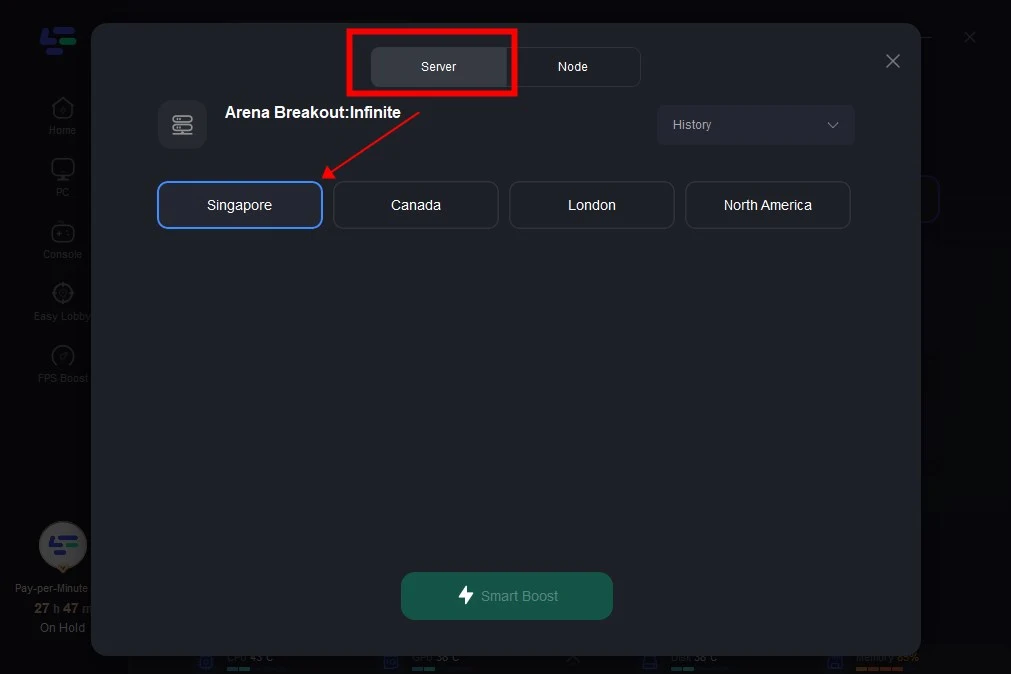
Step 3: Smart Boost: Let LagoFast auto-pick the best node, then enable Smart Boost for optimized routing.
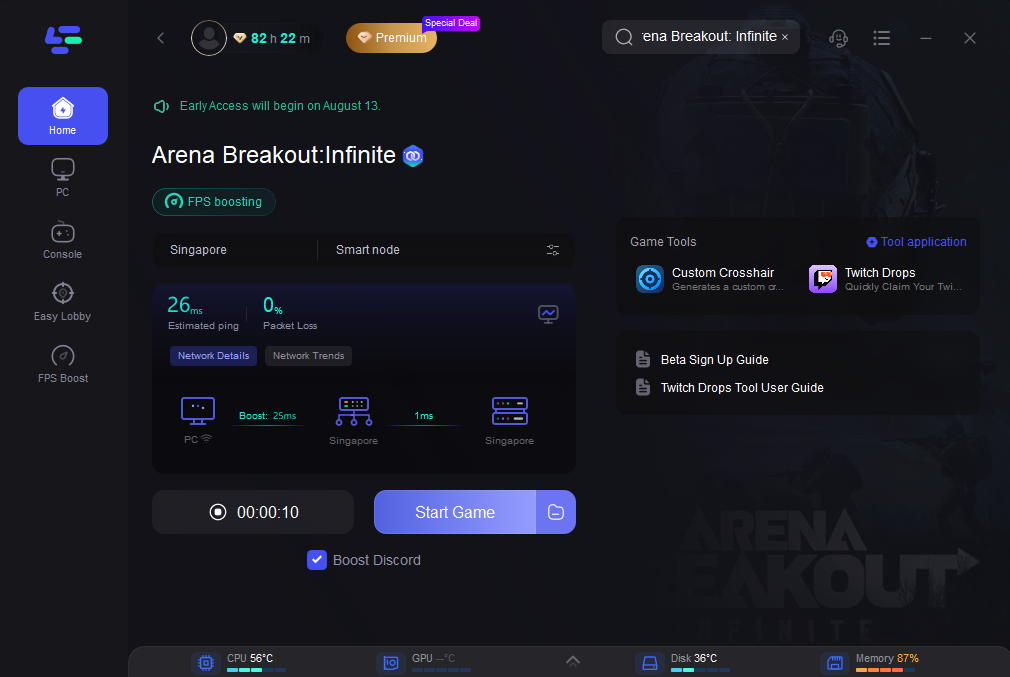
Step 4: Launch & Play: Click Boost, start the game, and enjoy 20–60 ms lower ping with fewer spikes.
Part 4: Other Ways to Reduce High Ping in Arena Breakout: Infinite
While LagoFast can fix ISP routing issues, there are additional in-game and system-level optimizations you should try:
1. Always Host Your Own Lobby
- Create your own squad instead of joining others.
- Matchmaking will place you on servers closest to you, not with random teammates.
2. Enable Low Ping Preferences
- Go to the character/team screen.
- Toggle Low Ping Preferences ON (left-hand side of the UI).
- Repeat this every time you restart the game.
3. Add Game to Antivirus Exceptions
If using Bitdefender or similar antivirus:
- Navigate to Protection > Advanced Threat Defense.
- Add Arena Breakout’s executable to the Allow List.
- Restart your PC.
4. Use a Wired Connection and DNS Tweaks
Switch to Ethernet instead of Wi-Fi.
Change DNS to:
- Google: 8.8.8.8 and 8.8.4.4
- Cloudflare: 1.1.1.1
5. Disable Overlays and Background Apps
- Turn off Discord overlay, GeForce Experience, Steam overlay.
- Close background apps like browsers or cloud sync tools.
6. System Performance Optimization
- Set Windows Power Plan to High Performance.
- Update GPU drivers (NVIDIA/AMD) to the latest Game Ready versions.
7. When It’s the Server’s Fault
- If ping spikes are widespread after updates, record gameplay and submit tickets.
- Many users report that issues are acknowledged quietly in future patches rather than immediately fixed.
Final Thoughts
Arena Breakout: Infinite’s high ping issues are a mix of server routing decisions, matchmaking bugs, and system-level conflicts. While waiting for official fixes, players can take control of their connection by:
- Hosting their own lobbies
- Enabling Low Ping Preferences
- Excluding the game from antivirus scans
- Using tools like LagoFast to bypass ISP routing problems
By combining these steps, you’ll minimize lag, reduce ping spikes, and keep fights smooth—giving you the competitive edge you need in this tactical shooter.

Boost Your Game with LagoFast for Epic Speed
Play harder, faster. LagoFast game booster eliminates stutter and lags on PC, mobile, or Mac—win every match!
Quickly Reduce Game Lag and Ping!
Boost FPS for Smoother Gameplay!