
AION 2 brings massive open world combat, intense faction battles, and complex character customization to MMORPG fans worldwide. However, many players in Turkey face a major language barrier because native Turkish localization is absent at launch. If you want to understand every quest line and skill description without confusion, learning how to play AION 2 in Turkish is essential. LagoFast provides real-time translation and ping optimization, letting you translate AION 2 to Türkçe effortlessly on PC.
Understanding the current language support status helps players plan the best setup for their gaming sessions.

- ✅ Reduce Lag and High Ping.
- ✅ Boost FPS at the Same Time.
- ✅ Support 8000+ Popular Online Games.
- ✅ Stable Server Connection
Part 1: Will AION 2 Have Official Turkish Language Support?
Part 2: Official Supported Languages in AION 2
Part 3: LagoFast: The Best Tool for AION 2 Turkish Translation and Performance
Part 4: How to Play AION 2 in Turkish Using LagoFast
Part 5: Native Localization vs Real Time Screen Translation
Part 6: Troubleshooting AION 2 Turkish Translation Issues
Part 7: Is It Possible to Play AION 2 Completely in Turkish?
Part 8: FAQs About AION 2 Turkish Language
Part 1: Will AION 2 Have Official Turkish Language Support?
Currently, there is no official aion 2 turkish language support listed by the game developers for launch. Players expecting built-in Turkish options in system menus will not find native settings for aion 2 türkçe.
The lack of built-in localization impacts several core areas of gameplay:
- No native Turkish user interface or game menus
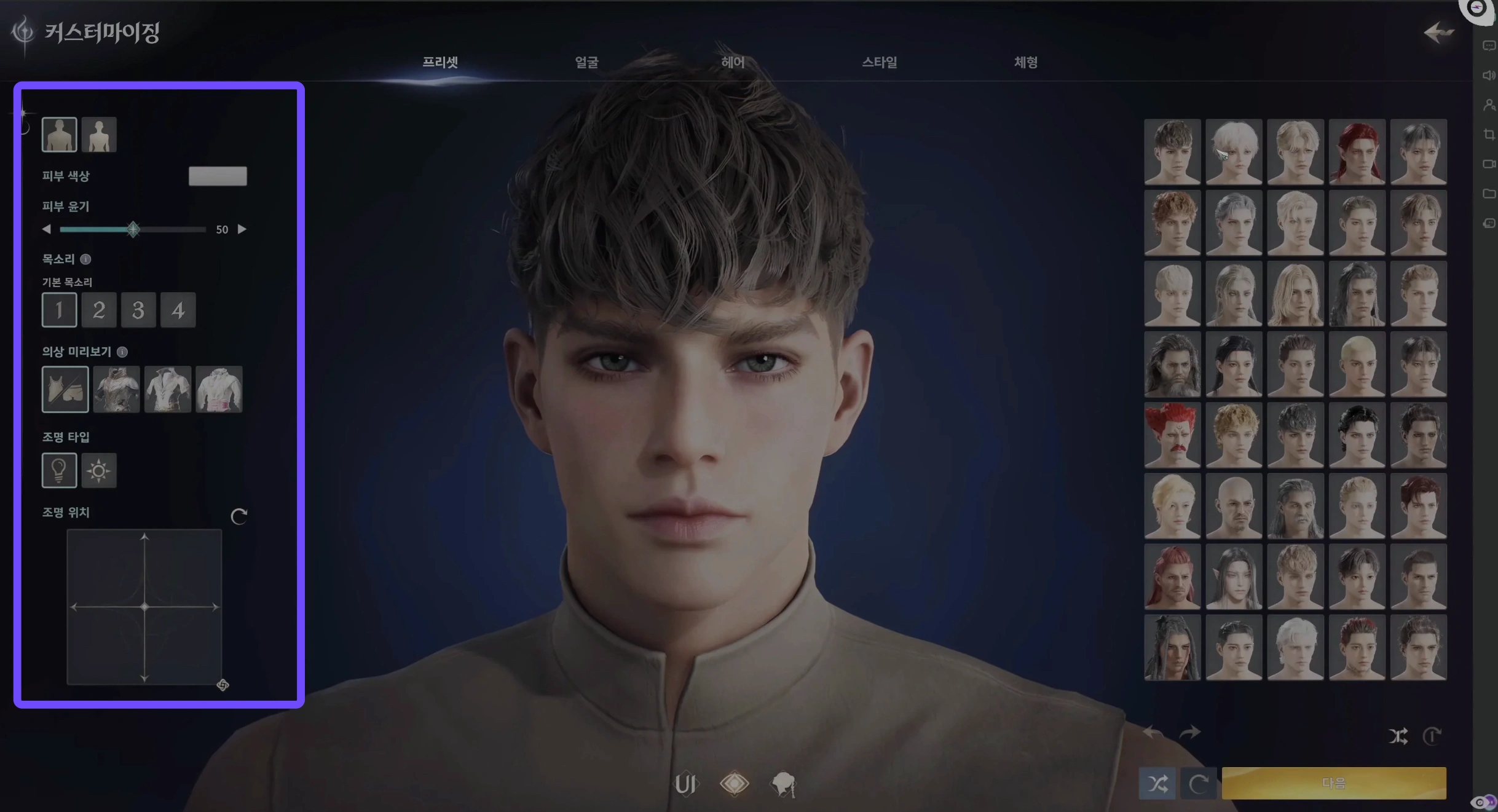
- No official Turkish subtitles for cutscenes or dialogue
- No localized Turkish voiceovers for characters
- Quest objectives and item tooltips remain in supported foreign languages
While official localizations might arrive in future game expansions, PC players can use real-time screen translation tools to enjoy full comprehension today.
Comparing all available localizations reveals where Turkish stands relative to officially supported options.
Part 2: Official Supported Languages in AION 2
The global language roster covers several primary regions, but omits native Turkish options at release.
|
Language |
Interface |
Full Audio |
Subtitles |
|
English |
Supported |
Supported |
Supported |
|
French |
Supported |
Not Supported |
Supported |
|
German |
Supported |
Not Supported |
Supported |
|
Spanish - Spain |
Supported |
Not Supported |
Supported |
|
Japanese |
Supported |
Supported |
Supported |
|
Portuguese - Brazil |
Supported |
Not Supported |
Supported |
|
Russian |
Supported |
Not Supported |
Supported |
|
Korean |
Supported |
Supported |
Supported |
|
Turkish |
Not Supported |
Not Supported |
Not Supported |
Because Aion 2 Turkish is completely absent from official game settings, external translation software is essential for local players.
Combining connection optimization with instant translation creates the smoothest possible MMORPG setup.
Part 3: LagoFast: The Best Tool for AION 2 Turkish Translation and Performance
LagoFast is a dedicated gaming booster designed to solve network latency and localization challenges for online gamers worldwide. It features a built-in real-time Screenshot Translation tool that converts on-screen game text into your chosen target language instantly. Beyond providing seamless aion 2 turkish translation, LagoFast optimizes network routing to reduce ping, stabilize packet transmission, and boost frame rates during heavy multi-player battles in AION 2.
Setting up the translation overlay requires only a few simple adjustments before launching your character.
Part 4: How to Play AION 2 in Turkish Using LagoFast
Follow these step-by-step instructions to configure screen translation for your PC gaming setup.
Step 1: Download and install the LagoFast application on your PC.
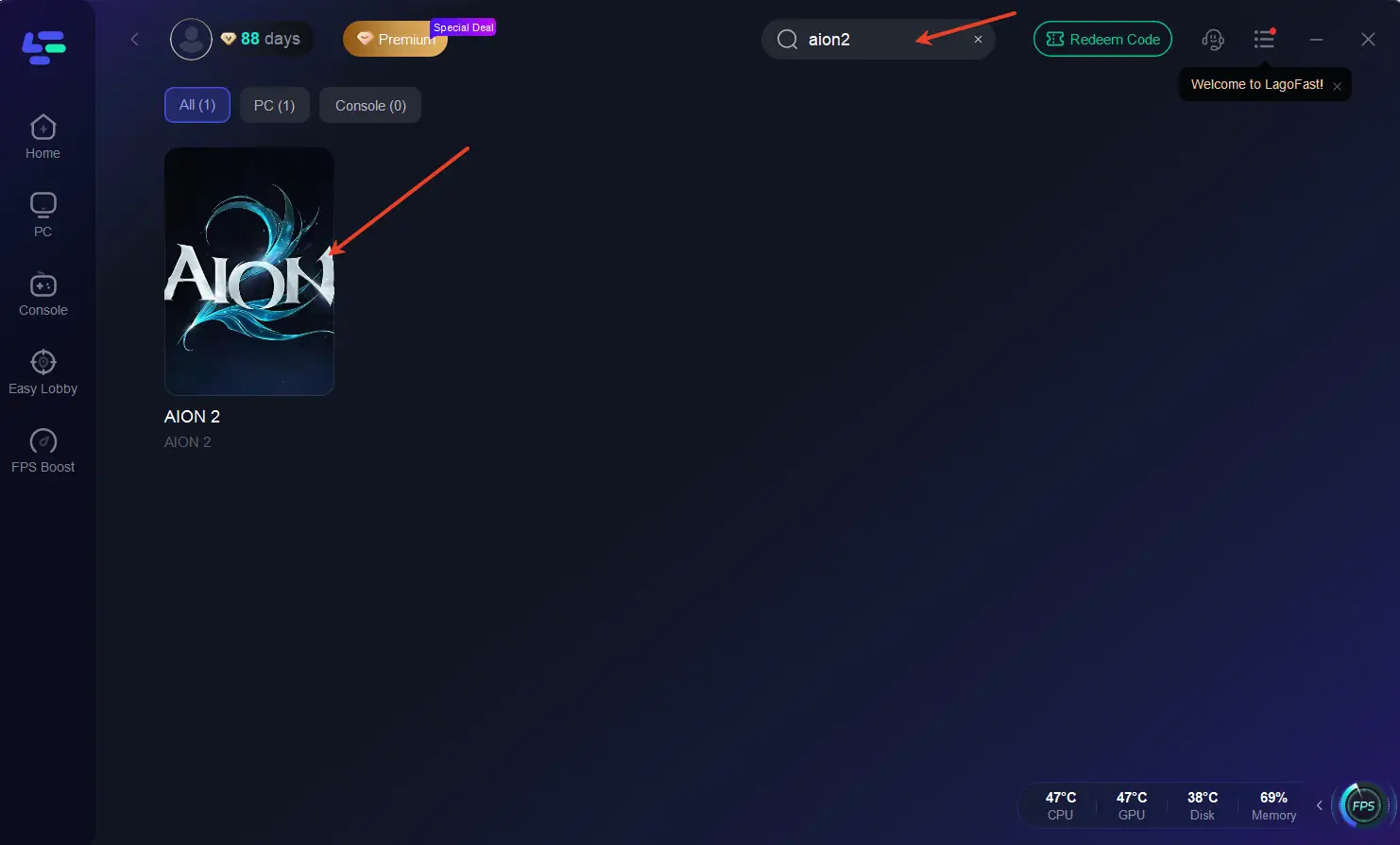
Step 2: Launch LagoFast and search for AION 2 in the main search bar.
Step 3: Navigate to the Game Tools section on the right panel and click on Translation.
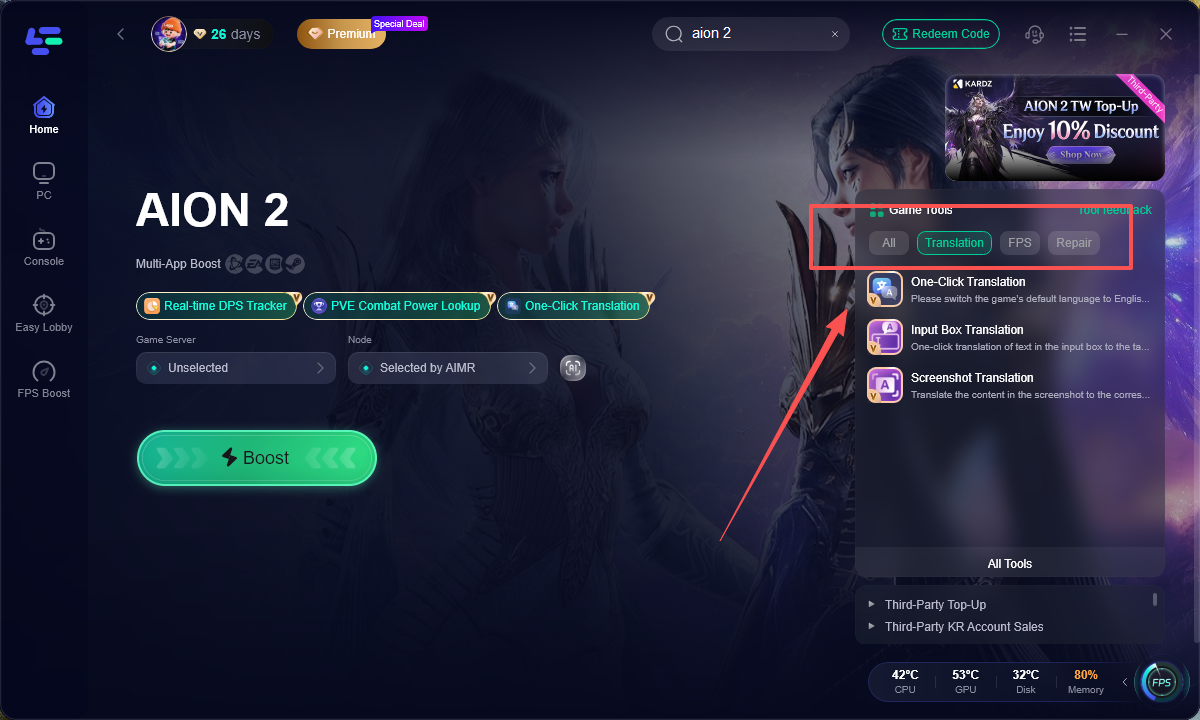
Step 4: Set Target Language to Turkish and select English as your Source Language for optimal translation accuracy.
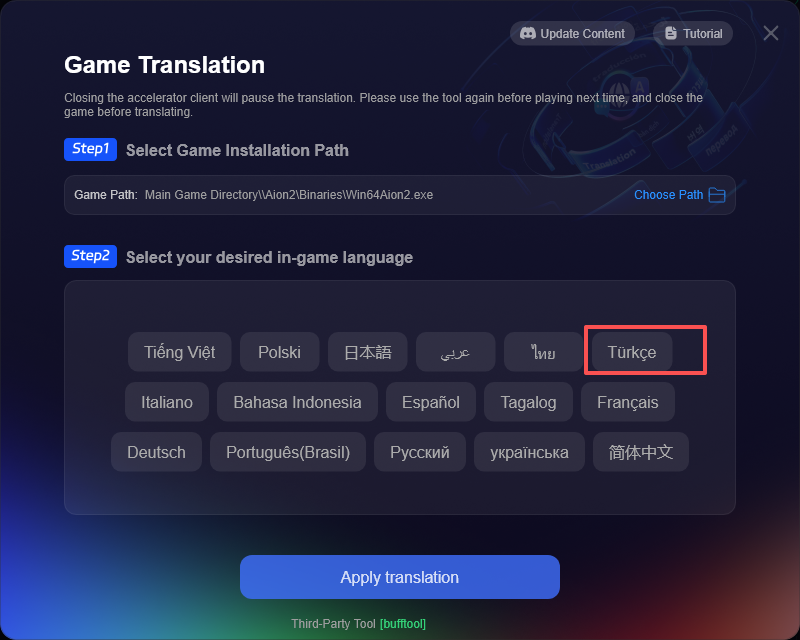
Step 5: Assign a dedicated translation hotkey shortcut, such as Alt + T, that does not overlap with your movement or skill controls.
Step 6: Open AION 2, go into game settings, enable subtitles, set the text language to English, and press your saved hotkey whenever you want on-screen text translated into Turkish.
Knowing where to apply screen translation allows you to progress through challenging content without falling behind.
Best Ways to Use Screenshot Translation in AION 2
MMORPGs feature detailed lore, multi-tier crafting systems, and complex combat mechanics. Using live translation in key areas enhances your overall experience:
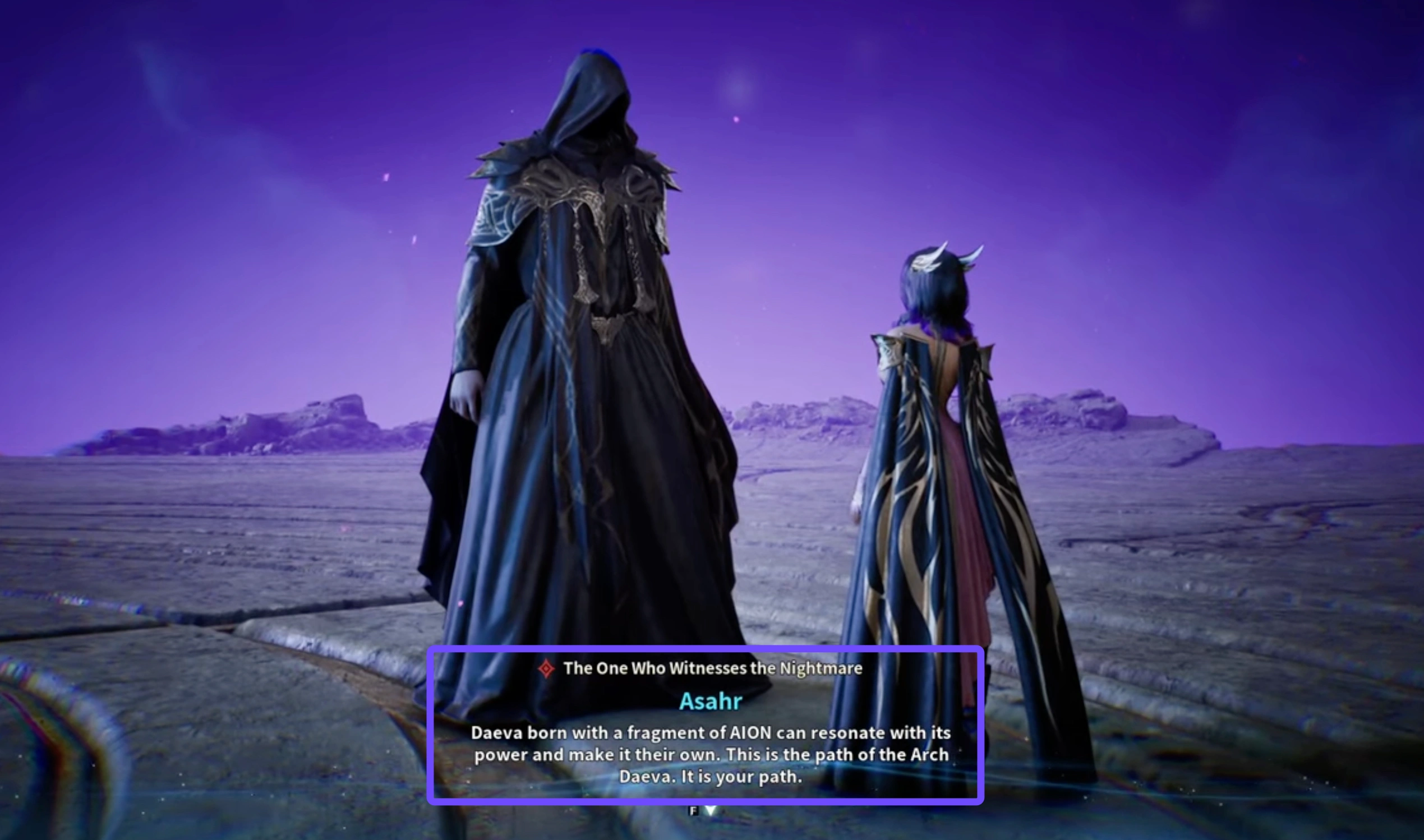
- Main Campaign and Quest Dialogue: Translate conversation choices before confirming answers. Story decisions can affect quest rewards and faction standing, making accurate comprehension essential.
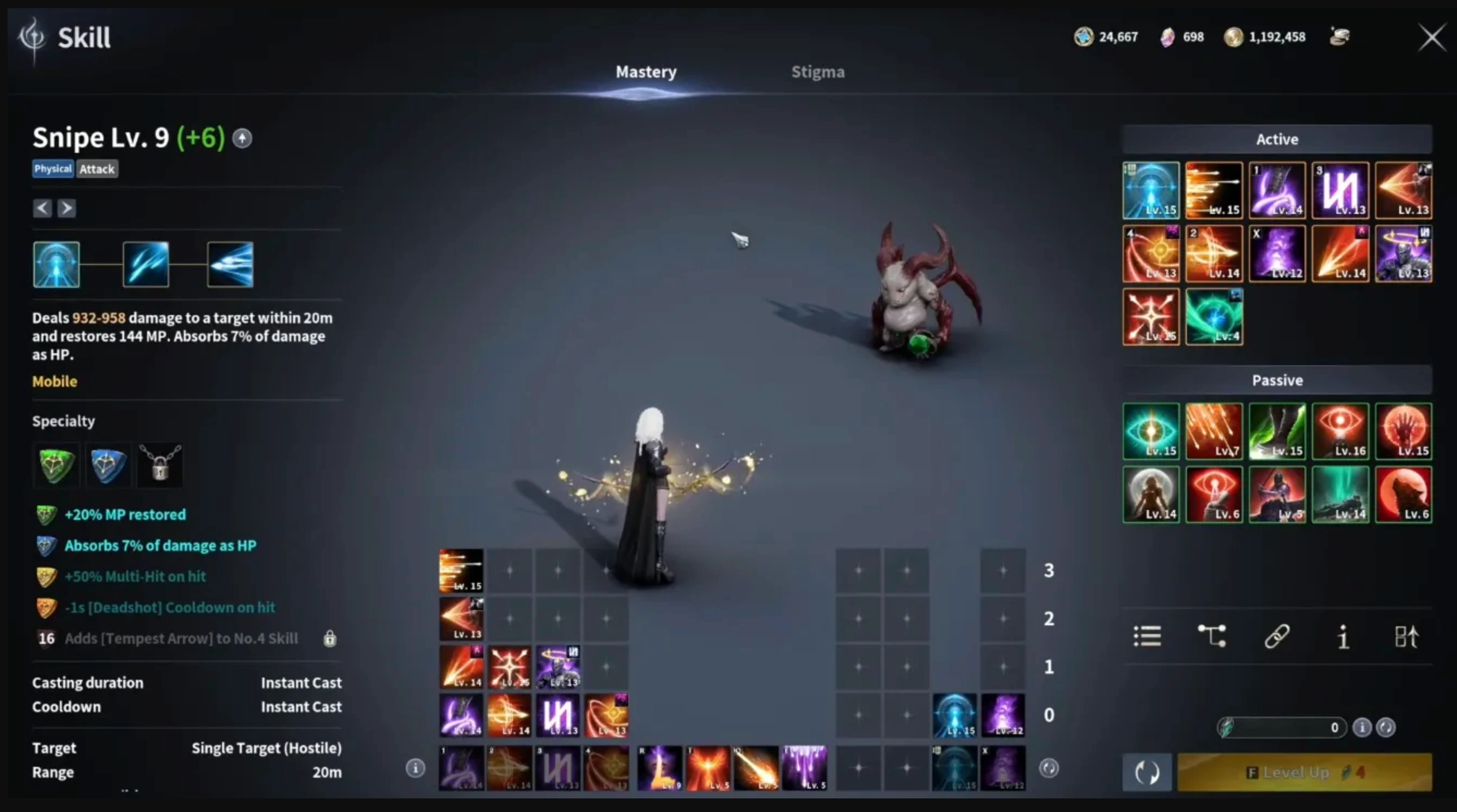
- Skill Trees and Stigma Abilities: Translate detailed spell descriptions, passive effects, and cooldown timers. Understanding exact stat scaling helps you build strong character loadouts.
- Equipment Stats and Enhancement Tooltips: Review weapon attributes, armor sets, and gem socket bonuses before investing valuable crafting resources or currency.
- Interface and Guild Menus: Easily manage party recruitment, guild boards, trade markets, and system graphics settings without relying on trial and error.
Comparing native localization with real-time screen translation helps clarify what to expect during long play sessions.
Part 5: Native Localization vs Real-Time Screen Translation
While a native language patch is ideal, screen capture translation provides a practical workaround for unsupported languages like Turkish.
|
Feature |
Official Localization |
LagoFast Real Time Translation |
|
Permanent On-Screen Text |
Yes |
On-Demand via Hotkey Overlay |
|
Native Audio Dubbing |
Yes (Select Languages) |
Original Voiceover Retained |
|
PC Compatibility |
Yes |
Yes |
|
Network Optimization Included |
No |
Yes (Ping and FPS Boost) |
|
Setup Complexity |
Automatic |
Simple One-Time Hotkey Setup |
If the translation tool does not trigger properly, a few quick configuration checks will restore full functionality.
Part 6: Troubleshooting AION 2 Turkish Translation Issues
Technical issues can occasionally interrupt screen translation. Refer to the table below to resolve common problems quickly.
|
Issue |
Underlying Cause |
Recommended Solution |
|
Pressing Hotkey Does Nothing |
Disabled feature or key binding conflict |
Open LagoFast settings, verify the translation switch is enabled, and rebind to a new key combination |
|
Incorrect Output Language |
Misconfigured target language settings |
Open LagoFast Game Tools, select Translation, and verify Target Language is set to Turkish |
|
Subtitle Dialogue Not Reading |
In-game subtitles are turned off |
Open AION 2 sound and gameplay settings, then enable full subtitle display |
|
Partial Text Captured |
Screen text was still rendering |
Wait until the dialogue animation completes fully before pressing your translation hotkey |
Understanding the practical boundaries of overlay tools ensures a smooth gaming experience without unexpected surprises.
Part 7: Is It Possible to Play AION 2 Completely in Turkish?
LagoFast translates on-screen text in real time on PC, but it acts as a visual overlay rather than an official language patch. Game audio remains in its original language, and console platforms (PS5, Xbox) are not supported.
The best setup for PC players is to keep English text active, enable subtitles, and use LagoFast to translate text when needed.
Below are answers to common questions about playing AION 2 in Turkish.
Part 8: FAQs About AION 2 Turkish Language
How to play AION 2 in Turkish on PC?
You can play AION 2 in Turkish by installing LagoFast, searching for AION 2, setting the Screenshot Translation tool target to Turkish, and pressing your chosen hotkey whenever you need instant text translation on screen.
Is there an official AION 2 turkish language patch?
No official Turkish language patch exists for AION 2. Using LagoFast screen translation is currently the most effective way to read game text in Turkish.
Can I use this method to translate AION 2 to Türkçe on PS5 or Xbox?
No. The screen translation feature in LagoFast requires a PC operating system. Console versions of AION 2 cannot run external translation overlays.
How does LagoFast help with AION 2 lag and ping?
LagoFast uses dedicated global routing servers to find the shortest path to game servers. This reduces ping, minimizes packet loss, and stabilizes frame rates during large-scale PvP combat.
Which source language works best when translating to Turkish?
English works best as the source language in LagoFast settings because the translation engine handles English-to-Turkish vocabulary conversion with high precision.
Here is a final summary of how you can dive into the world of Atreia in your native language today.
Does LagoFast translation work in full-screen mode in AION 2?
Yes, LagoFast's screenshot translation tool works seamlessly in borderless windowed and full-screen modes on PC. Pressing your designated translation hotkey immediately overlays the translated Turkish text without interrupting your gameplay.
Conclusion
Although official AION 2 türkçe support is not available at launch, players do not need to miss out on the rich storyline and tactical gameplay. By using LagoFast screenshot translation alongside its network acceleration features, you can easily translate AION 2 to Türkçe in real time while keeping latency low. Simple configuration steps let you focus on combat and exploration in your native language without delay.

Boost Your Game with LagoFast for Epic Speed
Play harder, faster. LagoFast game booster eliminates stutter and lags on PC, mobile, or Mac—win every match!
Quickly Reduce Game Lag and Ping!
Boost FPS for Smoother Gameplay!