
Pokémon Champions is a competitive battle-focused Pokémon game that lets players build teams and challenge opponents across multiple platforms. With the game now available on Nintendo Switch, Switch 2, iOS, and Android, more players than ever can jump into online battles and enjoy cross-platform play. However, downloading the game isn't always straightforward, especially in regions where the mobile version hasn't officially launched yet. If you're wondering how to download and play Pokémon Champions, this guide covers the release details, available platforms, and the easiest ways to get started.

- ✅ Reduce Lag and High Ping.
✅ Boost FPS at the Same Time.
✅ Support 2000+ Popular Online Games.
✅ Change Server without Latency.
✅ Boost Game Loading Speed.
Part 1: Pokémon Champions Release Date
Part 2: When and How Can You Download Pokémon Champions?
Part 3: How to Download and Play Pokémon Champions Easily — LagoFast
Part 4: Other Download Methods for Pokémon Champions
Part 1: Pokémon Champions Release Date
Pokémon Champions officially launched on Nintendo Switch and Nintendo Switch 2 on April 8, 2026. The game later arrived on iOS and Android on June 17, 2026, bringing its competitive battle experience to mobile players around the world.
Currently, Pokémon Champions is available on Nintendo Switch, Nintendo Switch 2, iPhone, and Android devices.
The game also supports cross-platform play, allowing players on console and mobile to battle each other without platform restrictions.
Key Features of Pokémon Champions
- Cross-Platform Battles: Challenge players across Switch, Switch 2, iOS, and Android through a shared online battle system.
- Competitive-Focused Gameplay: Unlike traditional Pokémon titles, Pokémon Champions focuses on strategic battles, team building, and competitive play.
- Pokémon HOME Integration: Players can bring eligible Pokémon into the game through Pokémon HOME and use them in battles.
- Ranked and Casual Battle Modes: Whether you're aiming to climb the rankings or just play for fun, multiple battle modes are available.
- Play on Mobile or Console: Choose the platform that fits your playstyle and enjoy the same core battle experience on both mobile and Switch devices.
- Ongoing Battle Updates: Competitive formats and battle rules may be updated over time to keep matches balanced and engaging.
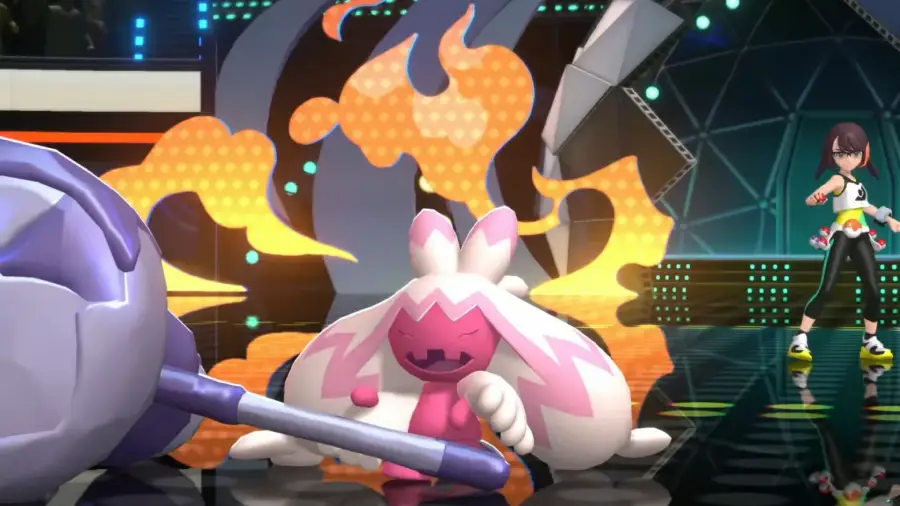
Part 2: When and How Can You Download Pokémon Champions?
Pokémon Champions is now available on Nintendo Switch, Switch 2, iOS, and Android. Players in supported regions can download the game directly from their platform's official store.
However, the mobile version has not been officially released in Vietnam. As a result, many Vietnamese players may find that Pokémon Champions does not appear in the App Store or Google Play Store.
Why Can't You Find Pokémon Champions?
If you're playing from Vietnam, you may encounter issues such as:
- The game not appearing in search results
- The store page being unavailable
- Region restriction messages
- Missing download options
Since Pokémon Champions has not officially launched in Vietnam yet, you'll need an alternative download method to access the game on mobile devices.
Part 3: How to Download and Play Pokémon Champions Easily — LagoFast
If you're trying to download Pokémon Champions in Vietnam, LagoFast is a good option. Its download feature helps you access and install the game more quickly and easily, especially when it doesn’t show up in your local app store.
Beyond the Download Feature, LagoFast can also lower ping, reduce packet loss, and stabilize your connection so matches don’t get interrupted by lag or sudden spikes. It also includes a Translation Tool, which can make in-game text easier to understand if you’re playing in a different language, helping you enjoy a smoother overall gaming experience.
How to Use LagoFast to Download and Smoothly Play Pokémon Champions
Step 1: Click download and install LagoFast Mobile
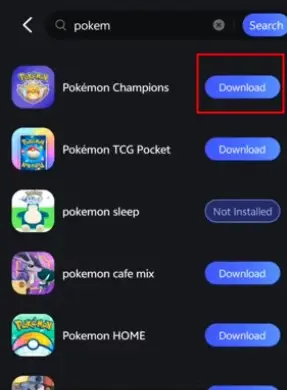
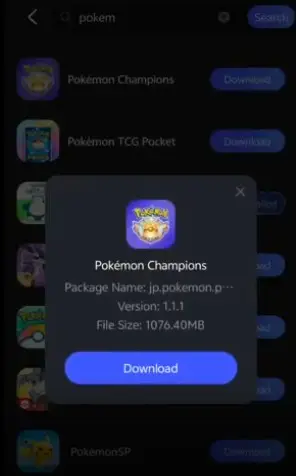
Step 2: Launch LagoFast Mobile, use the search bar to find Pokémon Champions Mobile, and click the download button to begin.
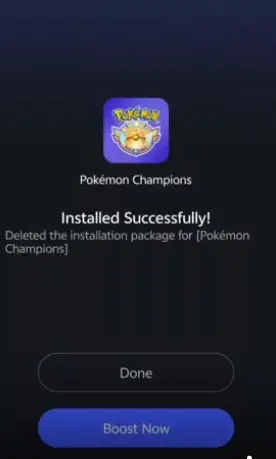
Step 3: After downloading, tap “Install” to safely and quickly install Pokémon Champions.
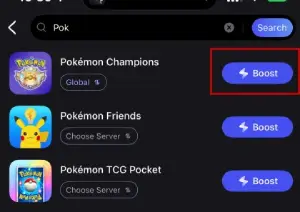
Step 4: Click boost and select your corresponding server region to connect.
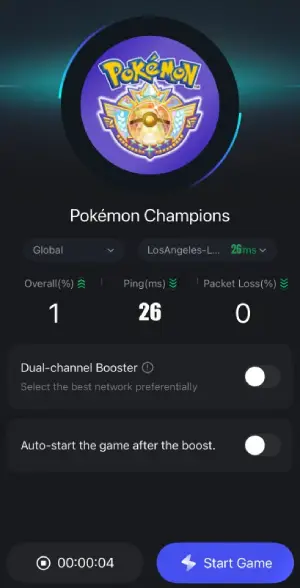
Step 5: Once optimized performance is confirmed, click "Start Game" to launch the game.
Part 4: Other Download Methods for Pokémon Champions
If you prefer a manual setup, you can still download Pokémon Champions through official platform stores depending on your device and region.
However, availability may vary, and some players might need to check different store settings before accessing the game.
For Nintendo Switch / Switch 2:
- Open the Nintendo eShop on your console
- Sign in with your Nintendo Account
- Search for “Pokémon Champions”
- Download and install the game
- Launch the game after installation
For Android:
- Open the Google Play Store
- Search for “Pokémon Champions”
- Install the game if it is available in your region
- If it does not appear, check your store region settings or wait for rollout updates
- Open the game after installation and log in
For iOS:
- Open the App Store
- Search for “Pokémon Champions”
- Download and install the game
- Complete login or account setup if required
- Launch the game once installation is finished
Final Thoughts
Pokémon Champions is now easier to access than ever with its release on Switch, Switch 2, iOS, and Android, but availability still depends on your region. If you’re unable to find it in your local store, it’s usually a regional issue rather than a device problem. Whether you choose official stores, alternative setup methods, or tools like LagoFast, the goal is the same—getting into the game and starting battles without unnecessary frustration.

Boost Your Game with LagoFast for Epic Speed
Play harder, faster. LagoFast game booster eliminates stutter and lags on PC, mobile, or Mac—win every match!
Quickly Reduce Game Lag and Ping!
Boost FPS for Smoother Gameplay!