

Many players search for how to change server in valorant when they experience high ping, unstable connections, or unavailable regional servers. Competitive shooters depend heavily on low latency, and even small network delays can affect reaction timing, hit registration, and match consistency. Recently, some regions—particularly parts of the Middle East—have experienced temporary disruptions affecting multiple online games such as Valorant, Fortnite, Rocket League, and EA FC. When local servers become unstable or unavailable, players often look for ways to connect to alternative regions like Europe or North America.
However, Valorant’s server architecture works differently from many multiplayer games. Players cannot freely switch global regions from a simple menu. Instead, server access depends on the Riot account region and a system that automatically chooses the server with the lowest ping. This guide explains how Valorant server regions work, how to change servers within the game, how to switch from Middle East servers to EU or NA, and how network optimization tools like LagoFast Game Booster can help maintain stable connections.

- ✅ Reduce Lag and High Ping.
✅ Boost FPS at the Same Time.
✅ Support 2000+ Online Games
✅ Change Server Without Latency.
✅ Multiplatform: PC, Console, Mobile.
✅ End Connection & Crashing Issues
Part 1. Understanding Valorant Server Regions and Shards
Part 2. How to Change Server in Valorant (In-Game Server Selection)
Part 3. How to Change Valorant Middle East to EU Servers
Part 4. How to Change Valorant Middle East to NA and Asia Servers
Part 5. How to Change Server and Improve Connection with LagoFast Game
Part 1. Understanding Valorant Server Regions and Shards
Before learning how to change server in valorant, it is important to understand the system Riot uses to organize servers.
Valorant uses a region-based shard architecture. When a Riot account is created, the system determines a Region of Residence (RoR) based on the user’s location. This region decides which shard the account belongs to and which servers it can access.
The main Valorant shards include:
- North America (NA)
- Europe (EU / EMEA)
- Asia-Pacific (AP)
- Korea (KR)
- Brazil (BR)
- Latin America (LATAM)
Each shard contains several data center servers. For example, the EU shard includes servers such as:
- Frankfurt
- Paris
- London
- Madrid
- Stockholm
- Bahrain
These individual servers are the ones players see in the server selection menu.
A key detail many players misunderstand is that server selection does not equal region switching. Changing from Frankfurt to Paris only changes the data center, not the global region. Players on different shards cannot play together unless the Riot account region itself is changed.
This system exists to maintain fair matchmaking and prevent extremely high latency matches.
Part 2. How to Change Server in Valorant (In-Game Server Selection)
If your goal is simply improving latency within your region, the in-game server selection feature is the fastest method.
Valorant includes a Server Select function that allows players to choose between available data centers inside their shard. Riot introduced this feature to help players avoid unstable servers and manually select a lower-ping option.
Steps to change server in Valorant
- Launch Valorant and log into the client.
- Open the Play menu.
- Look for the server icon (signal indicator) near the party panel.
- Hover your mouse over the icon to display available servers.
- Select the server with the lowest latency.
After selecting a server, the matchmaking system attempts to place you in matches hosted on that server.
For example, if you are playing in the EU shard, you may see servers such as:
- Frankfurt
- Paris
- London
- Stockholm
- Bahrain
Selecting one of these allows you to prioritize that data center during matchmaking.
However, this method cannot switch you to another shard such as NA or Asia. It only changes the server within your current region.
Part 3. How to Change Valorant Middle East to EU Servers
If your account belongs to the EMEA region, you may already have access to EU servers such as Frankfurt or Paris.
Steps to prioritize EU servers
1. Open the server selection menu.
2. Deselect Bahrain or Dubai servers.
3. Select EU servers such as:
- Frankfurt
- Paris
- London
4. Queue for matchmaking.
The system will try to connect you to those servers if the ping is acceptable.
In some cases, players in North Africa or nearby regions experience better ping to EU servers than Bahrain servers. Community reports show that countries like Morocco often get lower latency to European servers due to internet routing differences.
Part 4. How to Change Valorant Middle East to NA and Asia Servers
Many players from the Middle East search for ways to move away from Bahrain or Dubai servers, especially when those servers show high latency or instability.
Switching to NA and Asia is more complex because it requires a shard change.
Possible methods include:
Method 1: Riot Account Region Transfer
Riot allows players to request a change of Region of Residence through support. This option is usually intended for players who permanently move to another country.
However, there are limitations:
- Competitive rank progress may reset
- Match history can be cleared
- Transfers usually have a cooldown period
Method 2: Creating a New Regional Account
Some players create a new Riot account registered in another region, such as NA or Asia. This approach avoids altering the main account but requires starting progression again.
Part 5. How to Change Server and Improve Connection with LagoFast Game
Switching regions often leads to another problem: higher ping. When connecting to Asia or NA servers from the Middle East, latency may increase to 100–150 ms or higher.
This is where network optimization tools can help.
LagoFast (LagoFast Game Booster - Get No Lag and Lower Ping) improves connection stability by optimizing the network path between your device and the game server. Instead of relying on the default internet routing, it uses optimized routes designed for gaming traffic.
- Reduces High Ping: It finds the fastest route to the game server, cutting down latency significantly.
- Eliminates Packet Loss: It stabilizes your connection to ensure your inputs register instantly.
- Fixes Error Codes: By stabilizing the network handshake between your PC and the game server, it helps bypass many common connection-based error codes.
- Multi-Platform Support: Whether you are on PC or console, LagoFast has you covered.
How to Use LagoFast Game Booster
Step 1: Click the Free Trial button to download and install LagoFast Free Trial.
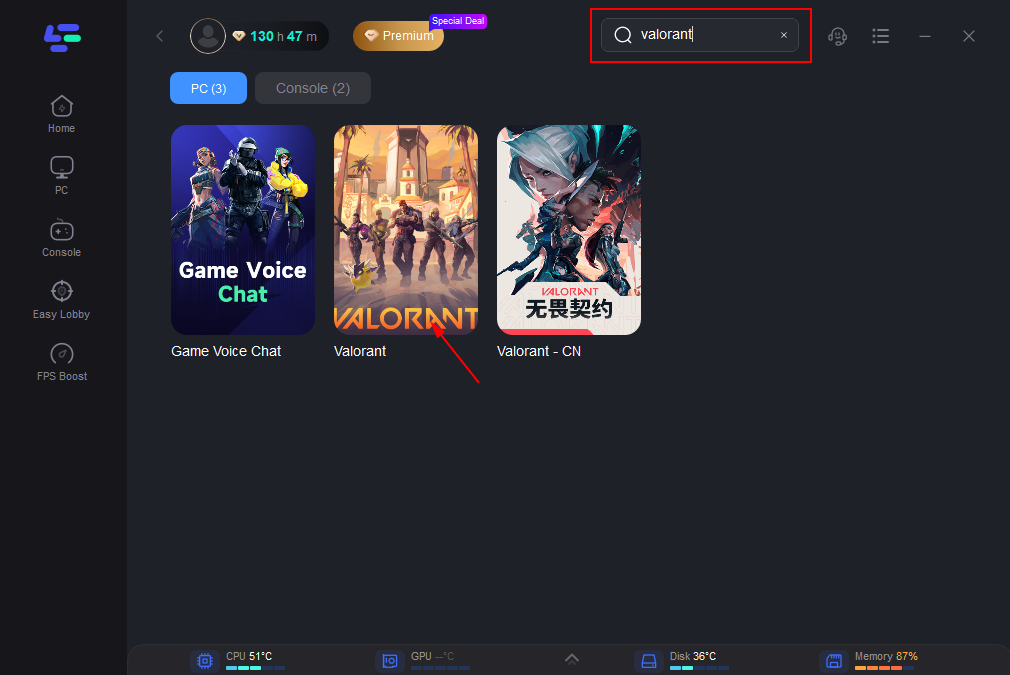
Step 2: Use the built-in search bar to find Valorant in the supported game list.
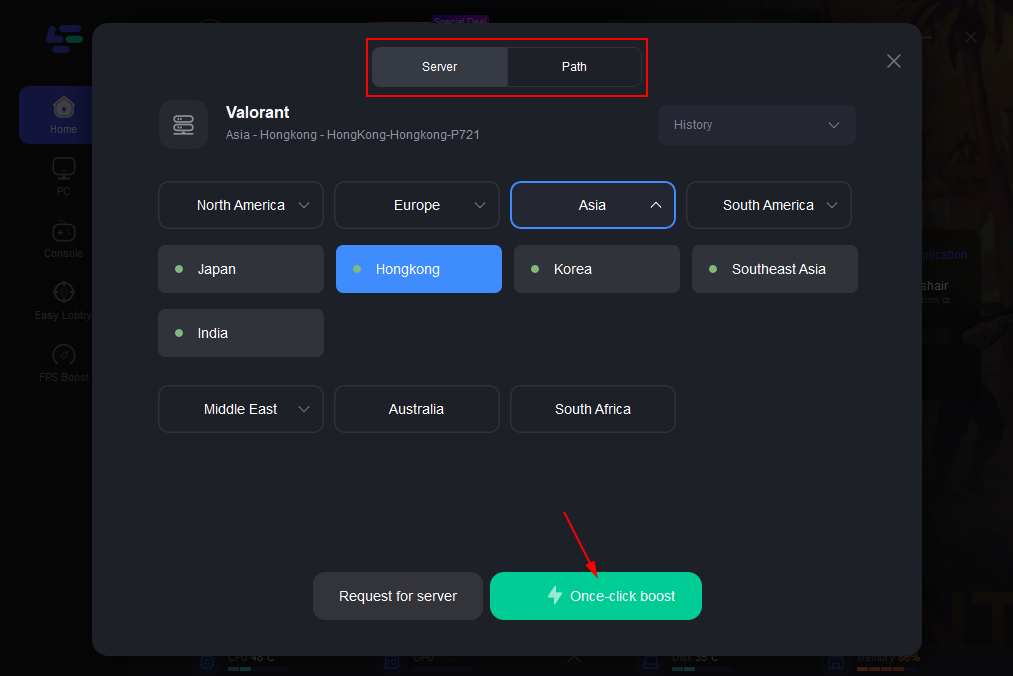
Step 3: Select the target region.
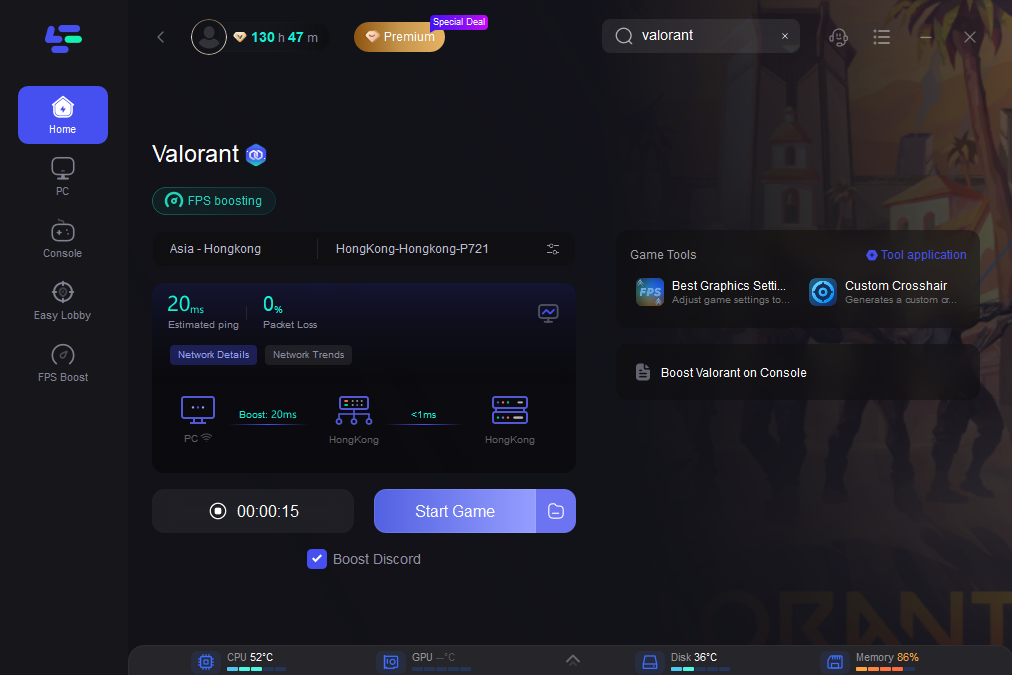
Step 4: Click the Boost button to activate network acceleration.
Advantages of using LagoFast
- Reduced cross-region latency
- More stable packet routing
- Lower packet loss during matches
- Smoother gameplay when connecting to EU or NA servers
For players dealing with unstable local servers, this approach helps maintain consistent performance.
Part 6. FAQs
1. Can you freely change server regions in Valorant?
No. Valorant uses a shard system based on your Riot account’s Region of Residence.
You can only select servers inside your current shard unless the account region is changed.
2. How do I select a specific server like Frankfurt or Paris?
Open the server selection icon in the Play menu and choose the desired data center before entering matchmaking.
3. Why does the game keep connecting me to Bahrain servers?
The matchmaking system automatically selects the server with the lowest detected latency. If Bahrain appears as the fastest option, the system may prioritize it.
4. Can I play with friends from another region?
Only if both accounts belong to the same shard. For example, EU players cannot queue with NA players unless the account region is changed.
5. Will changing region remove skins?
Most cosmetic items transfer with the account, but competitive rank progress may reset after a region transfer.
Conclusion
Learning how to change server in Valorant requires understanding the game’s region-based architecture. Unlike many online games, Valorant does not allow direct switching between global regions through the settings menu. Instead, players can select individual servers within their shard, such as Frankfurt or Paris in the EU region.
For players experiencing unstable Middle East servers or high latency, switching to European servers may provide a more consistent experience. If access to NA or Asia servers is needed, a Riot account region transfer or a new account may be required.
To maintain stable gameplay when connecting to distant servers, optimizing the network route becomes essential. Tools like LagoFast Game Booster can help reduce latency and packet loss, making cross-region matches more playable. With the right configuration, players can continue enjoying competitive matches even when local servers are unstable.

Boost Your Game with LagoFast for Epic Speed
Play harder, faster. LagoFast game booster eliminates stutter and lags on PC, mobile, or Mac—win every match!
Quickly Reduce Game Lag and Ping!
Boost FPS for Smoother Gameplay!