

Playing Honor of Kings: World CN from outside China often comes with one big issue—high ping. Even with a good internet connection, delays and lag can still affect combat and overall gameplay because the game connects to China-based servers. While this can’t be fully avoided, network optimization tools like LagoFast or a few manual adjustments can help improve stability and reduce lag. Below, we’ll break down why this happens and what you can do to make the experience smoother.

- ✅ Reduce Lag and High Ping.
✅ Boost FPS at the Same Time.
✅ Support 2000+ Popular Online Games.
✅ Change Server without Latency.
✅ Boost Game Loading Speed.
Part 1: Why Honor of Kings: World CN Has High Ping for Overseas Players
Part 2: Is It Possible to Get Low Ping in Honor of Kings: World CN?
Part 3: Best Ways to Reduce Honor of Kings: World CN Lag
Part 4: Additional Fixes for Honor of Kings: World CN High Ping
Part 6: Bonus Line: Honor of Kings: World CN Account Registration & Verification
Part 1: Why Honor of Kings: World CN Has High Ping for Overseas Players
If you’re trying to play Honor of Kings: World CN with low ping, you’ve probably noticed one thing right away—lag.
Even with fast internet, the game can feel delayed, especially in combat. This isn’t unusual, and it’s not just your setup. The issue mainly comes from how and where the game servers are hosted.
Server Location and Distance Limitations
The biggest factor is simple:
Most servers are hosted in China.
For overseas players, this means:
- Your data has to travel a much longer physical distance
- More routing steps (network hops) are involved
- Base latency is naturally higher
Even under good conditions, it’s common to see:
- 100–200 ms+ ping (depending on region and routing quality)
- Noticeable delay during fast actions
This is a fundamental limitation of playing on CN servers from abroad.
Cross-Border Routing and Network Instability
Cross-border routing is another key factor, and it can vary depending on network conditions.
Common problems include:
- Congested cross-border networks
- Inefficient ISP routing paths
- Performance fluctuations during peak hours
As a result, Honor of Kings: World CN lag often shows up as:
- Sudden ping spikes
- Skill activation delays
- Random stuttering or rubberbanding
Part 2: Is It Possible to Get Low Ping in Honor of Kings: World CN?
Yes—while you can’t reach true local-server ping, you can achieve a smoother gameplay experience with lower latency
Since Honor of Kings: World CN only uses China-based servers, overseas players will always have some delay due to distance. However, with proper network optimization, the connection can become significantly more stable, with fewer spikes and better responsiveness in combat.
In practice, “low ping” for overseas players means smoother gameplay rather than perfect numbers like local servers.
Part 3: Best Ways to Reduce Honor of Kings: World CN Lag
One of the most effective ways to improve stability in Honor of Kings: World CN is using a game optimization tool like LagoFast.
LagoFast is a game performance platform designed to improve connection quality by optimizing routing to China servers. It can help reduce ping spikes, improve packet loss, and stabilize connections.
It also provides extra useful features. The translation tool helps players instantly understand in-game text and quests, while the game download tool makes it easier to install and manage games without extra steps.
How to Use LagoFast to Boost Honor of Kings: World CN
Step 1: Click the Free Trial button to download and install LagoFast.
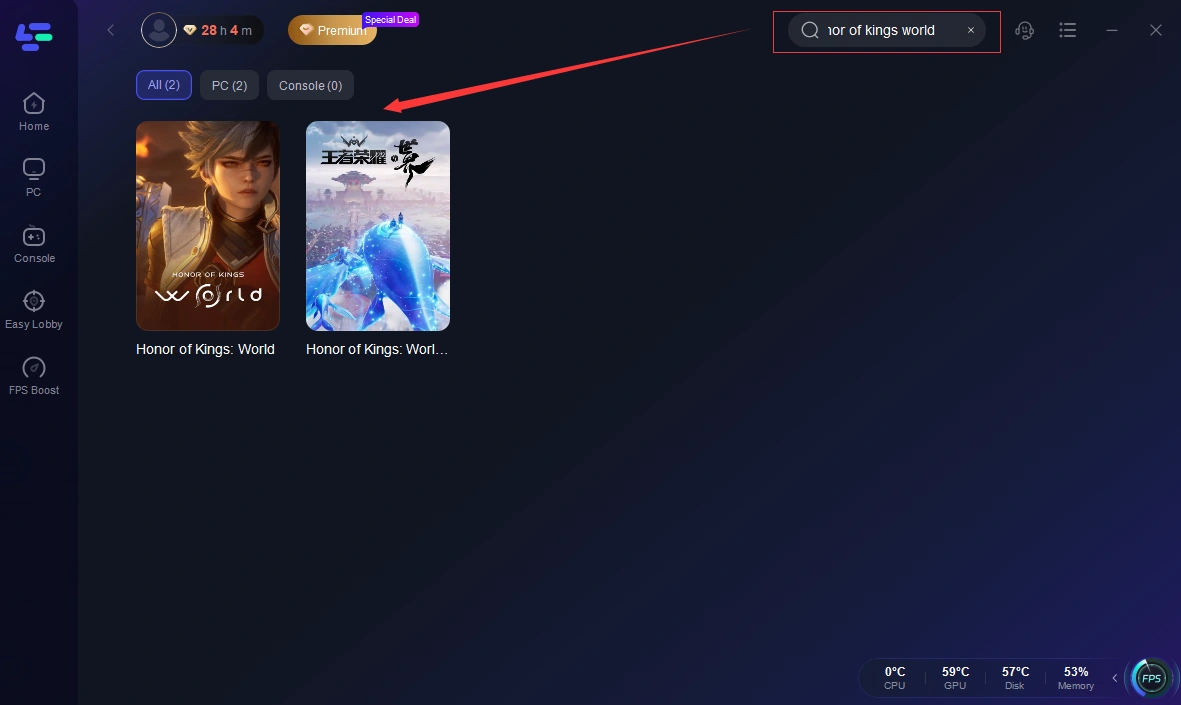
Step 2: After installation, search "Honor of Kings: World CN" in the search bar and select the game.
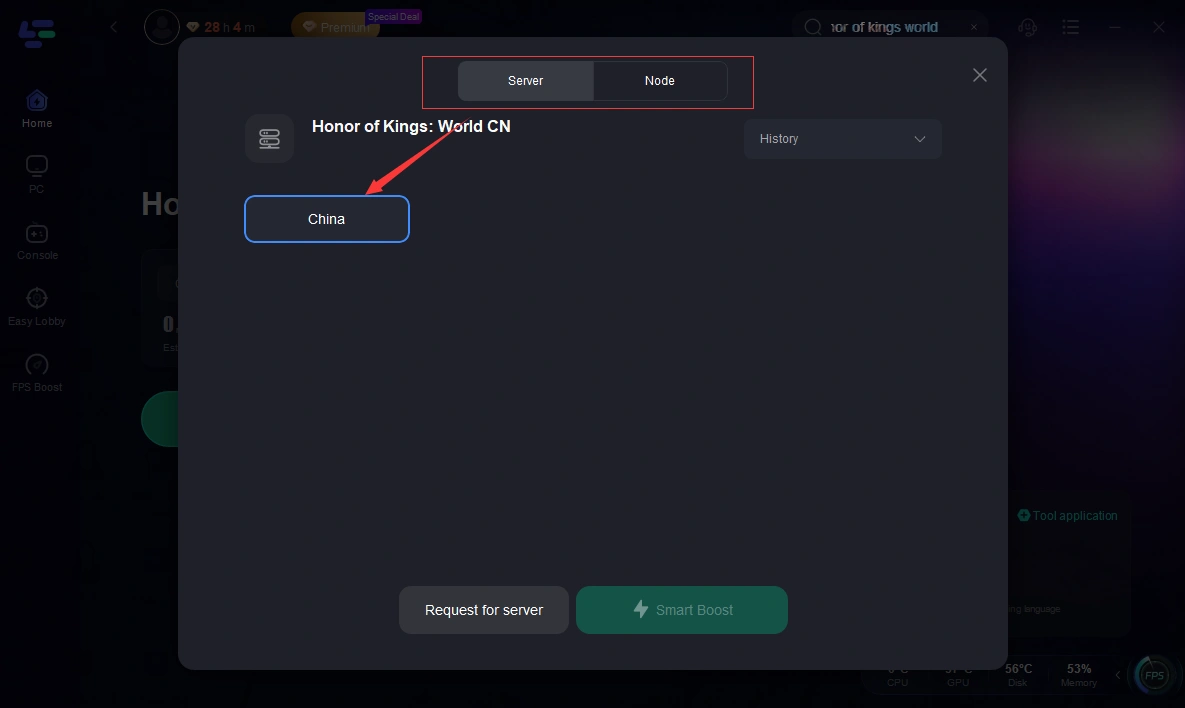
Step 3: Choose your preferred server node and click "Smart Boost" to start optimizing.
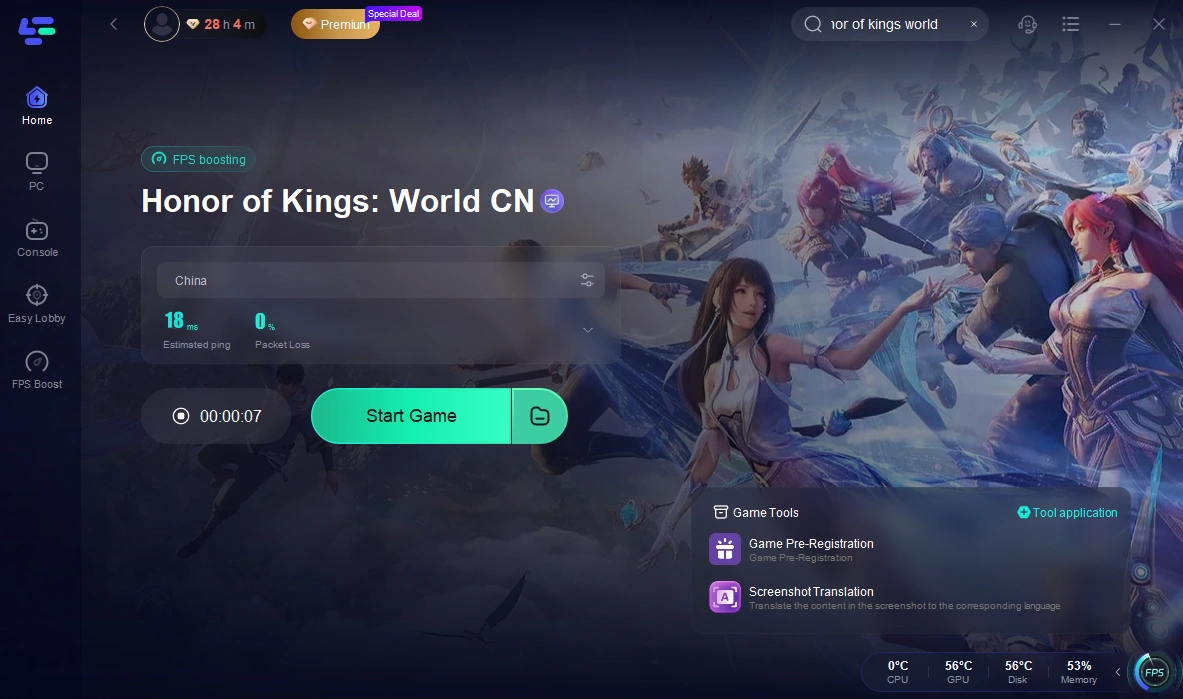
Step 4: Launch your game and enjoy smooth, optimized gameplay with lower ping and packet loss.
Part 4: Additional Fixes for Honor of Kings: World CN High Ping
Try different routing nodes
If lag continues, switching to another routing node can help. Different routes to China servers may have better stability depending on your location and network conditions.
Play during off-peak hours
Network congestion can affect international routing and server performance. Playing during off-peak hours often results in fewer spikes and smoother gameplay.
Restart and reapply acceleration
After changing nodes or enabling acceleration, restarting the game helps ensure the new routing path is properly applied and stable.
Check your ISP routing quality
In some cases, high ping is related to your internet provider’s international routing. If you experience consistent lag or packet loss across multiple apps, your ISP may not be using an efficient route to China servers. Switching networks or using optimized routing can help improve stability.
Part 5: Real Use Case Example
A player from Europe tried to play Honor of Kings: World CN and experienced constant 180–220ms ping during normal gameplay. Skills often felt delayed, especially in team fights.
After switching to an optimized routing tool and changing nodes, the connection became more stable.
Ping didn’t drop to local levels, but stability improved and spikes were reduced.
Gameplay felt smoother and more consistent overall.
Part 6: Bonus Line: Honor of Kings: World CN Account Registration & Verification
How to create an account
To access the CN version, you usually need a WeChat or QQ account.
Steps:
- Install the CN version of the game
- Choose WeChat or QQ login
- Follow the in-app registration process
Real-name verification explained
China requires real-name verification for most games.
You may be asked for:
- Full name
- ID number (China-based verification system)
- Face verification in some cases
If verification is skipped or not completed successfully
- Play time may be limited
- Some features may be restricted
Common issues and simple fixes
Verification failed
- Reason: No valid or supported ID
- Fix: Use a properly verified CN account when possible
Login issues
- Reason: Unstable network connection
- Fix: Enable a routing optimization tool before logging in
Frequent disconnections
- Reason: Poor routing to CN servers
- Fix: Switch to another node or try off-peak hours
Part 7: FAQs
Why is Honor of Kings: World CN lagging for overseas players?
Because the game runs on China-based servers.
Overseas players face higher latency due to long-distance connections and international routing.
Can I completely fix high ping in Honor of Kings: World CN?
No. You can reduce lag and improve stability, but you can’t fully remove latency caused by distance to China servers.
What causes lag spikes in the game?
Lag spikes are usually caused by unstable routing, network congestion, or ISP-related issues.
They are more noticeable during peak hours or when the route changes.
Do routing tools actually help with lag?
Yes. They help optimize the connection path, reduce packet loss and improve overall connection stability.
Do I need a Chinese account to play Honor of Kings: World CN?
Yes. You typically need a WeChat or QQ login.
Real-name verification may also be required depending on the account setup.
Conclusion
Playing Honor of Kings: World CN from outside China will always come with some level of latency because of server distance, but understanding the real cause of lag helps set realistic expectations. With a few network adjustments and tools like LagoFast, you can improve stability and reduce spikes for a smoother experience. While it’s not possible to fully eliminate ping, the gameplay can still feel much more responsive and consistent overall.

Boost Your Game with LagoFast for Epic Speed
Play harder, faster. LagoFast game booster eliminates stutter and lags on PC, mobile, or Mac—win every match!
Quickly Reduce Game Lag and Ping!
Boost FPS for Smoother Gameplay!