
Encountering the Honor of Kings: World CN error code 4551 can be incredibly frustrating, especially when you are eager to dive into the highly anticipated open-world adventure. This specific error, often accompanied by a message stating that bqccs.dll is missing or corrupted, prevents the game client from launching successfully.
This guide is designed for global players trying to access the Chinese (CN) version of the game. We will explore the root causes of this DLL failure, provide step-by-step solutions to restore the missing file, and crucially, explain how leveraging LagoFast Game Booster's specialized tools can be your first and most effective line of defense against this error, ensuring a seamless gaming experience.

- ✅ Reduce Lag and High Ping.
✅ Boost FPS at the Same Time.
✅ Support 2000+ Popular Online Games.
✅ Change Server without Latency.
✅ Boost Game Loading Speed.
Part 2. Understanding Error Code 4551: The bqccs.dll Failure
Part 3. Why Does Error 4551 Occur in Honor of Kings: World?
Part 4. Step-by-Step Guide to Fix bqccs.dll Missing or Corrupted
Part 5. How to Enhance Your Game Experience with LagoFast Game Booster
Part 6. Bonus Tips: Preventing Future DLL Corruption
Part 1. Quick Answer
If you are facing the Honor of Kings: World CN error code 4551, the issue is a blocked or missing security file (bqccs.dll). Here is a quick summary of the most effective fixes, with LagoFast leading the charge:
|
Solution Method |
Description |
Success Rate |
|
Use LagoFast Game Booster |
Utilize LagoFast's dedicated "Fix Error 4551" and "Fix Lag Issue" tools for network and file integrity. |
Very High |
|
Check Antivirus Quarantine |
Restore bqccs.dll from Windows Defender or third-party antivirus quarantine and add an exclusion. |
High |
|
Use Built-in Repair Tool |
Click the wrench icon on the game launcher to verify and redownload missing files. |
High |
|
Adjust Smart App Control |
Disable or configure Windows Smart App Control (SAC) which may block unsigned DLLs (Error 4551). |
Medium |
Part 2. Understanding Error Code 4551: The bqccs.dll Failure
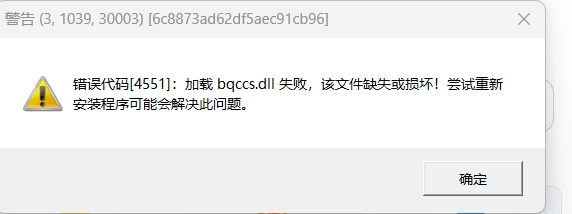
The core of this issue lies in a specific dynamic link library file. When you attempt to launch the game, you may receive a prompt similar to: "[4551]: Failed to load bqccs.dll, the file is missing or corrupted! Attempting to reinstall the program may solve this problem."
This error specifically points to a failure in loading bqccs.dll. In the context of Tencent games like Honor of Kings: World, this file is a critical component of the game's anti-cheat and security system. Before the main game engine initializes, the client must verify the integrity of its security modules. If bqccs.dll cannot be found, or if its digital signature is rejected by your operating system, the launch process is immediately halted, resulting in error code 4551.
Part 3. Why Does Error 4551 Occur in Honor of Kings: World?
Understanding why this file goes missing or becomes corrupted is the first step toward a permanent fix. Most cases of error 4551 are triggered by Windows Security or third-party antivirus software. Because bqccs.dll operates at a deep system level to monitor for cheats, heuristic scanners often flag it as a false positive, silently moving it to the quarantine vault.
Another significant cause is related to Windows Application Control Policies, specifically Smart App Control (SAC) in Windows 11. SAC is designed to block unsigned or untrusted executables and DLLs. If the game update delivers a version of bqccs.dll that SAC does not recognize, it will block the file from executing, throwing an OS-level error (often logged as error 4551) and causing the game client to report the file as missing or corrupted. Finally, interrupted downloads due to unstable connections to the CN servers can result in a genuinely corrupted file.
Part 4. Step-by-Step Guide to Fix bqccs.dll Missing or Corrupted
Resolving the bqccs.dll error requires a systematic approach, starting with the most effective solutions. LagoFast Game Booster offers specialized tools that can often resolve this issue directly or prevent its recurrence by stabilizing your connection and ensuring file integrity.
Step 1: Utilize LagoFast's Dedicated Fixes for Error 4551 and Lag Issues
LagoFast(LagoFast Game Booster - Get No Lag and Lower Ping) is more than just a network optimizer; it includes specific functionalities designed to address common game errors and performance issues, including those related to file integrity and security components. For Honor of Kings: World CN, LagoFast can be a game-changer.
1.Download and Install LagoFast: Begin by downloading the LagoFast client from its official website and complete the installation on your PC.
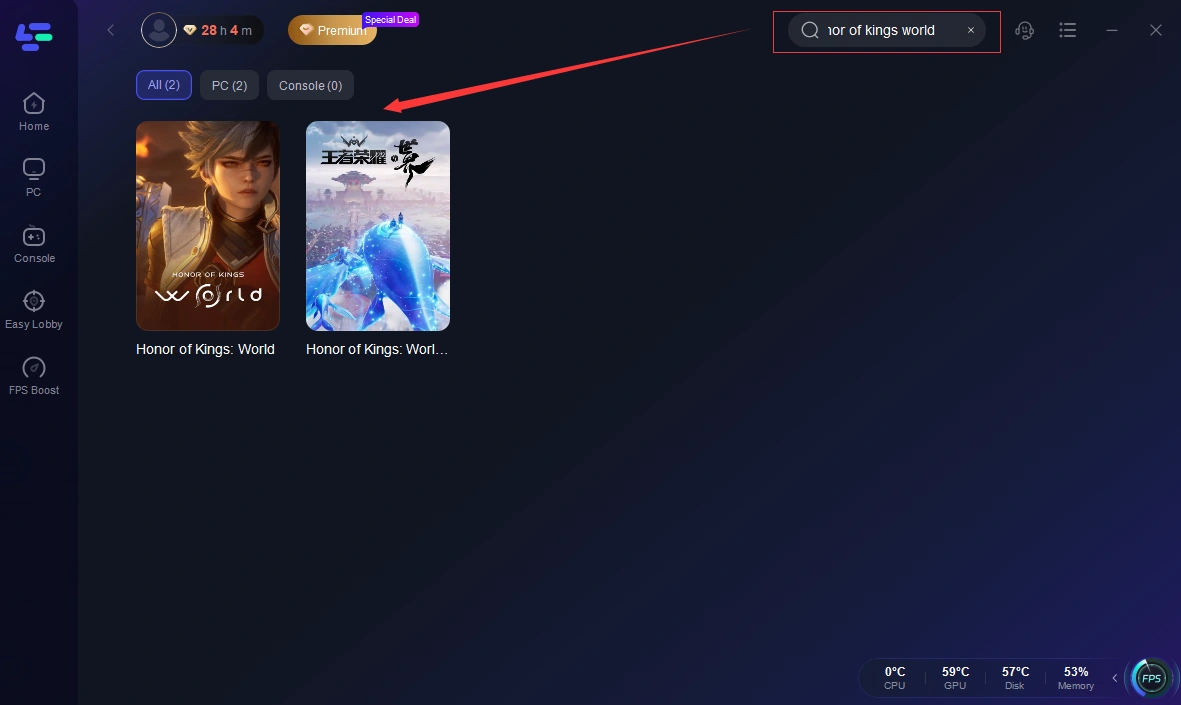
2.Launch LagoFast and Search for Honor of Kings: World: Open the LagoFast application. In the search bar, type "Honor of Kings: World" and select the game from the search results.
3.Activate Specialized Tools: Within the game profile, look for options like "Fix Error 4551" or "Fix Lag Issue." LagoFast's intelligent system is designed to identify and resolve underlying network or file-related problems that contribute to this error. Activating these tools will initiate a process to optimize your connection and verify game file integrity, often resolving the DLL issue directly.
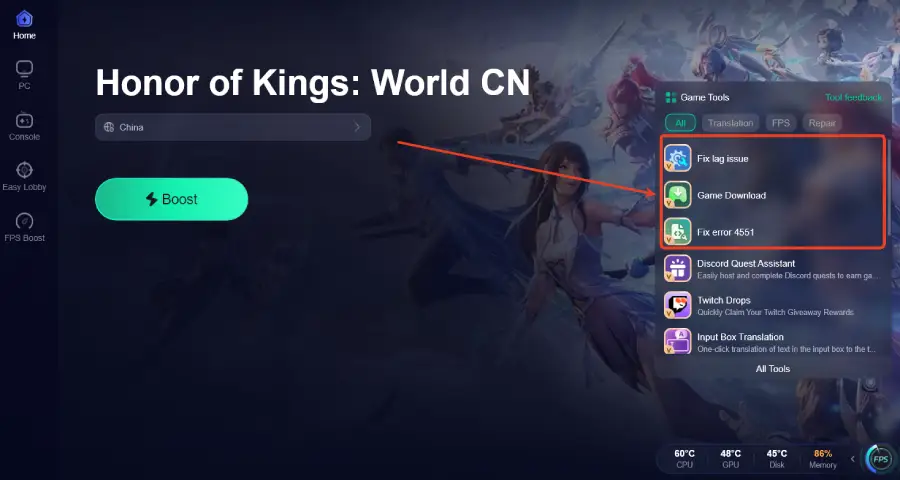
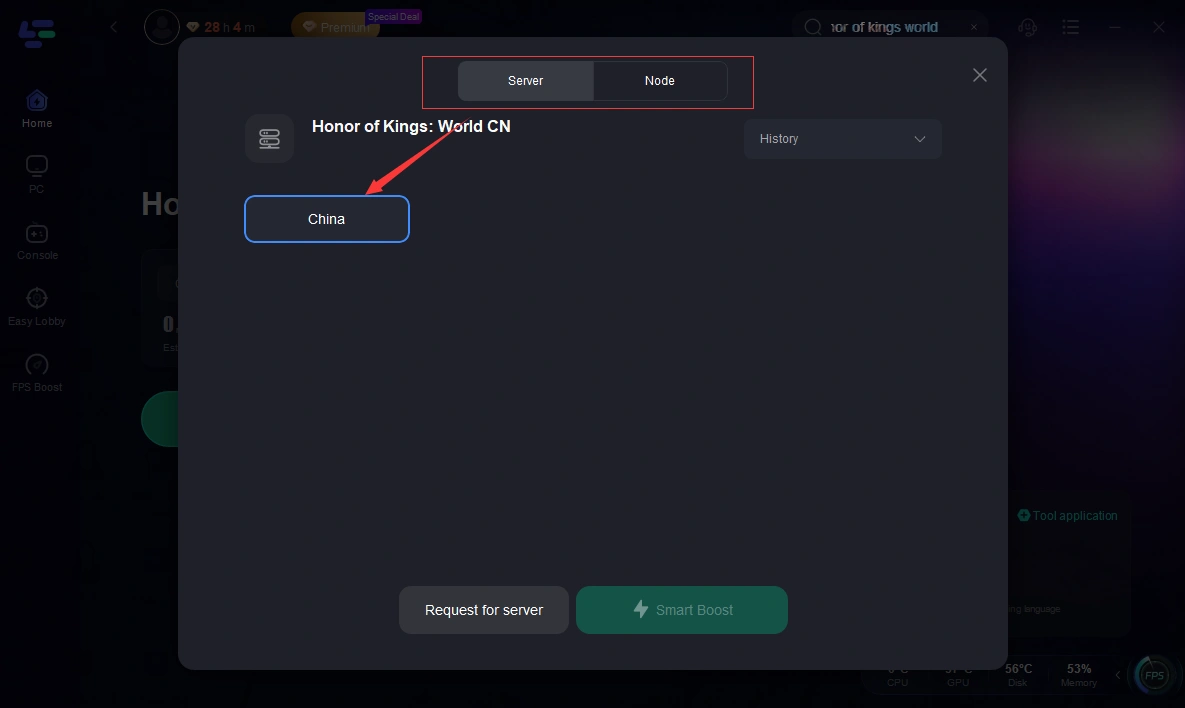
4.Select Server and Node (CN Region): After activating the tools, ensure you select the "CN" region. LagoFast will automatically recommend the best node for the lowest latency. This optimized connection is crucial for ensuring that game updates and security checks complete without corruption.
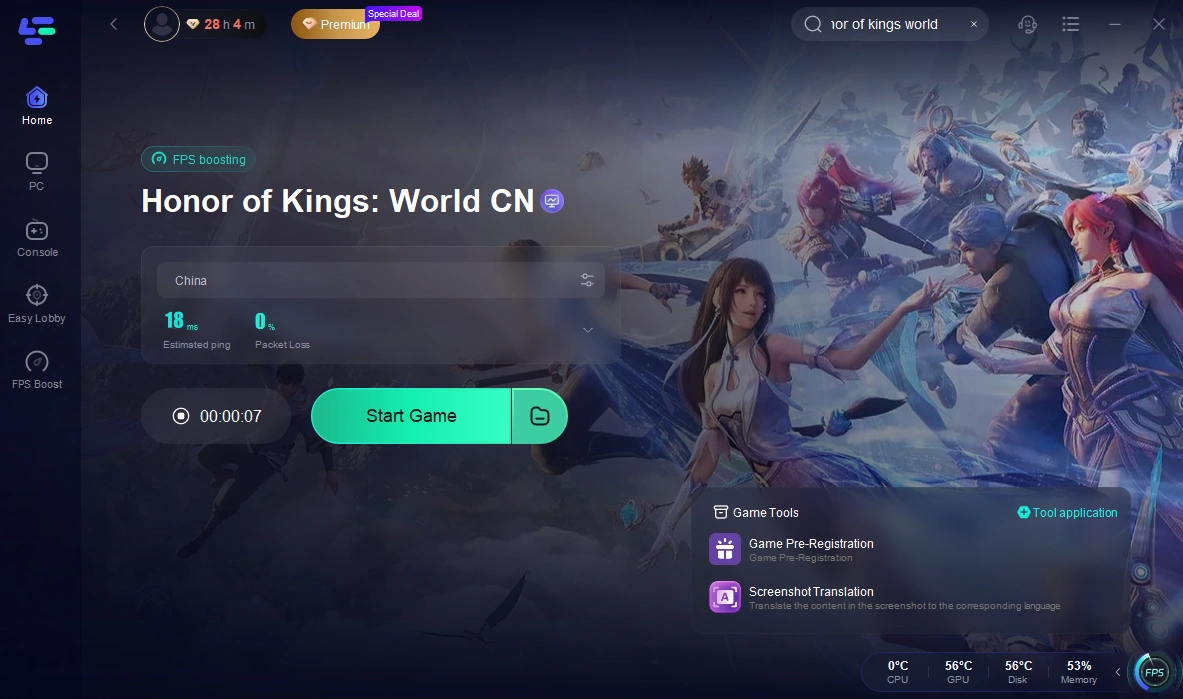
5.Click "Boost" and Launch the Game: Click the "Boost" button. Once the boost is active, launch Honor of Kings: World directly through LagoFast. This ensures the game runs within an optimized network environment, which can prevent the bqccs.dll from being flagged or corrupted during startup.
Step 2: Check Antivirus Quarantine and Add Exclusions
If LagoFast's tools do not immediately resolve the issue, your antivirus software is the next suspect. Open Windows Security, navigate to "Virus & threat protection," and click on "Protection history." Look for any recently blocked threats related to bqccs.dll or the Honor of Kings: World installation folder. If found, select "Restore." Crucially, add the entire game installation folder to your antivirus exclusion list to prevent future interference.
Step 3: Use the Game's Built-in Repair Tool
Tencent's game launchers typically include a robust repair feature. Open the launcher, and before clicking "Start," look for a wrench icon or a "Repair" option (usually located in the top right corner or within the settings menu). Running this tool will force the client to verify the integrity of all local files against the server's manifest. It will automatically detect the missing or corrupted bqccs.dll and download a fresh, uncorrupted copy.
Step 4: Adjust Windows Smart App Control (SAC)
For Windows 11 users, if the file is present but still failing to load, Smart App Control might be the culprit. Search for "Smart App Control" in the Windows Start menu. If it is set to "Evaluation" or "On," it may be blocking the DLL. You can temporarily set it to "Off" to test if the game launches. Note: Turning off SAC is a permanent action on some systems unless you reinstall Windows, so proceed with caution and ensure your standard antivirus is active.
Step 5: Reinstalling the Game
If all previous steps fail, a complete reinstallation of the game is your last resort. Uninstall the game completely, ensure the installation folder is deleted, and download a fresh installer. This guarantees that all registry entries and security components are correctly initialized. Remember to add the game folder to your antivirus exclusions before reinstalling.
Part 5. How to Enhance Your Game Experience with LagoFast Game Booster
LagoFast(LagoFast Game Booster - Get No Lag and Lower Ping) Game Booster is indispensable for global players accessing the CN version of Honor of Kings: World. Network stability is paramount not only for low ping but also for the successful loading of critical game components like bqccs.dll. Unstable connections can lead to corrupted downloads or failed security handshakes, directly causing error 4551. LagoFast's ability to optimize network routes, reduce packet loss, and provide a stable connection to distant CN servers ensures that these vital processes complete without interruption. Its specialized tools, such as the "Fix Error 4551" and "Fix Lag Issue" features, are specifically designed to tackle the unique challenges presented by this error, making it an essential utility for a smooth and error-free Honor of Kings: World experience.
- Reduces High Ping: It finds the fastest route to the game server, cutting down latency significantly.
- Eliminates Packet Loss: It stabilizes your connection to ensure your inputs register instantly.
- Fixes Error Codes: By stabilizing the network handshake between your PC and the game server, it helps bypass many common connection-based error codes.
- Multi-Platform Support: Whether you are on PC or console, LagoFast has you covered.
Part 6. Bonus Tips: Preventing Future DLL Corruption
Proactive measures can significantly reduce the likelihood of encountering bqccs.dll errors again. Always ensure your Windows operating system is fully updated, as Microsoft frequently releases patches that resolve compatibility issues with anti-cheat software. Regularly check your antivirus software to ensure it's not quarantining legitimate game files and keep its definitions up to date.
Furthermore, monitor the health of your storage drive. Installing Honor of Kings: World on a healthy NVMe SSD not only drastically reduces loading times but also minimizes the risk of read/write errors that corrupt files like bqccs.dll. Performing a clean boot of Windows can help identify if any background applications (like overlay software or aggressive system optimizers) are interfering with the game's launch sequence. By maintaining a clean system and leveraging network optimization tools like LagoFast, you create a robust environment for uninterrupted gaming.
Part 7. FAQs
Is bqccs.dll a virus?
No, bqccs.dll is not a virus. It is a legitimate security and anti-cheat component used by Tencent games, including Honor of Kings: World. However, because it monitors system memory to prevent cheating, antivirus programs sometimes mistakenly flag it as malicious software.
Can I play Honor of Kings: World CN without a VPN?
While it is technically possible to connect without a VPN, global players will likely experience severe lag, frequent disconnects, and login errors (including update failures that cause error 4551) due to the distance to the CN servers. Using a dedicated game booster like LagoFast is highly recommended for a stable experience.
Why does the error persist after reinstallation?
If the error persists after a full reinstallation, it is highly likely that your antivirus software or Windows Smart App Control is actively blocking or deleting the file the moment it is installed. You must configure your security settings to exclude the game folder before reinstalling.
Does LagoFast fix DLL errors directly?
LagoFast does not directly repair missing files on your hard drive. However, by providing a stable and fast connection to the game servers, it prevents the download interruptions and timeout errors that frequently cause files like bqccs.dll to become corrupted during updates. Furthermore, its specialized tools are designed to address the underlying causes of such errors.
What is the difference between error 4551 and a network timeout?
Error 4551 is a local file execution error, meaning the game client cannot find or is blocked from running a necessary file (bqccs.dll). A network timeout occurs when the game client successfully launches but fails to communicate with the remote server. Both can prevent you from playing, but they require different troubleshooting steps.
Conclusion
The Honor of Kings: World CN error code 4551, characterized by the missing or corrupted bqccs.dll file, is primarily a conflict between the game's security requirements and your PC's antivirus or application control policies. While manual steps like checking antivirus quarantines and using the game's repair tool are important, the most proactive and often most effective solution is to leverage the power of LagoFast Game Booster. Its specialized tools and network optimization capabilities not only help resolve existing 4551 errors but also prevent future occurrences by ensuring stable connections and proper file integrity during game updates. Secure your connection, fix your files, and prepare to conquer the world of Honor of Kings: World without interruption!

Boost Your Game with LagoFast for Epic Speed
Play harder, faster. LagoFast game booster eliminates stutter and lags on PC, mobile, or Mac—win every match!
Quickly Reduce Game Lag and Ping!
Boost FPS for Smoother Gameplay!