
The tactical precision of Valorant demands a flawless connection, but for players in the Middle East, the "low ping" dream has recently turned into a high-latency nightmare. If you have logged in recently only to find your usual 20ms ping has skyrocketed to over 100ms, or that your local servers have vanished entirely from the selection menu, you are not alone. This guide explores the root cause of the current regional instability and provides actionable solutions to restore your competitive edge.

- ✅ Reduce Lag and High Ping.
✅ Boost FPS at the Same Time.
✅ Support 2000+ Online Games
✅ Change Server Without Latency.
✅ Multiplatform: PC, Console, Mobile.
✅ End Connection & Crashing Issues
Part 1: Why High Latency in Valorant Middle East Servers?
Part 2: How to Fix High Latency in Valorant Middle East Servers? – 100% Working Solutions
Part 1: Why High Latency in Valorant Middle East Servers?
The sudden surge of High Latency in Valorant Middle East Servers isn't just a random glitch; it is the result of a significant regional infrastructure crisis. On March 2, 2026, a major incident at a local Amazon Web Services data center in the UAE caused a massive ripple effect across the cloud gaming landscape. Because Valorant’s Middle East infrastructure relies heavily on these AWS nodes, the damage has led to a complete shutdown of several game services.
Currently, local servers for several major titles, including Valorant, Fortnite, Rocket League, and EA FC, are temporarily shut down in Bahrain and the UAE. Players on Reddit have been vocal about the frustration, with threads in r/ValorantTechSupport describing "ghost servers" where the game client attempts to connect to a non-existent local node before rerouting traffic to Mumbai or EU West, resulting in unplayable lag spikes. Until official announcements confirm a full restoration of the AWS facilities, players are stuck with inefficient routing and 100ms+ latency.
Part 2: How to Fix High Latency in Valorant Middle East Servers? – 100% Working Solutions
While the physical servers in the Middle East are undergoing repairs, you don’t have to stop playing. Here are the most effective ways to bypass the regional outage and get back to smooth gameplay.
The Ultimate Fix: LagoFast Game Booster
When local servers are dark, the biggest challenge is the "default" routing your ISP uses, which often sends your data on a scenic tour of the globe before reaching a game server. LagoFast is widely considered the best game reducer for this exact scenario. It allows players to manually override restricted routing, enabling them to switch regions and access other servers with ease. By using LagoFast, Middle Eastern players can achieve low-latency gameplay on European or North American servers, effectively bypassing the broken local infrastructure.
Key Features of LagoFast:
- Global Server Network: Access 2,000+ dedicated gaming nodes to bypass regional outages in Bahrain or Dubai.
- Multipath Optimization: Automatically finds the fastest, most stable route to prevent packet loss and jitter.
- Easy Region Switching: Change your game region with one click to play on EU or NA servers without high-ping penalties.
- Real-Time Latency Monitoring: Keep a constant eye on your "Real Ping" to ensure a stable competitive environment.
If you aren't ready to use a dedicated booster, you can try these manual steps. However, keep in mind that these are "local" fixes; they aren’t as effective as LagoFast because they cannot fix the fundamental routing issues caused by the AWS data center outage.
Tutorial to Use LagoFast to Fix Valorant Connection Issue:
Step 1: Click the Free Trial button to download and install LagoFast.
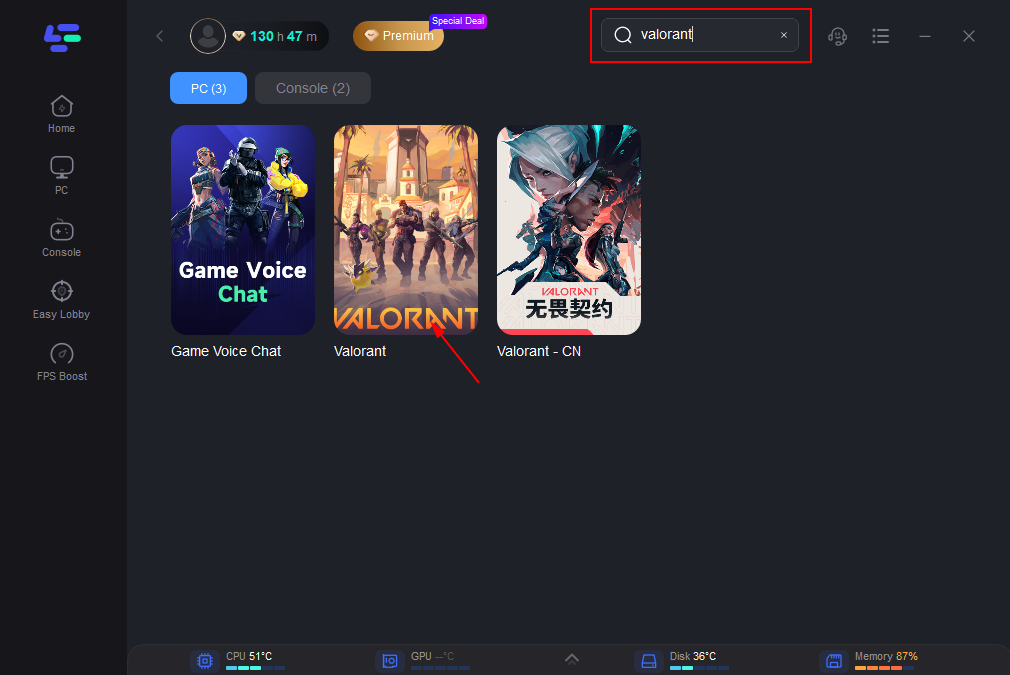
Step 2: Open LagoFast, then click the PC button on the left and search for Valorant in the search bar and click it after it appears.
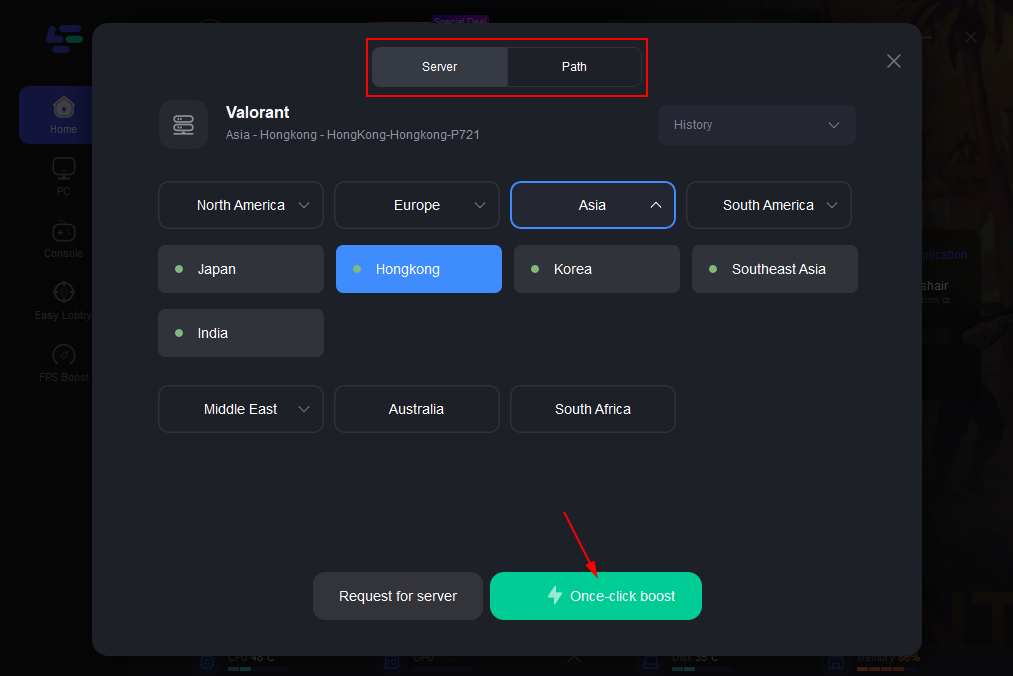
Step 3: Click “Server” to switch to a better server, such as EU or NA, which can improve the gaming experience. Then click “Smart Boost” to resolve the connection issue.
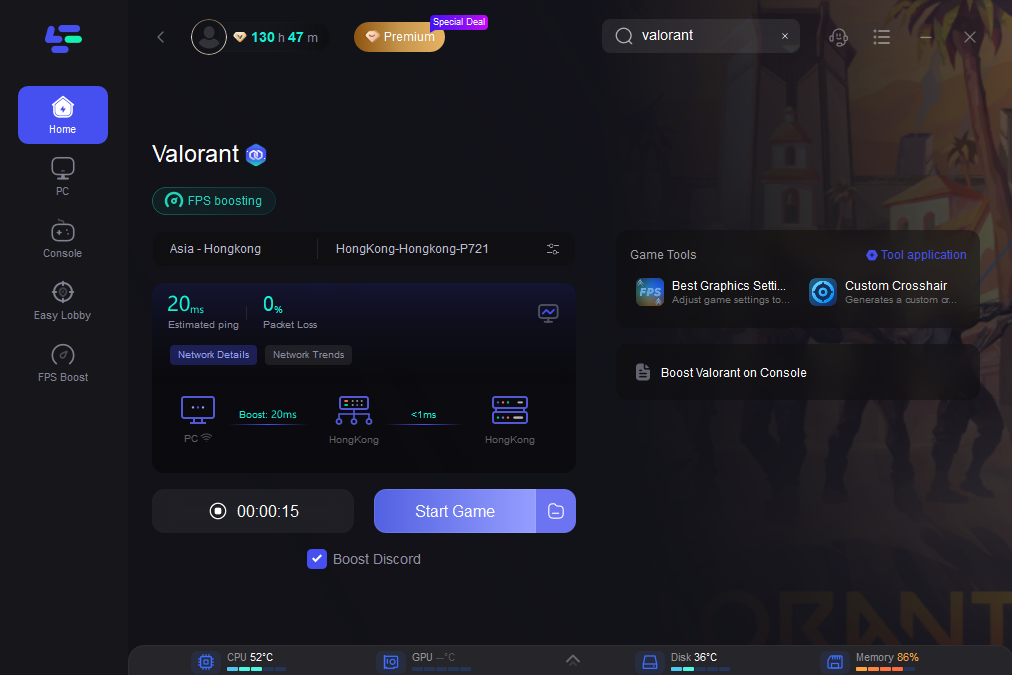
Step 4: Check the specific game ping, packet loss, and multiple path connections on the right side. Finally, click the “Start Game” to play the game.
Solution 2: Flush Your DNS Cache
Clearing your DNS cache can sometimes resolve "Session Errors" or "Unable to Connect" bugs by forcing the Riot Client to look for new connection paths.
Step 1: Press the Windows Key and type "cmd."
Step 2: Right-click Command Prompt and select "Run as Administrator."
Step 3: Type ipconfig /flushdns and press Enter.
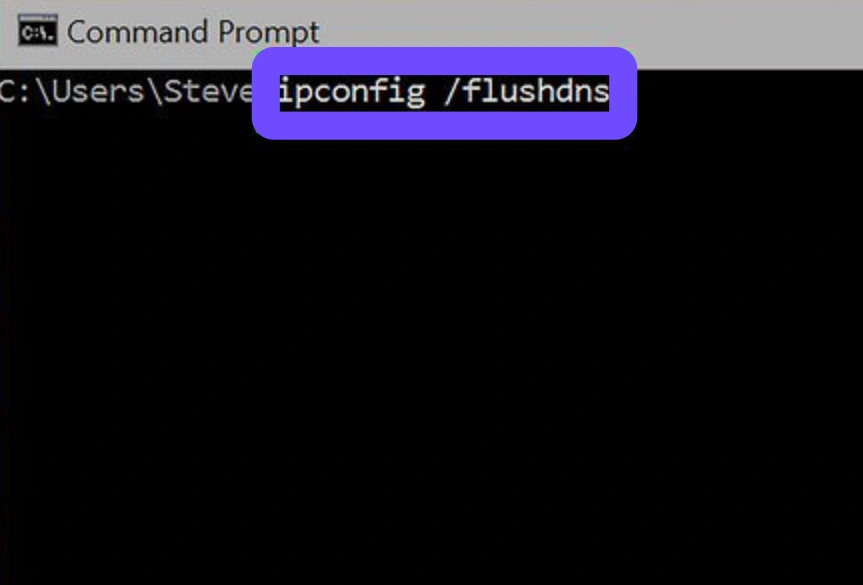
Step 4: Restart your computer to apply the changes.
Step 5: Launch the Riot Client and check if the server list updates.
Solution 3: Switch to a Wired Ethernet Connection
Wi-Fi is prone to "jitter," which makes high latency in Middle East servers feel even worse. A wired connection provides the stability needed when connecting to distant servers like Frankfurt or Paris.
Step 1: Obtain a high-quality Cat6 or Cat7 Ethernet cable.
Step 2: Connect one end to your router and the other to your PC’s LAN port.
Step 3: Open Network Settings on your PC and disable the Wi-Fi adapter.
Step 4: Ensure the connection status says "Wired."
Step 5: Launch Valorant to see if the ping spikes have stabilized.
Solution 4: Change to Public DNS
Sometimes your ISP's default DNS is slow to update during a regional crisis. Using a global DNS can help your client communicate faster with Riot’s authentication servers.
Step 1: Go to Control Panel and select Network and Sharing Center.
Step 2: Click on "Change adapter settings" and right-click your active connection.
Step 3: Select Properties, then double-click Internet Protocol Version 4 (TCP/IPv4).
Step 4: Select "Use the following DNS server addresses" and enter 8.8.8.8 (Google) or 1.1.1.1 (Cloudflare).
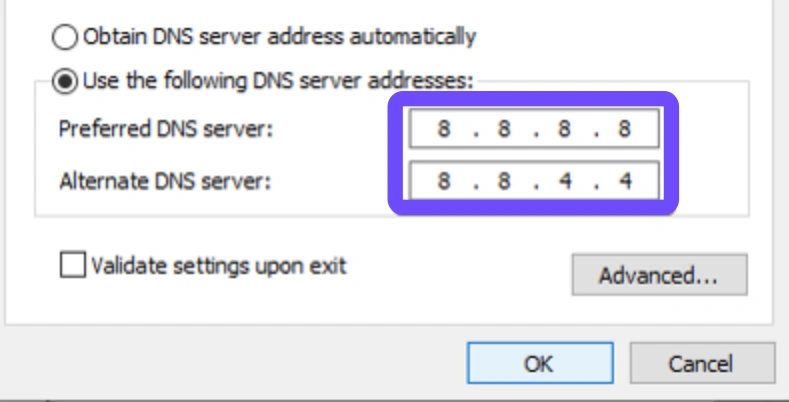
Step 5: Click OK and restart your game client.
Solution 5: Update Network Adapter Drivers
Outdated drivers can cause "bottlenecks" in how your PC processes data, leading to a higher perceived ping than what the server is actually sending.
Step 1: Right-click the Start button and open Device Manager.
Step 2: Find "Network adapters" and expand the list.
Step 3: Right-click your Ethernet or Wi-Fi controller and select Update driver.
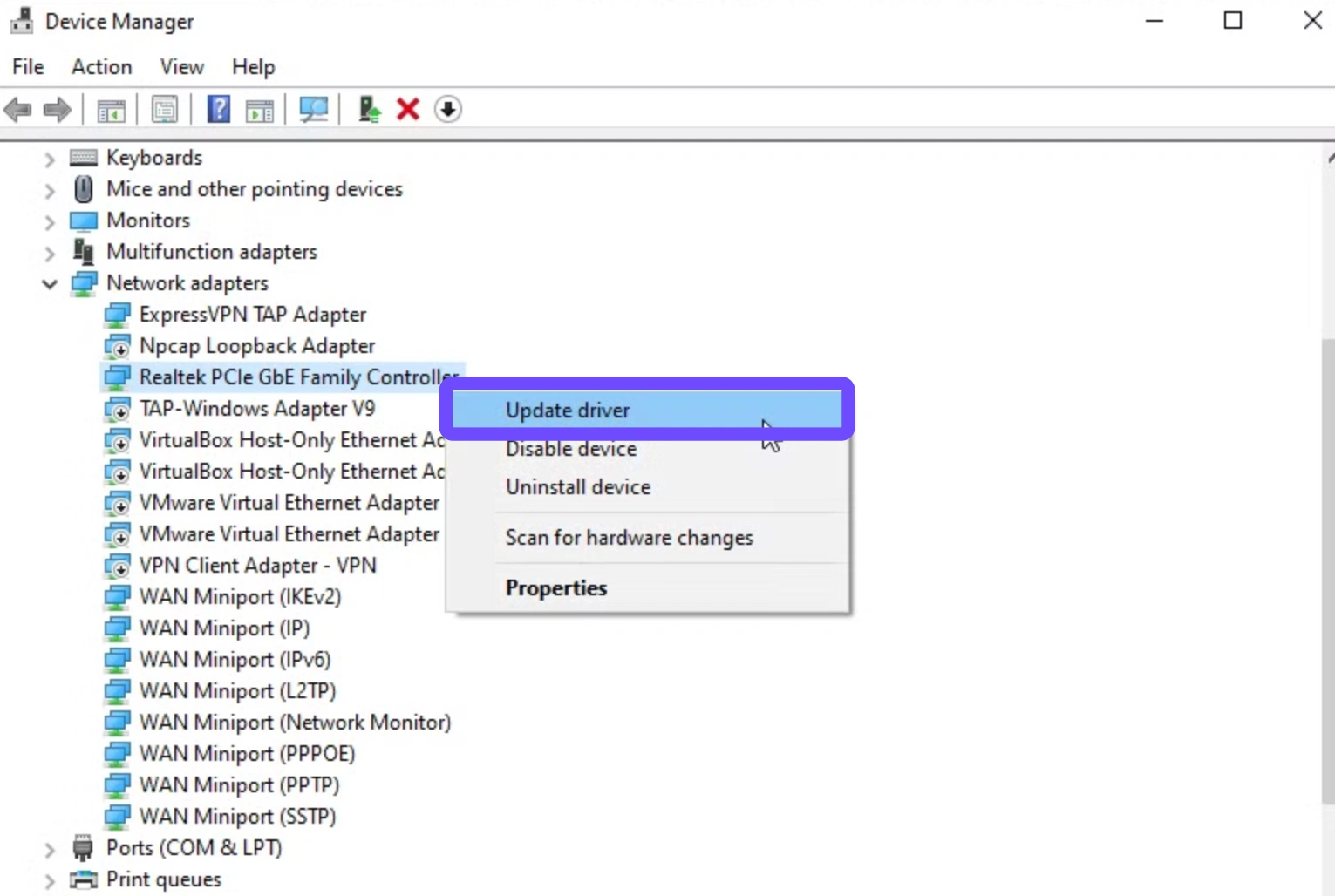
Step 4: Choose "Search automatically for drivers."
Step 5: Restart your system once the installation is complete.
Solution 6: Power Cycle Your Network Hardware
If your router has been running for weeks, it may have "cached" bad routing information related to the Middle East server outages.
Step 1: Unplug the power cable from your modem and router.
Step 2: Wait for a full 60 seconds to let the capacitors discharge.
Step 3: Plug the modem back in first and wait for the "Internet" light to turn solid.
Step 4: Plug the router back in and wait for it to sync.
Step 5: Reboot your PC and test your latency in the Valorant training range.
Conclusion
Dealing with the ping is so high in the Middle East region can be incredibly draining, especially when the cause is a physical infrastructure failure at the data center level. While manual fixes like flushing DNS or switching to Ethernet can provide minor stability, they cannot solve the problem of a missing local server. For the most reliable experience during this outage, using a tool like LagoFast to route your connection through optimized European paths is the only 100% working solution. Stay tuned for official announcements regarding the Bahrain and UAE servers!

Boost Your Game with LagoFast for Epic Speed
Play harder, faster. LagoFast game booster eliminates stutter and lags on PC, mobile, or Mac—win every match!
Quickly Reduce Game Lag and Ping!
Boost FPS for Smoother Gameplay!