

Quick Answer:
Hell Let Loose: Vietnam Micro Stuttering is usually caused by unstable frame times, FPS pacing issues, or shader cache problems, while Hell Let Loose: Vietnam DX12 stutter is more related to rendering instability and shader compilation after enabling DX12. Most players can improve smoothness by optimizing FPS limits, clearing shader cache, switching between DX11 and DX12, and using LagoFast to improve overall gameplay stability during online matches.
Hell Let Loose: Vietnam may run smoothly during smaller engagements, but performance often becomes unstable once large firefights begin. Many players report micro stuttering, sudden frame spikes, and inconsistent frame pacing, even on high-end systems. This guide covers the most common causes behind these issues and the best ways to improve overall gameplay smoothness.

- ✅ Reduce Lag and High Ping.
✅ Boost FPS at the Same Time.
✅ Support 2000+ Popular Online Games.
✅ Change Server without Latency.
✅ Boost Game Loading Speed.
Part 1: Why Hell Let Loose: Vietnam Keeps Stuttering
Part 2: How to Fix Hell Let Loose: Vietnam Micro Stuttering
Part 3: How to Fix Hell Let Loose: Vietnam DX12 Stutter
Part 4: Using LagoFast Solve Hell Let Loose: Vietnam Stuttering Issues
Part 5: Bonus Tips: Hell Let Loose: Vietnam Stutters on High End PC
Part 1: Why Hell Let Loose: Vietnam Keeps Stuttering
Most Hell Let Loose: Vietnam stuttering issues currently fall into two categories: micro stuttering and DX12 stutter. While both can make the game feel choppy, the actual causes behind them are different.
Hell Let Loose: Vietnam Micro Stuttering
Micro stuttering usually happens when average FPS still appears high, but gameplay no longer feels consistently smooth.
Common signs:
- FPS shows 80/100/120, but the game still feels rough
- Small hitching every few seconds
- Tiny camera shakes while aiming
- Mouse movement feels slightly delayed or uneven
- Frame times become unstable even without major FPS drops
Common causes include:
- Unstable frame pacing
- G-Sync or V-Sync conflicts
- Poor FPS limit configuration
- Shader cache instability
- Background overlays or monitoring tools
- Windows scheduling behavior
A lot of players describe it as the game feeling like it is being “slightly dragged” during movement.
Hell Let Loose: Vietnam DX12 Stutter
DX12-related stuttering often begins after switching the game from DX11 to DX12 rendering mode.
In some cases, DX12 can improve FPS during large battles, but it may also cause:
- Shader compilation hitching
- Random frame spikes
- Unstable frame times
- Short freezes during gameplay
- Texture loading stutter
In most cases, this type of stutter is tied to rendering behavior, shader compilation, or driver-level instability rather than internet connection quality. DX12 stutter is often connected to Windows graphics settings, shader behavior, GPU drivers, or cache instability.
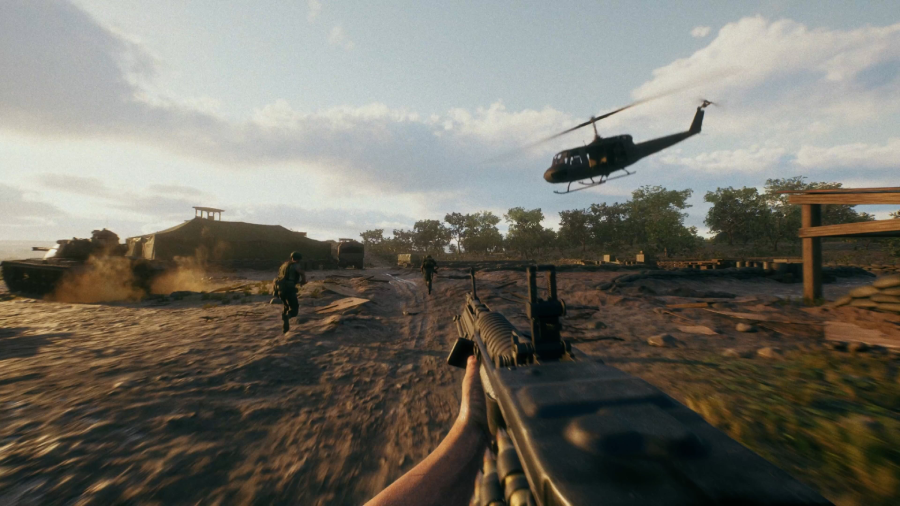
Part 2: How to Fix Hell Let Loose: Vietnam Micro Stuttering
Hell Let Loose: Vietnam micro stuttering is usually related to unstable frame times rather than low FPS. Even at high FPS, gameplay can still feel uneven. The fixes below focus on improving frame pacing and overall smoothness.
Disable V-Sync and Test G-Sync/FreeSync
V-Sync can introduce extra input delay and inconsistent frame pacing in multiplayer shooters.
A smoother setup for many players is:
- Disable in-game V-Sync
- Enable G-Sync or FreeSync if supported
- Use a stable FPS cap instead of leaving FPS uncapped
If the game still feels unstable, try temporarily disabling G-Sync/FreeSync as well to compare smoothness.
Clear Shader Cache
Shader cache issues are one of the most common causes of micro stuttering in Unreal Engine games.
To clear DirectX shader cache:
- Open Windows Disk Cleanup
- Select “DirectX Shader Cache”
- Delete the files
- Restart the PC
The first launch afterward may stutter briefly while shaders rebuild, but frame pacing often becomes smoother after a few matches.
Optimize Background and Steam Settings
Background apps can interrupt CPU scheduling and cause random mini-stutters.
Before launching the game:
- Close browser tabs
- Disable Discord overlay
- Turn off Xbox Game Bar
- Close RGB or monitoring software
- Enable Steam Low Performance Mode
- Disable Steam overlay for Hell Let Loose
Installing the game on an SSD also helps reduce texture streaming hitching during gameplay.
Try These In-Game Settings
Some settings have a bigger impact on frame stability than visual quality.
Recommended settings:
- Display Mode: Test both Fullscreen and Windowed Fullscreen to see which provides more stable frametimes on your system.
- Vertical Sync: Off
- Texture Quality: Medium
- Shadow Quality: Low
- FX Quality: Low
- View Distance: High
- Foliage Quality: Medium
- SSAO: Off
- Motion Blur: Off
Community TAA (if available) is often one of the smoother anti-aliasing options for reducing shimmering and improving visual stability.
Part 3: How to Fix Hell Let Loose: Vietnam DX12 Stutter
DX12 performance issues are commonly tied to shader compilation behavior and inconsistent frametime delivery during gameplay. While DX12 may improve FPS in large battles, some systems experience extra hitching and inconsistent smoothness instead.
Try Switching Between DX11 and DX12
DX12 does not always feel smoother, even if the FPS looks higher.
Some players report:
- Random frame spikes
- Shader hitching
- Stutter while aiming or turning quickly
If DX12 feels unstable, switching back to DX11 is often the easiest fix.
To test DX12 manually on Steam:
- Open Steam Library
- Right-click Hell Let Loose: Vietnam
- Select Properties
- Find Launch Options under the General tab
- Enter:
-dx12
Some players also test:
-dx12 -USEALLAVAILABLECORES
Performance can vary depending on your CPU and overall system setup.
Update GPU Drivers
DX12 performance can change a lot between driver versions.
If stuttering started after updating drivers:
- Reinstall the latest driver cleanly
- Or test an older stable version
This is fairly common in newer Unreal Engine multiplayer games.
Change Anti-Aliasing Settings
Anti-aliasing can also affect frame stability.
For smoother gameplay, many players recommend:
- Anti-Aliasing Method: Community TAA
- Anti-Aliasing Quality: Low or None
This may slightly reduce image quality, but it often improves frame consistency.
Switch to Windowed Fullscreen
If you are using DX12, Windowed Fullscreen may help reduce frame spikes on some systems.
To test it:
- Open Video Settings
- Change Display Mode to Windowed Fullscreen
Lower CPU-Heavy Settings
Large firefights put heavy pressure on the CPU, especially with DX12 enabled.
Lowering these settings can help:
- Shadow Quality
- Effects Quality
- Foliage Quality
- View Distance
This usually improves overall stability during combat.
Install the Game on an SSD
Running the game on an SSD can reduce shader loading and texture streaming stutter, especially during movement and large battles.
Part 4: Using LagoFast Solve Hell Let Loose: Vietnam Stuttering Issues
If Hell Let Loose: Vietnam stuttering issues still happen after adjusting your graphics and DX12 settings, unstable network conditions may also affect overall gameplay smoothness. Large multiplayer battles can easily expose ping spikes, packet loss, and connection instability.
Using LagoFast can help reduce lag spikes, stabilize routing, improve FPS stability, and create a more consistent gameplay experience during online matches. It also includes a Frequently Issue Fix tool that can repair common problems like DirectX 12 and C++ Runtime issues with one click, helping improve both game stability and performance.
How to Use LagoFast for Hell Let Loose: Vietnam:
Step 1: Click the Free Trial button to download and install LagoFast.
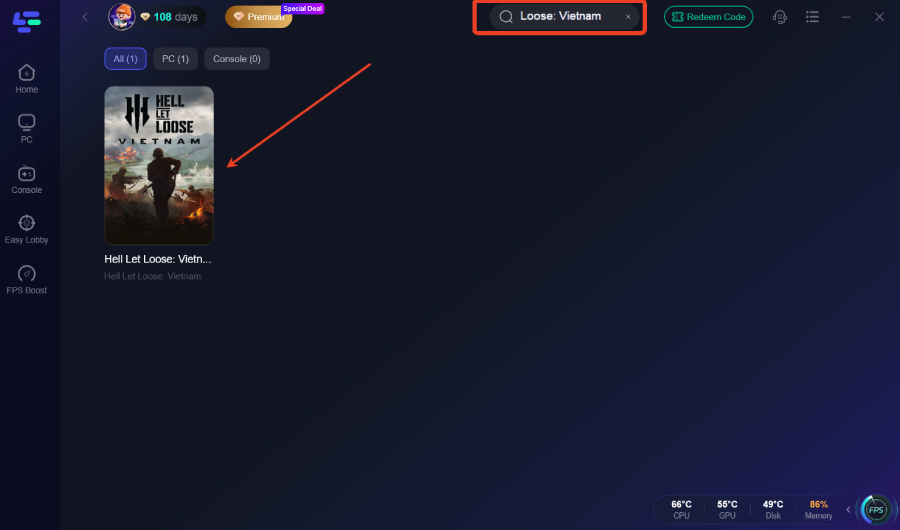
Step 2: After installation, search "Hell Let Loose: Vietnam" in the search bar and select the game.
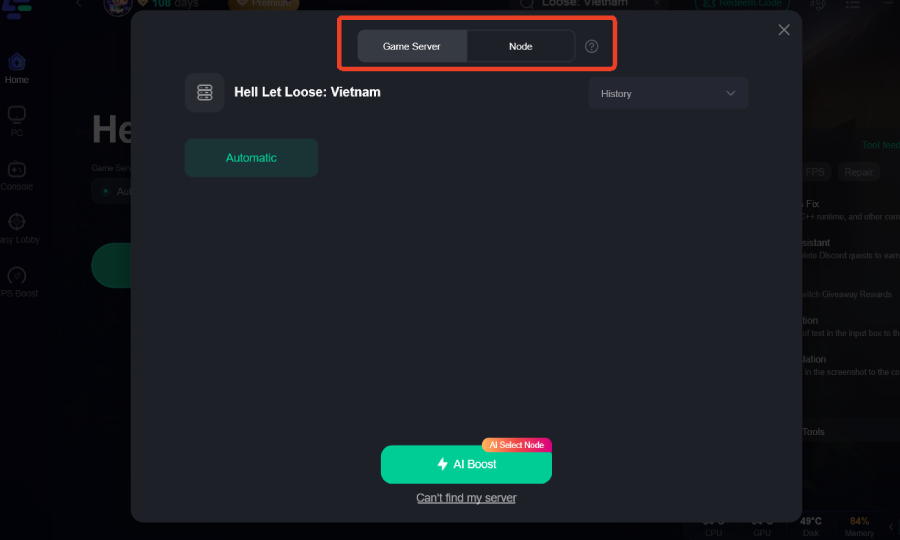
Step 3: Choose your preferred server node and click "Smart Boost" to start optimizing.
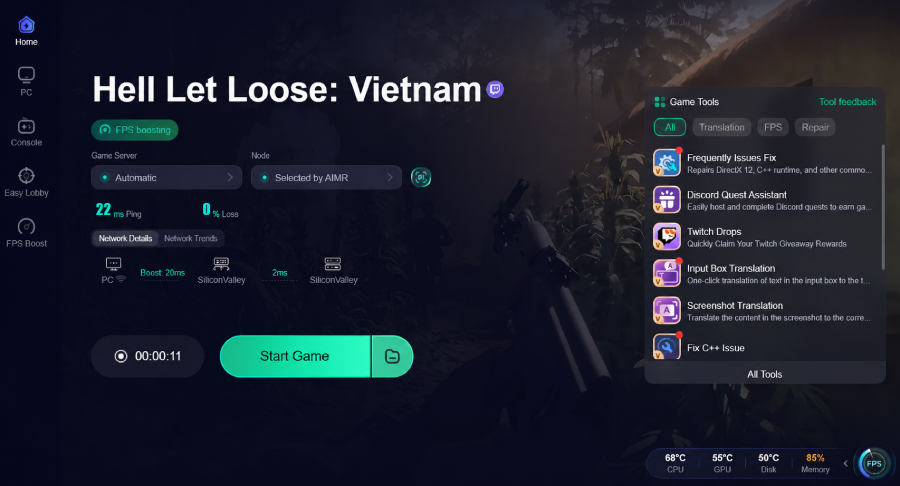
Step 4: Launch your game and enjoy smooth, optimized gameplay with lower ping and no stutter.
Part 5: Bonus Tips: Hell Let Loose: Vietnam Stutters on High End PC
Even powerful PCs may still experience occasional stuttering during intense firefights where CPU usage and frametimes become unstable. In many cases, the issue is more related to frame pacing and system optimization than raw GPU power.
If you are still getting stutters on a powerful system, try:
- Enabling XMP or EXPO in BIOS
- Switching Windows to High Performance mode
- Updating motherboard BIOS
- Disabling unnecessary overlays or background apps
- Testing Intel E-Core disable settings
- Turning off Hardware-Accelerated GPU Scheduling
These changes may not increase FPS directly, but they can reduce random stuttering and improve overall smoothness.
Part 6: FAQs
Should You Use DX11 or DX12 in Hell Let Loose: Vietnam?
DX12 can improve average FPS during large battles, but it may also introduce shader hitching and unstable frame times on some systems. If the game feels less smooth after enabling DX12, DX11 is usually the more stable option.
Why Does Hell Let Loose: Vietnam Stutter Even on High-End PCs?
Most stuttering issues are related to shader compilation, frame pacing, CPU scheduling, or overall game optimization rather than lack of GPU power.
Does Clearing Shader Cache Help Reduce Stuttering?
Yes. Clearing DirectX shader cache can help reduce shader-related hitching and micro stuttering, especially after major updates or GPU driver changes.
Can Installing the Game on an SSD Improve Performance?
Installing Hell Let Loose: Vietnam on an SSD can help reduce texture streaming stutter and improve loading smoothness, especially during large battles or fast movement across the map.
Key Takeaways
- Most stuttering issues are tied to unstable frametimes, shader compilation behavior, or DX12 rendering instability.
- Micro stuttering and DX12 stutter are different issues, so the fixes may vary depending on your setup.
- Clearing shader cache, optimizing settings, and testing DX11 vs DX12 can noticeably reduce stuttering for many players.
- Tools like LagoFast can also help stabilize connection quality and reduce stuttering during online matches.

Boost Your Game with LagoFast for Epic Speed
Play harder, faster. LagoFast game booster eliminates stutter and lags on PC, mobile, or Mac—win every match!
Quickly Reduce Game Lag and Ping!
Boost FPS for Smoother Gameplay!