

Quick Answer
If Hell Let Loose: Vietnam is lagging, stuttering, or experiencing high ping, start by ensuring your PC meets the game's demanding system requirements, especially RAM (16GB minimum, 32GB recommended). Update your graphics drivers, verify game files, and use a wired Ethernet connection. For console players, clear your console's cache and ensure a stable internet connection. For persistent network-related lag, a game booster like LagoFast can significantly reduce ping and stabilize your connection.

- ✅ Reduce Lag and High Ping.
✅ Boost FPS at the Same Time.
✅ Support 2000+ Popular Online Games.
✅ Change Server without Latency.
✅ Boost Game Loading Speed.
Part 1: Why is Hell Let Loose: Vietnam So Laggy? (PC, PS5, Xbox)
Part 2: How to Fix Hell Let Loose: Vietnam Lagging and Stuttering on PC
Part 3: Fix Hell Let Loose: Vietnam Lagging on PS5 and Xbox
Part 4: Why Am I So Laggy Even Though I Have Good Internet?
Part 5: How to Make Hell Let Loose: Vietnam Run Smoothly: Pro Tips
Part 6: How to Enhance Your Game Experience with LagoFast Game Booster
Part 7: Frequently Asked Questions (FAQs)
Part 1: Why is Hell Let Loose: Vietnam So Laggy? (PC, PS5, Xbox)
Hell Let Loose: Vietnam plunges players into the brutal, large-scale conflicts of the Vietnam War, demanding not only tactical prowess but also a robust system and a stable network connection. When the game feels sluggish, unresponsive, or suffers from frequent frame drops, it can quickly turn an immersive experience into a frustrating ordeal.
The reasons behind this pervasive lag can be multifaceted, ranging from hardware limitations to network congestion, and they often differ slightly across PC, PlayStation 5, and Xbox Series X|S platforms.
Hardware Demands of Unreal Engine 5
At its core, Hell Let Loose: Vietnam is built on Unreal Engine 5, a powerful yet resource-intensive engine. Features like Nanite (virtualized geometry) and Lumen (global illumination) enable incredibly detailed environments and realistic lighting, but they come at a significant performance cost.
This means the game is inherently demanding on your:
- CPU
- GPU
- RAM
If your system barely meets the minimum specifications, you're likely to experience performance-related lag, stuttering, and low frame rates, particularly during intense firefights or when many players are on screen.
Server-Side Performance and Community Servers
Unlike many mainstream titles, Hell Let Loose (and presumably its Vietnam iteration) often relies on community-run servers.
The quality and stability of these servers can vary wildly. A server with poor hardware, high player count, or located far from your geographical region can introduce significant server-side lag, manifesting as:
- Rubberbanding
- Delayed hit registration
- General unresponsiveness
Even official servers can experience temporary overload during peak hours or after major updates.
Network Congestion and Routing Issues
Network lag, characterized by high ping and packet loss, is a common culprit.
Your internet connection might be fast for browsing or streaming, but the path your game data takes to the server can be congested or inefficient. This is often due to your ISP routing traffic through suboptimal nodes, leading to:
- Ping spikes
- Packet loss
- Connection instability
Software Conflicts and Background Processes
On PC, background applications, outdated drivers, or conflicting software can consume system resources and interfere with game performance.
Examples include:
- Steam Overlay
- Discord Overlay
- Antivirus software
- Recording applications
On consoles, system cache issues or corrupted game installations may also contribute to lag and stuttering.
Part 2: How to Fix Hell Let Loose: Vietnam Lagging and Stuttering on PC
PC players have the most control over their systems, allowing for extensive troubleshooting and optimization.
Optimize In-Game Graphics Settings
This is often the most impactful step.
Prioritize lowering:
Shadow Quality
Shadows are notoriously demanding. Lowering this setting can provide a significant FPS boost.
Post-Processing
Effects such as:
- Motion Blur
- Depth of Field
- Bloom
can consume valuable GPU resources.
Anti-Aliasing
Experiment with lower-quality TAA or FXAA settings to improve performance.
View Distance
Reducing view distance slightly can improve frame rates, especially in dense environments.
Foliage Quality
The dense vegetation in Vietnam maps can heavily impact performance. Lowering foliage quality often helps reduce stuttering.
Update Graphics Drivers
Always install the latest graphics drivers from:
- NVIDIA
- AMD
- Intel
Performing a clean installation is recommended.
Verify Game Files Integrity
Corrupted or missing game files can cause:
- Stuttering
- Crashes
- Instability
To verify files:
- Open Steam Library
- Right-click Hell Let Loose: Vietnam
- Select Properties
- Open Installed Files
- Click Verify integrity of game files
Clear Shader Caches
Unreal Engine 5 games commonly experience shader compilation stutter.
You can clear shader caches by:
- Running Windows Disk Cleanup
- Selecting DirectX Shader Cache
- Clearing the cache through NVIDIA Control Panel (if applicable)
Disable Overlays and Background Applications
Disable overlays from:
- Steam
- Discord
- GeForce Experience
- Xbox Game Bar
Also close unnecessary background applications that consume CPU, RAM, or bandwidth.
Adjust Power Plan Settings
Set Windows to:
- High Performance
- Ultimate Performance
This prevents hardware throttling during gameplay.
Part 3: Fix Hell Let Loose: Vietnam Lagging on PS5 and Xbox
Power Cycle Your Console
A complete power cycle can resolve many temporary issues.
For PS5 and Xbox:
- Fully shut down the console
- Unplug the power cable
- Wait at least 30 seconds
- Reconnect power
- Restart the console
Clear Console Cache / Persistent Storage
Xbox
Navigate to:
Settings > Devices & Connections > Blu-ray > Persistent Storage
Then select:
Clear Persistent Storage
PS5
A full power cycle generally clears the cache.
If issues persist, consider rebuilding the database through Safe Mode.
Ensure Stable Network Connection
For the best experience:
- Use Ethernet instead of Wi-Fi
- Check NAT type
- Test connection quality
- Consider public DNS services
Recommended DNS options:
Google DNS
- 8.8.8.8
- 8.8.4.4
Cloudflare DNS
- 1.1.1.1
- 1.0.0.1
Reinstall the Game
If problems persist:
- Uninstall Hell Let Loose: Vietnam
- Restart the console
- Reinstall the game
Ensure sufficient storage space is available.
Part 4: Why Am I So Laggy Even Though I Have Good Internet?
The reality is that "good internet" for streaming and downloading is different from what gaming requires.
Gaming depends on:
- Low latency
- Stable routing
- Minimal packet loss
Even with a fast fiber connection, you may experience lag if:
- ISP routing is inefficient
- Network nodes are congested
- Packet loss occurs
In a competitive title like Hell Let Loose: Vietnam, even minor packet loss can create noticeable gameplay issues.
Part 5: How to Make Hell Let Loose: Vietnam Run Smoothly: Pro Tips
Enable XMP/DOCP for Your RAM
Many players forget to enable memory profiles in BIOS.
Enable:
- XMP (Intel)
- DOCP (AMD)
This allows RAM to operate at its advertised speed and can reduce micro-stuttering.
Install on an NVMe SSD
While any SSD helps, an NVMe SSD offers the best performance.
Benefits include:
- Faster asset streaming
- Reduced loading times
- Fewer traversal stutters
Select Servers with the Lowest Ping
Instead of using Quick Play:
- Open Server Browser
- Sort by Ping
- Choose servers under 80ms whenever possible
Because many servers are community-hosted, server quality can vary significantly.
Use High Performance Mode in Windows
Navigate to:
Settings > System > Power & Sleep > Additional Power Settings
Select:
- High Performance
- Ultimate Performance
This ensures consistent CPU performance during gameplay.
Part 6: How to Enhance Your Game Experience with LagoFast Game Booster
Even with powerful hardware and a solid ISP, the public internet is not optimized specifically for gaming. Data packets often travel through multiple network nodes before reaching the game server, which can result in unnecessary latency, packet loss, and sudden lag spikes—especially during peak hours or when connecting to distant servers.
LagoFast Game Booster is designed to address these issues by optimizing the route between your device and the game server. It helps:
- Reduce ping
- Stabilize routing
- Eliminate packet loss
- Improve server connectivity
Using a global network of dedicated gaming nodes, LagoFast intelligently selects the most efficient path for your game traffic. This can significantly improve connection stability, reduce rubberbanding, and provide more consistent performance during large-scale battles in Hell Let Loose: Vietnam. Whether you're playing on crowded community servers or connecting across regions, LagoFast helps ensure your actions are registered faster and your gameplay remains smooth and responsive.
By leveraging dedicated gaming routes, LagoFast helps create a more stable online experience in Hell Let Loose: Vietnam.
How to Use LagoFast Game Booster
Step 1: Click the Free Trial button to download and install LagoFast.
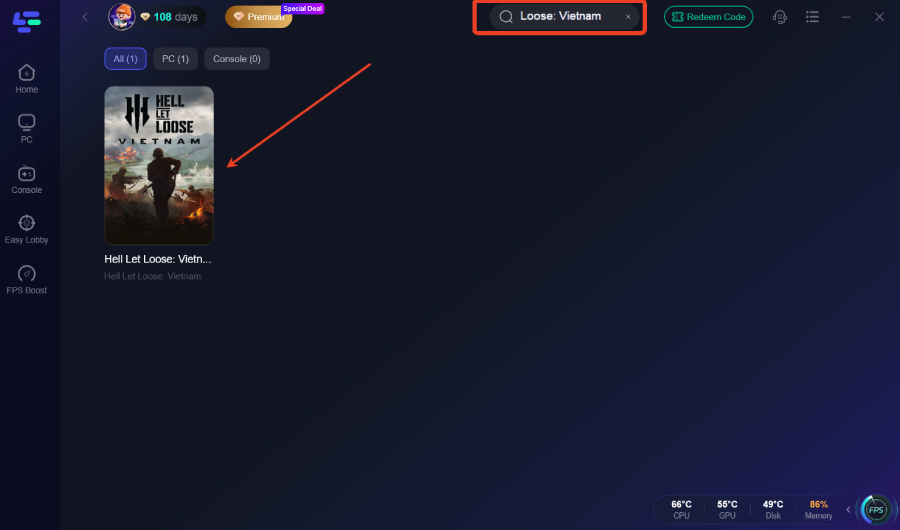
Step 2: After installation, search "Hell Let Loose: Vietnam" in the search bar and select the game.
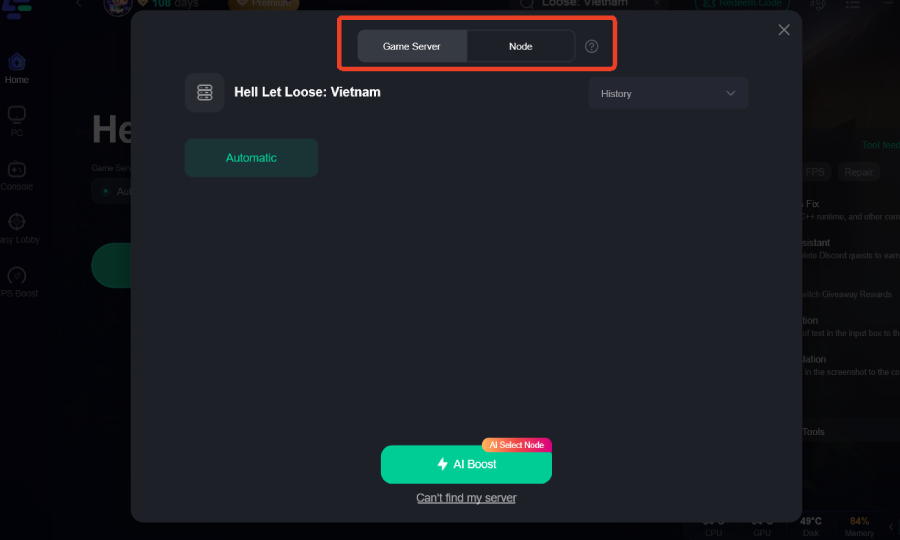
Step 3: Choose your preferred server node and click "Smart Boost" to start optimizing.
Step 4: Launch your game and enjoy smooth, optimized gameplay with lower ping and no stutter.
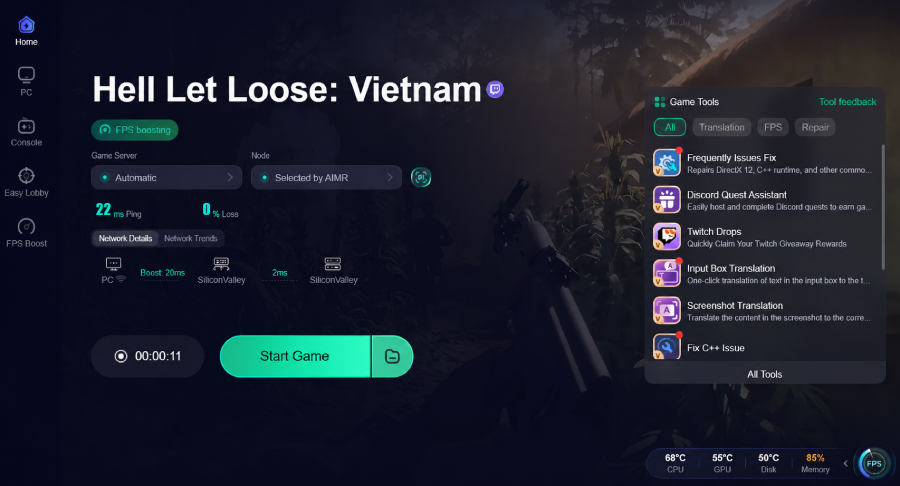
By using LagoFast, players can reduce the impact of routing issues and network instability, ensuring smoother gameplay in high-population servers.
Part 7: FAQs
Q1: How much RAM is needed for Hell Let Loose: Vietnam?
A: While the minimum requirement is 16GB, 32GB of RAM is highly recommended. Unreal Engine 5's large-scale maps and textures can quickly consume memory resources.
Q2: Why does my game stutter every time I enter a new area?
A: This is likely shader compilation stutter. Clearing shader caches and installing the game on an SSD can help reduce the issue.
Q3: Does Hell Let Loose: Vietnam support cross-play?
A: Yes, cross-play is generally supported between PS5 and Xbox Series X|S. PC players are typically separated, although server settings may vary.
Q4: Can I fix lag by lowering my resolution?
A: Lowering resolution helps improve FPS and GPU performance but does not reduce network latency or ping.
Q5: Is it better to use DX11 or DX12 for HLL: Vietnam?
A: DX12 generally offers better performance in Unreal Engine 5, but DX11 may provide greater stability on some systems. Testing both is recommended.
Key Takeaways
Lag in Hell Let Loose: Vietnam can stem from both hardware limitations and network-related issues. Whether you're battling Unreal Engine 5 performance demands or unstable server routing, there are multiple ways to improve the experience.
For the best results:
- Optimize graphics settings
- Update drivers
- Use an SSD
- Enable XMP/DOCP
- Select low-ping servers
- Maintain a stable wired connection
For players looking to further reduce ping and improve routing stability, LagoFast Game Booster offers an additional layer of network optimization. With the right setup, you can minimize lag spikes, maintain responsiveness, and stay focused on the battlefield.

Boost Your Game with LagoFast for Epic Speed
Play harder, faster. LagoFast game booster eliminates stutter and lags on PC, mobile, or Mac—win every match!
Quickly Reduce Game Lag and Ping!
Boost FPS for Smoother Gameplay!