
Quick Answer
If Hell Let Loose: Vietnam is suffering from FPS drops or stutters, immediately verify your game files through Steam, update your graphics drivers, and ensure your PC meets the game's demanding system requirements (especially 16GB+ RAM and an SSD). Adjust in-game graphics settings, particularly shadows and post-processing. For persistent issues, clear shader caches, disable fullscreen optimizations, and consider using LagoFast Game Booster to stabilize network performance, which can indirectly affect FPS stability.

- ✅ Reduce Lag and High Ping.
✅ Boost FPS at the Same Time.
✅ Support 2000+ Popular Online Games.
✅ Change Server without Latency.
✅ Boost Game Loading Speed.
Part 1: Why is Hell Let Loose: Vietnam Stuttering and experiencing immense FPS drops?
Part 2: Fix Hell Let Loose: Vietnam Fps Drops & Stutters: Essential System Tweaks
Part 3: How To Fix Hell Let Loose: Vietnam Freezing, Stuttering, Lagging or FPS Drop On PC
Part 4: Advanced Engine and Launch Option Optimizations for UE5
Part 5: Hardware and Background Conflict Resolution
Part 6: How to Enhance Your Game Experience with LagoFast Game Booster
Part 7: Frequently Asked Questions (FAQs)
Part 1: Why is Hell Let Loose: Vietnam Stuttering and Experiencing Immense FPS Drops?
Hell Let Loose: Vietnam, the latest iteration in the critically acclaimed tactical shooter series, thrusts players into the brutal, large-scale conflicts of the Vietnam War. Built on the formidable Unreal Engine 5, this game delivers stunning realism and immersive environments. However, this visual fidelity comes at a significant performance cost, leading many players to grapple with frustrating FPS drops and persistent stutters.
Understanding the root causes is the first step toward reclaiming smooth gameplay.
The Demands of Unreal Engine 5
Unreal Engine 5 is a technological marvel, but its advanced features like Nanite (virtualized geometry) and Lumen (global illumination) are incredibly resource-intensive.
These technologies allow for unprecedented detail and dynamic lighting, but they demand:
- A powerful CPU
- A capable GPU
- Substantial RAM
If your system barely meets the minimum requirements, or if you're trying to run the game on higher settings than your hardware can comfortably handle, FPS drops and stutters are almost inevitable.
Shader Compilation Stutter
One of the most common and frustrating sources of stuttering in Unreal Engine games is shader compilation.
When you:
- Load a new map
- Encounter new visual effects
- Update graphics drivers
the game needs to compile shaders in real time. If your CPU, storage device, or shader cache is struggling, noticeable hitches and freezes can occur.
CPU Bottlenecks and Core Utilization
Hell Let Loose: Vietnam is highly CPU-intensive due to:
- 50v50 player battles
- Complex physics calculations
- Extensive game logic processing
If your CPU cannot keep up, FPS can drop even when GPU usage remains low.
RAM and Storage Speed
The game's detailed textures and large environments require significant memory resources.
Common performance issues include:
- Insufficient RAM causing page file usage
- HDD installation causing slow asset streaming
- Background memory usage reducing available resources
While 16GB RAM may be the minimum requirement, 32GB RAM and an SSD are strongly recommended.
Part 2: Fix Hell Let Loose: Vietnam FPS Drops & Stutters: Essential System Tweaks
Optimize In-Game Graphics Settings
Start by adjusting the following graphics options:
Shadow Quality
Lowering shadows from High/Epic to Medium or Low can produce major FPS gains.
Post-Processing
Reduce or disable:
- Motion Blur
- Bloom
- Depth of Field
These effects can consume valuable GPU resources.
Anti-Aliasing
Try lower AA settings or experiment with TAA options to balance image quality and performance.
View Distance
Slightly lowering view distance may improve FPS, especially in dense combat zones.
Foliage Quality
Dense jungle vegetation can heavily impact performance. Lower foliage settings if stuttering occurs.
Texture Quality
Players with limited VRAM should reduce texture quality to avoid memory bottlenecks.
Update Graphics Drivers
Always install the latest drivers from:
- NVIDIA
- AMD
- Intel
New game-ready drivers often contain important optimizations and bug fixes for recently released titles.
Verify Game Files Integrity (Steam)
To verify game files:
- Open Steam Library
- Right-click Hell Let Loose: Vietnam
- Select Properties
- Open Installed Files
- Click Verify integrity of game files
This process repairs missing or corrupted files that may cause stuttering.
Disable Fullscreen Optimizations
To disable fullscreen optimizations:
- Locate the game's executable file
- Right-click and select Properties
- Open the Compatibility tab
- Check Disable fullscreen optimizations
This can help resolve unexpected performance issues.
Part 3: How To Fix Hell Let Loose: Vietnam Freezing, Stuttering, Lagging or FPS Drop On PC
Adjust Windows Power Plan Settings
Use the following power plans:
- High Performance
- Ultimate Performance
This prevents CPU and GPU throttling during gameplay.
Increase Virtual Memory (Page File)
If RAM usage is maxed out:
- Open System Properties
- Navigate to Advanced Settings
- Open Performance Settings
- Configure Virtual Memory
Set the page file size to approximately 1.5–2x your installed RAM.
Clean Boot Windows
A clean boot helps identify software conflicts.
Steps:
- Open System Configuration
- Hide Microsoft services
- Disable remaining services
- Disable startup applications
- Restart your PC
If performance improves, re-enable services gradually to locate the conflict.
Update Windows and DirectX
Keep your system fully updated through:
- Windows Update
- DirectX Runtime updates
Outdated system components can contribute to instability and FPS problems.
Part 4: Advanced Engine and Launch Option Optimizations for UE5
Utilize Steam Launch Options
Add the following commands individually and test performance:
-dx11
-USEALLAVAILABLECORES
-high
-dx11
Forces DirectX 11, which may reduce stuttering on certain systems.
-USEALLAVAILABLECORES
Encourages better CPU core utilization.
-high
Assigns higher process priority to the game.
Optimize NVIDIA Control Panel / AMD Radeon Settings
Recommended settings:
- Power Management Mode: Prefer Maximum Performance
- Texture Filtering Quality: High Performance
- Low Latency Mode: On / Ultra
- Shader Cache Size: Increase to reduce compilation stutter
AMD users can configure equivalent settings in Radeon Software.
Disable Unreal Engine 5's Nanite and Lumen (If Applicable)
Advanced users can explore configuration files to reduce or disable:
- Nanite
- Lumen
These features are major contributors to UE5 performance demands.
Proceed carefully and always back up configuration files before editing.
Part 5: Hardware and Background Conflict Resolution
Install Game on an NVMe SSD
Installing Hell Let Loose: Vietnam on an NVMe SSD can dramatically improve:
- Asset streaming
- Loading times
- Stutter reduction
This is one of the most impactful upgrades available.
Close All Overlays and Background Apps
Disable unnecessary applications such as:
- Steam Overlay
- Discord Overlay
- GeForce Experience Overlay
- Xbox Game Bar
Background applications can consume valuable system resources.
Ensure Sufficient RAM and XMP/DOCP Enabled
Recommended setup:
- 32GB RAM
- XMP enabled (Intel)
- DOCP enabled (AMD)
Running memory at its rated speed can improve game stability and reduce stuttering.
Monitor Hardware Temperatures
Use tools such as:
- MSI Afterburner
- HWMonitor
Watch for thermal throttling:
- CPU overheating
- GPU overheating
Excessive temperatures can directly cause FPS drops.
Part 6: How to Enhance Your Game Experience with LagoFast Game Booster
Even after optimizing your PC, network instability can still impact gameplay responsiveness.
LagoFast Game Booster is designed to:
- Reduce ping
- Stabilize network routing
- Minimize packet loss
- Improve online responsiveness
For large-scale multiplayer titles such as Hell Let Loose: Vietnam, a stable connection can contribute to a smoother overall experience.
How to Use LagoFast Game Booster
Step 1: Click the Free Trial button to download and install LagoFast.
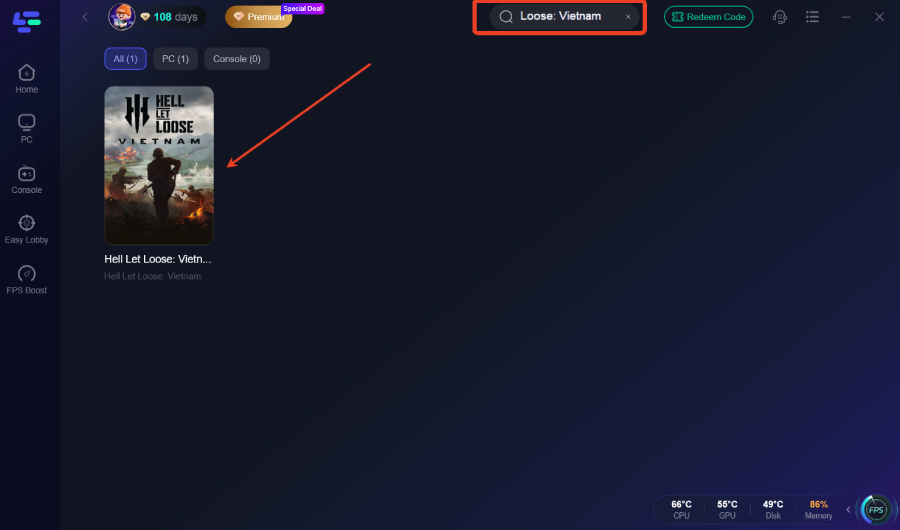
Step 2: After installation, search "Hell Let Loose: Vietnam" in the search bar and select the game.
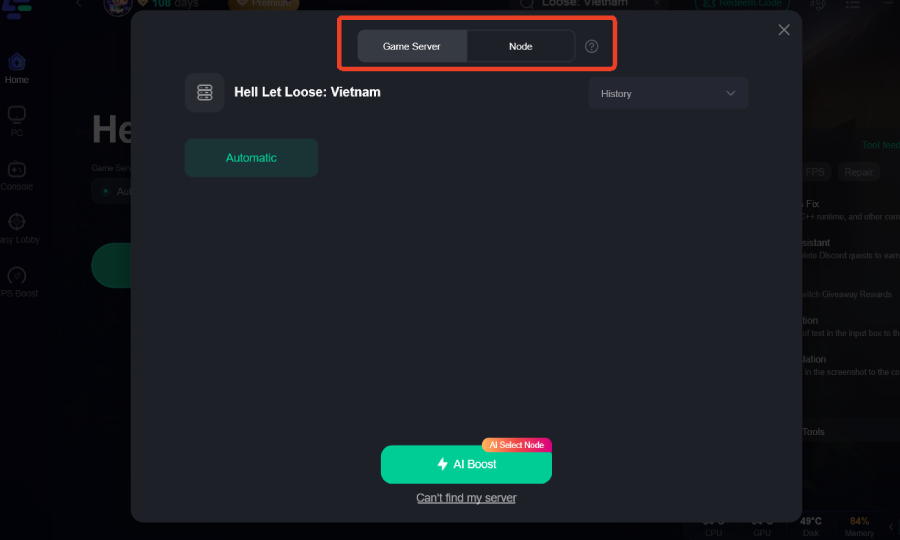
Step 3: Choose your preferred server node and click "Smart Boost" to start optimizing.
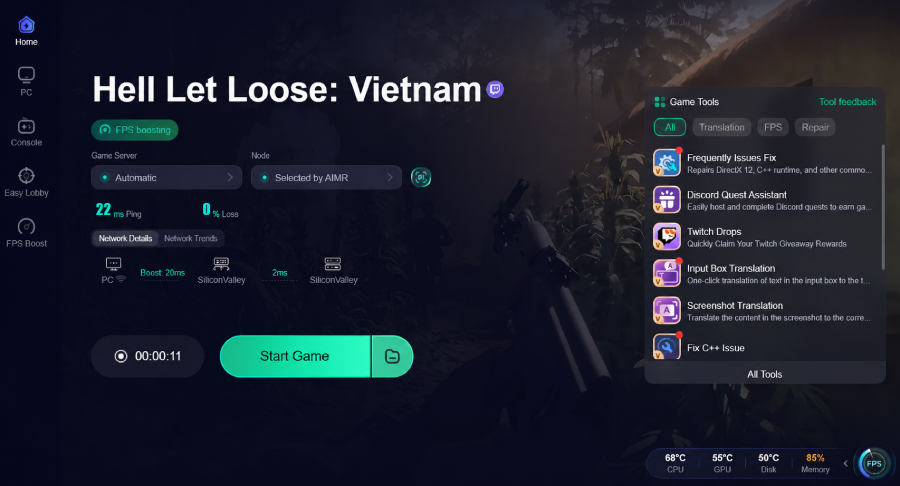
Step 4: Launch your game and enjoy smooth, optimized gameplay with lower ping and no stutter.
Part 7: Frequently Asked Questions (FAQs)
Q1: How much RAM is needed for Hell Let Loose: Vietnam?
Answer: While 16GB is generally considered the minimum, 32GB RAM is highly recommended for smooth gameplay and better asset streaming performance.
Q2: Why does my FPS drop significantly during large battles?
Answer: Massive player counts, explosions, and visual effects place heavy demands on both the CPU and GPU, making large battles one of the most performance-intensive scenarios.
Q3: What is shader compilation stutter and how do I fix it?
Answer: Shader compilation occurs when graphical effects are processed for the first time. Updating drivers, clearing shader caches, and installing the game on an SSD can reduce these stutters.
Q4: Does Hell Let Loose: Vietnam support DirectX 11 or DirectX 12?
Answer: The game primarily utilizes DirectX 12, but some players experience improved stability by forcing DirectX 11 through Steam launch options.
Q5: Can a slow internet connection cause FPS drops?
Answer: Not directly. FPS is determined by your hardware. However, network lag, packet loss, and server instability can create symptoms that feel similar to FPS drops or stuttering.
Key Takeaway
Battling FPS drops and stutters in Hell Let Loose: Vietnam can be as challenging as the game itself. Because the title is built on Unreal Engine 5, it places heavy demands on your CPU, GPU, RAM, and storage. By optimizing graphics settings, updating drivers, configuring Windows correctly, and applying advanced UE5 tweaks, most players can achieve noticeably smoother performance.
Additionally, maintaining a stable network connection is essential for consistent gameplay. LagoFast Game Booster helps reduce latency, stabilize routing, and minimize packet loss, allowing you to focus entirely on the battlefield.
Implement the fixes outlined in this guide, optimize your system, and enjoy a smoother, more responsive Hell Let Loose: Vietnam experience.
Boost Your Game with LagoFast for Epic Speed
Play harder, faster. LagoFast game booster eliminates stutter and lags on PC, mobile, or Mac—win every match!
Quickly Reduce Game Lag and Ping!
Boost FPS for Smoother Gameplay!