
Do you remember exploring Tyria years ago — through Ascalon, Elona, or Cantha? With Guild Wars Reforged launching on December 3, 2025, the classic MMO returns modernized for today’s PCs. It includes the full Prophecies, Factions, and Nightfall campaigns in one package, free for anyone who owned any previous campaign. The update adds improved visuals, HD textures, better UI scaling, modern rendering effects, enhanced audio, and full controller and Steam Deck support.
However, these upgrades also introduce complications related to account linking. Legacy ArenaNet accounts, older Steam purchases, and the new Reforged licensing system don’t always align, causing many players to run into the same issue: choosing “Log in with Steam” sometimes leads back to the old ArenaNet email-and-password login. If your Steam login isn’t working or you’re unsure which account applies to you, this guide explains why it happens and how to fix it.

- ✅ Reduce Lag and Boost FPS
✅ Ensure Stable Server Connection.
✅ Change Server without Latency.
✅Fix Crashing and Stuck Errors.
✅ 0% Packet Loss Rate
Part 1: Why “Log in with Steam” Redirects You to Your ANET Account
Part 2: Can I Use My Steam Account (e.g. GW2 Steam Account) to Log Into Reforged?
Part 3: How to Fix Guild Wars Reforged Steam Login Issue
Part 4: Enhance Game Experience With LagoFast Game Booster
Part 1: Why “Log in with Steam” Redirects You to Your ANET Account
1. Steam login redirects to email/password
Many players report launching the game via Steam, selecting “Log in with Steam,” but being redirected to the ArenaNet login page instead.
2. Why this happens
This occurs because legacy Guild Wars purchases — even those bought on Steam before the Reforged update — are still treated as ArenaNet-account licenses under Reforged’s system.
In other words:
- Your old Steam purchase is treated as an ANET license.
- Reforged expects a Steam-native license for Steam login to function.
- If the system sees your ownership as ANET-based, “Log in with Steam” does nothing and the client defaults to ANET login.
Thus, simply owning the game on Steam before Reforged does not guarantee Steam login compatibility.
Part 2: Can I Use My Steam Account (e.g. GW2 Steam Account) to Log Into Reforged?
1. Steam accounts don’t automatically transfer
Many players with Steam-linked Guild Wars 2 accounts assume the same Steam login will authenticate Guild Wars Reforged. This is not the case.
2. Why they don’t link
Reforged Steam accounts and legacy ArenaNet accounts use separate licensing rules.
- Steam-based GW2 login does not grant Steam-based Reforged login.
- Pre-Reforged Guild Wars Steam purchases count as ANET-accounts.
- Unless your Reforged license is registered as a Steam-native entitlement, Steam login may not work at all.
This mismatch leads to confusion and failed login attempts.
Part 3: How to Fix Guild Wars Reforged Steam Login Issue
Community findings suggest that many legacy Steam owners can enable Steam login by manually adding the Guild Wars Reforged: Steam Upgrade license to their account.
1. Why this works
This upgrade acts like a free DLC that converts your legacy license into a Steam-native entitlement, activating proper Steam authentication.
2. Recommended steps
Follow these community-verified steps:
- Log into your Steam account through a web browser.
- Visit the subscription page on SteamDB.
- Click Add License (this upgrade is free).
- Restart the Steam client completely.
- Relaunch Guild Wars Reforged — you should now see the option to log in via Steam.
Many users confirm this resolves the forced ANET login issue.
Part 4: Enhance Game Experience With LagoFast Game Booster
Online MMOs rely heavily on network stability. High ping, jitter, packet loss, or unstable routing can disrupt gameplay. LagoFast helps by optimizing your network path using dedicated global nodes.
Benefits of using LagoFast
- Reduced ping
- More stable routing
- Lower packet loss
- Fewer lag spikes
- Improved cross-region connectivity
How to use LagoFast on PC
Step 1. Download and install LagoFast.
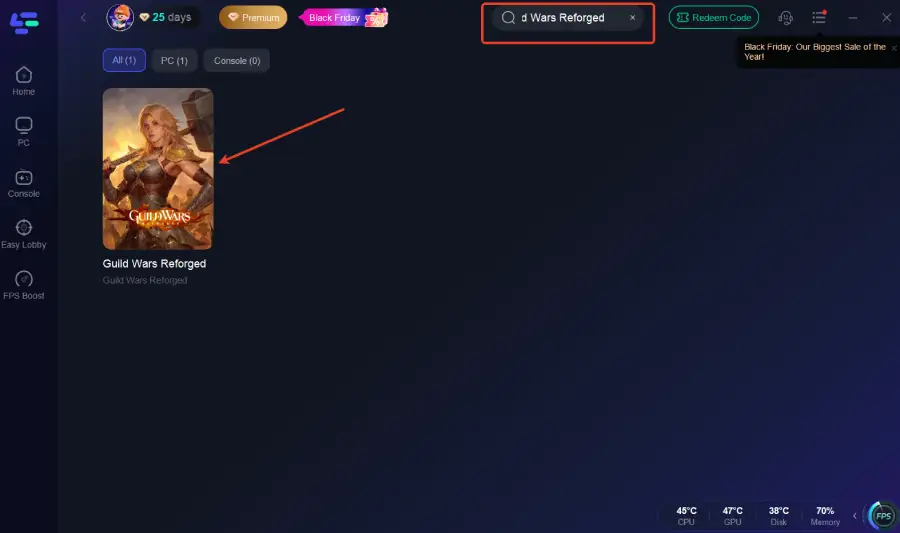
Step 2. Launch LagoFast and search Guild Wars Reforged.
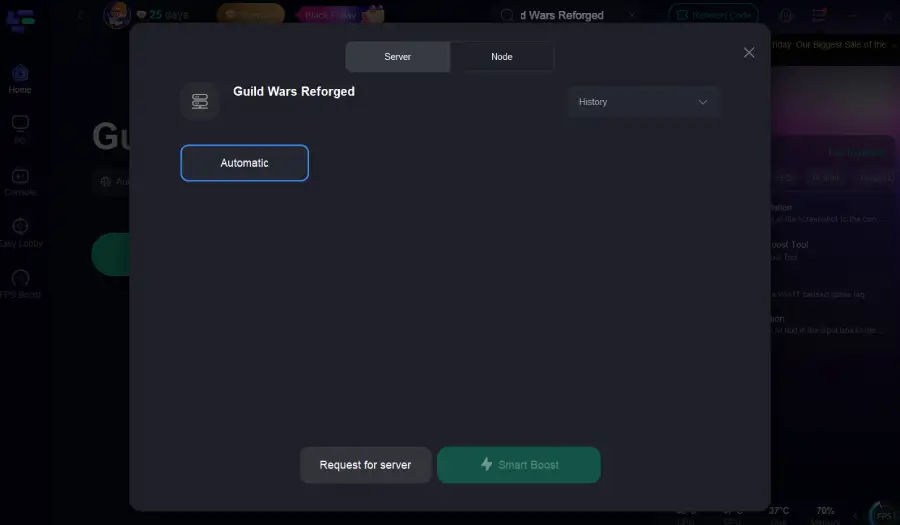
Step 3: Select the best server or route for your region to ensure optimal stability.
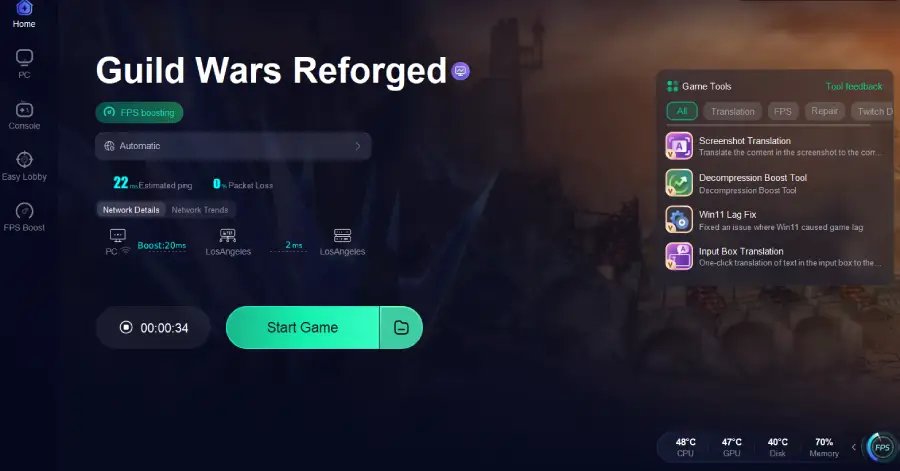
Step 4: Optimize network settings—LagoFast will automatically select the best connection path to minimize lag, packet loss, and high latency for smoother gameplay.
Part 5: FAQs
What’s the difference between an ANET account and a Steam account for Guild Wars Reforged?
An ANET account refers to the original Guild Wars login system (email + password). A Steam account login refers to Reforged’s new Steam-based authentication. Legacy Steam purchases still count as ANET accounts unless upgraded.
I bought Guild Wars on Steam before Reforged — can I still enable Steam login?
Yes. Many legacy owners can activate Steam login by adding the free Steam Upgrade license (Sub ID 1437968).
Will my old characters and progress carry over if I switch to Steam login?
Yes. ArenaNet confirms that all characters, items, and progression are preserved.
Do I need to repurchase the game if I already owned a campaign?
No. Any prior ownership grants full access to the Reforged trilogy.
What if I experience login errors or lag while playing?
Check your firewall, router, or antivirus. If routing remains unstable, a network-optimization tool like LagoFast can help stabilize connection quality.
Conclusion
Guild Wars Reforged is a long-awaited return of a classic MMO, refreshed for modern systems. But due to complex licensing rules, many players encounter Steam login issues — especially legacy Steam owners. The community-verified solution is to manually add the free Steam Upgrade license, which typically enables proper Steam authentication.
For smoother gameplay, tools like LagoFast can further enhance connection stability and reduce latency, improving your overall experience in Tyria.

Boost Your Game with LagoFast for Epic Speed
Play harder, faster. LagoFast game booster eliminates stutter and lags on PC, mobile, or Mac—win every match!
Quickly Reduce Game Lag and Ping!
Boost FPS for Smoother Gameplay!