
Connectivity issues are frustrating—especially when you’re ready to play and the game shows a message like “Networking Failed to Start: HUENEME-NEGEV.” For players of Black Ops 6, this error became known as relating to network instability, server communication issues, and IP address conflicts. This kind of problem can also occur in BO7. If you're seeing “HUENEME-NEGEV” in BO7, here’s what you need to know: what it means, why it happens, how to fix it, how to avoid it, and how tools like boosters can help stabilize your experience.

- ✅ Reduce Lag and Boost FPS
✅ Ensure Stable Server Connection.
✅ Change Server without Latency.
✅ Fix Crashing and Stuck Errors.
✅ 0% Packet Loss Rate
✅ Boost Game Downloading Speed.
Part 2. What Does Hueneme Negev Mean in BO7?
Part 3. Why Did Activision Networking Fail to Start Hueneme Negev?
Part 4. How to Get Rid of Hueneme Negev in Black Ops 7
Part 5. Enhance Your Gaming Experience with LagoFast Game Booster
Part 1: Introduction
Call of Duty: Black Ops 7 (BO7) is one of the most anticipated first-person shooters of the year, continuing the tradition of high-intensity campaigns and competitive multiplayer battles. However, with the excitement of new content also comes the frustration of technical issues. Among the most common network errors faced by players is the “Networking Failed to Start HUENEME – NEGEV” message.
This error can suddenly appear when you try to connect to BO7 servers, preventing you from enjoying matches with friends or diving into ranked play. While it may look complicated at first, HUENEME – NEGEV is a well-known error that has appeared in previous Call of Duty titles, including Black Ops 6, and is often related to how your device communicates with Activision’s servers.
In this guide, we’ll explain what HUENEME – NEGEV actually means, why it happens, and the best step-by-step solutions to fix it in BO7. We’ll also show you how tools like LagoFast Game Booster can ensure smoother gameplay and prevent future interruptions.
Part 2: What Does Hueneme Negev Mean in BO7?
The HUENEME – NEGEV error in Black Ops 7 is essentially a network connectivity failure. The message “Networking Failed to Start” indicates that your device (PC, PlayStation, or Xbox) cannot establish a stable link to Activision’s game servers.
This failure is not necessarily tied to one specific device or platform; instead, it is a server communication issue caused by mismatched IP addresses, disrupted routing, or conflicts between networking protocols.
Here are the most important points about this error:
- Multi-Platform Issue: Whether you play on PC, PS5, or Xbox Series X|S, HUENEME – NEGEV can occur if the server does not accept your network handshake.
- IP Restriction: Activision servers may temporarily block connections if they detect multiple or rapidly changing IP addresses.
- Server Maintenance: The error often shows up right after a new BO7 update, patch, or scheduled server downtime.
- Not Game-Breaking: While frustrating, HUENEME – NEGEV can be resolved with the right troubleshooting methods.
By understanding what the error code means, players can apply more effective fixes instead of wasting time with random trial-and-error solutions.
Part 3: Why Did Activision Networking Fail to Start Hueneme Negev?
HUENEME – NEGEV in BO7 has several common causes. Knowing these root issues helps narrow down the fix that works best for your situation.
1. Multiple IP Addresses
- If your internet service provider assigns you a dynamic IP (changing every time you reconnect), or if you frequently switch between Wi-Fi networks and hotspots, the server may flag your account.
- Activision interprets this as unusual activity, sometimes blocking or rejecting the connection.
2. Teredo and IPv6 Protocol Issues
- BO7 relies on stable communication protocols. If your device uses Teredo tunneling to simulate IPv6 over IPv4, conflicts may arise, preventing proper server communication.
3. Server-Side Problems
- During heavy server loads, patch rollouts, or backend maintenance, even players with strong connections may see HUENEME – NEGEV. In these cases, the issue is temporary and not your fault.
4. Router or Modem Cache Errors
- Networking equipment often holds onto outdated IP data or DNS records. A small glitch in your router’s cache may cause BO7 to miscommunicate with Activision servers.
5. Strict NAT or Firewall Settings
- Players with restrictive NAT types (Type 3 on PlayStation or Strict on PC/Xbox) may have difficulty connecting, leading to this error. Similarly, firewalls or antivirus programs blocking BO7 traffic can trigger the issue.
Part 4: How to Get Rid of Hueneme Negev in Black Ops 7
Now that we know the causes, let’s move on to the fixes. Below are tested methods you can try to resolve the HUENEME – NEGEV error in BO7.
1. Use LagoFast to Fix IP Restrictions
One of the most effective fixes is using a game booster or VPN tool such as LagoFast (LagoFast Game Booster—Get No Lag and Lower Ping), which will refresh your IP address and route your traffic through optimized servers, bypassing restrictions that trigger HUENEME—NEGEV.
Steps with LagoFast:
1. Click the Free Trial button to download and install LagoFast Free Trial.
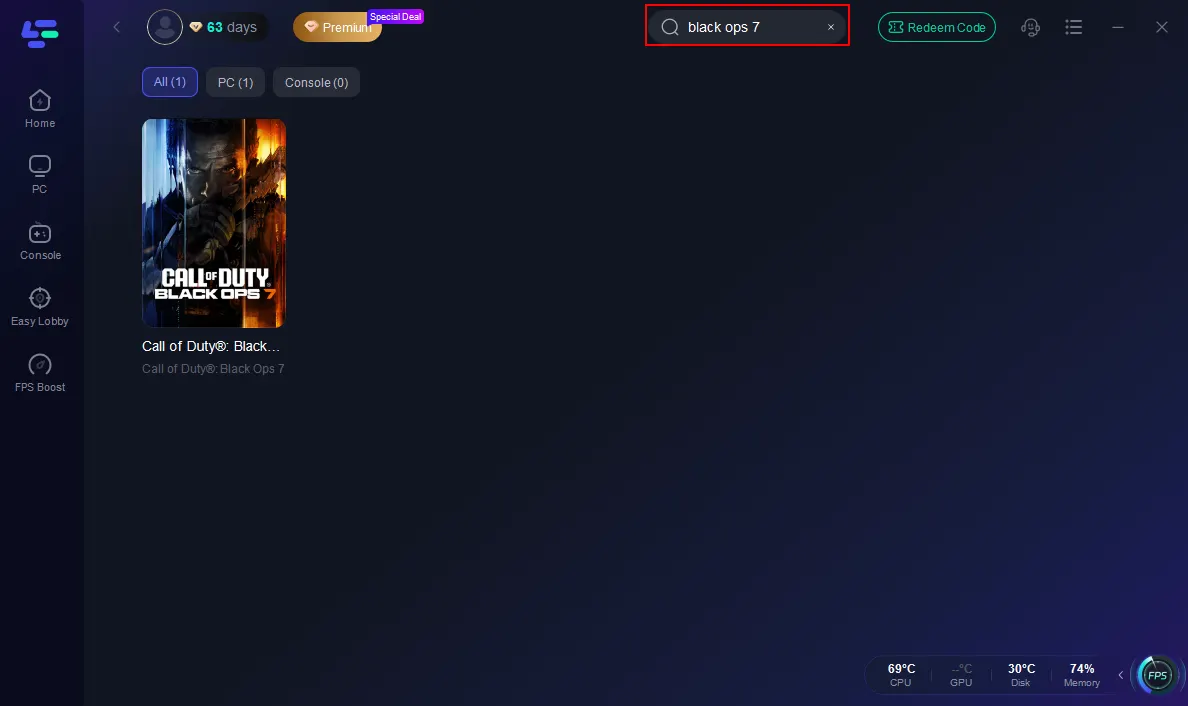
2. Open the app, search for “BO7” in the game library, and select it.
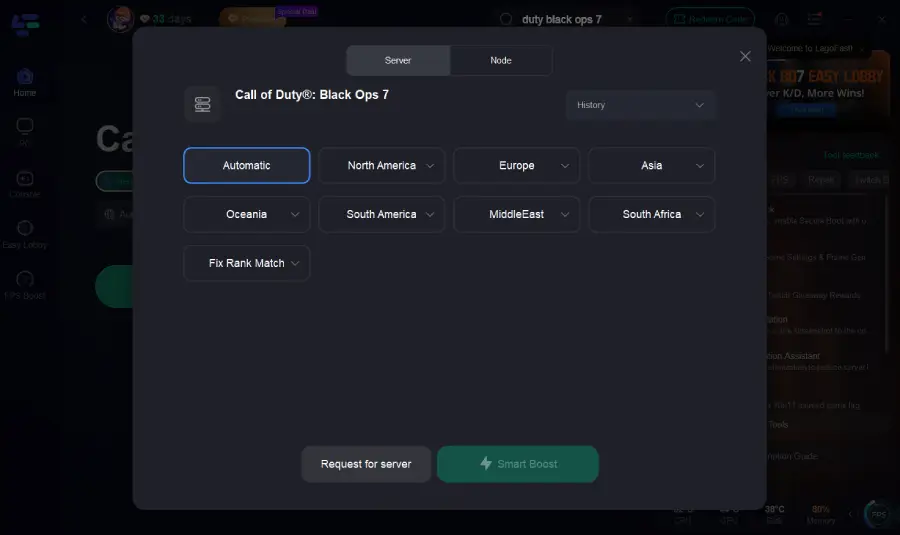
3. Choose a server closest to you or switch to a region with better stability.
4. Enable “Smart Boost” to reduce ping and packet loss.
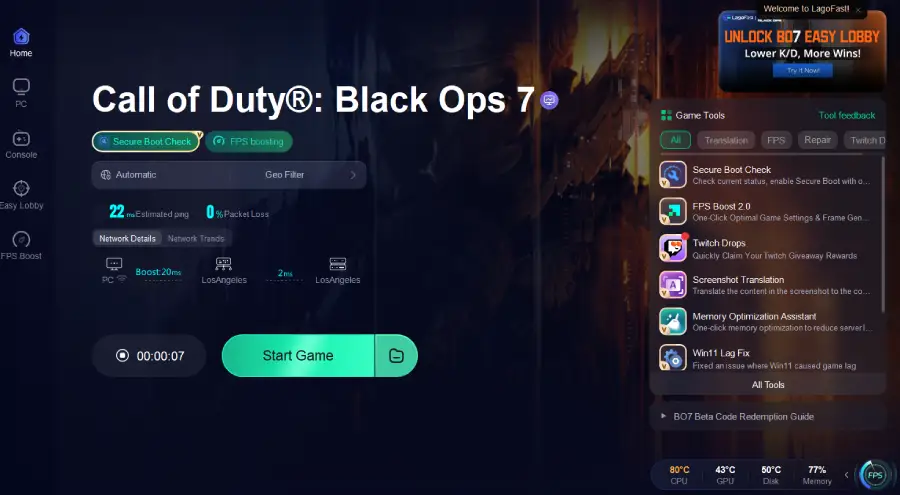
5. Launch BO7 directly from LagoFast for a smooth connection.
2. Switch to a Mobile Hotspot
If LagoFast isn’t an option, try creating a hotspot from your smartphone:
- On Windows, enable Mobile Hotspot from network settings.
- Connect your PC/console to this new network.
- Since the hotspot assigns a fresh IP, you may bypass the HUENEME – NEGEV restriction.
3. Set a Static IP Address
Dynamic IP addresses are often the culprit. Assigning a static IP ensures stability:
- Open Command Prompt and type ipconfig /all to find your current IP details.
- In Network Settings, go to your active connection → Properties → IPv4 settings.
- Enter the IP, Subnet Mask, and Gateway manually.
- Set DNS to Google DNS (8.8.8.8 / 8.8.4.4).
4. Disable Teredo Protocol
Since Teredo can interfere with IPv6:
- Open Command Prompt (Admin).
- Enter: netsh interface teredo set state disabled
- Restart your device and relaunch BO7.
5. Restart Router or Modem
A classic but effective fix:
- Unplug your router/modem for 30–60 seconds.
- Plug it back in and wait until it is fully rebooted.
- Test BO7 again.
6. Check for Server Outages
Sometimes, the issue isn’t on your end. Visit the official Activision Support page or check their social media (Twitter/X) for outage announcements.
7. Switch from Wi-Fi to Ethernet
If possible, connect your PC or console directly with a LAN cable. Wired connections are more stable and less prone to HUENEME–NEGEV errors.
Part 5: Enhance Your Gaming Experience with LagoFast Game Booster
While fixing HUENEME–NEGEV gets you back into the game, preventing future disruptions requires a more permanent solution. This is where LagoFast Game Booster excels.
- Optimized Routes: LagoFast selects the fastest, most stable connection paths to Activision servers.
- Lower Ping: Competitive players benefit from reduced latency in multiplayer and ranked matches.
- Global Servers: Choose different regions to access smoother lobbies and avoid crowded servers.
- Extra Features: Real-time ping monitoring, packet loss reduction, and smart routing keep your gameplay consistent.
By using LagoFast regularly, you not only resolve HUENEME – NEGEV but also prevent lag spikes, packet loss, and high ping issues that can ruin competitive matches in BO7.
Part 6: FAQs
Q1: Is HUENEME – NEGEV only in BO7?
No. The same error has been reported in previous Call of Duty titles, including BO6 and Warzone. It’s a recurring server connectivity issue.
Q2: Can restarting my console fix the error?
Yes, a simple restart can refresh your system’s connection. However, this is usually a temporary fix compared to setting a static IP or using LagoFast.
Q3: What if none of the fixes work?
If you’ve tried everything and HUENEME – NEGEV persists, it may be a server-side problem. Wait for Activision to complete maintenance and check their support pages.
Q4: Can changing DNS really help?
Yes. Using Google DNS or Cloudflare DNS often provides faster and more reliable server communication than your ISP’s default DNS.
Conclusion
The HUENEME–NEGEV networking error in Black Ops 7 is frustrating but not insurmountable. Whether caused by multiple IP addresses, Teredo protocol issues, or server overload, there are several practical solutions available.
From simple steps like restarting your router to advanced fixes like setting a static IP or using LagoFast Game Booster, you can quickly get back to uninterrupted gaming. By combining these methods and maintaining an optimized connection, you’ll ensure BO7 runs smoothly—without the dreaded HUENEME–NEGEV message blocking your path to victory.

Boost Your Game with LagoFast for Epic Speed
Play harder, faster. LagoFast game booster eliminates stutter and lags on PC, mobile, or Mac—win every match!
Quickly Reduce Game Lag and Ping!
Boost FPS for Smoother Gameplay!