
The launch of a new Battlefield era is supposed to be about scale, destruction, and adrenaline, not staring at a static menu while a string of cryptic numbers tells you that you aren't allowed to play. On Reddit and EA forums, the frustration is palpable. One PS5 player recently lamented, "Unknown error 0:51002S:57019s... does anyone know what this is or how to fix it? I followed the official links, but there is zero useful information there." Others have noted a recurring cycle of "90% false positives and 10% panic," with Xbox users pointing out that the error often triggers during autoplay, forcing a full relaunch of the application. When the "Connection Failed" screen becomes your most-viewed feature in Battlefield 6, it’s time to stop troubleshooting blindly and start addressing the root of the handshake failure.

- ✅ Reduce Lag and High Ping.
- ✅ Boost FPS at the Same Time.
- ✅ Support 8000+ Popular Online Games.
- ✅ Stop Stuck & Black Screen Issues.
- ✅ Ensure Stable Connections.
Part 1: Quick Answer: How to Fix Error Code 1:86001S:51002S:57019S in Battlefield 6
Part 2: Error Code 1:86001S:51002S:57019S: Where Does the Connection Break?
Part 3: What Makes The Error Code Different from Normal Connection Issues?
Part 4: How to Fix Battlefield 6 Error Code 1:86001S:51002S:57019S? – Detailed Tutorial
Part 5: Mistakes to Avoid After "Fixing" the Error
Part 1: Quick Answer: How to Fix Error Code 1:86001S:51002S:57019S
If you want to spend your night in a squad rather than a settings menu, here are the three most effective ways to bypass these connectivity hurdles:
- The Comprehensive Fix – LagoFast: Use a specialized gaming optimizer to bypass congested ISP nodes and force a clean path to Battlefield 6 servers. This resolves the handshake "timeout" that causes these specific codes.
- Flush Your DNS: Clear out outdated IP entries that might be pointing your console or PC toward a decommissioned or overloaded server shard.
- Verify Game Files: Ensure that the "Connection Failed" message isn't actually a result of a corrupted local asset failing to sync with the server’s anti-cheat or versioning check.
Part 2: Error Code 1:86001S:51002S:57019S: Where Does the Connection Break?
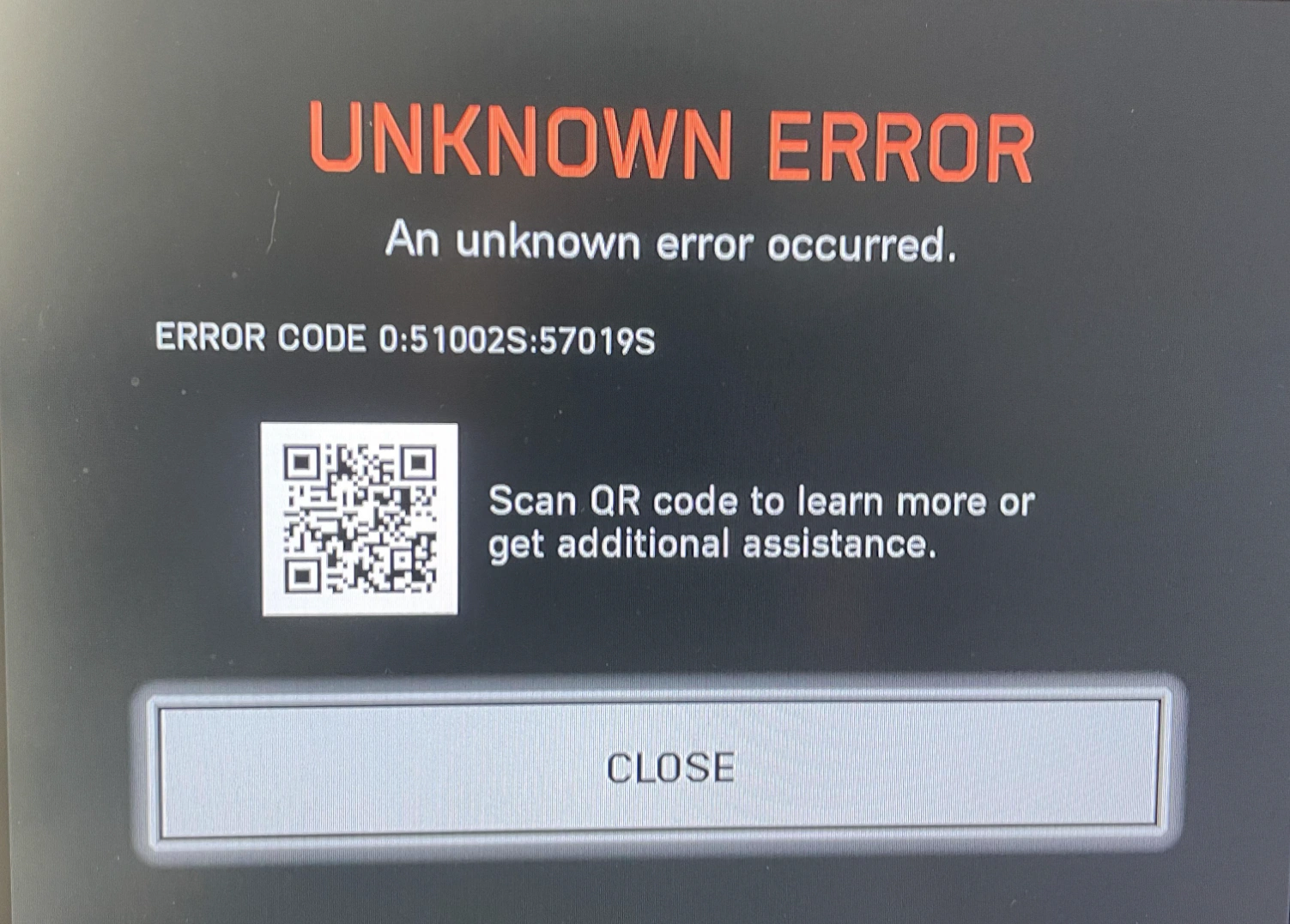
Unlike a standard "No Internet" prompt, the 1:86001S:51002S:57019S sequence is a "composite" error. In Battlefield 6, these digits often represent a failure at the Handshake/Authentication phase.
Essentially, your hardware is talking to the internet just fine, but the Battlefield backend cannot verify your session tokens or your regional placement. This often happens during peak hours or when your ISP utilizes "suboptimal routing", sending your data packets on a scenic tour of the country before they reach the game server. By the time the data arrives, the server has already "timed out" the request, resulting in the dreaded connection failed loop.
Part 3: What Makes These Error Codes Different from Normal Connection Issues?
|
Feature |
Standard "Lag" / High Ping |
Error 1:86001S:51002S:57019S |
|
Visibility |
You can see players "teleporting" in-game. |
You cannot reach the main menu or lobby. |
|
Root Cause |
Distance to server or low bandwidth. |
Authentication failure or packet loss at the gateway. |
|
Persistence |
Often fluctuates during a match. |
Total blockade; usually requires a hard restart. |
|
Platform |
Mostly PC (Wi-Fi related). |
High prevalence on PS5 and Xbox Series X |
Part 4: How to Fix Battlefield 6 Error Code 1:86001S:51002S:57019S? – Detailed Tutorial
The Quick Solution – LagoFast
Error 1:86001S:51002S:57019S usually occurs during the authentication handshake phase, not because your internet is disconnected. Your device can reach the server, but the request fails due to packet delay, loss, or poor routing, causing a timeout.
LagoFast targets this exact stage by optimizing the connection route instead of just improving speed. It ensures your data reaches Battlefield 6 servers quickly and consistently, preventing handshake failures.
Why It Works Better Than Normal Fixes
Unlike router resets or Wi-Fi switching, this error is not about basic connectivity. It’s a server validation issue, meaning:
- Internet works, but authentication fails
- Even low ping can still trigger the error
- Caused by unstable routing, not just slow speed
LagoFast solves this by stabilizing packet delivery and reducing routing delays during login.
Tutorial to Use LagoFast to Fix Battlefield 6 Connection Issue:
Step 1: Begin by clicking the Free Trial button to download and install the LagoFast Free Trial.
Step 2: Search for Your Game: Open LagoFast and find your game in the search bar.

Step 3: Choose the Best Server: Click "Select Server" and pick a stable server for your region.

Step 4: Activate Smart Boost: Hit the "Smart Boost" button to monitor your ping, packet loss, and network type in real time.

Flush Your DNS
A DNS cache acts like a phonebook for the internet. If the "phonebook" has the wrong address for the Battlefield 6 login servers, your connection will fail every time.
Step 1. Press the Windows Key and type "cmd."
Step 2. Right-click Command Prompt and select "Run as Administrator."
Step 3. Type ipconfig /flushdns and hit Enter.
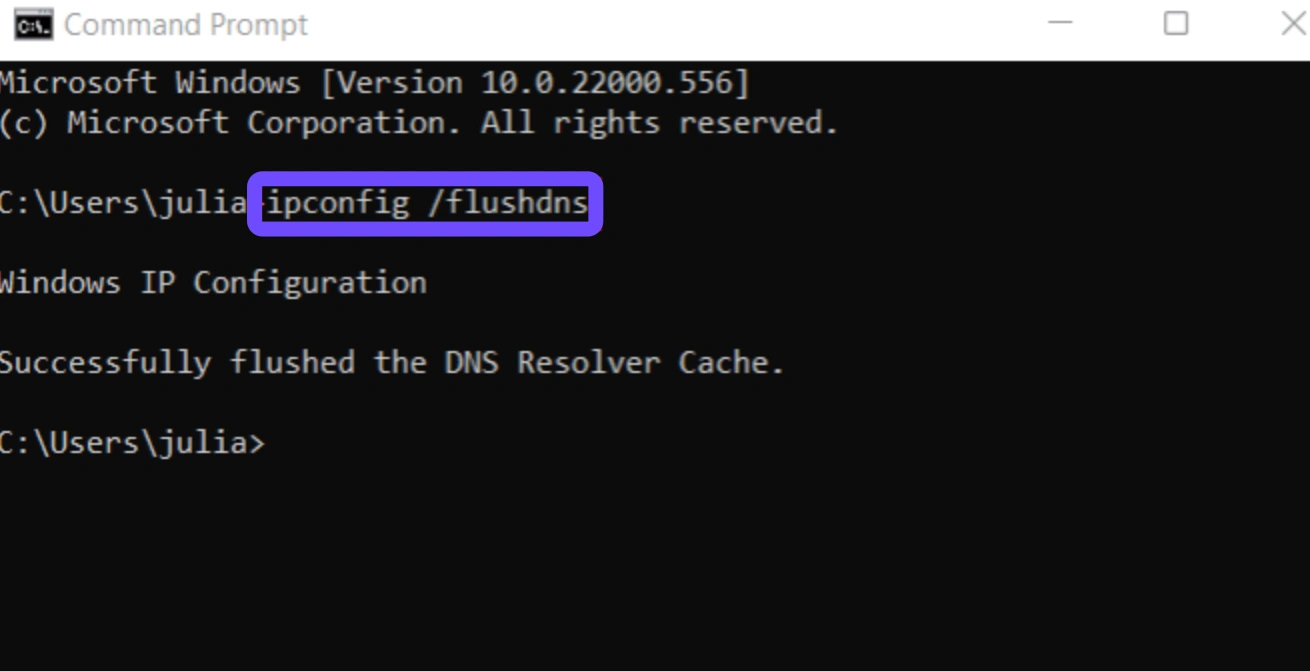
Step 4. Wait for the confirmation message: "Successfully flushed the DNS Resolver Cache."
Step 5. Restart your PC and attempt to relaunch the game.
Verify Game Files
Sometimes, a "Connection Failed" error is actually a "Version Mismatch" in disguise. If a small update failed to install correctly, the server will reject your connection.
Step 1. Open your Game Launcher (Steam, EA App, or Xbox App).
Step 2. Navigate to your Library and find Battlefield 6.
Step 3. Right-click the game and select Properties (Steam) or click the three dots (EA App).
Step 4. Choose Local Files and click Verify Integrity of Game Files.
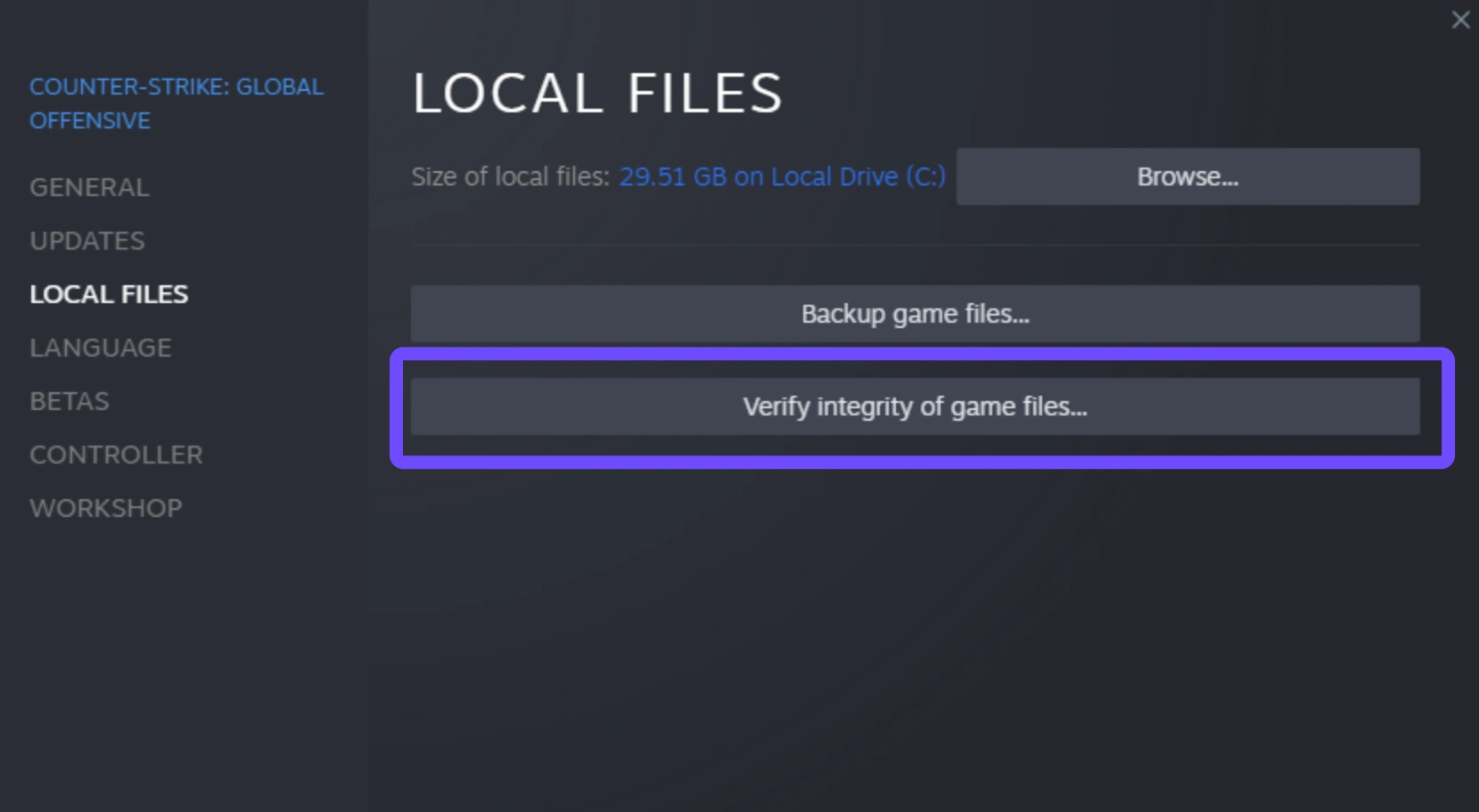
Step 5. Wait for the scan to finish; the launcher will automatically redownload any missing or corrupted "1:86001S" related files.
Part 5: Mistakes to Avoid After "Fixing" the Error
Once you get back into the game, players often make critical mistakes that invite the error back. Avoid using "Quick Resume" on Xbox for Battlefield 6. As noted by the community, the game’s "autoplay" or "instant-on" features often fail to re-authenticate your session with EA's servers, leading directly to the 51002S:57019S loop. Always quit the game fully before starting a new session.
Furthermore, don't rely on Wi-Fi if you can avoid it. Even a 5GHz signal can suffer from "micro-drops" in packets. While these won't kick you off YouTube, they are enough to break the delicate security handshake required for Battlefield servers. If a wired connection isn't possible, ensure your gaming optimizer is running to smooth out those inevitable wireless jitters.
Conclusion
Dealing with Battlefield 6 Error Code 1:86001S:51002S:57019S is undeniably exhausting, especially when official support channels offer little more than "restart your router." However, by understanding that this is a handshake and routing failure rather than a simple internet outage, you can take control of your connection. Whether you choose the surgical precision of LagoFast to automate your route or prefer the manual approach of flushing DNS and verifying files, the goal remains the same: getting back into the fight. Don't let a string of numbers keep you off the front lines. Fix your route, stabilize your packets, and see you on the battlefield.
Boost Your Game with LagoFast for Epic Speed
Play harder, faster. LagoFast game booster eliminates stutter and lags on PC, mobile, or Mac—win every match!
Quickly Reduce Game Lag and Ping!
Boost FPS for Smoother Gameplay!